
Analytify Makes Google Analytics Look Easy
Simplify your Google Analytics with the best WordPress Analytics Plugin in the market. Explore all the powerful analytics and reporting features that make Analytify the best Google Analytics Plugin for WordPress.
Analytify Features and Reports

Google Analytics 4 Tracking
Quick and easy website tracking setup across multiple devices and campaigns with just a few clicks for complete integration with GA4 (No coding).

Enhanced eCommerce Tracking
Easy-to-setup Google Analytics eCommerce tracking for WooCommerce and Easy Digital Downloads, including key metrics such as total revenue, average order value, and more.

Analytics Overview Dashboard
See all your important Google Analytics metrics in a user-friendly overview within your WordPress dashboard.

Custom Events Tracking
With Analytify, you can set up custom event tracking without writing a single line of code. Just use the plugin’s simple interface, and you're all set!

Customizable Date Ranges
Analytify allows you to view reports in the last 7, 14, and 30 day views or customize the date range to suit your needs.

Referral Tracking
Analyze your top referrers to find out which websites are sending you the most traffic, how long visitors are staying on your site, and what actions they’re taking.

File Downloads Tracking
Turn on file download tracking with Analytify to see which of your files are being downloaded the most.

Keywords Tracking
See which organic keywords lead to the most search impressions and clicks. Learn how people are finding your website.

404 Error Tracking
Easily monitor and identify broken links on your site. This feature helps you improve user experience by quickly addressing link errors that may drive visitors away.

Affiliate Links Tracking
Analytify’s affiliate link tracking feature allows bloggers and publishers to easily monitor affiliate link clicks directly within WordPress, ensuring accurate and detailed insights.

External Link Tracking
With Analytify’s external link tracking, you can effortlessly monitor clicks on outbound links. Gain valuable insights into where your users are heading after they leave your site.

Telephone / Email Link Tracking
Analytify automatically detects telephone (tel:) and email (mailto:) links, making it easy to track clicks and conversions on these links directly within your dashboard.

Ajax Error Tracking
Track Ajax errors with Analytify in just one click. Monitor issues and optimize your site by identifying when Ajax requests fail, helping ensure a smoother user experience.

Scroll Depth Tracking
Easily enable scroll-depth tracking with Analytify. Discover where users lose interest in your content so you can optimize it for better engagement.

Google Ads Tracking
Quickly implement Google Ads tracking with Analytify to monitor and understand your PPC performance, all within your WordPress dashboard.

JS Error Tracking
Track JavaScript errors effortlessly with Analytify. Quickly identify and monitor issues within your site's JavaScript code to improve performance.

WooCommerce Email Tracking
Track WooCommerce email events with Analytify to monitor customer engagement with key actions such as order confirmations.

Analytify UTM Builder
Easily create Google Analytics tracking URLs with Analytify's UTM parameter builder. Properly generate UTM codes to streamline your campaign tracking.

Social Media Stats
Easy to understand social media reports inside your WordPress dashboard, keeping you on top of your game.

Real-Time Stats
Quick access to real-time stats showing who is online, what they are doing on your site, and much more, all within WordPress.

Page Level Analytics
Get detailed stats and quickly analyze your specific posts, pages, and sections for deeper insights.

Geographic Stats
Quickly find out where on the map your visitors are coming from with accurate numbers in top countries and top cities.

Audience Demographics
View our demographics report to learn more about your visitors, with total views categorized by different age groups and gender.

Top Pages Stats
View a complete list of your top pages that bring the most number of views, along with their engagement time and bounce rate.

Force Analytics Traffic Over SSL
With Analytify, you can ensure your data is securely transmitted, encrypting your analytics while maintaining a secure user connection.

Video Tracking
View all your video-related stats in one place including the video title, play time, events and actions such as play count, pause count and more.

Setup Custom API Keys
Easily set up your custom API keys with Analytify. Securely integrate and customize your analytics data according to your unique needs.

Custom JavaScript Code
Analytify allows adding inline tracking code before sending the pageview hit to Google Analytics 4.

Custom CSS Code
Users can also easily inline CSS code in the admin dashboard pages of Analytify.

Analytify ShortCodes
Easily integrate stats in your custom templates using simple and advanced shortcodes.

Custom Dimensions
Custom tracking for authors, categories, events, tags, searches, and users, all with a single click.

Custom Post Types
Efficiently track different types of posts with dedicated stats under each post type to find out which post type works best for you.

Front End Reporting
View detailed stats for posts and pages on your front end without even a dashboard login.

Authors Tracking
Identify which author drives the most traffic, generating engagement, and even the bounce rate.

Contact Forms Tracking
Track and measure all popular WordPress forms’ performance in one go, a powerful value addition.

UTM Tracking
Simplified PPC and SEO marketing campaign management within your WordPress dashboard with UTM parameters.
Join 50,000+ beginners & professionals who use Analytify to manage complex GA4 data!
Get Analytify Now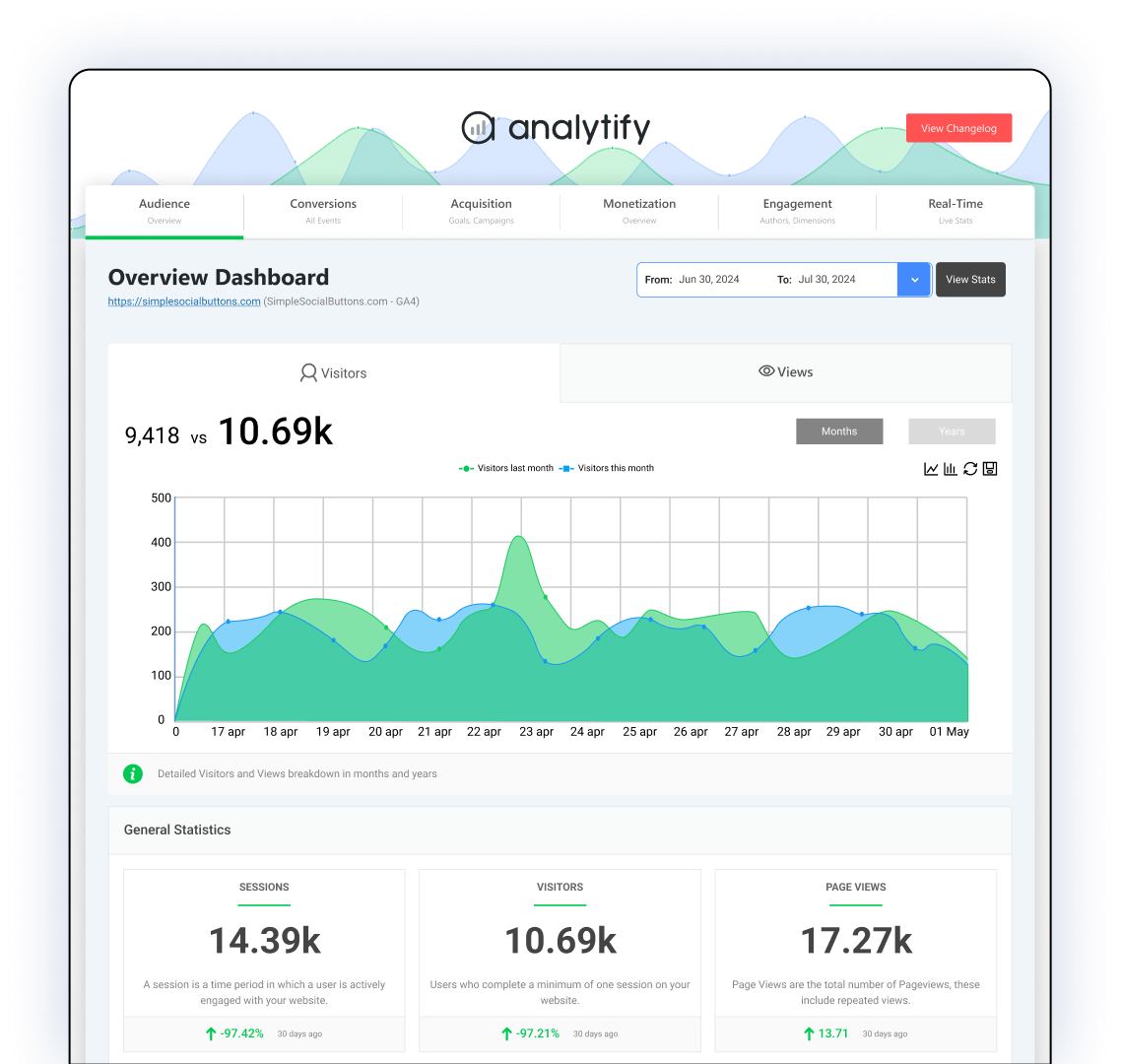
Compatible With the Most Popular Plugins Across the Board!
Analytify works seamlessly with the most popular WordPress plugins, so you can quickly track your product performance.






Analytify Addons

WooCommerce Addon
Analytify's integration with WooCommerce allows you to monitor the performance of your physical products. You can quickly and easily track sales, refunds, purchases, orders, and more to ensure your business runs smoothly.

Easy Digital Downloads
Analytify's integration with Easy Digital Downloads allows you to monitor the performance of your digital products. You can quickly and easily track sales, refunds, downloads, and more to ensure your business runs smoothly.

Forms Tracking
Analytify's forms tracking lets you easily track how users interact with your website's forms. You can get insights into which fields they are filling out and what information they submit, so you can quickly act on any issues.

LearnDash Tracking
Track quiz completions, lesson progress, course enrollments, and student engagement for your LearnDash-powered eLearning site. Identify drop-off points and improve course outcomes with detailed reports.

LifterLMS Tracking
Track memberships, course purchases, student enrollments, and revenue for your LifterLMS site. Understand how learners discover and move through your courses with clear, visual analytics.

Paid Memberships Pro
Track membership conversions, revenue, churn, and member activity for your Paid Memberships Pro site. Get detailed insights into membership levels, discount codes, trial conversions, and payment gateway performance.

Pixel Tracking
Connect and manage multiple ad pixels, including Meta, TikTok, Pinterest, and more, to track conversions and power smarter retargeting campaigns across all your platforms.

Campaigns
Analytify's campaigns feature allows you to monitor the performance of your marketing and advertising campaigns. You can track which campaigns generate the most conversions to ensure your budget is being used efficiently.

Authors Tracking
Analytify's author tracking feature lets you see how different authors perform on your website. This is useful for determining which authors produce the most popular content so you can ensure your website is optimized for success.

Email Notifications
Email notifications allow you to stay on top of your website performance without constantly monitoring it. Analytify can send you automated emails with reports and insights about your website's performance so you can quickly take action if needed.

Goals (Key Events) Dashboard
Analytify's Goals (Key Events) Dashboard allows you to monitor your website performance in real-time. You can quickly and easily see which goals are being met and what areas need improvement so you can act accordingly.
Trusted Worldwide by Thousands
Analytify is trusted by thousands of users worldwide, and we have an experienced support team ready to help you get set up and get the most out of our product.

Makes it easy for the team and me to see at a glance analytics.
Support has been superb, too. Very responsive.

Great to see all the information gathered on my main WordPress Dashboard. Plus I love getting weekly emails showing this information.

Great support that doesn’t first require all other plugins to be uninstalled, but simply looks at the problem and solves it.
Analytify Is The #1 WordPress Analytics Plugin
See why over 50,000 businesses trust Analytify as their go-to analytics and tracking solution for WordPress.

Easy to Set Up
Analytify makes WordPress site tracking simple. With just a few clicks, you can start monitoring your website's key metrics and gain valuable insights into user behavior so you can make better decisions to grow your business.

Accurate Data and Reporting
Analytify's data is accurate and reliable. Plus, with in-depth reporting tools and customizable dashboards, you can easily track the metrics that matter most to you.

Customizable Tracking Options
Analytify lets you customize how you track website performance. You can set up custom events to better understand user behavior and create goals to measure conversions.

No Coding Required
Analytify requires no coding knowledge or technical expertise to set up and use. The plugin is intuitive and user-friendly, so you can easily get started without any headaches.

Powerful Tracking
Whether you're a small business, large corporation, or anything in between, Analytify has the features and solutions to meet your needs. With features like Google Analytics integration and custom reports, you can easily track website performance from any device.

Custom Dimensions
Analytify's custom dimensions feature allows you to track user-defined data that is most relevant to your business. With just a few clicks, you can easily track your website's performance and gain valuable insights into user behavior.
Grow Your Business Faster with Data-Driven Decisions
Join over 50,000 business owners who make smarter decisions with Analytify to grow their businesses.
Frequently Asked questions
Analytify seamlessly integrates with Google Analytics through a simple authentication process. After installing Analytify, the Google Analytics WP plugin, you connect your Google Analytics account to Analytify with a few clicks. Once connected, Analytify imports your website's data directly into your WordPress dashboard, eliminating the need to switch between platforms.
Track, analyze, and optimize your content
Setup takes 60 seconds flat. What are you waiting for?