
We are excited to announce the release of Analytify 8.0, a major update focused on performance, usability, and reliability. This release continues our commitment to making Google Analytics simpler and more actionable within WordPress, whether you manage a single site or multiple client projects.
Analytify 8.0 brings noticeable improvements across both Free and Pro versions. From a cleaner codebase and faster load times to smarter diagnostics and better reporting visibility, this update is designed to make your daily analytics workflow smoother and more dependable.
Below is a detailed look at what is new in Analytify 8.0.
Analytify 8.0 (TOC):
Join 50,000+ beginners & professionals who use Analytify to simplify their Google Analytics!
Promo Code: ANALYTIFY80
What’s New in Analytify 8.0 Free Version
Performance and Codebase Improvements
Analytify 8.0 includes a major internal update where we applied modern coding standards and optimized the overall codebase. These improvements result in faster loading times, reduced overhead, and smoother operation across the WordPress admin.
While these changes mostly happen behind the scenes, you will feel the difference in day-to-day usage. Dashboards load faster, reports feel more responsive, and the plugin works more efficiently with the latest versions of WordPress.
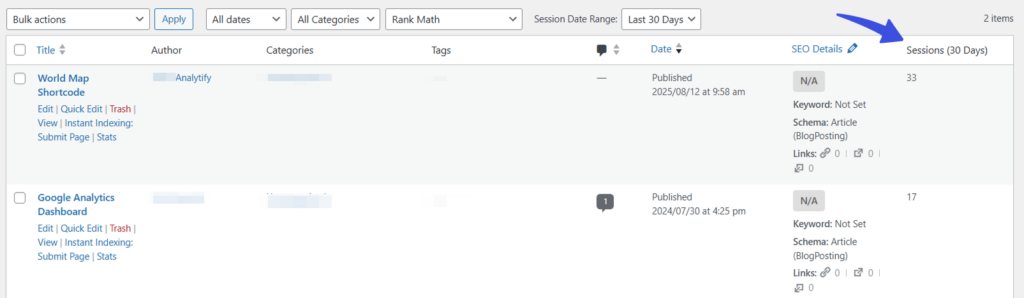
New Reset Button for Quick Cleanup
We have added a dedicated reset button that allows you to completely clean plugin settings and cached data. This feature is especially useful for troubleshooting issues, testing fresh configurations, or resetting the plugin before migrating or handing over a site.
The reset option ensures you can start fresh without manually removing settings or database entries.
Sessions Column for Last 30 Days
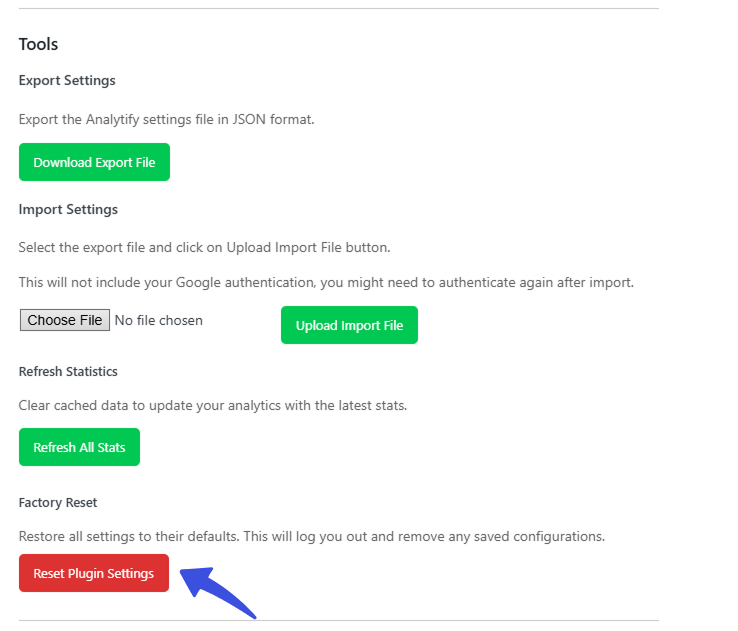
To help you quickly understand how your content is performing, Analytify now adds a Sessions column for the last 30 days directly in the WordPress post list.
This makes it easy to compare posts at a glance without opening individual analytics reports. You can instantly see which posts are gaining traction and which ones may need optimization.
Improved Settings Tabs and JSON Output
We have refined the settings tabs and improved JSON output to deliver a cleaner and more user-friendly interface. These changes also strengthen security and ensure more consistent data handling across the plugin.
Navigation within settings now feels more intuitive, making it easier for both new and advanced users to configure Analytify correctly.
Enhanced Diagnostic Logging
Diagnostic logging has been enhanced with better completeness, stronger security measures, and improved error handling. This update makes it easier to debug issues and provide accurate information when working with support.
Cleaner and more structured logs mean faster issue resolution and a better support experience overall.
Browser Breakdown Statistics
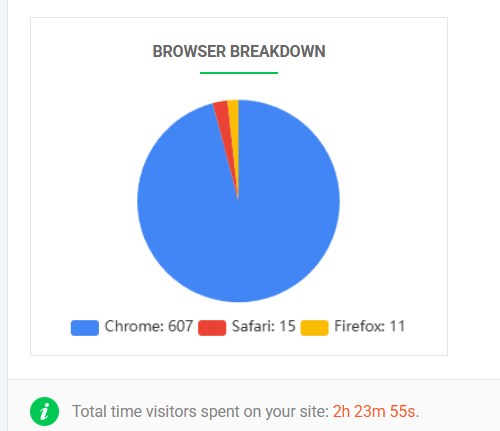
Analytify 8.0 introduces browser breakdown statistics on the dashboard. This enhancement helps you understand how visitors access your site based on different browsers.
With this insight, you can make more informed decisions about compatibility testing, performance optimization, and user experience improvements.
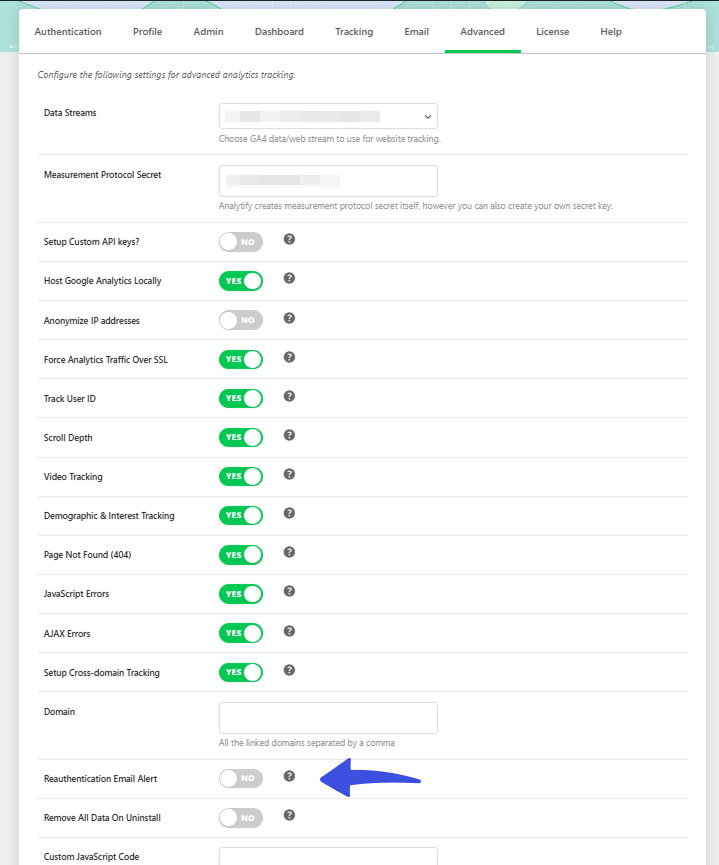
Google Reauthentication Email Toggle
We have added a new toggle in the Advanced tab that allows you to send email alerts when Google re-authentication fails. This ensures site administrators stay informed and can take action quickly if analytics data stops syncing.
This small but important feature helps prevent silent data gaps and keeps your reporting reliable.
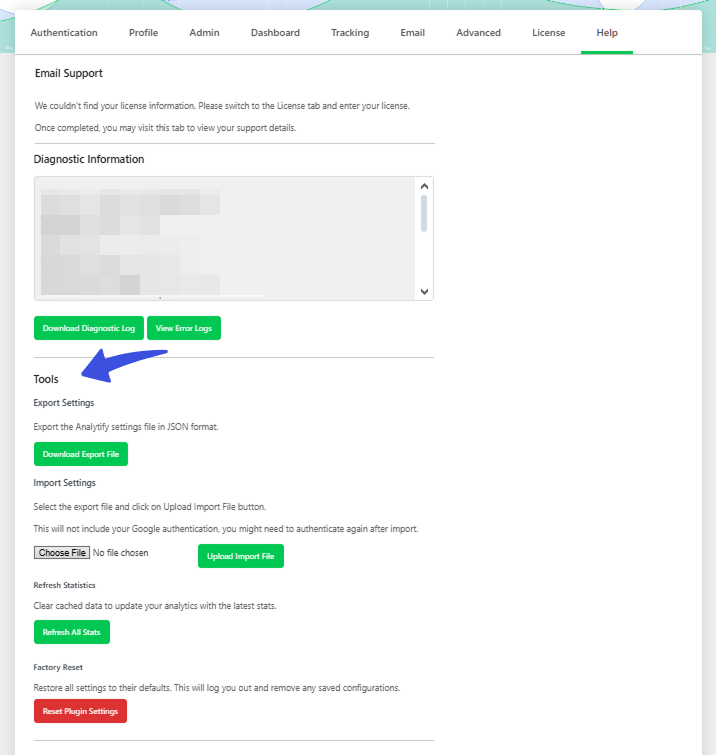
Tools Section in Help Tab
A new Tools section has been added to the Help tab to improve navigation and overall usability. This section centralizes useful utilities and resources, making it easier to find what you need without searching through multiple areas.
Improved Notification Layout
We have redesigned Analytify notifications to improve readability and clarity. Important messages are now easier to understand, helping you take action without confusion.
Cleaner Error Logs and WordPress Compatibility
Unnecessary error logging has been disabled to keep logs clean and easier to review. Analytify 8.0 is also fully compatible with WordPress 6.9, ensuring a smooth experience on the latest platform version.
What’s New in Analytify 8.0 Pro Version
Analytify 8.0 Pro builds on the Free version improvements with additional refinements focused on performance, usability, and accurate tracking.
Pro Level Performance Optimization
Just like the Free version, the Pro version benefits from applied coding standards and codebase optimization. This results in faster reporting, smoother interactions, and better scalability for high traffic sites.
Animated Loaders and UI Feedback
We have added animated loaders and smoother UI feedback for actions such as license validation and email notification updates. These visual improvements provide clearer feedback during background processes and enhance the overall user experience.
Tools Section and Notification Improvements
The Tools section is also available in the Pro version Help tab, offering improved navigation and easier access to essential utilities. Notifications have been further refined to ensure clear and readable communication across all Pro features.
Analytics and WooCommerce Tracking Fixes
This release fixes Google Analytics link attribution issues and resolves WooCommerce tracking problems. These fixes ensure more accurate reporting, especially for ecommerce stores that rely on precise conversion and revenue data.
WordPress 6.9 Compatibility
Analytify 8.0 Pro is fully compatible with WordPress 6.9, ensuring stability and reliability for modern WordPress environments.
Update to Analytify 8.0 Today
Analytify 8.0 is a significant step forward with meaningful improvements across performance, reporting visibility, and user experience. Whether you are using the Free or Pro version, this update makes analytics management inside WordPress faster, cleaner, and more dependable.
We highly recommend updating to Analytify 8.0 to take advantage of these enhancements. As always, we appreciate your continued support and feedback as we keep improving Analytify for the WordPress community.
More helpful resources:
- How to Install And Activate Analytify Pro Plugin (Easy Guide)
- How To Add Google Analytics 4 to WordPress (Easy Way)
Need further assistance? Check out our documentation or reach out to our support team.