Analytify 8.0 Release (New Features & Enhancements)

We are excited to announce the release of Analytify 8.0, a major update focused on performance, usability, and reliability.
This release continues our commitment to making Google Analytics simpler and easier to use in WordPress. It works whether you manage a single site or multiple client projects.
For the complete version history and past updates, see the Analytify Changelog.
Analytify 8.0 brings noticeable improvements across both Free and Pro versions.
Analytify 8.0 offers:
- A cleaner codebase and faster load times
- Smarter diagnostics
- Better reporting visibility
This update makes your daily analytics workflow smoother and more reliable.
Below is a detailed look at what is new in Analytify 8.0.
Analytify 8.0 (TOC):
Join 50,000+ beginners & professionals who use Analytify to simplify their Google Analytics!
Promo Code: ANALYTIFY80
What’s New in Analytify 8.0 Free Version
Performance and Codebase Improvements
Analytify 8.0 includes a major internal update. We applied modern coding standards and optimized the overall codebase.
These improvements result in:
- Faster loading times
- Less strain on your server
- Smoother operation across the WordPress admin
While these changes mostly happen behind the scenes, you will feel the difference in day-to-day usage.
With this update:
- Dashboards load faster
- Reports feel more responsive
- The plugin works better with the latest versions of WordPress
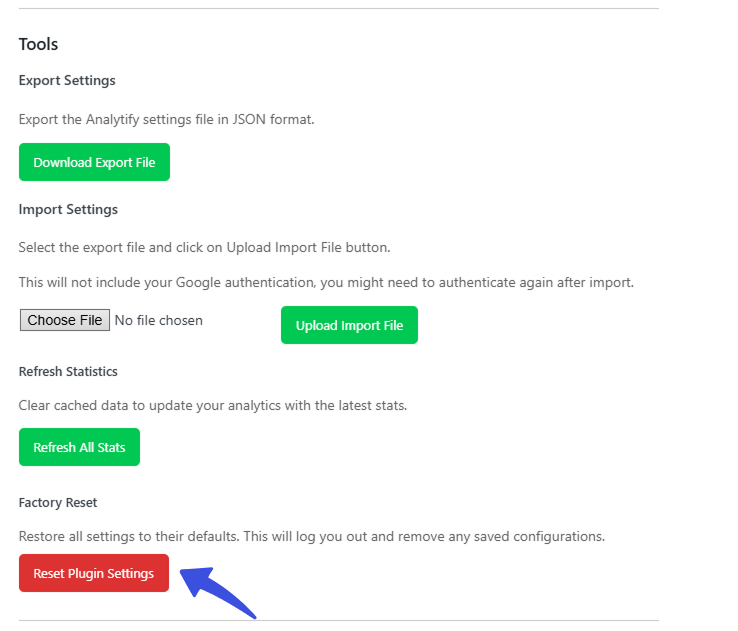
New Reset Button for Quick Cleanup
We added a dedicated reset button that lets you completely clear plugin settings and cached data.
This feature is useful for:
- Troubleshooting issues
- Testing new configurations
- Resetting the plugin before moving a site
The reset option ensures you can start fresh without manually removing settings or database entries.
Sessions Column for Last 30 Days
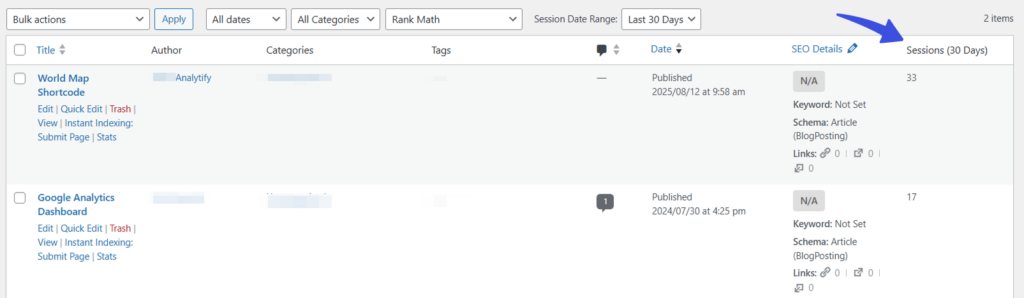
Analytify now adds a Sessions column for the last 30 days directly in the WordPress post list. This helps you quickly see how your content is performing.
This makes it easy to compare posts at a glance without opening individual analytics reports. You can instantly see which posts are doing well and which ones need improvement.
Improved Settings Tabs and JSON Output
We refined the settings tabs and improved JSON output to deliver a cleaner, more user-friendly interface. These changes also strengthen security and ensure more consistent data handling across the plugin.
Navigation within settings now feels easier to use. This makes it simpler for both new and advanced users to set up Analytify correctly.
Enhanced Diagnostic Logging
Diagnostic logging is now better in three ways:
- More complete
- More secure
- Better at handling errors
This update makes it easier to debug issues and provide accurate information when working with support.
Cleaner, better-organized logs mean faster fixes and a better support experience overall.
Browser Breakdown Statistics
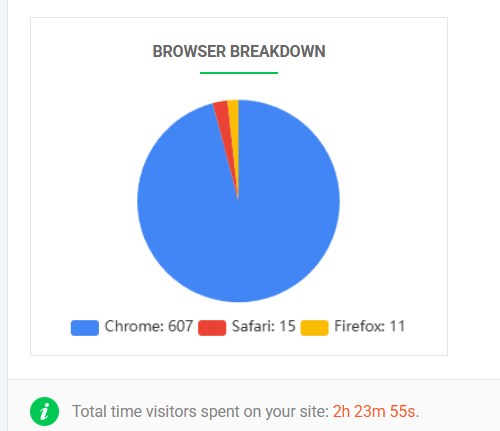
Analytify 8.0 introduces browser breakdown statistics on the dashboard. This helps you see which browsers your visitors use to access your site.
With this insight, you can make better decisions about:
- Compatibility testing
- Performance improvements
- User experience improvements
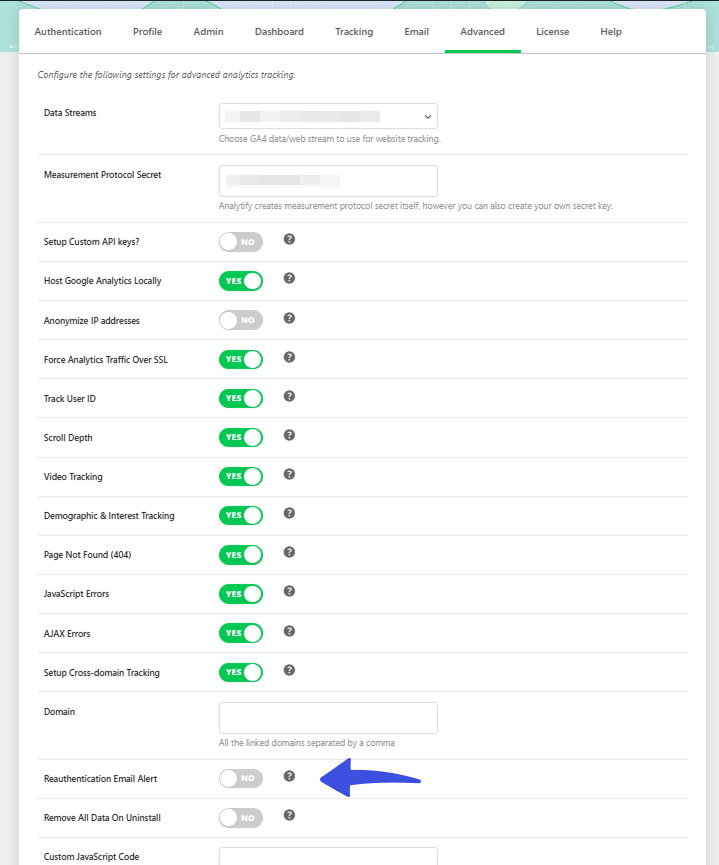
Google Reauthentication Email Toggle
We added a new toggle in the Advanced tab that lets you send email alerts when Google re-authentication fails.
This ensures site administrators stay informed and can take action quickly if analytics data stops syncing.
This small but important feature helps prevent silent data gaps and keeps your reporting reliable.
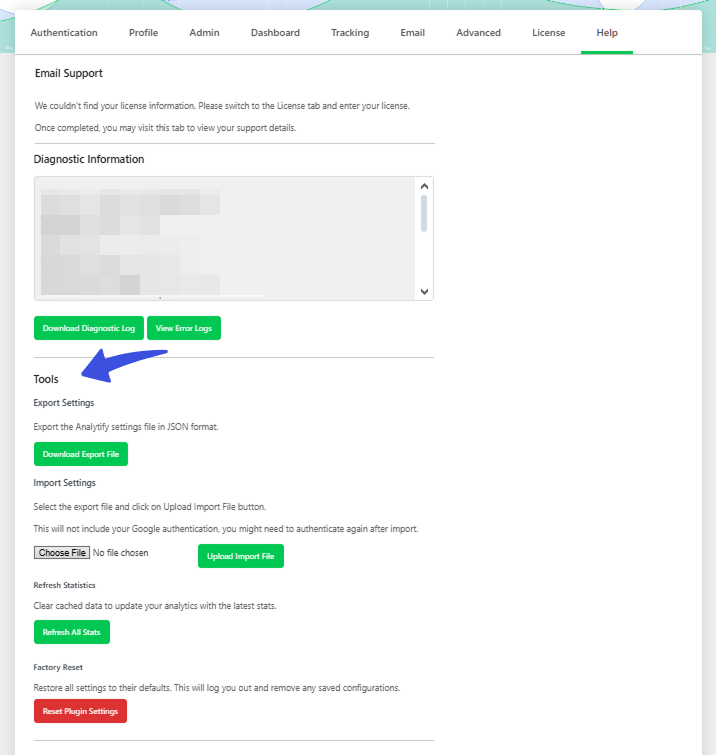
Tools Section in Help Tab
A new Tools section has been added to the Help tab to improve navigation and make the plugin easier to use.
This section brings useful tools and resources into one place, so you don’t have to search through multiple areas.
Improved Notification Layout
We have redesigned Analytify notifications to improve readability and clarity. Important messages are now easier to understand, helping you take action without confusion.
Cleaner Error Logs and WordPress Compatibility
Unnecessary error logging has been disabled to keep logs clean and easier to review.
Analytify 8.0 is also fully compatible with WordPress 6.9, ensuring a smooth experience on the latest platform version.
What’s New in Analytify 8.0 Pro Version
Analytify 8.0 Pro builds on the improvements in the Free version. It adds more upgrades focused on performance, ease of use, and accurate tracking.
Pro Level Performance Optimization
Just like the Free version, the Pro version benefits from applied coding standards and codebase optimization.
This results in faster reporting, smoother interactions, and better scalability for high-traffic sites.
Animated Loaders and UI Feedback
We have added animated loaders and smoother UI feedback for actions such as license validation and email notification updates.
These visual improvements provide clearer feedback during background processes and enhance the overall user experience.
Tools Section and Notification Improvements
The Tools section is also available in the Pro version Help tab, offering improved navigation and easier access to essential utilities.
Notifications have been refined to ensure clear, readable communication across all Pro features.
Analytics and WooCommerce Tracking Fixes
This release fixes Google Analytics link attribution issues and resolves WooCommerce tracking problems.
These fixes ensure more accurate reporting, especially for ecommerce stores that rely on precise conversion and revenue data.
WordPress 6.9 Compatibility
Analytify 8.0 Pro is fully compatible with WordPress 6.9 and Gutenberg, ensuring stability and reliability for modern WordPress environments.
You can also explore our detailed free vs pro overall comparison.
Update to Analytify 8.0 Today
Analytify 8.0 is a significant step forward with meaningful improvements across performance, reporting visibility, and user experience.
Whether you use the Free or Pro version, this update makes analytics management in WordPress faster, cleaner, and more dependable.
We highly recommend updating to Analytify 8.0 to take advantage of these enhancements.
As always, we appreciate your continued support and feedback as we keep improving Analytify for the WordPress community.
More helpful resources:
- How to Install And Activate Analytify Pro Plugin (Easy Guide)
- How To Add Google Analytics 4 to WordPress (Easy Way)
Need further assistance? Check out our documentation, reach out to our support team, or check our presale help section.