

Analytify 9.0 Release: Pixels, eCommerce Funnels, Multistep Form Tracking, and LMS Insights

We are thrilled to announce the launch of Analytify 9.0, a landmark update that delivers deeper commerce insights and more precise tracking.
This release marks a great step forward in our mission to transform complex GA4 data into a clear, actionable roadmap for your business growth.
For the complete version history and past updates, see the Analytify Changelog.
Analytify 9.0 introduces powerful new reporting capabilities across the entire ecosystem. From Pixel Tracking, Multistep form tracking, high-level Purchase Funnels, and Churn Rate Tracking to detailed Membership Platform Tracking, this update lets you see exactly how your audience interacts with your content and products.
Whether you are scaling an online store or optimizing engagement, this new upgrade will provide the clarity you need to make data-driven decisions.
Below is a detailed look at the groundbreaking features and updates launched in Analytify 9.0.
Analytify 9.0. Update (TOC):
Join 50,000+ beginners & professionals who use Analytify to simplify their Google Analytics!
Promo Code: ANALYTIFY90

What’s New in Analytify 9.0 Free Version
1. Enhanced Dashboard Visuals: Pie Chart and UI Polishing
We’ve addressed a CSS conflict that affected the rendering of Pie Charts within the main Analytify Dashboard.
This fix ensures that your audience overview and device breakdown charts are perfectly aligned and visually accurate across all browser types.
We have also refined the Email Button transitions within the post-level statistics, ensuring a smoother, more responsive user experience when sharing or exporting your data.
2. Precise Tracking: MemberPress and GA4 Integration
This update includes a critical fix for users tracking membership data. Resolved the issue, ensuring that MemberPress-related events are correctly identified and passed to Google Analytics 4 without data loss or class conflicts.
3. Performance Optimization: Minified JS Core
We have converted the core JavaScript files to minified versions (.min.js). This reduces the plugin’s asset file size, leading to faster load times in your WordPress admin area without sacrificing functionality.
4. Console Integrity: Video Tracking Fix
Your site’s console will now remain clean, and video tracking will execute silently and efficiently in the background.
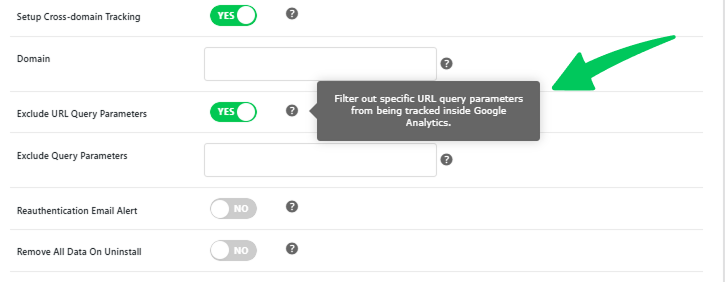
5. Exclude URL Query Parameters
You can now specify exactly which URL query parameters Analytify should ignore during tracking.
When marketing tools or internal systems append unique strings to your URLs, it often creates “fragmented” data in GA4, where the same page appears as multiple separate entries. This update allows you to consolidate that data into a single, clean URL.
Navigate to Analytify >> Settings >> Advanced, then enable Exclude Query Parameters to allow users to consolidate data into a single clean URL.
What’s New in Analytify 9.0 Pro Version
In version 9.0, we have expanded our integration ecosystem to ensure that no matter what tools you use to build your business, LMS platforms, form builders, or ad pixels, Analytify captures the data perfectly.
Following the structured approach of our 9.0 release:
1. Multistep Forms Tracking
We’ve introduced Multistep Forms Tracking, a powerful Pro feature that eliminates the guesswork behind complex user interactions.
By automatically detecting forms with “Page Breaks” or “Steps,” Analytify provides a detailed view of the conversion path, tracking:
- Form Impressions: Logs when a user first views the form.
- Step Views: Tracks every time a user moves to a new step.
- Form Submissions: Records every successful submission.
- Abandonment Rate: Tracks when a user starts a form but leaves the page without finishing.

2. Expanded LMS and Membership Tracking
Education and membership sites rely on specialized data. We’ve added deep tracking for the industry’s leading platforms:
- LearnDash and LifterLMS: Gain full visibility into your course performance. Track student progress and monetization metrics directly within your Analytify dashboard.
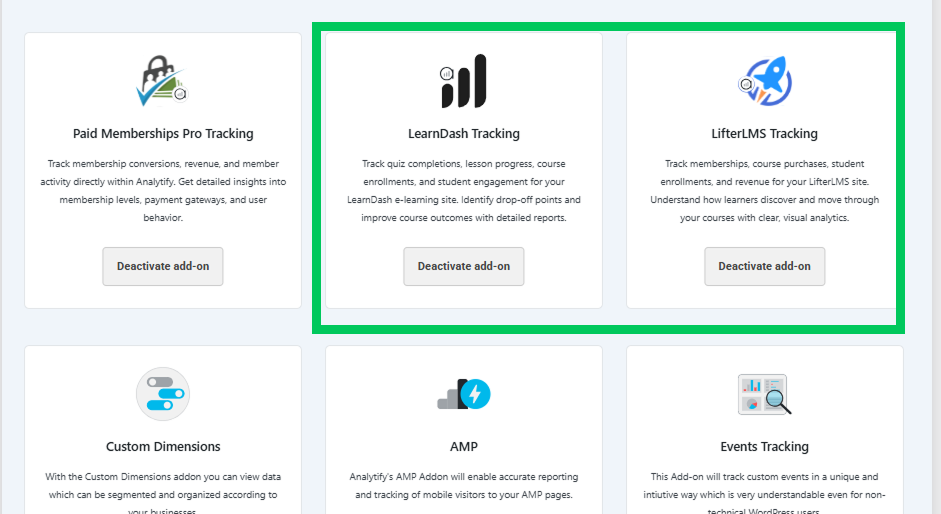
- LifterLMS: This detailed dashboard helps you track course stats and monetization metrics directly within your Analytify dashboard. Explore the documentation to set up LifterLMS tracking with Analytify.

- LearnDash: This detailed dashboard helps you track course stats and monetization metrics directly within your Analytify dashboard. Here’s the guide to set up LearnDash tracking with Analytify.

- Paid Memberships Pro (PMPro): Monitor your membership growth, renewals, and cancellations with our new dedicated PMPro reporting suite.
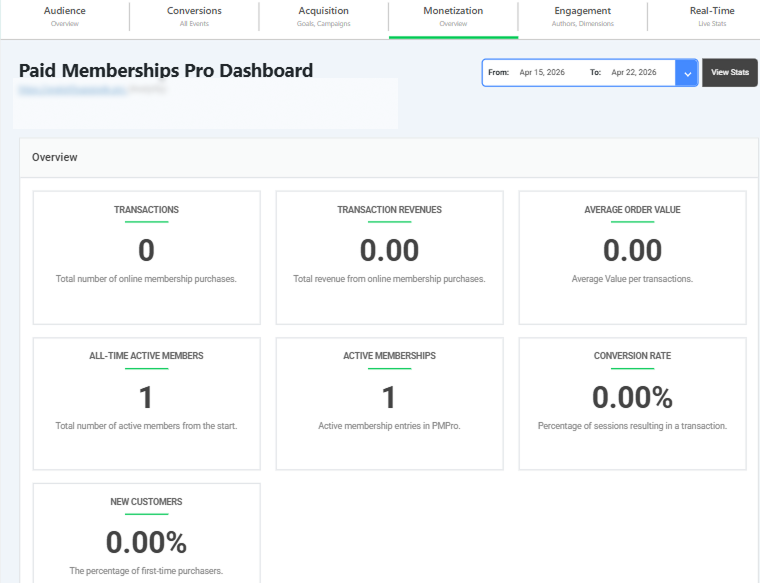
Note: These require activating their respective add-ons within Analytify Settings. Follow this doc to set up paid memberships pro tracking with Analytify.
3. Advanced Monetization: EDD and WooCommerce
We’ve refined our e-commerce tracking to handle complex global sales and customer retention metrics.
- EDD Multi-Currency and Churn: You can now track subscriptions across multiple currencies and monitor your Churn Rate directly in the EDD dashboard.

- Enhanced Refund Tracking: Both WooCommerce and EDD now feature improved refund reporting, giving you a transparent view of your net revenue.

- First Purchase Insights: For WooCommerce users, we’ve added a “First Purchase” indicator directly in the Order Detail view (click the Eye icon) to help you identify and welcome new customers.

4. Multi-Platform Pixel Tracking
Managing tracking pixels for different ad platforms can be a headache. Analytify 9.0 centralizes this process.
Activate the Pixel Tracking add-on and easily add your IDs for various social and search platforms directly in Settings >> Tracking.

This ensures your conversion data is accurately synced with your ad accounts without manual coding. Supported platforms include:
- Meta (Facebook)
- TikTok
- Microsoft
- Snapchat
- X (Twitter)
This keeps your campaign tracking aligned without requiring separate plugins.

5. Smarter Workflow and Security
We’ve improved how you and your team interact with your data.
- Enhanced Diagnostic Logs: We’ve overhauled our diagnostic system to provide better error logging, making it easier to troubleshoot server-side issues via the Help tab.
- Author-Specific Analytics: To keep your contributors focused, we’ve enhanced the Author Login experience. When an author logs in, they will only see statistics for their specific posts, protecting your global site data
- Custom Cron and Email Options: Take full control over when and how your reports are sent with updates.
Upgrade to Analytify 9.0 Today
This release of Analytify 9.0 marks a turning point in how WordPress site owners interact with their data.
By moving beyond surface-level metrics and introducing deep-dive tools like Multistep Form Tracking, Purchase Funnels, and Churn Rate analytics, we are giving you the transparency needed to truly understand your audience’s behavior.
This update isn’t just about adding more numbers to your dashboard; it’s about providing clarity.
Whether you are optimizing a sales funnel, tracking course engagement in LearnDash, or cleaning up your reports with URL exclusions, Analytify 9.0 ensures that your Google Analytics 4 data is accurate, actionable, and accessible.
We are committed to making your analytics workflow smoother and more reliable.
Upgrade to Analytify 9.0 PRO today and start seeing your WordPress site through a more professional, profit-focused lens.
As always, our support team is here to help you get the most out of these new features.
We can’t wait to see how you use these insights to grow!
Frequently Asked Questions
Is Analytify 9.0 a free update?
Yes. If you have an active Analytify Core or Pro license, the 9.0 update is free. You can update from your WordPress dashboard under Dashboard > Updates.
Do I need Analytify Pro for the new LMS and pixel features?
Yes. Pixel tracking, LearnDash, LifterLMS, PMPro, multi-step form tracking, and all WooCommerce/EDD improvements are Pro features. Core 9.0 focuses on improving tracking accuracy, performance, and data quality.
Will this update affect my existing GA4 data?
No. Updating Analytify does not modify historical data in GA4. New events and improvements apply going forward after the update.
Does the Pixel Tracking addon replace a Facebook Pixel plugin?
For most sites, yes. The Analytify Pixel Tracking addon handles pixel firing for Meta, TikTok, Microsoft, Snap, X, Pinterest, and LinkedIn. If you already use a dedicated pixel plugin and it is working correctly, you can keep it. There is no conflict. The advantage of managing pixels through Analytify is that your pixel events stay aligned with your GA4 events.
Check out these more helpful resources:
- How to Install And Activate Analytify Pro Plugin (Easy Guide)
- How To Add Google Analytics 4 to WordPress (Easy Way)
Need further assistance? Check out our documentation, reach out to our support team, or check our presale help section.



 Halloween Sale: Know which campaigns drive sales this season.