6 Best Google Analytics WordPress Plugins (Expert Comparison)

Analytify is the best Google Analytics WordPress plugin for most sites. It connects GA4 in a few clicks. It shows real-time, per-post and WooCommerce reports inside your dashboard. The StartUp plan costs $99/year for two sites and includes WooCommerce and forms tracking.
Google Site Kit is the best free GA4 plugin for WordPress if headline stats are enough. MonsterInsights suits stores that want its eCommerce reports and AI assistant, from $199.50/year on the Pro plan.
My team builds Analytify, so it sits at number one here. I’ve still noted where each rival fits better. I checked every price below against the vendor’s own pricing page in October 2026.
Here are all six plugins side by side, so you can match one to your site, budget and reports.
In This Comparison:
What’s the Best Google Analytics Plugin for WordPress?
Analytify is the best overall pick for most WordPress site owners. It shows clean GA4 reports inside WordPress. StartUp costs $99/year for two sites, with WooCommerce and forms tracking included. MonsterInsights is the strongest alternative if you want its AI assistant and deeper eCommerce reports, from $199.50/year on Pro. Google Site Kit is the best free option if headline stats are enough.
Each plugin below fits a different type of site. Bloggers and small business owners get the most value from Analytify’s per-post reports. WooCommerce stores can use Analytify’s included WooCommerce add-on, or MonsterInsights and ExactMetrics on their Pro plans. Budget-first users who just want the tag installed can stop at Google Site Kit or GA Google Analytics.
Google Analytics WordPress Plugins Compared: Price and Best Fit
Analytify is the top pick among the six plugins in this table. The table compares starting price, best-fit use case, and free-tier availability.
| Plugin | Best For | Starting Price | Free Version |
|---|---|---|---|
| Analytify (Editor’s Pick) | Bloggers, content sites, WooCommerce stores, small agencies | $99/year (2 sites) | Yes |
| MonsterInsights | WooCommerce stores wanting an AI assistant | $99.50/year (1 site) | Yes |
| ExactMetrics | Agencies managing multiple client sites | $99.50/year (1 site) | Yes |
| Google Site Kit | Free, headline-level Google stack | Free | Yes (fully free) |
| Conversios | WooCommerce ad pixel tracking | $89.10/year (1 site, promo) | Yes |
| GA Google Analytics | Installing the GA4 tag only | Free (Pro $20/year) | Yes |
Worth noting: MonsterInsights’ own comparison article claims Analytify’s premium pricing runs higher than comparable competitors. At current pricing, that’s not accurate. Analytify’s $99/year StartUp plan covers two websites; MonsterInsights Plus at $99.50/year covers one. Same price bracket, double the site coverage, and WooCommerce tracking included.
Why Do You Need a Dedicated Analytics Plugin Instead of Just Using GA4?
A dedicated plugin adds your GA4 tracking code automatically. It keeps that code working through theme updates. The right plugin also shows your data inside WordPress, so you skip separate GA4 logins.
Here’s what a good plugin handles for you:
- No code required. You paste in a tracking ID or connect your Google account. No editing header.php.
- Survives theme updates. Manually pasted tracking code often breaks when you switch themes. Plugin-based tracking doesn’t.
- Dashboard reports. The better plugins pull your GA4 data into WordPress so you’re not tab-switching all day.
- Advanced event tracking out of the box. Scroll depth, outbound links, file downloads, and form submissions without touching Google Tag Manager.
- User role exclusions. You can stop the plugin from tracking your own admin visits, so your data stays clean.
- eCommerce and goal tracking. WooCommerce stores get revenue and conversion data without custom event configuration.
If you only need the GA4 tag on your site with zero extras, a lightweight plugin like GA Google Analytics does the job. Most site owners want dashboard reporting on top of that. For that you need Google Analytics plugins for WordPress.
What Should You Look for in a Google Analytics Plugin for WordPress?
Look for five things. Pick easy setup, live reports inside WordPress, eCommerce and event tracking, accurate data, and a light footprint.
How Easy Should Setup Be?
Setup should take a few clicks and no code.
- Connect GA4 to WordPress in a few clicks, with no coding.
- Works with page builders, WooCommerce, and membership plugins.
- Automatic updates keep the GA4 script current.
Which Reports Should Appear Inside WordPress?
You should see live visitors, page views, traffic sources, and engagement without opening GA4.
- View live visitor activity directly in WordPress.
- Track page views, traffic sources, and engagement metrics at a glance.
- Drill down by page, campaign, or user segment.
Does the Plugin Track eCommerce and Custom Events?
The good ones do, with no manual GA4 setup.
- Supports WooCommerce, Easy Digital Downloads, and custom events.
- Tracks add-to-cart, checkout, and purchase events automatically.
- Enables conversion-focused reporting.
How Do You Know the Data Is Accurate?
Accurate plugins exclude internal traffic and match the numbers in GA4.
- Excludes admin and internal traffic for cleaner reports.
- Supports enhanced measurement and GA4 event mapping.
- Dashboard reports match GA4 metrics.
Will the Plugin Slow Your Site?
A good plugin adds almost no load time and keeps Core Web Vitals healthy.
- Minimal impact on page load and Core Web Vitals.
- Fewer bloated features means faster pages.
- Fast plugins support both analytics reliability and SEO.
Which Metrics Should Every WordPress Site Track?
Every WordPress site should track six things. They are visitors and sessions, top landing pages, traffic sources, engagement events, eCommerce actions, and campaign results.
- Visitors, sessions, and bounce rate.
- Top landing pages and user flow.
- Source and medium traffic (social, organic, referral).
- Engagement events like scroll depth and button clicks.
- eCommerce actions: add-to-cart, purchase, and checkout completion.
- Campaign performance using UTM tracking.
Which GA4 Plugin for WordPress Offers Which Features?
The table below lists the standout features of each plugin in this guide.
| Plugin | Standout features |
|---|---|
| Analytify | Real-time reports, page-level stats, eCommerce tracking, UTM campaigns, frontend stats display |
| MonsterInsights | Dashboard reports, eCommerce reports for WooCommerce and Easy Digital Downloads, forms tracking, Search Console integration, AI assistant |
| ExactMetrics | GA4 dashboard, automated event tracking, 404 error tracking, eCommerce tracking, custom dimensions |
| Google Site Kit | Connects GA4, Search Console, AdSense, and PageSpeed Insights |
| Conversios | eCommerce analytics, WooCommerce tracking, ad pixel integration (Meta, TikTok) |
| GA Google Analytics | Lightweight GA4 code insertion, IP anonymization, basic event support |
How Much Does Each WordPress Analytics Plugin Cost?
Most paid WordPress analytics plugins start between $89 and $100 for the first year. The real differences are site limits and which plan unlocks eCommerce. MonsterInsights and ExactMetrics show introductory prices, and both renew at full price.
| Plugin | Entry Plan | Sites | eCommerce Included From | Regular Price |
|---|---|---|---|---|
| Analytify | StartUp $99/year | 2 | StartUp ($99/year) | $199/year |
| MonsterInsights | Plus $99.50/year | 1 | Pro ($199.50/year, 5 sites) | $199/year (Plus) |
| ExactMetrics | Plus $99.50/year | 1 | Pro ($199.50/year, 5 sites) | $199/year (Plus) |
| Google Site Kit | Free | Unlimited | Not available | Free |
| Conversios | Pixel Pro $89.10/year | 1 | Pixel Pro | $198/year |
| GA Google Analytics | Pro Personal $20/year | 1 | Not available | $20/year ($40 lifetime) |
- Need more sites? Analytify Agency covers unlimited sites for $199/year.
- Prefer to pay once? Analytify Developer is $499 lifetime, unlimited sites.
- Prices checked on each vendor’s pricing page, October 2026.
Best Google Analytics Plugins for WordPress
1. Analytify: Best Google Analytics Plugin for Most WordPress Sites
Analytify is the best Google Analytics plugin for most WordPress sites. It puts GA4 reports, per-post stats and WooCommerce data in one dashboard, from $99/year for two sites.
I compared the leading Google Analytics plugins and reached one conclusion. For most WordPress users, Analytify offers the best balance of simplicity, tracking depth, and actionable reporting.

I say that because my team and I built Analytify around a problem we’ve seen repeatedly over the years. Google Analytics 4 is incredibly powerful, but it isn’t always friendly. Most website owners don’t want to spend their mornings digging through reports. They don’t want to build explorations, or hunt for where Google moved a metric this time.
They simply want answers.
- How many people visited my site today?
- Which blog posts are getting the most traffic?
- Where are my visitors coming from?
- Which marketing campaigns are driving conversions?
- Are my products actually selling?
Analytify answers those questions directly inside WordPress. You spend less time navigating GA4 and more time improving your website.
Built for WordPress, Not Just Connected to It
Many analytics plugins simply connect your site to Google Analytics.
Analytify goes further by making GA4 feel like a native part of WordPress.
Within minutes, you can connect your Google Analytics account without touching code. You then get clean, visual reports from your dashboard. You don’t need to open multiple GA4 reports. Your most important metrics wait where you manage your content every day.
The Feature I Use the Most: Page-Level Analytics
If I had to recommend one feature that makes Analytify stand out, it would be Page-Level Analytics.
While you edit a post or page, you can see how that content has performed. You never leave the editor.
Instead of searching through multiple GA4 reports, you can quickly review:
- Sessions
- Pageviews
- Engagement
- Traffic sources
- User behavior
That makes updating older content much easier because you’re making decisions based on real data instead of guesswork.

More Than Just Dashboard Reports
One reason I recommend Analytify so often is that it goes beyond showing pageviews.
It helps you understand how visitors interact with your entire website.
Depending on your plan, you can monitor:
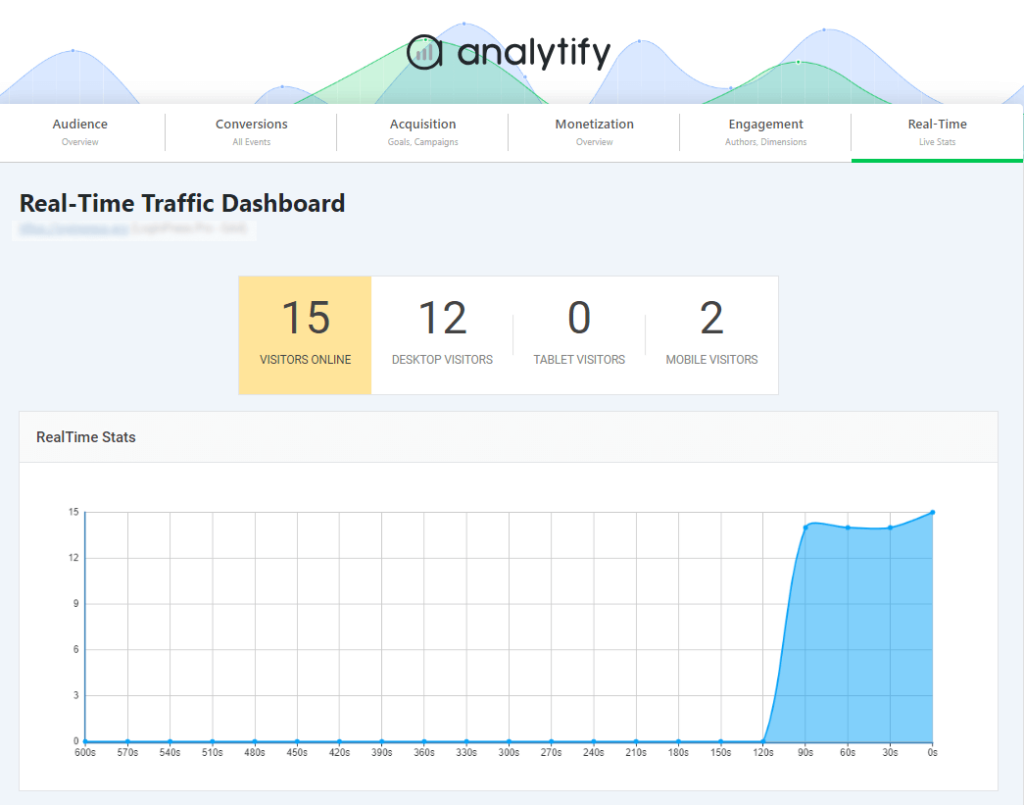
- Real-time visitor activity as it happens
- Top-performing pages and posts
- Audience demographics and geographic reports
- Organic keyword performance
- Referral traffic
- Social media traffic
- Campaign performance with the built-in UTM Builder
- File downloads
- Scroll-depth tracking
- Affiliate link tracking
- External link tracking
- Telephone and email link clicks
- Video engagement
- JavaScript and AJAX errors
- 404 error tracking
- Custom events without writing code
- Custom dimensions for authors, categories, tags, users, and post types
Instead of piecing together several plugins, you get one centralized analytics dashboard inside WordPress.
Want to see how these events show up in GA4 itself? Here is how the GA4 events report works.
Excellent for WooCommerce and Growing Businesses
If you run an online store, Analytify becomes even more valuable.
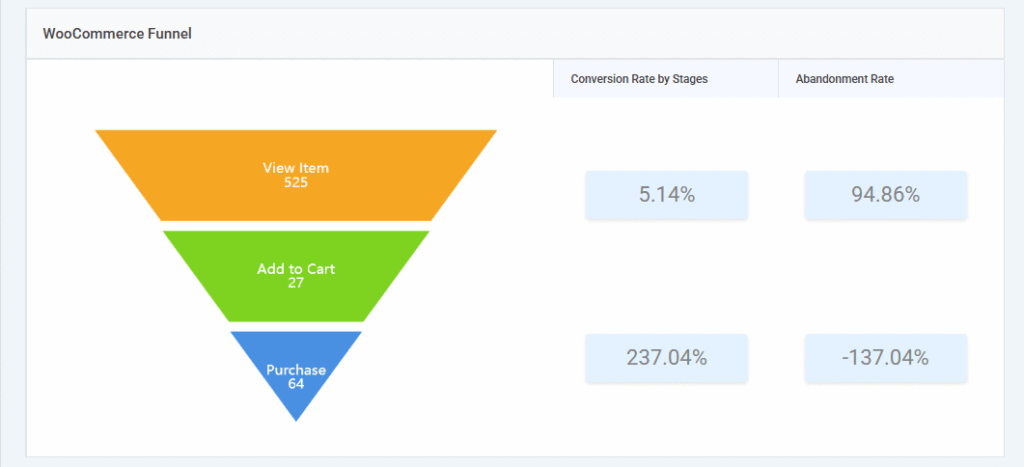
The WooCommerce and Easy Digital Downloads integrations track revenue, transactions, products, average order value, and refunds. You don’t need to configure GA4 reports by hand.
The WooCommerce, Easy Digital Downloads and Forms Tracking add-ons come with every paid plan, including StartUp. This guide shows how to set up Google Analytics ecommerce tracking on WordPress, and this one covers WooCommerce conversion tracking with GA4.
Marketing teams can also track Google Ads campaigns, UTM campaigns, and multiple advertising pixels. Popular contact forms show up in the same dashboard. LMS integrations for LearnDash, LifterLMS, and Paid Memberships Pro make it equally useful for course creators and membership websites.
2. MonsterInsights: Best for WooCommerce Stores Wanting an AI Assistant
MonsterInsights is worth it if you run a WooCommerce store or need forms and eCommerce tracking. You should be fine paying $99.50/year or more for it.
With 2+ million active installs on WordPress.org, MonsterInsights is the market leader in this category, and it earns that position. It covers dashboard reports and a dedicated eCommerce report for WooCommerce and Easy Digital Downloads. It also includes forms tracking and Search Console integration. A built-in AI assistant called Charlie Chat answers analytics questions in plain language.
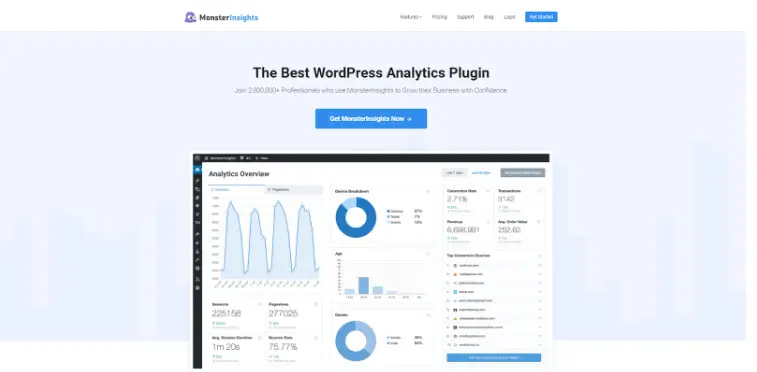
MonsterInsights Plus starts at $99.50/year for one site. Pro, which unlocks eCommerce and forms reporting, runs $199.50/year for five sites. That is a meaningful jump from Analytify’s $99/year, two-site starting tier. It matters if all you need is dashboard reporting without the eCommerce layer.
The honest gap here isn’t quality, it’s fit. MonsterInsights is built deep for stores. If your site is a blog, a service business, or a small content site without WooCommerce, you pay for reporting depth you won’t use. For a feature-by-feature breakdown, see our Analytify vs MonsterInsights comparison.
MonsterInsights at a glance:
- Price: Plus $99.50/year (1 site). eCommerce and forms need Pro, $199.50/year.
- Best for: stores that want an AI assistant for analytics questions.
- Skip it if: you run a blog or service site without a store.
3. ExactMetrics: Best for Agencies Managing Client Sites
ExactMetrics is a strong alternative if you manage multiple WordPress sites for clients. It offers MonsterInsights-level reporting with agency-friendly licensing.
ExactMetrics shares a parent company and much of its feature set with MonsterInsights. The reporting experience is near identical: dashboard stats, eCommerce reports, and forms tracking. The Plus plan starts at the same $99.50/year for one site.
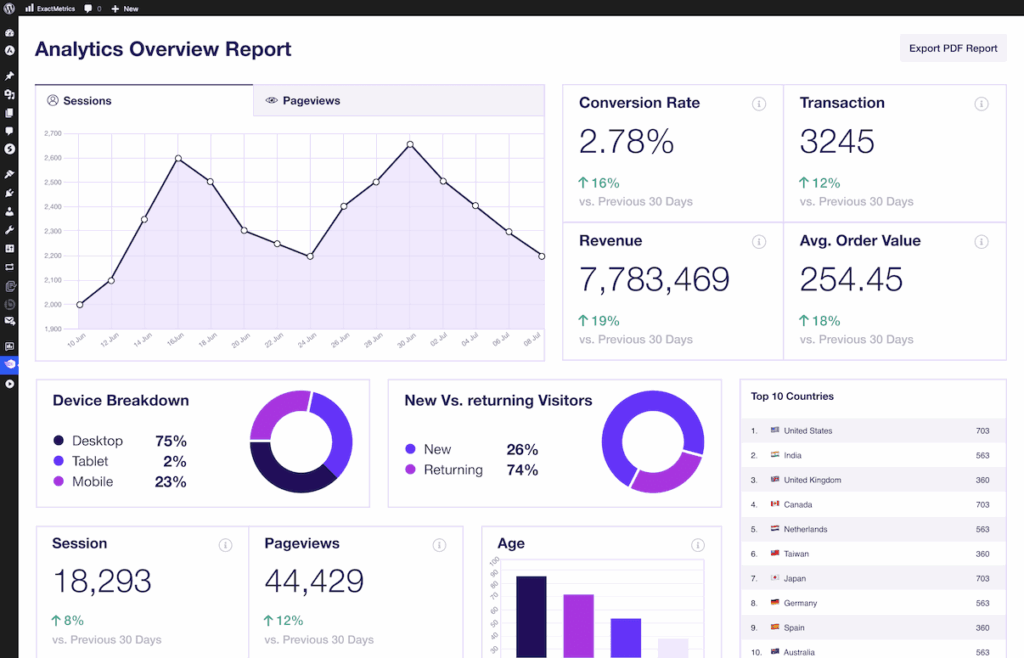
ExactMetrics stands out on agency licensing and pricing tiers. Those tiers help when you manage several client sites under one account. If you’re already comparing MonsterInsights, put ExactMetrics beside it. The core experience is close to identical.
ExactMetrics at a glance:
- Price: Plus $99.50/year (1 site). Agency $399.50/year (25 sites).
- Best for: agencies licensing many client sites.
- Skip it if: you already compared MonsterInsights. The features are near identical.
4. Google Site Kit: Best Free Option for Basic Stats
Google Site Kit is good enough if you only need headline-level stats. It puts Search Console, AdSense, and PageSpeed Insights data in the same free plugin.
Google builds and maintains Site Kit directly. That makes it the only plugin on this list with that distinction. It connects GA4, Search Console, AdSense, and PageSpeed Insights into a single WordPress dashboard widget, completely free.
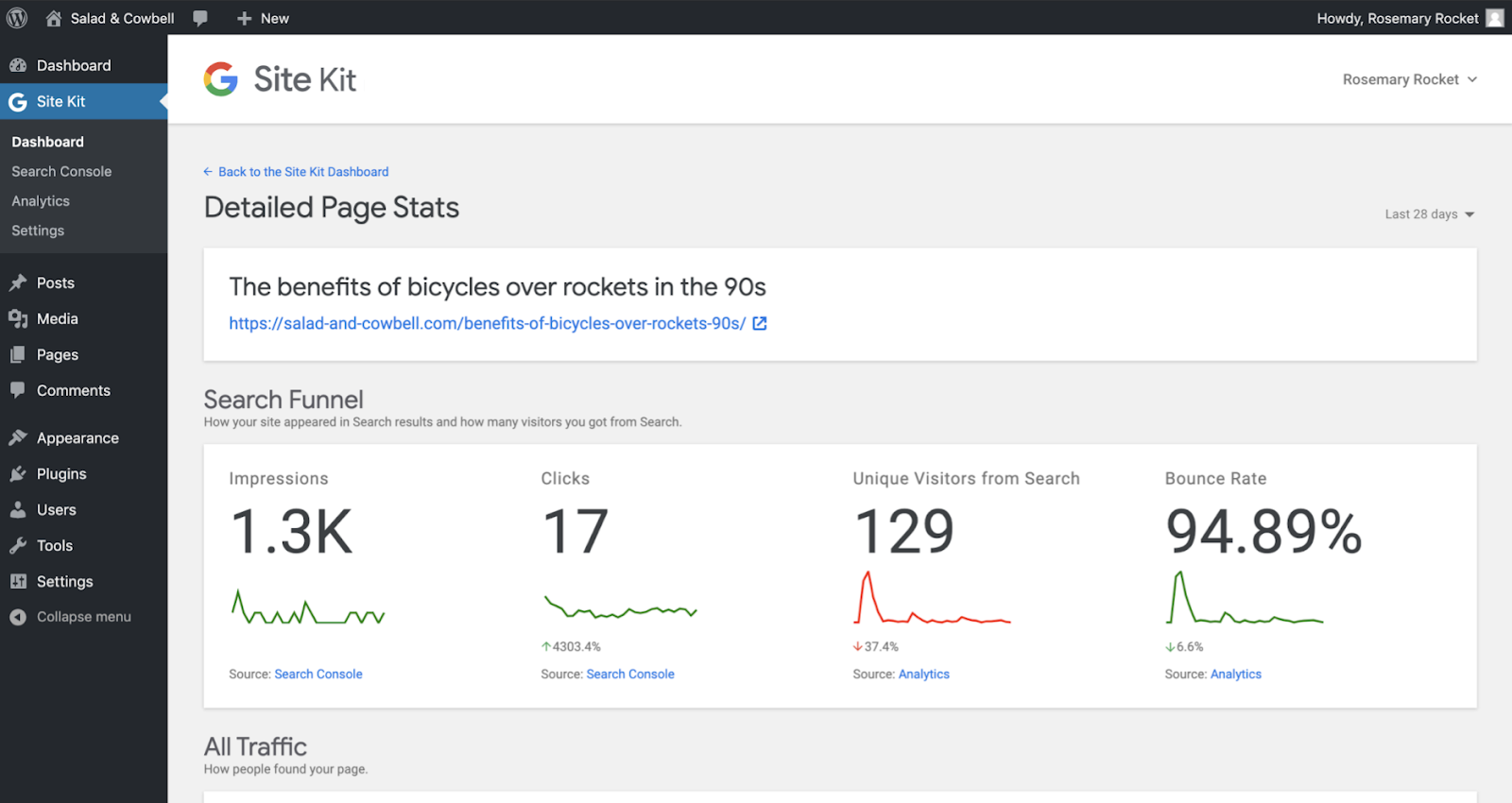
What Site Kit doesn’t give you: per-post reports, eCommerce tracking, or forms tracking. It’s a headline dashboard, not a reporting tool. If you use multiple Google products and want one unified view for free, it’s accurate, reliable, and worth installing.
Google Site Kit at a glance:
- Price: free.
- Best for: one free view of GA4, Search Console, AdSense and PageSpeed.
- Skip it if: you need per-post, eCommerce or forms reports.
5. Conversios: Best for WooCommerce Ad Pixel Tracking
Conversios is the strongest pick if you run WooCommerce and need Google Ads, Meta, and TikTok pixel tracking in one plugin. It does not provide general content or blog analytics.
Conversios focuses entirely on eCommerce ad tracking. It offers multi-platform pixel management, server-side tracking, and Google Merchant Center integration for product feeds. Pricing runs around $89/year on current promotional pricing for one active site. The regular price is $198/year, a different bracket from the general-purpose plugins above.
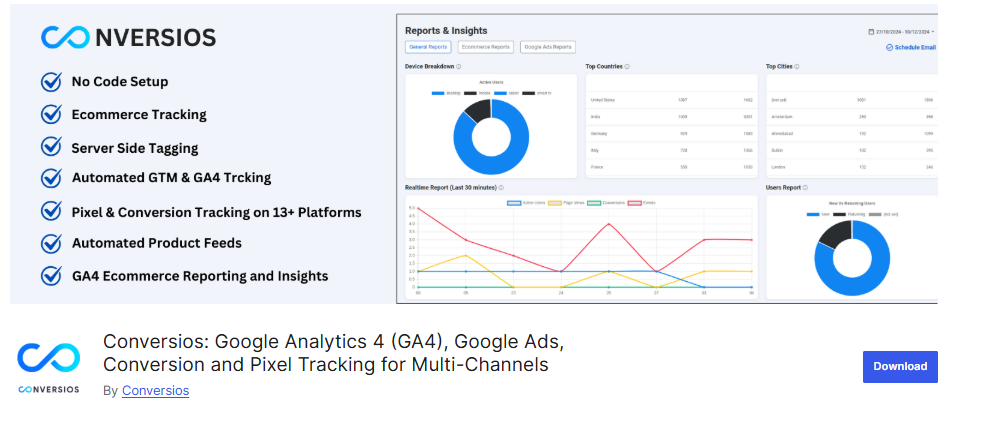
This is a niche pick. If your site isn’t running WooCommerce, or you’re not running paid ad campaigns, Conversios isn’t the plugin for you.
Conversios at a glance:
- Price: $89.10/year promo (regular $198/year), 1 site.
- Best for: WooCommerce stores running Google, Meta or TikTok ads.
- Skip it if: you want content or blog analytics.
6. GA Google Analytics: Best for Tag-Only Tracking
GA Google Analytics is enough if all you need is the GA4 tracking code installed correctly. It has no dashboard reports and no advanced tracking.
This is a lightweight, single-purpose plugin. You paste in your GA4 tracking ID and choose a script position. It’s live. The Pro version, at roughly $20/year, adds IP anonymization and more control over script placement.

If you’re comfortable navigating GA4 directly and just need reliable tag delivery, this is the minimalist’s choice. If you want that data inside WordPress itself, you’ll need one of the other five plugins on this list.
GA Google Analytics at a glance:
- Price: free. Pro from $20/year.
- Best for: adding the GA4 tag with nothing else.
- Skip it if: you want reports inside WordPress.
How Do You Choose the Right Analytics Plugin for Your WordPress Site?
For most WordPress site owners, Analytify is the right default. Move to a different pick only if your site has a specific need Analytify doesn’t cover.
Here’s how I’d break the decision down:
| Site Type | Recommended Plugin |
|---|---|
| Blogger, content site, small agency | Analytify |
| WooCommerce store wanting revenue, product and checkout reports in WordPress | Analytify (WooCommerce add-on included in StartUp) |
| WooCommerce store that wants an AI assistant and has the Pro budget | MonsterInsights Pro or ExactMetrics Pro |
| Agency licensing 25+ client sites on one account | Analytify Agency (unlimited sites) or ExactMetrics Agency |
| Free or minimal budget, headline stats only | Google Site Kit or GA Google Analytics |
| WooCommerce store running heavy ad campaigns | Conversios |
Start with what your site actually is, not what features look impressive on a comparison table. A blog doesn’t need eCommerce reporting. A WooCommerce store doing serious ad spend does need pixel-level tracking that general dashboard plugins don’t offer. Match the plugin to the job, and check the free version first before paying for anything.
Frequently Asked Questions
1. What’s the best WordPress plugin for Analytics?
Analytify is the best overall pick for most WordPress site owners, with clean GA4 dashboard reporting starting at $99/year for two sites. MonsterInsights is the stronger choice if your site needs deep eCommerce and forms tracking from $199.50/year on Pro, the plan that unlocks eCommerce and forms reports. Google Site Kit is the best free option if you only need headline-level stats.
2. What is the best free Google Analytics plugin for WordPress?
Google Site Kit is the strongest free option because it’s built directly by Google and connects GA4, Search Console, AdSense, and PageSpeed Insights in one dashboard at no cost. It’s limited to headline-level reporting, so sites that need per-post reports or eCommerce tracking will outgrow it.
3. Do I need to use a Google Analytics WordPress plugin?
No, you can add the GA4 tracking code manually by pasting it into your theme’s header. A plugin keeps the code in place through theme updates, adds it without editing files, and, depending on the plugin, brings your data into the WordPress dashboard so you don’t need to check GA4 separately.
4. Why isn’t my Analytify dashboard showing any data?
This usually means your GA4 property isn’t fully connected yet, or your site hasn’t had enough traffic since setup for data to populate. Check Analytify >> Settings to confirm your GA4 property is linked correctly, and give it 24-48 hours after a fresh connection before expecting full reports. For other fixes, see why Google Analytics is not working on WordPress.
5. MonsterInsights vs Analytify vs Google Site Kit, which is better?
Analytify is the better pick for most WordPress site owners: clean GA4 dashboard reporting and per-post reports starting at $99/year for two sites. MonsterInsights offers a deeper feature set for eCommerce, forms, and AI-assisted queries, but its eCommerce and forms reports start at $199.50/year on Pro, worth it mainly if you specifically need that extra depth. Google Site Kit is completely free but limited to basic stats, a fit only if budget is the only factor. Our Analytify vs MonsterInsights comparison covers pricing, eCommerce, LMS tracking, and AI side by side.
6. What is the best Google Analytics plugin for WooCommerce?
Analytify is the best value for most WooCommerce stores. Its StartUp plan ($99/year, 2 sites) includes the WooCommerce add-on. That add-on tracks revenue, products, refunds and the checkout funnel inside WordPress. MonsterInsights and ExactMetrics offer similar reports from $199.50/year on Pro. Conversios is the pick if ad pixel tracking for Google, Meta or TikTok matters most.
7. Is a GA4 plugin the same as a Google Analytics plugin?
Yes. Universal Analytics stopped processing data in July 2023, so every current Google Analytics plugin for WordPress uses GA4. The terms are interchangeable. Check that any plugin you install connects to a GA4 property (Measurement ID starting with “G-“).
8. Can I run Analytify and Google Site Kit at the same time?
Yes, but only one plugin should place the GA4 tracking code. If both add it, GA4 counts each pageview twice. Keep Site Kit for Search Console and PageSpeed data, and turn off its Analytics code snippet in Site Kit’s Analytics settings. Analytify then handles GA4 tracking and reports.
WordPress Analytics Plugin Comparison: Final Thoughts
There’s no single universal best plugin here, only the best plugin for your site’s budget and tracking needs. The pricing gap between these six options is often smaller than it looks. Once you know what your site needs, the feature gap matters more than the price gap.
Before you install anything:
- Decide whether your site needs eCommerce or forms tracking, or just clean dashboard reporting.
- Compare the verified starting price of your top two candidates against the table above.
- Install the free version of your top pick first. Confirm it surfaces the reports you need before you upgrade.
See your GA4 and WooCommerce data inside WordPress: compare Analytify plans.
Further Readings: