What is a Technical SEO Audit for SaaS and How Do You Execute the Checklist?

A technical SEO audit for SaaS identifies the issues that stop search engines from properly crawling, indexing, and ranking your platform. SaaS products have unique challenges that standard website audits miss, including JavaScript-heavy frontends, dynamic URLs, and authentication walls.
Below, I give you an 8-area technical SEO checklist for SaaS platforms, covering crawlability, JavaScript rendering, Core Web Vitals, and structured data. It is for anyone responsible for a SaaS site’s organic search performance.
Technical SEO Audit Checklist (TOC):
What Is Technical SEO for SaaS?
Technical SEO for SaaS is the process of optimizing a SaaS platform’s technical foundation so search engines can crawl, index, and rank it effectively. It covers site speed, JavaScript rendering, URL structure, crawl budget, security, and structured data , all with SaaS-specific considerations that standard technical audits do not address.
SaaS platforms face technical SEO challenges that traditional websites do not. Dynamic dashboards, single-page applications, and user authentication all create crawling problems if not handled correctly.
| SaaS Technical SEO Challenge | Why It Matters |
|---|---|
| JavaScript-heavy frontends (React, Vue, Angular) | Search engines may not render JS content correctly, causing incomplete indexation |
| Dynamic URL parameters | Generates thousands of near-duplicate URLs that waste crawl budget |
| Authentication walls | Login-protected content may be invisible to search engine crawlers |
| API documentation pages | High-intent developer traffic is missed if documentation is not properly indexed |
| Single-page applications (SPAs) | Route changes are not tracked as page views by default, causing missing indexation |
| Multiple subdomains | Content spread across subdomains dilutes domain authority if not structured correctly |
Why Does a SaaS Platform Need a Regular SEO Audit?
A SaaS platform needs a regular SEO audit because every new feature or URL path can introduce crawl, rendering, or speed issues that reduce search visibility. Common problems include blocked crawl paths, unrendered JavaScript content, slow page speed, and duplicate URLs. Finding and fixing these issues directly improves organic rankings and drives more qualified traffic.
The main reasons to run a regular SaaS SEO audit:
- SaaS platforms change rapidly. Every new feature or URL path can introduce new crawl issues.
- JavaScript frameworks update frequently. Rendering behavior can change between versions.
- Google’s crawl budget is limited. Wasted crawl on low-value pages reduces coverage of important pages.
- Core Web Vitals are a ranking signal. Performance regressions from new features need to be caught early.
- Competitors are optimizing too. Regular audits keep you from falling behind.
Tip: Run a full technical SEO audit quarterly at minimum. Run a partial audit after every major product release or infrastructure change.
The Complete SaaS SEO Checklist: 8 Audit Areas
A complete SaaS SEO checklist covers eight areas: core technical foundations, JavaScript rendering, URL structure, crawlability, HTTPS security, API documentation, Core Web Vitals, and structured data. Work through each area in order, fixing high-priority issues first.
1. Core Technical Foundations
These are the essential elements search engines need to function. Fix these before anything else.
| Element | What to Check | Priority |
|---|---|---|
| robots.txt | Confirm it does not block critical directories like /features or /pricing | High |
| XML sitemap | Includes all indexable pages; auto-updates when new pages are added | High |
| Internal linking | No orphaned pages; all important pages are reachable within 3 clicks | High |
| Crawl depth | Key pages are not buried more than 3 clicks from the homepage | Medium |
| Redirect chains | No chains longer than 2 hops; 301 redirects used for permanent moves | Medium |
| Server response time | Pages respond in under 200ms; hosting infrastructure is appropriately scaled | High |
| Mobile responsiveness | Site renders correctly on all screen sizes; use the URL Inspection tool to see how Googlebot renders key pages | High |
| Canonical tags | Set correctly on all pages; no self-referencing conflicts or missing canonicals | High |
2. JavaScript Rendering and Single-Page Applications
JavaScript rendering is the most common SEO issue for SaaS applications. Search engines can render JavaScript, but it takes more time and resources than parsing plain HTML.
Key checks for JavaScript and SPA SEO:
- Use Google’s Rich Results Test or URL Inspection tool to see what Googlebot actually renders on each page
- Implement server-side rendering (SSR) or pre-rendering for critical marketing and content pages
- Ensure all important content appears in the initial HTML response, not only after JavaScript executes
- For SPAs, implement virtual pageview tracking so route changes are treated as separate pages
- Test AJAX-loaded content: content that loads after user interactions may be invisible to crawlers
- Add proper fallbacks so all valuable content is accessible even if JavaScript fails to execute
| Rendering Approach | SEO Impact | Best For |
|---|---|---|
| Client-Side Rendering (CSR) | Highest risk: content may not be indexed | Apps behind login (does not need indexing) |
| Server-Side Rendering (SSR) | Best SEO: full content in initial HTML | Marketing pages, blog, landing pages |
| Static Site Generation (SSG) | Excellent SEO: pre-built HTML files | Documentation, content that changes infrequently |
| Pre-rendering | Good SEO: generates HTML for crawlers | SPAs that need indexing without full SSR migration |
3. URL Structure and Parameter Handling
SaaS platforms generate large numbers of URLs through dashboards, user settings, and filtered views. Without proper controls, these create duplicate content and crawl budget waste.
URL structure audit checklist:
- Use clean, descriptive URLs: /features/reporting not /app?tab=3&view=report
- Trim parameters that do not change the content. Search Console no longer has a URL Parameters tool, and Google learns how to handle parameters automatically.
- Set canonical tags on all filtered or sorted views to point to the primary URL
- Block low-value parameterized URLs from crawling via robots.txt
- Use consistent URL patterns for similar content types: /blog/, /docs/, /features/
- Plan URL structure for new features before building, not after
Many development teams underestimate how quickly developing an effective SaaS SEO strategy transforms their organic growth trajectory, especially when technical foundations support content and marketing efforts. For those looking to build robust, scalable platforms that support long-term SEO and product growth, exploring SaaS development services can be a valuable first step toward aligning technical architecture with marketing strategy.
4. Crawlability Assessment
A crawlability audit checks whether search engines can find and access all the pages you want indexed.
| Audit Area | Common Issues | Impact | Audit Frequency |
|---|---|---|---|
| robots.txt | Blocking critical directories | High | After every deploy |
| XML sitemaps | Missing dynamic or newly added pages | Medium | Weekly |
| Internal linking | Orphaned pages with no internal links | High | Monthly |
| Crawl depth | Important pages more than 3 clicks deep | Medium | Quarterly |
| Redirect chains | Multiple hops before reaching destination | Low | Quarterly |
| Login walls | Marketing content blocked by authentication | High | Monthly |
Tools to use for crawl analysis:
- Screaming Frog: full site crawl to identify broken links, redirect chains, and crawl depth
- Google Search Console: Page indexing report to find blocked or erroring pages
- DeepCrawl: enterprise-level crawl analysis for large platform architectures
5. HTTPS and Security
HTTPS is a confirmed Google ranking signal. For SaaS platforms, security issues extend beyond a basic SSL check.
Security audit checklist:
- Verify SSL certificates are valid and not expired across all subdomains
- Check for mixed content warnings in browser developer tools (HTTP resources on HTTPS pages)
- Confirm all forms use HTTPS submission
- Implement HSTS headers to enforce HTTPS at the browser level
- Set up certificate expiration monitoring alerts
- Check that login and authentication pages are fully secured
Note: Browsers display a security warning when a page has mixed content. Warnings lower user trust and can reduce conversion rates.
6. API Documentation and Developer Resources
Developer documentation is a high-value SEO asset for SaaS platforms. Developers searching for specific implementations often convert at high rates.
Documentation SEO checklist:
- Confirm all documentation pages are indexable and included in your sitemap
- Implement breadcrumb structured data for documentation navigation
- Add FAQPage schema to FAQ sections for machine-readable questions and answers. Google no longer shows FAQ rich results.
- Create a logical hierarchy: /docs/ > /docs/api/ > /docs/api/authentication/
- Generate dynamic sitemaps that automatically include new documentation pages
- Add internal links from product feature pages to relevant documentation
7. Core Web Vitals
Core Web Vitals are Google’s page experience metrics. Google recommends good Core Web Vitals, and they align with what its core ranking systems seek to reward.
| Metric | What It Measures | Target Threshold | Common SaaS Issues |
|---|---|---|---|
| LCP (Largest Contentful Paint) | How fast the main content loads | Under 2.5 seconds | Large hero images, slow API calls on initial load |
| CLS (Cumulative Layout Shift) | Visual stability while loading | Under 0.1 | Dynamic content insertion, late-loading fonts |
| INP (Interaction to Next Paint) | How fast the page responds to clicks | Under 200ms | Heavy JavaScript event handlers, third-party scripts |
How to check Core Web Vitals:
- Run your key URLs through Google PageSpeed Insights for a quick score.
- Check the Core Web Vitals report in Google Search Console for real-user data.
- Use WebPageTest for detailed waterfall analysis of what is causing slowdowns.
- Fix issues in order: LCP first, then CLS, then INP.
8. Structured Data and Schema Markup
Structured data helps search engines understand your content and can generate rich snippets in search results. Rich snippets improve click-through rates.
| Schema Type | Use Case | SEO Benefit |
|---|---|---|
| SoftwareApplication | Your main product pages | Rich snippets showing ratings, pricing, and features |
| FAQPage | FAQ sections in docs and blog posts | Machine-readable questions and answers (Google no longer shows FAQ rich results as of May 7, 2026) |
| HowTo | Tutorial and setup documentation | Machine-readable steps (Google no longer shows HowTo rich results) |
| BreadcrumbList | All pages with navigation hierarchy | Breadcrumb trail shown in search results |
| Review / AggregateRating | Pricing or product pages with customer reviews | Star ratings visible in search results |
| Article | Blog posts and thought leadership content | Author, date, and image displayed in results |
Tip: Test all structured data using Google’s Rich Results Test before deploying. Invalid schema does not generate rich snippets and can cause Search Console errors.
SaaS Technical SEO Best Practices
Quick answer: The most impactful SaaS technical SEO best practices are: implement server-side rendering for public pages, use canonical tags on all parameterized URLs, protect crawl budget by blocking low-value pages, monitor Core Web Vitals continuously, and add structured data to product and documentation pages.
| Best Practice | Why It Matters | Implementation Priority |
|---|---|---|
| SSR or pre-rendering for marketing pages | Ensures content is indexed even if JS rendering is delayed | High |
| Canonical tags on all filtered views | Prevents duplicate content from product filters and sorting | High |
| Dynamic XML sitemaps | Ensures new pages are discovered without manual submission | High |
| HSTS and full HTTPS coverage | Security is a ranking signal; mixed content hurts trust | High |
| Crawl budget protection | Block low-value URLs so Googlebot focuses on important pages | Medium |
| Core Web Vitals monitoring | Performance regressions from new features are caught early | Medium |
| Structured data on key pages | Rich snippets improve CTR in competitive SaaS categories | Medium |
| Developer doc indexation | High-intent developer traffic converts at higher rates | Medium |
Track Your SaaS SEO Performance with Analytify
Analytify connects GA4 and Google Search Console data to your WordPress dashboard. For SaaS platforms that use WordPress for their blog, landing pages, or documentation, it provides a centralized view of organic traffic, keyword performance, Core Web Vitals, and conversion data without switching between tools.
Auditing without tracking is incomplete. Analytify closes the loop between your technical improvements and their measurable impact on search performance.
Join 50,000+ beginners & professionals who use Analytify to simplify their Google Analytics!
| Analytify Feature | How It Supports SaaS SEO |
|---|---|
| GA4 Integration | Shows organic traffic trends and conversion data inside WordPress |
| Search Console Integration | Tracks keyword rankings, impressions, and CTR per page |
| Real-Time Dashboard | Monitors performance immediately after deploying a technical fix |
| Top Pages Report | Identifies which pages drive the most organic traffic and conversions |
| 404 Error Report | Surfaces broken links and missing pages before they hurt rankings |
| Engagement Metrics | Tracks bounce rate and session duration to evaluate UX quality |
| Campaign Tracking (UTM) | Measures the impact of content marketing on SaaS trials and sign-ups |
Tip: After fixing a technical SEO issue, use Analytify’s real-time dashboard and Search Console integration to confirm whether organic traffic improves over the following 2 to 4 weeks.
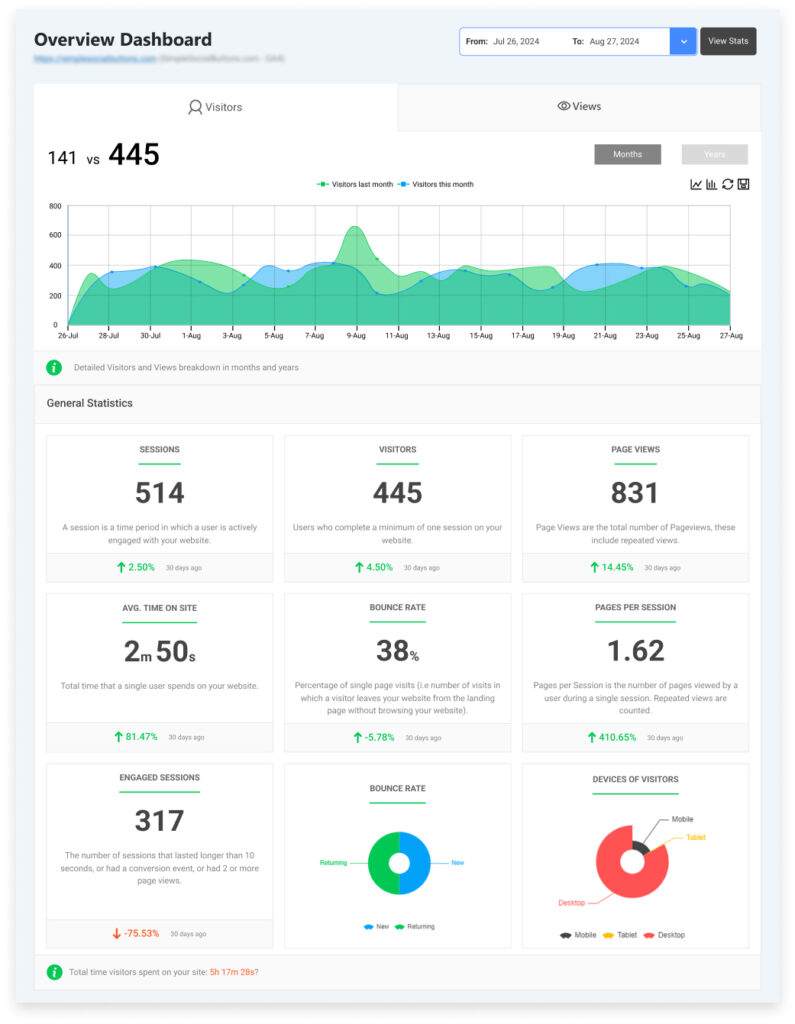
Four ways Analytify adds value to staff augmentation management:
- Monitor web performance of augmented staff in real time, including page visits, engagement, and conversions.
- Streamline reporting by surfacing GA4 data inside your WordPress dashboard, so you can evaluate team impact quickly.
- Improve outcomes by identifying which content or campaigns are underperforming and need attention.
- Assess ROI by connecting traffic, engagement, and conversion data directly to the work your augmented team delivers.
Tip: After your augmented team publishes new content or launches a campaign, check Analytify’s real-time dashboard immediately. Traffic and engagement data shows within minutes whether the work is performing as expected.
. By integrating Analytify with your WordPress-based SaaS site, you can easily monitor the effectiveness of your SEO strategies, track the impact of new updates, and ensure your platform is visible and optimized for both search engines and users.
Analytify can provide you with actionable SEO insights, helping you refine your strategy and boost your rankings.
Technical SEO for SaaS (FAQs)
1. What is Technical SEO for SaaS?
Technical SEO for SaaS is the optimization of a SaaS platform’s technical elements so search engines can crawl, index, and rank it effectively. It includes site speed optimization, JavaScript rendering, URL structure management, crawl budget control, HTTPS implementation, and structured data. SaaS platforms have unique challenges including single-page applications and user authentication that require specialized attention beyond standard technical SEO.
2. Why is a SaaS SEO audit important?
A SaaS SEO audit is important because SaaS platforms change constantly. Every new feature, URL pattern, or infrastructure update can introduce technical issues that hurt search visibility. Without regular audits, problems accumulate silently while organic traffic declines. A quarterly audit catches regressions early and ensures your technical foundation supports your content and marketing efforts.
3. How do I perform a Technical SEO audit for SaaS platforms?
To perform a technical SEO audit for SaaS platforms:
Crawl your site with Screaming Frog or DeepCrawl to find broken links, redirect chains, and depth issues.
Check Google Search Console for index coverage errors, Core Web Vitals failures, and manual penalties.
Test JavaScript rendering with Google’s URL Inspection tool.
Review robots.txt and sitemap completeness.
Check HTTPS coverage across all subdomains.
Run PageSpeed Insights on your top landing pages.
Validate all structured data with Google’s Rich Results Test.
4. What are the best SEO strategies for SaaS platforms?
The most effective SaaS technical SEO strategies are:
Implement server-side rendering for all public marketing and content pages
Use canonical tags to prevent duplicate content from dynamic URL parameters
Optimize Core Web Vitals continuously, especially after new feature releases
Index all developer documentation for high-intent organic search traffic
Add structured data to product, pricing, and FAQ pages for rich snippet eligibility
Monitor crawl budget and block low-value URLs from Googlebot
5. How does mobile responsiveness impact SaaS platform SEO?
Google uses mobile-first indexing for all new websites. This means the mobile version of your site is what Google primarily crawls and ranks. For SaaS platforms, mobile traffic often represents the first touchpoint for prospects researching solutions. If your platform’s marketing pages and blog perform poorly on mobile, rankings and conversions both suffer. Use Google’s Mobile-Friendly Test and Core Web Vitals reports to identify mobile-specific issues.
6. What is a technical SEO audit and how often should I run one?
A technical SEO audit is a systematic review of a website’s technical elements to identify issues that prevent search engines from crawling, indexing, and ranking pages effectively. For SaaS platforms, run a full audit quarterly and a partial audit after every major release. Monitor Core Web Vitals and Search Console errors continuously between full audits.
Technical SEO for SaaS: Summing Up
Technical SEO for SaaS is an ongoing process that must keep pace with product development.
Priority order for your SaaS SEO checklist:
| Priority | Area | Action |
|---|---|---|
| 1 — Immediate | Crawlability | Fix robots.txt blocks, broken links, and redirect chains |
| 2 — Immediate | HTTPS | Resolve mixed content warnings and certificate issues |
| 3 — This sprint | JavaScript rendering | Implement SSR or pre-rendering on all public pages |
| 4 — This sprint | Core Web Vitals | Fix LCP issues on top landing pages |
| 5 — This month | URL structure | Add canonicals to parameterized URLs; clean up parameter handling |
| 6 — This quarter | Structured data | Add schema to product, FAQ, and documentation pages |
| 7 — Ongoing | Documentation SEO | Ensure all new docs pages are indexed and internally linked |
| 8 — Ongoing | Performance monitoring | Track Core Web Vitals and organic traffic after every release |
Use Analytify alongside GA4 and Search Console to track whether your technical fixes are improving organic visibility and driving more qualified traffic to your SaaS platform.
We hope this article is helpful in conducting a Technical SEO audit for your SaaS Platform.
You may also like to read:
Google Analytics Audit (A Complete Checklist)
9 Best Content Audit Tools To Improve Rankings
So, what are you doing today to ensure your SaaS platform SEO is on the right track? Share your thoughts in the comments.