Data Storytelling with Analytics: How to Turn Metrics into Decisions (2026)

Data storytelling with analytics means pairing each GA4 metric with the reason it changed and the action to take next.
Your GA4 dashboard reports sessions, pageviews, and bounce rates every day. Those numbers alone do not explain what happened. A data story names what happened, why it happened, and what to do next.
AI-powered summaries can now draft reports, but a person still has to decide what the numbers mean. Analytify shows GA4 data in readable dashboards inside WordPress, which gives you a clear starting point for each story.
This guide is for marketers, content teams, and site owners who report on GA4. I show you the three parts of a data story, three worked examples, five reporting best practices, and a seven-step checklist for decision-ready reports.
Data Storytelling with Analytics (TOC):
What is Data Storytelling with Analytics?
Data storytelling with analytics is the practice of turning raw GA4 numbers into stories that guide business decisions.
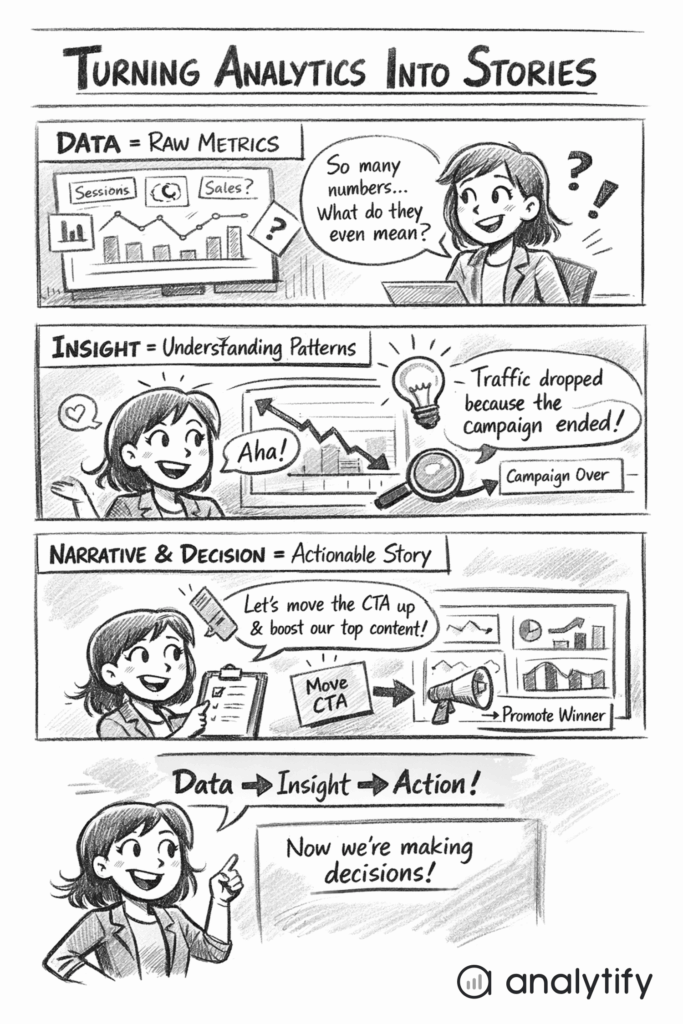
The Three Pillars: Data, Insight, Narrative
Data storytelling combines three elements:
- Data (What happened) – The actual metrics, like sessions, pageviews, engagement rate, conversions, and events. These are the facts from your GA4 dashboard.
- Insight (Why it happened) – The interpretation of the data. For example, traffic dropped because a key landing page lost visibility in search, or engagement increased due to a new content update. Insight explains patterns and trends behind the numbers.
- Narrative (What should be done) – A clear explanation that connects the data and insight to action. Every story should answer: what’s the impact on the business, and what is the next step?
How does data storytelling with analytics differ from traditional analytics reporting?
- Traditional analytics reports focus on numbers, charts, and historical trends.
- Data storytelling goes beyond reporting to explain why results occurred and what actions to take.
Data storytelling makes analytics easier for non-technical teams and executives to understand, and it keeps metrics tied to decisions.
In practice, data storytelling adds context and meaning to data. For example, instead of reporting “bounce rate is 70%,” a data story would explain “bounce rate is 70% because users can’t find the signup form, consider repositioning the CTA.”
Data storytelling turns GA4 metrics into insights that guide data-driven decisions.
Why Data Storytelling with Analytics Matters in 2026
Data storytelling matters because raw metrics alone do not tell a team what to do. Too many numbers overwhelm teams and lead to analysis paralysis. Vanity metrics such as pageviews or total clicks can look good without driving decisions.
Problems with raw metrics:
- Too many metrics make it hard to see what matters.
- Numbers without context can lead to wrong conclusions.
- Executives and non-technical teams struggle to understand dashboards.
Benefits of data storytelling with analytics:
- Provides clarity: Shows what happened, why, and what to do.
- Supports alignment: Teams focus on shared goals rather than isolated numbers.
- Reduces misinterpretation: Ensures GA4 metrics lead to accurate insights.
- Makes analytics accessible: Marketers, content teams, and managers can act confidently.
A narrative connects metrics to real-world outcomes, which makes insights easier to remember and act on. AI tools and automated reporting highlight trends, but a person still has to interpret them before making a decision.
The 3 Core Components of Effective Data Storytelling
Effective data storytelling with analytics relies on three key elements: Data, Insight, and Narrative/Decision.
Each element plays a distinct role in turning metrics into actions.
1. Data: What Happened
Data is the foundation of a data story: the raw numbers from your GA4 or Analytify dashboards.
Examples include:
- Sessions : how many visits your site received
- Engagement rate : the percentage of sessions that were engaged sessions
- Events – clicks, form submissions, video plays
- Key events: the actions you mark as important, such as form submissions or purchases
Choose metrics that tell a story about business performance. Leave the rest of the dashboard out. Simplified dashboards help highlight what matters most.
2. Insight: Why It Happened
Insight explains why a metric changed by interpreting the data:
- Example: Traffic dropped vs traffic dropped due to a specific campaign ending
- Example: High bounce rate vs users leaving because they found answers quickly
Segmentation, comparisons, and trends uncover these insights and turn raw metrics into understanding.
3. Narrative and Decision: What Should Be Done
The narrative states what the business should do next, based on the data and the insight:
- Example: “Bounce rate is high because users can’t find the signup button. Move the button above the fold to improve conversions.”
- Example: “Blog traffic spiked due to a social media campaign. Promote similar content to maintain engagement.”
End every data story with a recommendation. An insight without a next step goes unused.
Storytelling with Data Analytics: Real-World Examples
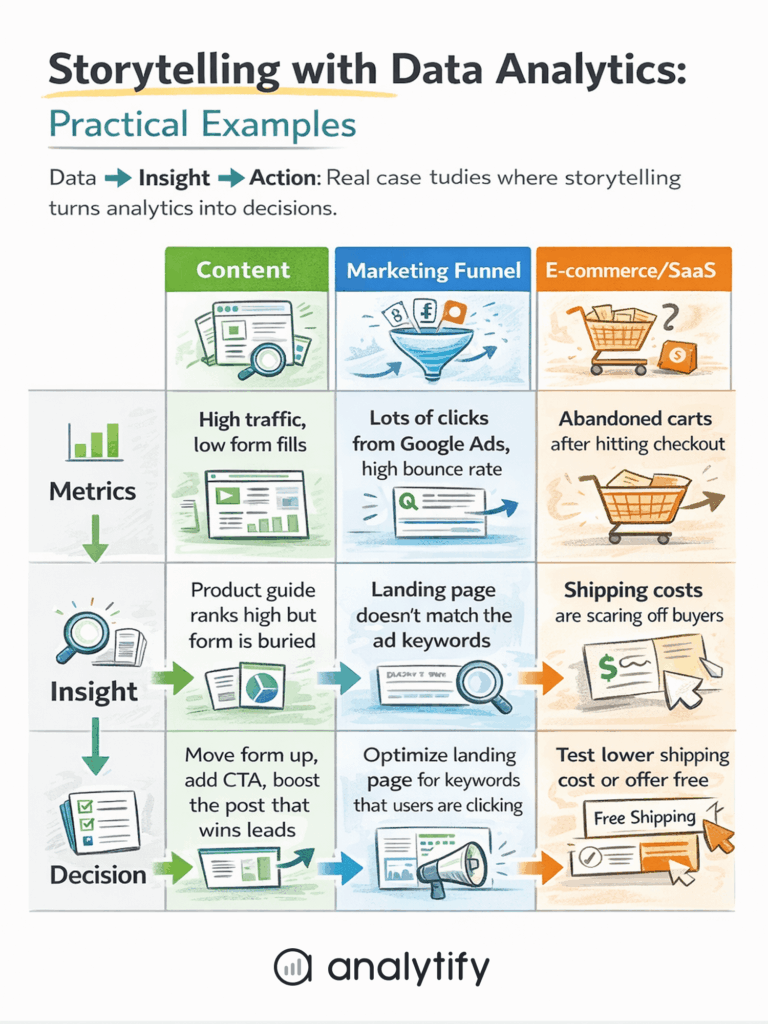
Three scenarios show how a metric becomes a decision: content performance, a marketing funnel, and an e-commerce or SaaS journey.
1. Content Performance Example of Data Storytelling with Analytics
Metrics to track: blog traffic, engagement rate, and key events.
- Insight: A blog post with high pageviews but low engagement may attract clicks but fail to retain readers.
- Decision: Update the content, add visuals, or repurpose for other channels to increase engagement and conversions.
2. Marketing Funnel Example
Metrics to track: traffic source, engagement, conversion.
- Insight: Users drop off at a specific stage, e.g., product page visits, but with low add-to-cart actions.
- Decision: Focus marketing efforts on channels bringing high-quality traffic, optimize pages where users drop off, or test new CTAs.
3. E-commerce or SaaS Journey Example
Ecommerce metrics to track: product views, add-to-cart, checkout, purchase.
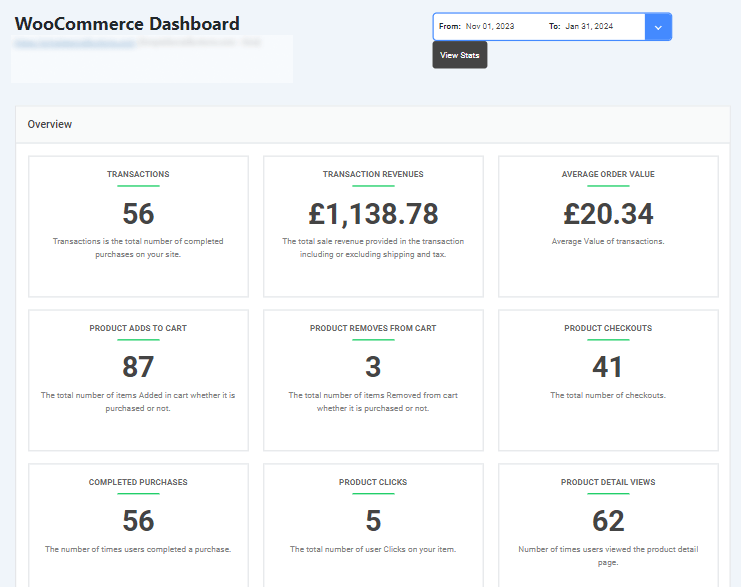
- Insight: High add-to-cart but low checkout indicates friction in the purchase process.
- Decision: Improve UX, simplify checkout steps, or adjust messaging to reduce drop-offs.
In each example, the key steps are:
- Look at metrics (what happened)
- Interpret insights (why it happened)
- Define actions (what should be done)
Storytelling turns static dashboards into decision-making tools that help teams act confidently. With Analytify, these metrics are simplified into clear reports, making it easier to identify trends, spot issues, and make decisions fast.
Analytics Reporting Best Practices for Storytelling
Five practices make an analytics report tell a clear story: start with a business question, pick decision-driving metrics, use supporting visuals, keep the report focused, and end with recommendations.
1. Start with a Business Question
Every report should answer a specific question. Avoid reporting everything. For example: “Which marketing channels drive the most engaged users?” keeps the focus clear.
2. Select Metrics That Support Decisions
Choose metrics that tie directly to your goals. Vanity metrics, like total pageviews, are useful only if they support an insight. Focus on engagement, conversions, revenue, or other decision-driving KPIs.
3. Use Visuals to Support the Story
Graphs, trend lines, and comparisons highlight patterns and anomalies. Include annotations or summaries instead of cluttering charts with raw numbers. A simple line chart showing traffic trends over time can tell a clearer story than a table of raw data.
4. Keep Reports Simple and Focused
One report = one main story. Don’t overload stakeholders with too much information. Prioritize clarity over completeness.
5. Always End with Recommendations
Reports should guide action:
- What should the team test or improve?
- Which campaigns should continue or stop?
- Which content needs updating?
These practices turn reports into insight and action. Analytify creates dashboards and reports that highlight the most meaningful metrics for storytelling.
How Analytify Helps Turn Analytics into Stories
Join 50,000+ beginners & professionals who use Analytify to simplify their Google Analytics!
Turning GA4 data into decisions can be complex, but Analytify simplifies the process for WordPress users. The four sections below show how Analytify supports data storytelling:
1. Simplifying GA4 for WordPress Users
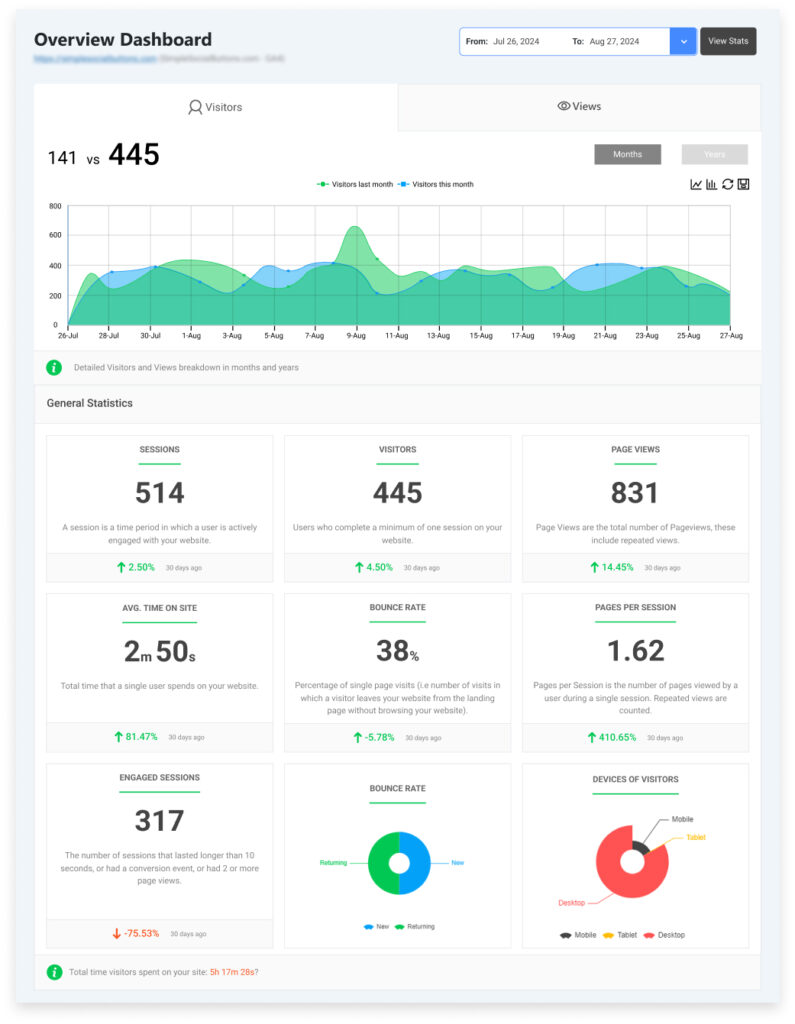
Analytify pulls GA4 data into easy-to-read dashboards, highlighting the most important metrics. Instead of scrolling through raw numbers, users see sessions, engagement rates, conversions, and content performance in one place.
2. Reports That Support Storytelling
Analytify offers pre-built reports that focus on decision-driving metrics:
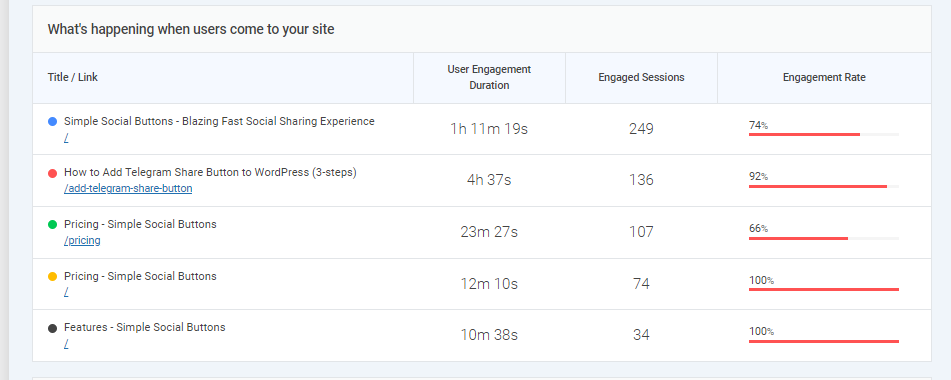
- Traffic and engagement reports – show how users interact with your site.
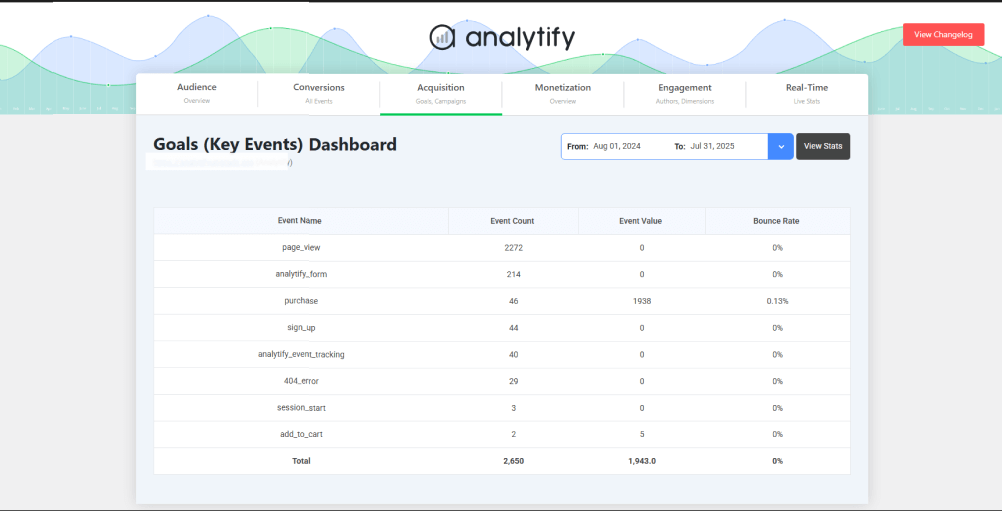
- Conversion and goal tracking – reveal which actions lead to business outcomes.
- Content and eCommerce insights – identify top-performing pages, products, or campaigns.
Analytify’s reports provide the “data” layer of your story and make trends and patterns easy to spot.
3. From Insights to Decisions
With Analytify, insights are immediately actionable:
- Spot traffic drops or spikes and understand the underlying cause.
- Identify high-performing content or products to double down on.
- Track conversion funnels to find friction points and improve UX.
4. Ideal for AI Summaries and Executive Reviews
Analytify’s clear dashboards make it easy to generate decision-ready insights for reports, team meetings, or client updates. Executives don’t need to interpret charts. They get answers to “What’s working?” and “What needs improvement?”
Analytify turns GA4 data into clear reports that support business decisions.
Checklist: Turning Metrics into Decisions
Seven steps turn analytics data into decisions:
- Define the decision you need to make
- Be clear about the business question you want to answer.
- Be clear about the business question you want to answer.
- Choose metrics aligned with that decision
- Focus on KPIs that directly impact your goal.
- Focus on KPIs that directly impact your goal.
- Add context through comparisons or trends
- Compare time periods, segments, or campaigns to understand patterns.
- Compare time periods, segments, or campaigns to understand patterns.
- Identify the insight behind the numbers
- Ask why the metrics are changing and what it means.
- Ask why the metrics are changing and what it means.
- Explain the impact on business goals
- Connect the insight to revenue, conversions, engagement, or other outcomes.
- Connect the insight to revenue, conversions, engagement, or other outcomes.
- Recommend a clear next action
- Define exactly what should be tested, improved, or stopped.
- Define exactly what should be tested, improved, or stopped.
- Review and refine regularly
- Keep reports updated and adjust decisions as new data comes in.
- Keep reports updated and adjust decisions as new data comes in.
The checklist guides decisions and aligns teams around measurable business outcomes. You can adapt it into a visual checklist or infographic for quick reference.
Frequently Asked Questions
1. What is data storytelling with analytics?
It’s the process of turning raw data into understandable insights by combining data (what happened), insight (why it happened), and a narrative (what should be done next). This helps teams make informed decisions instead of just looking at numbers.
2. How is data storytelling different from data visualization?
Data visualization is about showing data with charts and graphs. Data storytelling uses visuals, context, and interpretation to explain meaning and connect it to business decisions. The narrative is what makes data memorable and actionable.
3. Why can’t I just use dashboards without storytelling?
Dashboards show metrics but don’t explain why changes are happening or what action to take. Storytelling adds context and makes your analytics useful for teams and executives.
4. What metrics should I focus on for a good data story?
Choose metrics tied to your business goals, such as conversions, engagement, and revenue, not just total pageviews or raw numbers. The right metrics help you tell a clear, decision-ready story.
5. How do I explain the “why” behind the data?
Use comparisons, trends, and segmentation to dig deeper. For example, compare time periods or segments to understand patterns rather than reporting numbers alone. Asking “why” repeatedly, such as why traffic dropped, can uncover deeper causes.
6. Who benefits most from data storytelling?
Marketers, managers, executives, and clients all benefit because storytelling makes analytics understandable and actionable, especially for non‑technical audiences.
7. Can data storytelling work with automated tools?
Yes. Tools like Analytify simplify complex GA4 data into understandable reports, making it easier to build stories without manual analysis.
Data Storytelling with Analytics: Conclusion
Data storytelling with analytics turns raw GA4 metrics into insights that support business decisions. By combining data, insight, and narrative, teams see what happened, why it happened, and what to do next.
This shift from dashboards to decisions is critical for marketers, content teams, executives, and business owners. Analytify makes this process simple, turning complex analytics into clear, actionable reports.
Adopt data storytelling as a core practice so your analytics guide strategy and align teams around measurable goals. Start with one report and add the three parts: data, insight, and narrative.
Further Readings:
So, which part of your analytics could you start turning into a story today to make smarter decisions?