
AI Data Analytics (Tools and Tips 2026)

AI Data Analytics is transforming how businesses understand and use data.
Instead of manual analysis, AI processes large datasets, uncovers patterns, and helps make faster decisions.
But here’s the problem.
Most businesses collect data but struggle to turn it into actionable insights.
That’s where AI-powered analytics tools come in.
In this guide, you’ll learn:
- How to get started with AI and Data Analytics step by step
- What AI data analytics is
- Why it matters for business growth
- The best tools you can use today
By the end of this post, you’ll have a clear understanding of how to use AI data analytics to drive smarter decisions and measurable results.
AI Data Analytics (TOC):
What is AI Data Analytics?
AI Data Analytics is the process of using artificial intelligence to analyze data, find patterns, and generate insights automatically.
Instead of manually reviewing spreadsheets, AI tools process large datasets in seconds. They identify trends, detect anomalies, and even predict future outcomes.
AI Data Analytics has a few components:
- Machine Learning (ML): Utilizes algorithms to identify patterns and make predictions based on data.
- Natural Language Processing (NLP): Enables machines to understand and interpret human language, facilitating sentiment analysis and automated reporting.
- Predictive Analytics: Forecasts future trends by analyzing historical data, helping businesses anticipate market shifts.
This is why many businesses are now combining AI and data analytics to make faster, smarter decisions.
How AI Works in Data Analytics
AI enhances traditional analytics by adding automation and intelligence.
Here’s how it works:
- Data collection: AI gathers data from multiple sources
- Data processing: It cleans and organizes raw data
- Pattern detection: AI identifies trends and correlations
- Prediction: It forecasts future outcomes using historical data
- Automation: Reports and insights are generated automatically
This approach is often called data analytics AI, where machines handle complex analysis with minimal human input.
AI vs Traditional Data Analytics
Traditional analytics relies on manual processes and basic tools.
AI changes that completely.
| Traditional Data Analytics | AI Data Analytics |
|---|---|
| Manual data analysis | Automated analysis |
| Limited scalability | Handles large datasets |
| Reactive insights | Predictive insights |
| Time-consuming | Real-time processing |
Why AI for Data Analytics is Important
Using AI for data analytics helps businesses:
- Save time on manual reporting
- Reduce human error
- Discover hidden insights
- Make data-driven decisions faster
This is why AI in data analytics is becoming essential for modern businesses.
Why AI Is Revolutionizing Data Analytics in 2026
AI Data Analytics is no longer a future trend; it’s a core business necessity.
Today, companies are rapidly adopting generative AI for data analytics to process data faster, reduce costs, and improve decision-making.
Here’s why AI in data analytics is growing so quickly in 2026:
Here’s why AI is at the forefront of data analytics in 2026:
- Widespread Adoption: Around 78% of organizations used AI in at least one business function in 2024, up from 55% the previous year.
- Generative AI Integration: 71% of organizations regularly use generative AI across at least one business function, indicating a strong trend towards AI-driven innovation.
- Productivity Gains: Businesses using data analytics AI report productivity gains of up to 25%, with some aiming for as much as 80% higher productivity.
- Cost Efficiency: Early adopters of generative AI have achieved average cost savings of 15.2%, demonstrating the financial benefits of AI integration.
- Revenue Growth: 51% of companies integrating AI are seeing revenue increases of 10% or more, highlighting AI’s impact on business growth.
- Generative AI Spending Surge: Worldwide spending on generative AI is expected to total $644 billion in 2026, marking a 76.4% increase from 2024.
These trends show a clear shift.
Businesses are no longer asking whether to use AI. They’re focused on how to use AI in data analytics effectively.
Companies that adopt AI data analytics early gain:
- Stronger competitive advantage
- Faster insights
- Better forecasting
How to Use AI in Data Analytics (Using AI Tools)
Instead of manual reporting, AI tools automate data collection, analysis, and insights generation.
Let’s explore how to use AI in data analytics with real tools.
1. Analytify (AI-Powered Google Analytics Reporting)
Join 50,000+ beginners & professionals who use Analytify to simplify their Website Analytics!
Analytify is a beginner-friendly WordPress plugin that simplifies Google Analytics data using AI for data analytics.
Key Features
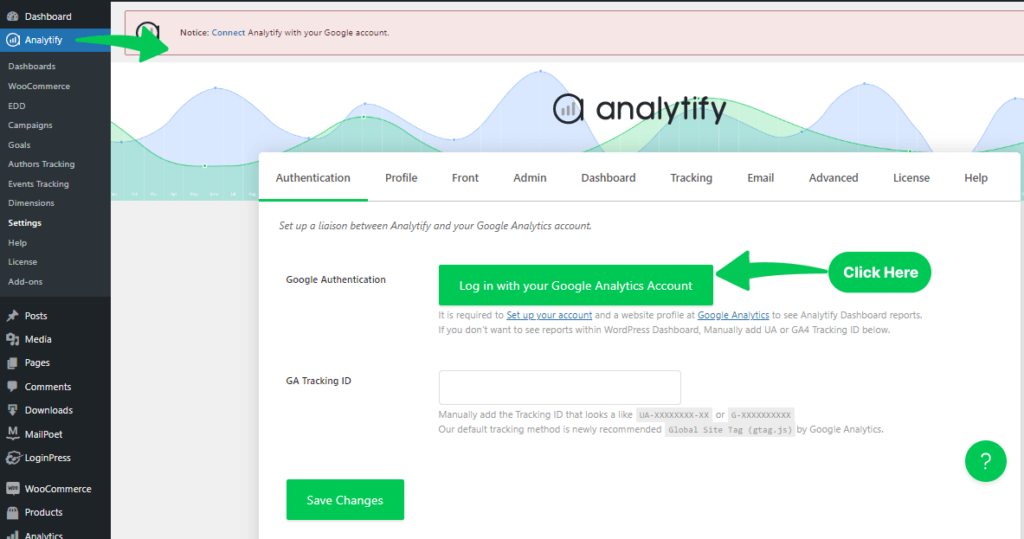
- Easy Google Analytics Integration
Connect your WordPress site to GA4 in minutes and start tracking data instantly.
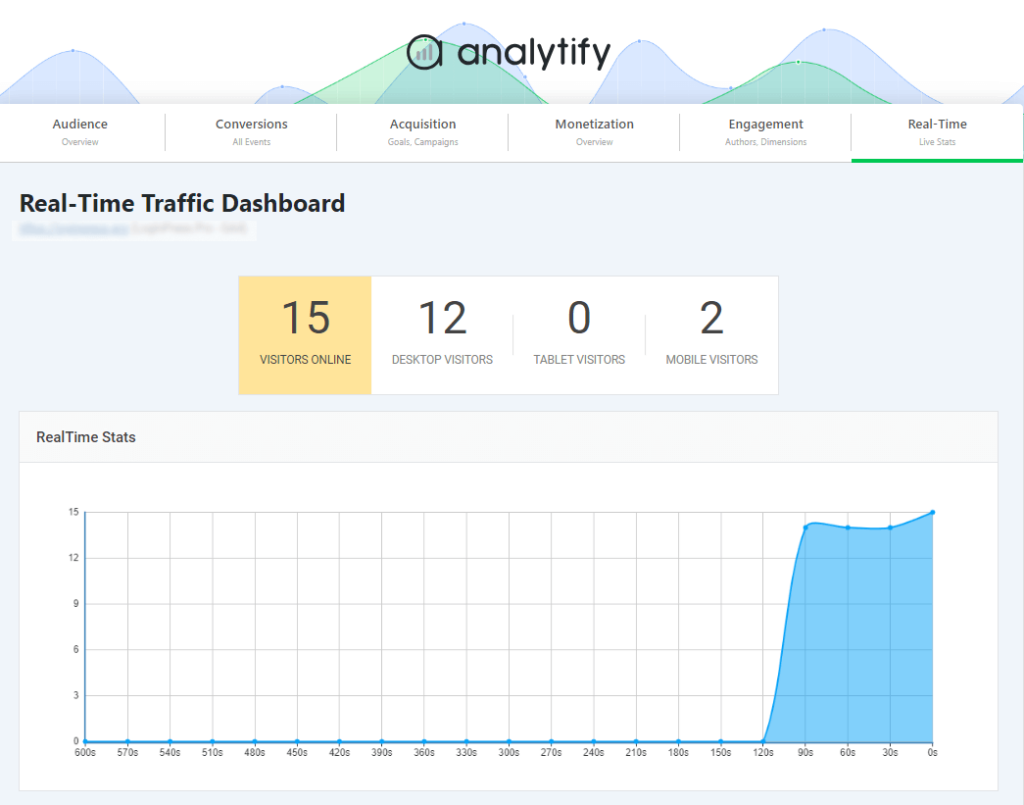
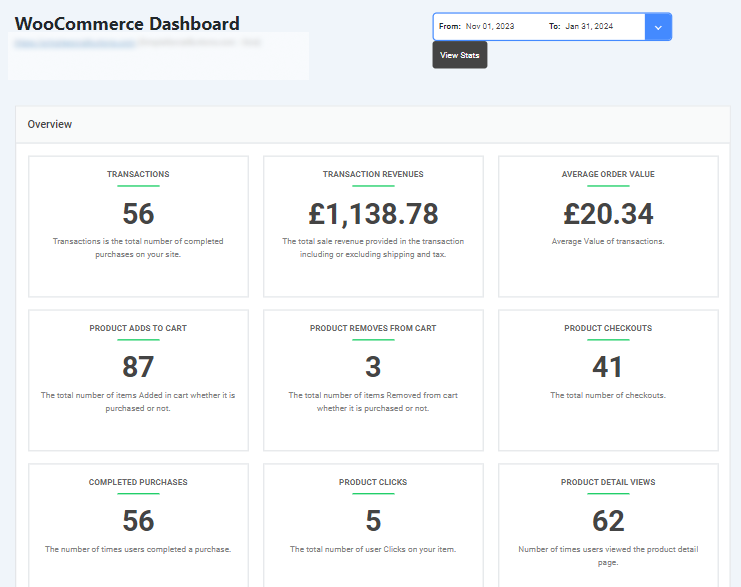
Real-Time Data: Monitor user activity, conversions, and eCommerce performance live.
Smart Reports: Automatically generate reports that highlight key metrics and trends.
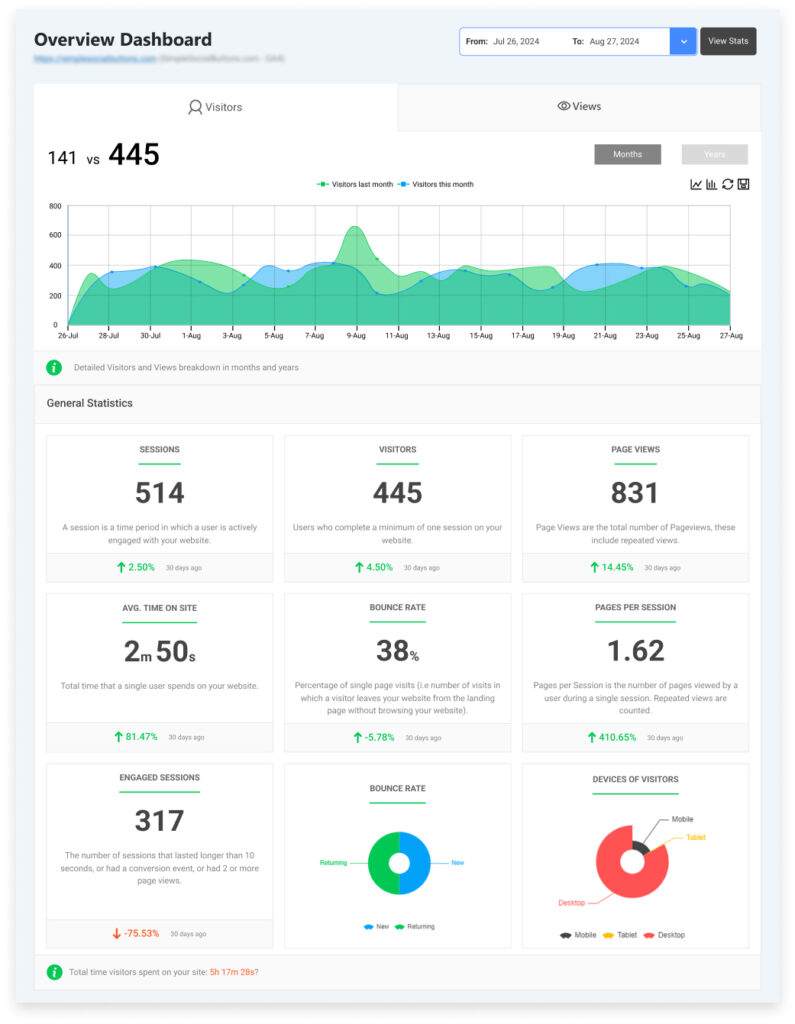
Customizable Dashboards: Create dashboards focused on your most important KPIs.
Enhanced eCommerce Tracking: With built-in eCommerce tracking, Analytify provides detailed insights into product performance and customer behavior.
Benefits of Using Analytify
- Saves Time
Set up analytics in minutes and eliminate manual reporting. - Easy to Understand
Visual dashboards make data simple, even for beginners. - Better Decision-Making
Use AI-powered insights to improve marketing and conversions. - Track Campaign Performance
Measure conversions, traffic sources, and ROI effectively.
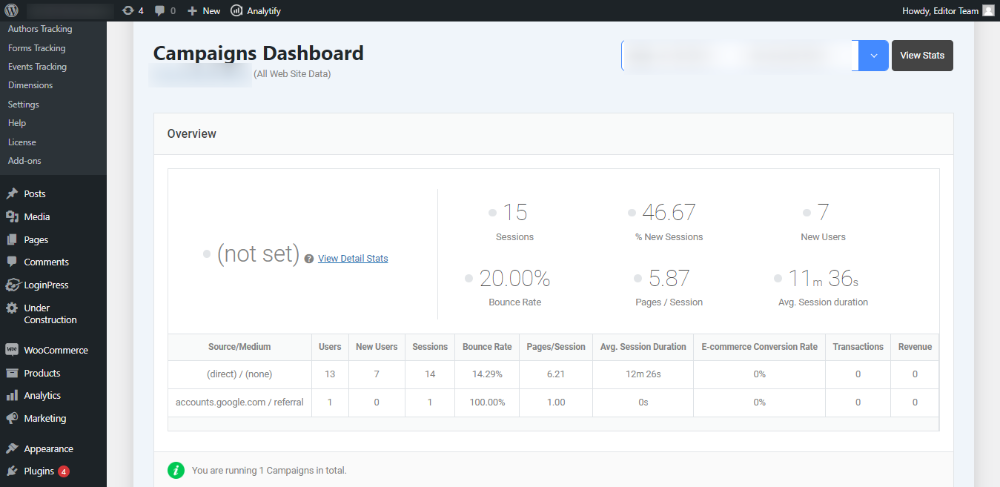
Pro Tip: If you’re just starting with AI in data analytics, Analytify is one of the easiest tools to implement on a WordPress site
2. Google Analytics 4 (GA4): The Foundation for AI-Driven Data Analytics
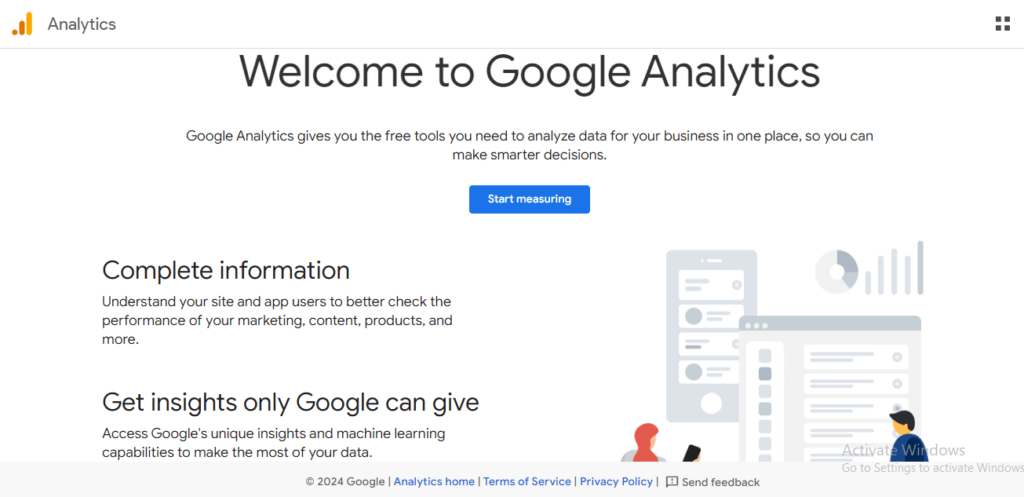
Google Analytics 4 (GA4) is an advanced analytics platform that uses AI Data Analytics to track user behavior and predict future trends.
It combines event-based tracking with machine learning to give a complete view of how users interact with your website and apps.
Key Features
- Predictive Analytics
Uses machine learning to forecast user behavior and future trends. - Enhanced Event Tracking
Tracks user actions like clicks, scrolls, and engagement automatically. - AI-Based Anomaly Detection
Identifies unusual data patterns and alerts you in real time.
How It Helps in AI Data Analytics
GA4 strengthens AI in data analytics by turning raw data into predictive insights.
It helps you:
- Understand user behavior across platforms
- Identify trends before they happen
- Make smarter, data-driven decisions
Benefits of Using GA4
- Better Audience Targeting
Create segments based on predicted user behavior. - Improved Customer Journey Insights
Track users from acquisition to retention. - Stronger Marketing Decisions
Use data to optimize campaigns and conversions. - Customer Lifetime Value Analysis
Predict long-term user value for better strategy planning.
You can use GA4 to:
- Track user acquisition and traffic sources
- Measure engagement and user interactions
- Monitor retention and returning users
- Analyze customer lifetime value
You can use GA4 in tracking user acquisition, engagement, and retention metrics.
Additionally, it aids in analyzing customer lifetime value predictions for more effective marketing strategies.
3. Looker Studio (by Google): Visualizing AI Insights
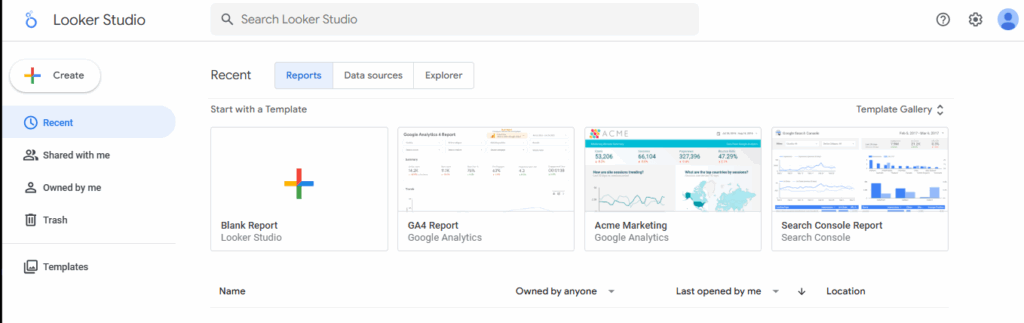
GoLooker Studio is a free tool from Google that helps businesses turn raw data into visually compelling reports and dashboards.
With AI Data Analytics integration, it makes trends easier to spot and insights accessible for teams at every level.
Key Features
- AI-Driven Visualizations
Automatically suggests the best charts and graphs to represent your data. - Customizable Dashboards
Build dashboards tailored to your needs using data from Google Analytics, Google Ads, and other sources. - Collaboration Tools
Share reports in real time with your team and stakeholders.
Benefits of Using Looker Studio
- Simplified Data Analysis
Interactive visuals make complex data easier to understand. - Enhanced Team Collaboration
Teams can make faster, informed decisions together. - Executive-Level Reporting
Create reports for management to track marketing performance and other key metrics.
How Looker Studio Supports AI Data Analytics:
Using Looker Studio in your analytics workflow helps you:
- Communicate trends and KPIs effectively to stakeholders
- Visualize insights generated by AI analytics tools
- Track marketing performance across channels
How to Utilize AI Data Analytics (Expert Tips)
Implementing AI Data Analytics can deliver huge benefits, but it requires planning and strategy.
To maximize AI-driven insights, focus on practices that enhance accuracy, transparency, and collaboration.
Here are expert tips for successfully implementing AI in your data analytics workflow.
1. Data Quality: Ensure High-Quality, Clean Data
Accurate AI insights depend on clean, high-quality data. Poor data—missing, inconsistent, or incorrect—can lead to unreliable predictions.
Best Practices:
- Data Cleaning: Remove duplicates, correct errors, and fill missing values regularly.
- Standardization: Keep data consistently formatted across sources.
- Data Validation: Detect errors before feeding data into AI models (check outliers, inconsistencies, and incorrect inputs).
Tip: High-quality data is the foundation of AI in data analytics.
2. Model Transparency: Build Trust in AI Models
AI models can feel like “black boxes,” making it hard for stakeholders to trust the insights.
Best Practices:
- Explainability: Use interpretable models like decision trees or linear models.
- Model Auditing: Regularly review models to ensure alignment with business goals.
- Clear Documentation: Document data sources, algorithms, and assumptions for transparency.
Transparent AI strengthens confidence in AI Data Analytics outcomes.
3. Continuous Learning: Update Models with New Data
AI improves over time—but only if models are updated with fresh data.
Best Practices:
- Model Retraining: Schedule regular retraining to capture the latest trends.
- Automated Data Pipelines: Automate data flow to AI systems without manual intervention.
- Monitor Performance: Track accuracy to detect degradation and know when to retrain.
Pro Tip: Use cloud platforms like Google Cloud AI or AWS SageMaker to automate retraining.
4. Ethical Considerations: Implement AI Responsibly
AI introduces ethical challenges—bias, privacy, and accountability.
Best Practices:
- Bias Mitigation: Identify and reduce bias in data to avoid unfair outcomes.
- Data Privacy: Comply with GDPR, CCPA, and other regulations.
- Accountability: Keep humans in the loop for critical decisions.
Ethical AI is essential for trustworthy AI in data analytics.
5. Collaboration: Combine Data Scientists and Domain Experts
AI success depends on combining technical skill with business knowledge.
Best Practices:
- Cross-Functional Teams: Align data scientists with business experts for actionable insights.
- Continuous Communication: Encourage dialogue between technical and non-technical teams.
- Feedback Loops: Refine AI models based on real-world user feedback.
Collaboration ensures AI tools deliver practical, high-impact AI Data Analytics insights.
Challenges in AI-Driven Data Analytics
While AI Data Analytics offers huge benefits, organizations often face challenges during implementation. Here are the most common hurdles and how to address them:
1. Data Privacy
Sensitive data must be protected. Implement strong security measures and comply with relevant regulations like GDPR or CCPA.
2. Bias in AI Models
Skewed data can lead to biased outcomes. Regularly audit AI models for fairness and correct any detected biases.
3. Integration Issues
AI tools may not easily integrate with existing systems. Plan for seamless integration and provide staff training to ensure smooth adoption.
4. Skill Gap
There’s a shortage of professionals skilled in AI and data analytics. Invest in training programs or collaborate with educational institutions to build expertise.
5. High Costs
AI implementation can require significant investment. Evaluate ROI carefully and explore cost-effective solutions when possible.
Pro Tip
Being aware of these challenges early helps you implement AI in data analytics more effectively and reduces risks.
Frequently Asked Questions
1. What is AI data analytics?
AI Data Analytics uses artificial intelligence to examine large datasets, identify patterns, and generate actionable insights for business decisions.
It combines technologies like:
Machine Learning (ML): Learns from data to make predictions
Natural Language Processing (NLP): Understands text and speech data
Predictive Analytics: Forecasts trends and future outcomes
By leveraging these technologies, AI data analytics helps businesses process data more efficiently, uncover hidden insights, and make smarter decisions faster.
2. How does AI data analytics work?
AI Data Analytics works by collecting and cleaning data, applying AI models to detect patterns, using natural language processing to interpret text-based data, and generating predictions with predictive analytics. Insights are then visualized in dashboards or reports to guide smarter, faster business decisions.
3. What tools do I need for AI data analytics?
To start with AI Data Analytics, you can use tools that offer AI-powered insights and automation. Popular options include:
Google Analytics 4 (GA4): Event-based tracking, predictive analytics, and anomaly detection.
Analytify: Simplifies Google Analytics data with AI-driven dashboards and reports.
Looker Studio (Data Studio): Visualizes AI insights in interactive, customizable dashboards.
These platforms help businesses analyze data efficiently, uncover trends, and make data-driven decisions faster.
4. Can AI analyze data in Excel?
Yes, AI Data Analytics can be applied in Excel. Microsoft Excel offers AI-powered features such as Ideas and Data Types, which help you:
Analyze trends in your data
Forecast future outcomes
Detect anomalies automatically
These AI tools make it easier to extract insights from spreadsheets without needing advanced technical skills.
5. Will AI replace data analysts?
While AI Data Analytics can automate repetitive tasks and process large datasets quickly, it will not replace data analysts entirely.
Humans are still essential for:
Interpreting AI-generated insights
Making strategic business decisions
Providing context and expertise to the data
AI complements data analysts, helping them focus on higher-value tasks rather than replacing them.
6. What are the benefits of using AI in data analytics?
AI Data Analytics offers several benefits that make data-driven decisions faster and more accurate:
Speed: Processes large datasets quickly, saving time and resources.
Accuracy: Reduces human error in data interpretation.
Pattern Recognition: Identifies trends and anomalies that might be missed manually.
Predictive Power: Forecasts future outcomes using historical data.
Accessibility: Let users explore and query data with natural language tools.
Final Thoughts
AI Data Analytics is reshaping the way businesses analyze data, uncover insights, and make smarter decisions. By leveraging AI-powered tools and strategies, companies can work faster, reduce errors, and predict trends with confidence.
I hope this guide has given you actionable insights to start implementing AI Data Analytics effectively in your business.
You may also like to read:
Share Your Thoughts
Which AI Data Analytics tools are you already using? Or which one are you most excited to try? Let us know in the comments below. I’d love to hear your experiences!.



 Halloween Sale: Know which campaigns drive sales this season.