Data Confidence Marketing: Making Decisions You Can Actually Trust

Have you ever looked at your GA4 dashboard and thought, “This can’t be right”?
You aren’t alone. Most marketing teams collect plenty of data, but very few actually trust the numbers they’re seeing.
The good news is that you can turn GA4 from a source of confusion into a reliable engine for growth, giving you the clarity needed to scale your budget without the guesswork.
In this guide, I’ll show you how to build a data confidence marketing system by validating your tracking and cleaning up your reporting. By the end, you’ll know exactly how to make marketing decisions based on hard data rather than gut feelings.
Data Confidence (TOC):
What Is Data Confidence in Marketing?
Data confidence means your analytics match reality. When teams trust their data, they can set budgets, change strategies, and update stakeholders without second-guessing the numbers.
To build real data confidence, you need to trust a few key things:
- Your tracking is accurate, so every click, scroll, and purchase is recorded correctly.
- Your metrics reflect real behavior and help analyze actual human actions, not bot traffic or internal testing.
- Your dashboards show validated data, so your reports are clean, deduplicated, and free of setup errors.
- Your decisions are supported by reliable signals, and you can make decisions based on facts, not glitches.
Data Collection, Interpretation, and Validation
Many marketers confuse having data with having actionable insights. To build a seamless data confidence system, you must understand the difference between these three stages:
- Data Collection: This stage involves the technical process of gathering raw data, such as activating a GA4 tag or loading a tracking code. But simply collecting data doesn’t make it useful.
- Data Interpretation: This stage involves analyzing collected metrics. For instance, a high “Average Session Duration” may be interpreted as an indicator of elevated user engagement.
- Data Validation: This is where you verify that your data is correct. In the previous example, validation would determine whether the observed high session duration results from genuine user engagement or from anomalies such as a browser tab left open by an automated process.
Without validation, your data can be unreliable and your insights questionable.
Why Most Marketing Teams Don’t Trust Their Analytics
Technical inconsistencies, such as attribution mismatches, cookie signal loss, and fragmented cross-device tracking, lead to low data confidence for marketers.
Below are some of the common reasons for low analytics trust:
Common Reasons for Low Analytics Trust

Low analytics trust usually comes from one of these issues:
- GA4 Tracking Misconfiguration: The GA4 setup process is complex, and minor configuration errors can result in missing data or inaccurate reports from the outset.
- Duplicate Events: When tracking code executes multiple times, metrics become unreliable. Apparent increases in conversions may simply reflect repeated counts of the same user.
- Broken Conversion Tracking: If the ‘Thank You’ page fails to trigger the appropriate event, reported return on investment may appear negligible despite strong sales performance.
- Cross-Domain Issues: When users transition from the main website to a checkout page on a separate domain, GA4 may register them as distinct individuals, thereby fragmenting customer journey data.
- Bot Traffic Distortion: Ghost referrals and automated bot clicks affect 36% of all digital advertising campaigns and cost businesses billions annually. Without effective filtering, perceived growth may be misleading.
- Sampling Confusion: For large accounts, Google may sample data to optimize processing efficiency. As a result, reported figures represent estimates rather than complete counts.
- Attribution Inconsistencies: When reported sales numbers differ across advertising platforms and GA4, it indicates attribution challenges. This can make it harder to decide where to invest in future marketing.
What Does Bad Data Actually Cost You?
For example, a marketing team may allocate $5,000 to a new advertising campaign and observe a notable increase in reported clicks, while actual sales remain unchanged.
This leads to the question: Is the campaign not working, or are the tracking tools giving inaccurate results?
Without data validation, marketing teams have to rely on assumptions when making decisions.
Many end up cutting spending because they worry about inefficiency, not because their marketing is bad, but because they do not trust their analytics.
How Low Data Confidence Slows Business Growth
A lack of trust in data extends beyond disorganized spreadsheets and sets a ‘trust tax’ that restricts overall business operations.
Without data confidence, marketing decisions slow down and growth suffers. The following outcomes commonly occur when organizational trust in analytics is low:
- Teams hesitate to scale: When tracking accuracy is uncertain, organizations are unlikely to increase advertising expenditures. This caution can result in missed growth opportunities due to concerns about data reliability.
- Budget decisions become subjective: In the absence of reliable data, teams may rely on intuition rather than evidence-based reasoning. This often results in internal disagreements and inefficient resource allocation to underperforming channels.
- A/B tests appear unreliable: Even when a split test indicates a successful variant, weak data validation can create uncertainty about the results’ validity, raising concerns about potential tracking errors.
- Stakeholder questions: Differences identified by clients or supervisors can undermine a marketer’s credibility. Once trust is compromised, subsequent reports are subject to increased scrutiny.
- Marketing ROI appears inconsistent: Noisy data can cause Return on Investment (ROI) metrics to fluctuate unpredictably, making it difficult to conduct effective quarterly planning.
The 15% Glitch Scenario
Minor errors can have significant consequences. For example, if conversion tracking is inaccurate by 15%, the impact can be considerable.
A genuinely profitable campaign may appear unviable in reports. As a result, advertisements may be discontinued, momentum lost, and potential customers missed due to a minor tracking error.
Decision confidence is established when a 15 percent gain is reflected in analytics dashboards and directly in financial outcomes. Without this alignment, marketing efforts become theoretical and costly.
Now that you understand the risks, let’s fix them.
How to Build Data Confidence in Analytics (Step-by-Step)
To improve data confidence in your analytics dashboard data, apply the following five-step framework to ensure data reliability:
Step 1: Validate Your Tracking Implementation
Before reviewing any reports, ensure your basic tracking setup is complete.
- Check GA4 Property Setup: Verify that your Data Streams are active and your Measurement ID matches your website.

- Verify Tag Installation: Use tools like Google Tag Assistant to confirm that your tags are loading on every page.

- Confirm Event Firing Logic: Ensure events only trigger when the specific action occurs (e.g., a button click, not just a page load).

- Test Conversions Manually: Perform a test purchase or sign-up yourself and watch the Real-Time Reports to see if the event registers instantly.
Step 2: Eliminate Duplicate or Broken Events
Accurate data collection requires adherence to the ‘one action, one event’ principle. Overlapping data reduces decision confidence.
- Check Enhanced Measurement Conflicts: GA4’s built-in tracking (e.g., scroll or file download events) can sometimes clash with manual tags you’ve created in Google Tag Manager.
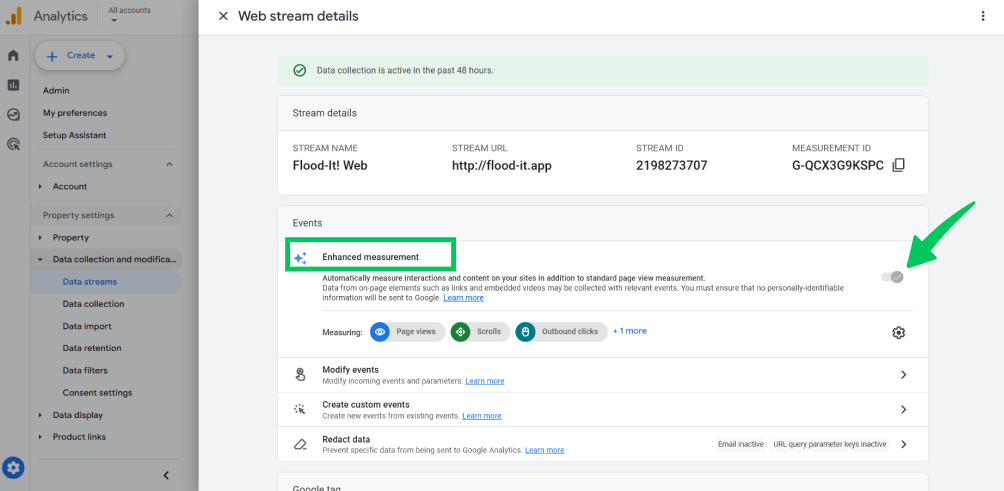
- Remove Overlapping Tags: If you have an old “Universal Analytics” tag and a new GA4 tag firing for the same event, your numbers will be inflated.
- Standardize Event Naming: Use a consistent format (e.g., form_submit_contact vs. ContactForm). Inconsistent naming makes it impossible to aggregate data accurately, leading to poor data validation and marketing.
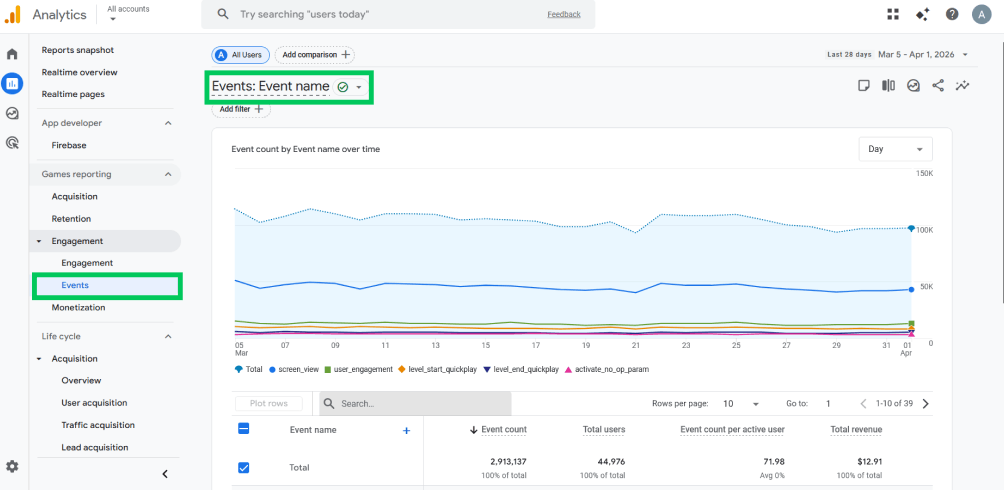
Step 3: Filter Internal and Bot Traffic
The main objective in this step is to analyze customer interactions with the site, rather than internal employee or automated bot activity.
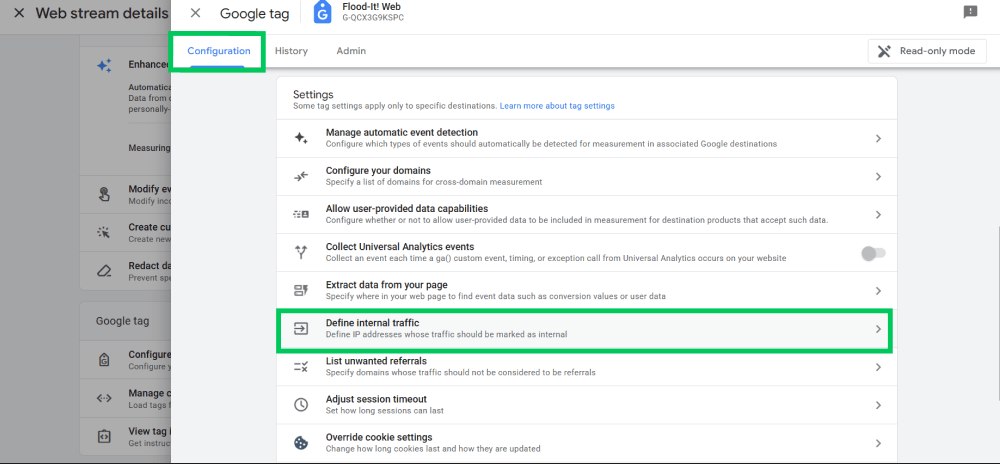
- Internal IP Filtering: In GA4 Data Streams, designate office or home IP addresses as Internal to prevent internal visits from distorting conversion rate data.
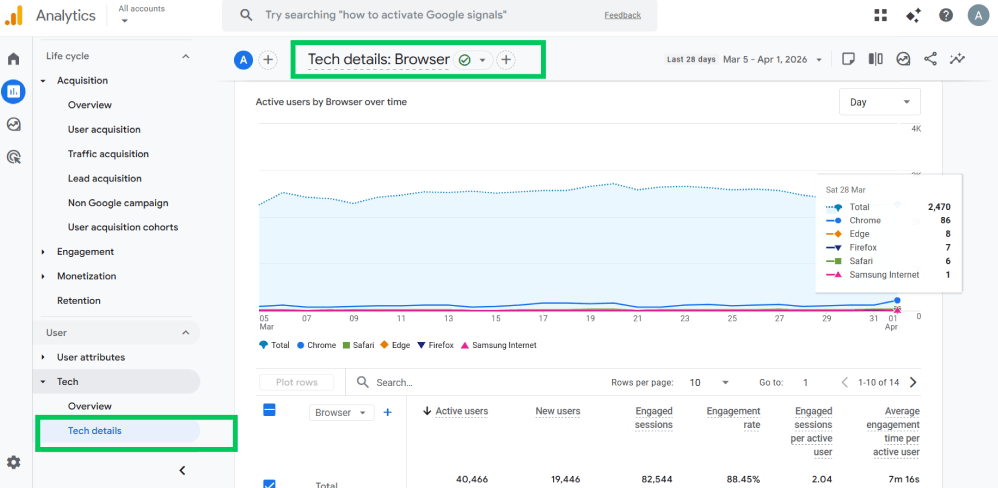
- Bot Filtering Settings: Although GA4 automatically filters known bots, regularly monitor the Service Provider and Country Reports for unexpected spikes from atypical locations.

- Server-Side Tracking: For high-traffic sites, implement server-side tracking to bypass ad blockers and obtain a more accurate count of genuine human users.
Step 4: Verify Conversion Accuracy
Accurate revenue data is necessary; inaccurate figures render ROI reports ineffective.
- Test Form Submissions: Confirm that each lead-generation form sends a unique event to the reporting dashboard.
- Check Purchase Values: Verify that the “Value” parameter in eCommerce events matches the price the customer paid.
- Confirm Currency and Parameters: Ensure the dashboard is configured for the local currency and that all eCommerce parameters, including tax, shipping, and items, are accurately recorded.
Step 5: Standardize Your Reporting Dashboards
To maintain confidence in the data, reporting should remain straightforward and direct.
- Avoid Metric Overload: You don’t need 50 charts. Pick the 5-10 KPIs that actually impact your bottom line.
- Focus on Goal-Aligned KPIs: For example, if the main objective is “Sales,” avoid prioritizing metrics such as Page Views.
- Ensure Consistent Time Comparisons: Compare equivalent time periods, such as this Monday versus last Monday, to account for natural fluctuations in traffic.
How to Build Trusted Analytics Systems
Passive tracking methods are insufficient for maintaining accuracy as a website evolves.
Core Pillars of Trusted Analytics
To maintain reliable analytics, you need a repeatable framework that prevents data loss and tracking errors.
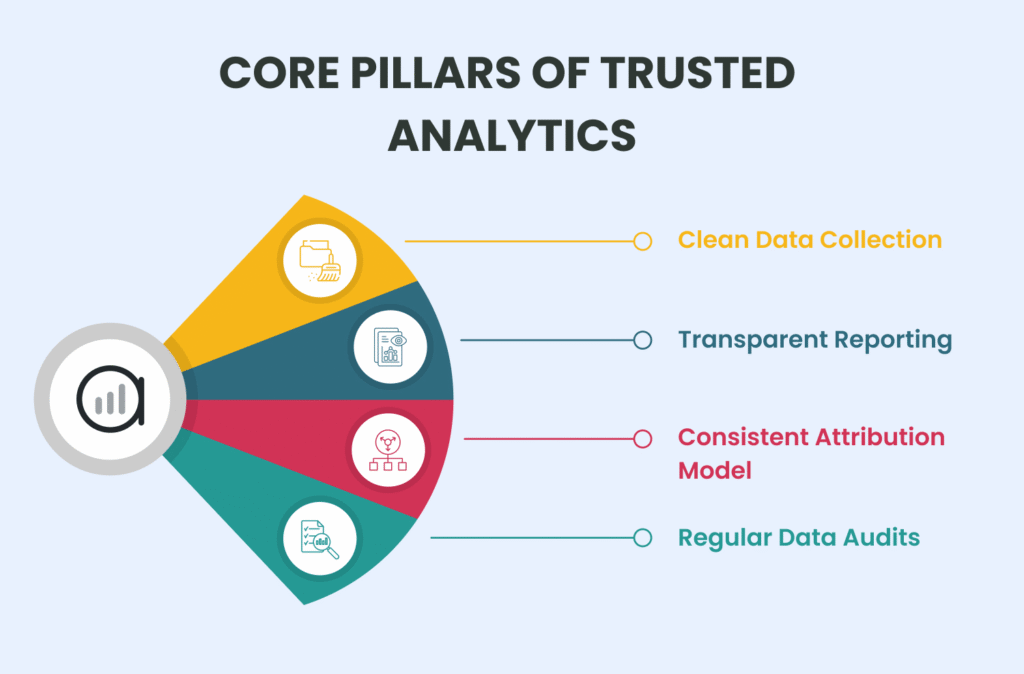
Here are some core pillars mandatory for understanding data confidence marketing:
Pillar 1: Clean Data Collection
Inputting poor-quality data into the system will yield unreliable outputs. Tracking processes must remain streamlined and well-organized.
- Correct Event Setup: Each button click or form submission should trigger precisely one event.
- Structured Taxonomy: Consistent naming conventions (for example, button_click_hero versus hero_click) are important. Inconsistent naming leads to disorganized and unclear reports.
- No Tracking Clutter: Remove old or unused tags and events. Excessive dashboard clutter hinders the identification of meaningful metrics.
Pillar 2: Transparent Reporting
Data is valuable only when its meaning is clearly understood by all stakeholders. Transparency enhances confidence in decision-making throughout the organization.
- Clear Metric Definitions: Terms such as “Lead” must be explicitly defined, for example, as a newsletter signup or a booked demonstration, to remove any ambiguity.
- Shared Dashboards: A unified source of truth, such as a simplified WordPress dashboard, ensures that both marketing teams and stakeholders reference consistent data.
Pro-tip: Instead of creating new dashboards or navigating a complex GA4 dashboard, Analytify provides clean, minimal, and actionable metrics right in your dashboard.
- No Hidden Calculations: Complex metrics should be avoided. Direct, easily interpretable signals that align with business objectives are preferable.
Pillar 3: Consistent Attribution Models
Attribution assigns credit to marketing channels, such as SEO, email, or advertising.
- Choose Intentionally: Decide whether you value the “First Click” (how they found you) or the “Last Click” (what made them buy).
- Document and Maintain Consistency: Once an attribution model is selected, it should be formally documented and consistently applied.
- Avoid Random Switching: Frequent changes to attribution models hinder comparisons of historical performance. Consistency is essential for data reliability.
Pillar 4: Regular Data Audits
Even resilient systems may fail following plugin updates or landing page modifications. To tackle this:
- Monthly Validation: Allocate time each month to compare total recorded sales with the corresponding conversions in analytics systems.
- Tracking Health Checks: Click through your main funnels to ensure your tags are still firing correctly.
- Conversion Accuracy Review: It is necessary to verify that “Value” parameters, such as revenue, continue to be captured accurately.
Data Reliability in GA4: What Marketers Overlook
Even with perfect tracking, GA4 uses background processes that can alter your reports. Understanding these mechanisms prevents you from misinterpreting “filtered” or “estimated” data as technical errors.
1. Data Thresholding
In low-traffic reports, Google may hide specific data (like search terms or cities) to protect user privacy.
- The Signal: Look for a warning icon at the top of your report.
- Impact: Your reported user totals may appear lower than reality.
2. Sampling vs. Unsampled Data
For complex, long-term custom reports, GA4 may only process a percentage of your events and estimate the rest.
- Impact: Sampled reports can be misleading for precise, small-scale decisions. Always verify the “Quality” icon shows 100% data.
3. Modeled Conversions
When users decline cookies or switch devices, Google uses AI to “predict” if a conversion happened.
- Impact: Your “Conversions” column is often a trend-based estimate rather than a 1:1 record of human actions.
4. Consent Mode Gaps
Under privacy laws like GDPR, many users opt out of tracking. With Consent Mode, GA4 tracks basic hits but doesn’t link them to a specific user.
- Impact: You may see a sale recorded without knowing which ad or campaign actually drove it.
5. Cross-Device Tracking
Unless a user is logged into a Google account on both their phone and desktop, GA4 views them as two separate people.
- Impact: This inflates your “New User” count and masks the true length of the customer journey.
How to Navigate These Gaps
You cannot disable these privacy features permanently. So instead of chasing a 100% match between your dashboard and backend sales, prioritize growth signals and long-term trends.
How Clear Dashboards Increase Decision Confidence
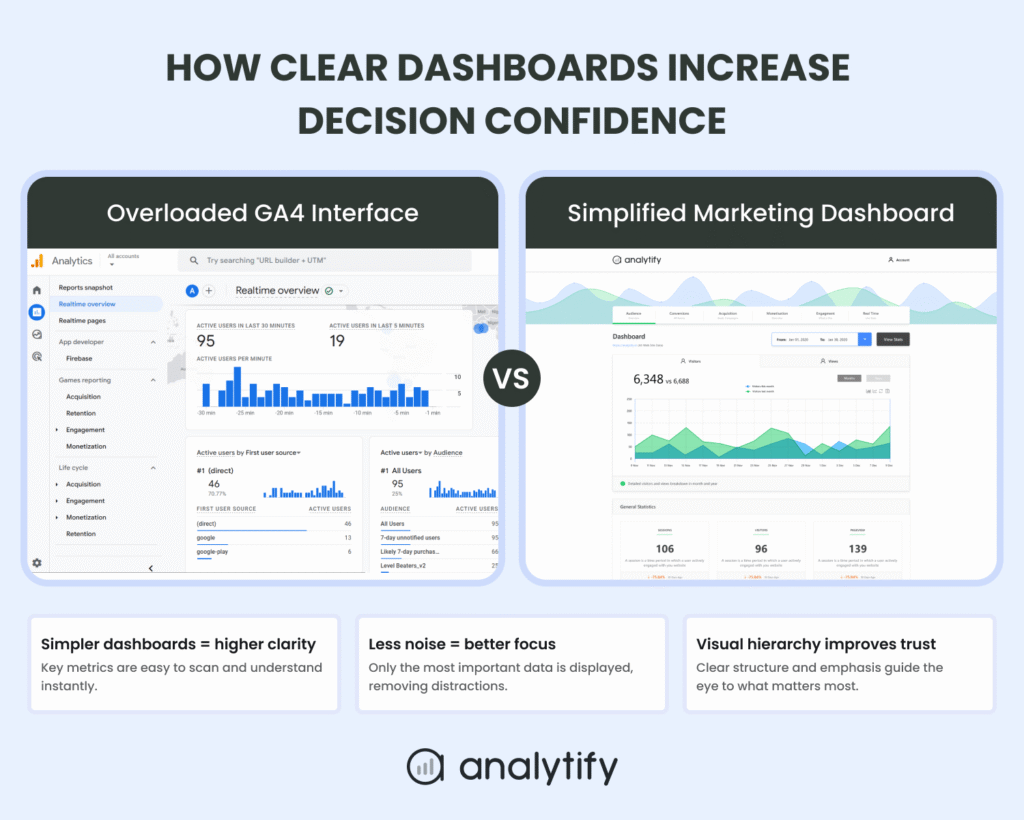
The value of data is determined by how effectively it can be interpreted. When the majority of time is spent navigating complex menus to locate key metrics such as conversion rate, business management becomes complicated.
Decision-making confidence is rooted in clarity. When data is presented in an accessible manner, it enables prompt and informed action.
A cluttered dashboard not only diminishes visual appeal but also impairs effective leadership. The following points illustrate why a simplified reporting layer is needed for fostering data confidence:
- Simpler Dashboards mean Higher Clarity: When you reduce the number of metrics on a screen, your brain can process the story behind the numbers faster. This helps you to stop wondering what a metric means and start seeing what it’s telling you.
- Less Noise means Better Focus: GA4 tracks hundreds of events by default. Most of them, like “scrolls” or “session_start,” don’t help you make a proper budget decision. Removing this noise lets you focus on high-value growth signals.
- Visual Hierarchy Improves Trust: We naturally trust information that is organized. A clean, professional dashboard with a clear hierarchy feels more “official” and reliable than a chaotic spreadsheet.
Comparing Dashboard Designs: The Clarity Gap
Consider two contrasting scenarios during a Monday morning marketing meeting:
The GA4 Interface (Before): The standard Google Analytics 4 interface requires navigating through multiple menus, such as Reports, Engagement, and Conversions.
Users may encounter incorrect date ranges and warnings, such as “Data Thresholding,” when attempting to filter by source.
After several minutes, the team may lose engagement, and key campaign outcomes remain unverified.
The Simplified Dashboard (After): The WordPress dashboard presents a single screen displaying the top five traffic sources, total revenue, and conversion rate for the previous seven days.
The data is streamlined, and irrelevant information is removed, and it becomes apparent that the email list generated 40% of sales.
Outcome: In the second scenario, decision-makers gain the confidence to invest further in email marketing before the meeting concludes. The improvement is not in the quantity of data, but in enhanced accessibility.
Data Validation in Marketing Workflows
Data integrity extends beyond technical implementation and should be integrated into daily operational routines.
Monthly reviews are insufficient to ensure data reliability. You need to incorporate consistent “trust checks” at every stage of the campaign process.
1. Pre-Campaign Tracking Tests
Always carry out a quick dry run before launching.
- Workflow: Utilize an Incognito browser window to click the advertisement link with a test UTM parameter and complete a conversion.
- Verification: Confirm the event appears in the GA4 Real-Time report. Resolve any attribution errors prior to allocating campaign budget.
2. Post-Launch Validation (24-Hour Rule)
Technical issues may not become apparent until after the campaign is live.
- Workflow: Generate a traffic report 24 hours following campaign launch.
- Verification: Identify anomalies such as a 0% bounce rate, which may indicate double-firing tags, or the presence of “Unassigned” traffic. Early detection safeguards data reliability.
3. Weekly Attribution Audits
Attribution across marketing channels is often non-linear. This is why it is necessary to regularly keep them in check.
- Workflow: Conduct weekly comparisons of primary traffic sources.
- Verification: Discrepancies such as Facebook reporting 100 sales while GA4 reports 10 indicate an attribution gap. Identifying these inconsistencies prevents misinformed budget allocations based on incomplete data.
4. Monthly Revenue Reconciliation
This process serves as the final validation of the reliability of the analytics.
- Workflow: Compare total monthly revenue recorded in WordPress (WooCommerce or EDD) with figures from the analytics dashboard.
- Verification: A variance of up to 5% is normal, whereas a 30% discrepancy indicates a tracking failure. Aligning these figures ensures that ROI reports accurately reflect actual revenue.
Common Analytics Trust Mistakes
Even the best marketing teams can fall into “data traps” that ruin their decision confidence. To maintain trusted analytics, avoid these common mistakes that lead to broken reports and wasted budgets.
- Trusting the Default GA4 Setup: Google’s out-of-the-box settings are rarely enough for a professional business. Without custom event tracking and defined conversions, you are only seeing half the story.
- Ignoring Event Parameters: An event, like a click, tells you someone did something, but without parameters (like link_url or button_text), you don’t know what they did. Ignoring these details makes your data validation marketing nearly impossible.
- Over-Customizing Reports: It is tempting to build dozens of custom explorations in GA4. However, too many filters and segments create “data noise,” making it harder to find the growth signals that actually matter.
- Comparing Apples to Oranges: Never compare data from two different platforms without context. For example, your email provider’s “clicks” will rarely match your website’s “sessions.” Expecting a 1-to-1 match leads to unnecessary panic.
- Not Documenting Tracking Changes: If you change a conversion goal in March but don’t record the date, your year-over-year reports for next March will look broken. Always keep a “change log” to maintain data reliability.
- Blindly Trusting AI Insights Without Validation: GA4’s automated “Insights” can be helpful, but they aren’t perfect. Always verify an AI-generated trend against your raw data before making a major budget shift.
The Role of Simplified Reporting Tools in Data Confidence
Even when your tracking is correct, confidence can still break down at the reporting stage.
Data confidence is often lost even when tracking is technically correct. The problem is not always bad data. It’s not being able to quickly verify what you’re seeing.
When reports are overloaded or unclear, you start second-guessing:
Is this number accurate?
Did tracking break?
Can I actually act on this?
That hesitation slows down decisions. A simplified reporting layer helps remove that doubt.
Instead of replacing GA4, tools like Analytify make your data easier to read, verify, and trust:
Here’s how that improves data confidence:
• You see only the metrics that matter (traffic, conversions, revenue)
• You reduce the risk of misinterpreting complex reports
• You can quickly validate performance without digging through multiple reports
For example, instead of switching between GA4 reports, you can view your top traffic sources and conversions directly inside your WordPress dashboard.
That clarity reduces hesitation. You’re no longer guessing what the data means; you can act on it immediately. And that’s what real data confidence looks like in practice.
Here are some solutions Analytify provides to help clarify complex GA4 dashboards and help you enhance your data trust:
- Clean Reporting: You see exactly what matters, traffic sources, top pages, and conversions, without the technical clutter or switching apps.

- Simplified Visualization: By presenting data in a familiar environment, it reduces the intimidation factor that leads to low analytics trust.
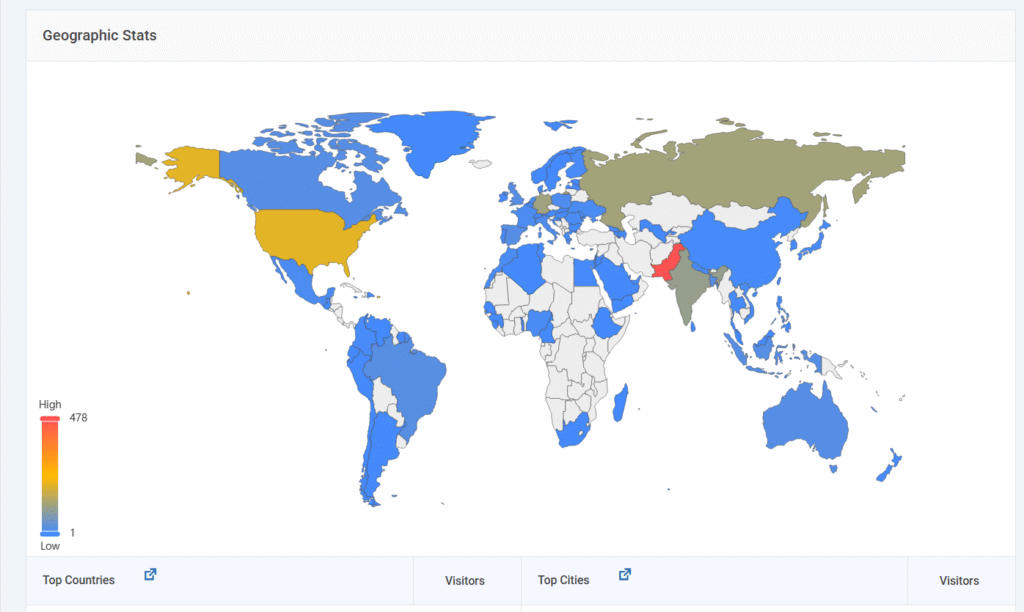
- Consistent Email Report Insights: When the data is easy to read, you spend less time finding the numbers and more time using them to grow your business.
By simplifying how you view your data, you reduce the risk of human error and analysis paralysis.
You stop being a data collector and start being a trusted analyst who knows exactly where their traffic comes from and why it matters.
When to Audit Your Analytics Setup
Even optimal configurations may fail following plugin updates, URL modifications, or landing page adjustments.
To ensure data integrity, conduct a manual audit whenever anomalies appear in reporting.
The following checklist assists in identifying potential risks to data reliability:
- Sudden Traffic Drops: An overnight decrease in sessions, while sales remain stable, often indicates a malfunctioning tracking code.
- Conversion Mismatch with CRM: For example, if a Shopify or WooCommerce store records 50 orders but Google Analytics 4 (GA4) reports only 30, a tracking gap is present. Such dissimilarities rapidly erode stakeholder confidence in analytics.
- Ad Platform Discrepancy: When Facebook or Google Ads report more conversions than your dashboard, your attribution settings or event triggers are likely misconfigured.
- New Website Launch: Transitioning to a new theme or domain results in data loss. A detailed data validation check should be conducted immediately after deployment.
- Tracking Changes: Whenever a new “Thank You” page is added or an event name is modified in Google Tag Manager, the tracking flow must be audited. Failure to document such changes results in inconsistent data comparisons and compromises long-term reporting.
FAQs on Data Confidence
What is data confidence?
Data confidence is the certainty that your digital metrics accurately reflect real-world user behavior and business revenue. It is the bridge between raw numbers and actionable strategy. When you have high data confidence, you can make high-stakes budget decisions without second-guessing your dashboard or fearing that a spike is just a technical glitch.
How to trust analytics data?
To trust your data, you must move from passive collection to active validation:
Verify the Source: Confirm your GA4 Measurement ID is firing on every page.
Filter the Noise: Block internal IP addresses and known bot traffic to keep metrics clean.
Audit Conversions: Manually test form submissions and purchases to see if they register in Real-Time reports.
Reconcile Revenue: Match your dashboard’s total sales against your actual bank deposits or CRM records monthly.
How to build confidence in analytics?
Building confidence is a systemic process, not a one-time fix. It requires a “Clarity First” approach: reduce your focus from hundreds of default GA4 events to 5–10 Key Performance Indicators (KPIs) that directly impact your goals. By using a simplified reporting layer like Analytify, you remove the technical “intimidation factor” and create a consistent environment where data is easy to read, making it easier to trust.
What are trusted analytics systems?
A trusted analytics system is a documented workflow designed to prevent data decay. It consists of clean data collection (standardized naming), transparent reporting (shared dashboards with clear definitions), and regular health checks (monthly audits). Practically speaking, it is a setup where every team member knows exactly where the data comes from, what it means, and how to verify its accuracy.
Data Confidence: Conclusion
Data confidence isn’t about having more data. It’s about trusting the data you already have.
When your tracking is clean and your reports are simple, decisions become obvious.
You stop guessing.
You stop hesitating.
You start scaling.
If your data doesn’t match your revenue, don’t optimize campaigns; fix your tracking first.
That is all for this blog. For more related posts, check: