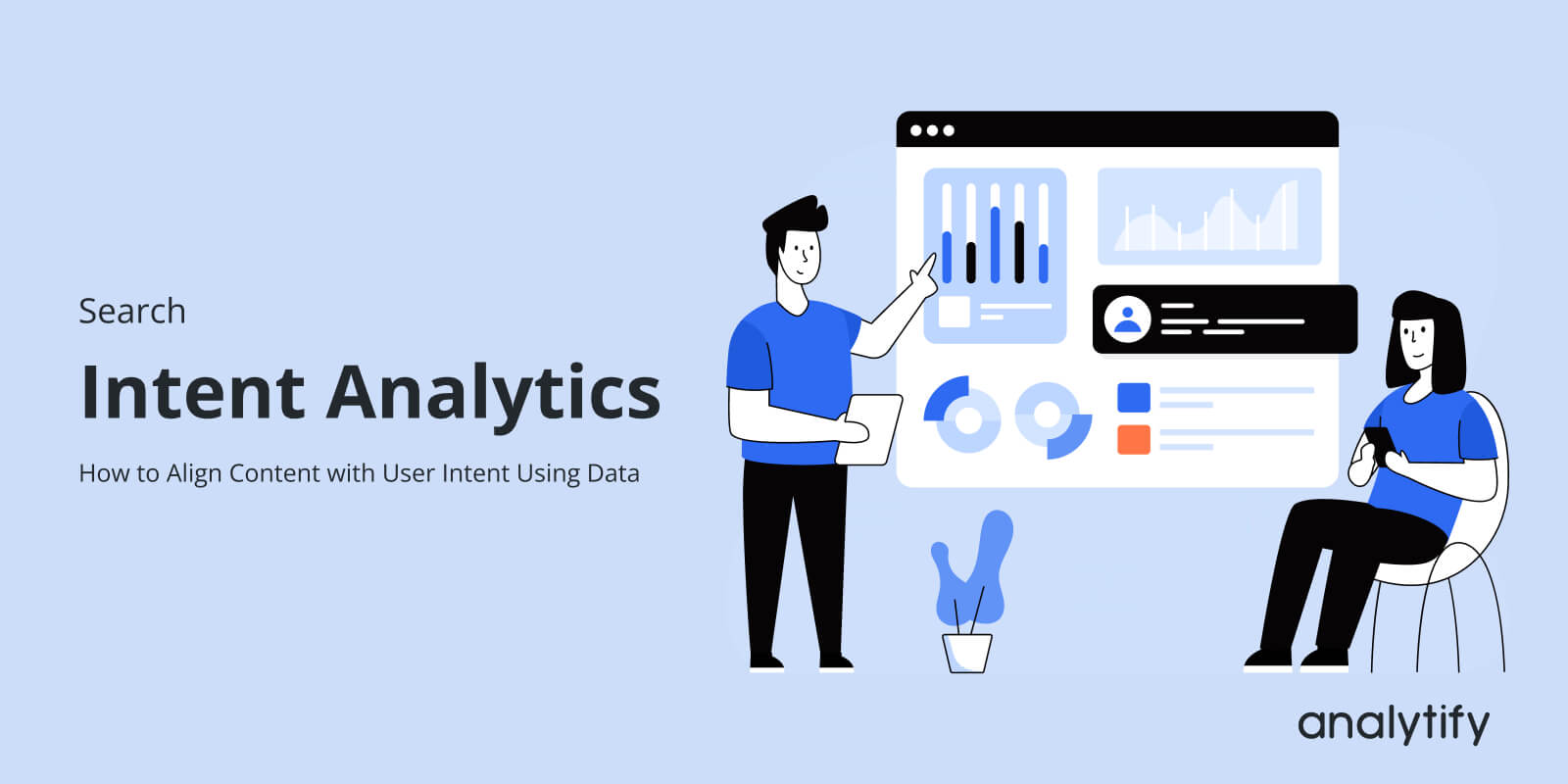
Search Intent Analytics: How to Align Content with User Intent Using Data

Are your pages really giving visitors what they’re searching for? Search intent analytics can tell you the answer. Many sites get plenty of traffic but fail to convert because their content doesn’t match what users actually expect when they click.
Keyword research alone can only guess intent. The real insights come from user behavior, such as how long they stay, how far they scroll, and whether they complete key actions. Platforms like Google Analytics 4 track this, but digging through multiple reports can be overwhelming.
With Analytify, all the essential metrics, engagement, conversions, and landing page performance are right inside WordPress. This makes it easy to see which pages truly align with user intent and which need adjustment.
In this guide, you’ll learn how to leverage data to validate intent based SEO, optimize content performance, and turn organic traffic into measurable results.
Search Intent Analytics (TOC):
What is Search Intent Analytics?
Search intent analytics is the process of using behavioral data to verify whether your content matches the intent behind a user’s search query.
Instead of relying only on keyword research, it analyzes how users interact with your pages after they arrive from search results. This helps you understand whether your content actually satisfies the user’s goal.
To understand this better, let’s first look at the main types of search intent.
What is Search Intent?
Search intent refers to the purpose behind a user’s search query. Most searches fall into four main categories.
Informational intent
The user wants to learn something or find an answer to a question.
Example: “How to track website traffic”
Navigational intent
The user is trying to reach a specific website or brand.
Example: “Analytify plugin”
Transactional intent
The user is ready to take an action, such as purchasing or signing up.
Example: “buy wordpress analytics plugin”
Commercial intent
The user is researching options before making a decision.
Example: “best Google Analytics plugin for wordpress”
Understanding these intent types is the first step in intent based SEO.
What is Search Intent Analytics?
Traditional SEO focuses on classifying keywords by intent. However, search intent analytics goes a step further by validating intent using real user behavior.
Instead of assumptions, you analyze metrics such as:
- Bounce rate
- Engagement rate
- Scroll depth
- Conversion events
- Landing page performance
These metrics reveal whether users are finding what they expected when they clicked your page.
For example, if a blog post targeting an informational query has very low engagement and quick exits, it may indicate a mismatch between the search query and the content’s actual value.
This is where user intent analysis and search intent tracking become powerful. By combining intent classification with analytics data, you can refine your content strategy and ensure each page truly serves the user’s goal.
Why Intent Based SEO Fails Without Data?
Many SEO strategies rely heavily on keyword research to understand search intent. Tools analyze the search query, examine current search results, and classify intent as informational, commercial, or transactional.
But this approach still relies on assumptions.
Just because a keyword appears informational doesn’t mean your content actually meets users’ expectations when they click. The real validation comes from user behavior after they land on your page.
For example, a blog post might rank well for a query, but if visitors leave quickly, don’t scroll, or ignore your calls to action, it often signals an intent mismatch.
This is one of the most common reasons websites experience high traffic but low conversions.
There are several reasons why relying only on keyword research can lead to problems:
- Search results evolve constantly. Google updates SERPs to better match changing user expectations.
- User behavior shifts over time. What users expect from a query today may be different a few months later.
- AI-generated summaries and rich results now answer many informational queries directly on the results page. This changes how users interact with content.
Because of this, intent based SEO requires validation through analytics data.
Behavioral signals like engagement rate, time on page, and conversions reveal whether your content strategy truly aligns with user intent. When the alignment is correct, users stay longer, explore more pages, and respond to your calls to action.
When it’s not, you end up with traffic that doesn’t convert.
That’s why modern SEO needs more than keyword classification. It requires search intent analytics that connects search queries with real user behavior.
How to Track User Intent Using GA4 (Step-by-Step)
Once you understand search intent, the next step is validating it with real data. This is where search intent analytics becomes practical. Instead of guessing what users want, you analyze their behavior after they arrive on your page.
Using engagement metrics in Google Analytics 4, you can perform search intent tracking and identify whether your content truly aligns with the user’s expectations.
Step 1: Identify Landing Pages by Search Query
Start by identifying which pages receive organic search traffic.
In GA4, go to:
Reports >> Acquisition >> Traffic Acquisition
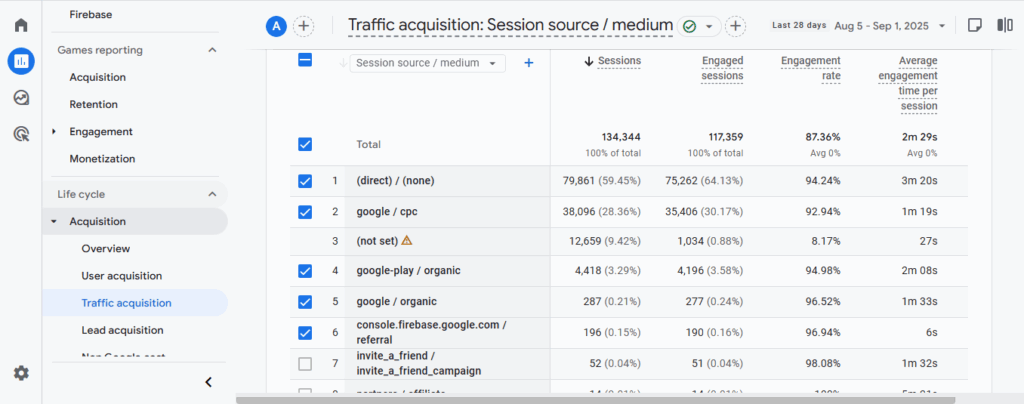
Then apply a filter:
Session source = google / organic
Now review the landing pages receiving organic traffic and analyze metrics such as:
- Engagement rate
- Average engagement time
- Conversions
- Event count
These metrics help reveal how users interact with your content after clicking from search results.
For example, if an informational blog post attracts traffic but shows very low engagement time, it may indicate that the page does not fully satisfy the user’s search intent.
Step 2: Use Engagement Metrics for Intent Validation
Different intent types typically produce different user behaviors. This is where user intent analysis becomes easier.
You can map engagement signals to intent categories:
| Intent Type | Expected Behavior |
| Informational | Longer time on page, deeper scroll depth |
| Commercial | Product comparisons, CTA clicks |
| Transactional | Conversions such as purchases or sign-ups |
| Navigational | Short sessions but immediate access to the desired page |
If the behavior doesn’t match the expected pattern, it often signals an intent mismatch.
For example, if a page targeting a commercial query receives traffic but no CTA clicks, the content might be too informational and not guide users toward the next step.
Step 3: Track Conversion Events by Content Type
Conversions provide the strongest signal for validating intent.
In GA4, track events such as:
- Button clicks
- Form submissions
- Product views
- Newsletter sign-ups
Using Analytify, you can track all this in simple steps right from your WordPress dashboard.
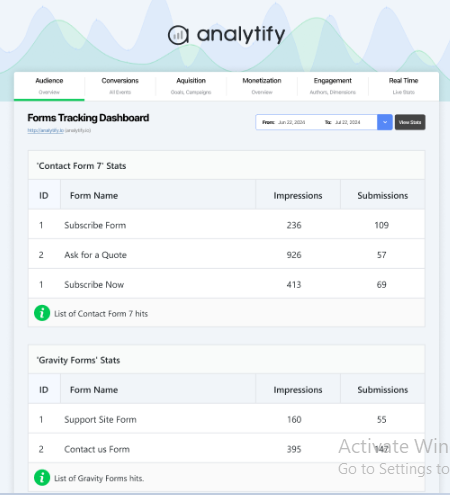
Then analyze which types of content generate these actions.
If blog posts targeting commercial queries rarely produce conversions, it may mean your content structure, messaging, or calls to action need adjustment.
This step turns intent based SEO into measurable insights because you’re no longer guessing what users want. Instead, you’re observing how they behave and optimizing content based on real engagement data.
Content Intent Mapping Using Analytics Data
Once you start collecting behavioral insights, the next step is content intent mapping. This process helps you organize your pages based on the user intent they are meant to satisfy and evaluate whether they actually perform that role.
In simple terms, content intent mapping connects three things:
- The search query
- The content type
- The user behavior on the page
This allows you to move from basic user intent analysis to a structured content optimization process.
Step 1: Categorize Pages by Intent
Start by grouping your pages based on their primary intent. For example:
- Informational pages – tutorials, guides, blog posts
- Commercial pages – comparison articles, reviews
- Transactional pages – product pages, pricing pages
- Navigational pages – brand or product landing pages
This classification helps you understand what role each page plays in your intent based SEO strategy.
Step 2: Pull Engagement and Conversion Metrics
Next, analyze behavioral data for each intent category using analytics metrics such as:
- Engagement rate
- Average engagement time
- Scroll depth
- Conversion events
- Exit rate
These metrics help you see whether users interact with the page in ways that match the intended goal.
For example, informational content should typically show longer engagement time and deeper scroll activity, while transactional pages should generate conversion actions.
Step 3: Compare Performance by Intent Group
Now evaluate how each intent category performs.
To compare performance, you should notice patterns such as:
- Informational posts generate traffic, but no deeper engagement
- Commercial pages are receiving visits, but very few CTA clicks
- Transactional pages with high exit rates before conversion
These signals often indicate an intent alignment problem.
Step 4: Adjust Content Structure and CTAs
Once mismatches appear, update the page to better match the user’s goal.
To adjust content structure, you can do following things:
- Adding clearer explanations to informational content
- Introducing product comparisons for commercial queries
- Improving calls to action on transactional pages
- Restructuring content sections to guide users toward the next step
When done correctly, content intent mapping transforms your content strategy from guesswork into a measurable system where each page supports a specific stage of the user journey.
How Analytify Simplifies Search Intent Tracking
Join 50,000+ beginners & professionals who use Analytify to simplify their Google Analytics!
Tracking intent with raw analytics data can quickly become complicated. In Google Analytics 4, you often need to switch between multiple reports to understand how users interact with different pages.
For many content teams, this makes search intent tracking slow and difficult to manage.
This is where Analytify helps simplify the process.
Instead of navigating several GA4 reports, Analytify brings key analytics insights directly into your WordPress dashboard. This makes it easier to review performance while working on your content.

With Analytify, you can quickly see:
- Top-performing pages
- Engagement statistics
- Traffic sources
- Goal completions
- Conversion data
These insights help you evaluate whether your pages truly align with user expectations.
For example, if a blog post receives strong organic traffic but shows low engagement, it may signal that the page does not fully match the search intent behind the query. On the other hand, pages with strong engagement and conversions usually indicate good intent alignment.
Because the data is available inside WordPress, content teams can review performance while updating articles, adjusting calls to action, or improving page structure.
In this way, Analytify works as an operational layer for intent driven marketing. Instead of constantly switching between analytics tools, you can quickly evaluate how well your content supports user intent and make data-informed improvements.
Common Intent Alignment Mistakes
Even when teams understand the importance of search intent analytics, small strategic mistakes can still cause a mismatch between content and user expectations. These mistakes often lead to high traffic but low engagement or conversions.
Recognizing these issues is an important part of improving intent based SEO.
Here are some of the most common intent alignment mistakes.
1. Using Aggressive CTAs on Informational Content
Informational content is designed to educate users. If a page immediately pushes users toward a purchase or sign-up, it can feel forced.
Instead, informational pages should first provide value and then introduce soft calls to action such as guides, resources, or related tools.
2. Targeting Commercial Queries With Blog-Style Content
Commercial queries usually indicate that users are comparing options. If your page only provides general information without comparisons, reviews, or decision-support content, it may fail to meet the user’s needs.
In these cases, adding elements like comparison tables, product evaluations, or feature breakdowns can better match the search intent.
3. Ignoring Engagement Metrics
Many teams focus only on rankings and traffic. However, engagement metrics such as engagement rate, scroll depth, and time on page reveal whether users actually find the content useful.
Ignoring these signals makes user intent analysis incomplete.
4. Not Reviewing Search Queries in Search Console
Sometimes, the search queries bringing traffic to a page are slightly different from what the content was originally optimized for.
Checking performance in Google Search Console helps identify these queries and refine the page so it better matches real user expectations.
5. Not Mapping Content to Intent Categories
When content is published without clear intent categories, it becomes difficult to evaluate performance later.
Mapping blog posts, landing pages, and product pages to specific intent types helps create a more structured content strategy and improves long-term search intent tracking.
Avoiding these mistakes makes it easier to align your content with what users actually want when they click your page in search results.
Search Intent Analytics Tools
To effectively implement search intent analytics, you need the right set of tools to gather and interpret data. While keyword research helps you hypothesize intent, analytics platforms show whether your content truly satisfies it.
Here are the main categories of tools to use:
1. Google Search Console
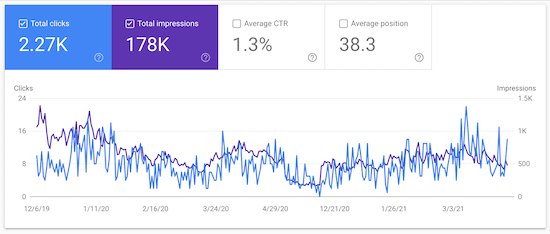
- Shows which queries bring users to your pages
- Helps identify unexpected search intent or emerging queries
- Provides click-through rates, impressions, and average position
- Great for spotting intent mismatches early
2. Google Analytics 4 (GA4)
- Tracks engagement metrics like scroll depth, session duration, and conversions
- Let’s you segment traffic by landing page or search query
- Essential for mapping user behavior to intent types
3. Analytify
- Pulls GA4 metrics directly into your WordPress dashboard
- Displays top pages, engagement stats, traffic sources, and goal completions
- Acts as the execution layer for intent driven marketing
- Makes search intent tracking faster and more actionable without jumping between reports
4. Keyword Research Tools
- Tools like Semrush, Ahrefs, or Ubersuggest can help classify keywords by assumed intent
- Useful for planning, but they don’t replace real behavioral validation
- Combine with analytics data to align content strategy
By using these tools together, you can turn intent based content strategy from a guesswork exercise into a measurable system. Start with research, validate with behavioral analytics, and track results efficiently using Analytify.
Search Intent Analytics FAQs
1. What is search intent analytics?
Search intent analytics is the process of using behavioral data, such as engagement rate, scroll depth, and conversions, to determine whether your content aligns with the intent behind users’ search queries.
2. How do I track user intent?
You can track user intent by analyzing landing page performance in GA4 or Analytify. Metrics like time on page, scroll depth, CTA clicks, and conversions reveal whether the content aligns with the user’s goal.
3. What is content intent mapping?
Content intent mapping involves categorizing your pages by intent (informational, commercial, transactional, navigational) and comparing engagement and conversion metrics to ensure each page fulfills its purpose.
4. Which tools help with search intent tracking?
Key tools include:
Google Search Console for query-level insights
GA4 for engagement and conversion metrics
Analytify to view actionable analytics directly in WordPress
Keyword research tools for initial intent planning
5. Why does intent based SEO fail without analytics?
Keyword research shows assumed intent, but actual user behavior often differs. Without behavioral validation, you risk high traffic but low conversions due to intent mismatches.
6. How does Analytify simplify search intent tracking?
Analytify consolidates key GA4 metrics like top pages, engagement stats, goal completions, and traffic sources into the WordPress dashboard, making intent driven marketing operational and actionable.
7. How to align content with user intent?
To align content with user intent, first identify the purpose behind the search query: informational, commercial, navigational, or transactional. Then create content that directly satisfies that need.
Next, validate your assumptions using behavioral data like engagement rate, time on page, and conversions in Google Analytics 4. Tools like Analytify make this easier by showing key engagement and performance metrics directly inside your WordPress dashboard.
Search Intent Analytics: Conclusion
Search intent analytics is not about guessing what users want. It’s about validating intent with real behavioral signals. Traffic alone doesn’t guarantee success; engagement metrics, scroll depth, and conversions reveal whether your content truly satisfies the searcher’s goal.
By combining intent based SEO with analytics data from GA4 and tools like Analytify, you can map content to intent, track user interactions, and adjust pages to meet expectations. This makes your content strategy measurable, actionable, and aligned with actual user behavior.
When SEO strategy aligns with engagement data and conversions, intent driven marketing becomes practical and measurable. Instead of guessing what your audience wants, you can optimize content with confidence, improve conversions, and make every page work toward a clear goal.
- Start using search intent analytics today to turn your organic traffic into meaningful results. By validating user intent, you ensure that every blog post, landing page, or product page delivers the right content to the right audience at the right time.
You may also like to read:
Now, I’d love to hear from you. How do you currently ensure your content truly matches what your audience is searching for? Have you tried using analytics to validate intent, or is it mostly guesswork? Share your experience in the comments!