Best WooCommerce Plugins for WordPress (Top 10)

Choosing the best WooCommerce plugins should be simple. It is not.
The WordPress plugin directory lists over 60,000 options. Every ‘best plugins’ article you find recommends 30 or more tools. After reading five of them, you still do not know what to install first.
This list cuts through that noise. Ten plugins, organized by store problem, each with a clear recommendation. You get one winner per category and a quick framework to decide what you actually need before installing anything.
Here is what I covered in this article: a 60-second selection framework, the top 10 plugins by store category, and a stage-based guide to prioritize based on where your store is standing today. Analytify is the analytics recommendation.
Best WooCommerce Plugins (TOC):
How to Choose the Best WooCommerce Plugins (Without Slowing Down Your Store)
The best WooCommerce plugins solve a specific store problem, are actively maintained, and add no unnecessary feature overlap with tools you already have.
Before installing any plugin, ask yourself three questions:
- Does it solve a real gap? Not a ‘nice to have.’ A problem that is costing you sales or time right now.
- Is it actively maintained? Check WordPress.org: last update within 3 months, tested with the current WP version.
- Does it overlap with something you already have? Two SEO plugins or two caching plugins create conflicts and slow down your site.
If you’re wondering how to choose the best WooCommerce plugins for your store?
Use this table to understand the top 10 best WooCommerce plugins to grow sales:
| Category | What It Solves | When You Need It |
|---|---|---|
| Analytics & Tracking | Blind spots in sales data, GA4 setup complexity | Day one. You cannot improve what you cannot measure. |
| SEO | Low organic visibility for products and categories | Before driving paid traffic. Fix discoverability first. |
| Checkout Optimization | Cart abandonment, slow or confusing checkout flow | When conversion rate is below 2%. |
| Email & Marketing Automation | Low repeat purchase rate, no abandoned cart recovery | Once you have 100+ monthly orders. |
| Performance & Caching | Slow page loads hurting conversions and rankings | Day one. Speed affects every other metric. |
| Security & Backups | No recovery plan if site goes down or gets hacked | Day one. Install at the start. |
Which are the Best WordPress Plugins for WooCommerce Analytics?
These ten best plugins for WooCommerce cover the six core categories every growing WordPress store needs: analytics, SEO, checkout, marketing, performance, and security.
Each entry follows the same structure: what the plugin does, who it is best for, and pricing.
Quick Comparison: Top WooCommerce Plugins
| Plugin | Category | Free Version | Best For | Starting Price |
|---|---|---|---|---|
| Analytify | Analytics | Yes | GA4 tracking inside WP | $99/year |
| Rank Math | SEO | Yes | Free SEO features | $59/year |
| FunnelKit | Checkout | Yes | Increasing AOV | $99/year |
| Omnisend | Marketing | Yes | Automation | $11.2/month |
| WP Rocket | Performance | No | Speed optimization | $59/year |
| Yoast WooCommerce SEO | SEO | No | Yoast users | $178.8/year |
| Advanced Coupons | Promotions | Yes | Discount logic | $249/year |
| Customer Reviews | Social Proof | Yes | Reviews | $59.99/year |
| UpdraftPlus | Backup | Yes | Recovery | $70/year |
| Wordfence | Security | Yes | Protection | $119/year |
1. Analytify | Analytics & WooCommerce Tracking
See your GA4 ecommerce data inside WordPress. No GA4 interface required.
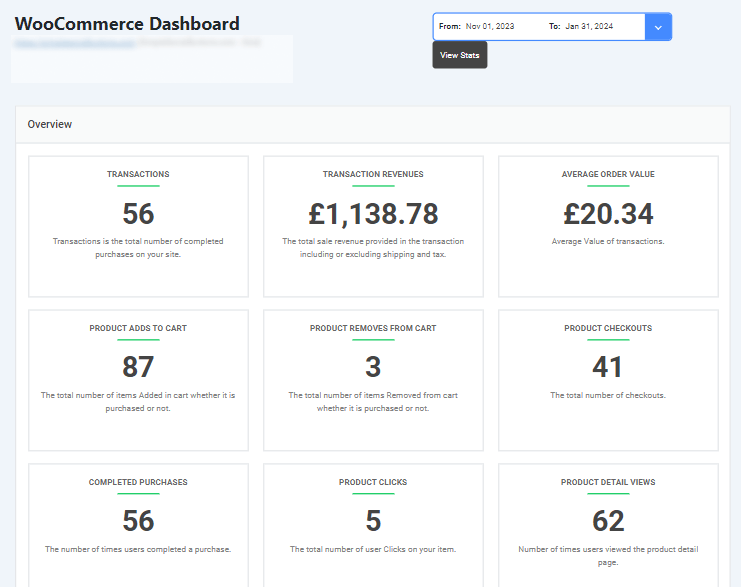
Most WooCommerce store owners have GA4 connected. Almost no one can tell you which product drove the most revenue last week, or where buyers dropped out of the checkout funnel. GA4 holds that data. It just doesn’t show it in a way store owners can use.

Analytify pulls your GA4 ecommerce data into a dedicated WooCommerce Dashboard inside WordPress. No exporting. No switching tabs. No learning GA4’s interface.
Open Analytify’s WooCommerce Dashboard and you see nine store metrics immediately: Transactions, Transaction Revenue, Average Order Value, Product Adds to Cart, Product Removes from Cart, Product Checkouts, Completed Purchases, Product Clicks, and Product Detail Views. All filterable by preset ranges (today, last 7 days, last 30 days) or a custom date window.
Scroll down and the data gets more specific:
- WooCommerce Funnel: Analytify shows your View Item → Add to Cart → Purchase funnel visually. Conversion rate and abandonment rate appear per stage. You see exactly where buyers stop, not just that they left.

- Products Performance table: Analytify lists each product’s revenue, quantity sold, Cart-to-Detail Rate, and Buy-to-Detail Rate. Export any table to CSV in one click.
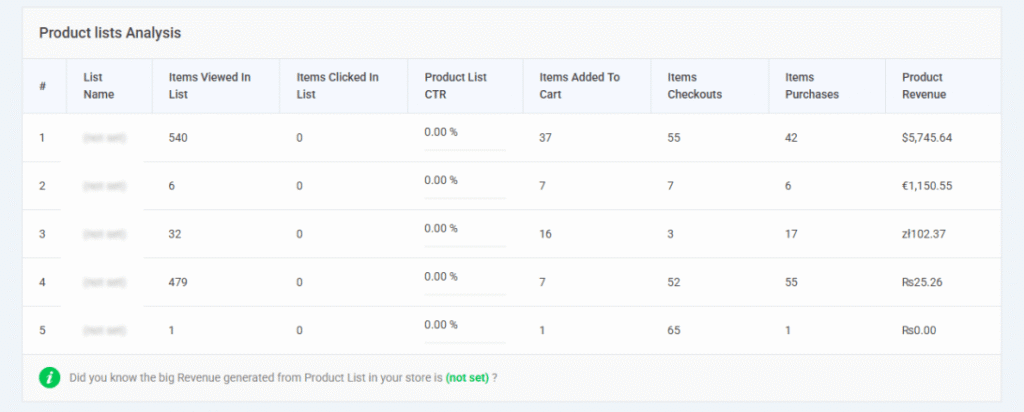
- Measuring ROI by source: Analytify maps each traffic source (organic, email, direct, referral) to actual transaction revenue. You know which channel earns, not just which drives traffic.
- Country-level breakdown: Analytify shows Product Detail Views and Add to Carts by country. Spot your highest-intent markets without opening a separate report.
- Coupons Analysis: Analytify tracks revenue and transaction count per coupon code. Know which discount drove sales and which didn’t.
GA4 records every event. Analytify organizes them into decisions.
If your last quarter’s top-selling product is still a guess, Analytify’s Product Performance table answers that before your next coffee. A free version is available to connect GA4 and start seeing basic store stats.
| Best For | Free Version | Pro Starts At |
|---|---|---|
| Any WooCommerce store needing GA4 ecommerce tracking inside WordPress | Yes (general stats, GA4 connection) | $99/year |
2. Rank Math | SEO
Product schema, sitemaps, and on-page SEO from one plugin.

Rank Math handles WooCommerce-specific SEO automatically. It adds product schema markup, breadcrumb navigation, XML sitemaps, and on-page optimization suggestions for every product page.
Rank Math’s WooCommerce module adds product-specific structured data so your listings can appear in Google rich results, improving organic click-through rates. The free version includes features that typically require paid plans elsewhere.
Rank Math is the best WooCommerce SEO plugin. For stores using FAQ or HowTo schema on product pages, Rank Math generates it automatically when you use its dedicated blocks, not freehand text.
| Best For | Free Version | Pro Starts At |
|---|---|---|
| Stores that want strong SEO without a paid plugin subscription | Yes (full WooCommerce SEO features) | $54/year |
3. FunnelKit | Checkout Optimization
Custom checkout flows, one-click upsells, and order bumps.

FunnelKit replaces WooCommerce’s default checkout with high-converting custom flows. It is considered as the best WooCommerce checkout plugin. FunnelKit adds one-click upsells, order bumps, and post-purchase offers without needing a separate page builder.
Stores using FunnelKit see meaningful increases in average order value. FunnelKit inserts relevant offers at the exact moment the customer has their wallet out. The Stripe Payment Gateway plugin by the same team integrates natively.
| Best For | Free Version | Pro Starts At |
|---|---|---|
| Stores with an average order value below their category benchmark | Yes (basic funnel builder) | $99/year |
4. Omnisend | Email & Marketing Automation
Abandoned cart recovery, automated flows, and SMS built for WooCommerce.

Omnisend integrates directly with WooCommerce to trigger automated email and SMS campaigns based on order events: abandoned carts, post-purchase sequences, win-back campaigns, and welcome flows.
Omnisend’s audience segmentation targets customers based on purchase history. For stores past 100 monthly orders, abandoned cart recovery alone typically covers the subscription cost within the first month.
| Best For | Free Version | Pro Starts At |
|---|---|---|
| Stores with growing order volume wanting to automate retention | Yes (up to 250 contacts, 500 emails/month) | From $11.2/month |
5. WP Rocket | Performance & Caching
Page caching, lazy loading, and database optimization in one plugin.

WP Rocket improves WooCommerce store load times without server configuration. WP Rocket handles page caching, lazy image loading, CSS and JS minification, and database optimization.
WooCommerce-specific settings keep cart and checkout pages dynamic while caching the rest of the site. A 1-second delay in page load time reduces conversions by 7%. WP Rocket is the fastest setup-to-result caching plugin for WooCommerce.
| Best For | Free Version | Pro Starts At |
|---|---|---|
| Every WooCommerce store. Speed is non-negotiable. | No (premium only) | $59/year |
6. Yoast WooCommerce SEO | SEO (Product-Specific)
Breadcrumbs, product schema, and SEO for every product page.

Yoast WooCommerce SEO extends the core Yoast SEO plugin with WooCommerce-specific features: optimized product breadcrumbs, clean product URLs, and enhanced product schema that makes listings eligible for rich results.
Yoast WooCommerce SEO runs on top of the free Yoast SEO plugin, so stores already using Yoast get WooCommerce SEO as a direct upgrade. New stores lean toward Rank Math for its better free tier. Stores already on Yoast extend with this add-on.
| Best For | Free Version | Pro Starts At |
|---|---|---|
| WooCommerce stores already using Yoast SEO | No (requires free Yoast SEO as base) | $178.80 (ex VAT)/year |
7. Advanced Coupons | Promotions & Pricing
BOGO (Buy one, get one) deals, cart conditions, loyalty points, and advanced discount rules.

Advanced Coupons extends WooCommerce’s native coupon system with buy-one-get-one deals, cart conditions based on minimum spend or specific products, loyalty points, and scheduled promotions.
For stores running regular promotions, Advanced Coupons removes the need for manual discount management. Advanced Coupons also reduces checkout abandonment caused by coupon code friction, one of the most common conversion killers.
| Best For | Free Version | Pro Starts At |
|---|---|---|
| Stores running recurring promotions, flash sales, or loyalty programs | Yes (basic coupon improvements) | $249/year |
8. Customer Reviews for WooCommerce | Social Proof
Automated review requests, photo reviews, and verified buyer badges.

Customer Reviews for WooCommerce sends automated review request emails to verified buyers after purchase, supports photo uploads with star ratings, and displays verified badges that build trust.
According to BrightLocal’s Consumer Reviews Survey, 93% of consumers say online reviews influence their purchase decisions. For stores selling physical products, adding photo reviews to product pages is the highest-return social proof change you can make. The free version covers most growing stores.
| Best For | Free Version | Pro Starts At |
|---|---|---|
| Stores selling physical products where social proof closes sales | Yes (automated requests, badges, photo reviews) | $59.99/year |
9. UpdraftPlus | Backups & Recovery
Automated off-site backups on a schedule you set.

UpdraftPlus automates backups to remote storage, including Google Drive, Dropbox, and Amazon S3 on a schedule you configure. UpdraftPlus backs up your database separately from your files, allowing targeted restores.
If your site goes down after a plugin update or server issue, UpdraftPlus restores it in minutes. The free version covers basic backup needs. Install UpdraftPlus before any other plugin on this list.
| Best For | Free Version | Pro Starts At |
|---|---|---|
| Every WooCommerce store. Install this first. | Yes (manual and scheduled backups to remote storage) | From $70/year |
10. Wordfence | Security
Firewall, malware scanning, and login protection for WooCommerce stores.

Wordfence protects WooCommerce stores against malware, brute-force attacks, and known vulnerabilities. Wordfence’s firewall inspects traffic before it reaches WordPress. Real-time threat detection flags suspicious activity as it starts.
For stores handling customer payment data and order history, a security breach is a legal and reputational problem. Wordfence’s free tier covers firewall and malware scanning for most stores. The premium tier adds real-time threat signature updates.
| Best For | Free Version | Pro Starts At |
|---|---|---|
| Every WooCommerce store handling customer data | Yes (firewall, malware scanning, login security) | From $149/year |
Which WooCommerce Plugins Do You Need First? (A Stage-Based Guide)
The plugins you need depend on your store stage. New stores should start with analytics, backups, and performance. Growing stores add SEO, checkout optimization, and email automation.
Use this table to find your current stage and build your plugin stack:
| Store Stage | Monthly Orders | Start With These Plugins |
|---|---|---|
| New store (just launched) | 0–50 | Analytify, UpdraftPlus, Wordfence, WP Rocket, Rank Math |
| Growing store | 50–500 | Add: FunnelKit, Omnisend, Customer Reviews, Advanced Coupons |
| Scaling store | 500+ | Add: Yoast WooCommerce SEO if already on Yoast. Audit all plugins for overlap and speed quarterly. |
The goal is not to install all 10 at once. Start with the foundation layer: analytics, backups, performance, and security. Add conversion and marketing tools once that foundation is stable.
A new store that installs Analytify, UpdraftPlus, Wordfence, WP Rocket, and Rank Math on day one has everything it needs to grow safely and measure results clearly.
How to Check If a WooCommerce Plugin Is Safe to Install
Before installing any WooCommerce plugin, check three things on its WordPress.org page: last updated date, active installs, and compatibility with your current WordPress version.
Here is what each signal tells you:
- Last updated: Should be within the last 90 days. An older update date increases the risk of conflicts.
- Active installs: A plugin with fewer than 1,000 installs has limited real-world testing. Every plugin on this list has 10,000+ active installs.
- Compatibility: Check ‘Tested up to’ version. If it lags your WordPress version by more than one major release, test on staging first.
- Update frequency: Plugins updated once a year or less are a risk. Look for consistent update history in the changelog tab.
Frequently Asked Questions
1. What are the best WooCommerce plugins for WordPress stores?
For a new WooCommerce store, start with five plugins: Analytify for GA4 analytics and ecommerce tracking, UpdraftPlus for automated backups, Wordfence for security, WP Rocket for site speed, and Rank Math for SEO. These cover the four non-negotiables before you add any marketing or conversion tools.
2. What is the best WooCommerce tracking plugin for GA4?
Analytify is the best WooCommerce tracking plugin for GA4. It connects your WooCommerce store to Google Analytics 4 and shows ecommerce data, including revenue, top products, and conversion rate, directly inside your WordPress dashboard. The WooCommerce Ecommerce Tracking Add-on activates detailed order-level reporting without requiring manual GA4 configuration.
3. Why is my WooCommerce tracking not showing in GA4?
WooCommerce tracking fails to appear in GA4 for three common reasons. First, the GA4 measurement ID may not be added to your WordPress site correctly. Second, the ecommerce tracking events may not be enabled in your GA4 property settings under Admin > Data Streams > Enhanced Measurement. Third, a caching plugin may be serving a cached version of your site that does not include the GA4 tracking code. Analytify’s WooCommerce Ecommerce Tracking Add-on diagnoses and resolves the GA4 connection inside your WordPress dashboard without touching GA4’s interface.
4. How many plugins should a WooCommerce store have?
Most well-run WooCommerce stores use between 15 and 25 plugins. The number matters less than the quality. A well-coded store with 30 plugins outperforms a messy store with 10. The real risks are outdated plugins, duplicate functionality such as two caching or two SEO plugins, and plugins not updated in over six months.
5. Do WooCommerce plugins slow down your site?
Poorly coded or duplicated plugins slow sites down. Well-coded plugins with no feature overlap add minimal performance impact. To protect store speed, install one plugin per job category, use WP Rocket for caching, and run a Google PageSpeed Insights test before and after any new plugin install to confirm no regression.
6. Are free WooCommerce plugins good enough?
For most store functions, yes. Rank Math, Analytify, UpdraftPlus, Wordfence, and Customer Reviews for WooCommerce all offer free versions that cover new and growing stores. Upgrade to paid tiers only when a specific feature you need is locked behind the premium version, not because a Pro badge looks more official.
7. What is the best WooCommerce tracking plugin for GA4?
Analytify is the best WooCommerce tracking plugin for GA4. It brings all the WooCommerce analytics right in your WordPress dashboard. Moreover, Analytify also helps you connect your WooCommerce store to GA4 in simple, easy steps.
Best WooCommerce Plugins: Final Thoughts
The best WooCommerce plugins are not the ones with the most features. They are the ones that solve real problems without slowing your store.
If you are also looking to customize how customers log in to your WordPress site, LoginPress lets you design, secure, and brand your login page from a single place.
Three things to do next:
- Install Analytify today to connect your WooCommerce store to GA4. See your revenue, top products, and conversion rate inside WordPress without touching the GA4 interface.
- Add UpdraftPlus and Wordfence before anything else. Backups and security come before growth tools.
- Review your current plugin list. Remove anything outdated, duplicated, or unused.
I hope this article helped you in choosing the best WooCommerce plugins for your WooCommerce store.
Further Readings:
Now, I’d love to hear your thoughts about the best plugin for your WooCommerce store. Which WooCommerce plugin personally worked better for your store? Share your thoughts in the comments.