How to Implement Data Redaction in GA4 to Ensure Privacy Compliance(2026 Guide)

GA4 data redaction removes email addresses and selected URL query parameters from your data before it is sent to Google Analytics. You set it up in Admin, under Data collection and modification, by opening Data streams, selecting your web data stream, and clicking Redact data in the Events section.
If GA4 is not yet connected to your site, I recommend the guide: How to Set Up Google Analytics 4 and Connect it to Your WordPress Site?.
Regulations like the GDPR and CCPA protect individuals’ rights, so businesses need to control what personal data reaches their analytics. This guide is for site owners who want to stop personal data, such as an email address in a URL, from reaching GA4.
Here is how I would set it up: turn on email redaction, find the URL query parameters that carry personal data, and add those parameters to the redaction list.
GA4 Data Redaction (TOC):
What is Data Redaction in Google Analytics 4?
Data redaction in Google Analytics 4 removes or obscures Personally Identifiable Information (PII) from your Google Analytics data. GA4 redacts email addresses and the URL query parameters you list, before the event is sent to Analytics servers.
Why is Rata Redaction Important in GA4?
Skipping data redaction can lead to fines, legal trouble, and damage to your reputation.
Data redaction in GA4 has these benefits:
- It helps you stay compliant with data privacy regulations, giving you peace of mind.
- It protects your users’ privacy, builds trust, and fosters a positive relationship with your audience.
- You can still gather valuable insights about user behavior without compromising sensitive information.
Understanding Personally Identifiable Information (PII)
Personally Identifiable Information (PII) is any data that can be used to identify a specific individual.
Here are some common examples of PII:
- Names (full names, first names, last names)
- Email addresses
- Phone numbers
- Home addresses
- Social Security numbers
- IP addresses
- Location data
- Device IDs
- Any other unique identifiers
PII can reach GA4 through several routes.
GA4 can collect PII depending on your configuration and the data you choose to track. Common sources include:
- User IDs: If you’re using user-ID tracking in GA4, it’s possible to associate data with specific users.
- Form submissions: If your website or app has forms that collect user information (like names, email addresses, etc.), this data could end up in GA4.
- Query parameters: URLs can sometimes contain query parameters that include PII (e.g., ?email=john.doe@example.com).
- IP addresses: Google Analytics 4 does not log or store IP addresses, so they are not a source of PII in your reports.
Collecting and storing PII carries risks. If PII is mishandled or exposed, it can lead to:
- Identity theft
- Fraud
- Privacy breaches
- Legal consequences
- Damage to your reputation
Handling PII with care and setting up data redaction in GA4 reduces these risks.
GA4 Data Redaction Methods
You can redact PII in GA4 data with server-side redaction or client-side redaction.
1. Server-Side Redaction
Server Side Redaction method involves redacting PII directly on your server before it’s even sent to Google Analytics. Think of it as stopping the sensitive data at the source.
How it works: You’ll need to modify your server-side code (e.g., PHP, Python, Node.js) to identify and remove or mask PII before it’s included in the GA4 tracking requests.
Advantages:
- Stronger privacy protection: Since the PII never leaves your server, it’s less likely to be exposed.
- More control: You have fine-grained control over what data gets redacted and how.
Disadvantages:
- Requires technical expertise: You’ll need someone familiar with server-side programming to implement this method.
- Can impact data collection: Redacting data too aggressively might affect the accuracy of your GA4 reports.
2. Client-Side Redaction
The client-side redaction method involves redacting PII directly within your website or app’s code using JavaScript. It’s like scrubbing the sensitive data before it’s packaged up and sent to GA4.
How it works: You’ll need to modify your GA4 tracking code to identify and remove or mask PII before sending events to Google Analytics.
Advantages:
- Easier to implement: You might not need as much technical expertise to set this up compared to server-side redaction.
- Less impact on data collection: Since redaction happens after the data is collected, you can still gather some insights even if you redact certain elements.
Disadvantages:
- Less secure: PII might still be temporarily present in your website or app’s memory before being redacted.
- Limited control: You might have less flexibility in how you redact data compared to server-side redaction.
| Feature Comparison | Server-Side Redaction | Client-Side Redaction |
| Privacy Protection | Stronger | Weaker |
| Control | More | Less |
| Technical Expertise | Required | Less Required |
| Impact on Data Collection | Can be significant | Less significant |
| Ease of Implementation | More complex | Simpler |
Which method should you choose?
The best method for you will depend on your specific needs and technical capabilities. If you have the resources and want the highest level of privacy protection, server-side redaction is the way to go. Client-side redaction might be a good option if you need a simpler solution and are comfortable with some trade-offs.
The next section covers the built-in Redact data setting in GA4.
How Data Redaction Works in Google Analytics 4
Data redaction in GA4 hides email addresses and the URL query parameters you list. It runs in the visitor’s browser before the event is sent, so the hidden data never reaches Google Analytics servers.
Important: Data redaction only works on new data. It won’t hide sensitive information that was already collected.
Data redaction is available only for web data streams. Google Analytics evaluates data for email addresses on a best-effort basis, and it may redact text that is not an email address.
1. How to Redact Data
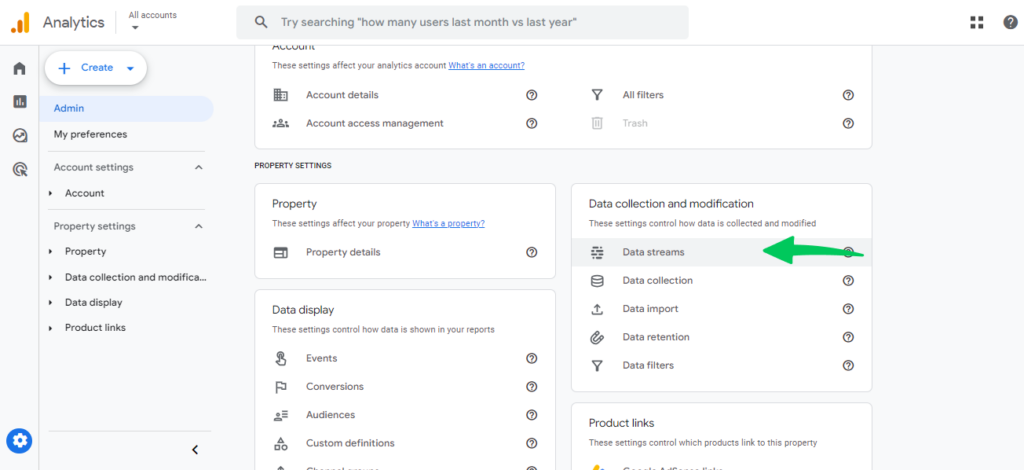
In Admin, under Data collection and modification, click Data streams.
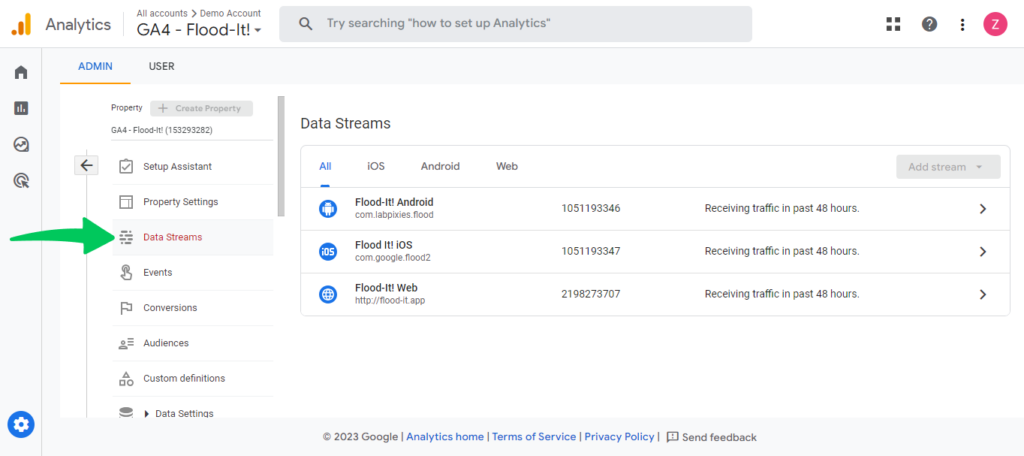
Click on the specific website you want to adjust.
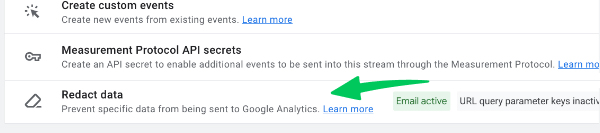
In the Events section, click Redact data.
2. How to Redact Emails
- Email redaction is on by default for new properties. Older properties need it turned on manually.

- If not, turn it on with the slider.

- Google Analytics finds and hides email addresses on a best-effort basis.
3. How to Redact URL Query Parameters
URL query parameters are the text added after the “?” in a web address, and they can contain personal data such as names or emails. You can exclude URL Query Parameters in GA4.
You can tell Google Analytics to hide up to 30 specific query parameters.
How to Find Query Parameters
- Use ‘Explore’ in Google Analytics:
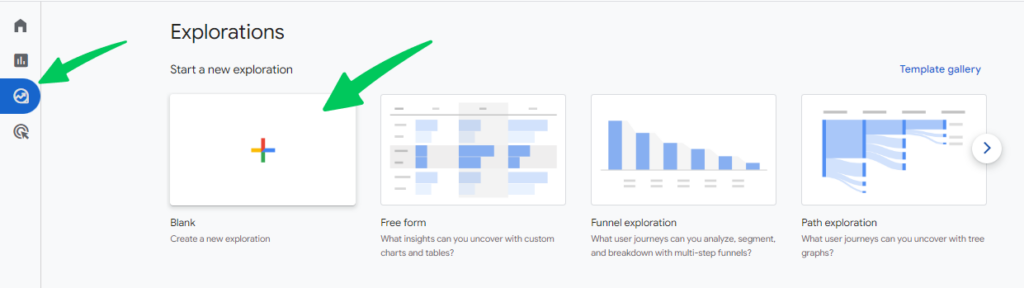
- Create a new exploration.
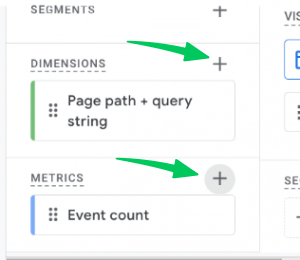
- Look at “Page path + query string” to see full website addresses.
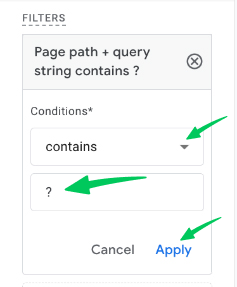
- Filter to only see addresses with a “?” in them.
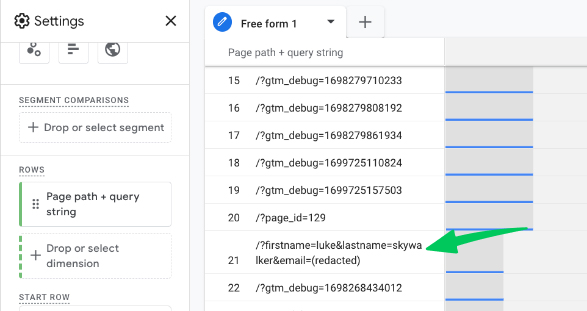
- This will show you which query parameters are being collected.
How to Set Query Parameters to Redact
- Go back to Redact data.
- Type in the query parameters you want to hide.
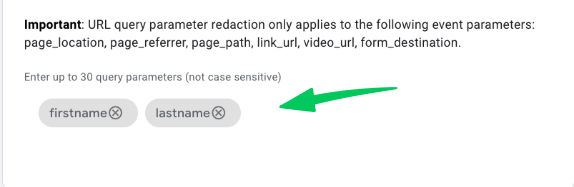
- Save your changes.
Note: It takes up to 24 hours to see the changes in your reports.
You’ve now set up data redaction in Google Analytics 4.
Best Practices for GA4 Data Redaction
Five practices keep GA4 data redaction effective: review the settings regularly, document your strategy, train your team, collect less PII, and follow privacy regulations.
- Regularly Review and Update Your Redaction Settings
- The digital world moves fast, and so do data privacy regulations. Make it a habit to revisit your GA4 data redaction settings periodically. As your website or app evolves and new data collection methods are introduced, you might need to adjust your redaction strategy to stay compliant and protect user privacy.
- Document Your Redaction Strategy
- Documenting your strategy keeps your redaction settings consistent. Outline which events and parameters you’re redacting, the methods you’re using (server-side or client-side), and the reasons behind your choices. This documentation will be useful for compliance audits and onboarding new team members.
- Educate Your Team on Data Redaction
- Data privacy is a team effort. Make sure everyone involved in data collection and analysis understands the importance of data redaction and their role in protecting user privacy. Provide training and resources to ensure your team can handle sensitive data responsibly.
- Minimize PII Collection
- While data redaction is essential, it’s even better to minimize the collection of PII in the first place. Only collect the data you need for analysis and consider alternative methods like anonymization or pseudonymization whenever possible.
- Stay Informed About Data Privacy Regulations
- Data privacy laws and regulations are constantly evolving. Stay up-to-date on the latest developments to ensure your GA4 setup remains compliant.
These practices keep your GA4 redaction strategy current and protect your users and your business from legal and reputational risk.
Streamline Data Redaction & Analysis with Analytify (For WordPress)
Join 50,000+ beginners & professionals who use Analytify to simplify their Google Analytics!
Analytify simplifies viewing, understanding, and acting on your Google Analytics data directly within your WordPress dashboard. Its user-friendly interface and insightful reports make it easier to track key metrics, identify trends, and make data-driven decisions even with redacted data.
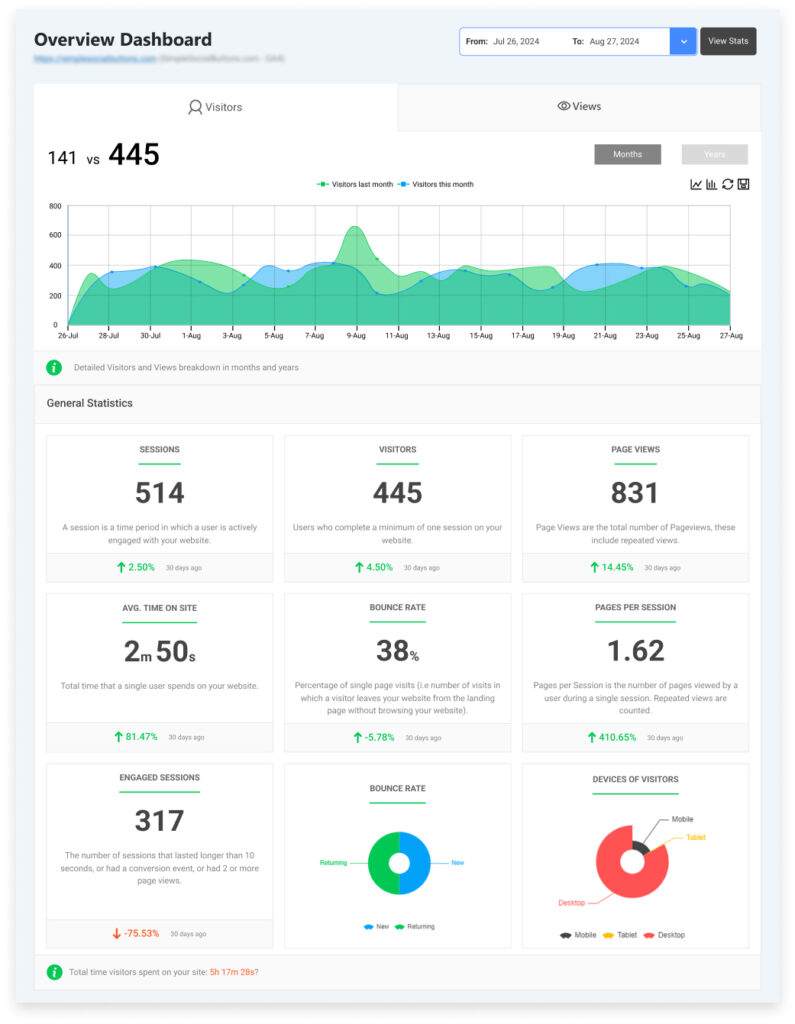
Key benefits of using Analytify:
- Effortless integration: Analytify connects to your GA4 property, allowing you to access redacted data directly within WordPress.
- Clear and concise reports: Analytify’s visually appealing reports present redacted data in a way that’s easy to understand and act upon.
- Enhanced data analysis: Analytify’s advanced filtering and segmentation features enable you to drill down into specific data sets, even with redacted information.
- Improved decision-making: Analytify’s insights allow you to make informed decisions about your website or app, even when handling sensitive data.
Analytify displays your GA4 data in the WordPress dashboard, so you can review it without opening Google Analytics. Redaction itself is configured in the Redact data setting of your GA4 web data stream.
Data Redaction FAQs
What is PII in the context of Google Analytics?
Google Analytics PII refers to any information collected within GA4 that could be used to identify an individual, such as names, email addresses, or IP addresses.
How can I redact data in GA4?
GA4 offers two primary methods for data redaction:
Server-side redaction, which involves modifying your server-side code to remove PII before it’s sent to GA4
Client-side redaction, which uses JavaScript to redact PII within your website or app’s code
How do I configure data redaction in GA4?
You can configure data redaction in GA4 by navigating to the “Data Streams” section in your GA4 Admin settings. From there, you can access the “Data Redaction” options to redact specific events and parameters or use regular expressions for more advanced redaction.
Can I redact data in custom dimensions and metrics?
Yes, you can redact data in GA4 custom dimensions and metrics using either server-side or client-side redaction techniques.
What is the difference between redacted data and PII Redaction?
Redacted data refers to PII that has been obscured or masked, making it unreadable but still present in your GA4 data. PII removal involves completely deleting PII from your data.
How does data redaction affect my GA4 reports and analysis?
Data redaction in GA4 might impact certain reports and analyses that rely on PII. However, you can still gain valuable insights using aggregated data and alternative metrics.
Can I use Google Tag Manager for data redaction in GA4?
Yes, you can leverage Google Tag Manager to implement additional data redaction in GA4 capabilities, such as creating custom JavaScript variables to capture and redact PII before it’s sent to GA4.
How often should I review my GA4 data redaction settings?
It’s recommended to regularly review and update your GA4 redact data settings as your data collection practices or privacy regulations change.
What are some best practices for GA4 data redaction?
Some best practices include documenting your redaction strategy, educating your team on data privacy, minimizing PII collection, and staying informed about data privacy regulations.
Is data redaction enough to ensure GDPR compliance?
While data redaction in GA4 is an important step toward GDPR compliance, it’s not the only requirement. You must also obtain user consent, provide transparent privacy policies, and implement other data protection measures.
Final Thoughts
Key takeaways on GA4 data redaction:
- Data redaction in GA4 is a core part of responsible data collection and analysis. By proactively protecting Personally Identifiable Information (PII), you demonstrate your commitment to user privacy and build trust with your audience.
- GA4 offers flexibility with both server-side and client-side redaction methods. Choose the approach that best suits your technical capabilities and privacy requirements.
- Data privacy regulations and user expectations are constantly evolving. Regularly review your GA4 redact data settings, stay informed about industry trends, and adapt your practices accordingly.
By implementing effective data redaction in GA4, you can balance gathering valuable insights and respecting user privacy.