How to Create a Data-Driven Marketing Strategy with Analytify?

You have GA4 installed. You have seen the charts. But those charts have not changed a single marketing decision you made this week.
The problem is not the data. It is the translation layer: nobody showed you how to go from a GA4 report to a concrete marketing action. This article gives you a 5-step workflow for building a data-driven marketing strategy. It maps each GA4 report to a specific decision, so you know exactly what to do next.
You will learn which GA4 reports to open at each decision point. You will also see what a good result vs. a bad one looks like, and exactly which action to take. Analytify surfaces all these reports inside your WordPress dashboard, so this entire workflow runs where you already manage your site. For WordPress site owners handling marketing analytics for small businesses, this is the most actionable starting point available.
Data-Driven Marketing Strategy (TOC):
What is a Data-Driven Marketing Strategy?
A data-driven marketing strategy is a plan that uses analytics data to decide what content to create, which channels to invest in, and how to measure whether any of it is working. Data-driven marketing strategies replace guessing with decisions made from real traffic, engagement, and conversion data. A data-driven marketing plan starts with reading the right report and ends with a specific action, not a hypothesis.

The result? Research from McKinsey Global Institute shows data-driven organizations are 23 times more likely to acquire customers and 6 times more likely to retain them. The gap is not access to data. It is knowing which data answers which business question. (“The Age of Analytics: Competing in a Data-Driven World”)
Gut instinct vs. data-driven decision-making, in practice:
- “I think this blog post topic will perform well.” vs. “My GA4 data shows this topic drives 3x more organic sessions and converts at a higher rate than any other category.”
- “Let us post more on social media.” vs. “Social drives 2% of my conversions. Organic search drives 68%. I need more content, not more posts.”
- “This page looks fine.” vs. “This page gets 4,000 monthly visits and a 0.3% conversion rate. It needs a stronger call to action.”
The following section covers which data points a WordPress site needs to make these decisions consistently.
What Data Does a WordPress Site Need to Build a Data-Driven Marketing Strategy?
To build a data-driven marketing strategy for a WordPress site, you need accurate GA4 tracking, a clear view of where visitors come from, which content they engage with, and whether any of them convert.

Four data types every WordPress site needs:
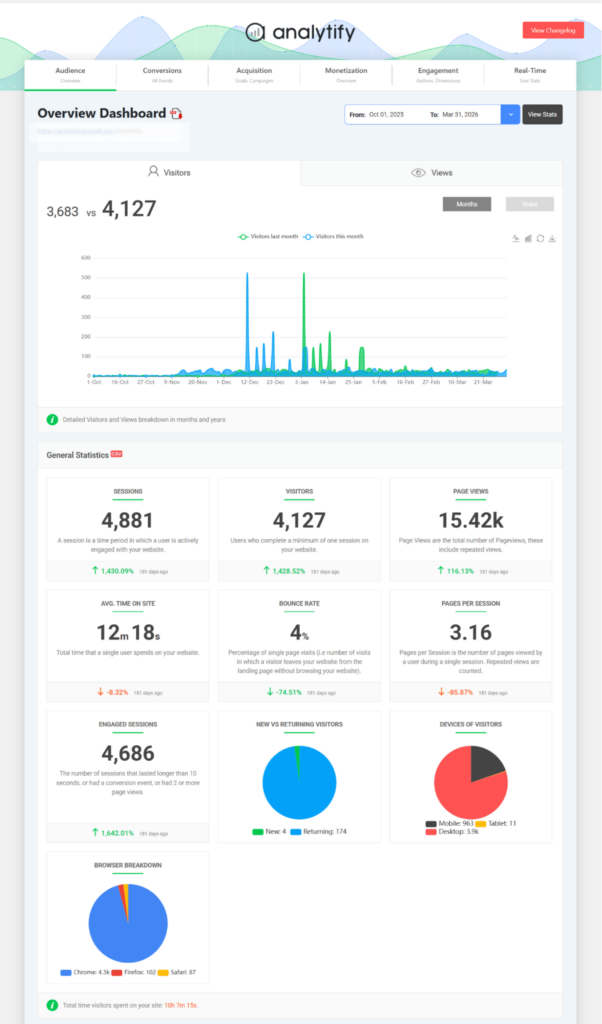
- Website traffic data (sessions, users, traffic sources): Shows how many people visit, where they come from, and how behavior differs by channel. Available via GA4 Traffic Acquisition and the Analytify Traffic Sources overview.
- Content performance data (which pages and posts drive engagement): Shows which topics hold attention and which lose visitors after one page. Available via the Analytify Top Pages report and per-post analytics view inside the WordPress editor.
- Conversion data (form fills, purchases, sign-ups): Shows whether visitors take the action your business needs. Analytify tracks these conversion events through its Goals and Events view, pulling the data directly from GA4. For ecommerce sites, the WooCommerce analytics addon tracks product-level revenue and conversion data inside WordPress.
- Campaign data (UTM-tagged links and campaign results): Shows which specific marketing efforts produce real results, not just clicks. Available via the Analytify Campaign Tracking dashboard.
If switching between GA4 and disconnected reports is slowing your decisions, Analytify brings all four data types into your WordPress admin panel. Analytify shows traffic sources, content performance, conversion events, and campaign results in one place. See the full guide to track website traffic in WordPress using Analytify, or explore how data-driven marketing for WordPress works directly in your dashboard.
How to Create a Data-Driven Marketing Strategy? (5 Steps)
Step 1: Connect GA4 to Your WordPress Site with Analytify
You cannot make data-driven decisions without accurate tracking, so the first step is connecting GA4 to your WordPress site.
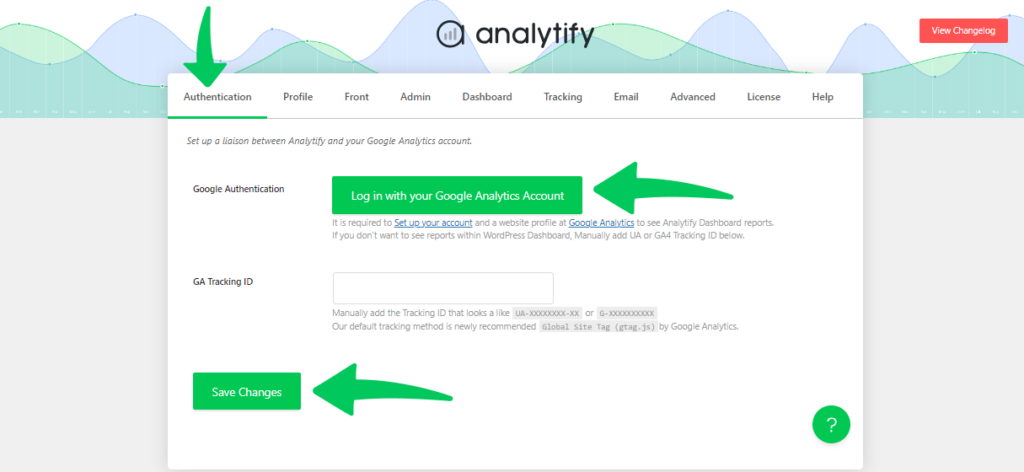
Install Analytify from the WordPress plugin directory. Then navigate to Analytify, then Settings, then Authentication. Click Authenticate with Google and complete the 1-click Google account authorization. Once connected, Analytify begins pulling GA4 data into your WordPress dashboard immediately. No code editing required.
For a full setup walkthrough, see the GA4 for WordPress guide with Analytify.
Step 2: Define 3 to 5 Goals and Pick One KPI Per Goal
Pick 3 to 5 specific business goals and assign one measurable KPI to each. Without a defined KPI, every metric looks equally important, and nothing gets prioritized.
Apply SMART criteria: each goal should be specific, measurable, and time-bound. “Get more traffic” is not actionable. “Grow organic sessions by 30% in 90 days” gives you a number to hit and a deadline to evaluate. Marketing analytics for small businesses delivers the clearest returns when one goal drives one metric.
TABLE 3: KPI Examples by Site Type
| Site Type | Example Goal | KPI to Track in GA4/Analytify |
|---|---|---|
| Blog / Content Site | Grow organic traffic 30% in 90 days | Organic sessions (Traffic Sources report) |
| WooCommerce Store | Increase conversion rate from 1.5% to 2.5% | Ecommerce conversion rate (WooCommerce addon) |
| Lead Generation Site | Double monthly form submissions | Conversion events (Goals/Events in GA4) |
| Membership Site | Reduce bounce rate on pricing page below 40% | Bounce rate per page (Top Pages report) |
| Marketing / Agency | Identify top-converting traffic channel | Channel-specific conversion rate (Traffic Sources) |
Step 3: Establish Your Baseline Before Changing Anything
Your baseline is the snapshot of your current performance. Without it, you have no way to tell whether a change you made actually worked.
Open Analytify and set the date range to the last 30 days. Record these 5 baseline numbers in a spreadsheet:
- Total sessions (last 30 days)
- Top 5 pages by traffic. This is your data driven content marketing strategy starting point: the topics you already own online.
- Primary traffic source: organic, direct, referral, or social
- Average engagement time
- Number of conversion events recorded
These numbers are your before-picture for every campaign or content change that follows.
Step 4: Map Your Data to a Marketing Action
The most important step is turning a report into a decision. Each GA4 signal should point directly to one specific marketing action.
Tracking data without acting on it produces no results. The question to ask at the end of every Analytify review is: given what this data shows, what is the one thing I should change or do more of this week?
Here is what that mapping looks like in practice.
Step 5: Review, Adjust, and Repeat on a Defined Cadence
A data driven marketing strategy only works if you review the data on a fixed schedule: weekly for traffic and engagement, monthly for conversions and channel performance.
Two-tier review cadence:
- Weekly: Open Analytify, check your traffic trend vs. last week, review your top pages, and flag any anomalies. This review takes 15 minutes or less.
- Monthly: Review channel performance, check each goal’s KPI against your original target, and update your five baseline numbers with the latest figures.
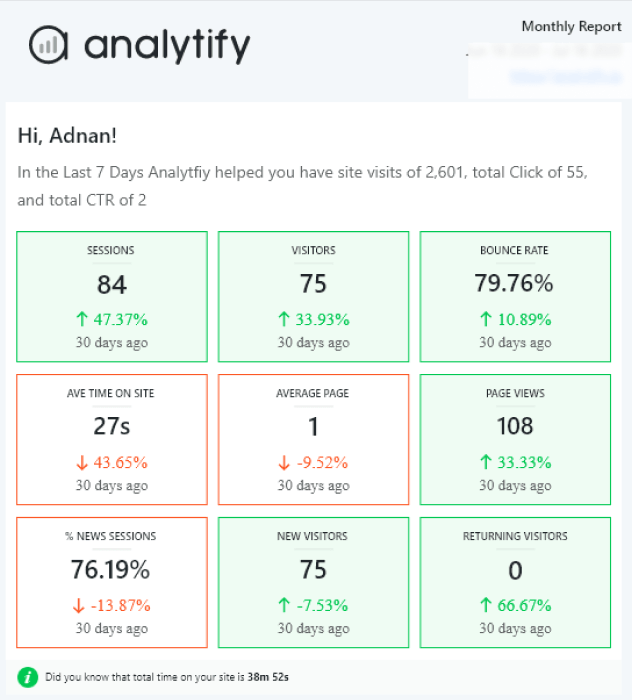
Analytify Pro includes automated email reports that deliver your key metrics on a schedule you set. These reports arrive in your inbox without requiring a login, removing the single biggest friction point in any review habit.
Which GA4 Reports Should You Use for Data Driven Marketing Strategies?
Four GA4 reports drive most data driven marketing decisions: Traffic Acquisition, Pages and Screens, Conversions, and User Demographics. All are accessible inside Analytify without opening GA4 directly.
TABLE 1: GA4 Data Driven Marketing Reports
| GA4 Report | What to Look For | Marketing Decision It Informs | Where in Analytify |
|---|---|---|---|
| Traffic Acquisition | Which channel drives most sessions AND conversions | Double effort on the highest-converting channel | Traffic Sources report |
| Pages and Screens | Top pages by engagement time and pageviews | Create more content on high-performing topics | Top Pages report + per-post view |
| Conversions | Which pages and sources drive goal completions | Optimize high-traffic pages with low conversion rates | Goals/Events in GA4 via Analytify |
| User Demographics | Geography, device, age, and interest breakdown | Adjust content angle and ad targeting for your real audience | Geographic report in Analytify |
| Campaign Performance | Which UTM-tagged campaigns drive sessions and conversions | Kill or scale campaigns on conversion data, not clicks | Campaigns dashboard in Analytify |
| Real-Time Overview | Live visitors and active pages right now | Validate that a newly published post is receiving traffic | Real-Time report in Analytify |
Bottom line: if switching between GA4 and your WordPress admin every day is costing you time, Analytify puts all six of these reports inside one dashboard. Analytify Free covers traffic sources, top pages, and per-post analytics. Analytify Pro adds campaign tracking in WordPress, WooCommerce conversion data, geographic reports, and automated email reports.
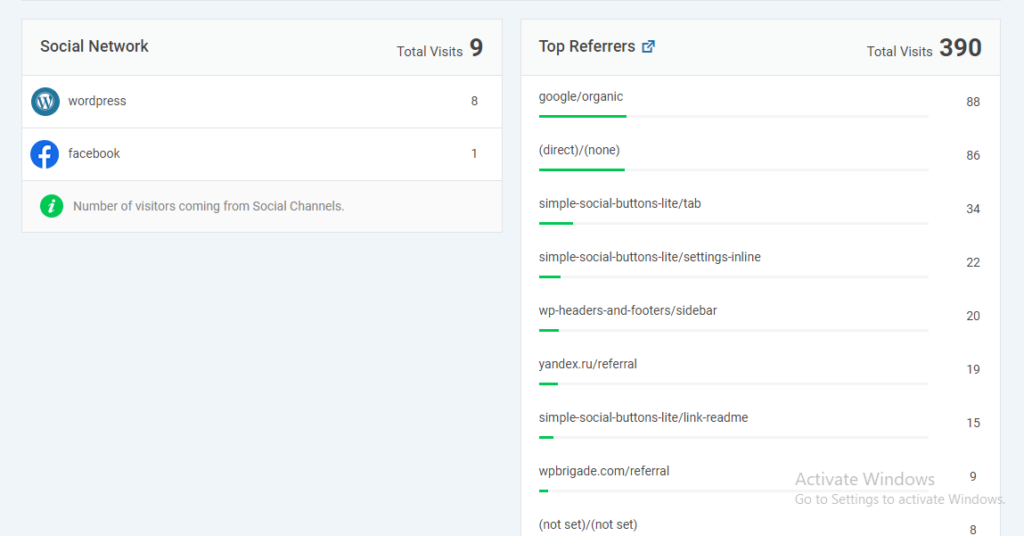
TABLE 2: Analytify Feature-to-Marketing-Use
| Analytify Feature | Marketing Use Case | Plan Required |
|---|---|---|
| Overview Dashboard | Weekly traffic and engagement baseline review | Free |
| Top Pages Report | Identify top-performing content to replicate | Free |
| Traffic Sources | Find the highest-converting acquisition channels | Free |
| Per-Post Analytics | See individual post performance inside the WP editor | Free |
| Campaign Tracking | Measure UTM campaign ROI | Pro |
| WooCommerce Addon | Track product and revenue conversion data | Pro (addon) |
| Automated Email Reports | Receive weekly/monthly data digest without logging in | Pro |
What Are the Most Common Mistakes in Data-Driven Marketing for WordPress Sites?
The most common mistake is tracking everything but deciding on nothing: collecting data without a process for turning it into a specific marketing action.
Five mistakes WordPress site owners make repeatedly:
- Tracking too many KPIs. Watching 20 metrics means no metric gets acted on. Pick 3 to 5 maximum, tied directly to your 3-to-5 business goals. More metrics is not more insight.
- Checking data without a fixed question. Opening Analytify without a specific question produces confusion, not decisions. Start every review with: “What is my best-performing channel this week?” Then answer it.
- Optimizing for traffic instead of conversions. A post with 5,000 views and zero conversions is underperforming, not winning. The conversion rate per page drives revenue. The pageview count does not.
- Ignoring the geographic breakdown. A site with 60% of traffic from low-intent locations may show impressive session numbers that do not translate to business outcomes. Check the geographic report before drawing conclusions from volume.
- Setting up tracking and never reviewing it. Data has a 13-week relevance window before it decays as an actionable signal. A monthly review cadence is the minimum to keep the strategy current.
FAQs: Data Driven Marketing Strategy
1. How do you create a data driven marketing strategy with GA4?
You create a data driven marketing strategy with GA4 by following 5 steps: connect GA4 to your WordPress site, set 3 to 5 measurable goals with one KPI each, record a data baseline, map each GA4 report to a specific marketing decision, and review results on a weekly and monthly cadence. The key is not just tracking data but knowing which report answers which marketing question. Analytify simplifies this for WordPress users by surfacing GA4 reports inside the dashboard, so the decision workflow runs where the site is managed.
2. What is a data driven marketing strategy?
A data driven marketing strategy is a plan that uses analytics data to decide what content to create, which channels to invest in, and how to measure whether any of it is working. It replaces guessing and gut instinct with decisions made from real traffic, engagement, and conversion data. For WordPress site owners, this typically means using GA4 to understand which pages attract visitors, which channels drive conversions, and which campaign efforts produce measurable results
3. What are examples of data-driven marketing strategies?
Examples of data-driven marketing strategies include: publishing more content in the topic category that already drives the most organic traffic on your site; shifting campaign budget to the channel with the highest conversion rate in GA4; updating landing pages that have high traffic but low conversion rates; and removing or consolidating low-traffic posts to improve topical authority. Each of these actions is taken because the data pointed to a specific opportunity or problem, not because it seemed like a good idea.
4. How can Analytify help create a data-driven marketing strategy?
Analytify helps build a data-driven marketing strategy by bringing GA4 reports into the WordPress dashboard, removing the need to navigate GA4 directly. Analytify shows traffic sources, top-performing pages, per-post analytics, campaign performance, and ecommerce conversion data in one place. Per-post analytics appear directly below each post in the WP editor, making content decisions faster without switching tools. Automated email reports (Pro) deliver weekly and monthly data summaries to the inbox, keeping the review cadence consistent without requiring a login.
5. What is the first step in creating a data-driven marketing strategy?
The first step is connecting accurate analytics tracking to your site so data flows correctly from day one. Without reliable tracking, every decision that follows is based on incomplete or incorrect data. For WordPress site owners, this means installing GA4, confirming that all key pages are tracked, and setting up at least one conversion event so goal completions are measurable from the start. Only after tracking is verified should goal-setting and data analysis begin.
Data Driven Marketing Strategy: Recap
A data driven marketing strategy is not about collecting more data. It is about knowing which report answers which question, and having a process that turns that answer into a decision every week.
Next steps:
- Connect Analytify to your WordPress site and confirm GA4 is tracking correctly. This is the foundation everything else builds on.
- Pick 3 goals from your business objectives and identify one measurable KPI for each. Record your baseline numbers in a spreadsheet before running any campaign or making any content change.
- Set a calendar reminder for a weekly 15-minute Analytify review. Check your traffic trend, top pages, and one conversion metric. Make one decision based on what you see.
Start tracking smarter with Analytify Pro and see your GA4 data where you already work, inside your WordPress dashboard.
If you are also looking to improve your WordPress site’s first impression, LoginPress lets you customize your login page to match your brand without touching code.