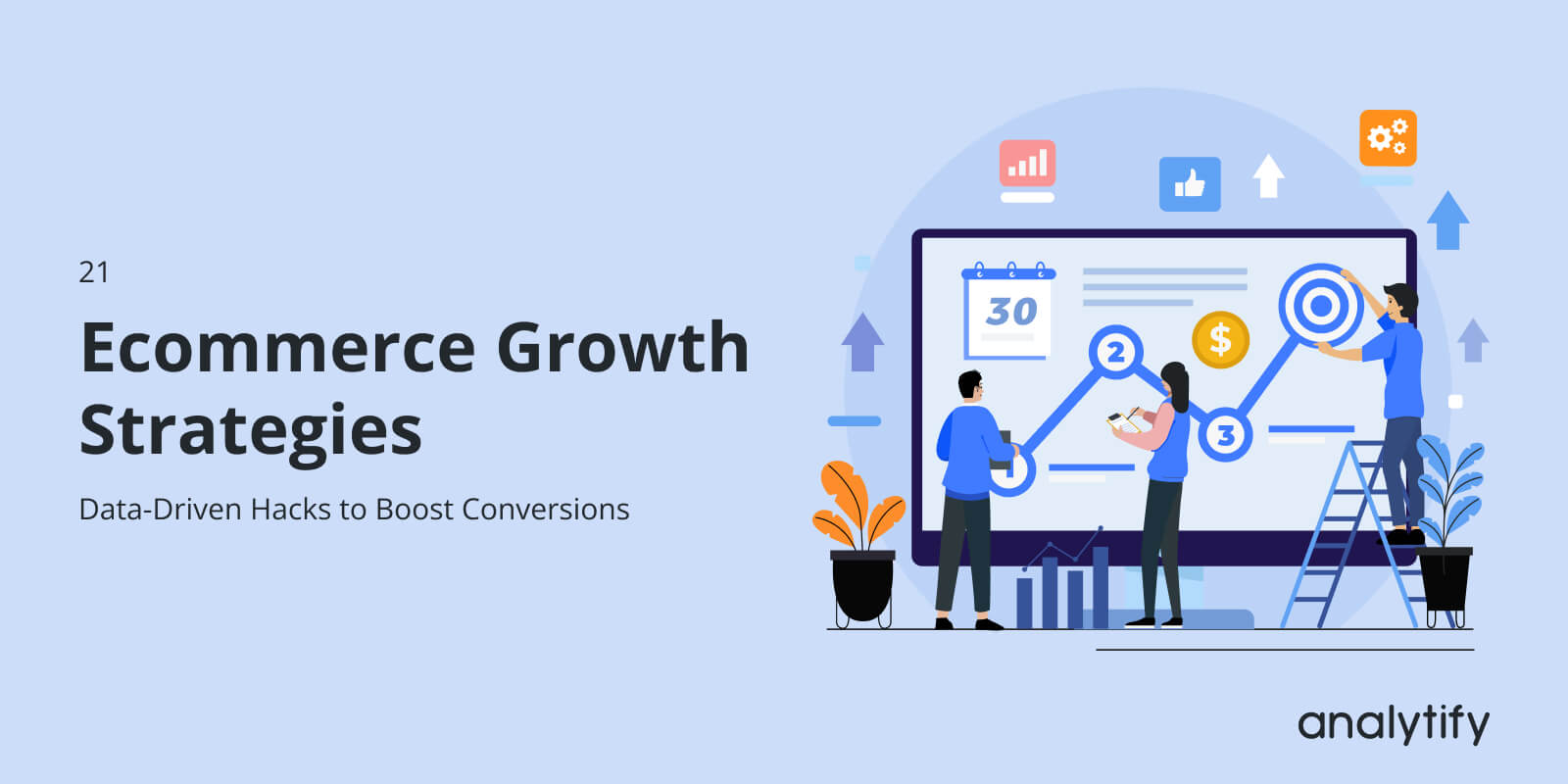
21 eCommerce Growth Strategies: Data-Driven Hacks to Boost Conversions

Your WooCommerce store gets visitors, but not enough of them buy. You have tried eCommerce hacks before and could not tell if you were solving the right problem.
This article gives you 21 eCommerce growth strategies to increase sales, each tied to one specific GA4 report inside your WordPress dashboard.
Analytify shows these eCommerce reports directly inside WordPress. Every strategy below names the exact report to check first, then the action to take.
What is an Ecommerce Growth Strategy?
An eCommerce growth strategy is a data-backed plan that increases a store’s revenue by finding its highest-impact conversion leak and testing a fix against real GA4 analytics data before scaling it. Good eCommerce analytics strategies rely on funnel data to reveal exactly where revenue is lost, turning guesswork into a measurable, repeatable process.
Table of Contents
TL;DR: Ecommerce Growth Strategies at a Glance
Fix your funnel in this order: traffic quality, product pages, checkout friction, then retention. Skipping ahead wastes effort on fixes that will not move revenue.
- Check GA4’s Traffic acquisition, Checkout Journey, and Product performance reports before changing anything on the site.
- Your single biggest funnel drop-off, usually somewhere in checkout, is almost always the highest-return fix.
- Analytify surfaces all of these GA4 reports directly inside WordPress, so you do not need a separate GA4 login to find them.
- Test one change at a time and confirm the result in GA4 before rolling it out further.
How Do You Use GA4 and Analytify to Find Ecommerce Growth Opportunities?
You find eCommerce growth opportunities in GA4 by checking four reports in sequence: traffic source performance, product-level conversion rate, checkout funnel drop-off, and device-based session behavior. Skipping this order wastes time on fixes that do not move revenue.
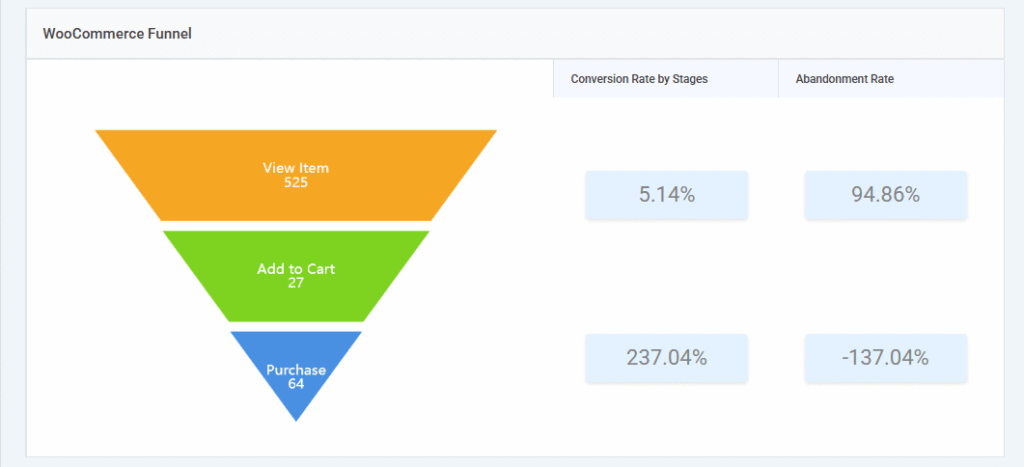
Analytify surfaces these reports directly inside your WordPress eCommerce analytics screens, under Analytify >> Monetization.

You never need to open a separate GA4 dashboard to see them.
Here are the four reports to open first:
- Traffic source performance shows which channels bring buyers, not just visitors.
- Product-level conversion rate shows which products convert well and which ones do not.
- Checkout funnel drop-off shows the exact step where shoppers abandon their cart.
- Device-based session behavior shows whether mobile or desktop sessions convert differently.

What Are the Best Ecommerce Growth Strategies to Increase Conversions?
The 21 most effective eCommerce growth strategies focus on traffic quality, product page performance, checkout friction, and post-purchase retention, in that order. Fixing later-funnel problems before earlier ones yields the lowest return.
Traffic & Acquisition Strategies (Strategies 1-5)
Traffic growth strategies only work once you know which existing source converts best, since doubling traffic from a weak channel wastes budget.
1. Find Your Highest-Converting Traffic Source
You find your highest-converting traffic source in GA4’s Traffic acquisition report, under Reports >> Acquisition >> Traffic acquisition, broken down by Session source/medium with the Ecommerce purchases metric added.

Once you spot the channel converting best, put more content, spend, or partnership effort behind it, and pull spend from channels with high sessions but almost no sales. This is one of the fastest eCommerce hacks because it reallocates a budget you already have.
2. Identify and Fix Your Highest Drop-Off Funnel Step
Your highest drop-off funnel step shows up in GA4’s Checkout Journey report, under GA4 >> Monetization >> Checkout Journey, as the step where the largest share of shoppers exit.

A high exit rate at “Begin Checkout” usually points to friction on the cart page itself. A high exit rate at “Add Payment Info” usually means the form asks for too much, or offers too few ways to pay.
Fix whichever step is losing you the most shoppers before touching anything earlier or later in the funnel.
3. Prioritize Your Best-Performing Products
Your best-performing products are the ones Analytify’s product performance report, under Analytify >> Ecommerce >> Products, shows earning the most revenue once sorted highest to lowest.
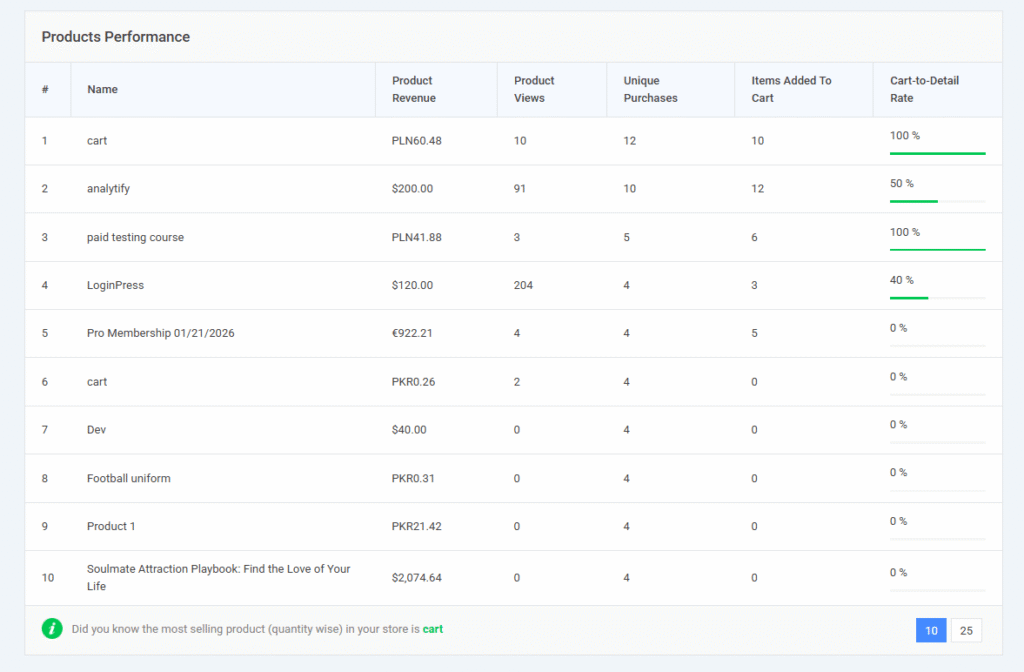
In most stores, the top 20% of products drive close to 80% of total revenue. Put those products on your homepage, in email campaigns, and in related-product sections before spending time on anything else. Better descriptions and better images on these few pages is one of the simplest eCommerce strategies to increase sales without needing a single new visitor.
4. Audit Your Mobile Conversion Gap
A mobile conversion gap shows up in GA4’s device breakdown report, under GA4 >> User >> Tech >> Overview >> Device Category, as a mismatch between mobile session share and mobile purchase rate.
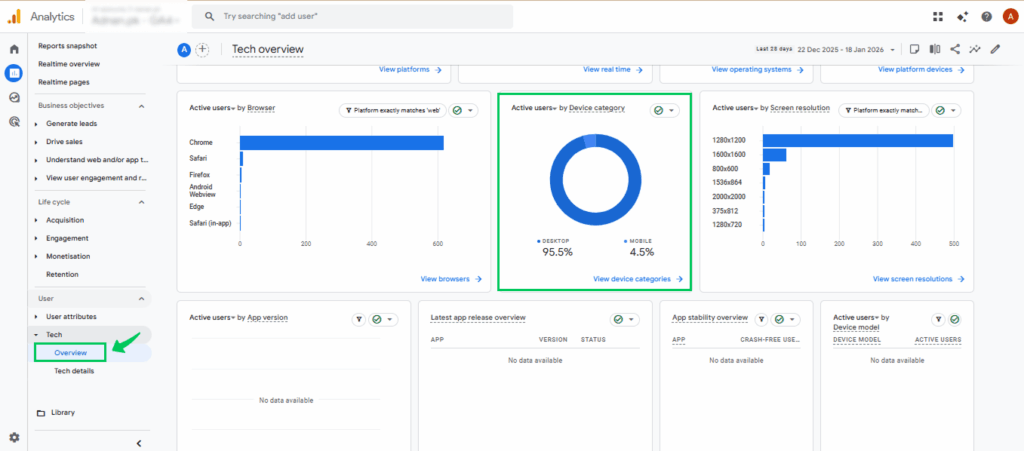
If mobile brings in 60% or more of your sessions but converts at roughly half the desktop rate, the mobile checkout is where you are losing revenue. Fix the mobile checkout form first, since it touches the majority of your traffic and even a small improvement compounds fast.
Checking four separate GA4 reports every time you need a growth signal takes real time. Analytify’s WooCommerce add-on solves this by pulling traffic source performance, product revenue, funnel steps, and device breakdown into one WooCommerce analytics inside WordPress screen.
5. Use Organic Search Landing Page Data to Fix Intent Mismatch
An intent mismatch shows up in GA4’s landing page report, under GA4 >> Engagement >> Landing Page filtered to Organic Search, as a page pulling solid organic traffic but converting almost none of it. That gap usually means the visitor searched for one thing and landed on a page selling something slightly different. Rewrite the page headline and product description to match the exact search query sending traffic there, and the conversion rate on that page should start closing the gap.
Product Page & Conversion Hack Strategies (Strategies 6-11)
Product page fixes deliver the highest return of any eCommerce conversion hack, because every improvement reaches every visitor, regardless of traffic source.
6. Check Which Products Have High Views but Low Add-to-Cart
A product with high views but low add-to-cart is visible in GA4’s Items report, under GA4 >> Monetization >> Ecommerce Purchases >> Item name, by comparing item_view events against add_to_cart events for each product.
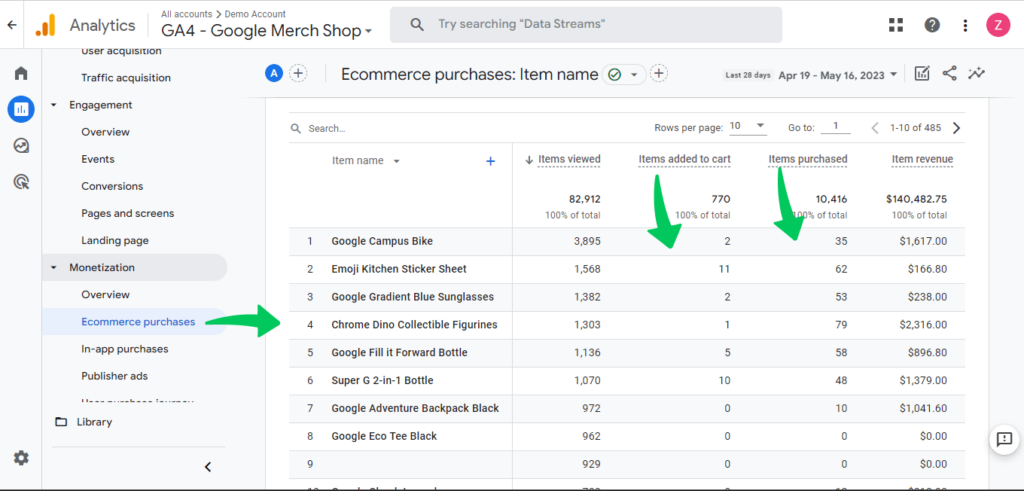
High interest paired with low action means the product page creates curiosity but fails to close it. Check the price, reviews, description, and images, and change only one variable at a time so you know exactly what moved the needle.
7. Add Reviews to Products With Zero Social Proof
Zero social proof is easy to spot once you already have the view-to-cart data from Strategy 6: look for the weak-converting products that also show no reviews at all. A review request email sent 7 to 14 days after purchase is usually enough to start closing that gap. Even three to five genuine reviews on a product page can meaningfully lift its add-to-cart rate.
8. Improve Product Images on Your Top Revenue Items
Your top revenue items are already listed for you in Analytify’s product performance report, sorted by revenue, so there is no guessing which products deserve better photography first. Add three or more angles, a zoom feature, and one lifestyle shot to each of your top 10 products. Better images are one of the fastest ways to increase eCommerce conversions, because the fix needs no developer and no new code.
9. Test Urgency Signals on Your Highest-Traffic Products
Your highest-traffic products show up when you sort the product performance report by item views instead of revenue. Add a low-stock warning or a countdown timer to those specific pages, not to slower-moving ones. Urgency works because it nudges people who already want the product, not because it manufactures interest that is not there.
10. Fix Product Descriptions That Do Not Answer Buyer Questions
The questions your product descriptions fail to answer usually show up in GA4’s Search Console integration or your own site search data, both of which reveal what shoppers actually type before they leave. Rewrite descriptions to lead with the benefit, not just the spec sheet, and answer the top three questions your reviews mention most often. Bullet points for technical details let shoppers scan for the one fact they came looking for.
11. Add a Related Products Section Driven by Co-Purchase Data
Which products get bought together is visible in GA4’s path exploration report, under GA4 >> Explore >> Funnel or Path exploration.
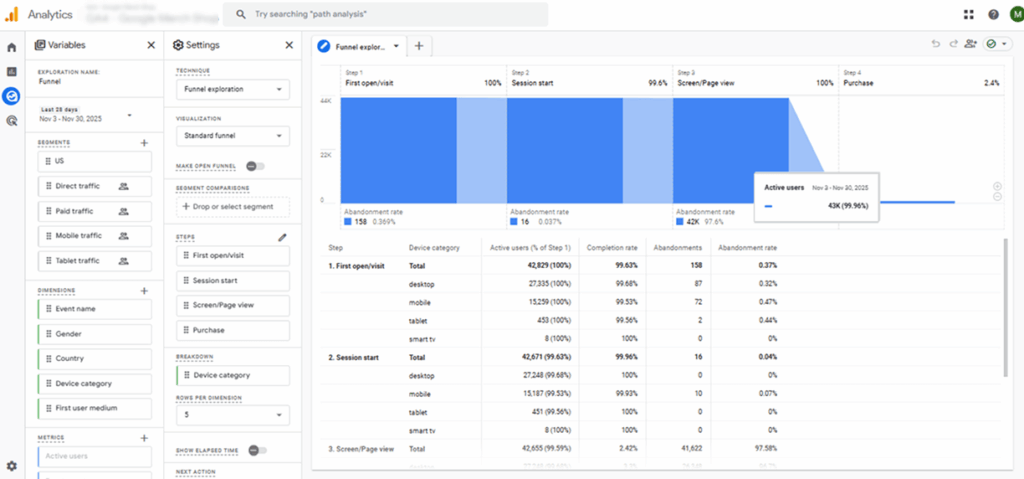
Build a “frequently bought with” section on product pages using that exact data, rather than guessing which items pair well. This raises average order value without requiring a single extra visitor, which is genuine ecommerce conversion optimization rather than just a nice-to-have feature.
Checkout Friction Strategies (Strategies 12-16)
Checkout friction represents the costliest ecommerce conversion optimization opportunity in the funnel, because shoppers who reach checkout have already decided to buy.
12. Simplify Your Checkout Form
Reuse the checkout funnel data from Strategy 2: if “Add Payment Info” is where you lose the most shoppers, the form is very likely asking for too much. Remove every field that is not essential to completing the order. Company name, a second phone number, and address line two are common fields worth cutting or making optional.
13. Add a Guest Checkout Option
If your checkout funnel shows drop-off right at the account creation step, forcing an account before purchase is very likely the cause. Turn on WooCommerce guest checkout under Settings >> Accounts & Privacy. This single setting change addresses one of the most common, and most fixable, causes of checkout abandonment.
14. Add More Payment Options
There is no single GA4 report that flags missing payment options; check this against your device and audience data instead, since mobile shoppers in particular expect digital wallets. Offer at least a card option, PayPal, and one buy-now-pay-later choice. These eCommerce growth hacks cost little to add and remove a purchase blocker right at the final step.
15. Set Up Cart Abandonment Email Recovery
GA4’s Checkout Journey report shows the exact gap between “Begin Checkout” and “Purchase,” and that gap is revenue you have already paid to attract but have not collected. Build a three-email sequence: one hour after abandonment, one at 24 hours, and one at 72 hours, with a small discount reserved for the third email only. These eCommerce conversion hacks recover money you already spent acquiring the visitor in the first place.
16. Add Trust Signals at Checkout
Drop-off specifically at the payment step, separate from earlier checkout steps, usually signals hesitation rather than confusion. Place an SSL badge, a money-back guarantee line, and your accepted payment logos near the “Place Order” button. Trust signals placed at the exact moment of payment do more to reduce last-second hesitation than the same signals placed anywhere earlier in the funnel.
Post-Purchase & Retention Strategies (Strategies 17-21)
Retaining an existing customer costs roughly five times less than acquiring a new one, and returning customers convert at four to six times the rate of first-time visitors.
17. Identify Your Repeat Buyer Profile and Replicate It
GA4’s Retention report, under GA4 >> User >> Retention, compares purchase rates between new and returning users, and the gap is usually larger than most store owners expect: returning customers convert at 4.5 to 6.0 percent, versus 1.0 to 2.0 percent for new visitors.
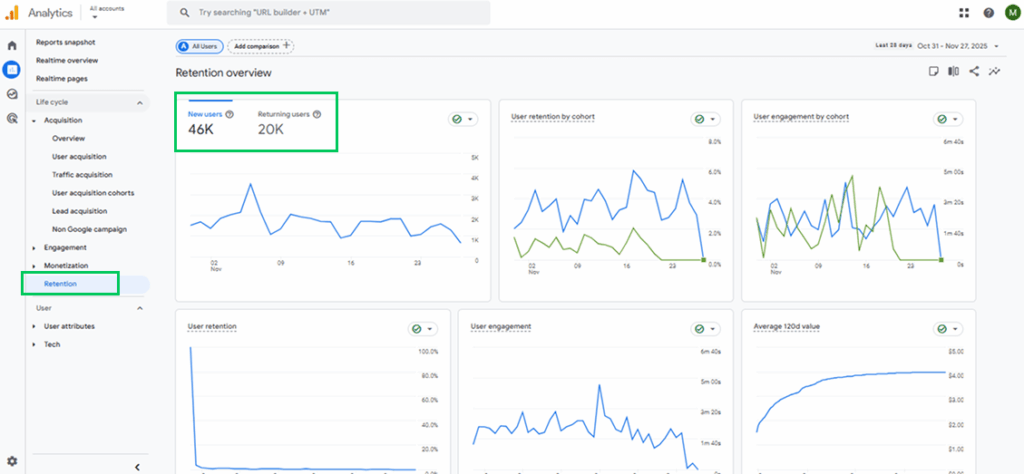
Find which traffic source or first product is most linked to your repeat buyers, then put new acquisition spend behind replicating that exact entry point rather than chasing cold traffic broadly.
18. Launch a Post-Purchase Email Sequence
There is no single GA4 signal that tells you to start this one; instead, track its impact through the Retention report’s returning user rate over time. Send three emails after every purchase: an order confirmation with a related product suggestion, a 7-day check-in with a review request, and a 30-day re-engagement offer. Each email earns its place by giving the customer a reason to open it, not just a reminder that you exist.
19. Run Retargeting Ads to Cart Abandoners
Build a GA4 audience of everyone who triggered “add_to_cart” without “purchase” in the last 30 days, then share that audience with Google Ads. Show them the exact product they added, not a generic ad for your store. This group converts far better than cold traffic, because they already showed real purchase intent, making it one of the highest-leverage eCommerce strategies to increase sales from traffic you already paid for once.
20. Fix Your Slowest-Loading Pages
Your slowest-loading pages show up in GA4’s Page Timing report, or in Google Search Console’s Core Web Vitals report, ranked by load time. Start by compressing product images to WebP format under 150KB, since images are usually the biggest offender. Industry benchmark studies on page speed (including analyses referencing Google data) show that an eCommerce page that loads in one second converts roughly 2.5 times better than one that takes five seconds.
21. Build a Segment-Based Email List from Analytics Behavior
GA4’s Audiences report lets you segment shoppers by actual behavior: viewed a category, bought once, never bought, or high value. Sync each segment to your email platform and send a different offer matched to that behavior, rather than one generic blast to your whole list. This delivers real eCommerce conversion optimization through personalization, without buying a separate personalization platform.
Quick Reference: All 21 Strategies at a Glance
| # | Strategy | GA4 Report to Check |
|---|---|---|
| 1 | Find your highest-converting traffic source | Traffic acquisition (Session source/medium) |
| 2 | Fix your highest drop-off funnel step | Checkout Journey |
| 3 | Prioritize your best-performing products | Product performance |
| 4 | Audit your mobile conversion gap | Device category |
| 5 | Fix organic landing page intent mismatch | Landing pages (Organic Search) |
| 6 | Find high-view, low-cart products | Item view vs. add_to_cart |
| 7 | Add reviews to weak products | Item data + review status |
| 8 | Improve top product images | Product performance (revenue) |
| 9 | Test urgency signals | Product performance (views) |
| 10 | Fix weak product descriptions | Search Console/Site search |
| 11 | Add related products by co-purchase | Path exploration |
| 12 | Simplify the checkout form | Checkout Journey |
| 13 | Add guest checkout | Checkout Journey (account step) |
| 14 | Add more payment options | Device and audience data |
| 15 | Set up cart abandonment emails | Checkout Journey (purchase gap) |
| 16 | Add trust signals at checkout | Checkout Journey (payment step) |
| 17 | Replicate your repeat buyer profile | Retention |
| 18 | Launch a post-purchase email sequence | Retention (returning user rate) |
| 19 | Retarget cart abandoners | GA4 Audiences |
| 20 | Fix slow-loading pages | Page Timing / Core Web Vitals |
| 21 | Build behavior-based email segments | GA4 Audiences |
For the complete list of eCommerce events GA4 tracks by default, see Google’s developer documentation on GA4 ecommerce events.
Frequently Asked Questions
1. What is the best eCommerce growth strategy?
The best eCommerce growth strategy depends on your store’s current conversion rate and the specific funnel stage where you lose the most customers. For most WooCommerce stores, fixing checkout friction delivers the fastest return. Start by auditing your GA4 checkout funnel report to find your biggest drop-off step, then apply a targeted fix there before investing more in traffic.
2. How do I increase eCommerce conversions?
You increase eCommerce conversions by finding the specific page or funnel step where users leave before buying, then testing one fix at a time. Use GA4’s Checkout Journey report to find your highest-abandonment step. Common high-impact fixes include simplifying checkout forms, adding trust signals near the payment button, and enabling guest checkout.
3. What is eCommerce conversion optimization?
Ecommerce conversion optimization is the practice of using behavioral data and testing to increase the percentage of store visitors who complete a purchase. It covers product page improvements, checkout flow simplification, and post-click experience design. The average eCommerce conversion rate sits between 1.81 and 3 percent, with top performers exceeding 5 percent.
4. How do I use Google Analytics for eCommerce growth?
You use Google Analytics 4 for eCommerce growth by tracking four core report areas: traffic source conversion rates, product-level performance, checkout funnel drop-offs, and device behavior. Analytify displays these GA4 eCommerce reports directly inside your WordPress dashboard, so you can spot and act on growth opportunities without switching between tools.
5. What eCommerce metrics should I track?
The five most important eCommerce metrics are conversion rate, average order value, cart abandonment rate, traffic source revenue contribution, and returning customer rate. Track them monthly inside GA4’s Monetization and Retention reports. Analytify makes these visible inside WordPress without a separate login to GA4.
6. Why isn’t my store’s conversion rate improving after I make changes?
Your conversion rate often stays flat because you fixed the wrong funnel step first, not because the fix itself failed. Check your GA4 checkout funnel report to confirm you targeted the actual highest drop-off point, not just the first issue you noticed. Give any single fix two to three weeks of traffic before judging the result, since small sample sizes create misleading swings either way.
7. How can I use GA4 and Analytify to find growth opportunities in my eCommerce funnel?
Open GA4’s Monetization and Acquisition reports to see your raw funnel numbers, then check the same data inside Analytify’s WooCommerce dashboard for a faster read without switching tools. Look for the single biggest percentage drop between two consecutive funnel steps, since that gap is almost always your next growth opportunity. Analytify surfaces this comparison automatically under Analytify >> Monetization, so you do not need to build a custom GA4 exploration just to spot it.
8. What is a simple eCommerce growth strategy using analytics and A/B testing?
Pick one variable on your highest-traffic product or checkout page, form a single hypothesis from your GA4 data (for example, that a shorter checkout form will cut drop-off), then run an A/B test comparing the original page against the change. Measure the result against the same GA4 metric that justified the test, and only roll the change out sitewide once it reaches statistical significance. This keeps the strategy grounded in real analytics instead of guesswork.
9. What are some practical eCommerce hacks to increase conversions on a WordPress eCommerce site?
The fastest practical eCommerce hacks are enabling guest checkout, adding at least one more payment option, placing trust badges near the Place Order button, and fixing your single highest-traffic product page before anything else. Each targets one specific, measurable step in your WooCommerce funnel rather than a general site-wide change, so you can confirm the impact in GA4 within a week or two of applying it.
10. How does a WordPress analytics plugin like Analytify support eCommerce growth strategies inside the dashboard?
Analytify pulls GA4’s traffic source, product performance, checkout funnel, and device reports into your WordPress dashboard, so you can build and check an eCommerce growth strategy without logging into a separate GA4 property. Every strategy in this guide names the exact Analytify or GA4 report to open first, which turns a general analytics dashboard into a practical, repeatable growth checklist.
Start Fixing the Right Problem First
Every one of these 21 strategies works, but only if you start with your own data. The store owner who opens their GA4 funnel report first, finds the single biggest leak, and fixes that one thing will outperform the one who tries all 21 at once.
If you are also looking to customize your WordPress login page, LoginPress lets you build a fully branded login experience in minutes.
Next, do this:
- Open Analytify Ecommerce Reports in your WordPress dashboard and check your checkout funnel drop-off rate.
- Match your highest drop-off step to the strategy above that addresses it, and implement it this week.
- Set a reminder to recheck your funnel in 30 days and measure the change.
Further Readings:
Start seeing WooCommerce conversions tracked inside your WordPress dashboard: Get Analytify Pro.