What is Cornerstone Content? (And How to Create It for SEO)

You have a WordPress site with dozens of posts. But no clear sense of which ones are the most important, which ones Google should rank first, or whether any of them are actually working together. Most WordPress sites look like a pile of blog posts with no real hierarchy, and that structure costs you rankings.
This article will show you exactly what cornerstone content is, how to identify and build it in WordPress, and how to use analytics data to tell if it is actually working.
Here is what we cover: the definition of cornerstone content, the benefits for SEO, step-by-step creation, and how to track performance with Analytify directly inside your WordPress dashboard.
Cornerstone Content (TOC):
What is Cornerstone Content?
Cornerstone content is the set of articles on your WordPress site that cover your most important topics, earn the most internal links, and are built to rank for your highest-value keywords. These articles are broader in scope, longer in length, and updated more frequently than regular blog posts.
Think of your site as a city. Your cornerstone articles are the main roads. Every other post is a side street that connects back to them. This structure is called the hub-and-spoke model: the cornerstone is the hub, and supporting posts are the spokes that link back to it.
Here is a concrete example. A photography site might have a cornerstone article on camera settings. The supporting posts would cover aperture, ISO, shutter speed, and white balance separately. Each supporting post links back to the cornerstone. The cornerstone also links out to each of them.
But what makes an article actually worth calling a cornerstone? Here is the test:
- It targets a broad, high-value keyword central to your niche
- It covers the topic comprehensively (typically 2,000 to 5,000 words)
- It receives the most internal links from your other posts
- It gets updated regularly as the topic evolves
- It earns more organic traffic than most posts on your site
Regular blog posts are narrower. They target long-tail keywords. They answer one specific question and link back to the cornerstone. Cornerstone content answers the big question and serves as the reference point for your entire content cluster.
Major SEO plugins recognize this structure. Both Rank Math and Yoast SEO include a toggle in the post editor that lets you flag any post as cornerstone or pillar content. This activates internal linking priority within the plugin’s tools.
Cornerstone SEO is the practice of building your site’s authority around a small number of these hub articles. Done right, it tells search engines which pages matter most on your site.
What are the Benefits of Cornerstone Content for SEO?
Cornerstone content improves SEO by concentrating topical authority on your most important pages, helping search engines understand which content should rank for competitive keywords. Here is what that looks like in practice.
1. Topical authority concentration
Google rewards sites that go deep on a topic. When multiple posts on your site all link to one cornerstone page, those internal links signal to Google that the cornerstone is the most authoritative resource on that subject. The more supporting posts you publish, the stronger that signal becomes.
2. Stronger E-E-A-T signals
Comprehensive, well-linked cornerstone pages demonstrate expertise and depth to Google’s quality evaluators. A single definitive guide that covers a topic from every angle performs better than ten thin posts that each skim the surface. For more on this, see Google’s guidance on creating helpful content.
3. Better navigation for readers
When every supporting post links back to the cornerstone, readers always have a clear path to your most complete resource. This reduces dead ends, keeps visitors on your site longer, and improves the overall reading experience.
4. Clearer content planning
Once you define your cornerstone topics, you have a built-in system for deciding what to write next. Every new post either supports an existing cornerstone or becomes a cornerstone itself. No more publishing random articles that do not connect to anything.
5. Higher internal link equity
Cornerstone pages accumulate more internal PageRank than any other pages on your site. This makes them more competitive for the keywords they target. Supporting posts act as a continuous pipeline of authority flowing toward your most important content.
Bottom line: Cornerstone content is not just a content strategy. It is the structure that makes your entire site more competitive.
What are Some Good Cornerstone Content Examples?
Good cornerstone content examples are comprehensive guides on broad, high-traffic topics with clear potential for multiple supporting posts, such as a photography site’s ultimate guide to camera settings or a fitness blog’s complete guide to strength training.
Here are examples across different site types:
| Site Type | Cornerstone Topic | Example Title | Supporting Posts |
|---|---|---|---|
| Photography Blog | Camera Settings | The Complete Guide to Camera Settings for Beginners | What is Aperture? / How to Set ISO / Shutter Speed Explained |
| WooCommerce Store (Fitness) | Strength Training | The Complete Guide to Strength Training for Beginners | How to Do a Deadlift / Best Protein for Muscle Growth / 5-Day Workout Split |
| SaaS / WordPress Blog | Google Analytics for WordPress | How to Set Up Google Analytics in WordPress (GA4 Guide) | How to Track WooCommerce Sales / GA4 Events for Beginners / Best WordPress Analytics Plugins |
| Personal Finance Blog | Budgeting | The Ultimate Guide to Budgeting for Beginners | How to Make a Monthly Budget / Best Budgeting Apps / Zero-Based Budgeting Explained |
Notice what every example has in common. The cornerstone title targets a broad keyword. The supporting posts each target a specific long-tail variation. All supporting posts link back to the cornerstone.

The best cornerstone content is the article a reader would bookmark and return to as a reference, not a single-use tutorial they read once and forget.
How Do You Create Cornerstone Content in WordPress? (Step-by-Step)
To create cornerstone content in WordPress, choose a broad topic your site is already associated with, write a comprehensive guide targeting a competitive keyword, mark it in your SEO plugin, and build internal links from supporting posts back to it.
Follow these steps:
Step 1: Choose Your Cornerstone Topic
Pick a broad, high-search-volume topic that is central to your site’s niche. It must have enough subtopics to support at least five separate supporting posts. Avoid topics that are too narrow (only one supporting post possible) or too broad (would require covering an entirely different niche).
Step 2: Research Your Keyword Cluster
Find the primary keyword for your cornerstone. It should be broad and high-volume. Then identify 5 to 10 related long-tail keywords. These become your supporting posts. Use Google’s People Also Ask section and autocomplete suggestions to find them. If you use GA4 for WordPress tracking, check your existing organic search terms for topic clusters already gaining traction on your site.
Step 3: Write a Comprehensive Guide
Cornerstone content runs 2,000 to 5,000 words. Cover the topic from every angle: definition, benefits, how-to steps, examples, FAQ. Every subtopic you include is a potential supporting post. Do not worry about length. Worry about completeness. If a reader still has questions after finishing your cornerstone, it is not done.
Step 4: Mark It in Your SEO Plugin
In Rank Math, toggle the “Pillar Content” option in the post sidebar. In Yoast SEO, enable the “Cornerstone content” toggle. This flags the post for the plugin’s internal linking suggestions and content analysis tools. The toggle itself does not change your ranking. It tells the plugin to prioritize linking other posts to this one.

Step 5: Build Supporting Posts
Write cluster articles that each target one of the long-tail keywords from Step 2. Every supporting post should link to the cornerstone using descriptive anchor text. Use phrases like “our complete guide to camera settings” rather than generic text like “click here.” Descriptive anchors pass relevance signals to the cornerstone.
Step 6: Link from the Cornerstone to Supporting Posts
The cornerstone article should also link out to each supporting post. This creates a bidirectional internal link structure. Search engines read this as a coherent content cluster, not a collection of unrelated articles.
Step 7: Update Regularly
Cornerstone content must stay accurate and current. Set a quarterly review reminder. Update statistics, add new sections that reflect changes in the topic, and replace any outdated information. A stale cornerstone loses authority fast.
Here’s why that matters: a cornerstone article that stops being updated loses both rankings and AI citations. Quarterly refreshes are not optional.
How Do You Measure Cornerstone SEO Performance with Analytics?
To measure cornerstone content performance, track organic traffic to the cornerstone page, average engagement time, internal click-through rate from supporting posts, and assisted conversions. All of these metrics are visible inside WordPress using Analytify.

Creating the hub-and-spoke structure is only half the job. You need to confirm it is actually working. If a cornerstone gets organic traffic but no internal clicks from supporting posts, the cluster is broken. If engagement time is under 30 seconds, readers are not consuming the content at all.
This is where most WordPress site owners hit a wall. Checking these metrics normally means opening Google Analytics, navigating to multiple reports, cross-referencing data manually, and doing this for every cornerstone page you want to monitor.
Analytify removes that step entirely.
Analytify surfaces GA4 data directly inside your WordPress dashboard. More specifically, Analytify shows per-post analytics reports directly below each post in the WordPress editor. No tab switching. No logging into a separate platform. You open the post, scroll down, and the data is already there.
Here is what to track and what each metric tells you:
| Metric | What It Shows | Where to Find It in Analytify | Action If Low |
|---|---|---|---|
| Organic Traffic | How many visitors reach the cornerstone from Google search | Analytify per-post report > Traffic Sources > Organic | Update content, improve metadata, add more supporting posts |
| Average Engagement Time | Whether readers are actually reading the cornerstone | Analytify per-post report > Engagement metrics | Improve intro, add table of contents, break up long text sections |
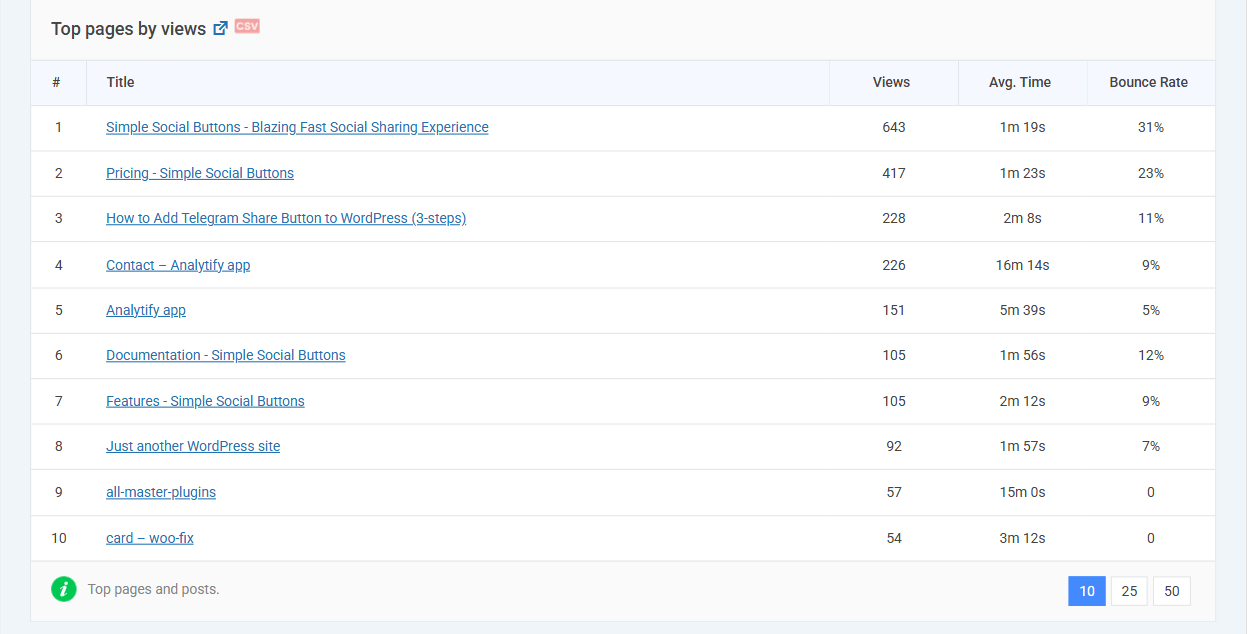
| Top Pages Report | Whether your cornerstone is among your highest-traffic pages | Analytify Dashboard > Top Pages (Analytify Pro) | Add more internal links from newer posts; submit to Google Search Console |
| Traffic Acquisition: Source Breakdown | Whether supporting posts are routing readers to the cornerstone | GA4 via Analytify > Traffic Acquisition > Source breakdown | Add internal links to supporting posts; audit anchor text |
Analytify Pro gives you access to the full top-pages report and advanced traffic source breakdowns. The free version shows per-post organic stats and basic engagement metrics per post.

So what does a healthy cornerstone dashboard actually look like?
A well-performing cornerstone shows steady organic traffic month over month, an engagement time above one minute (ideally two minutes or more), and traffic coming in from multiple sources, including internal links.
Once you know which cornerstone pages are performing, you can prioritize them for updates, link them more aggressively from new content, and expand them with new H2 sections.
What Signals Tell You a Cornerstone Page Is Underperforming?
A cornerstone page is underperforming when it shows one or more of these warning signs:
- Low organic traffic despite internal links. The page has supporting posts linking to it, but Google is not sending visitors. This usually means the content needs updating or the metadata needs work.
- Low engagement rate. GA4 measures engagement rate instead of bounce rate. A low engagement rate means visitors are landing and leaving without interacting. Fix the intro, improve the structure, and add a clear table of contents.
- No supporting posts linking to it. The cornerstone exists, but other posts on your site ignore it. Without internal links, the hub-and-spoke model is not functioning.
- Page not in your top 20 positions. Check Google Search Console. If your cornerstone does not rank in the top 20 for its target keyword after six months, reassess keyword selection or content depth.
Frequently Asked Questions
What is cornerstone content in SEO?
Cornerstone content in SEO refers to the most important, comprehensive articles on a website that target high-value keywords and serve as the central hub of a content cluster. These articles receive the most internal links from supporting posts, which signals their importance to search engines. Cornerstone pages are typically broader in topic, longer in length, and updated more frequently than standard blog posts. They are designed to rank for competitive keywords and attract organic traffic that supporting posts can then build on.
What is cornerstone content in WordPress and how does it help SEO?
In WordPress, cornerstone content is any post or page you designate as your primary resource on a topic, typically by enabling a toggle in your SEO plugin such as Rank Math or Yoast SEO. Marking a page as cornerstone content does not directly change its ranking, but it activates internal linking priority in your SEO plugin, making it easier to ensure every new supporting post links back to the cornerstone. This structured internal linking tells search engines which page is most important on a given topic.
How many cornerstone articles should a website have?
Most websites benefit from 3 to 10 cornerstone articles, depending on the number of distinct topic clusters they cover. Each cornerstone should represent a broad, high-priority topic central to the site’s niche. A site with too many cornerstone articles risks diluting internal link equity across too many pages. A practical starting point is one cornerstone per major content category, with a minimum of five supporting posts per cornerstone before the cluster becomes effective.
What are some examples of cornerstone content?
Good cornerstone content examples include comprehensive guides that cover an entire subject area: a photography site’s guide to camera settings, a personal finance blog’s guide to budgeting, or a WordPress analytics blog’s guide to setting up GA4. Each of these topics is broad enough to support multiple cluster articles and specific enough to target keywords with meaningful search volume. The best cornerstone examples are the articles readers would bookmark and return to as a reference, not single-use tutorials.
How do I know if my cornerstone content is working?
A cornerstone article is working when it shows consistent organic traffic growth, an engagement time of at least one to two minutes (indicating readers are consuming it), and evidence that internal links from supporting posts are routing visitors to it. Analytify surfaces these metrics per post directly below each post in the WordPress editor, so you can check organic traffic and engagement time without leaving your dashboard. If organic traffic is flat and supporting posts are not linking to the cornerstone, the content cluster needs attention.
Conclusion
Cornerstone content is the structural backbone of a high-ranking WordPress site: a small number of comprehensive, well-linked articles that concentrate topical authority and guide search engines toward your most important pages. Creating the structure is only half the job. Measuring its performance is what ensures the hub-and-spoke model is actually working, not just existing.
Your next three steps:
- Identify 1 to 3 existing posts that cover your most important topics and could serve as cornerstones. Check their per-post analytics reports in Analytify to confirm they have existing organic momentum before investing heavily in the cluster.
- Mark those posts as pillar or cornerstone content in Rank Math or Yoast SEO, then audit your other posts and add internal links pointing to the cornerstone wherever the topic is mentioned.
- Set a quarterly reminder to review cornerstone performance in Analytify: check organic traffic, engagement time, and whether supporting posts are successfully routing readers to the hub.
See Analytify plans and pricing
Further Readings:
- Predictive SEO Guide: Forecasting Search Trends With Data
- Google Analytics For SEO: 15 Ways To Boost Rankings
- Best SEO Software: 15 Powerful Tools to Rank Higher
- 60+ SEO Statistics For 2026: AI Overviews, Rankings & GEO
Do you already have a post that could become your cornerstone — or are you building one from scratch? Let me know in the comments; I’m happy to give feedback.