

Digital Marketing Analytics for Beginners: A Complete Guide

Your website gets traffic, but you cannot tell what marketing efforts actually work. Digital marketing analytics is the process of collecting and interpreting data from your website and marketing channels to understand what is working and what is not.
This guide simplifies this data for you. You will learn the core definition, types of analytics, and how to get started.
We also cover key metrics, top tools, and growth tactics. You will see how tools like GA4 and Analytify help WordPress beginners track success.
Analytify brings GA4 data directly into your WordPress dashboard. You connect GA4 in one click without touching any code. The entire setup takes less than five minutes.
Table of Contents:
What Is Digital Marketing Analytics and Why Does It Matter?
Digital marketing analytics is the process of collecting, measuring, and interpreting data from your website and digital channels to understand how people find you, what they do when they arrive, and whether they take the actions you want them to.
Without analytics in digital marketing, you are just guessing. You spend time and money without knowing which marketing efforts drive sales.
With proper data analytics in place, the guesswork is removed.
Why Does Tracking Web Data Matter For Your Business?
- Stop wasting money: You quickly see which ads or links don’t deliver results.
- Double down on success: You find your highest-performing blog posts and replicate them.
- Understand visitor behavior: You see exactly where people get confused or leave your site.

Knowing what data exists helps you categorize your marketing efforts.
What Are the Main Types of Marketing Analytics?
Digital marketing analytics for beginners covers five main types: website analytics, social media analytics, email analytics, search analytics, and paid advertising analytics.
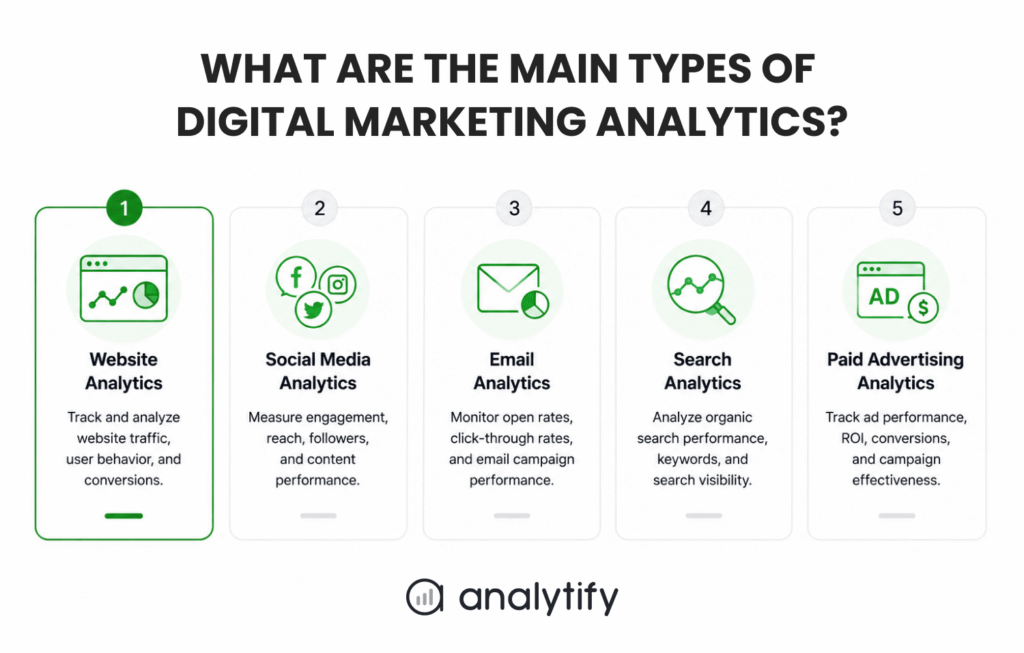
Understanding these categories helps simplify the digital marketing analytics guide for marketing.
| Analytics Type | What It Measures | Example Metric | Tool Category |
| Website Analytics | User behavior on your site. | Pageviews | Web tracking software. |
| Social Media Analytics | Engagement on social networks. | Likes, shares, and comments. | Social network tools. |
| Email Analytics | Email campaign performance. | Open rate | Email marketing software. |
| Search Analytics | Organic search visibility. | Keyword rankings on Google. | Search engine tools. |
| Paid Advertising Analytics | Paid ad performance. | Conversion | Ad network platforms. |
For most WordPress beginners, website analytics forms the foundation. You must first understand your website traffic.
This baseline data helps you grow so you can later expand into other marketing analytics for beginners.
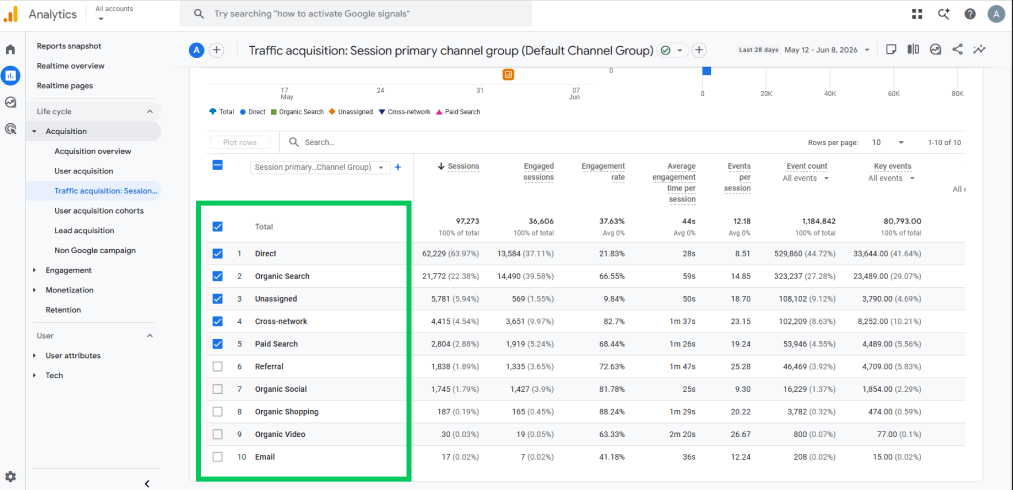
Website analytics helps you see where your users come from. Paid search and organic search both bring users to your pages, while social media also drives traffic to your blog posts. You can track all these sources in one centralized place.
How Do You Get Started with Digital Marketing Analytics?
To get started with digital analytics for marketing, connect Google Analytics 4 to your website, set up at least one conversion goal, and check your traffic sources report once a week.
This workflow provides a complete marketing analytics guide for business growth.
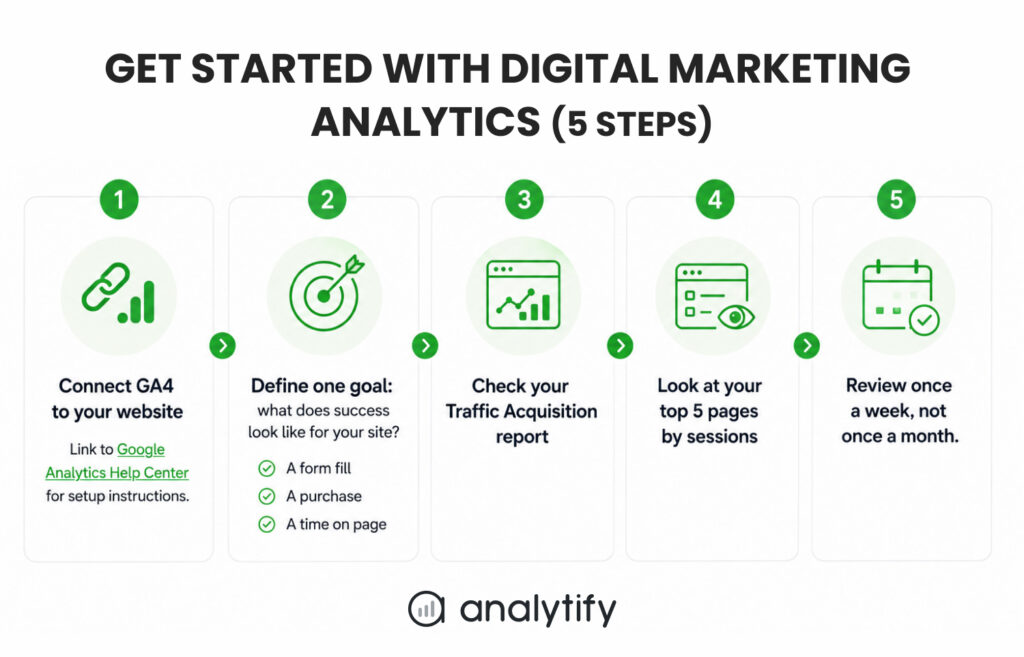
Steps to Launch Your Web Analytics Dashboard
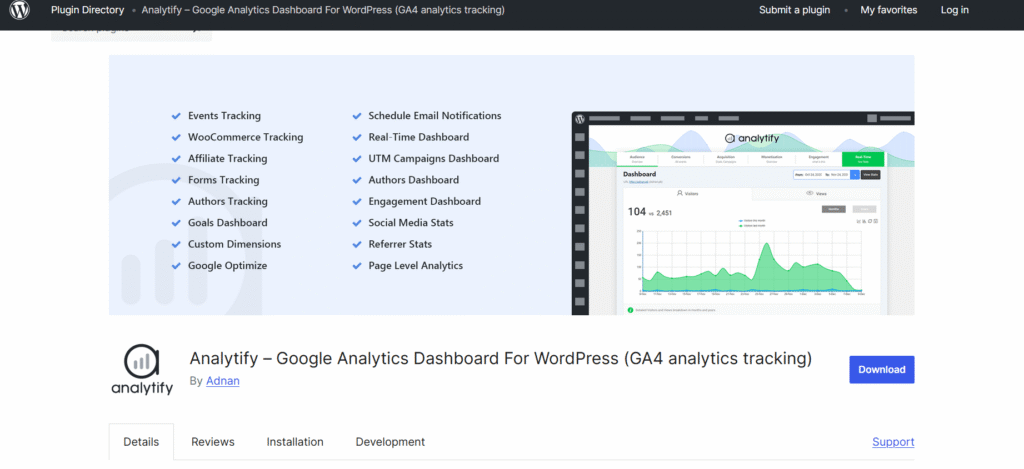
- Connect GA4 with the Analytify Wizard: Install the plugin and run the 1-click authentication wizard to link your site without code. First, get the free version from Analytify WordPress.org, and then download the pro version.
- Enable Automated Goal Tracking: Use the dashboard to define what success looks like for your site. You can automatically track a form fill, a product purchase, or a specific time on a page.
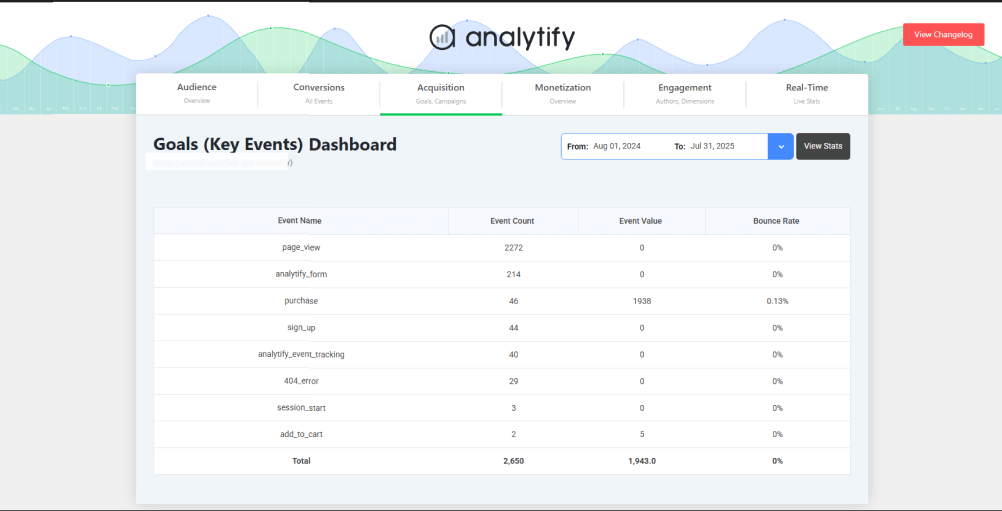
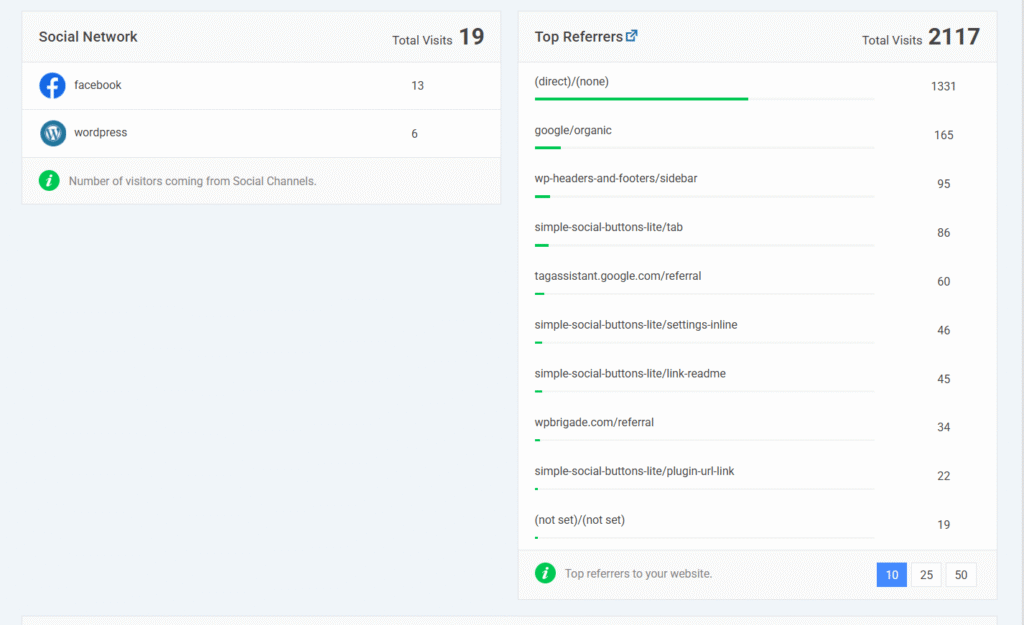
- Check Your Analytify Traffic Sources Card: Open your WordPress backend to view how people find your website. You can see traffic from search engines, emails, or social networks instantly.
- Monitor Your Top Pages Report: Identify your top five pages by tracking each session (a single user visit within a specific timeframe). This view shows what content attracts the most attention without forcing you to open GA4.

- Review Your Dashboard Weekly: Do not wait until the end of the month. Checking your WordPress stats every week helps you address declining traffic trends quickly.
But here is the part most users skip. Knowing how people find you is only useful if you also know what they do next. You must match your traffic sources with key performance indicators to measure true business growth.
Next, you need to know which specific metrics show if your content succeeds.
Which Metrics and KPIs Should Beginners Track in Digital Marketing?
Beginners should start by tracking six core metrics: organic sessions, traffic source breakdown, bounce rate, average session duration, goal completions, and top landing pages.
Focusing on these points simplifies marketing measurement and analytics.
| Metric Name | What It Tells You | Where to Find It | Beginner Priority |
| Organic Sessions | Visits from free search engine clicks. | Analytify: Main Dashboard (Overview report). GA4: Reports >> Acquisition >> Traffic acquisition | High |
| Traffic Source Breakdown | Channels driving users to your site. | Analytify: Main Dashboard (Traffic Sources card). GA4: Reports >> Acquisition >> Traffic acquisition | High |
| Bounce Rate | The percentage of visitors who leave after viewing just one page. | Analytify: Main Dashboard (General Stats). GA4: Needs to be calculated as it is the inverse of the engagement rate. It is not a separate metric in GA4. | Medium |
| Average Session Duration | How long users stay on your site. | Analytify: Main Dashboard (General Stats). GA4: Reports >> Engagement >> Pages and screens | Medium |
| Key Events | Total conversion actions, like form submissions. | Analytify: Main Dashboard (Conversions tab). GA4: Admin >> Events | High |
| Top Landing Pages | The exact pages where users enter. | Analytify: Top Pages Report. GA4: Reports >> Engagement >>Pages and Screen | High |
Do not track everything at once. Pick the 3–4 metrics that directly relate to your current goal and build for starters. Focused KPIs beat tracking every single data point on your site.
Tracking these metrics directly inside your Analytify dashboard makes optimization much faster.
What Are the Best Digital Marketing Analytics Tools for Beginners?
The best marketing analytics tools for beginners are Google Analytics 4 for website data, Google Search Console for organic search performance, and a simplified dashboard plugin if your site runs on WordPress.
Using these platforms helps you quickly master your audience data.
| Tool Name | What It Tracks | Free or Paid | Best For |
| Analytify | WordPress GA4 data integration. | Free and Paid versions | Simplicity inside WordPress. |
| GA4 | Website traffic and conversions. | Free | Deep web data analysis. |
| Google Search Console | Search rankings and clicks. | Free | Monitoring Google search health. |
| Social Media Insights | Social channel engagement. | Free | Tracking platform growth. |
If your site runs on WordPress, Analytify brings your GA4 data directly into your WordPress dashboard. You get the key reports without having to learn the full GA4 interface.
- Traffic Sources: This section shows exactly how visitors find your website. You can see traffic from search engines, social media, and email campaigns side by side.
- Per-Page Performance: This report displays individual post and page statistics directly. You can quickly track which articles get the most engagement or have the highest bounce rates.

- Campaign Tracking: This tab tracks your crucial business outcomes automatically. You can monitor form submissions, sign-ups, and sales conversions without hunting through confusing menus.

This integration saves you hours of switching between platforms every week. Once you have your tools ready, you can start growing your traffic.
How Do You Use Analytics Data to Improve Your Digital Marketing?
You use analytics data to improve your digital marketing by identifying which channels bring the most engaged visitors, which pages keep people on your site the longest, and which actions visitors take before they convert. This loop refines measurement and analytics for marketing strategy.
The goal of analytics is not to collect more data. It is to ask better questions of the data you already have.
Action Steps for Your Weekly Data Review
- Analyze your traffic sources: Check if your organic traffic from search engines grows over time.
- Evaluate top content: Find your top three pages by session count and analyze why they perform well.
- Optimize drop-off points: Find your highest-exit page and uncover why people leave your site there.
For WordPress users, Analytify shows per-post performance right below each post in the editor, making this review fast. You can immediately make layout adjustments based on actual viewer habits.
Reviewing these simple points keeps your marketing plan on track. Now you can review some common tracking issues before finalizing your dashboard.
FAQs: Marketing Analytics Metrics and KPIs
1. What is digital marketing analytics, and why does it matter?
Digital marketing analytics is the process of collecting and interpreting data from your website and marketing channels to understand how visitors find you, what they do when they arrive, and whether they complete the actions you want. It matters because without data, every marketing decision is a guess.
2. How do I get started with digital marketing?
To get started, connect Google Analytics 4 to your website and set up at least one conversion goal, such as a form submission or a purchase. Then check your Traffic Acquisition report once a week to see where your visitors are coming from. Start with these two reports before expanding to other metrics. Adding more data before you understand the basics creates confusion, not clarity.
3. What is the difference between web analytics and digital Analytics?
Web analytics focuses specifically on website data such as page views, session duration, and bounce rate. Digital analytics is broader and covers all digital channels, including social media, email campaigns, paid advertising, and search performance, alongside website data. Web analytics is a subset of digital marketing analytics. For most beginners, starting with web analytics and expanding from there is the practical approach.
4. Which metrics should I track first in digital marketing?
Start with these four core metrics for absolute starters: organic sessions (how many visitors came from search), traffic source breakdown (where all visitors came from), Key Ev(how many did what you wanted), and your top 5 landing pages by sessions. These give you a complete picture of whether your marketing is bringing the right people to the right pages. Add more metrics once these feel familiar.
5. What is the best free digital marketing analytics tool for beginners?
Google Analytics 4 is the best free tool for beginners because it tracks website visitors, traffic sources, and conversions at no cost and connects directly to Google Search Console. For WordPress users, a plugin that surfaces GA4 data in the WordPress dashboard can make it more accessible without needing to navigate the full GA4 interface. Google Search Console is also free and essential for tracking organic search performance.
6. How often should I check my digital marketing analytics?
Check your analytics once a week for core metrics: traffic sources, top pages, and goal completions. Review deeper trends such as monthly traffic growth, channel performance shifts, and content performance once a month. Daily checking is rarely useful for most small websites because day-to-day fluctuations are normal and do not reflect real trends.
Final Thoughts
Digital marketing analytics is not about having more data. It is about asking the right questions of the data you already have, and acting on the answers consistently.
Start simple, review regularly, and add complexity only when your current setup stops giving you useful answers.
Next Steps to Master Your Data
- Connect GA4 to your website today. First, link your platform to GA4 if you haven’t already.
- Set up one conversion goal in GA4: Choose an outcome, such as a form submission or a key page view, so your traffic data connects to a real business result.
- Check your traffic reports this week: Look at your Traffic Acquisition report and your top five pages by sessions. Write down one question each report raises, then answer that question next week.
If your site runs on WordPress, Analytify brings your GA4 reports, including traffic sources, top posts, and goal completions, directly into your WordPress dashboard.
Check out Analytify Pricing Plans.
That is all for this article. For more detailed posts, check:
- Google Analytics Best Practices for WordPress (2026)
- Digital Marketing for Small Business: Analytics-Driven Strategies to Get More Customers (2026)
- Best eCommerce Digital Marketing Strategies & Tools for 2026
Which digital marketing metric are you going to start tracking on your dashboard this week? Let us know in the comments below!




 Halloween Sale: Know which campaigns drive sales this season.