Local PPC: A Beginner’s Guide to Local Pay-Per-Click Advertising

Local PPC, or local pay-per-click advertising, is a paid search method that targets people searching within a set distance from your business.
You are spending money on Google Ads every month, but you cannot tell which clicks turned into real customers. A call comes in on Tuesday, and you have no idea whether it came from the ad, Google Maps, or a friend’s referral.
This guide shows you exactly how local PPC works, how to set up a geo-targeted campaign step by step, and how to track what happens after someone clicks your ad, all from inside WordPress. If you are new to Google Ads, start with our A Complete Google Ads Tutorial.
You will learn three things: what local PPC is and how it works, a step-by-step campaign setup in Google Ads, and how to measure real results using GA4 and Analytify without leaving your WordPress dashboard.
Table of Contents
What Is Local PPC and How Does It Work?
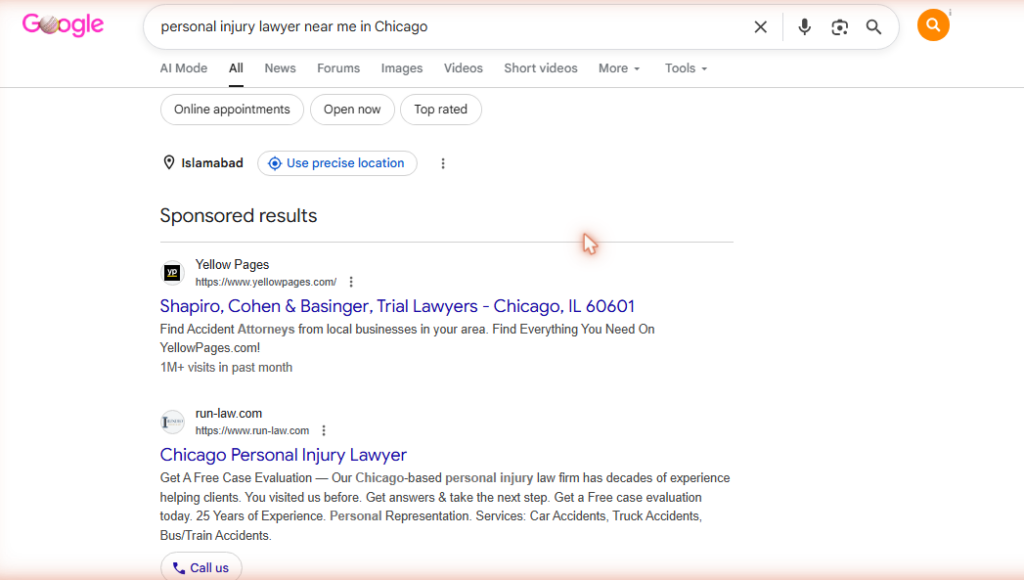
Local PPC, or local pay-per-click advertising, is a paid search strategy that shows your ads only to people searching within a specific geographic area near your business, so you pay only for clicks from potential customers who can actually become real ones.
This is the core idea behind local pay-per-click: proximity plus intent. Google matches a searcher’s location to your target radius, then decides whether your ad qualifies for that auction.
Here’s how the auction works. An advertiser bids on a keyword and sets a geographic radius around their business.
Google then shows the ad only to searchers inside that radius. The advertiser pays only when someone clicks.
Take a plumber in Dallas bidding on “emergency plumber near me.” Only searchers physically near that plumber’s service area ever see the ad. A user in Houston never will.
Local PPC advertising differs from national campaigns in three ways: the geographic limit, the use of city and “near me” modifiers in keywords, and the higher buying intent of local searchers.
Local intent is bigger than most business owners realize. BrightLocal reports that 46% of all Google searches carry local intent, and Google’s own data shows 76% of people who search “near me” visit a business within 24 hours.
Local PPC vs. National PPC
| Factor | Local PPC | National PPC |
|---|---|---|
| Target area | Radius, zip code, or city around your business | Entire country or multiple regions |
| Keywords | City modifiers, “near me” terms, service terms | Broad category terms, no location modifiers |
| Avg. conversion rate | 8-12% (pre-qualified by proximity) | 3-5% (broader, lower intent) |
| Best for | Service businesses, brick-and-mortar, local providers | E-commerce, SaaS, national brands |
| Typical monthly budget | $500-$3,000 for most local businesses | $5,000+ for meaningful national reach |
Why Does Local PPC Work Better Than Other Advertising for Local Businesses?
Local business PPC outperforms traditional advertising because it targets people who are actively searching for your service right now, in your area, at the exact moment they are ready to buy.
That timing advantage is hard to match with a billboard or a flyer. Local PPC marketing puts your offer in front of someone mid-decision, not mid-scroll.
- Immediate visibility. Local PPC ads appear at the top of Google in hours, not months. There is no waiting for organic rankings to build.
- High-intent audience. “Near me” searchers are not browsing. They need something now, which makes local PPC clicks far more likely to convert than display or social ads.
- Precise budget control. Set a daily cap and never overspend. A local plumber can start with $20 a day and scale up once they see what converts.
- Measurable results. Every click, conversion, and cost is tracked. Unlike a billboard, you know exactly what you paid for each lead.
- Speed advantage over local SEO. Local SEO takes three to six months to build. Local PPC produces calls and visits on day one.
PPC does not replace SEO. The two work together: PPC delivers immediate traffic while SEO builds long-term authority that lowers your cost per lead over time.
So local PPC works. But only if it’s set up correctly. Here’s exactly how to do it.
How Do You Set Up a Local PPC Campaign Step by Step?
To set up a local PPC campaign, create a Google Ads account, choose the Search campaign type, set your geographic target to your service area, research and add local keywords, write ad copy with your location and offer, build a local landing page, and set a daily budget that matches your cost-per-lead target.
Each step below covers exactly what to click and why it matters.
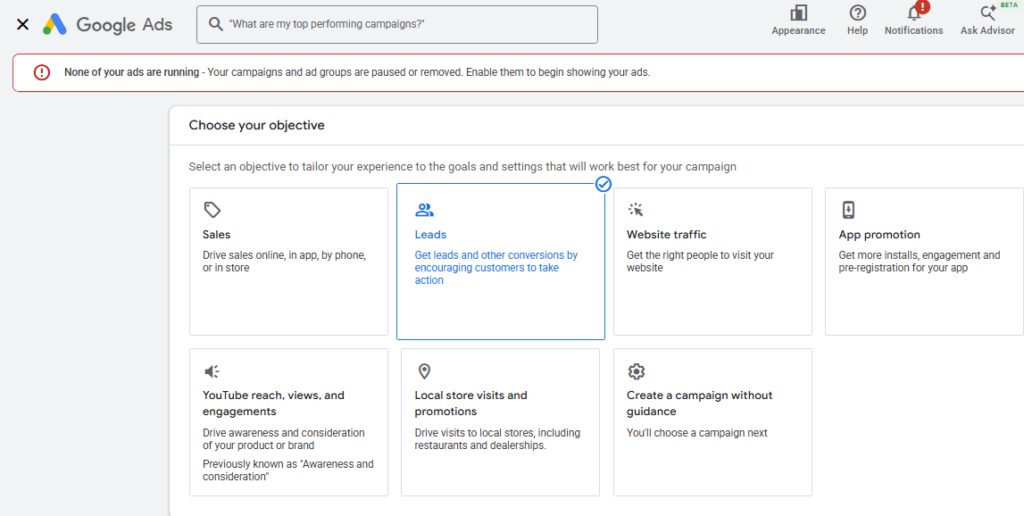
- Set your campaign goal. Open Google Ads and create a new campaign. Choose “Leads” if you want calls and form fills, or “Store visits” if foot traffic is your priority. The goal determines what Google’s algorithm optimizes for.
- Choose Search campaign type. Select “Search” from the campaign type options. Search campaigns target active searchers, which makes them the highest-intent format for local businesses. Avoid Performance Max to start, since it needs clean conversion data to work well.
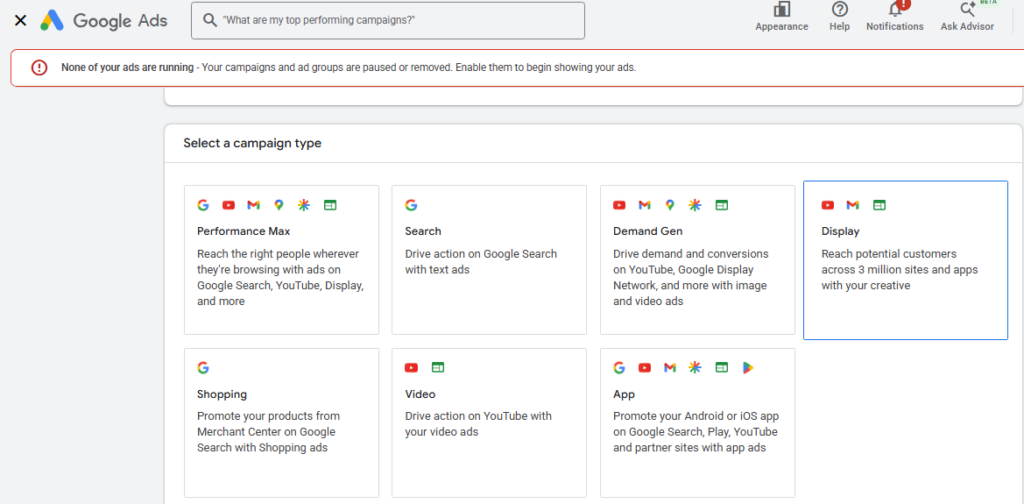
- Set your geographic target. In campaign settings, enter your business address and set a radius target. Start with 10-15 miles for most service businesses, or pick specific zip codes if your customers cluster in certain neighborhoods. Untick “People interested in your location” and leave only “People in your location.”
- Find your local keywords. Use Google Keyword Planner for ppc for local businesses to find what your customers actually search. Focus on three types: service plus city (“plumber Austin”), service plus “near me” (“plumber near me”), and service plus neighborhood (“plumber South Austin”). Avoid broad match on new campaigns.
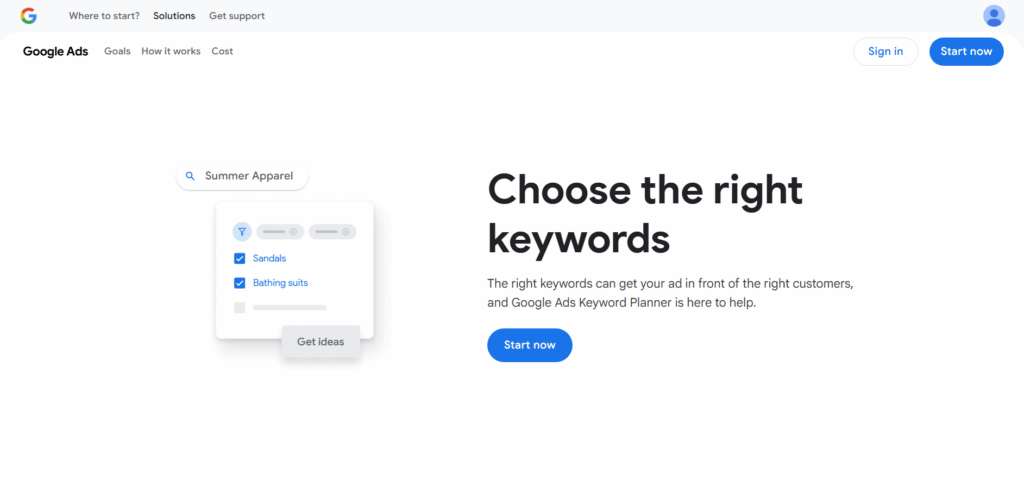
- Write your ad copy. Your headline should match what the searcher typed. Include your city name, a specific benefit, and a call to action. Example: “Austin Plumber | Same-Day Service | Call Now.” Add location and call extensions so your address and phone appear directly in the ad.
- Build a dedicated landing page. Send ad clicks to a page that matches your ad exactly. If the ad says “Same-Day Plumbing Austin,” the landing page must lead with that offer, with a phone number above the fold, a short form, and local trust signals such as reviews and years in business.
- Set your daily budget and bidding. Start with a budget that delivers at least 30-50 clicks per month for meaningful data. Use “Maximize Clicks” bidding at first, then switch to “Target CPA” once you have 30 or more recorded conversions.
- Enable conversion tracking. This is the most important step. Without it, you are flying blind. Set up at least two conversion events in GA4, one for form submissions and one for phone calls, then link GA4 to Google Ads so conversion data flows into your campaign reports.
What Is the Best Local PPC Strategy for a Local Business?
The best local PPC strategy for a small business combines tight radius geo-targeting, exact-match and phrase-match keywords with city modifiers, ad copy that matches the search term and location, and a dedicated landing page with a clear call to action and local trust signals.
Here are six tactics that move the needle most for a local ppc strategy.
- Use radius targeting, not city-wide. A 10-15 mile radius consistently outperforms broad metro targeting for service businesses. Narrower audiences convert better because proximity pre-qualifies them.
- Bid on “near me” keywords explicitly. These rank among the highest-converting keywords in local search. Someone searching “dentist near me” is ready to book, not researching.
- Add location and call extensions to every ad. Location extensions display your address in the search result. Call extensions let mobile users tap to call directly from the ad.
- Use negative keywords aggressively. Add “free,” “DIY,” “how to,” “jobs,” and competitor city names you do not serve. Negative keywords stop your budget from paying for irrelevant clicks.
- Schedule ads for business hours. There is no point paying for clicks at 2 am if your team cannot answer the phone. Use ad scheduling for your operating hours, or the hour before closing when purchase intent peaks.
- Test three to four ad variations per ad group. Write different headlines and descriptions. After two weeks and 100+ impressions, pause underperforming variants and scale the winner.
Running these tactics is half the job. Knowing which ones are actually working is the other half. That’s where analytics comes in.
How Do You Manage and Track Local PPC Results?
Local PPC management means tracking which campaigns drive calls and form fills, which keywords waste budget on clicks that never convert, and which landing pages turn ad visitors into customers, all of which GA4 shows when connected to your WordPress site through Analytify.
Most local business owners only check Google Ads for clicks and impressions. That tells you who clicked, not what happened next.
GA4 closes that gap by tracking conversions, such as form fills and calls, and linking them back to specific campaigns.
Analytify brings this GA4 data straight into your WordPress dashboard, so you can check local PPC performance without logging into a separate analytics account.
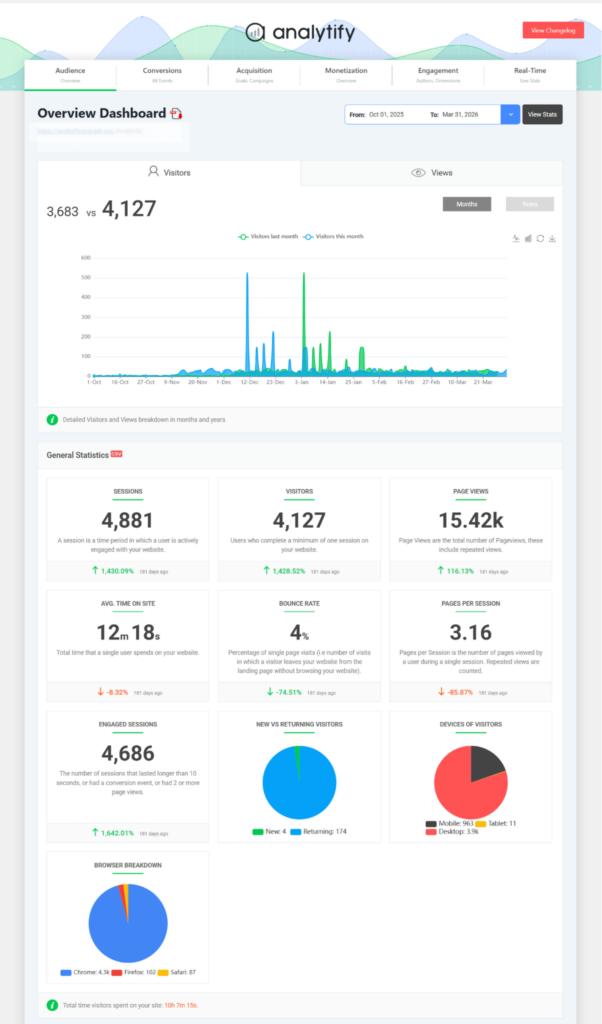
Analytify is a GA4 data presenter inside WordPress. It surfaces the data GA4 already collects. It is not a Google Ads management tool, and it does not replace Google Ads reporting. It gives you the post-click picture in plain numbers.
One clarification worth making here: phone call tracking itself requires a dedicated call-tracking tool or Google Ads call reporting, with those events sent to GA4. Analytify then displays whatever conversion data GA4 has recorded, including call events once they’re set up that way.
Key Metrics to Track for Local PPC
| Metric | What it measures | Where to check | Action if poor |
|---|---|---|---|
| Click-Through Rate (CTR) | % of people who see the ad and click it | Google Ads campaign report | Rewrite ad copy; match headline to search query more precisely |
| Conversion Rate | % of clicks that result in a call or form fill | GA4 > Advertising > Campaigns (linked to Google Ads) | Fix the landing page; add social proof and a clearer CTA |
| Cost Per Conversion (CPA) | What you pay for each lead or customer action | GA4 or Google Ads linked reports | Tighten geo-targeting; pause low-converting keywords |
| Landing Page Engagement | How long PPC visitors stay and what they do | Analytify per-page report inside WordPress | Improve page load speed; test a new headline or form placement |
| Traffic Source: Paid Search | % of total traffic coming from PPC campaigns | Analytify Dashboard > Traffic Sources inside WordPress | If PPC share is low vs. spend, check keyword targeting and bids |
Link GA4 to Google Ads first: Google Ads Admin > Linked Accounts > Google Analytics. Once linked, conversion data from GA4 flows back into Google Ads campaign reports, and GA4 shows campaign-level traffic and conversions.
Analytify pulls that same GA4 data into your WordPress dashboard. Open your WordPress admin, and Analytify shows how much Paid Search traffic arrived this week, which pages PPC visitors landed on, and whether those visits turned into conversions, without opening GA4 or Google Ads.
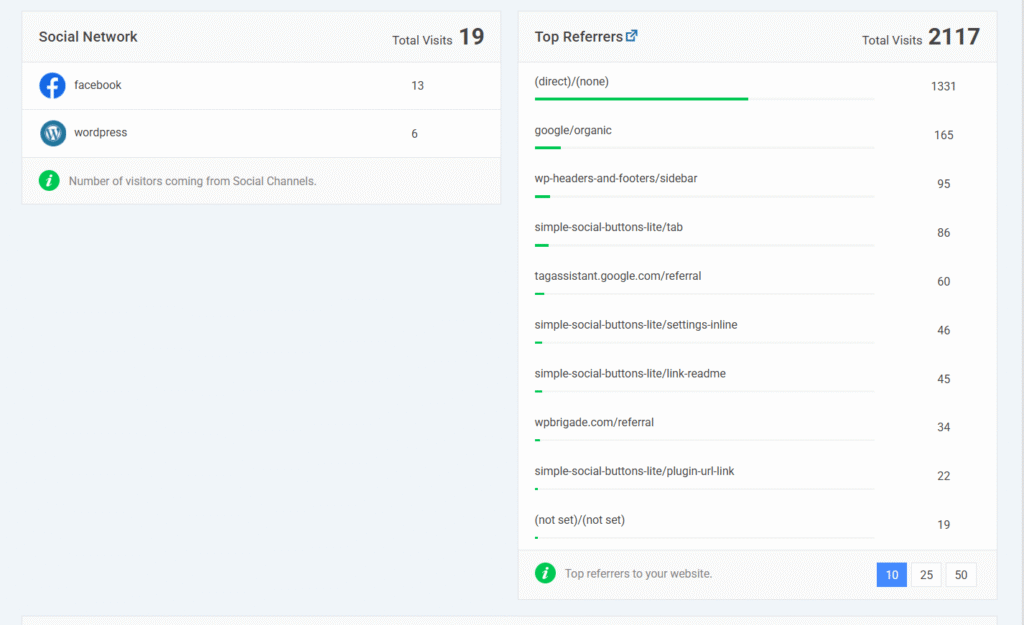
But what happens when campaigns are running and you need to decide what to cut and what to scale? This is where data makes the decision.
How Do You Know When to Pause or Scale a Local PPC Campaign?
Pause a campaign when you see three specific signals: a consistently high CPA above your target for two or more weeks, zero conversions after 100+ clicks, or a Quality Score below 5 in Google Ads.
Signals to pause:
- CPA stays above your target for two consecutive weeks or longer.
- 100 or more clicks with zero recorded conversions.
- Quality Score below 5 in Google Ads, signaling poor ad-to-page relevance.
Signals to scale:
- CPA falls below your target cost per lead.
- Conversion rate climbs above 5% for the campaign.
Quality Score is a Google Ads metric, not something GA4 or Analytify reports. Check it directly inside your Google Ads campaign view.
If switching between Google Ads, GA4, and WordPress every morning is eating your time, Analytify shows your traffic sources, landing page performance, and conversion activity directly inside your WordPress dashboard, no extra logins needed. (Traffic Source breakdown and per-page reports are available on Analytify Pro.)
Frequently Asked Questions
1. What is local PPC and how does it work for small businesses?
Local PPC is pay-per-click advertising that restricts your ads to a specific geographic area around your business. When someone nearby searches for your service on Google, your ad appears at the top of the results, and you pay only when they click. For small businesses, local PPC works because it targets high-intent searchers who are already looking for what you offer and are close enough to become actual customers. Google’s auction system decides which ads appear based on your bid, ad quality, and relevance to the searcher’s query.
2. How much does local PPC cost for a small business?
Local PPC typically costs between $500 and $3,500 a month for small businesses, depending on industry, competition, and geographic market. Cost-per-click ranges from $3 to $25 on average, with higher-competition industries like legal services and healthcare paying more. The number that matters most is not total spend but cost per conversion. If a customer is worth $500 to your business and you spend $50 to get one, local PPC is profitable regardless of total budget.
3. Is local PPC worth it for small businesses?
Local PPC is worth it for most small businesses that serve a specific geographic area and have a clear service offering with measurable customer value. Local campaigns with tight geo-targeting see conversion rates of 8 to 12 percent, well above broad national campaigns. The key condition is proper conversion tracking: without knowing which clicks turned into calls or form fills, you cannot tell if a campaign is profitable. Businesses that set up GA4 conversion tracking and review results weekly consistently see better returns than those running campaigns without measurement.
4. What is the best local PPC strategy for a local business?
The best local PPC strategy for a local business combines tight radius targeting of 10 to 15 miles for most service businesses, exact-match and phrase-match keywords with city and “near me” modifiers, ad copy that includes your location and a specific offer, and a dedicated landing page that matches the ad. Add call and location extensions to every ad. Use negative keywords to exclude searches from people outside your service area or with no purchase intent, and review results weekly to pause keywords that spend budget without producing conversions.
5. How do I track local PPC results in GA4?
To track local PPC results in GA4, link your Google Ads account to your GA4 property through the Admin section under Linked Accounts. Once linked, GA4 shows campaign-level traffic and conversion data under Reports > Advertising > Campaigns. Set up conversion events in GA4 for form submissions and any other key actions, then mark them as conversions so Google Ads optimizes toward real results. For WordPress sites, Analytify surfaces this GA4 data inside your dashboard, showing traffic sources, landing page performance, and conversion activity without requiring a separate login to GA4.
6. Why is my local PPC campaign not showing conversions in GA4?
Local PPC campaigns usually fail to show conversions in GA4 because the conversion events were never created, GA4 was never linked to Google Ads, or the wrong events were marked as conversions. Check Admin > Linked Accounts in Google Ads first to confirm the link is active. Then confirm your form submission and call events exist in GA4 under Admin > Events and are marked as key events. A delay of 24 to 48 hours after setup is normal before data starts appearing.
Local PPC Guide: The Final Verdict
Local PPC gives small businesses immediate visibility with the highest-intent audience available: people actively searching for your service, in your area, right now. The businesses that get the best results are not the ones with the biggest budgets, but the ones who track what happens after the click and adjust based on what the data shows.
Three things to do next:
- Connect your GA4 property to Google Ads in Admin > Linked Accounts, then create two conversion events: one for form submissions and one for phone call tracking.
- Set up a single local Search campaign using the step-by-step guide above, starting with a $20-$30 daily budget and phrase-match keywords for your top service plus city combination.
- Install Analytify on your WordPress site so you can check Paid Search traffic, landing page performance, and conversion results directly from your WordPress dashboard each week.
Ready to see which campaigns are actually working? See Analytify plans and pricing.
Further Readings:
- A Complete Guide To PPC Competitor Analysis
- What Is PPC Marketing? (Beginners Guide)
- How to Implement AI-Optimized PPC Campaigns
- PPC Analysis Guide—2026 Strategies, Tools & Metrics
If you are also looking to create a more professional and branded experience for your WordPress site, LoginPress lets you customize your login page design and add security features in minutes.