How to Increase Organic Keywords and Traffic with 10 Proven Ways

I’ve read a lot of “increase your organic traffic” guides over the years, and most of them miss something obvious. They treat keywords as a means to an end. Traffic is the goal; keywords are just the vehicle.
That’s backward, especially if you’re stuck. If you keep publishing and your traffic still isn’t moving, the number worth watching isn’t traffic. It’s how many distinct search terms your site actually ranks for. This distinction matters more than it used to: Google now processes more than 5 trillion searches a year by its own count, and 91.8% of those queries are long-tail, according to Backlinko’s analysis of 306 million keywords. Most of that volume is spread across terms no single “increase traffic” tactic will ever touch directly. Growing keyword count is how you actually reach it.
In this guide, you’ll get 10 ways to increase organic keywords specifically. You’ll see how to increase organic traffic and how to increase search engine keywords by finding gap keywords, targeting long-tail questions, expanding content depth, fixing cannibalization, and tracking keyword growth inside WordPress.
How to Increase Organic Keywords (TOC):
What Are Organic Keywords?
Organic keywords are the specific search terms a website ranks for in unpaid search results, and the total count of these terms represents how many different ways people can discover the site.
Here’s the distinction that matters most. Keyword count is breadth: how many doors into your site exist. Traffic volume is depth: how much foot traffic comes through the doors you already have. A site can rank for 200 keywords and get modest traffic, or rank for 20 keywords and get a lot of it. Most SEO advice optimizes the second number. This guide is about the first.
What Is the Best Keyword Growth Strategy for 2026?
The best keyword growth strategy for 2026 combines finding keyword gaps in existing content, expanding topical depth, and tracking which terms are already close to ranking.

Here are the 10 tactics, in the order to tackle them:
- Audit Search Console for gap keywords
- Target question-based long-tail keywords
- Expand content with missing subtopics
- Fix keyword cannibalization
- Track keyword growth inside WordPress with analytics
- Build internal links to push page-2 rankings to page 1
- Split broad pages into keyword-cluster pages
- Optimize for featured snippets and AI Overviews
- Refresh outdated content to reclaim lost keywords
- Build backlinks to grow topical authority
None of these are exotic. What matters is that each one is chosen specifically because it grows keyword count, not just because it’s generally good SEO practice.
1. Audit Search Console for Gap Keywords
A gap keyword is a search term already generating impressions for your site in Search Console, just not enough clicks or ranking position to count as a real win yet.
This is where I’d start, every time. Google already considers your page somewhat relevant to the query. You just haven’t earned page one yet. That gap is worth more than it looks. The average CTR for a position-1 organic result runs around 27%, based on Backlinko’s analysis of 4 million search results, though the exact figure swings from roughly 19% to 40% depending on the study and which SERP features are present. Moving a page from position 15 to position 8 rarely closes that whole gap, but it closes a meaningful part of it, and it’s a much smaller problem to solve than starting from zero.
Here’s how to find them:
- Open Search Console and go to the Performance report
- Filter for pages, then sort by impressions
- Set the position filter to 11 through 20
- Look for queries with high impressions and low clicks
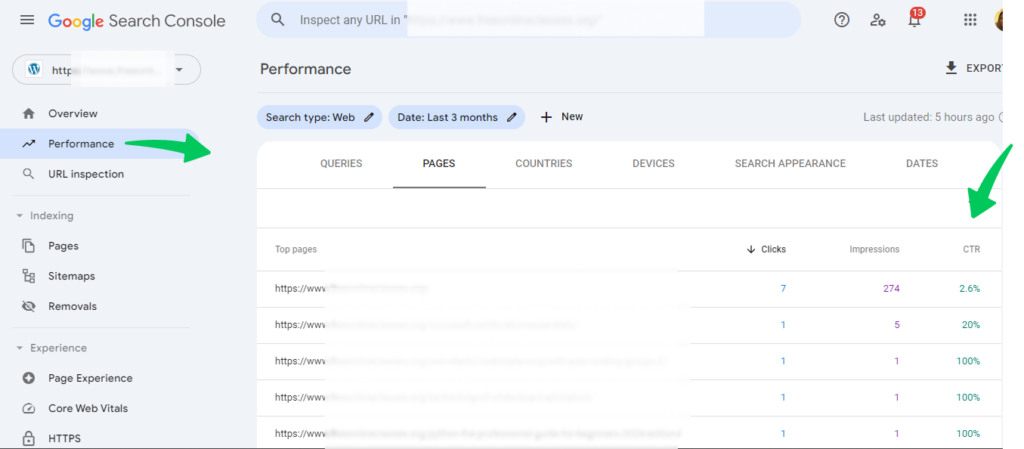
No new content required. Just target work on pages you’ve already published. Google’s own Performance report documentation covers every column in this report if you want the full breakdown.
2. Target Question-Based Long-Tail Keywords
You can drive organic traffic by targeting more search terms when you build content around the specific questions people ask. That’s how to drive organic traffic without depending on head terms to carry the whole page, since each question variation becomes its own rankable keyword.
This isn’t a minor tactic. Backlinko’s keyword study found that 91.8% of all search queries are long-tail, even though each individual term carries low volume on its own. That’s the bulk of search demand sitting outside the handful of head terms most content targets.
Where to pull these questions from:
- People Also Ask boxes on Google
- Autocomplete suggestions as you type a query
- Real questions from forums and communities in your niche
Give each question its own H2 or H3. Don’t bury the answer three paragraphs into a section built for something else. Long-tail questions carry less competition than head terms, so they tend to rank faster too.

3. Expand Content With Missing Subtopics
The strategies that help improve rankings for more organic keywords most reliably involve adding the subtopics and related entities that top-ranking competitor pages already cover but your page doesn’t.
This tactic doesn’t require a new page, just a more complete version of one you already have.
Here’s the process:
- Open your published page next to the top three ranking pages for the same term
- List every subtopic they cover that yours doesn’t
- Add those sections to your existing page
- Republish with an updated date
Search engines and AI systems both reward pages that fully cover a topic, not just the headline term. That’s not a trick, it’s just how relevance gets judged now.
4. Fix Keyword Cannibalization
Keyword cannibalization happens when two or more pages on your site compete for the same term, which can actually shrink your total keyword count instead of growing it.
This shows up most often on sites that have published for years without much editorial oversight. Watch for these signs:
- Two URLs from your own site ranking for the same query
- Rankings swapping back and forth between the pages over time
- One page ranking well, then dropping as the other climbs
The fix is straightforward. Consolidate into one stronger page, or rewrite one of the two to target a clearly different intent.
5. Track Keyword Growth Inside WordPress With Analytics
You can measure organic search results and keyword coverage by tracking how many distinct queries generate impressions and clicks over time, not just total sessions.

Here’s the reason we built the Search Console view into Analytify. Switching between WordPress and Search Console every time you want a keyword-level read is friction, and friction is why most people stop tracking keyword count at all. They fall back to checking total sessions in GA4, which hides exactly the signal this article is about.
Analytify shows per-query impressions, clicks, and average position without leaving wp-admin. That makes it faster to spot the gap keywords from tactic 1. We also built a traffic and engagement correlation view, so you can see which high-impression keywords aren’t converting to clicks yet, a signal worth acting on before you write a single new page.
Analytify surfaces this SEO analytics data. It doesn’t fix cannibalization for you or write new subtopics into your content. Those are still manual calls, using the tactics covered earlier in this guide. Organic traffic growth is easier to manage once impressions and position sit in one dashboard instead of two.

6. Build Internal Links to Push Page-2 Rankings to Page 1
Adding internal links from high-authority pages to ones ranking on page two can push those pages into the top 10, where they start picking up related keyword rankings on their own.
Here’s how to do it:
- Pull the list of page-2 rankings from your tactic 1 audit
- Find two or three pages on your site with strong existing rankings and topical overlap
- Add contextual internal links with descriptive anchor text pointing to the page-2 content
- Recheck rankings after two to four weeks
Anchor text matters more than people give it credit for. Use the phrase you actually want the page to rank for, not “click here.”
7. Split Broad Pages Into Keyword-Cluster Pages
A single broad page trying to rank for many unrelated terms usually ranks weakly for all of them. Splitting it into a pillar page plus dedicated cluster pages lets each one rank for its own set of specific keywords.
Signs a page has gotten too broad:
- It tries to answer three or more distinct search intents at once
- It ranks on page two or three for many different terms, none of them strongly
- Different sections of the page are clearly written for different audiences
Keep one pillar overview page, build dedicated subtopic pages around it, and link them together in both directions. This multiplies keyword count instead of just redistributing the rankings you already had.
8. Optimize for Featured Snippets and AI Overviews
Winning a featured snippet or AI Overview for a keyword you already rank on page one for effectively doubles your visibility for that term without needing a new page.
That matters more now than it used to, not less. AI Overviews are cutting organic click-through rates industry-wide, with studies from Ahrefs and GrowthSRC putting the drop for top-ranking pages anywhere from roughly a third to over half, depending on the query type and dataset. Pages cited inside the AI Overview or snippet itself hold onto a larger share of that shrinking pool of clicks than pages that rank but aren’t cited.
Target keywords where you’re already ranking positions 2 through 8 and a snippet exists. Then:
- Format your answer as a concise 40 to 60 word paragraph
- Place it directly under the relevant heading
- Use a numbered or bulleted list if the query implies steps or options
- Recheck snippet ownership monthly, since it shifts often
Format tends to matter more than length here. A tight, direct answer under the right heading beats a longer, better-researched paragraph more often than it should.
9. Refresh Outdated Content to Reclaim Lost Keywords
Improving organic search results for pages that have quietly dropped rankings often just requires updating outdated facts, statistics, and examples rather than a full rewrite.
To find declining pages, compare current impressions in Search Console against impressions from six months ago. A steady drop usually means the content went stale, not that the topic stopped mattering.
What to update:
- Dates and version numbers
- Statistics and data points
- Screenshots that show an outdated interface
- Broken or outdated outbound links
This reclaims keywords the page used to rank for, which is a faster win than chasing new ones from scratch.
10. Build Backlinks to Grow Topical Authority
Backlinks don’t just help the exact page they point to. They raise your domain’s overall topical authority, which can lift rankings for related keywords across your whole site.
Backlinks work best as a keyword-breadth multiplier, not a single-page tactic. A relevant link from a smaller, topically connected site usually does more for your keyword count than an unrelated link from a bigger one. That pattern has held up in every audit my team and I have run, even though it runs counter to how a lot of people still build links purely for authority scores.
Common Mistakes That Stop Keyword Growth
Even with all 10 tactics in place, a few habits quietly cap how many keywords a site can rank for. Watch for these.
Publishing without checking Search Console first. New content built without checking which gap keywords already exist duplicates effort instead of closing an existing opportunity. Check tactic 1 before writing tactic 2 or 3.
Ignoring internal links after publishing. A page can sit at position 12 indefinitely without a single internal link pointing to it. Rankings rarely move on their own once a page plateaus.
Changing URLs without redirects. Changing a slug or restructuring a URL without a 301 redirect can wipe out every keyword that page ranked for overnight. Confirm every URL change includes a redirect before it goes live.
Deleting old pages instead of consolidating them. Deleting a page that still ranks for a handful of low-volume terms removes those keywords permanently. Redirecting into a stronger, related page keeps most of that value instead of losing it.
Writing for search volume instead of intent. Chasing the keyword with the highest search volume, even when it doesn’t match what the page actually delivers, produces content that ranks briefly and then drops as engagement signals catch up. Matching the keyword to genuine search intent holds rankings longer and tends to pick up related long-tail terms along the way.
Frequently Asked Questions
1. How do I increase organic keywords for my website?
You increase organic keywords by finding gap keywords already generating impressions in Search Console, expanding content to cover missing subtopics, and fixing cannibalization that splits ranking power across pages. Tracking keyword count separately from traffic is what makes this approach different from generic traffic-growth advice.
2. What is the difference between organic traffic and organic keywords?
Organic traffic is the total number of visits from unpaid search results, while organic keywords is the count of distinct search terms a site ranks for. A site can grow traffic without growing keywords by ranking higher for the same terms, or grow keywords without an immediate traffic spike by ranking for new low-volume terms.
3. How long does it take to rank for more keywords?
Optimizing existing gap keywords can show movement within weeks, since the page already has some relevance signal. Ranking for entirely new keywords through fresh content typically takes three to six months to stabilize.
4. What strategies help improve rankings for more organic keywords?
The most reliable strategies are expanding existing content with missing subtopics, splitting overly broad pages into keyword-cluster pages, and building internal links to push page-two rankings into the top 10. Each of these adds keyword coverage without necessarily requiring brand-new content.
5. What should I track to measure organic traffic growth over time?
Track total keyword count, not just sessions, alongside impressions, clicks, and average position for individual queries in Search Console. A rising keyword count with flat traffic often signals early-stage growth that hasn’t converted to clicks yet.
6. How can analytics help improve organic search results and keyword coverage?
Analytics helps by surfacing which queries are already generating impressions without a top-10 ranking, the fastest opportunities to close. Without this data, it’s difficult to know whether to focus on new content or optimizing what already exists.
Conclusion
Growing organic search performance long-term means treating keyword count as its own metric, and closing gap keywords before chasing entirely new content. Tactic 1 is the highest-value place to start. It needs no new writing and usually shows movement fastest.
Next steps:
- Pull your Search Console Performance report and filter for position 11-20 to find your fastest gap-keyword opportunities
- Pick one existing page and expand it with the subtopics top-ranking competitors cover that you don’t
- Connect Analytify to track keyword count and impressions growth inside WordPress going forward
See your keyword growth inside WordPress with Analytify Pro. If you’ve got questions on any of this, reach out; my team and I read every message that comes in.
Now it’s over to you: which page-two keyword are you going to rescue first? Pick one, work through the tactics above, and tell us in the comments how far it climbs.