How to Spot and Fix Content Decay Using Google Analytics Data (2026)

Content decay is the gradual decline in a page’s traffic, clicks, rankings, or conversions over weeks or months. To spot it in GA4, compare each page’s performance across several months, not days. To fix it, refresh the pages that lost the most.
Content decay lowers rankings, clicks, and conversions without any Google penalty. Even high-quality content stops performing when nobody updates or monitors it.
Decay often goes unnoticed because overall traffic can look normal and many site owners do not track individual pages over time. As engagement, conversions, and clicks drop, the page becomes less relevant to users and search engines. The page then loses visibility in search results and falls behind competitors.
This guide is for site owners and content teams. I show you how to detect content decay in GA4 and how to fix it using Analytify. I also cover key metrics, page-level trends, common mistakes, and strategies for refreshing your content.
Content Decay (TOC):
What is Content Decay?
Content decay is the gradual, trend-based decline in traffic, clicks, rankings, or conversions from a webpage over time. Performance decreases slowly, month after month, unlike a one-time drop from an algorithm update.
A page that once performed well may begin to see slightly fewer visits, impressions, and conversions. These small declines may not appear significant at first, but together they form a clear downward trend.
In GA4, a page can appear “fine” in a short date range. However, when you compare several months of data, you may see it steadily losing visibility and engagement. Many site owners only notice when the drop becomes significant.
Why Does Content Decay Happen?
Content decay happens because pages lose relevance over time. Even high-quality pages lose visibility when nobody updates them. The loss of relevance leads to gradual declines in rankings and traffic.
- Search Intent Changes:
Search behavior evolves over time. What users searched for in 2022 may differ in 2026. If your content no longer matches the current intent, it becomes less relevant. As relevance declines, rankings slowly drop, and traffic follows.
- Competitors Improve Their Content:
When competitors refresh their pages with updated insights and better optimization, their content may better satisfy user intent. Google may rank them higher, pushing your page down in search results over time.
- Content Loses Freshness and Accuracy:
Outdated data, broken links, or old strategies reduce trust and usefulness. As relevance decreases, rankings and traffic gradually decline.
Example of Content Decay
Suppose you published “Complete GA4 Guide (2022)”, which ranked well and got high traffic in 2022. By 2026, GA4 had changed, new features had been added, and competitors had released updated guides such as “GA4 Guide 2026”.
Even a great 2022 article can experience a decline in content performance, losing traffic, clicks, and conversions over time.
Why Content Decay is Hard to Notice
Content decay is hard to notice for three reasons:
- It rarely shows up as a sudden drop. It happens gradually, forming a slow downward trend that’s easy to miss.
- The bigger issue is visibility in analytics. GA4 typically shows totals and short-term snapshots. You might see overall traffic holding steady, even as specific pages quietly decline in performance. Without reviewing page-level trends over time, early signs of decline remain hidden, making traffic drop analysis difficult
- Most website owners also never compare historical periods for each URL. They don’t compare how a page performed three or six months ago with how it performs today. As a result, steady month-over-month losses go unnoticed until traffic declines significantly.
Tracking long-term per-URL trends makes performance declines visible before they become a serious problem.
Key Metrics that Signal Content Decay
Track four groups of metrics to spot content decay early: traffic, engagement, conversion, and SEO signals. A decline in any of them can reveal a performance problem.
Traffic Metrics
- Users: A decline in users means fewer unique visitors are reaching your page. Consistent drops indicate reduced visibility and may signal performance issues.
- Sessions: Falling sessions show reduced overall visits. If sessions drop steadily, engagement and conversion opportunities decline as well.
- Organic traffic: A decrease in organic traffic indicates a loss of search visibility. If impressions stay stable but clicks fall, your content may be losing relevance or appeal in search results, an early sign of content decay.
Engagement Metrics
- Engagement Rate: A drop in engagement rate suggests the content no longer meets user expectations. When relevance declines, users leave quickly, a sign of fading usefulness.
- Average Engagement Time: Shorter time on page indicates the content isn’t as helpful or compelling as before, signaling declining value.
Conversion Metrics
- Leads: If leads decline while traffic remains stable, it signals the content is losing its conversion effectiveness. Visitors are still arriving, but the page no longer convinces them to take action, a clear sign of content decay.
- Ecommerce Revenue: Falling revenue with steady traffic suggests the page is attracting visitors but failing to convert them. This often means outdated offers, weaker messaging, or reduced relevance.
- CTA Clicks: When CTA clicks drop despite similar traffic levels, it indicates declining engagement and effectiveness. The content may no longer align with user intent or motivate action.
SEO Signals
- Landing Page Traffic: If fewer users enter your site through a specific page, it may indicate the page is losing relevance or dropping in search rankings. A steady decline is an early warning sign.
- Organic Session Share: This shows a page’s contribution to your site’s total organic traffic. Even if overall traffic stays stable, a declining share indicates the page is gradually losing search visibility and relevance.
Tracking these metrics enables a thorough content decay analysis. You can then update and improve your pages to restore traffic, engagement, and conversions.
Where to Find Content Decay Signals in GA4 (and the Limitation You’ll Notice)
In GA4, you can find signs of content decay in the Pages and screens report.
- Go to Reports >> Engagement >> Pages and Screens.
- Set the date range for the period you want to analyze.
- Check Views, Active users, and Average engagement time per page. These metrics are included in the report.
- Compare with a previous period to see which pages may have lost traffic or engagement.

At this point, you have the numbers, but you still don’t know which pages are quietly losing traffic over time.
The Pages and screens report does not rank pages by decline or list declining content. You have to compare date ranges manually, so small but important declines can go unnoticed.
Because the report shows totals per date range instead of a trend for each page, early signs of content decay on individual pages often stay hidden. To see Sessions for pages where visits start, open Reports >> Engagement >> Landing page.
How Analytify Detects Content Decay in WordPress
Join 50,000+ beginners & professionals who use Analytify to simplify their Google Analytics!
Analytify is a Google Analytics WordPress plugin that connects to GA4 and helps you track traffic, engagement, and conversions across all your pages.
Analytify reads GA4’s historical page data and shows trends directly in your WordPress dashboard. This helps you spot content decay and monitor page performance without manually comparing GA4 reports.
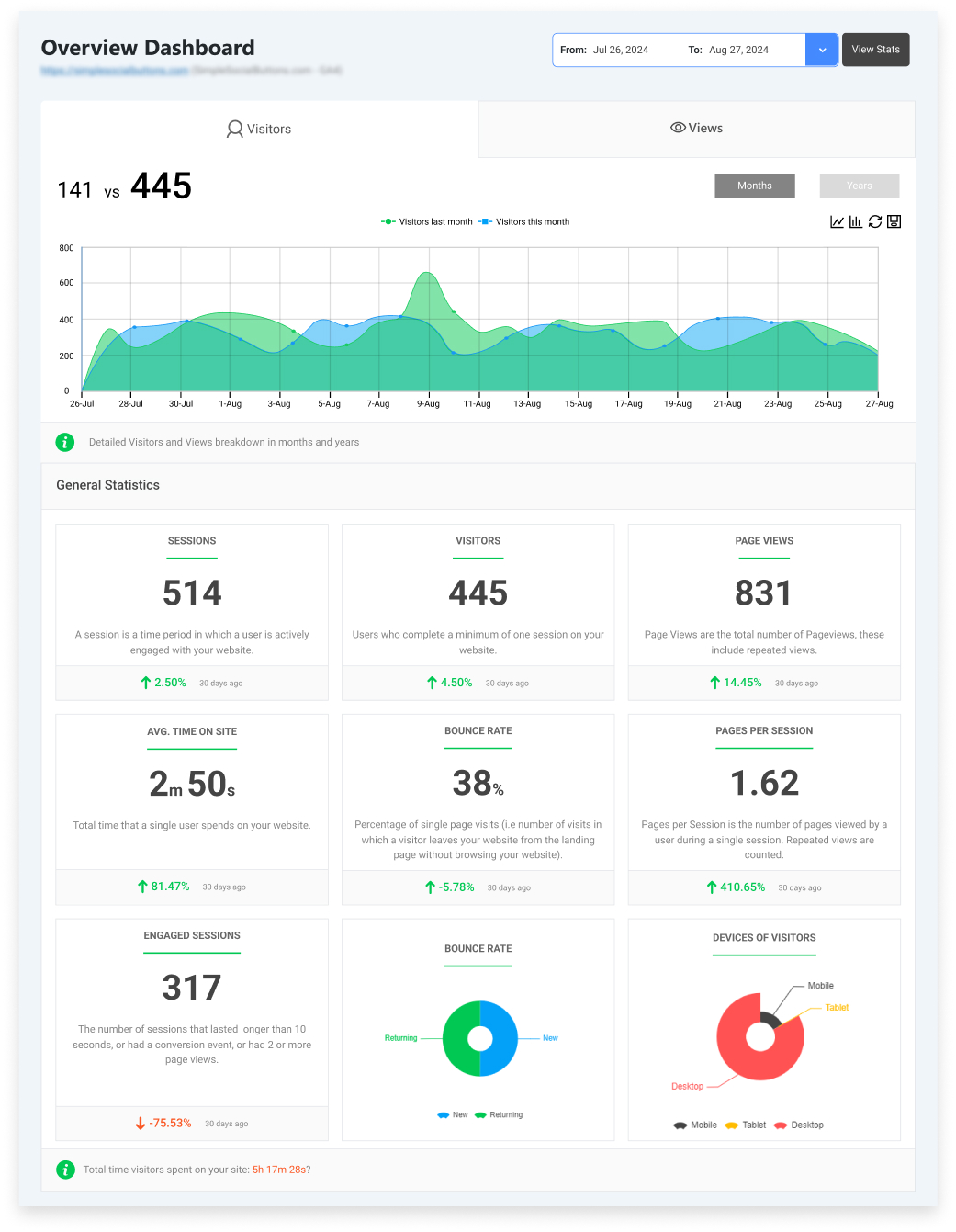
Unlike GA4’s native reports, which can be overwhelming and require manual comparisons, Analytify organizes your website analytics into clear, actionable insights.
Once Analytify is connected, it highlights performance declines that might otherwise go unnoticed, so site owners can act before traffic, engagement, or conversions drop significantly.
Key features include:
- Historical comparisons: See how your pages performed over time to spot trends.
- Page-level trends: Identify which individual pages are losing traffic, clicks, or engagement.
- Visual graphs: Understand performance at a glance with easy-to-read visual graphs and charts.
- Performance drop indicators: Quickly identify pages with declining content performance to prioritize updates.
By combining these features, Analytify turns complex GA4 data into actionable insights. WordPress publishers can then identify and respond to performance declines more easily.
How to Find Decaying Content in Analytify (Step-by-Step)
To find decaying content in Analytify, open the Content Performance Report and compare long date ranges. Follow these steps:
- Log in to Analytify on your WordPress dashboard.
- Go to the Content Performance Report. It is built on GA4 data and shows metrics for all your pages.
- Select the Date Range: Choose a period long enough to spot trends, such as the last 3–6 months.

- Check Page-Level Trends: Identify pages where traffic, engagement, or conversions are declining steadily.
- Use Visual Graphs: Analytify shows historical comparisons in easy-to-read charts, making declines obvious.
- Identify Performance Drop Indicators: Pages marked with performance drop signs are experiencing content decay.

- Prioritize Pages for Action: Focus on high-value pages or those driving conversions first, then plan a strategy to refresh content.
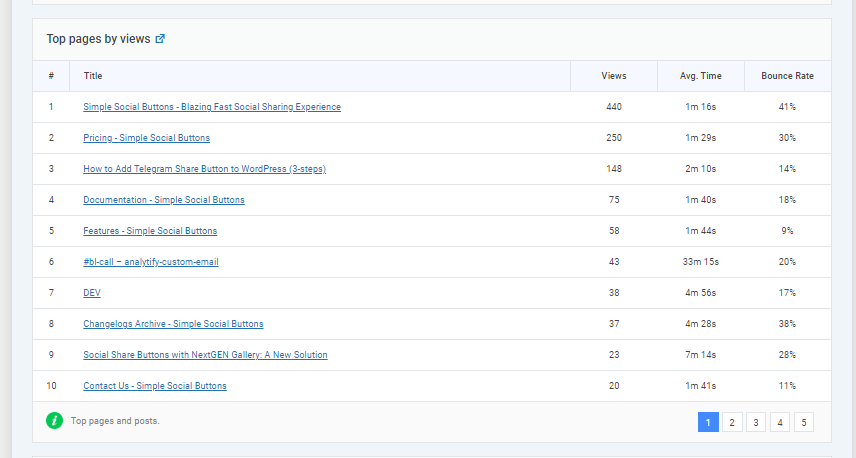
Use the Search Terms Dashboard to see which queries are declining and prioritize pages that rank for important search terms. Then plan a strategy to refresh the content based on this data.
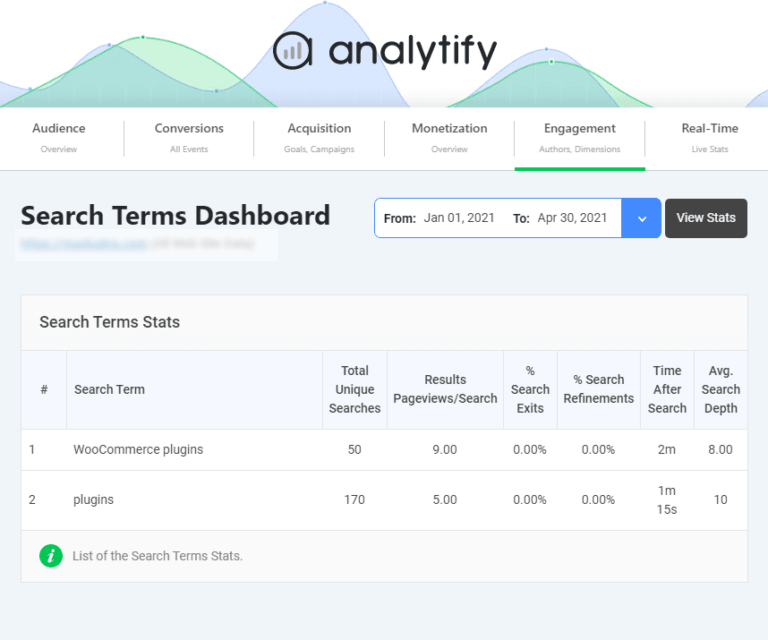
- Monitor After Updates: Track the page again after updates or a rewrite to see improvements in traffic, engagement, and conversions.
By following these steps, you can quickly identify decaying content, understand the cause of the decline, and take actionable steps to improve your website’s rankings and visibility.
How to Know if a Page Needs Updating or Replacing
Match your page’s traffic, engagement, and conversion pattern to a row in the table below to decide whether to refresh, rewrite, or replace it:
| If You See | It Means | Possible Cause | Action |
| Traffic is down, but engagement is high | Content is still valuable | Search rankings dropped, minor SEO issues | Refresh content |
| Traffic and engagement are down | Content is outdated or irrelevant | Outdated info, weak structure, competitors outranking | Rewrite or replace |
| Traffic down, but conversions high | Rankings have fallen | Loss of organic visibility | Optimize SEO |
| Traffic is flat, but CTR is down | People aren’t clicking from search | Unattractive title/meta description | Update title/meta |
| Traffic is up, but engagement is low | Visitors leave quickly | Content is not engaging or hard to read | Improve readability |
| Engagement is high, but conversions are low | Users are interested but not converting | Weak CTA or form | Optimize conversions |
| Sudden traffic drop | Possible technical or algorithm issue | Broken links, page errors, and an algorithm update | Investigate |
How to Fix Content Decay (Content Refresh Strategy)
Fixing content decay doesn’t always mean starting from scratch. A smart content refresh strategy focuses on improving what already works and making it relevant for today. Use these five actions:
- Updating vs. Rewriting: If your page is mostly accurate, simply update facts, stats, and examples. If it’s outdated or losing traffic significantly, consider a full rewrite.
- Re-optimizing Keywords: Identify which search terms drive traffic in your site performance reports, and update your content to align with current search trends in Google Analytics.
- Adding New Sections: Include new insights, FAQs, or steps to keep your page complete and competitive.
- Improving UX: Make content easier to read with headings, bullet points, images, or videos to boost engagement metrics.
- Updating Dates & Examples: Replace outdated screenshots, references, or year-specific information to signal relevance to both users and search engines.
Use Analytify data to guide your decisions; historical comparisons and page-level trends show which pages are experiencing declines in content performance.
Content Decay for Different Website Types
Content decay shows up differently on blogs, ecommerce sites, and SaaS or lead-generation sites. The sections below describe the typical pattern for each.
Blogs
- Evergreen posts losing rankings: Older articles that used to drive consistent traffic may begin to decline in search results as competitors update their content or as search intent changes. Traffic usually drops first, followed by engagement and conversions. Regular updates can help restore visibility.
Ecommerce
- Category pages: Product categories may lose traffic if products are out of stock, descriptions are outdated, or competitors optimize their pages better. Traffic typically declines first, signaling reduced search visibility.
- Product pages: Individual product pages may experience a decline in content performance if images, specifications, or pricing information are outdated, which can affect both rankings and conversions. Engagement often drops first, as users spend less time on the page.
SaaS & Lead Generations
- Landing pages: Lead-generation pages may see lower engagement or fewer conversions over time due to outdated copy, features, or offers. Conversions usually decline first, even if traffic remains stable.
- Comparison pages: Pages comparing your product with competitors may lose relevance if competitors update their features or pricing. Traffic and engagement often fall together, showing reduced interest in the page.
By using content trends in Google Analytics and tools such as Analytify, you can track page-level performance, identify early signs of content decline, and implement a strategy tailored to each website type.
Mistakes to Avoid When Analyzing Content Decay
Five mistakes hide content decay or give a wrong picture of your pages:
- Looking at short date ranges: Checking only a few days or weeks can make traffic drops hard to spot. Always use longer periods to track Google Analytics content trends.
- Ignoring engagement metrics: Focusing only on traffic misses key signals, such as average engagement time and clicks, which indicate whether users still find your content valuable.
- Only checking the homepage: Many pages, like blogs, product pages, or landing pages, can gradually lose performance over time. Don’t ignore deeper pages when monitoring your site performance data.
- Not tracking after updates: Updating content without monitoring performance afterward can hide whether your content refresh strategy actually improved traffic, engagement, or conversions.
- Relying on overall site totals: GA4 shows site-wide metrics, but page-level trends are what reveal actual declines in specific content.
Content Decay: Frequently Asked Questions
1. What is content decay in SEO?
Content decay is the gradual decline in traffic, rankings, clicks, or conversions for a page over time. Even high-performing pages can experience a decline in performance if they become outdated, competitors improve their content, or search intent changes.
2. How do I know if a page is losing traffic?
You can spot a declining page by tracking page-level trends in GA4 or using tools like Analytify. Monitor declines in traffic, engagement, and conversions over time. Comparing current performance with historical data reveals early warning signs.
3. What metrics show content decay?
Key metrics include:
Traffic metrics: Users, sessions, organic traffic
Engagement metrics: Engagement rate, average engagement time
Conversion metrics: Leads, ecommerce revenue, CTA clicks
SEO signals: Landing page traffic, organic session share
Tracking these in website content analytics helps detect declines in content performance.
4. Can Google Analytics detect content decay?
GA4 provides valuable data, but it doesn’t clearly show page-level trends or highlight declining content. You can manually compare metrics across date ranges, but this takes time and makes gradual declines harder to spot. Tools like Analytify simplify the process by providing clearer page-level trends and performance drops.
5. How often should I update content?
There’s no fixed schedule, but reviewing content every 6–12 months is a good start. Pages showing a decline in content performance should be updated sooner. Use a content strategy to keep all pages relevant, engaging, and optimized for SEO.
Final Thoughts
This guide covered content decay, why it happens, and why even high-performing pages decline over time.
We reviewed examples and key metrics. Spotting gradual declines in traffic, engagement, or conversions can be challenging without using content analytics tools like Analytify.
We also discussed how to identify decaying content step by step. You learned how to decide whether to update or rewrite pages. We covered how to implement a content strategy for different website types, including blogs, eCommerce, and SaaS pages.
Avoiding common mistakes, such as ignoring engagement metrics or checking only the homepage, helps ensure you don’t miss early warning signs.
By regularly monitoring page-level trends, tracking historical comparisons, and using performance drop indicators, you can detect content decay, recover lost traffic, and maintain long-term engagement and conversions.
For further understanding, you can read:
Are your pages starting to lose traffic or engagement? Share your thoughts and experiences in the comments below.