AI Content Velocity: How to Measure Performance of High-Output AI Publishing

Are you publishing AI content quickly, but don’t know if it’s actually helping your website?
Many websites now use AI to publish a lot of content quickly, but speed alone does not bring good results. This is where AI content velocity analytics comes in.
Learning AI content velocity analytics is important because it helps you avoid publishing too much low-value content. It shows whether your AI-generated content is helping your site grow or silently hurting rankings, traffic, and content quality.
In this section, you’ll learn what AI content velocity really means and why it matters for SEO. You’ll also see how to track and measure AI-generated content performance using GA4, SEMrush, and Analytify.
Let’s get started!
AI Content Velocity Analytics (TOC):
What is AI Content Velocity?
AI content velocity measures how quickly AI-generated content is published and how it performs over time. Simply, it shows the speed, growth, and results to measure AI-generated content effectively.
Here are the main components of AI content velocity analytics:
- Publishing frequency: How often AI-generated content is published on a website.
- Content scaling efficiency: AI makes it easy to create more content in less time, with minimal effort and no loss of quality.
- Performance trends of AI-generated posts: How AI content performs over time, such as traffic, clicks, and engagement.
For example, if a website uses AI to publish five articles every day, it needs very little time to edit them, and those articles start getting clicks and traffic. It means the site has strong AI content velocity.
But if the site publishes many AI posts quickly and they get no traffic or lose rankings, the AI content velocity is weak.
The publishing speed of AI content directly affects the following things:
- Google Filtering: Posting too much AI content too fast can cause some pages to be ignored by Google.
- Content Decay: AI content can lose traffic quickly if it’s not updated or useful.
- Crawl Budget: Too many pages at once can stop Google from crawling important content.
- Quality Signals: Google checks if users find the content helpful, not just fast to publish.
Why You Must Track AI-Generated Content Performance Separately
Here’s why tracking AI-generated content performance separately matters:
- AI content behaves differently: AI-generated content often ranks, drops, or peaks faster than human-written content. So, tracking it separately helps you measure the performance of AI-generated content and spot these patterns early.
- AI content velocity impacts rankings: Publishing AI content at high speed can affect AI visibility, making it important to measure how AI content velocity influences traffic and impressions.
- Early content decay detection: AI content may lose traffic faster than human-written posts. Separate tracking makes it easier to measure AI-generated content and identify when updates are needed.
- Google’s response varies: Search engines may treat AI-generated pages differently, so monitoring performance separately helps you understand Google filtering effects.
- Quality vs. quantity balance: Separate tracking shows whether publishing more AI content is improving results or hurting quality signals.
- Smarter content decisions: When you track content output separately, you can identify which AI topics, formats, or prompts perform best and refine future content strategies.
Core Metrics for AI Content Velocity Analytics
To properly measure AI content velocity analytics, you need metrics that track content output, site speed, performance, visibility, and quality together. Below are details of core metrics for AI content velocity analytics, grouped by category:
Production Velocity Metrics
These metrics explain how fast and at what scale AI content is being produced.
- Number of AI posts per day/week: Total AI-generated articles published in a fixed time period.
- Word count output: The total volume of words produced by AI within a given timeframe.
- Content cluster output: The number of AI posts created under the same topic, category, or keyword group.
- Time-to-index: The average time Google takes to index newly published AI pages.
Performance Metrics
These metrics show how users interact with AI-generated content after it goes live.
- Users / new users to AI content: Total and first-time visitors landing on AI-generated pages.
- Sessions started on AI pages: Number of sessions that begin directly on AI content.
- Engagement rate: Percentage of sessions where users actively interact with AI pages.
- Average engagement time: How long users stay engaged on AI-generated content.
- Scroll depth: How far users scroll on AI pages, showing content usefulness.
- Conversions from AI pages: Completed goals or actions that originate from AI content.
- Returning visitors to AI clusters: Users who revisit multiple pages within the same AI topic group.
Search Visibility Metrics
These metrics track how AI content performs in search results.
- Keyword ranking count per AI cluster: Number of keywords ranking for each AI topic group.
- New ranking URLs vs. decay: URLs gaining rankings compared to those losing visibility.
- Featured snippet wins/losses: AI pages gaining or losing SERP features.
- Pages with zero visibility: AI pages receiving no impressions or rankings.
- Low content signals: Pages flagged for low value, duplication, or weak relevance.
Quality and Retention Metrics
These metrics help judge the long-term value and sustainability of AI content.
- Bounce rate alternatives: Engagement-based signals, such as engagement rate and average engagement time, which replace traditional bounce-focused analysis.
- Content decay: Traffic or ranking drops over 30, 60, or 90 days.
- Time to first ranking: How quickly an AI page starts ranking in search results.
- Topic saturation: Detection of too many similar AI pages competing against each other.
Together, these metrics provide a complete view of AI content velocity analytics, ensuring speed, quality, and performance stay balanced.
How to Tag and Segment AI Content in GA4 (Step-by-Step)
Start by clearly identifying AI pages in GA4 for bulk content, so they can be analyzed collectively as a single group. You can do this by following the simple steps given below:
Step 1: Create a Custom Definition in GA4
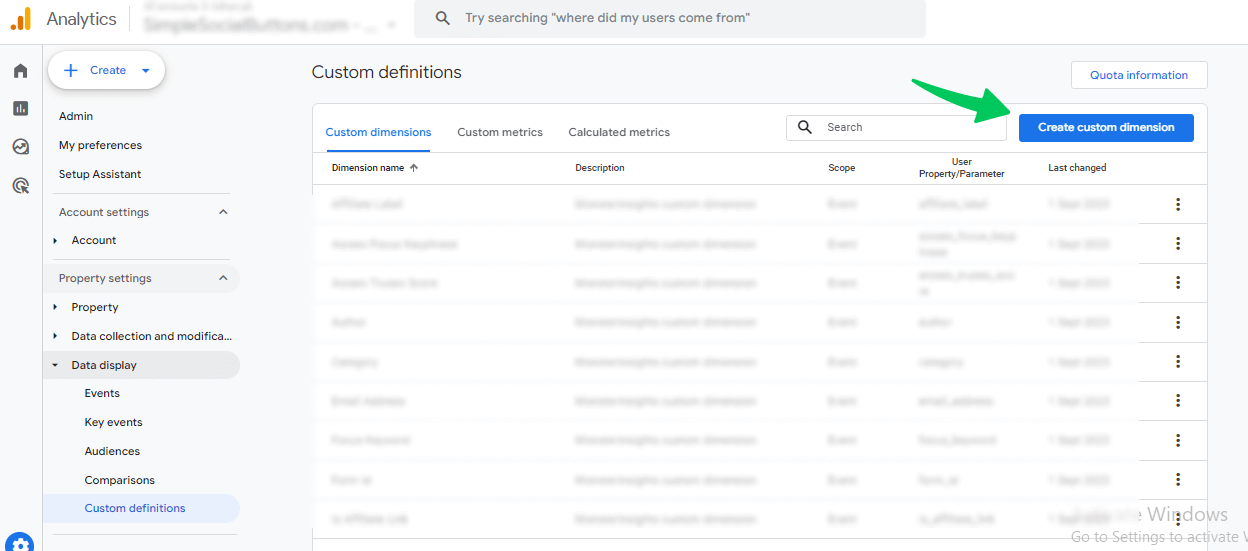
- Start by creating a custom dimension in GA4. Go to Admin >> Custom definitions.
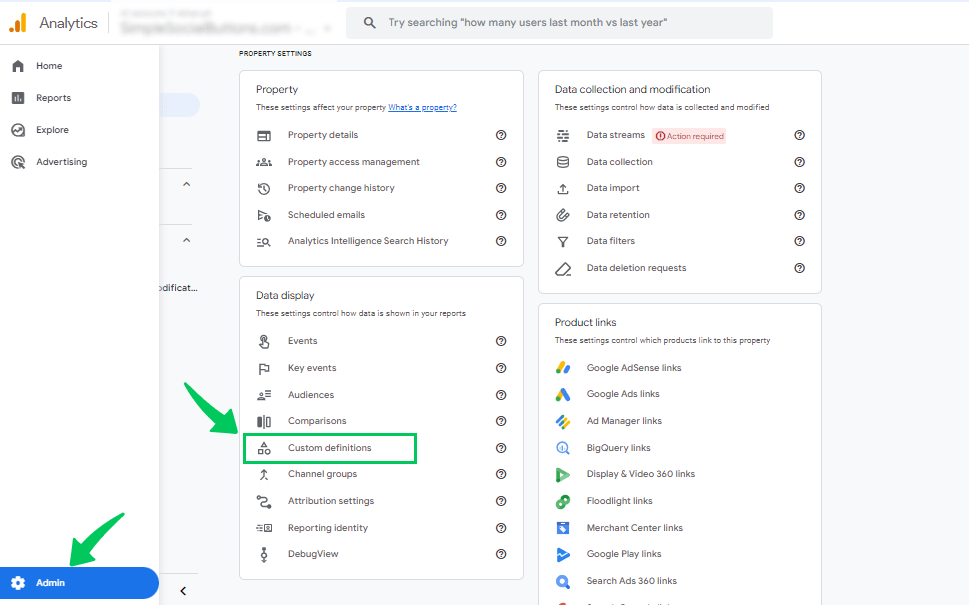
- Then, click on Create custom dimension.
- Next, enter the following details:
- Dimension name: Content Type
- Scope: Event
- Description: Identify AI, Human, or Hybrid content
- Event parameter: content_type
- Click Save.
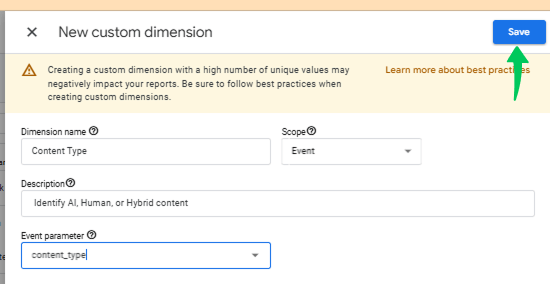
This dimension will be used to identify whether a page is AI, Human, or Hybrid.
Step 2: Configure How GA4 Receives the Data
Once the custom definition is created, GA4 is ready to receive values. At this stage, GA4 knows what to track but not which pages belong to AI or human content.
Step 3: Pass Content Type Values (AI / Human / Hybrid)
Now you need to send values to GA4.
- Using Analytify (easy method):
If you’re using WordPress, you can label posts as AI, Human, or Hybrid. Analytify automatically sends this information to GA4 without any coding. - Using Google Tag Manager (manual method):
For manual tracking, you can use Google Tag Manager to pass the content_type parameter with values like AI or Human based on page rules.
Step 4: Create a Custom Exploration Report
Now analyze performance using Explorations.
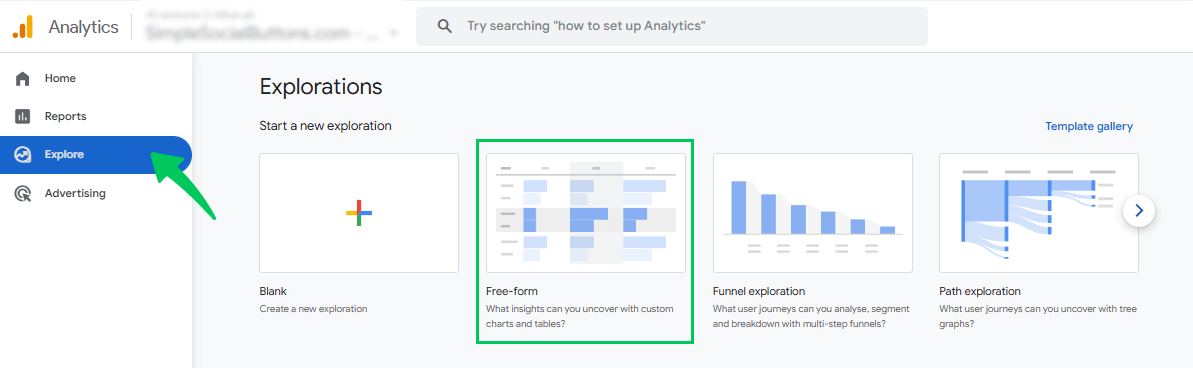
- Go to Explore >> Free-form in GA4.
- Add Content Type as a dimension and apply it to your report.
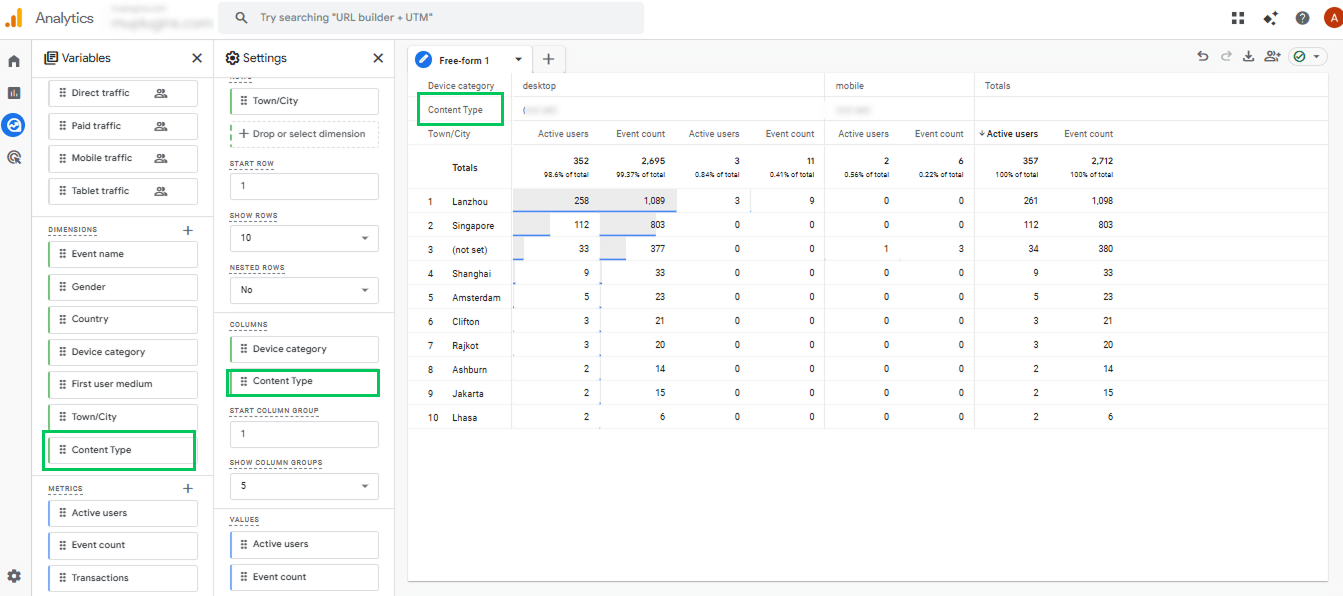
This lets you track content output and view traffic, engagement, and conversions separately for AI, Human, and Hybrid content.
Step 5: Analyze and Compare Performance
With this setup, you can now easily see how AI content performs compared to human-written pages. This makes it easier to measure AI-generated content, identify trends, assess quality, and scale effectively.
How to Analyze High-Volume AI Content in WordPress
Join 50,000+ beginners & professionals who use Analytify to simplify their Google Analytics!
Analytify, the best Google Analytics plugin for WordPress. It seamlessly integrates with GA4 and displays all key analytics in one place, without requiring complex GA4 explorations. This makes it ideal to track content output.
Overview Dashboard
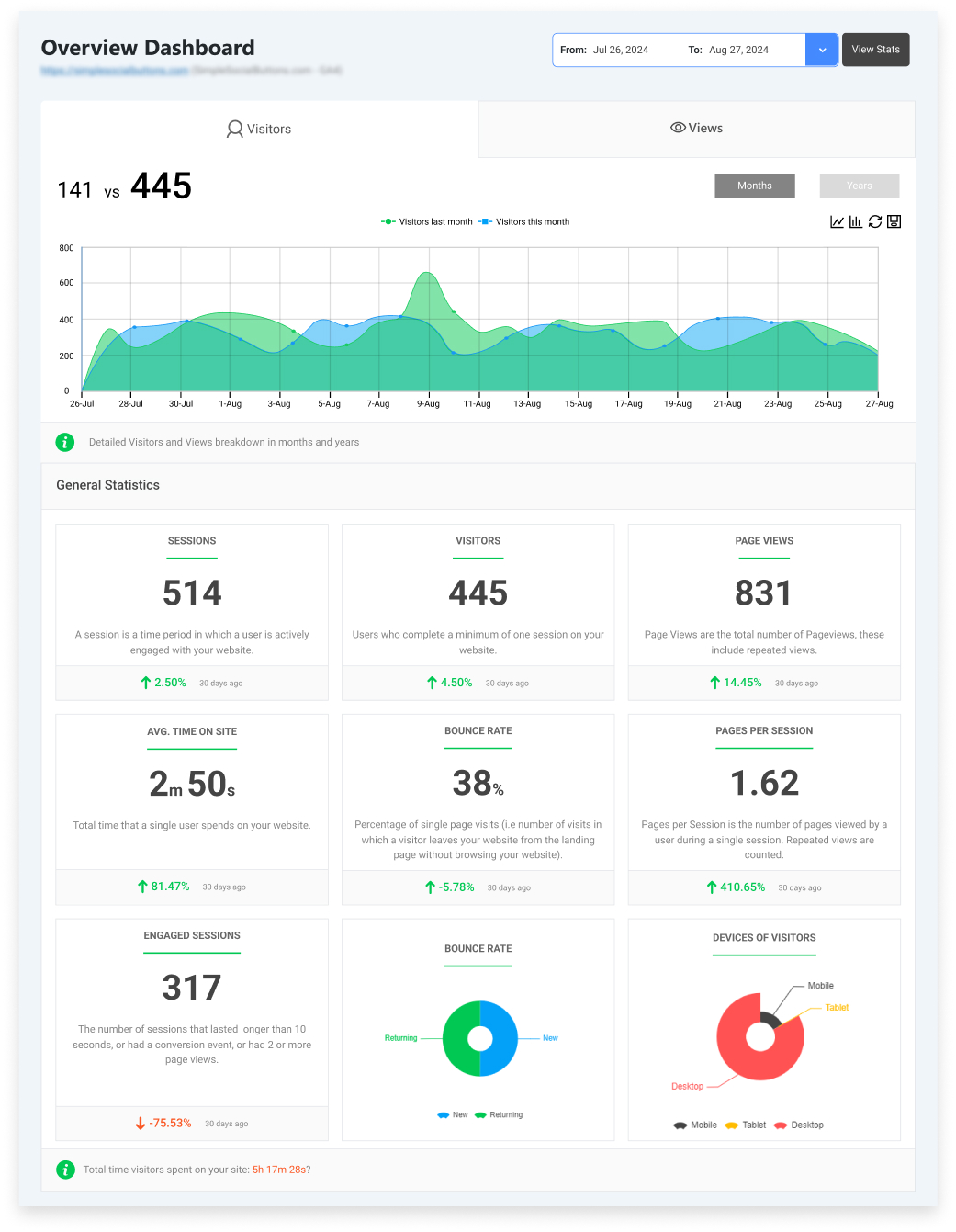
Start with the Analytify Overview Dashboard to quickly spot traffic spikes or drops on AI-tagged pages. Here, you can track content output by checking pageviews, average engagement time, and top landing pages to identify which AI content is performing well and which is slowing down.
Detailed Page-Level Reports
Start with page-level reports to evaluate how your AI-generated content performs.
- Identify pages with high impressions but low engagement; these often indicate content isn’t meeting user expectations.
- Conversely, pages with strong engagement but low impressions are great candidates for SEO optimization. This helps you spot underperforming AI pages early, preventing them from affecting overall site quality.
The Landing Page Report shows how visitors interact with each AI-tagged page, including metrics like engagement duration, engaged sessions, and engagement rate.
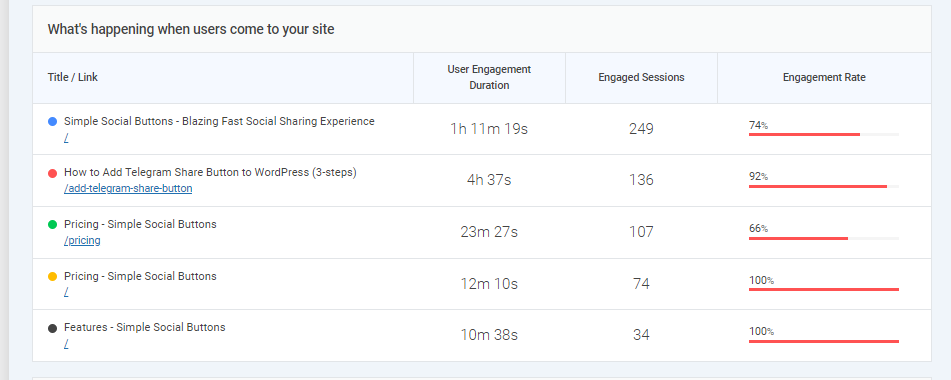
Pages with high engagement and longer time spent usually provide value and relevance, while pages with low engagement may need better structure, clearer answers, or improved quality.
Finally, check the Top Pages by Views report to see which pages attract the most visitors. This includes pageviews, average time on page, and bounce rate.
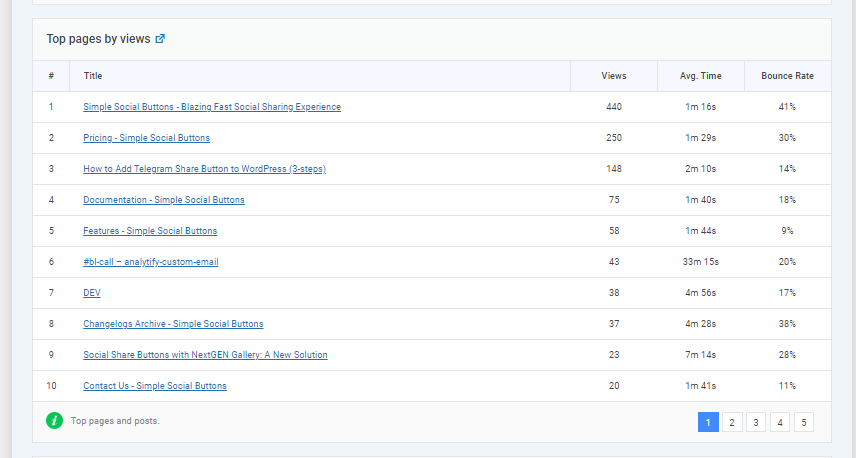
Pages with high views and good engagement are your strongest performers. While pages with high views but low time spent may need content improvements to meet user expectations.
Track User Engagement Events for AI Content
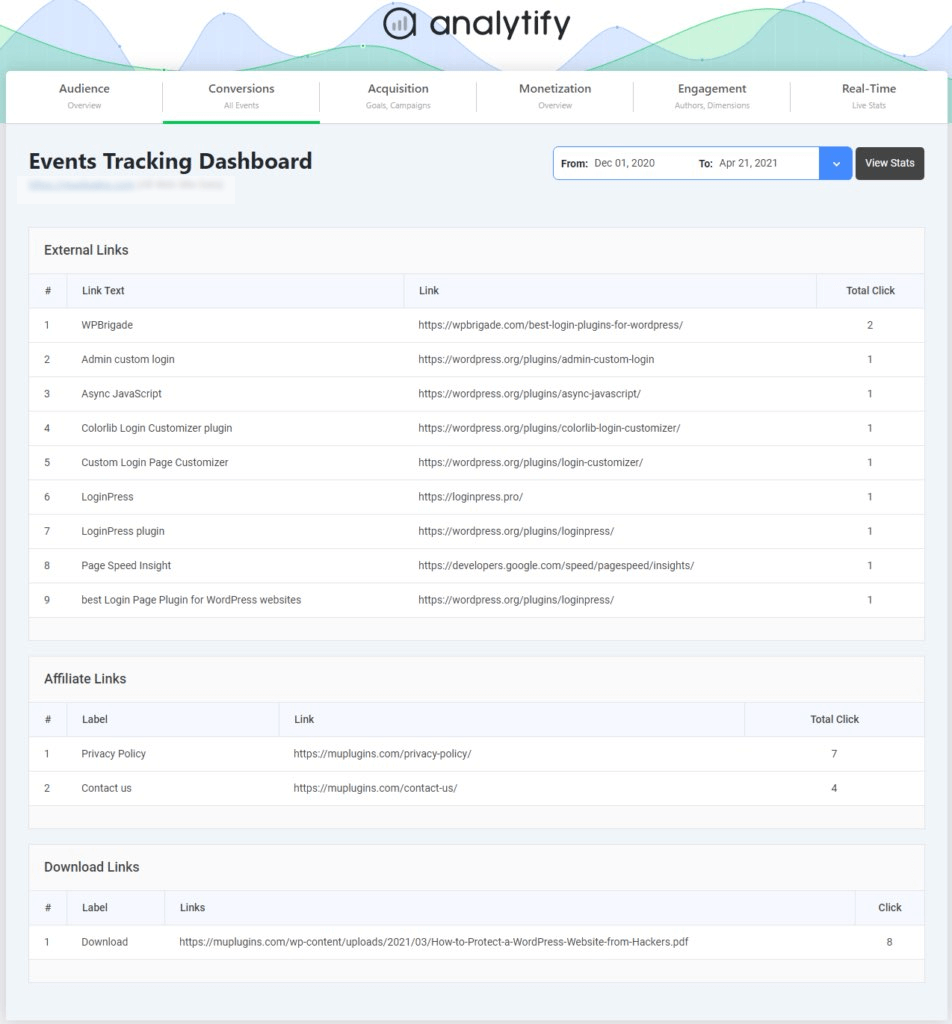
Analytify also tracks key engagement events, such as scroll depth, link clicks, and CTA interactions. These detailed metrics track content output and show how users actually interact with AI-generated content. You can clearly see which AI pages drive real actions instead of views.
Optimize AI Content Using Search Term Insights
Analytify’s Search Term Dashboard shows which keywords and queries bring visitors to your site. It helps you measure AI-generated content and identify which posts perform best. By tracking high-traffic search terms, you can optimize and prioritize AI content that drives the most engagement.
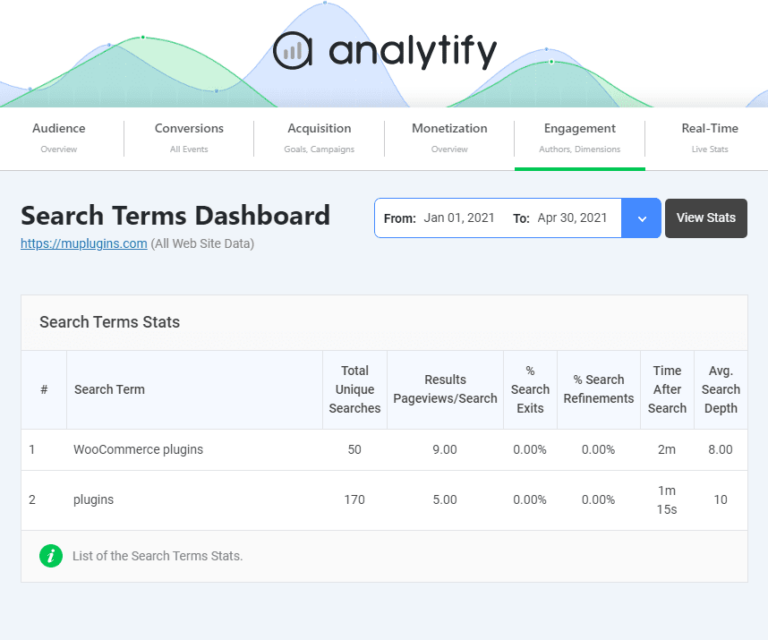
By using Analytify’s dashboards and insights, you can effectively track content output and optimize your AI-generated content to maximize engagement and results.
How to Measure SEO Performance of AI Content in SEMrush
Here’s a way you can follow to measure SEO performance of AI content in SEMrush:
Step 1: Log in to SEMrush
Open SEMrush and log in to your account.
Step 2: Identify AI Pages Ranking
- Before analyzing performance, it’s essential first to know which AI-generated pages are ranking in search results.
You can check our detailed guide on how to identify pages ranking in AI answers using SEMrush to create a clear list of AI pages that are visible to Google.
Step 3: Set Up SEO Tracking to Measure AI Content Performance
- Once you have identified the ranking AI pages, you can measure their SEO performance to see how well they are doing in terms of traffic, engagement, and authority.
- Click on Position Tracking to monitor your AI content ranking for target keywords.
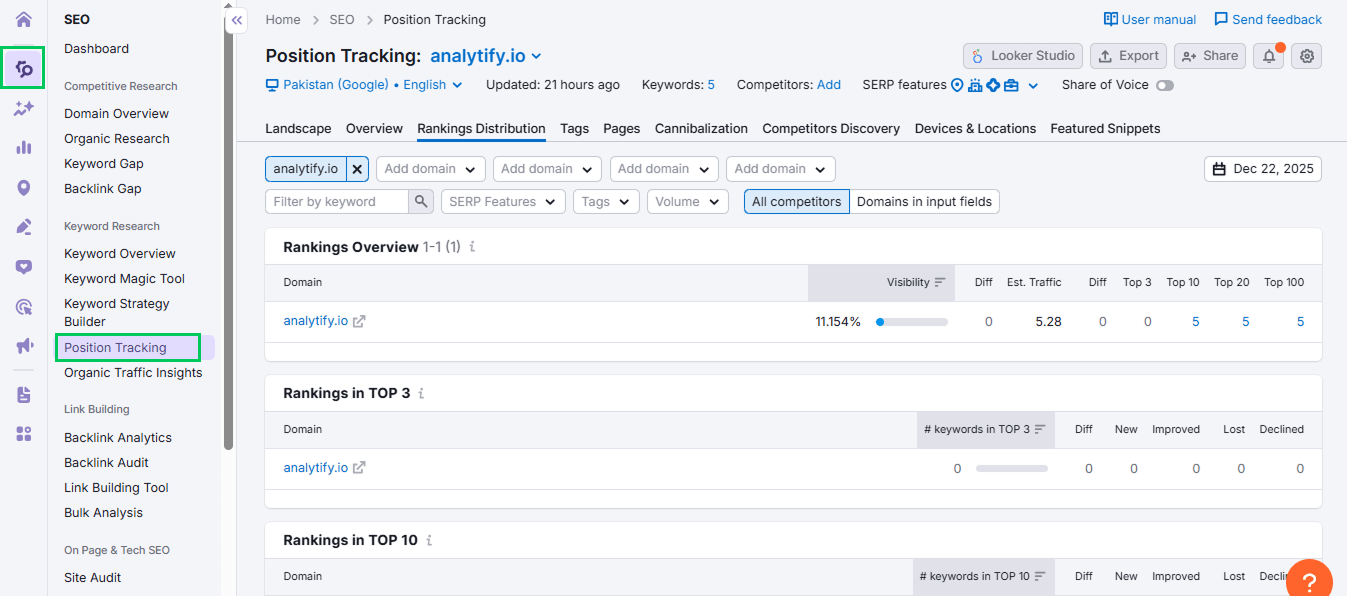
- Next, use the Organic Research tool to check organic traffic and see which pages are attracting visitors and whether traffic is growing over time.
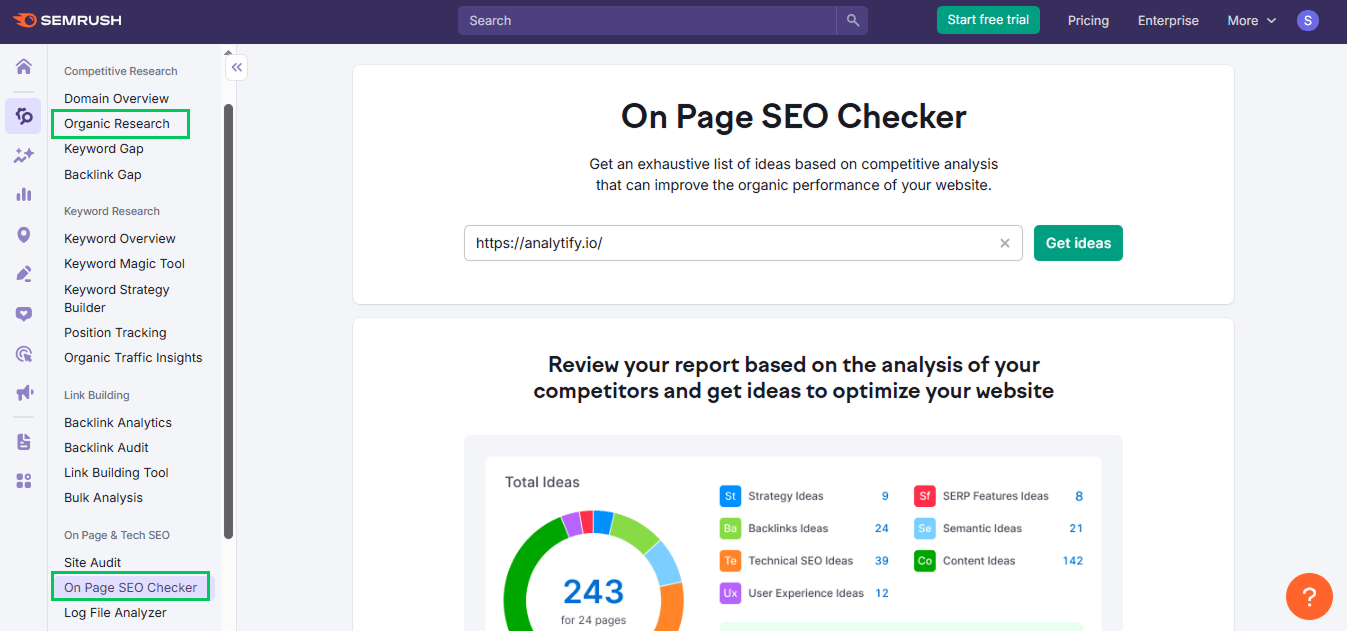
- Finally, use the On-Page SEO Checker to uncover optimization opportunities, such as content gaps and recommended keyword usage, to ensure your AI content aligns with search intent.
How to Measure What Works: AI Content Performance Signals
To know if your AI content is doing well, look at how quickly it gets noticed, how people engage, and how it ranks.
Signs of High-Performing AI Posts:
- High-performing AI posts are noticed by Google quickly and start ranking fast.
- People spend more time reading these pages than usual, and they begin to rank for multiple related keywords.
- Over time, these posts also show steady growth in impressions, meaning more people are seeing them in search results.
Signs of Underperforming AI Posts
- Underperforming AI posts show clear warning signs. Some pages get zero impressions after 2–3 weeks, meaning nobody sees them in search.
- Others have very low engagement, with visitors leaving within 20–25 seconds.
- Rankings may stay stuck on page 3 or further, and the content may provide little useful information. When many similar AI posts compete with each other, overall performance declines.
Which AI Topics Work Best
- To find the best AI topics, check cluster-level performance to see which groups of related posts perform well.
- Look for niche gaps where AI content can add value, and focus on formats that work best, like FAQs, how-to guides, and comparison posts.
What to Do When AI Content Fails
When AI content does not work well, fixing it is more important than posting fast. First, make the content better by adding human edits and new ideas. Use simple examples, real facts, screenshots, and clear step-by-step instructions so readers can easily understand and trust the content.
Next, clean up similar content. If many AI articles talk about the same topic, join them into one strong post. Remove or redirect weak pages that are too short or not helpful. This helps search engines understand which page is the most important.
To make AI content more trustworthy, always show a real author by adding an author profile. Include reliable sources and link to trusted websites to back up the information. Add human review notes to show that a person checked the content. Finally, keep it fresh by adding updated dates so readers and search engines know the content is current.
Finally, update AI content regularly. Minor updates are enough if the page is doing okay. But if people are not reading it or it is not ranking, rewrite it entirely to match what users are currently searching for.
Checklist to Create Weekly AI Content Velocity Audit Template
Use this simple checklist once every week to see how your AI content is doing and what to fix next.
- New AI posts published: Count how many new AI articles you posted this week.
- Indexed vs. non-indexed pages: Check which pages Google can see and which ones are still missing.
- Top 10 performers this week: List the 10 AI posts that got the most visits and attention.
- Bottom 10 underperformers: Find the 10 AI posts that people are not reading or clicking.
- Posts with declining traffic: Note the posts that are getting fewer visits than last week.
- Clusters needing refresh: Spot topics with many similar posts that need updates or merging.
- Action plan: Write simple actions like update, merge, rewrite, or delete.
- Next week’s publishing capacity: Decide how many new AI posts you can safely publish next week.
Common Mistakes When Scaling AI Content
When creating a lot of AI content, many sites make small mistakes that can hurt performance. Below are the most common mistakes to watch out for:
- Publishing faster than indexing: Posting many AI articles before Google can read the old ones.
- Targeting too many similar keywords: Writing many posts about almost the same topic, which confuses Google.
- Ignoring engagement signals: Not checking if people actually read, scroll, or stay on the page.
- Not tagging AI content: Forgetting to label which posts are written by AI.
- Overlooking content decay: Not noticing when old AI posts slowly lose visitors.
- Relying only on traffic instead of conversions: Looking only at visits, not at sign-ups or actions.
- No cluster-level tracking: Not checking how groups of similar AI posts perform together.
Knowing these common mistakes helps you grow AI content while keeping quality and results on track using AI content velocity analytics.
Frequently Asked Questions About AI Content Velocity Analytics
1. What is content velocity?
Content velocity is the speed at which new content is created and published on a website. Using AI tools helps you understand how quickly AI-generated content is produced and how well it performs over time. AI content velocity analytics can track these patterns to improve overall content strategy.
2. How much AI content is acceptable for SEO?
There’s no fixed number, but balance is key. Using AI for bulk content can save time, but Google values quality over quantity. Monitoring AI content with AI content velocity analytics helps ensure you don’t publish too much, too fast, and risk search visibility.
3. Is AI content good for SEO?
AI content can be good for SEO when it provides valuable, relevant, and well-written information for users. Monitoring performance with AI content velocity analytics ensures it supports rankings, engagement, and overall site quality.
4. How do you measure AI-generated content performance?
Engagement, traffic, conversions, and search visibility measure performance. AI content velocity analytics allows you to monitor these metrics, helping you see which AI-generated content works best and which needs updates.
5. What is the 30% rule for AI?
The 30% rule suggests that no more than 30% of your content should be fully AI-generated without human editing. This ensures a balance between automation and quality, helping you maintain strong SEO performance while following AI content velocity analytics. It’s important to note that this is an industry guideline based on best practices, not an official Google policy.
6. What is the velocity AI overview?
A velocity AI overview shows the rate of AI content creation, publishing frequency, and performance trends. Using GA4 for bulk content helps you track content output, see which AI posts perform well, and identify areas that need improvement.
Final Thoughts: AI Content Velocity Analytics
In this guide, we first explored what AI content velocity analytics means and the core metrics used to measure AI-generated content.
Next, we covered tagging and segmenting AI content in GA4 for bulk content, showing how to track performance separately for AI, human, and hybrid posts. Tools like Analytify simplify monitoring by providing detailed dashboards, page-level reports, engagement events, and search term insights, making it easy to track content output effectively.
We also outlined SEMrush tools for measuring SEO performance and identifying optimization opportunities. Finally, we highlighted common mistakes, such as over-publishing, ignoring engagement signals, and failing to track clusters, and offered strategies to fix underperforming content.
Following these steps helps you track content output effectively and optimize AI content for consistent growth.
For further guidance, you can read:
- AI-Ready Analytics: How to Optimize WordPress Tracking for LLM Search
- AI Visibility: How to Enhance Your Brand Presence in LLMs?
- 10 Best AI Tools for SEO: Find a Solution to Streamline the Workflow
Now it’s your turn, tell me how you are measuring your AI content performance? Share your experiences and thoughts in the comments below!