GA4 Insights for AI Content: How to Analyze Pages That Rank in AI Answers

To get GA4 insights for AI content, first list the pages that AI tools cite using SEMrush AI Visibility, then check those URLs in GA4 landing page reports, Explorations, and the AI Assistant channel.
Google shows AI Overviews, Perplexity shows sources, and tools like ChatGPT Search and Bing Copilot quote websites inside their answers. A page that appears in these answers gains visibility that differs from a normal ranking.
AI-ranked content means pages that AI tools cite, link to, or use as supporting information. Such a page may not appear in the Google top 10, yet it can appear in AI answers when the content is clear and well structured.
This guide is for WordPress site owners and editors who want to see how AI-cited pages perform. I cover three topics:
- How to use SEMrush’s AI Visibility report to analyze AI-ranked content
- How to verify AI-related engagement using GA4 traffic insights, landing pages, and attribution
- How Analytify displays these GA4 metrics inside WordPress so you can spot patterns faster
You end with a list of your AI-cited pages and a view of how visitors engage with them.
GA4 Insights for AI Content (TOC):
Why GA4 Insights for AI Content Matter
GA4 insights for AI content matter because GA4 shows what visitors do after an AI answer cites your page. AI answers shift how visitors find you: they can send traffic that leaves no keyword data in Google Search Console. Those visitors can arrive through the Direct channel, Unassigned, or the AI Assistant channel in GA4.
This shift makes GA4 the primary system for detecting AI-driven visibility. Instead of ranking positions, you track user behavior patterns that follow AI citations and summaries.
With the right GA4 setup, you can tie AI visibility directly to business KPIs:
- AI Visibility: landing page spikes, new referrers, direct surges
- GA4 Behavior Insights: engagement time, scroll depth, repeated sessions
- Key events: form submissions, purchases, signups, or any event you mark as a key event
GA4 shows whether your AI-ranked content is only mentioned or also drives engaged sessions and key events.
What “AI-Ranked Content” Means
A page is considered AI-ranked when an AI system uses it as a source for generating answers. This includes Perplexity sources, ChatGPT/Copilot citations, and links inside Google AI Overviews.
If Perplexity shows ‘example.com’ under its Sources box, that page is AI-ranked even if it doesn’t rank on page one.
How AI Tools Rank These Pages
AI systems prefer pages that:
- Give clear definitions
- Use structured information
- Contain bullet points or steps
- Offer factual, updated explanations
- Have strong topical relevance
- Answers specific questions clearly
- Includes structured markup where relevant
This is different from traditional SEO, where ranking depends heavily on backlinks, domain authority, and competition.
What are Engagement Signals That Prove AI-Driven Traffic
Not all AI tools send referral data. GA4 has an AI Assistant channel for visits from sources such as ChatGPT, Gemini, Copilot, and Grok, and that channel does not include Google AI Overviews or AI Mode. Visits without referrer data still appear as Direct. Check these patterns for AI-generated traffic:
Sudden Increase in “Direct” Traffic After Your Page Appears in AI Answers
AI tools such as ChatGPT Search, Bing Copilot, and Claude can send traffic without referrer data. Those clicks show up in GA4 as:
- Acquisition >> Traffic acquisition > Session default channel group = Direct
- Landing page spikes with unassigned / direct sources
A sudden rise in Direct traffic shortly after Perplexity, Copilot, or ChatGPT cites your page may be AI-driven traffic. Direct also includes saved links and typed URLs, so confirm with other signals.
These signals are part of modern AI performance tracking.
Three Types of AI Search Performance Signals
AI search performance has three signals: AI visibility, AI-driven traffic, and content fitness. Together they show whether AI tools cite your content, send traffic, and deliver engaged visitors.
1. AI Visibility
AI visibility is how often AI tools reference your pages. Tools like SEMrush AI Visibility measure it and show:
- Pages cited in Perplexity, Bing Copilot, ChatGPT Search, and Google AI Overviews
- AI Visibility score at domain and URL level
- Keywords where your page was used as an AI source
AI visibility is your discovery signal. It shows which pages AI systems cite.
2. AI-Driven Traffic
The clicks you receive from AI platforms or from users influenced by AI answers.
While still emerging, this traffic appears in GA4 as:
- Direct spikes (common from ChatGPT/Copilot clicks)
- Sessions in the AI Assistant channel, or new referrers such as perplexity.ai or copilot.microsoft.com
- Increased landing page views without matching SEO keyword growth
AI-driven traffic is your verification signal. It shows visitors arriving at your AI-ranked content.
3. Content Fitness (User Engagement After Landing)
How well the page performs once the visitor lands on your site.
You can measure this through:
- GA4 Engagement: engagement rate, scroll depth, time on page, event interactions
- Analytify Page Reports: device trends, exits, traffic sources, geo data
- Behavior patterns: high engagement = a “fit” page for AI sourcing
Content fitness is your quality signal. It shows how well AI-cited pages hold visitors.
What Tools Do You Need to Analyze AI-Ranked Content
To measure how your pages perform in AI search, you need three tools. Each one provides a different layer of insight:
1. SEMrush AI Visibility
SEMrush AI Visibility shows which pages AI tools reference, with AI citations, visibility scores, and the keywords that trigger them.
2. GA4
GA4 verifies traffic and engagement on AI-cited pages. It tracks landing page visits, traffic sources, and behavior metrics such as scroll and engagement rate.
3. Analytify
Analytify displays GA4 insights inside WordPress. It gives writers and editors quick page-level stats without opening GA4.
How to Identify Pages Ranking in AI Answers Using SEMrush
Use the SEMrush AI Visibility Toolkit to identify which of your pages appear inside AI-generated answers. The toolkit reports AI citations, page-level sources, AI-triggering keywords, and a domain-level visibility score.
Below are accurate, step-by-step instructions for LLM search performance tracking.
Accessing the AI Visibility Toolkit
- Log in to SEMrush.
- In the left-hand navigation, look for AI or AI Visibility and open the AI Visibility Toolkit.
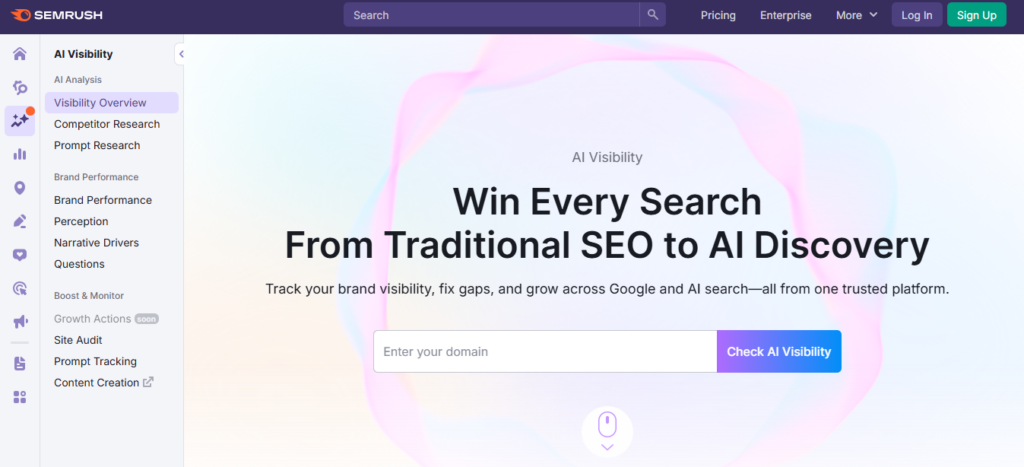
- Open Visibility Overview (or Brand Performance / Visibility Overview) to see your domain-level dashboard and trend graphs. Use Prompt Research when you want prompt-level or topic-level insights.
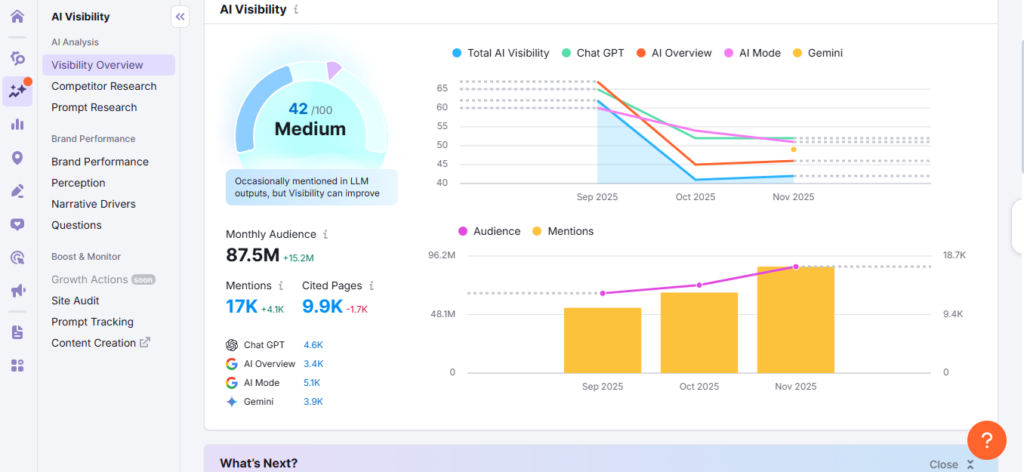
Alternate path: If you prefer starting from Domain Overview, open Domain Overview and then look for AI features or links to the AI Visibility Toolkit from the domain summary.
What the Report Shows!
- AI Visibility Score — overall measure of how often your domain appears in AI answers (track this monthly).
- AI Citations / Page-Level Sources — counts and lists of URLs that AI tools used as sources (Perplexity, ChatGPT Search, Google AI Overviews, Copilot, etc.).
- AI Keywords / AI-triggering prompts — queries and prompts that led to your pages being cited. Use Prompt Research for prompt-level detail.
- Visibility Graphs & Trends — trend lines and spike detection for citations and visibility over time.
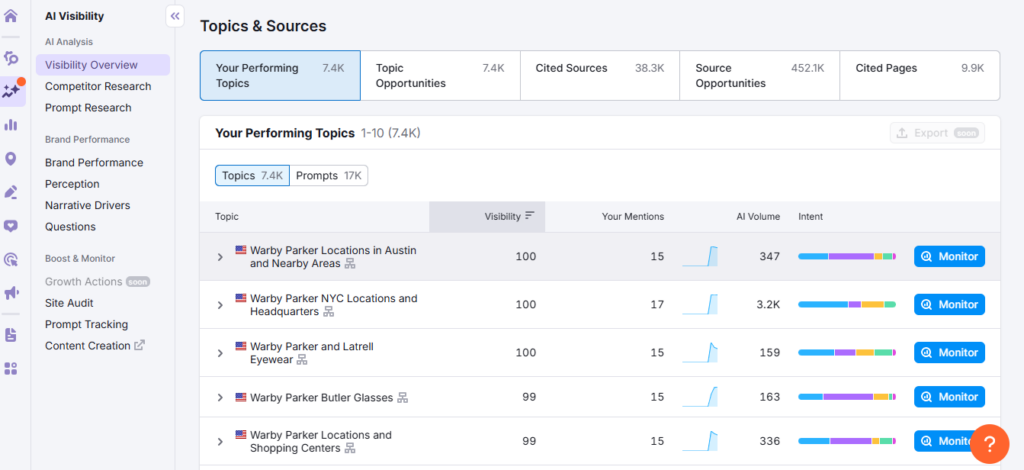
Export your AI-ranked Pages (Step by Step)
- In Visibility Overview or the URL list, locate the Export button. Export the full dataset (URLs, AI citations, AI Keywords, visibility score).
- In your export, flag pages that show:
- High AI citations
- Strong visibility score
- Multiple AI-triggering keywords
- High AI citations
- These flagged URLs are your priority list to analyze later in GA4 and Analytify.
How to interpret the most important metrics
- AI Visibility Score — baseline for domain-level presence in AI answers; use it for monthly benchmarking.
- AI Citations — higher counts indicate the content is being reused/extracted by AI tools (trust and extractability).
- AI Keywords / Prompts — reveal the specific queries that generate AI citations; use them to map which topics your pages serve for AI.
- Position in AI results / Source order — where available, this shows your place among the sources used by a given AI answer (useful to prioritize pages).
Benchmarking vs Competitors
In the AI Visibility Toolkit, open the Competitor Research (or run the same Visibility Overview for competitor domains).
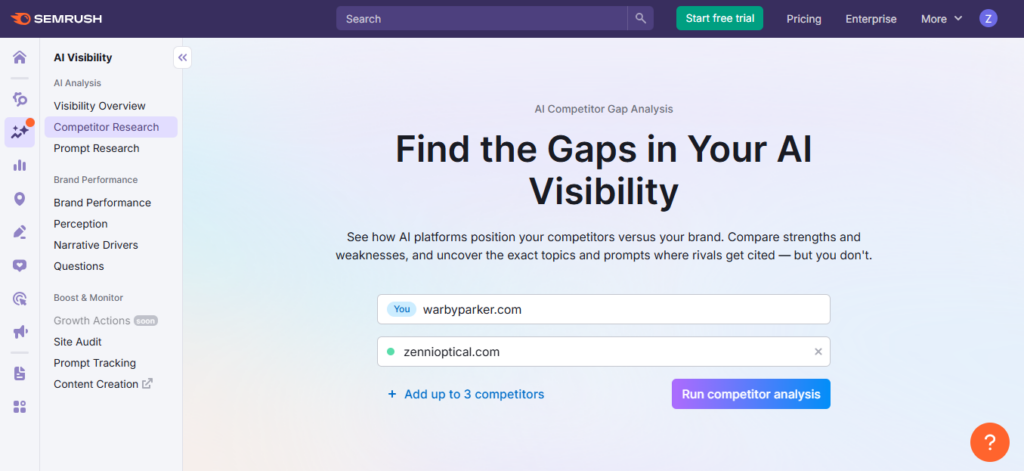
- Compare:
- Their AI Visibility Score vs yours
- Number of AI citations and the trend lines
- Which URLs have they cited (copy/export their cited URLs)
- Their AI Visibility Score vs yours
- Inspect competitor AI-ranked pages to identify structural and content differences: headings, definitions, FAQs, lists, tables, or extractable snippets. These often explain why AI systems prefer certain pages.
Use Exported AI Keywords to Find Content Gaps
- Export AI Keywords for competitors and filter for prompts they trigger but you don’t rank for. These are practical content opportunities: write new pages, add clearer definitions, or add structured sections (tables, steps, FAQs) that are easy for AI to extract.
How to Analyze GA4 Insights for AI Content (Step by Step)
Check your AI-ranked URLs in GA4 by opening the Landing page report, filtering for each URL, and building an Exploration. The goal is to verify engagement, traffic patterns, and behavior signals, so you can tell whether AI visibility produces real user actions.
Step 1: Open the Landing Pages Report
The Landing Pages report shows how users first arrive on your site. It is critical for measuring AI-driven traffic.
How to access it:
- Open GA4 >> Reports
- Go to Engagement >> Landing page or Pages and screens.
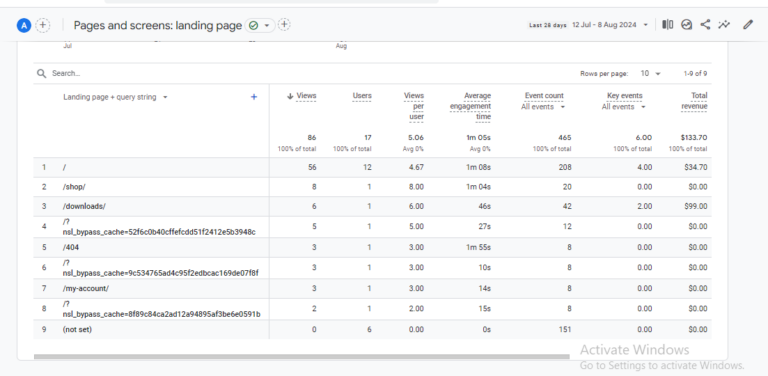
- Switch the primary dimension to Landing page (or add Landing page + query string for full path tracking)
The Landing page report shows views, users, engagement time, and key events for each landing page.
Step 2: Filter for Your AI-Ranked URLs
Use the list exported from SEMrush to focus on AI-ranked pages.
How to filter:
- In the Landing Pages report, use the Search box to find a specific URL slug (e.g., /what-is-schema/)
- GA4 will display metrics for that page
- Repeat for each AI-ranked page
Tip: For more consistent filtering across charts and tables, consider using a custom Exploration (next step).
Step 3: Build a Custom Exploration to See GA4 Insights for AI Content
Custom Explorations provide deeper GA4 insights for AI Content into user behavior.
Steps:
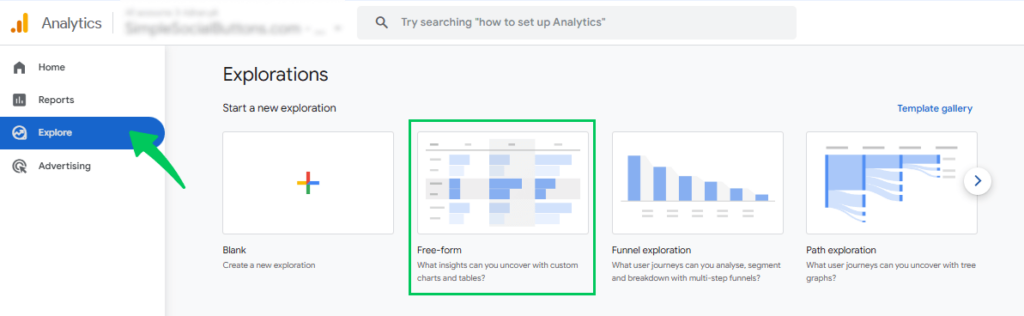
- Go to Explore >> Free form.
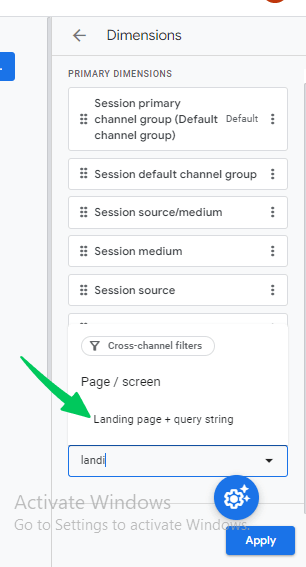
- Add Landing page (or Landing page + query string) as a dimension.
- Add metrics:
- Views (pageviews)
- Users
- Average engagement time
- Key events
- Scroll depth (only if scroll tracking is set up)
- Views (pageviews)
- Apply a filter: Landing page contains your AI-ranked URL
Landing Pages report allows you to monitor engagement and behavior specifically for AI-cited pages.
Step 4: Analyze Core Metrics
Key metrics to analyze AI-ranked content traffic:
- Views & Users – Track trends over time. Spikes may indicate AI citations or new AI visibility.
- Average Engagement Time – Higher time means users are reading, not bouncing.
- Events & Key events: Look at scrolls, clicks, form submissions, and other key events. These show the page’s content fitness.
- Traffic Patterns Over Time – Use the line graph to spot spikes after AI updates or new AI citations.
- New vs Returning Users – A sudden rise in new users may indicate AI-driven traffic.
Step 5: Add Secondary Dimensions
To uncover hidden patterns, include dimensions like:
- Session source / medium
- Page referrer
- Device category
- Country
Why:
- Some AI tools send traffic as “Direct” (no referrer).
- Country or device trends may reveal traffic from global AI platforms or mobile apps.
Step 6: Save a Dedicated AI Traffic Exploration
For ongoing monitoring:
- Save your Exploration as “AI Content Performance”
- Update the page list whenever SEMrush identifies new AI citations
This approach allows you to track AI-driven traffic and engagement trends over time without rebuilding reports.
Step 7: Optional Enhancements
- Compare Dates: Use GA4’s date comparison to see before/after traffic changes related to AI citations.
- Custom Metrics: Include scroll depth, video engagement, or other GA4 events if you want deeper insights.
- Segments: Create a segment where Session default channel group is AI Assistant, or where Session source matches the AI referrers you see, to isolate AI-driven behavior.
How to Analyze AI-Ranked Content with Analytify (WordPress-Level Stats)
Join 50,000+ beginners & professionals who use Analytify to simplify their Google Analytics!
Analytify lets you view page-level analytics directly inside WordPress. While it cannot identify traffic specifically from AI tools, you can review the performance of AI-ranked pages individually or within the general pages report.
Step 1: Open the Pages Report
- Log in to your WordPress dashboard.
- Navigate to Analytify Dashboard.
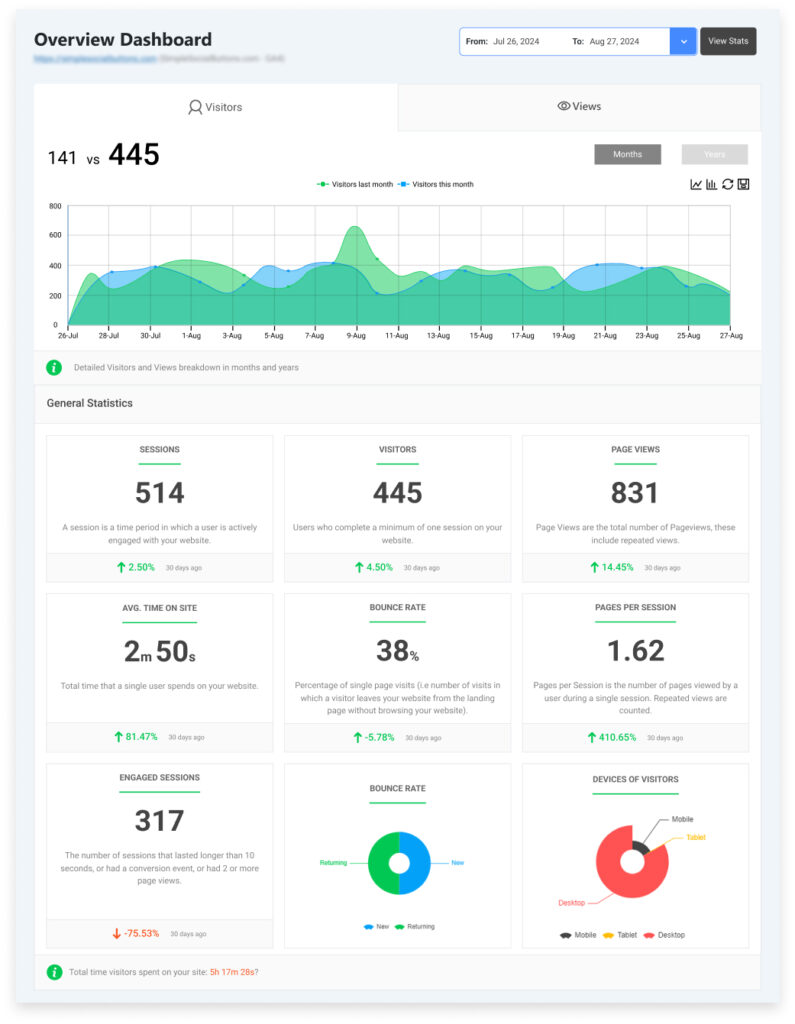
Scroll down the page to see top pages by views.
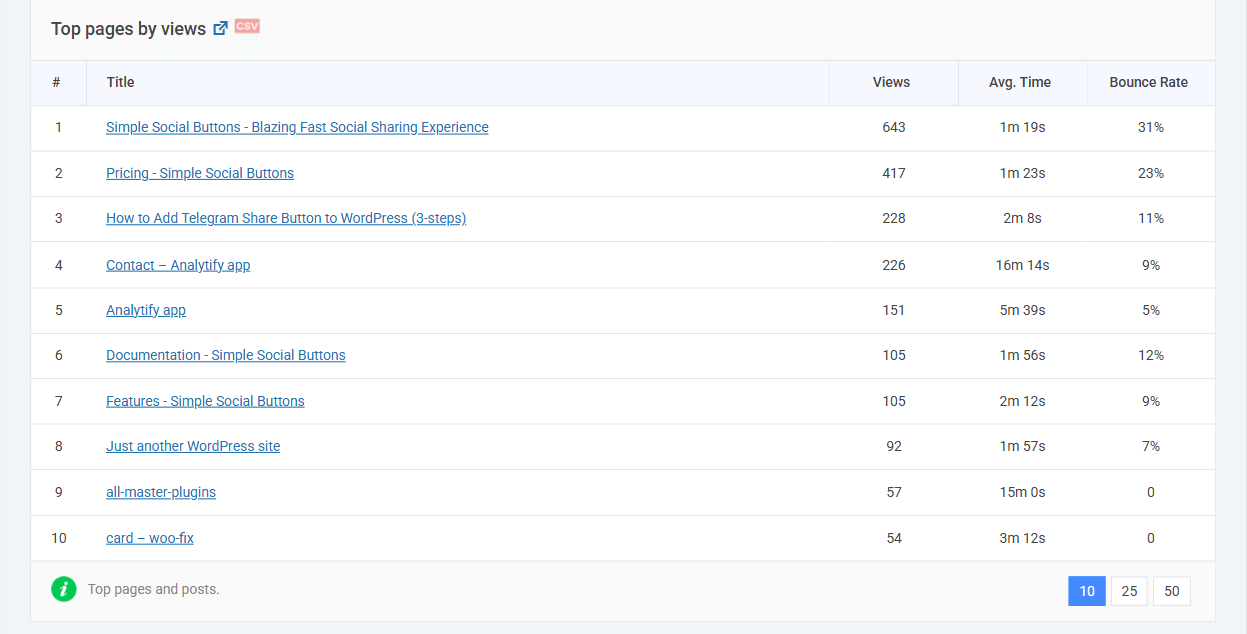
This report provides a quick overview of engagement for each page without opening GA4.
Step 2: Locate Your AI-Ranked Pages
Since Analytify cannot automatically tag AI-cited pages:
- Go to specific URLs from your SEMrush AI-ranked list. Means, in your WordPress site you open AI ranked pages or post.
- Then scroll down the page to open each page’s detailed stats to review performance individually.
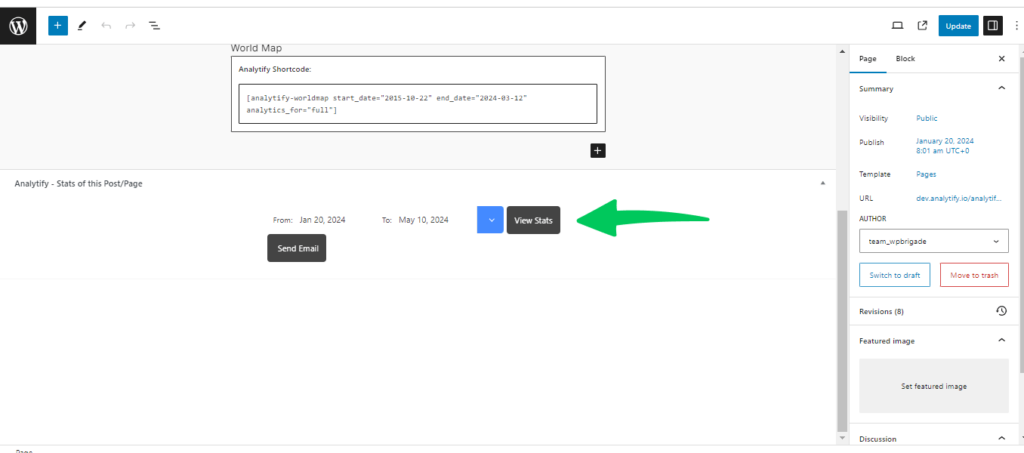
You’ll see a table listing all your pages with key metrics such as:
- Pageviews
- Unique visitors
- Average time on page
- Bounce rate
- Exit rate
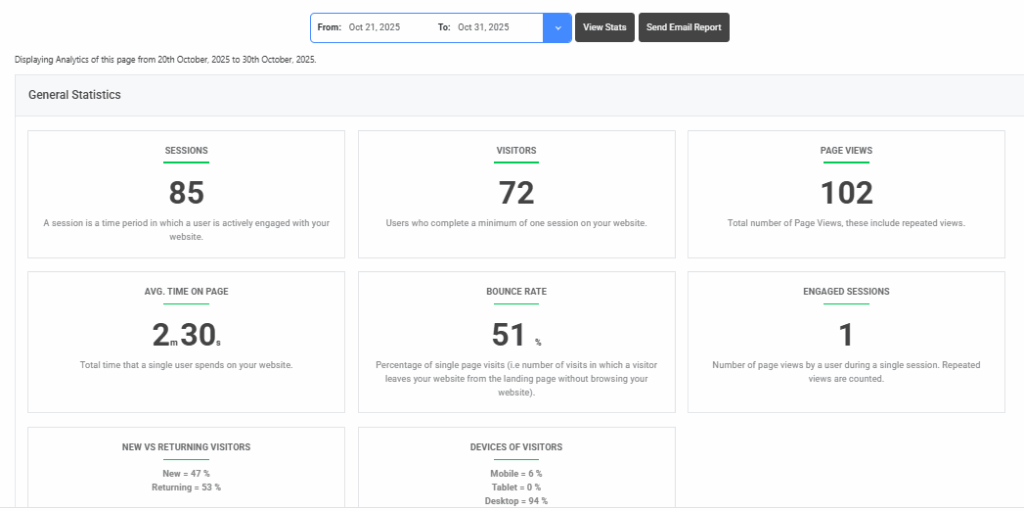
This allows you to focus on the AI-ranked content that matters most.
Step 3: Key Metrics to Monitor
Even without AI-specific filters, these metrics reveal how users interact with AI-cited content:
- Pageviews Trend – Shows whether the page consistently attracts visitors.
- Average Time on Page – Indicates engagement depth.
- Bounce Rate / Exit Rate – Highlights pages that may need improvement.
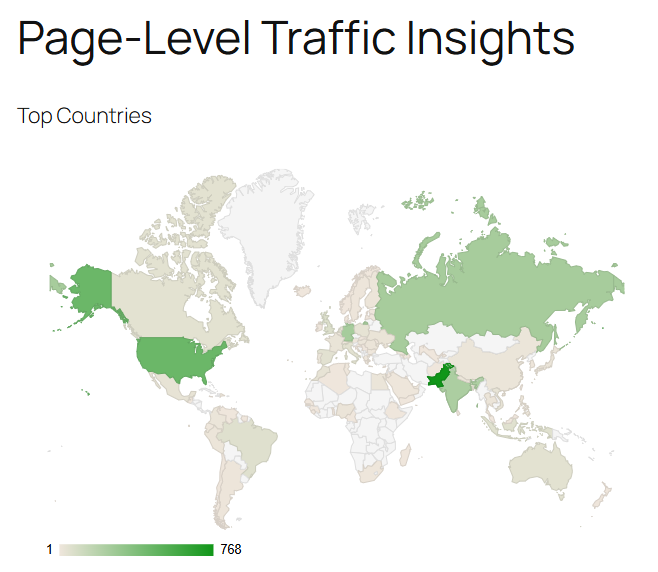
- Device & Geo Information – Understand which devices and locations drive traffic.
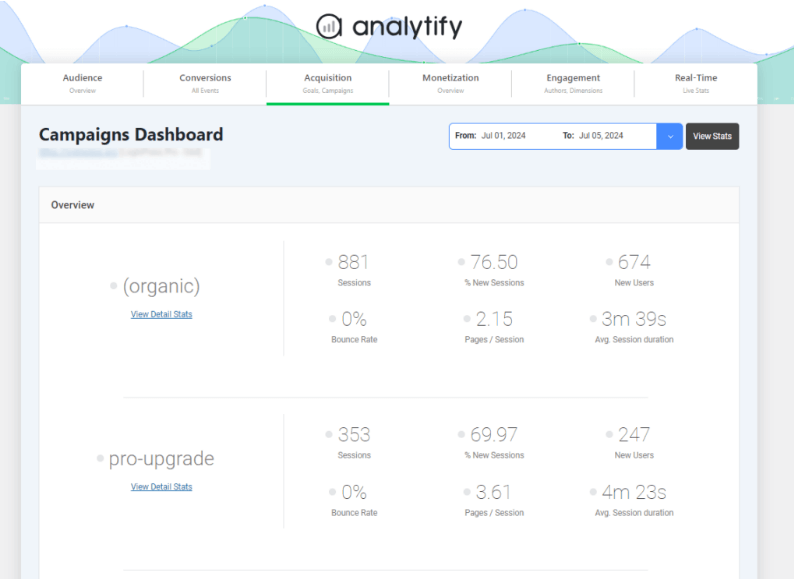
- UTM / Campaign Tags – Track traffic from specific campaigns or experiments, if applied.
Why Analytify Adds Value
- Quick insights for writers and editors: See page performance without opening GA4.
- Front-end accessibility: Teams can monitor metrics directly in WordPress.
- Identify content updates: Spot AI-cited pages that need refreshed stats, clearer explanations, or better structured content for easier AI extraction.
Optional Tip
For ongoing tracking:
- Maintain a list of AI-ranked pages in WordPress.
- Regularly check metrics for changes in engagement or traffic trends.
- Use Analytify in combination with GA4 for deeper analysis of AI-driven traffic patterns.
How to Improve Content That Ranks in AI Answers
Improve AI-cited pages by adding clear definitions, step-by-step instructions, internal links, structured data, fresh information, and readable layout. AI systems favor content that is clear, structured, and easy to extract.
1. Add Clear Definitions and Summaries
- Start sections with concise definitions.
- Summarize complex concepts using bullet points or numbered lists.
- Example: A brief step-by-step summary at the top of the page makes it easier for AI tools to extract key information.
2. Strengthen Step-by-Step Instructions
- Break processes into discrete steps.
- Use headings and subheadings for each step.
- Include actionable instructions so AI tools can reuse them in generated answers.
3. Improve Internal Linking
- Link to related pages on your site to create strong contextual connections.
- Internal links also help users explore related content after landing.
4. Use Structured Data
- Add tables, lists, or schema markup to make content machine-readable.
- Examples: FAQ schema, HowTo schema, or product tables.
- Structured content increases the likelihood of AI citation.
5. Refresh Outdated Information
- Update statistics, screenshots, and examples regularly.
- Remove outdated references that AI tools may misinterpret.
- Ensure accuracy and trustworthiness. These are key factors for AI citation.
6. Optimize for Readability
- Use short sentences and plain language.
- Break content into sections with descriptive headings.
- Include images, charts, or visuals for clarity.
These steps ensure your AI-ranked pages remain high-quality, AI-friendly, and user-friendly, helping maintain or increase visibility in AI-generated answers.
Identify New Content Opportunities Using SEMrush AI Keywords
Find new content opportunities by exporting competitor AI Keywords from SEMrush and comparing them with your own content. The gaps show topics that AI tools cite for competitors but not yet for your site.
Step 1: Export Competitor AI Keywords
- Open a competitor’s AI Visibility report in SEMrush.
- Export their AI Keywords list queries where their pages appear in AI answers.
- Compare these keywords with your own content to find coverage gaps.
Step 2: Map AI Keywords to Your Content Calendar
- Group similar keywords into clusters.
- Assign each cluster to a new or existing content page.
- Prioritize topics with high relevance and low competition in AI answers.
Step 3: Create LLM-Ready Content Templates
- Structure pages for AI extraction using:
- Headings and subheadings
- Bullet points or numbered lists
- Tables
- Clear definitions and concise explanations
- Headings and subheadings
- Example: For the keyword “GA4 content insights for AI,” create a section that directly answers the query step-by-step.
Step 4: Track and Update
- Monitor AI visibility reports regularly to see if new pages are cited.
- Update content with fresh data, visuals, and structured information.
- Repeat the process to continuously expand your AI visibility footprint.
FAQs on GA4 Insights for AI Content
1. How do I analyze my AI search traffic in GA4?
GA4 does not label traffic as “AI-driven.” You analyze AI-ranked pages by filtering landing page reports or creating custom explorations for the URLs exported from SEMrush. Track metrics like pageviews, engagement time, and bounce rate to measure user behavior. That’s how you can see GA4 insights for AI content.
2. How can I see which pages rank in AI answers?
Use SEMrush AI Visibility report to find pages cited by AI tools. The report lists URLs, AI citations, AI Keywords, and visibility scores.
3. What metrics show AI content performance in GA4?
Focus on metrics such as:
Pageviews – total visits to the AI-cited page
Users – unique visitors
Average engagement time – indicates if visitors are reading
Bounce and exit rate – shows engagement issues
Conversions/events – track goal completions
4. How do I track AI visibility trends over time?
In SEMrush, monitor your AI Visibility Score and citation trends.
In GA4, track the performance of AI-ranked URLs over time using landing page reports or custom explorations.
5. Does Google show AI traffic separately in GA4?
No. GA4 does not currently differentiate AI-driven traffic. You infer AI traffic by matching AI-ranked URLs from SEMrush with your GA4 landing page or custom exploration reports.
6. How can WordPress users improve content for AI answers?
Add clear definitions and summaries
Use step-by-step instructions
Improve internal linking
Include tables or structured data
Refresh outdated information
Optimize readability and layout
Following these steps increases the likelihood that AI tools will cite your content.
GA4 Insights for AI Content: Conclusion
AI search is becoming a key source of visibility for websites. Pages that appear in AI-generated answers ( your AI-ranked content) can drive traffic, build authority, and improve engagement even if they don’t rank at the top of traditional search results.
In this guide, you learned how to:
- Identify AI-ranked pages using SEMrush AI Visibility reports
- Analyze performance of these pages in GA4 and at the WordPress level with Analytify
- Optimize content to increase AI citations through clear definitions, structured data, internal linking, and step-by-step instructions
- Find new content opportunities using competitor AI Keywords
By regularly tracking AI visibility and updating your content, you can ensure that your WordPress site stays relevant in both AI-generated answers and traditional search results.
You may also like to read How to Set Up Google Analytics 4 and Connect it to Your WordPress Site?.
Which of your pages do you think has the highest potential to appear in AI answers, and how would you improve it?