AI-Ready Analytics: How to Optimize WordPress Tracking for LLM Search

AI-ready analytics means configuring your WordPress tracking with clean GA4 events, consistent parameters, and clear metadata, so you can measure how visitors engage with your content.
More users now ask LLMs such as ChatGPT, Perplexity, and Google AI Overviews instead of searching by keyword. Keyword reports alone do not show how your content performs in that shift. I recommend tracking engagement with clean GA4 events and keeping your metadata and structured data accurate.
Structure your WordPress tracking for GA4 and use Analytify to make your events, dimensions, and metadata consistent and machine-friendly. Consistent data makes it easier to track engagement and find your high-value pages. This guide is for WordPress site owners who want a clean, consistent GA4 setup.
This guide shows how to:
- Configure GA4 for AI‑ready analytics
- Structure events and parameters for LLM interpretation
- Optimize WordPress content and metadata for AI
- Use Analytify to make structured, readable, and AI-friendly Analytics.
AI-Ready Analytics (TOC):
Why Traditional Keyword SEO is No Longer Enough
Keyword SEO alone is no longer enough because search is shifting from keyword queries to AI-driven, conversational answers.
Instead of returning a list of blue links, tools like ChatGPT Search, Perplexity, and Google AI Overviews generate direct answers. Google states that standard SEO best practices still apply to AI Overviews and AI Mode, and that no additional requirements or special optimizations are needed.
AI-ready analytics should track more than rankings and traffic counts. Analytics should also show how visitors engage with your content.
What is AI‑Ready Analytics?
AI‑ready analytics means configuring your WordPress tracking with consistent naming, structure, and machine-readable metadata, so site behavior, content performance, and user interactions are easy to interpret. Traditional analytics focuses on dashboards and reports for humans. AI-ready analytics adds structure, consistency, and machine readability.
LLM search engines, like ChatGPT Search or Perplexity, read your pages and their metadata. These are the main elements of an AI-ready setup:
- Event patterns: How users interact with pages and features
- Metadata: Titles, descriptions, schema markup, and content attributes
- Content context: Hierarchies, categories, and semantic relationships
- Clean data layers: Consistent naming and unambiguous parameters
Think of it as a difference between:
- Tracking for reporting: Collecting data to see graphs and dashboards
- Tracking for AI interpretation: Structuring data so AI can analyze it, detect trends, and reference content correctly
Implementing AI-ready analytics keeps your WordPress data consistent and your metadata clear. No setup guarantees that AI search tools will cite your content.
How AI Tools Interpret Website Signals
AI tools read a site through its text, headings, metadata, and structured data. Consistent naming and a clear structure make that content easier to interpret.
Key elements that support interpretation:
- Consistent Event Taxonomy: Standardized event names (e.g., page_view, signup_click) make interactions predictable and readable for AI.
- Clean URL Structure: Semantic URLs like /blog/ai-ready-analytics help AI interpret page context quickly.
- Metadata: Titles, descriptions, and schema markup provide context for summaries and answers.
- Content Hierarchy: Clear H1 → H2 → H3 structures help AI detect topic importance and relationships.
Using GA4 and Analytify, you can surface these signals clearly:
- GA4 tracks user behavior in a structured way.
- Analytify organizes page-level events, metadata, and dimensions in a readable format for AI.
The result is a WordPress site whose analytics are consistent and machine-readable.
How to Optimize WordPress Tracking for LLM Search (Step by Step)
Optimize WordPress tracking for LLM search in six steps: set up GA4, configure tags, structure event parameters, organize reports in Analytify, optimize content structure, and use the data to improve content signals.
Step 1: Set Up GA4 for AI-Ready Analytics
Configure your GA4 property correctly first. Clean, accurate data is the foundation of reliable page-level reporting.
How to Prep GA4 for AI Tools?
Check these four items to prepare GA4:
- Proper GA4 Property Setup: Verify your property, data streams, and time zones are correct.
- Enhanced Measurement: Enable automatic tracking for page views, scrolls, outbound clicks, site search, video engagement, file downloads, and form interactions.
- Event Data Accuracy: Check that events are firing correctly without duplication or missing data.
- Avoid Conflicting Plugins: Disable or configure plugins that might send duplicate events.
Why it matters:
Clean GA4 data lets you trust the engagement numbers for each page. Messy or duplicated events distort those numbers.
Step 2: Configure GA4 Tags for AI-Friendly Data
Once your GA4 property is properly set up, the next step is to configure tags so that events and interactions are meaningful for AI interpretation.
Proper tag configuration ensures your events are semantic, consistent, and easy for AI to interpret. Well-named and structured tags allow LLMs to understand user behavior and content context accurately.
Best practices for GA4 tagging:
- Use Clear Event Names: Start by using descriptive event names that clearly reflect user intent. Avoid generic labels like click1 or event_action. Instead, use names such as signup_click, newsletter_submit, or video_play. Clear naming allows AI systems to differentiate between passive interactions and high-intent actions.
- Add Semantic Parameters: Next, enrich events with semantic parameters. Parameters like page_category, content_type, topic_name, or cta_location provide context that helps AI understand where and why an interaction occurred. For example, a signup_click on a blog post about analytics signals a different intent than the same event on a pricing page.
- Organize Events Hierarchically: Organize related events using a logical hierarchy. Grouping engagement events (e.g., video_start, video_complete, scroll_depth) under a consistent structure helps AI detect behavior patterns across content types.
- Test Tags Thoroughly: Finally, test all tags using GA4 DebugView or GTM Preview mode. Ensuring each tag fires correctly and only when intended prevents noisy data that can weaken AI-ready analytics signals.
Proper GA4 tagging produces structured, machine-readable data. This allows LLMs to detect behavioral patterns, track content engagement, and understand the context of your WordPress pages more accurately.
Step 3: Structure Event Parameters for LLM Interpretation
Event parameters provide the context layer that helps AI tools understand what user actions actually mean. While event names describe what happened, parameters explain where, why, and in what context the interaction occurred. Well-structured parameters are essential for AI-ready analytics.
Best practices:
- Consistent Naming: Start by enforcing consistent naming conventions across all parameters. Use descriptive names such as page_category, content_type, topic_name, or author_name instead of ambiguous labels like value1 or param_a. Consistency allows AI systems to compare behavior patterns across pages and sessions reliably.
- Semantic Labels: Next, use semantic labels that reflect real content attributes. Parameters like category_slug, schema_type, or content_goal help AI models connect user behavior with content intent. For example, tracking whether a page serves an informational, transactional, or navigational goal provides valuable signals for AI-driven search interpretation.
- Avoid Generic Parameters: Avoid generic or overloaded parameters. When a single parameter represents multiple meanings, AI tools may misclassify interactions or ignore them altogether. Each parameter should serve a single, clear purpose.
- Use Standard Data Types: Finally, ensure parameters follow GA4’s expected data types. Strings, numbers, and booleans should be used consistently. Clean, structured parameters enable LLMs to detect engagement trends, identify high-performing content, and understand how users interact with your WordPress site at scale.
Why it matters:
Consistent parameters make reports easier to filter and compare. To report on an event parameter in GA4, register it as an event-scoped custom dimension. The data appears in reports 24 to 48 hours after you create the custom dimension.
Step 4: Use Analytify to Organize Analytics
Join 50,000+ beginners & professionals who use Analytify to simplify their Google Analytics!
While GA4 collects raw event data, Analytify transforms GA4 data into structured, readable AI analytics for WordPress, making it easier for LLMs to interpret content performance and user engagement.
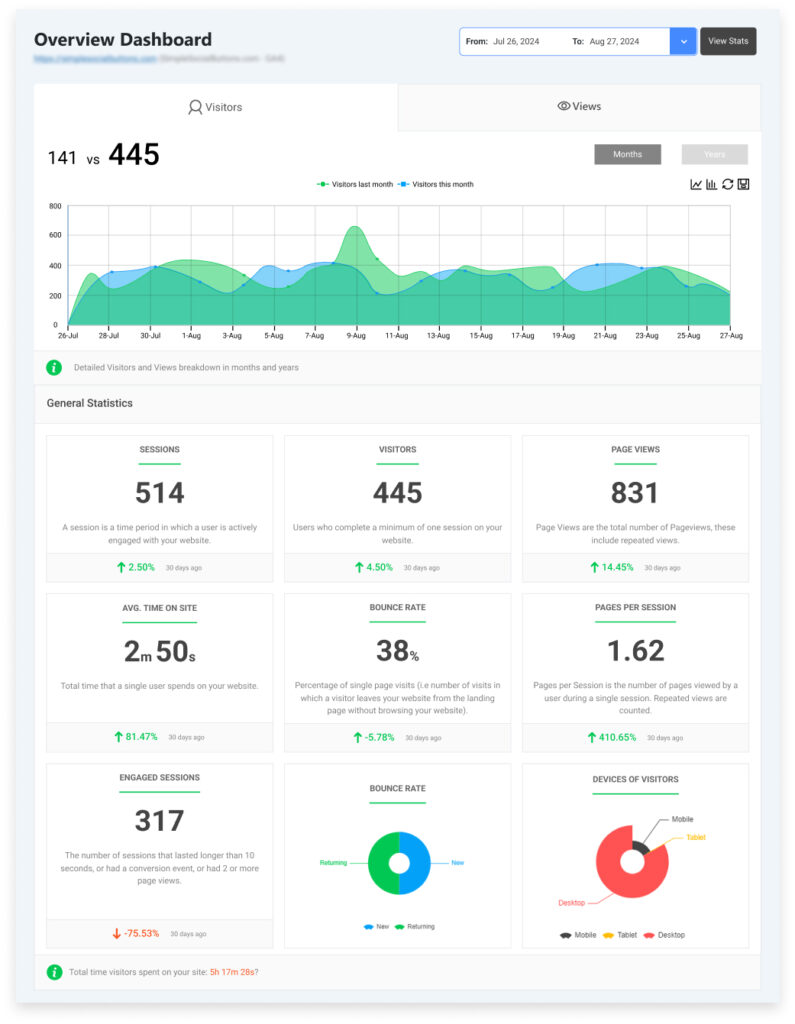
By organizing events, metadata, and dimensions clearly, Analytify ensures that engagement patterns and content performance are more understandable.
How Analytify enhances AI-ready analytics:
- Clean Event Organization: Analytify organizes GA4 data at the page and post level, allowing you to see engagement, traffic, and interactions in direct relation to individual pieces of content. This page-level view shows which pages earn the most engagement.
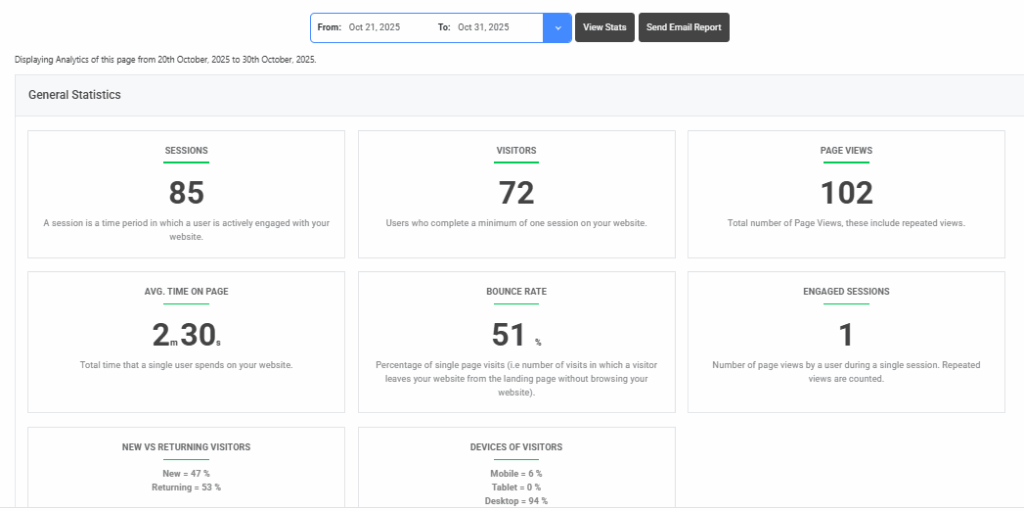
- Enhanced Data Schema: Organizes GA4 data with structured labels such as post_type, category_name, and author_name, helping AI tools and humans understand content context more clearly.
- Structured Event Reporting: Automatically groups GA4 events with clear names and categories, making behavioral patterns transparent.
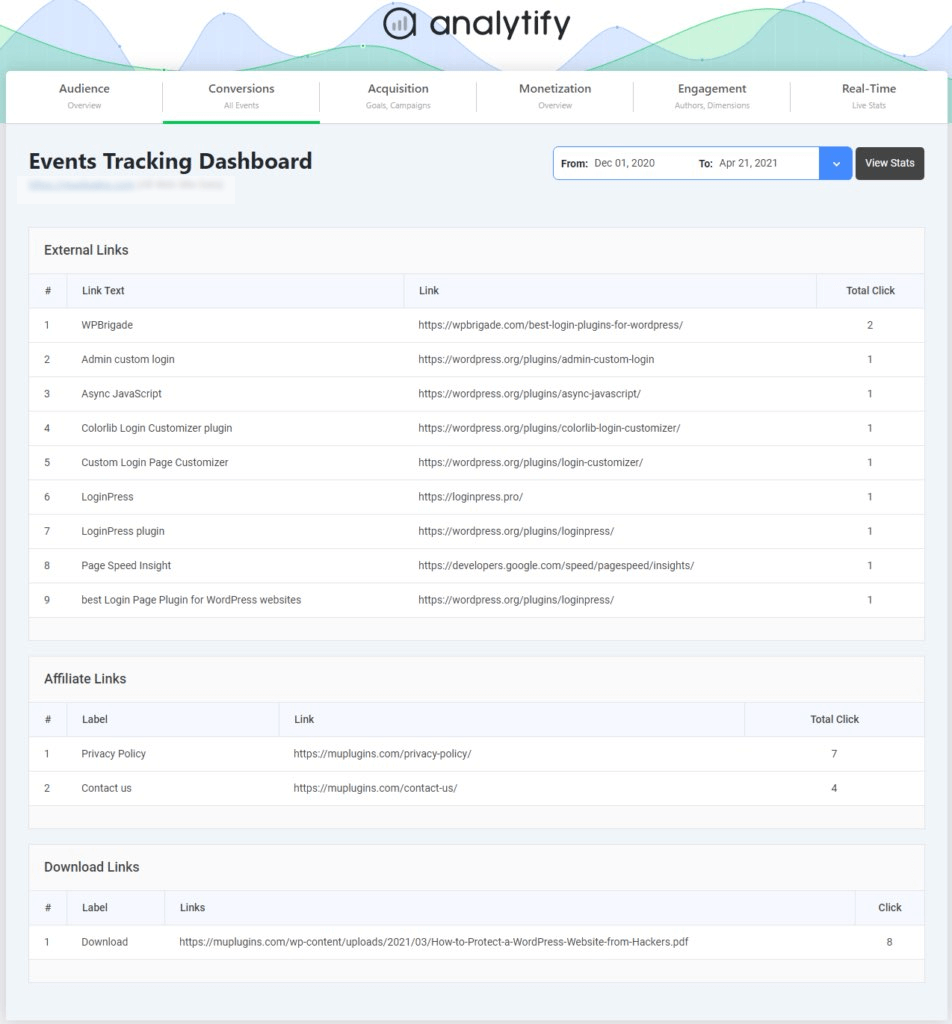
- Campaign & UTM Tracking: Displays campaign data in an organized way, helping AI detect user acquisition sources and intent.
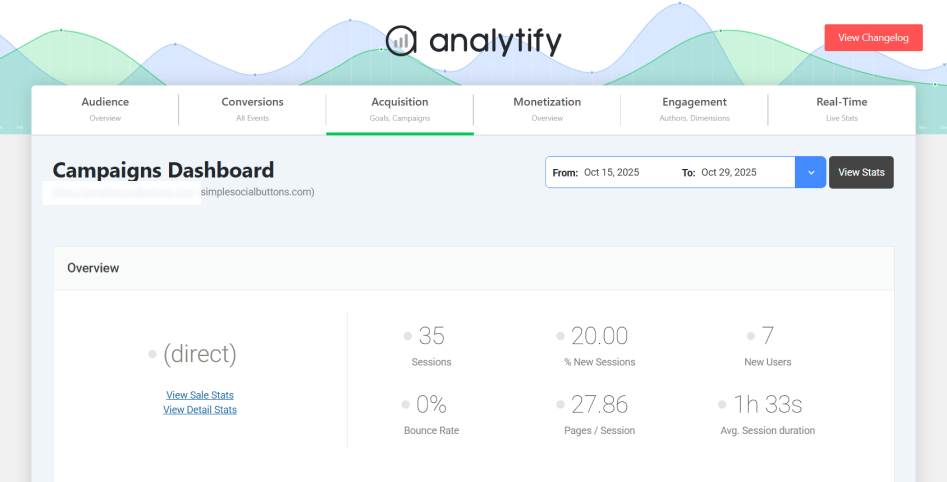
Analytify turns raw GA4 data into structured, readable analytics inside WordPress.
Step 5: Optimize WordPress Content Structure
Clean URLs, clear headings, schema markup, and consistent metadata make a WordPress site easier for AI tools to read. Metadata that matches the page content also gives accurate previews.
Key steps to optimize your site structure:
- Clean URLs: Start with clean, semantic URLs. Descriptive slugs such as /blog/ai-ready-analytics immediately communicate topic context to AI systems, whereas generic or numeric URLs provide little semantic value.
- Structured Headings: Next, focus on heading hierarchy. Every page should have a single, clear H1 that defines the primary topic, followed by logically nested H2 and H3 headings. This structure helps AI models extract meaning, identify subtopics, and understand how ideas relate across the page.
- Schema Markup: Implement schema markup where appropriate. FAQ, HowTo, and Article schema provide machine-readable context that explicitly defines content type and structure. Google states that no special schema.org structured data is needed to appear in its AI features, and it recommends making sure structured data matches the visible text on the page.
- Metadata Consistency: Finally, maintain metadata consistency across your site. Titles, meta descriptions, and Open Graph tags should align with on-page content and clearly reflect user intent. AI tools frequently reference metadata when generating previews or summaries.
Optimizing your WordPress content structure ensures that your analytics data is meaningful and that your content is easier for AI to read, interpret, and rank in AI-driven search results.
Step 6: Leverage AI-Ready Analytics to Improve Content Signals
Use your structured analytics to improve your content strategy. Page-level engagement shows which pages hold attention and which need work.
Practical steps to improve content using AI-ready analytics:
- Identify High-Value Content: Use page-level insights from GA4 and Analytify to see which pages get the most engagement.
- Track User Interactions: Monitor clicks, scrolls, and form submissions to understand content effectiveness and optimize calls-to-action or layout.
- Analyze Campaign Performance: Well-structured UTM tracking helps detect which topics or promotions drive meaningful traffic. AI can use this data to prioritize content relevance.
- Refine Topic Clusters: Organize related content into clusters using structured events and metadata. This helps AI models understand the relationships between topics and surface them more effectively.
By aligning your content strategy with AI-ready analytics, you improve both human and machine understanding, ensuring your WordPress site performs well in AI-driven search environments.
FAQs: AI-Ready Analytics for WordPress
1. What does “AI-ready analytics” mean for WordPress?
AI-ready analytics means configuring your WordPress tracking so that AI search tools and LLMs can interpret your site’s behavior, content structure, and engagement patterns more easily. It emphasizes structured, consistent data rather than just human-focused dashboards and reports.
2. How do I optimize my WordPress analytics for AI search?
Structure GA4 events with clear names, use semantic parameters, maintain consistent metadata, and organize page-level insights with tools like Analytify. These steps make your site’s analytics interpretable for AI tools.
3. Does clean analytics help my WordPress site appear in AI search tools?
Yes. Structured analytics, including consistent event names, clean URLs, and well-organized metadata, helps AI detect high-value content and engagement trends, increasing the likelihood that your pages are referenced in AI-generated answers.
4. How is AI-ready tracking different from regular analytics tracking?
Regular tracking focuses on dashboards and reporting for humans. AI-ready tracking emphasizes machine-readable signals such as semantic event names, structured metadata, and consistent parameter hierarchies that LLMs can interpret automatically.
5. Do I need a separate plugin to track AI visits to my WordPress site?
You can use plugins that track AI agents (e.g., Smalk AI Analytics or GPTrends Agent Analytics), but these do not replace GA4 or Analytify’s structured tracking. AI-ready analytics is about making behavioral and engagement data interpretable, not just detecting AI crawlers.
6. Can WordPress analytics show which content AI search engines favor?
Analytics tools like Analytify reveal which pages drive the most engagement. While they don’t directly show “AI ranking,” high-engagement pages are more likely to be surfaced by AI tools in summaries and answers.
7. How do clean URLs and schema markup help with AI search?
Semantic URLs and structured schema (FAQ, HowTo, Article) provide explicit context for AI models. This helps LLMs understand your content better, making it more likely to be included in structured summaries or responses.
8. How can I ensure my WordPress analytics are fully AI-ready?
Focus on structured event names, semantic parameters, clean metadata, page-level insights, and organized content hierarchies. Using Analytify alongside GA4 helps maintain consistent, machine-readable tracking, preparing your site for LLM search interpretation.
AI-Ready Analytics: Final Thoughts
AI‑ready analytics gives your WordPress site consistent GA4 events, clear parameters, and clean metadata. Schema markup adds machine-readable context to your content.
Analytify simplifies this process by presenting WordPress analytics in a structured, readable format, enhancing GA4 data and making it easier for AI to detect patterns and content value.
With AI-ready analytics in place, you can:
- Identify high-value pages and content clusters
- Track user engagement more meaningfully
- Optimize your site for AI-driven search visibility
Further Readings:
Now, I’d love to hear from you. Which AI analytics tool did you find best for analytics?