
How To Add Your Domain On Google Analytics

WordPress Analytify is one of the most unique WordPress plugins ever. It makes a user’s life simple and saves a handsome amount of time by showing all their website stats on the WordPress Dashboard. Not only does WordPress Analytify have a WooCommerce addon that provides excessive data on each product, including the number of clicks on a product and how many time-specific products are added to the cart. Here we will discuss How To Add Your Domain On Google Analytics
But to start WordPress Analytify, the most important thing is to add your site first to Google Analytics. This process will be done in just 2 3 minutes.
So here are the steps:
How To Add Your Domain to Google Analytics
- Go to https://www.google.com/analytics/ and sign in with your Google account.
- Click on the Admin option from the nav menu.
- Click on “Create new account.”

4. Fill the form.
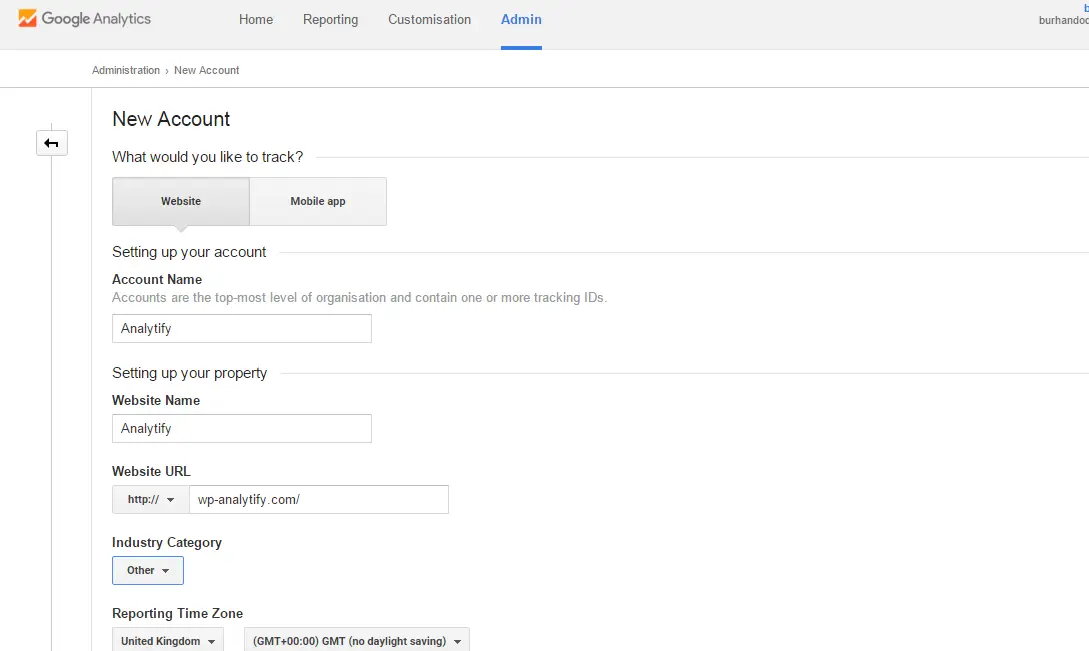
5) Submit the form by clicking “Get Tracking ID” button. That’s it you are done with Google Analytics and its time to activate the WordPress Analytify plugin and enjoys all your website on stats on your dashboard 😉
Frequently Asked Questions
Why do we need Google Analytics?
Google Analytics helps you to evaluate and measure the performance of content and product are performing websites relative to user engagement.
Can I use Google Analytics with WordPress?
Yes, Google Analytics is compatible with WordPress. You can track the behavior of your website’s visitors and gain insight into how to improve engagement and drive growth once you learn how to use Google Analytics on WordPress.