Analytify vs GA Google Analytics: 7-Point Comparison

The question for today is: Analytify or GA Google Analytics Plugin? GA Google Analytics has 600,000+ active installs. It adds your GA4 tracking code to WordPress without touching a single line of code. If that is all you need, it is a solid choice. GA Google Analytics and Analytify both connect WordPress to Google Analytics 4, but they solve different problems.
But most WordPress site owners hit the same wall. The tracking is running. The data is flowing. And to actually see it, you still have to open Google Analytics every time. That is where the Analytify vs GA Google Analytics comparison becomes a real question worth answering, and where Analytify consistently wins for WordPress-first users.
This comparison covers setup, dashboards, reporting, tracking, and pricing. You’ll get a full feature table, a decision guide, and a clear answer on which tool works best for WordPress site owners.
Bottom line: GA Google Analytics gets your tracking code on the page. That’s it. Analytify goes further: it puts GA4 reports, per-post stats, WooCommerce data, and real-time traffic right inside WordPress. For most site owners, it’s not even a close call.
Analytify vs GA Google Analytics (TOC):
GA Google Analytics and Analytify: Overview
GA Google Analytics is a lightweight plugin. It adds your GA4 tracking code to every page on your site. Your data flows into your GA4 account, and you view reports inside Google’s interface. Analytify is different. It connects to the same GA4 account and shows data in simplified, actionable reports right inside your WordPress dashboard.
What is GA Google Analytics?
GA Google Analytics is a WordPress plugin that acts as a tracking connector. It installs your GA4 Measurement ID into your site without code. The plugin weighs under 20KB. The free version covers full GA4 tracking for a single property. The Pro version adds visitor opt-out (for GDPR compliance) and support for multiple tracking codes at approximately $20/year.

After installation, all your analytics data lives in Google’s own interface at analytics.google.com. GA Google Analytics does not add any dashboard, reports, or charts inside WordPress. Its job is to get data from your site to Google, nothing more.

What is Analytify?
Analytify is one of the best WordPress plugins for Google Analytics. It connects to GA4 as its data source. It pulls that data into your WordPress dashboard as usable reports. It doesn’t collect analytics data on its own. It reads what Google already has. Then it shows it where you already work: inside WP-admin.
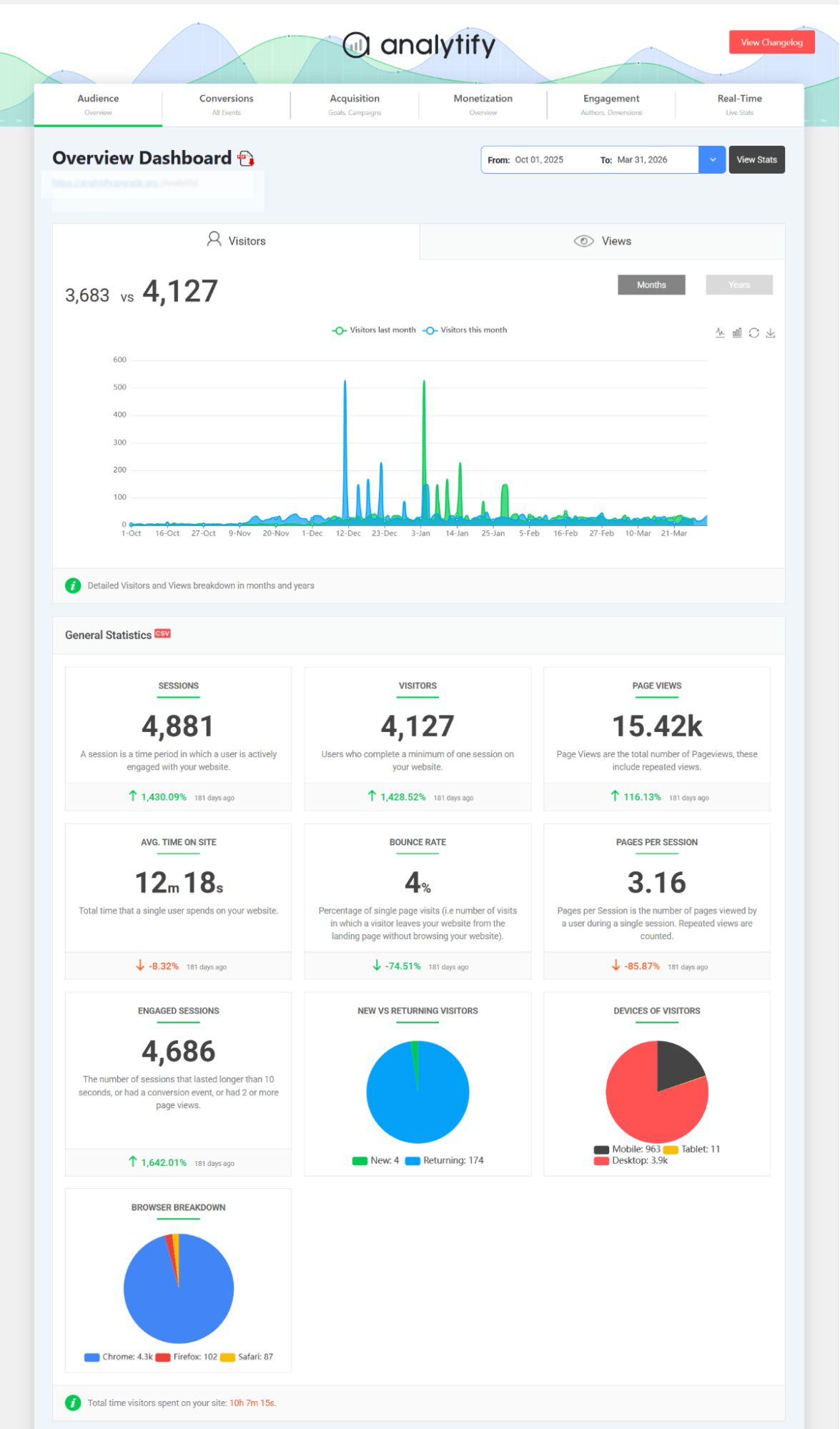
Analytify shows a traffic overview, top pages, referral sources, and session data inside Analytify > Dashboard. It also shows per-post stats directly below each post in the WP editor. That means you can see a post’s performance while you’re editing it. No other analytics plugin does this inside the WordPress editor.
In the Analytify vs GA Google Analytics comparison, Analytify is the reporting layer: it shows GA4 data inside WordPress. It is not a standalone analytics platform and does not replace Google Analytics.
Here is a quick side-by-side overview:
| GA Google Analytics | Analytify | |
| What it does | Adds GA4 tracking code to WordPress | Shows GA4 data as reports inside WordPress |
| Dashboard inside WordPress? | No | Yes |
| Reports visible in | Google Analytics interface | WordPress WP-admin + WP editor |
| Free version | Yes (full tracking) | Yes (basic dashboard) |
| Pro version starts at | ~$20/year | $99/year |
| Best for | Developers, GA4-fluent users | Bloggers, content creators, WooCommerce stores |
| Active installs | 600,000+ | 100,000+ |

What Is the Difference Between GA Google Analytics, and Analytify?
The core difference is straightforward. GA Google Analytics is a tracking connector; it sends your data to Google. Analytify is a reporting layer; it retrieves that same data and makes it readable right inside WordPress.
Think of it this way. After installing GA Google Analytics, you log into analytics.google.com to see your traffic. After installing Analytify, you stay in your WordPress dashboard and see that same traffic there.
These are not competing functions. They are sequential. Most WordPress site owners need both: something to get data to Google, and something to make that data usable without leaving WordPress. GA Google Analytics handles step one. Analytify handles both.
Here is how their roles break down:
| GA Google Analytics | Analytify | |
| Role | Tracking connector | Reporting layer |
| What it does | Sends data from your site to Google’s servers | Retrieves that data and makes it readable inside WordPress |
| Where you read reports | analytics.google.com | Your WordPress dashboard |
| Do you leave WordPress? | Yes, every time | No |
Worth noting: Analytify includes its own GA4 tracking code installation. If you install Analytify, you do not need a separate plugin for the tracking step. GA Google Analytics handles only that tracking step and leaves the reporting to Google’s native interface.
Secondary keyword anchor (Analytify vs GA Google Analytics related): For a practical guide on the best way to use Google Analytics in WordPress, see Analytify’s setup guide linked below.
Why Use an Analytics Plugin If GA Google Analytics Is Free?
You use Analytify when you need to see your GA4 data inside WordPress — without switching platforms for every traffic check, without learning GA4’s navigation, and without missing per-post, author, or ecommerce reports that GA4 doesn’t surface clearly on its own.
GA Google Analytics is free and installs tracking correctly. The issue is not the plugin. The issue is that all your reports still live outside WordPress. For site owners who work inside WP-admin every day, that platform switch is friction.
Here are five specific reasons WordPress site owners make the Analytify vs GA Google Analytics switch in favor of Analytify:
- Reports inside WordPress. GA Google Analytics sends data to GA4. You read it in Google’s interface. Analytify shows the most important GA4 reports in WP-admin, so you never leave WordPress for routine traffic checks.
- Per-post stats in the WP editor. Analytify adds a stats panel below every post, showing that post’s sessions, pageviews, and engagement while you are editing it. GA Google Analytics has no equivalent for this.
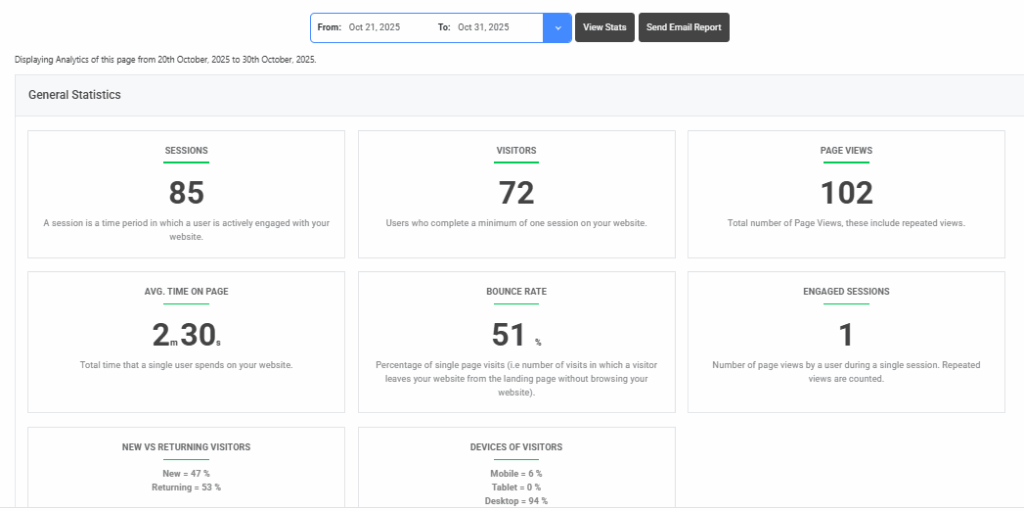
- Simplified reporting. GA4’s native interface requires navigating nested report menus. The Analytify vs GA Google Analytics advantage becomes obvious the moment you compare dashboards. Analytify surfaces top pages, traffic sources, and engagement in a clean one-screen view inside your WP dashboard built for non-analysts.
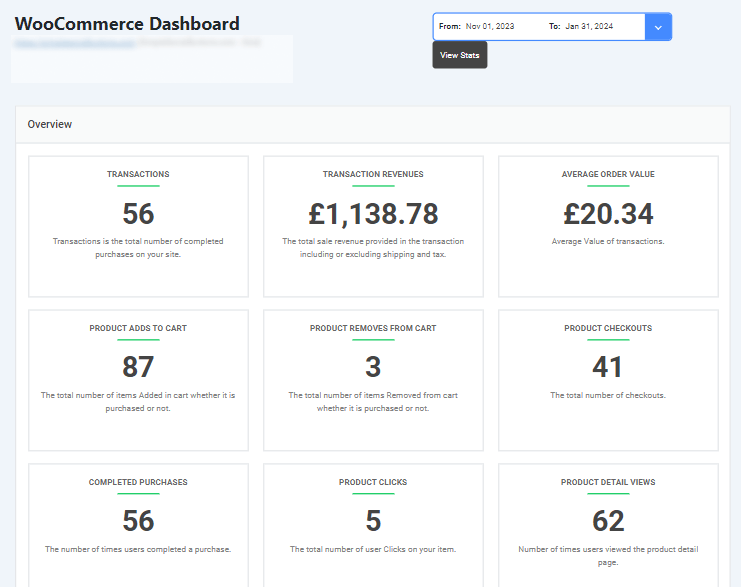
- WooCommerce and forms tracking (Pro add-ons). GA4’s enhanced measurement tracks WooCommerce events. But revenue reports live in GA4’s interface, not WordPress. Analytify’s WooCommerce add-on surfaces that data in WP-admin without requiring GA4 Explorations.
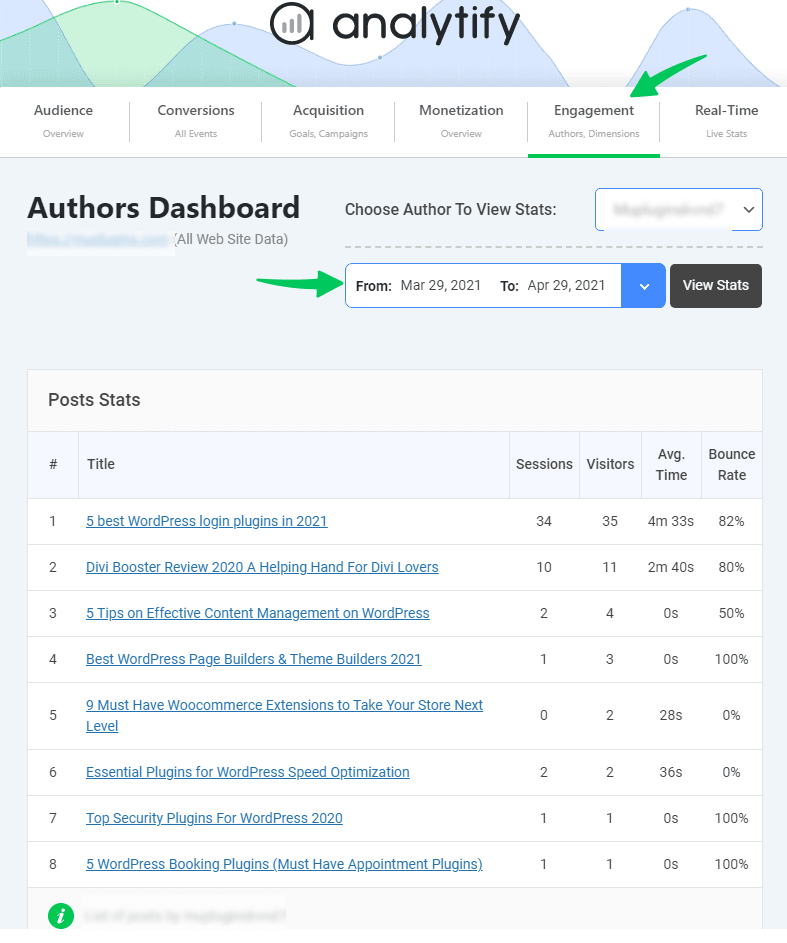
- Author and content tracking (Pro). Analytify’s Authors add-on shows per-author traffic and engagement inside WordPress. GA Google Analytics has no in-WordPress dashboard for this.
The result? GA Google Analytics does its tracking job well. But if you want to see your analytics data inside WordPress — without leaving your dashboard — Analytify is the layer that makes it happen.
Analytify vs GA Google Analytics: Full Feature Comparison
Analytify and GA Google Analytics differ across nine categories: dashboard reporting, setup complexity, per-post analytics, WooCommerce tracking, form tracking, author reports, email summaries, pixel tracking, and pricing.
Here is the complete feature breakdown across both free and Pro versions:
| Feature | GA Google Analytics (Free) | GA Google Analytics (Pro) | Analytify (Free) | Analytify (Pro) |
| Adds GA4 tracking code | Yes | Yes | Yes | Yes |
| Dashboard inside WordPress | No | No | Yes (basic) | Yes (full) |
| Per-post stats in WP editor | No | No | Yes | Yes |
| Real-time stats | No | No | No | Yes (add-on) |
| WooCommerce tracking | Via GA4 natively* | Via GA4 natively* | No | Yes (add-on) |
| Form conversion tracking | No | No | No | Yes (add-on) |
| Author performance reports | No | No | No | Yes (add-on) |
| Email summary reports | No | No | No | Yes (add-on) |
| Pixel tracking (Meta, TikTok, etc.) | No | No | No | Yes (add-on) |
| Visitor opt-out (GDPR) | No | Yes | No | Yes |
| Multiple tracking codes | No | Yes | No | No |
| Price | Free | From $20/year | Free | From $99/year |
What the table shows: both free versions install tracking correctly. The free Analytify version adds a dashboard inside WordPress and per-post stats, which GA Google Analytics does not offer at any price tier.
The decision comes down to where you want to read your data. If the GA4 interface works for you, GA Google Analytics free is sufficient. If you want that data inside WordPress, Analytify’s free version already closes most of the gap.
Is Analytify better than using GA Google Analytics alone? For site owners who work inside WordPress and want analytics in WP-admin — yes. It gets even clearer when you look at what Analytify Pro adds: real-time stats, WooCommerce revenue reports, author tracking, and pixel management. All from one WordPress panel.
Analytify Pro shows your GA4 reports, per-post stats, and real-time traffic directly inside WordPress.
Is Analytify Better Than Using GA Google Analytics Alone?
Analytify wins if you want your analytics inside WordPress. GA Google Analytics installs the tracking and leaves all reporting in Google’s interface. Analytify brings that same data into WordPress.
The verdict is clear. You get the same GA4 data either way. But with Analytify, you never have to leave WordPress to see it.
Use this Analytify vs GA Google Analytics decision matrix to find your answer:
| Use GA Google Analytics if… | Use Analytify if… |
| You are comfortable navigating GA4’s native interface and check it regularly | You want to see traffic, top posts, and engagement without opening GA4 |
| You are a developer who just needs clean tracking code on the page | You publish content regularly and want per-post stats in the WP editor |
| You have a minimal WordPress setup and want zero extra dashboard widgets | You run a WooCommerce store and need revenue data inside WordPress |
| You prefer to analyze data with GA4’s full Exploration tools | You have a content team and need author-level performance reporting |
| Your site has a technical user managing analytics separately | You want email summaries of your site stats without logging in weekly |
Honest take: Analytify is built for site owners who live inside WordPress. If you check your stats in GA4 every day and feel comfortable there, GA Google Analytics alone is enough. You don’t need the extra layer.
But if you want a Google Analytics dashboard inside WordPress, per-post stats in the WP editor, or WooCommerce revenue reports — without digging through GA4 Explorations — Analytify is built for exactly that workflow.
What Does Analytify Add on Top of Google Analytics for WordPress?
This is the core of the Analytify vs GA Google Analytics difference.
Analytify adds seven capabilities that GA4 doesn’t show you inside WordPress. You get a GA4 dashboard, per-post analytics in the WP editor, real-time stats, WooCommerce reports, form conversion tracking, author performance data, and pixel tracking for Meta, TikTok, LinkedIn, and other ad platforms.
Each Analytify vs GA Google Analytics capability gap solves a specific problem for WordPress site owners who work in WP-admin:
- GA4 dashboard inside WordPress: the headline benefit in the Analytify vs GA Google Analytics debate. Analytify shows traffic, sessions, top pages, and referral sources in Analytify > Dashboard. You check analytics as part of your normal WordPress workflow, without opening a second browser tab.
- Per-post stats in the WP editor. Analytify displays that individual post’s sessions, pageviews, and engagement data below the post content area. You see performance data while editing the post. No tab switching required.
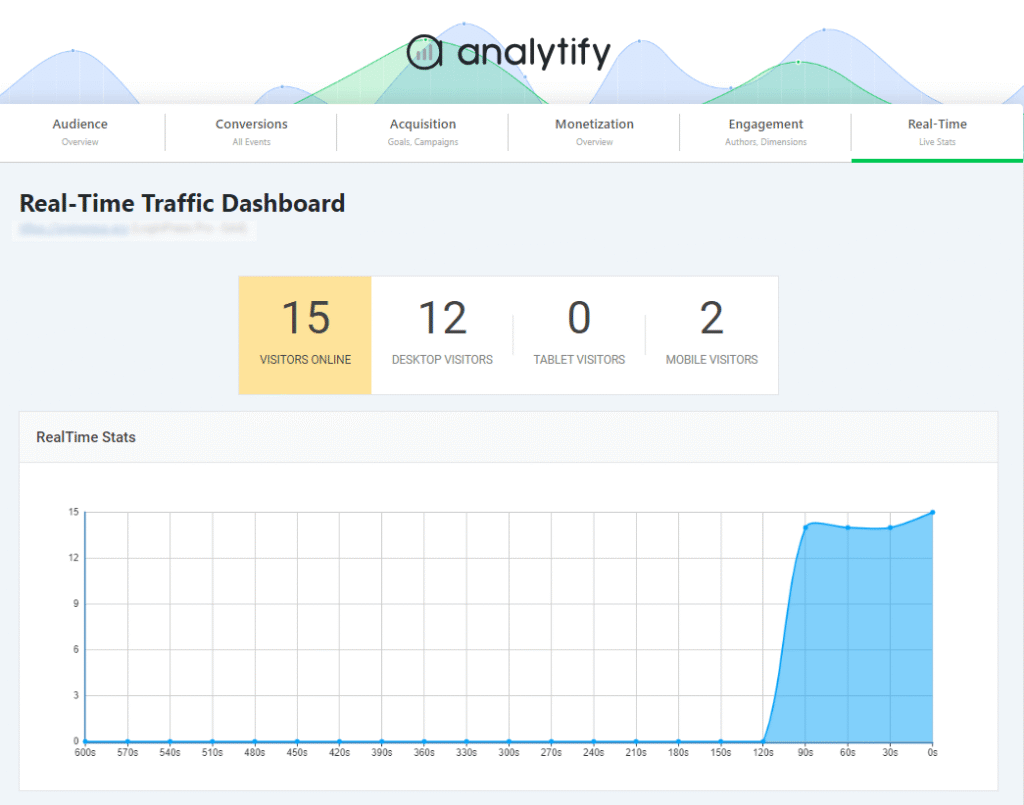
- Real-time stats show another clear winner. Analytify shows active visitors, their pages, and current traffic sources live inside Analytify > Dashboard > Realtime Stats. This is a Pro feature.
- WooCommerce reports (Pro add-on). Analytify’s WooCommerce add-on shows revenue, transactions, top products, and checkout funnel data inside WP-admin. GA4 tracks the same events, but you read them inside GA4’s interface, not WordPress.
- Forms tracking is another Analytify vs GA Google Analytics differentiator (Pro add-on). Analytify tracks form impressions and conversions for major WordPress form plugins and shows results in the dashboard. This requires the Forms add-on.
- Author tracking is also unique to the Analytify side of the Analytify vs GA Google Analytics comparison (Pro add-on). Analytify’s Authors add-on shows per-author traffic, engagement, and top posts. This is useful for multi-author blogs and editorial teams managing contributor performance.
- Pixel tracking is the final Analytify vs GA Google Analytics feature gap (Pro add-on). Analytify installs and manages Meta, TikTok, LinkedIn, Pinterest, Snapchat, Microsoft Ads, and X/Twitter pixels from one WordPress settings panel. No separate per-platform code installation is needed.
So what does this mean for you? Every item above is a Pro feature or paid add-on. The free version of Analytify covers items 1 and 2: the GA4 dashboard and per-post stats.

How Do Analytify and GA Google Analytics Compare on Pricing?
The pricing gap is real, but so is the value gap. GA Google Analytics is free. The Pro version runs about $20/year for a single site. Analytify also has a free version. Pro plans start at $99/year for the StartUp plan, which covers two sites and includes all Pro add-ons.
| Plan | GA Google Analytics | Analytify |
| Free | Full tracking code installation | Basic dashboard + per-post stats |
| Pro/Paid (entry) | $20/year (1 site) | From $99/year (2 sites) |
| What Pro adds | Visitor opt-out, multiple tracking codes | Real-time stats, all Pro modules included |
| Add-ons | None | WooCommerce, Forms, Authors, Pixels, Campaigns (separate) |
The price difference makes sense when you see what each plugin delivers. GA Google Analytics Pro adds GDPR compliance and multi-code support. Analytify Pro adds deeper reporting, real-time stats, and the full add-on ecosystem. A much stronger value proposition.
For most WordPress site owners, Analytify’s entry price pays for itself quickly. Think about the time you save. No more switching to GA4 every time you want to check a post’s traffic or WooCommerce revenue. It’s all right there in your dashboard.
Frequently Asked Questions
1. What is the difference between Analytify and GA Google Analytics?
The Analytify vs GA Google Analytics difference comes down to purpose. GA Google Analytics and Analytify both connect WordPress to Google Analytics 4, but they solve different problems. GA Google Analytics adds the tracking code to your site so data flows into Google’s platform, where you read it in GA4’s native interface. Analytify connects to the same GA4 data and displays it as reports inside your WordPress dashboard, including per-post stats below every post in the WP editor. GA Google Analytics is a tracking connector. Analytify is a reporting layer.
2. Is Analytify better than using GA Google Analytics alone for WordPress?
Analytify is better than GA Google Analytics alone if you want to see your analytics data inside WordPress without logging into Google Analytics separately. GA Google Analytics installs tracking but moves all reporting outside WordPress. Analytify keeps reporting inside WordPress with a simplified dashboard, per-post stats, and add-ons for WooCommerce and forms. For developers who prefer GA4’s native interface and do not need in-WordPress reports, GA Google Analytics alone is sufficient.
3. What does Analytify add on top of Google Analytics for WordPress sites?
Analytify adds a GA4-powered dashboard inside WordPress, per-post analytics below every post in the WP editor, real-time visitor stats, WooCommerce ecommerce reports, form conversion tracking, author performance reporting, and pixel tracking management for Meta, TikTok, LinkedIn, and other ad platforms. All of these are Pro features or add-ons. The free version of Analytify includes the core WP dashboard and per-post stats.
4. Is Analytify free?
Yes, Analytify has a free version available on the WordPress plugin directory. The free version includes the GA4 dashboard inside WordPress and per-post stats below each post in the WP editor. Pro features, including real-time stats, WooCommerce tracking, form tracking, author reports, email summaries, and pixel tracking, require the Pro plan, which starts at $99/year for two sites.
5. Does Analytify replace Google Analytics?
No. Analytify does not replace Google Analytics. It uses Google Analytics 4 as its data source. To use Analytify, you must have a GA4 property connected. Analytify reads data from GA4 and displays it inside WordPress. GA4 still collects, processes, and stores all your analytics data. Analytify is a reporting interface for that data inside WordPress, not a separate analytics platform. Removing Analytify does not affect your GA4 data.
Final Thoughts
The winner is clear. GA Google Analytics gets your tracking code on the page — and that’s where its job ends. Analytify goes further. It takes all that GA4 data and brings it inside WordPress. Raw numbers become actionable dashboards. You check your stats in seconds, without switching tabs.
If you also want to improve the design and security of your WordPress login page, LoginPress lets you fully customize it without touching any code.
Here are your next steps:
- If you’ve gone through the full Analytify vs GA Google Analytics comparison and have GA Google Analytics installed with a lightweight setup that works for you, no change is needed. Your data is flowing into GA4 correctly.
- If the Analytify vs GA Google Analytics comparison has convinced you, and you want to see that GA4 data inside WordPress, check per-post stats in the WP editor, or run WooCommerce revenue reports without opening Google Analytics, complete your Analytify vs GA Google Analytics switch — install Analytify free and connect it to your GA4 property.
- If the Analytify vs GA Google Analytics comparison has shown you that per-post stats, real-time reporting, or WooCommerce tracking inside WordPress matters to your workflow, complete your Analytify vs GA Google Analytics upgrade — review Analytify Pro plans and select the add-ons that match your site type.
Further Readings: