How to Detect Bot Traffic and Spam Visits in GA4 (2026)

Have you ever wondered how to detect bot traffic in GA4 before it distorts your data?
Many website owners notice sudden traffic spikes, broken engagement metrics, or visits from unfamiliar sources. They often assume it’s real growth, but in many cases, it’s actually fake traffic in GA4.
Unlike Universal Analytics, GA4 has fewer visible filters and more automated tracking, which makes it harder to detect GA4 spam traffic.
This guide will help you identify suspicious activity, validate patterns, clean your GA4 data, and continuously monitor it. By following these steps, you can ensure your analytics remain accurate and that your decisions are based on real user behavior rather than automated visits.
Let’s get started!
Detect Bot Traffic in GA4 (TOC):
What Is Bot Traffic and Spam in GA4?
In GA4, not all traffic comes from real people. Some visits are created by automated systems that can make your data confusing or misleading.
Not all non-human traffic is the same. It falls into a few clear categories:
1. Bot Traffic (Automated Visits)
Bots are automated visits that can inflate your traffic numbers and engagement metrics. They often:
- Load pages automatically
- Trigger events without user intent
- Appear as real visitors in GA4
2. Spam Traffic (Fake or Manipulated Sources)
Spam traffic is fake traffic created on purpose to pollute your analytics. It usually appears as:
- Fake referral websites
- Strange traffic sources
- Visits that don’t match real user behavior
The goal of GA4 spam traffic is to manipulate source or referrer data, not to use your website.
3. Automated Tools (Fake Engagement Signals)
Some automated tools are designed to mimic real users and create fake engagement signals. They can:
- Fire fake events
- Create fake clicks or scrolls
- Show engagement without real interest
These tools create activity that looks real in GA4 but isn’t.
Understanding these differences helps avoid blocking useful traffic while targeting harmful activity. When bot and GA4 spam traffic mix with real users:
- Traffic numbers look higher than they should
- Engagement data becomes unreliable
- Marketing decisions are based on false signals
Why GA4 Shows Bot and Spam Traffic
Here are the main reasons:
- GA4 tracks events, not just page visits.
GA4 records almost every action as an event: page views, clicks, scrolls, and more. Bots can easily trigger these events, making them appear as real users in your reports even when no human has actually visited your site. - Many bots behave like real browsers.
Modern bots are smart. They use real browsers, standard screen sizes, and common devices, which makes their activity look human. As a result, GA4 often struggles to distinguish genuine users from bots that are intentionally imitating real behavior. - GA4 doesn’t block all bots by default.
GA4 applies basic protection, but it does not automatically filter every bot or spam source. Google avoids aggressive filtering to prevent real users from being blocked, which means some fake traffic still slips through. - Fake events can be sent without visiting your website.
Using automated tools or the Measurement Protocol, spam traffic can send events directly to GA4. This means your reports may show sessions, events, or even conversions that never involved a real page visit. - Referral and source spam still exist.
Some spam tools send fake traffic in GA4 just to display their website names in your referral reports. These visits usually have no engagement, no real behavior, and no value, yet they still appear in GA4. - Privacy rules limit deep filtering.
GA4 is designed to be privacy-friendly. Because it collects less personal data (like IP addresses), it has fewer signals to confidently block suspicious traffic without risking data accuracy.
Early Warning Signs of Bot Traffic in GA4
Before you try to prove anything, the first step is simply to suspect bot traffic. These early warning signs don’t confirm bots on their own, but they tell you where to look more closely.
- Near-Zero Engagement Time
- What it looks like: Many sessions show almost no engagement time, even though page views or events are recorded.
- Why it’s suspicious: Real users usually spend at least a few seconds reading, scrolling, or interacting. Bots often load pages and leave instantly, creating sessions without meaningful engagement.
- High Traffic From Unknown Referrers
- What it looks like: Traffic suddenly appears from websites you don’t recognize or have no relationship with.
- Why it’s suspicious: Legitimate referrals usually make sense in context. Spam traffic often uses fake or random referrer names just to appear in your reports.
- Traffic Spikes Without Any Campaigns
- What it looks like: Sessions increase sharply even though you didn’t run ads, publish content, or send emails.
- Why it’s suspicious: Real growth usually has a reason. Sudden spikes with no clear cause often point to automated or spam-driven traffic.
- Unusual Countries, ISPs, or Locations
- What it looks like: Large amounts of traffic come from countries or locations that don’t match your audience.
- Why it’s suspicious: If your business targets a specific region, unexpected geographic surges often indicate bot networks or data center traffic.
- Extremely Fast Session Duration or Multiple Events Per Second
- What it looks like: Sessions show unrealistically short durations or multiple events firing within seconds.
- Why it’s suspicious: Real users don’t click, scroll, or trigger events that fast. When actions happen at unusually high speed, it’s often a sign of bots or automated tools generating fake engagement.
Note: Each of these signs alone doesn’t prove bot traffic. But when several appear together, it’s a strong signal that your GA4 data needs closer inspection.
How to Detect Bot Traffic and Spam Visits in GA4
Detecting GA4 Spam traffic isn’t about clicking the right buttons; it’s about looking for patterns across multiple signals.
No single metric confirms that traffic is fake; instead, you combine insights from engagement, sources, hostnames, and behavior to identify suspicious activity. This approach helps you reliably spot GA4 spam and fake traffic.
Tools You Can Use in GA4
GA4 offers several tools that make detection easier without needing technical setups:
- Explorations: lets you combine multiple metrics and dimensions to analyze traffic patterns in detail
- Dimensions: examine traffic by country, device, browser, or referral source to spot anomalies
- Comparisons: compare suspicious traffic segments against normal traffic for quick insights
Using these tools, you can analyze patterns instead of relying on single numbers.
Detection Methods
Here are the following detection methods to detect bot traffic in GA4:
1. Engagement-Based Filtering Logic
Engagement-based filtering highlights sessions likely generated by bots rather than real users. You can identify them by spotting sessions with:
- Near-zero engagement time
- High bounce rates
- Extreme or unusual event counts
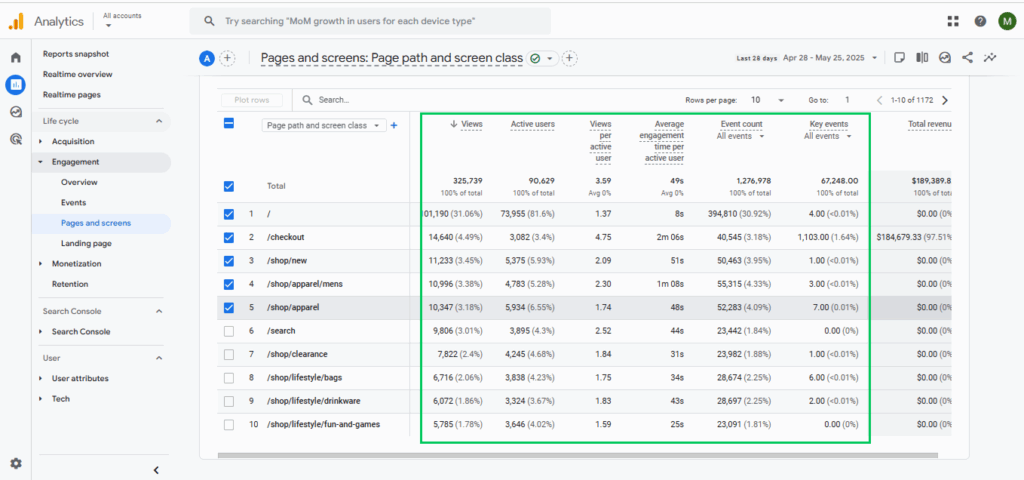
So, when interactions look minimal or unnaturally intense, it’s a strong sign of automated traffic rather than genuine user activity.
2. Source / Medium Pattern Analysis
Source / medium pattern analysis exposes repeated or fake referrers. When you see traffic coming from:
- Unknown or suspicious referrers
- Repeated appearances from the same domains
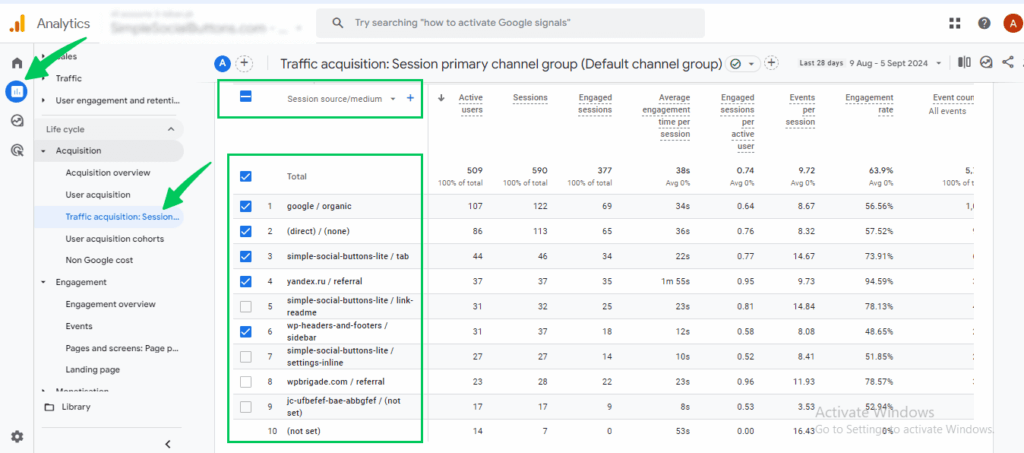
It often indicates spam attempting to manipulate source data. These unnatural source patterns make this method a reliable way to spot fake traffic in GA4.
3. Hostname Validation
Hostname validation confirms that traffic originates from your actual domain. That’s why:
- Hostname mismatches often indicate automated traffic
- Sessions recorded under unrelated domains are usually bots or spam
This step helps separate real user sessions from GA4 spam traffic.
4. Repetitive Behavior Patterns
Repetitive behavior highlights sessions that follow unnatural or automated patterns. Watch for actions that humans rarely repeat:
- Multiple sessions hitting the same page repeatedly
- Identical sequences of events across sessions
- Excessive event firing from the same device or browser
Such repetitive patterns are strong indicators of bots or automated traffic, helping you distinguish fake activity from real user behavior.
Note: Remember, no single metric confirms bot traffic. Detection relies on patterns across engagement, sources, hostnames, and behavior to confidently identify suspicious sessions while preserving real traffic.
How to Clean GA4 Data from Bot and Spam Traffic
Once you start noticing bot traffic in GA4 or GA4 spam traffic, the next step is cleaning your GA4 data.
Cleaning GA4 data does not mean deleting past data. It involves two different actions:
- Preventing future bad data from entering GA4
- Excluding suspicious traffic when viewing and reporting data
Ways to Prevent Future Bot and Spam Traffic
These steps help reduce fake traffic in GA4 going forward and keep new data cleaner.
1. Built-in GA4 Filters
GA4 includes basic Google Analytics bot filtering in line with established standards. This removes some automated traffic automatically, but it is limited and cautious to avoid blocking real users.
Think of it as basic protection, not full security.
2. Internal Traffic Rules
Internal traffic rules help you exclude:
- Your own visits
- Team activity
- Testing behavior
This doesn’t stop bots, but it prevents your internal activity from mixing with suspicious traffic and keeps reports clearer.
3. Referral Exclusions
Referral spam is one of the most common problems. By excluding known spam referrers:
- Fake referral traffic stops appearing in reports
- Session data becomes more trustworthy
This is one of the easiest ways to visualize clean GA4 data.
How to Exclude Bot Traffic from Analysis (Clean Reporting)
Since GA4 can’t delete past data, the best approach is to use clean reporting.
1. Segment-Based Clean Reporting
You can:
- Compare normal traffic vs suspicious traffic
- Exclude low-quality sources
- Focus reports only on trusted behavior
This helps you make decisions using clean views, even if raw data still contains noise.
2. External Protection
Some businesses also reduce fake traffic using:
- Google Tag Manager rules
- Server-side tracking
- Web Application Firewalls (WAF)
These tools help prevent bad traffic from reaching GA4, but they are optional and not required for basic cleanup.
What GA4 Cannot Clean or Undo
This part is critical to understand.
- GA4 cannot delete historical bot or spam data. Once data is collected, it stays in GA4.
- Reporting filters and comparisons do not remove data; they only change how you view it.
These are reporting workarounds, not data deletion.
Ongoing Monitoring and GA4 Data Hygiene
Detecting bot traffic in GA4 is not a one-time task. It’s an ongoing process that requires regular attention, just like website maintenance or content updates.
Why Bot Traffic Keeps Changing
Bots are constantly evolving. As detection methods improve, bots adjust their behavior. New spam sources emerge, and older patterns become unreliable.
This means traffic that looks normal today might become suspicious later. Because of this, relying on a single cleanup or filter is not sufficient to protect your data over the long term.
Why Regular Data Review Matters
GA4 data slowly loses value if it isn’t checked regularly. Without review:
- Small spikes turn into long-term distortion
- Engagement trends become unreliable
- Decisions are made on outdated assumptions
Regular checks help you catch problems early, before they affect long-term reporting.
Tip: Set weekly alerts for spikes in Direct traffic or unusual referrers to catch anomalies in a timely manner.
Use Trends, Comparisons, and Patterns
Instead of watching individual numbers, focus on patterns over time.
Helpful habits include:
- Comparing traffic week over week
- Watching sudden changes in engagement trends
- Separating trusted traffic from suspicious sources
These patterns reveal problems faster than isolated metrics.
Alerts Help You Stay Proactive
Basic alerts or scheduled reviews help you notice:
- Unexpected traffic spikes
- Sudden drops in engagement quality
- New sources behaving abnormally
Monitoring is easier when your GA4 data is visible within WordPress, where content and traffic changes occur.
Having clear visibility helps site owners notice unusual behavior early, without constantly switching between tools or digging through complex reports.
When monitoring becomes routine, analytics remain trustworthy, and decisions remain grounded in real user behavior.
Simplifying GA4 Bot Traffic Analysis with Analytify
Join 50,000+ beginners & professionals who use Analytify to simplify their Google Analytics!
Analyzing bot traffic in GA4 often involves navigating complex reports and Explorations. For many WordPress users, that process can slow down detection and delay action, especially if they’re not comfortable navigating GA4’s interface.
Analytify simplifies this by making GA4 traffic patterns easier to see directly inside WordPress, where site owners already work.
- When key data is visible at a glance, unusual behavior stands out more quickly without relying heavily on advanced GA4 configurations.
- Analytify presents important GA4 data in easy-to-read reports inside a single dashboard.
This is especially helpful for non-technical users who want clarity without complexity.
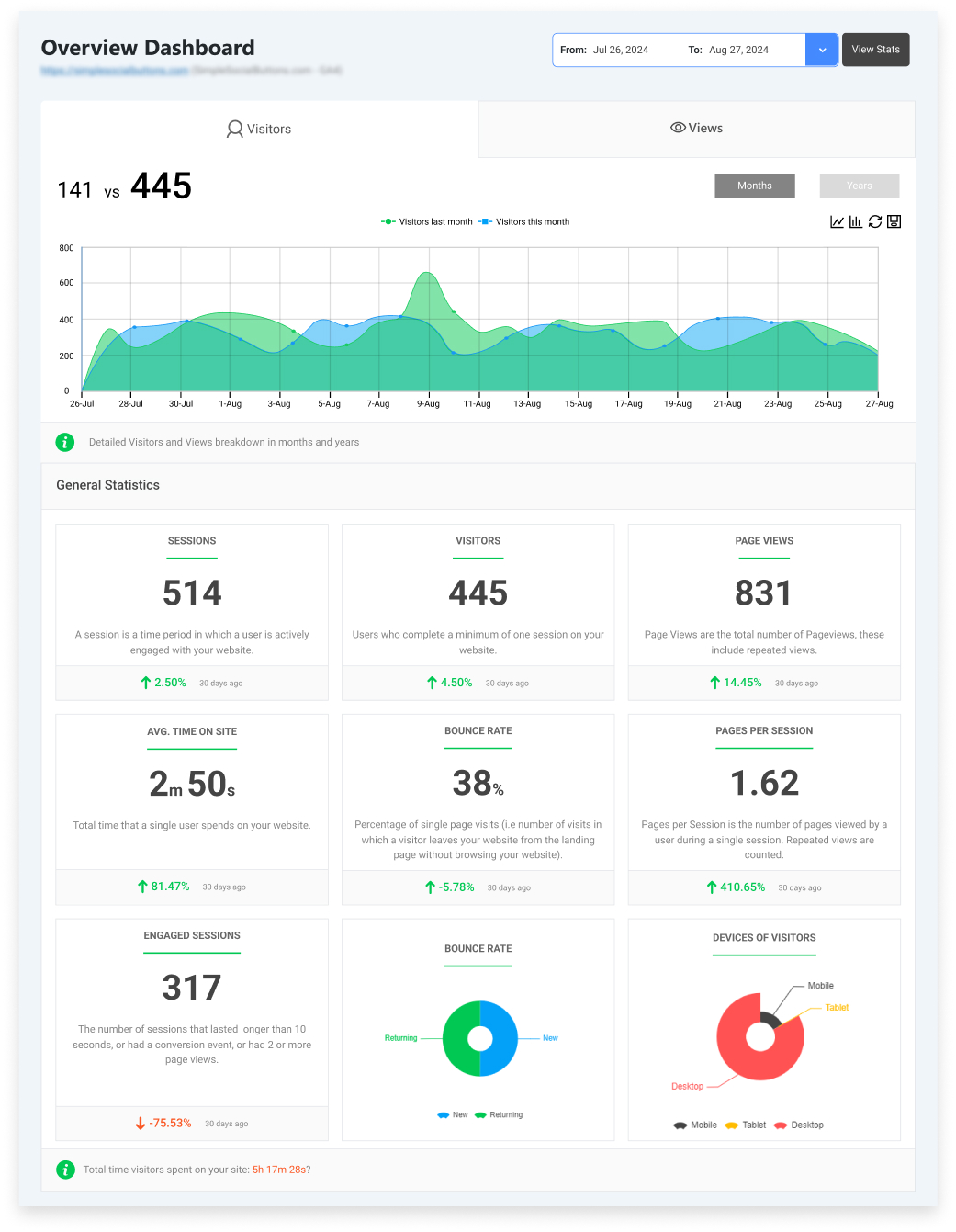
With seamless GA4 integration, Analytify pulls real-time and historical data directly from your GA4 property.
This makes it easier to notice sudden changes, such as traffic spikes or drops, as they happen rather than discovering them later during manual report reviews.
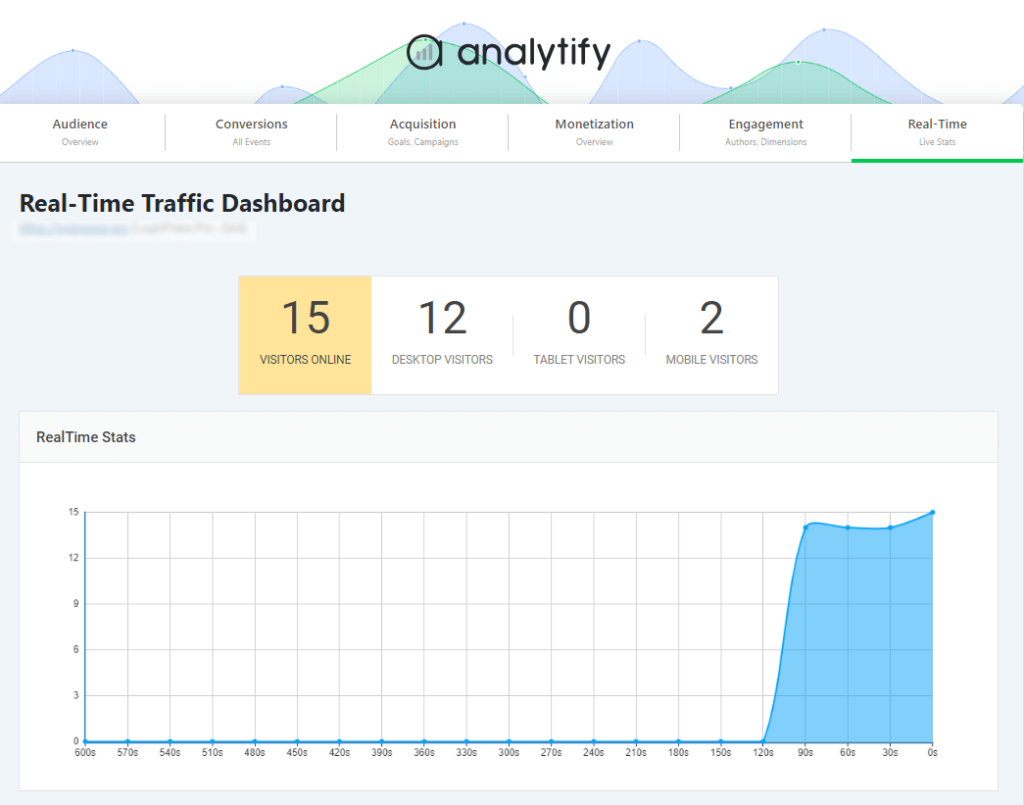
Instead of switching between multiple GA4 views, users can quickly review traffic sources, engagement trends, and user activity in a single view.
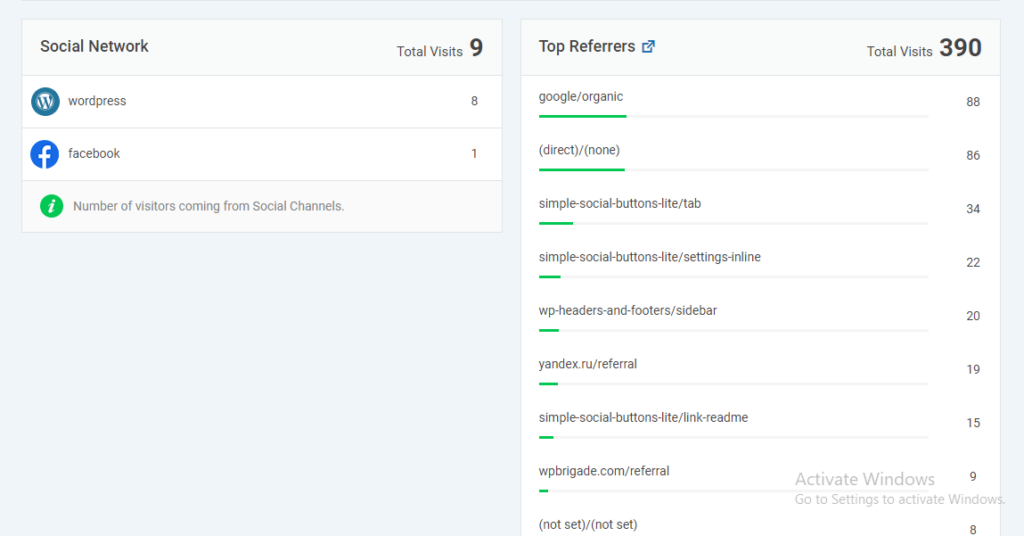
Example:
Imagine opening your WordPress dashboard and noticing a sudden spike in Direct traffic, but with almost zero engagement.
No campaign was launched, and no new content was published. That mismatch alone is enough to raise a red flag and prompt a closer look, before reports are shared or decisions are made.
This kind of early visibility helps non-GA4 experts:
- Spot suspicious traffic patterns sooner
- Review cleaner, more focused reports
- Respond to data issues without deep GA4 knowledge
The goal isn’t to replace GA4. It’s to make traffic quality easier to understand, right where WordPress users already manage their site.
FAQs: Detect Bot Traffic in GA4
1. How to identify bot clicks?
Bot clicks usually don’t behave like real users. You may notice:
Clicks with no time spent on the page.
Repeated clicks from the same source.
High clicks but no conversions or follow-up actions.
In short, if clicks happen without real engagement, they’re often a sign of fake traffic in GA4.
2. How to filter bot traffic?
You can’t completely block all bots, but you can filter their impact. Common ways include:
Using Google Analytics bot filtering (built-in GA4 protection)
Excluding known spam referrers
Separating suspicious traffic when analyzing reports
This helps clean GA4 data for decision-making, even if raw data still exists.
3. How to check AI traffic in Google Analytics?
AI traffic acts like advanced bot traffic and can be spotted by repeated behavior, unusually high event counts, or artificial engagement. In GA4, it often appears as GA4 spam traffic mixed with real users, so carefully reviewing patterns is key.
4. Does GA4 remove bot traffic?
No, GA4 does not fully remove bot traffic. GA4 applies limited automatic filtering, but some bot traffic still appears; historical data cannot be deleted, and filters mostly affect reporting rather than stored data. That’s why manual review is still needed.
5. How do you identify bot traffic in GA4?
You detect bot traffic in GA4 by combining multiple signals, such as:
Low engagement + high traffic
Strange sources or referrers
Repetitive behavior across sessions
No single metric confirms bots. Detection relies on patterns across engagement and source.
Final Thoughts
In this guide, we covered how to detect bot traffic in GA4 and maintain clean GA4 data. We started by defining bot traffic, GA4 spam traffic, and automated tools that create fake engagement. This helps you understand why GA4 shows spam traffic.
We explored early warning signs such as near-zero engagement, unusual referrers, and traffic spikes.
We also explained how to detect bot traffic by analyzing patterns in engagement, sources, hostnames, and repetitive behavior. To do this, you can use GA4 tools like Explorations, Dimensions, and Comparisons.
Cleaning GA4 data involves preventing future bot traffic using filters, referral exclusions, and segment-based reporting.
At the same time, monitoring trends regularly helps keep your reports reliable. Tools like Analytify simplify this by providing real-time insights directly in WordPress.
Following these steps helps spot fake traffic in GA4 and ensures your analytics stay trustworthy.
For further understanding, you can read:
- 11 Key Customer Engagement Metrics To Measure (2025)
- Top 5 Tips to Get More Instagram Shares and Boost Engagement (2026)
- Real-Time vs Event-Based Reporting in GA4: Which One to Use When
If you found this guide helpful, share your thoughts in the comments below.