
How to Implement GA4 Referral Exclusion to Fix Misattributed Traffic? (2026 Guide)

To set up GA4 referral exclusion for PayPal, add paypal.com to the List unwanted referrals setting of your web data stream. In Admin, under Data collection and modification, click Data streams, select your web stream, click Configure tag settings, click Show all, open List unwanted referrals, add paypal.com as a condition, and click Save. GA4 then stops showing PayPal as the referral source for customers who return from checkout.
If GA4 is not yet connected to your site, I recommend the guide: How to Set Up Google Analytics 4 and Connect it to Your WordPress Site?.
Navigating the e-commerce analytics can sometimes feel daunting, especially when you notice oddities in your traffic sources. WooCommerce and Easy Digital Downloads stores often see payment gateway domains such as paypal.com listed as a referral source instead of the real traffic source.
If you accept payments through PayPal, GA4 can attribute transactions to PayPal instead of the source that brought the customer to your store. Excluding paypal.com from referrals returns credit to the original source.
This guide is for WooCommerce and Easy Digital Downloads store owners who see PayPal as a traffic source in GA4. It walks through the exclusion steps and explains what the setting changes in your reports.
GA4 Referral Exclusion (TOC):
What is GA4 Referral Exclusion?
Referral exclusion in Google Analytics 4 (GA4) lets you list domains that GA4 must not count as referral traffic sources. It is useful for third-party domains in your customers’ journey, such as payment processors. GA4 already treats your own domain and its subdomains as self-referrals, so you do not need to list them.
Navigation between your own pages must not count as a new referral. GA4 does not count your own domain, its subdomains, or configured cross-domain setups as referrals. Referral exclusion handles the other domains that GA4 would treat as referrers.
Accurate source data shows where your conversions come from, so you can invest in the right channels. Adding paypal.com to your GA4 referral exclusion list stops GA4 from showing PayPal as the source of the returning visit. Source attribution then goes to the original source.
Why You Might Want to Use GA4 Referral Exclusion?
Use GA4 referral exclusion to keep third-party, internal, and mistaken referrals out of your traffic source data. Here are the reasons:
- Internal Traffic: Visits that move between your own domains can show up as referrals. GA4 handles your own domain and cross-domain setups automatically, so list a domain only if it still appears as a referral.
- Third-party Services: Your website works with payment gateways, marketing automation tools, and other third-party services. Visitors who return from these domains should not count as new referral traffic. Excluding these domains keeps your referral data limited to real external sources.
- Inaccurate Referrals: Technical quirks, browser behavior, or misconfigurations can attribute visits to the wrong referrer. Identify those domains and exclude them to clean up your source data.
How do Google Analytics and PayPal Referrals Happen?
PayPal referrals appear in GA4 because customers leave your site to pay on PayPal and then return to it.
Here’s the typical journey: a customer adds products to their cart on your website and chooses PayPal as their payment method. This action redirects them to PayPal’s website to complete the transaction. Once the payment is successful, they’re brought back to your site to finalize the order.
GA4 can mark PayPal as the referral source for the transaction. That hides the actual origin: the website, ad, or link that first led the customer to you. It happens because the customer returns from PayPal, and GA4 reads PayPal as the referrer of that return visit.
Misattribution makes it hard to see which channels drive sales. GA4 referral exclusion fixes the PayPal case.
Adding PayPal to the GA4 referral exclusion list tells Google Analytics to ignore PayPal as a referrer. Reports then show the original source instead of the payment gateway.
Excluding PayPal from your referral sources gives a clearer view of the customer journey and of the channels that drive traffic and conversions.
How to Implement GA4 Referral Exclusion for PayPal?
To exclude PayPal in GA4, add paypal.com to the List unwanted referrals setting of your web data stream. You need the Editor role or higher on the property.
Follow these five steps.
Step 1: Access Your GA4 Web Stream Settings
- Go to Admin , then under Data collection and modification, select Data streams.
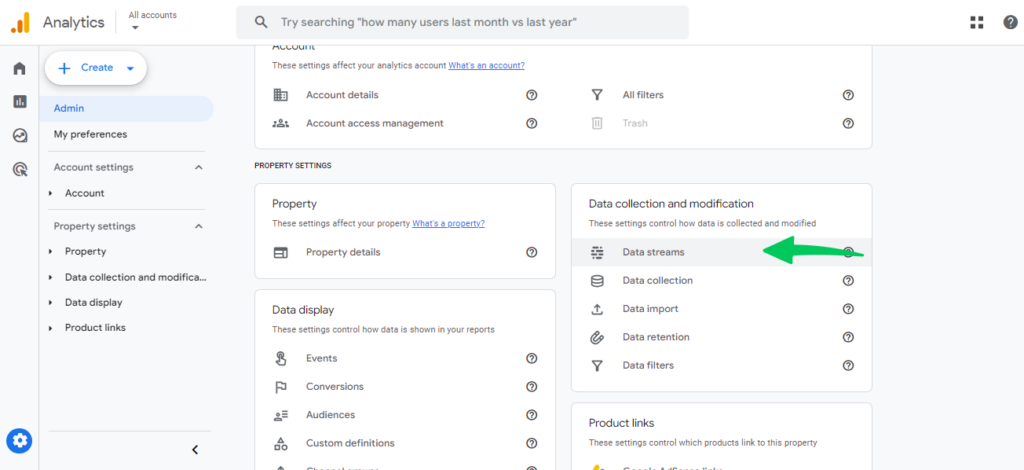
Choose the web data stream you want to adjust.
Step 2: Configure Your Tag Settings for Referral Exclusion
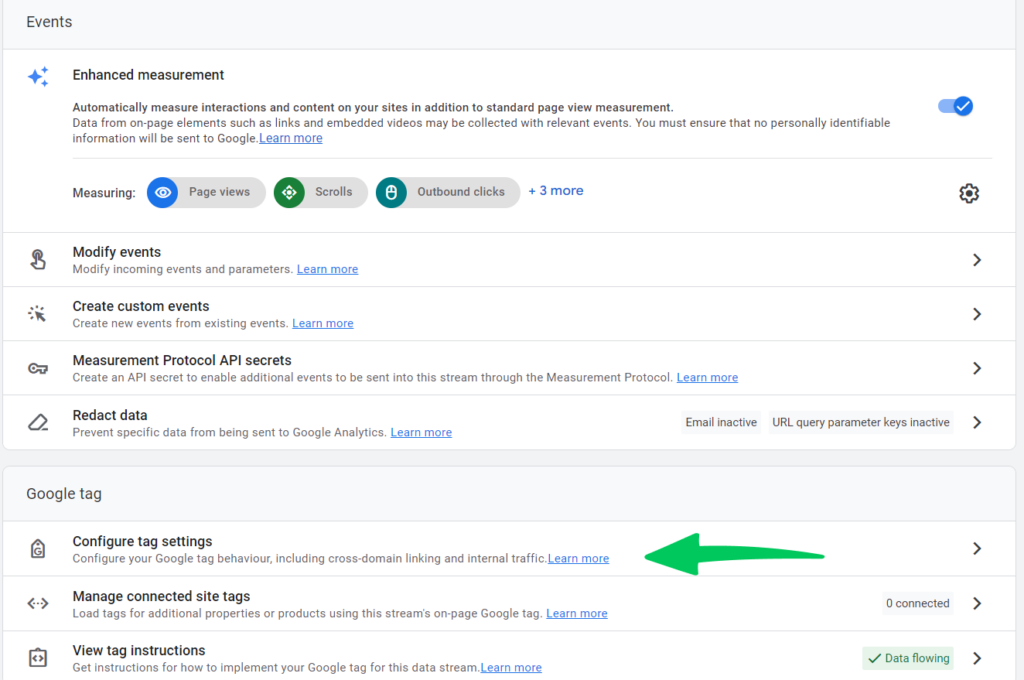
- In the web stream details, click Configure tag settings at the bottom. Then click Show all in the Settings section to see every setting.
Step 3: Exclude PayPal as an Unwanted Referral
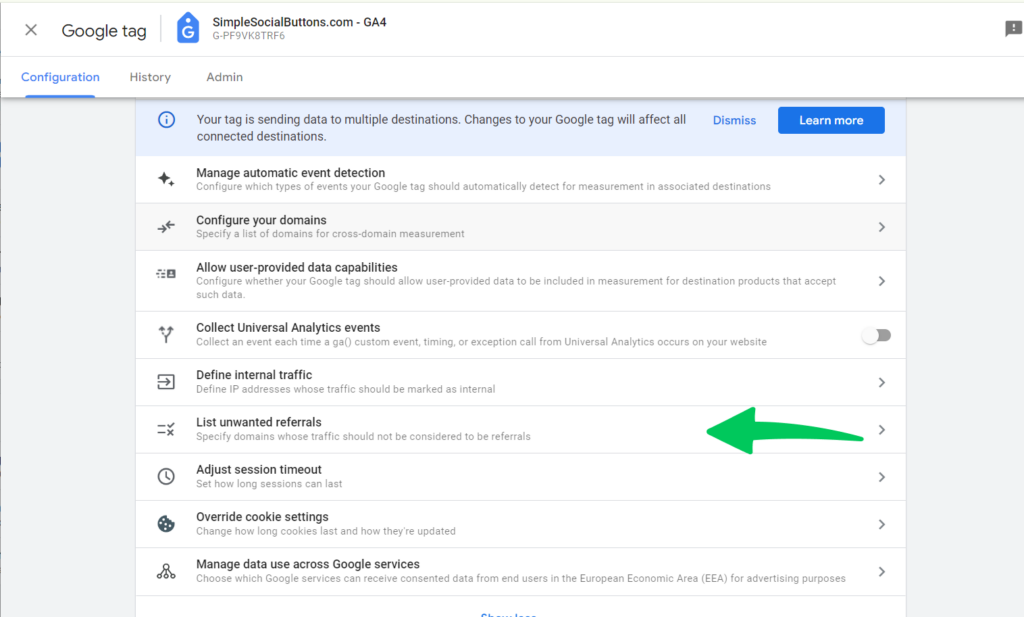
- In the Settings section, click List unwanted referrals. Add a condition for each domain that GA4 must not count as a referral. You can add up to 50 conditions per data stream.
Step 4: Adding PayPal to Your Exclusion List
- Under Include referrals that match ANY of the following conditions, choose a match type and enter paypal.com as the domain. Add a condition for any other domain you want to exclude. Conditions use OR logic. You can choose from these match types:
- Referral domain contains: The most straightforward option, where you simply type paypal.com. This is the go-to method for a Google Analytics 4 referral exclusion.
- Hostname prefix: This choice is less common but useful if you need to exclude specific PayPal subdomains.
- Hostname suffix: An even less common option, not typically necessary for PayPal exclusions but available should you need it.
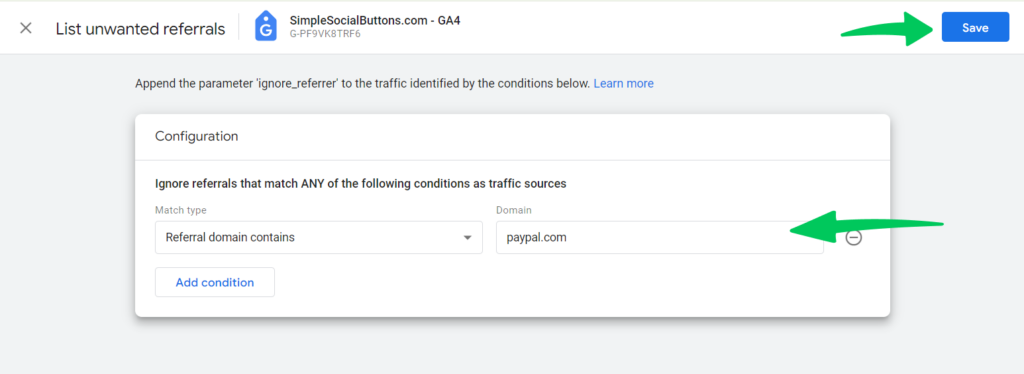
Step 5: Save Your Changes
- Click Save to apply the exclusion.
Important Considerations
- The GA4 referral exclusion might take up to 48 hours to fully integrate into your data.
- Excluding PayPal Google Analytics referrals affects only the source attribution, not other metrics like sessions or page views.
- While you’re at it, consider excluding other domains or sources that might skew your analytics for a more accurate overview.
- Exclusion is a powerful tool, but it should be used wisely. Over-exclusion can hide valuable insights.
- Users who arrived through PayPal before you added the exclusion can stay attributed to PayPal when they return directly, because GA4 uses last non-direct click attribution.
Pro Tips
- Analyze the Impact: To gauge its effect, compare your referral reports before and after the exclusion.
- Use Segments: Create segments in GA4 to dissect traffic data with and without the PayPal Google Analytics exclusion.
- Beyond Exclusions: Consider custom dimensions or UTM parameters for nuanced tracking, especially for campaigns involving PayPal.
GA4 Referral Exclusion FAQs
1. What is GA4 referral exclusion, and why is it important for PayPal transactions?
GA4 referral exclusion allows you to exclude specific referral sources, like PayPal, from being recognized as the referral source in your Google Analytics data. This is crucial for PayPal transactions because it ensures that the original source of the traffic—such as a search engine or social media link—is credited for the visit, rather than PayPal, where the visitor is redirected to complete their purchase. This gives you a more accurate understanding of where your traffic is coming from.
2. How can I add PayPal to my referral exclusion list GA4?
To add PayPal to your referral exclusion list GA4, navigate to your GA4 Property Settings, select Data Streams, and choose your web data stream. Click on Configure tag settings, show all settings, and find the List unwanted referrals section. Here, you can add “paypal.com” to exclude it as a referral source.
3. How long does it take for a Google Analytics 4 referral exclusion to take effect?
A Google Analytics 4 referral exclusion typically takes up to 24-48 hours to fully take effect. Monitoring your referral data before and after making this change is important to ensure the exclusion is working as intended.
4. Will excluding Google Analytics PayPal referral traffic affect my other metrics?
Excluding Google Analytics PayPal referral traffic will not impact other metrics such as sessions, page views, or user engagement data. It only affects how the referral source is attributed, ensuring that PayPal is not mistakenly credited as the source of traffic that leads to conversions.
5. Can I exclude other payment gateways besides PayPal Google Analytics?
Yes, you can exclude other payment gateways besides PayPal Google Analytics by adding them to your referral exclusion list in GA4. This is useful if you use multiple payment processors and wish to maintain accurate tracking of your original traffic sources.
6. What are some common issues to look out for when setting up GA4 referral exclusion for PayPal?
When setting up GA4 referral exclusion for PayPal, ensure that you correctly type the domain name (“paypal.com”) to avoid errors. Use this feature carefully and consider excluding only those domains that genuinely skew your referral data.
7. How can I verify that my PayPal Google Analytics referral exclusion is working?
To verify that your PayPal Google Analytics referral exclusion is working, compare your referral traffic reports before and after applying the exclusion. Look for a decrease in traffic attributed to PayPal as a referral source and an increase in the original referral sources. It’ll indicate that the exclusion is correctly attributing traffic to its initial source.
Conclusion
GA4 referral exclusion stops PayPal and other listed domains from appearing as the referral source of returning visits. Your reports then show the original traffic sources.
We’ve explored how Google Analytics PayPal referral traffic occurs, often misattributing the source of a transaction to PayPal when, in fact, the visitor originated from another site. This misattribution can skew data and disturb the real performance of marketing campaigns. To resolve this, we provided a step-by-step guide on applying Google Analytics 4 referral exclusion for PayPal, ensuring that your analytics accurately track the customer journey from initial engagement to conversion.
Remember, while excluding PayPal from your referral list, patience is key, as changes can take up to 48 hours to apply fully. Moreover, this exclusion is targeted; it does not affect other metrics, such as sessions or page views, but refines the attribution of your referral sources. By carefully managing your GA4 referral exclusion, you can better understand your traffic sources, empowering you to make more strategic decisions in your marketing efforts.
By following the outlined steps to manage referral exclusion in GA4, you can ensure that your analytics has a true picture of where your traffic comes from, allowing you to focus on strategies that drive your business forward.


Great article — especially relevant for SEO professionals and analytics marketers.
Managing referral sources is often overlooked in GA4, even though it directly impacts the reliability of attribution and conversion data.
Excluding domains like PayPal, Stripe, or other payment providers is essential to avoid session fragmentation and to maintain a coherent view of the user journey. Without this, reports may incorrectly attribute conversions to a “referral” source that played no actual role in acquisition or purchase decisions.
One suggestion to further enrich the article: consider adding a data-driven case study that illustrates the before/after impact of excluding a referral domain (e.g., shift in conversions attributed to “direct” vs “referral”).
Thanks for this clear and useful resource — it’s highly valuable for anyone looking to maintain a clean and reliable data structure in GA4.
Thank you for your suggestion about the case study. Our editorial team will look into it!