Analytify is an easy-to-use WordPress plugin that integrates your site with Google Analytics.
Analytify shows a list of GA4 properties linked to your Google account in the Profile tab. If you manage a site on behalf of a client, or if your WordPress site has multiple admins and editors, you may want to prevent other users from seeing this list.
Hiding the profile list does not affect data collection or reporting. It only removes visibility of the property list from users who should not have access to it.
Continue reading “How to Hide Google Analytics Profile List In Analytify?” →
With the release of Analytify Pro, Analytics have just been much more colorful! The ‘Analytify Comparison Graph Colors‘ filter is one of the exciting new features included in the most recent version of Analytify Pro. It’s a game-changer since it enables you to add a pop of color to your Analytify Dashboard.
Let’s explore the methods for bringing this color revolution to your Analytify Google Analytics Dashboard.
Continue reading “How To Change Comparison Graph Color In Analytify Dashboard” →
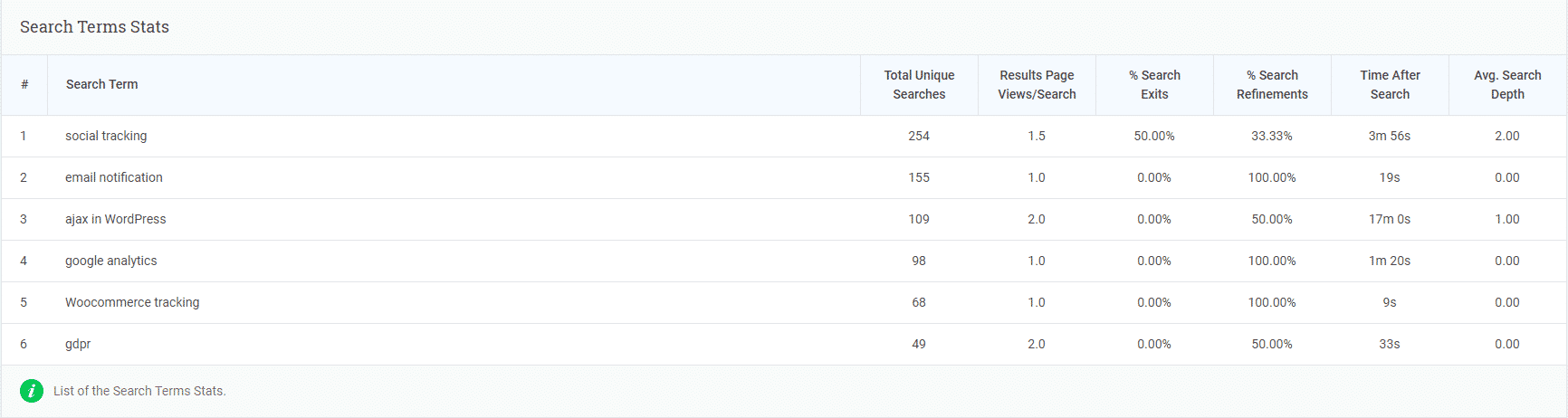
Site search tracking tells you what your visitors are searching for on your site. When someone uses your WordPress search bar, that query is captured as a GA4 event and shown in both Google Analytics 4 and your Analytify dashboard.
This guide walks you through enabling site search tracking in GA4 and viewing the data inside Analytify.
Continue reading “How To Get Site Search Tracking Stats in WordPress Dashboard” →
If you have removed the trailing slash from Tracking your website URLs in Google Analytics. You must be having trouble in viewing stats per post/page in Analytify.
Continue reading “How To Remove Trailing Slash From Google Analytics?” →
In the digital world, it’s crucial for any online business to keep track of users’ behavior and website performance. Google Tag Manager (GTM) and Analytify are two well-known tools in this field and can be used to analyze data in valuable ways. But can you use GTM with Analytify without causing double code tracking issues? Let’s learn more about it.
Continue reading “Using GTM with Analytify: An In-Depth Guide” →
Yes, you can give access to any specific user role. There are plugin settings in the Dashboard Tab which you can add/remove the user roles who you want access e.g you want to show stats to your Authors only.
Yes, Analytify works with Free version and Google Analytics 360 (Premium) per year cost is 150,000 USD per year. Analytify should work with Analytics 360 as well because We are using Advanced Google Analytics APIs and updating our backend APIs actively to keep up-to-date our Product.
“Site Speed after analytify installation” doesn’t change. Analytify just adds Google Analytics JS script and configurations by Google. Our dashboard queries don’t load by default on the public end. All the processing load happens in plugin backend pages.
Yes, we are fully compatible with Gutenberg and WordPress 6.9 currently.
Analytify is a WordPress plugin that only works with WordPress, and it doesn’t work with Shopify and Cloud base app.