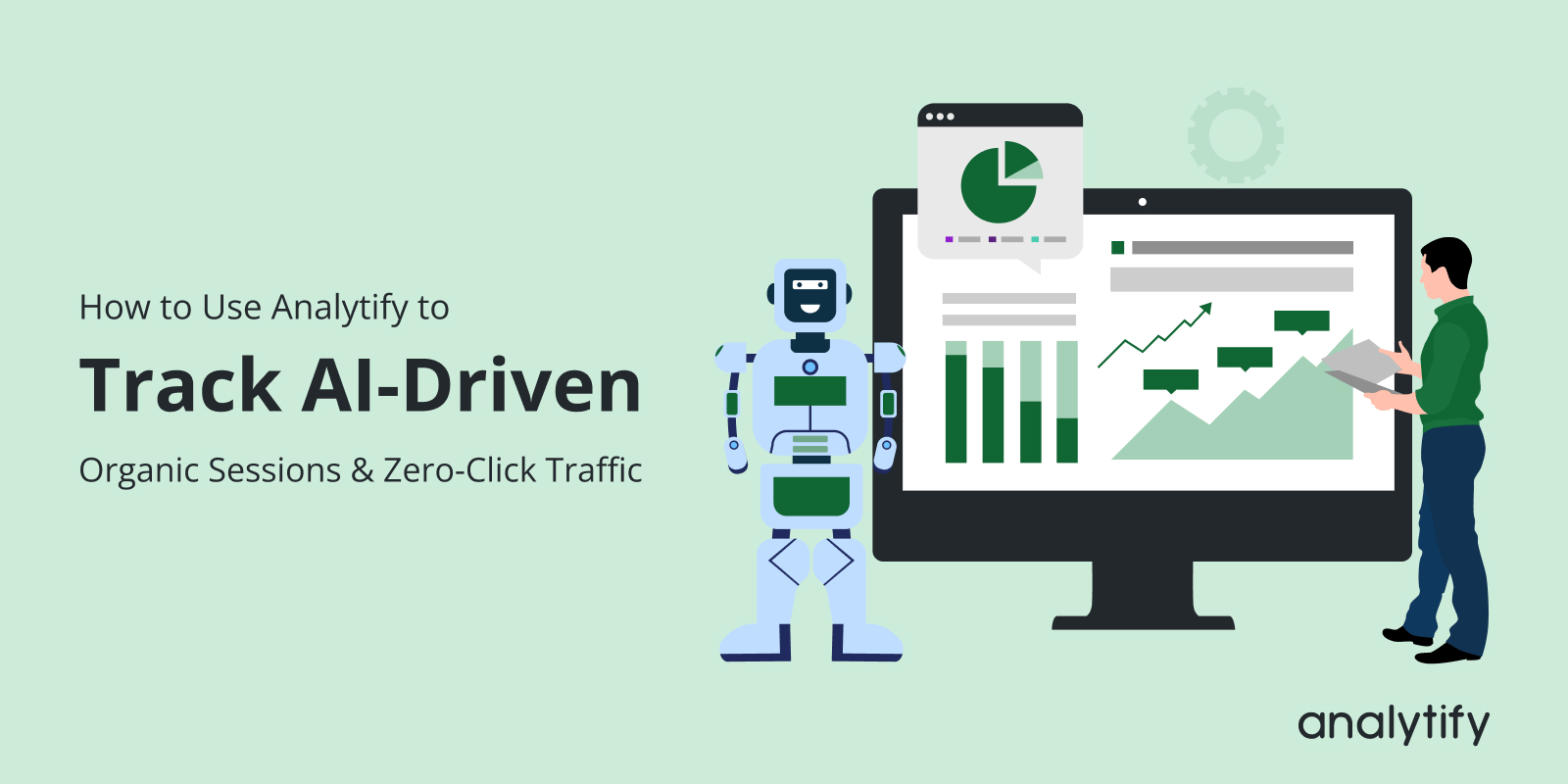
How to Use Analytify to Track AI-Driven Organic Sessions & Zero-Click Traffic

Have you noticed your website rankings staying steady, but traffic seems to drop? If so, you’re not alone, and it’s a new challenge in the age of AI-driven traffic.
With AI-powered search, users often get instant answers, summaries, or zero-click results right on the search page. This means people may read your content without ever visiting your site.
Many site owners experience this confusion in GA4. Where organic traffic appears to drop even though rankings and SEO performance remain stable. This makes it difficult to understand how your content is truly performing.
In this guide, you’ll learn how to track AI-driven traffic, measure AI search traffic impact, and monitor zero-click search analytics. You’ll also discover how to analyze GA4 organic traffic changes using Analytify to track AI-driven organic traffic effectively.
Let’s get started!
Track AI-Driven Traffic (TOC):
What Is AI-Driven Organic Traffic?
AI-driven organic traffic means your website becomes visible when AI search tools read your content and use it to answer people’s questions.
Instead of always showing website links, AI sometimes gives direct answers on the search page.
When people search online, AI tools may show AI answers, summaries, or overviews. To create these, AI reads and understands content from different websites, including yours. Even if users don’t click your site link, your content is still helping them.
In traditional organic traffic, users search on Google, see a list of links, and click on a website. Rankings, clicks, and sessions mainly measure this success.
In AI-influenced search results, users often see instant AI-generated answers. These answers may not require a click because the user receives the information right away.
This change can reduce website clicks, but it doesn’t mean your content failed. It means your site helped AI generate the answer and gained visibility in a new way. Your content is still being read, trusted, and referenced.
That’s why AI-driven exposure still counts as search visibility, not failure. The key now is learning how to measure AI search traffic beyond clicks.
Instead of focusing only on sessions, look at engagement, brand searches, and content performance.
These signals help you understand long-term growth and real visibility in AI-driven search.
What Is Zero-Click Traffic (and Why GA4 Doesn’t Show It Directly)
Zero-click traffic means people see your content in search results but don’t click your website link.
Think of it like this: You ask a question, and Google answers it right away on the screen. You get the answer, so you don’t need to open any website. That is called zero-click traffic.
This happens a lot with AI answers, summaries, and overviews. AI uses your content to answer questions, but users may see the answer without visiting your website.
In zero-click searches, the user never comes to your site. So GA4 has nothing to record.
Because of this:
- GA4 doesn’t show zero-click traffic.
- GA4 only counts visits when someone actually opens your website.
- If AI uses your content, but no one clicks on your site. So, GA4 has nothing to record as a session.
That’s why you may see GA4 organic traffic changes, even when your content is still useful and visible.
To better understand this, marketers are now tracking AI-driven traffic in new ways. Instead of just looking at clicks, they also consider brand searches, later user engagement, and content performance.
This helps in AI search traffic measurement, showing how AI systems use your content even when users don’t click through to your site.
How AI SERPs Cause Organic Traffic Drops (Even Without Ranking Loss)
AI SERPs are search engine results pages powered by artificial intelligence, showing answers that are more helpful and relevant than regular search results. As a result, website traffic can drop even if your page ranks well.
Here are common situations where traffic may decline:
- AI Overviews answering questions
When someone searches, AI may show a complete answer at the top of the page. This answer is prepared by reading many websites, including yours. If the user gets the answer there, they may not click any link. - Featured snippets with AI summaries
Sometimes AI shows a summary along with a snippet. Your content may help create that summary, but users already understand the topic and don’t visit the site. - Brand mentions without clicks.
AI may mention your website name or idea, but it doesn’t always send users to your page. Your content is still being used and seen.
Why this is not an SEO failure
Drops in traffic do not mean your content is bad. It means:
- AI is reading your content.
- AI trusts your information.
- Your site helps answer user questions.
What Signals You Can Track for AI-Driven Traffic Changes
To track AI-driven traffic effectively, focus on signals that show how AI is affecting your website visits.
- Start by monitoring GA4 organic traffic changes to see which pages are losing clicks or gaining fewer visitors than before.
- Pay attention to page-level performance, especially for pages that provide quick answers, because AI may show those answers directly in search results, reducing user clicks.
- You can also use AI search traffic measurement by tracking how often your content appears in zero-click searches or is referenced by AI assistants.
- Look at engagement metrics like time on page, scroll depth, and interactions; these show whether the visitors you do get are finding your content useful, even if overall traffic drops.
Watching these signals together helps you understand the actual impact of AI on your organic traffic and adapt your SEO strategy accordingly.
Why GA4 Alone Makes AI Traffic Analysis Hard
Google Analytics 4 is a powerful tool, but understanding AI-driven traffic through it can be difficult, especially for non-technical users. The main challenges include:
- Complex interface
Important data is spread across multiple reports, making it hard to quickly see how organic traffic changes because of AI search behavior. - Heavy reliance on Explorations
To analyze landing page drops, changes in engagement, or shifts in intent, users often need to build custom explorations. This takes time and experience and slows down decision-making for WordPress site owners. - Focus on sessions, not visibility.
GA4 mainly tracks sessions and events, but AI search can reduce clicks without reducing visibility. This makes it harder to track AI-driven organic traffic using GA4 alone. - Misleading traffic drops
When sessions fall, users may assume SEO is failing, even though AI tools are still using their content in summaries and answers. - Hard to spot patterns quickly
GA4 doesn’t clearly connect traffic drops with engagement quality or content performance in a simple, visual way.
Because of these challenges, simplified GA4 reporting inside WordPress becomes important. Clear, page-level insights in a familiar dashboard help site owners understand AI search traffic changes without deep analytics expertise and respond faster with confidence.
How to Track AI-Driven Traffic in Analytify
Join 50,000+ beginners & professionals who use Analytify to simplify their Google Analytics!
Analytify is one of the best Google Analytics plugins, offering seamless integration with GA4.
Analytify displays all the essential metrics directly on your WordPress dashboard. So you don’t need to jump between multiple reports or platforms to understand your traffic.
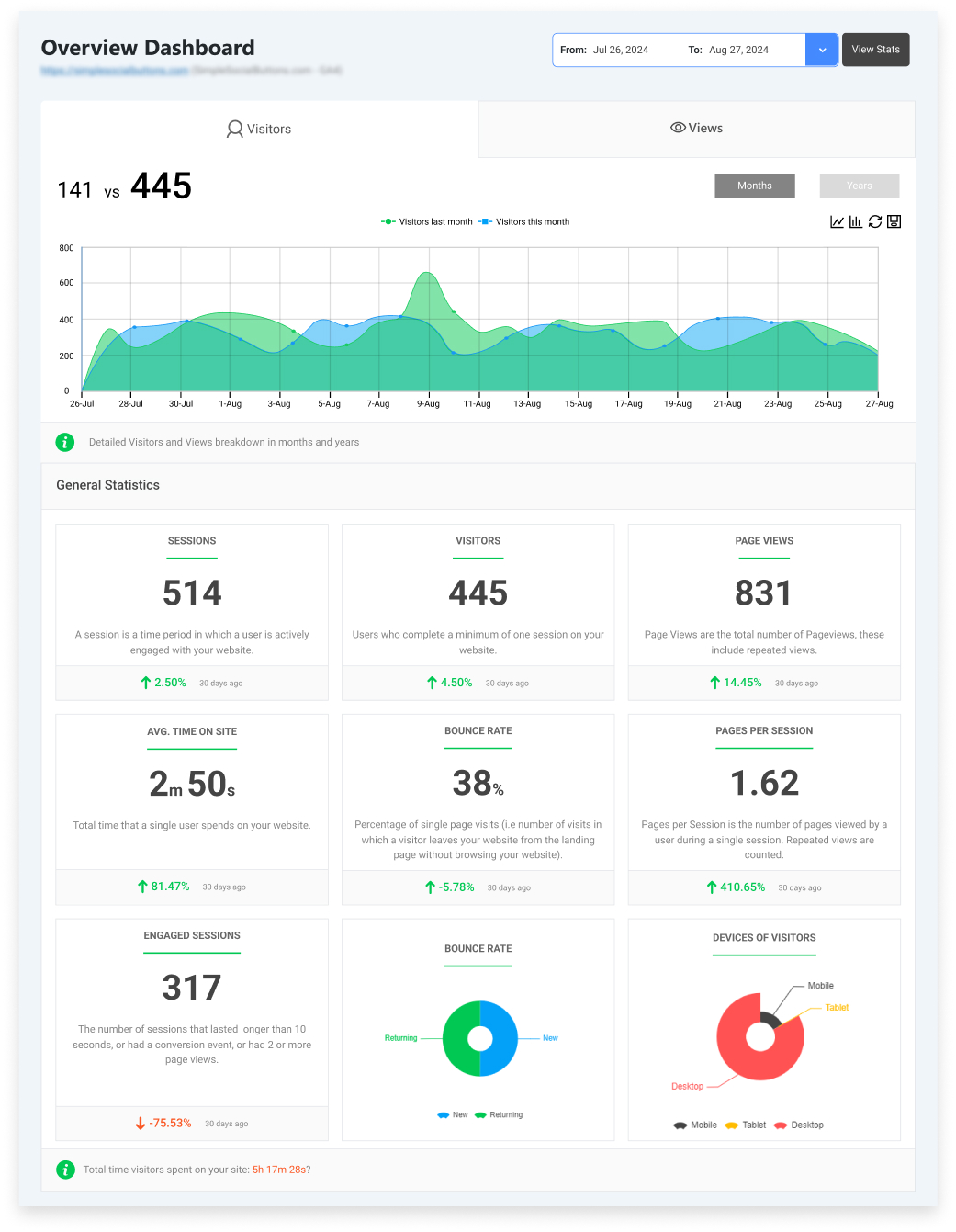
With Analytify, tracking GA4 organic traffic changes becomes simple. You get accurate insights, including GA4 organic traffic visibility inside WordPress. So, you can see overall trends without leaving your dashboard.

With the Top Landing Pages report, you can identify which pages users visit. You can also see the engagement rate, engaged sessions, and user engagement duration, showing exactly what happens when users visit your site.
Open Analytify >> Pages >> Top Landing Pages
Filter by Organic traffic
Compare date ranges (before vs after AI SERP changes)
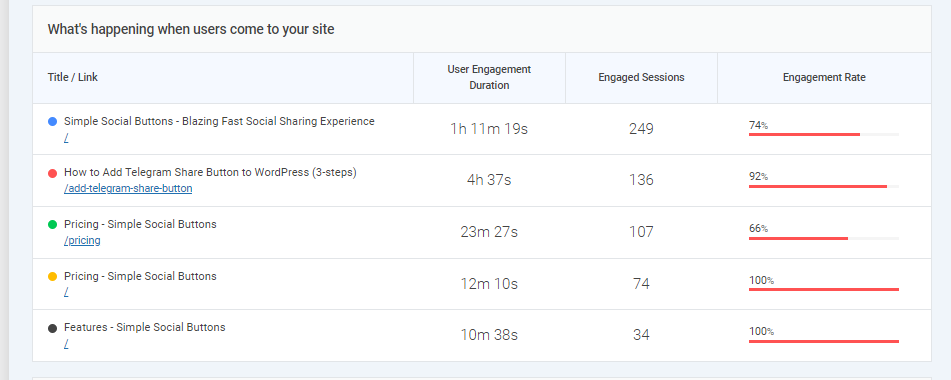
Check engagement metrics for pages with declining sessions:
- Engagement rate
- Average engagement time
- Events or conversions
Additionally, you can track other engagement metrics such as average time on site, engaged sessions, pages per session, page views, bounce rate, and more.
You can classify the page interface by following the framework below:
- Sessions ↓ + Engagement ↑ = AI-driven filtering (no action)
- Sessions ↓ + Engagement ↓ = Content update needed
- Stable sessions + Strong engagement = High-value content
This framework allows you to track AI-driven organic traffic without guessing.
By combining clear metrics, engagement signals, and page-level insights, Analytify lets you see where AI has changed user behavior.
This helps you respond strategically instead of just guessing. With this approach, you can adapt your content, optimize engagement, and maintain a strong presence in AI-influenced search results.
Tracking Zero-Click Impact Through Engagement Signals
Zero-click searches can make it feel like your traffic is dropping, but engagement data helps you understand what’s really happening.
Even when fewer users click through to your site, strong engagement signals show that your content remains relevant and valuable.
- When AI answers appear in search results, sessions may decline while user quality remains the same or improves. This is where engagement metrics become essential.
- For example, if your organic sessions decline but time on page remains stable or increases, it means the users who do click are genuinely interested and finding helpful information.
- Scroll depth (if you track it) is another helpful signal. When visitors scroll through most of a page, it shows they are reading and engaging with the content rather than leaving immediately. This suggests that AI summaries filtered out casual visitors, leaving more intent-driven users.
- You can also look at landing page performance. A page may receive fewer visits, but still drive sign-ups, downloads, or internal clicks. This indicates the content continues to perform well for users who reach it.
We can understand better with an example like:
If an article gets fewer clicks after AI summaries appear, but users spend more time reading and complete actions on the page, it is considered a success. It means the content is still doing its job.
In this way, even with fewer visits, you can track AI-driven traffic by focusing on these signals. Understand that AI handles basic questions while your page serves detailed user needs.
How to Respond to AI-Driven Traffic Drops (What to Fix vs. Ignore)
Not every traffic drop means something is broken. With AI-powered search results, some changes are expected, and knowing what to fix and what to ignore saves time and effort, such as:
When a drop is expected (and okay):
- If AI answers or summaries start appearing for your keywords, fewer users may click through even though your content is still being used. In this case, check engagement metrics rather than panicking about sessions.
- If users who do visit spend time on the page, scroll, or complete actions, the drop is normal and doesn’t need fixing.
When optimization is needed:
- If you see declining sessions and poor engagement, such as high bounce rates or very short time on page, it’s a signal to improve content.
- This may mean updating outdated sections, improving readability, adding clearer headings, or answering follow-up questions users might have after seeing an AI summary.
When content should shift intent:
- Some content types are now fully answered by AI (simple definitions or quick facts).
- For these pages, consider shifting intent. Add deeper explanations, practical steps, tools, comparisons, or real examples that AI can’t fully cover.
Analytify makes this easier by showing page-level traffic, engagement, and event data in a simple WordPress dashboard.
For example, if a blog post shows fewer visits but strong engagement and conversions, it’s working fine. If both traffic and engagement drop, that’s where updates are needed.
Content Optimization Strategies for AI-Dominated SERPs
As AI-powered search results become more common, content needs to be optimized differently. The goal is not just to win clicks, but to stay useful, visible, and valuable even when AI shows summaries.
Here are practical strategies you can apply:
- Structure content for partial clicks
Use clear headings, short paragraphs, and simple explanations at the top, then expand details below. This helps users who arrive after reading an AI summary quickly find value. - Go deeper than AI summaries.
AI usually gives short answers. Add examples, step-by-step guidance, screenshots, use cases, or comparisons that AI cannot fully cover in a summary. - Target intent AI can’t fully satisfy
Focus on content that requires experience or action, such as tutorials, tools, checklists, templates, or real-world scenarios. These still encourage users to click. - Answer follow-up questions on the page.
Include FAQs, clarifications, and “what to do next” sections. AI often answers the first question but leaves users searching for deeper help. - Optimize for engagement, not just rankings.
Improve readability, internal linking, and content flow so users spend more time on the page once they arrive. - Keep content updated and accurate.
Fresh and well-maintained content is more likely to be trusted by AI systems and reused in summaries.
Common Mistakes When Analyzing AI-Driven Organic Traffic
Here are some common mistakes to see when analyzing AI-driven organic traffic:
- Panicking over session drops
Fewer sessions don’t always mean your content is failing. AI answers and summaries can reduce clicks while still using your content. - Focusing only on clicks and sessions
AI-driven organic traffic includes visibility even without clicks, so only tracking sessions misses a big part of the picture. - Ignoring engagement metrics
Ignoring engagement metrics can be misleading. Even with fewer visitors, users who do click may spend more time, scroll more, and interact better. - Treating zero-click traffic as a failure
Zero-click search analytics show that AI may answer questions without sending visitors. This is normal and not broken tracking. - Overlooking trends in GA4 organic traffic changes
Short-term drops can look alarming, but long-term trends reveal the real impact of AI-driven search. - Expecting perfect AI search traffic measurement
AI-driven traffic must be inferred from patterns such as engagement, brand searches, and landing page performance, not from exact clicks.
Frequently Asked Questions
1. How do I track AI-driven traffic in Google Analytics?
You can’t see AI-driven traffic as a separate line in GA4, but you can track AI-driven organic traffic by watching patterns. Look at organic traffic trends, engagement rate, time on page, and landing page performance. If sessions drop but engagement stays strong, your content may still be visible in AI answers and summaries.
2. Can GA4 track zero-click searches?
No, GA4 does not track zero-click searches directly. GA4 only records sessions when someone actually visits your website. When AI tools answer a question without a click, GA4 does not receive that data. This is why zero-click search analytics must be understood indirectly.
3. How do I track AI zero-click traffic in Google Analytics?
To track AI zero-click traffic, focus on indirect signals. These include increases in organic sessions, higher engagement from fewer users, stable rankings with fewer clicks, and increases in branded searches. This approach is part of modern AI search traffic measurement.
4. Why is my organic traffic dropping, but rankings are stable?
This often happens because AI-powered search answers questions directly on the search page. Your content may still rank well, but users get answers without clicking. This does not mean your SEO is failing; it means AI is using your content.
5. Is zero-click traffic bad for SEO?
No, zero-click traffic is not bad for SEO. It shows that your content is trusted and valuable enough for AI systems to reference. While clicks may be lower, your brand visibility and authority can still grow through AI-driven organic traffic.
Final Thoughts: Track AI-Driven Traffic
In this article, we explored how AI is changing search results. First, we defined AI-driven organic traffic and zero-click search analytics. Then, we discussed why GA4 cannot record these interactions, highlighting that traffic drops don’t necessarily mean SEO failure.
Next, we examined how AI SERPs can cause organic traffic drops through AI overviews, featured snippets, and brand mentions. We then outlined signals you can track to monitor AI-driven traffic changes, including GA4 organic traffic, page-level performance, and engagement metrics.
We discussed why GA4 alone makes AI traffic analysis hard due to complexity, focus on sessions, and difficulty spotting patterns.
Using Analytify, you can simplify tracking by measuring zero-click impact, engagement, and conversions in a clear WordPress dashboard. Finally, we covered how to respond to AI-driven traffic drops and strategies for optimizing content.
For further guidance, you can read:
- AI-Powered SEO Experiments: How to Analyze Test Results with Analytify
- How to Use Analytify Data to Train Better AI Prompts for Marketing
Now it’s your turn. Tell us how AI has impacted your website traffic and what changes you have noticed in user engagement.
Share your experiences in the comments below!