Voice Search Optimization in 2026: How to Optimize Content Using Analytics Data

Looking for voice search optimization using analytics data?
Voice search has evolved from a novelty feature to a mainstream discovery channel. Users now speak full questions instead of typing keywords, often on mobile devices, in cars, or via smart speakers. These queries are longer, more conversational, and frequently location-specific.
Modern voice assistants prioritize clear, concise answers often pulled from featured snippets, FAQ sections, or fast-loading, mobile-optimized pages. Traditional content strategies focused on short keywords and desktop behavior are no longer sufficient.
In this article, you’ll learn data-backed voice search optimization strategies, including how to use GA4 insights surfaced through Analytify, measure content performance, and make updates that improve both traditional SEO and mobile voice search SEO.
Voice Search Optimization (TOC):
Understanding Voice Search Behavior in GA4 Analytics
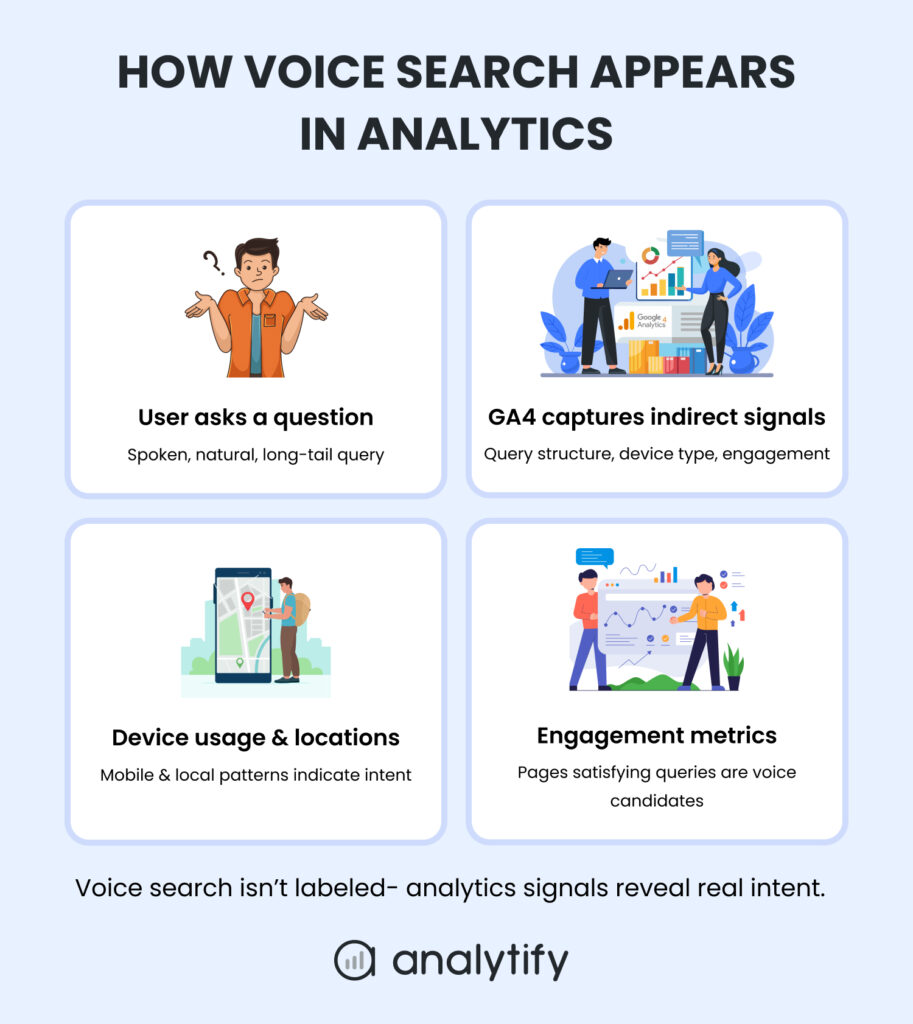
To optimize for voice search SEO, you first need to understand how voice-driven behavior appears in analytics. GA4 does not label sessions explicitly as “voice search”, but you can identify indirect signals through query structure, device usage, local intent, and engagement metrics.
How Voice Queries Appear
Voice searches are longer, conversational, and often phrased as questions. In GA4 (via Search Console integration), typical patterns include:
| Query Pattern | Example |
| Question words | “How do I track WordPress site traffic?” |
| Contextual phrases | “best way to…” |
| Local modifiers | “near me,” “open now” |
| Long-tail structure | 5+ words with natural sentence flow |
These patterns are the foundation of voice search optimization strategies because they reflect actual user intent, not guesswork.
Mobile and Local Dominance
About 65% of people aged 25–49 use voice-enabled devices daily.
Most voice searches occur on mobile devices and have local intent. GA4 signals include:
- High concentration of queries from mobile/tablet devices
- Landing pages with regional relevance
- Shorter user paths (fewer page views before conversion)
Tip: Pages with strong mobile engagement, fast load times, and local relevance are prioritized by voice assistants.
How Voice Assistants Select Answers
Voice assistants typically pull answers from:
- Featured snippets or top-ranking pages with concise answers
- Pages with structured data (FAQ, HowTo, LocalBusiness)
- Pages showing high engagement metrics (average engagement time, low bounce rate, repeat impressions)
By correlating these signals in GA4, you can identify pages most likely to be selected for voice results.
Key Takeaways for Voice Search Analytics
- Look for question-based, long-tail queries in Search Console.
- Focus on mobile-first and local content.
- Track engagement metrics to validate if pages satisfy user intent.
Understanding these patterns allows you to move from assumptions to data-backed voice search decisions, a crucial step before optimizing content.
What GA4 Captures (Indirectly)
You may be thinking, How do I optimize my website for voice search using analytics data?
GA4 doesn’t label sessions explicitly as “voice search,” but these signals help identify voice-driven behavior:
- Query structure: long-tail, conversational questions with modifiers like how, what, where, when, why
- Device usage: mobile and tablet-heavy traffic
- Local intent: regional traffic spikes or location-specific landing pages
- Engagement metrics: pages with high average engagement time, low bounce rates, and repeat impressions
Understanding these patterns allows teams to move from assumptions to data-backed voice search decisions, a crucial first step before optimizing content.
How to Identify Voice Search Patterns (Using Analytify)
Join 50,000+ beginners & professionals who use Analytify to simplify their Google Analytics!
Once you understand how voice search appears in GA4, the next step is turning analytics signals into voice search SEO best practices.
While GA4 contains the raw data, Analytify surfaces it inside WordPress, making it easier for teams to optimize content directly where they manage it.
Step 1: Identify Question-Based Queries
Voice search relies heavily on question phrasing. To find these queries in Analytify:
- In your WordPress dashboard, navigate to Analytify >> Reports >> Keywords.

- Filter for question words: how, what, where, when, why
- Focus on long-tail queries (5+ words, natural sentences)
- Flag queries with high impressions but low CTR for optimization
Actionable uses:
- Expand existing blog sections
- Create new FAQ blocks
- Improve concise, featured-snippet-ready answers
Example: GA4 shows the query: “How can I track WordPress site traffic in real-time?”
Action: Add it as a subheading in your blog or a FAQ entry with a 40–60 word concise answer.
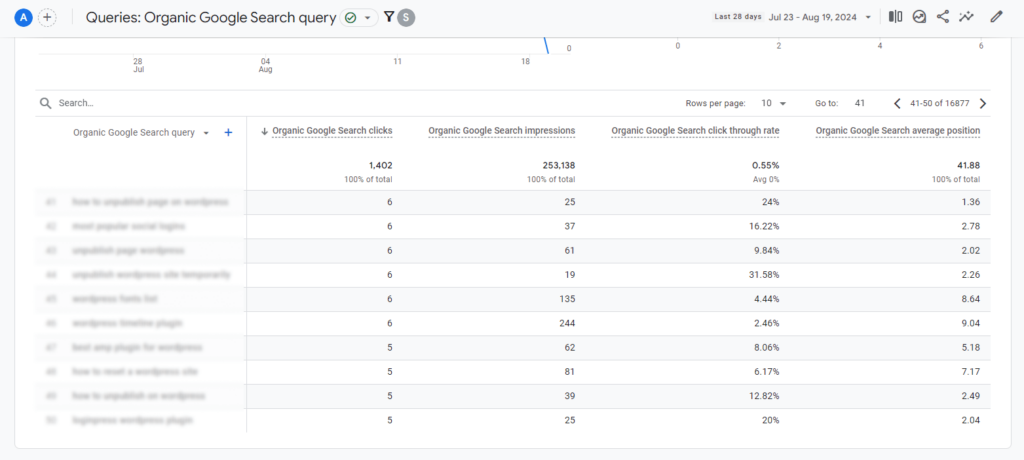
You can also check the Queries report in Google Analytics 4, as shown below:
Step 2: Analyze Device and Local Signals
Voice searches are primarily mobile-driven and often location-specific. Analytify helps you segment traffic effectively:
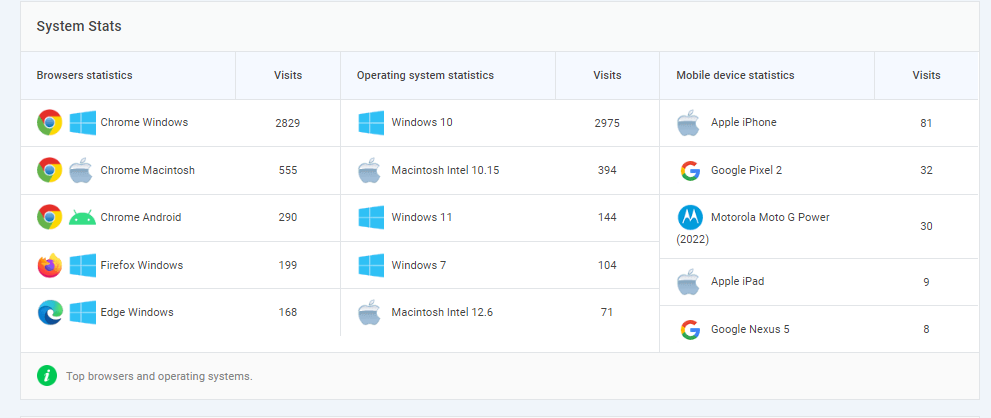
Device Segmentation:
- Mobile / Tablet / Desktop
- Pages with disproportionately high mobile engagement = likely voice traffic
Local Signals:
- Country and city reports
- Pages ranking for location-specific queries
- Traffic spikes from regional searches
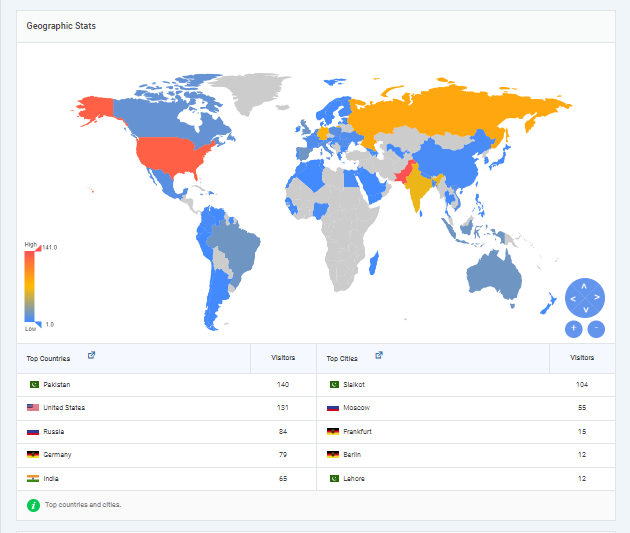
Optimization Tip: Prioritize pages that align with mobile and local voice queries. Include location terms in headings, titles, and meta descriptions.
Step 3: Validate Engagement Metrics
Voice assistants prefer pages that satisfy intent quickly. Focus on:
- Engagement rate – higher indicates better query satisfaction
- Average engagement time – longer suggests content answers questions effectively
- Conversion events – calls, form submissions, directions
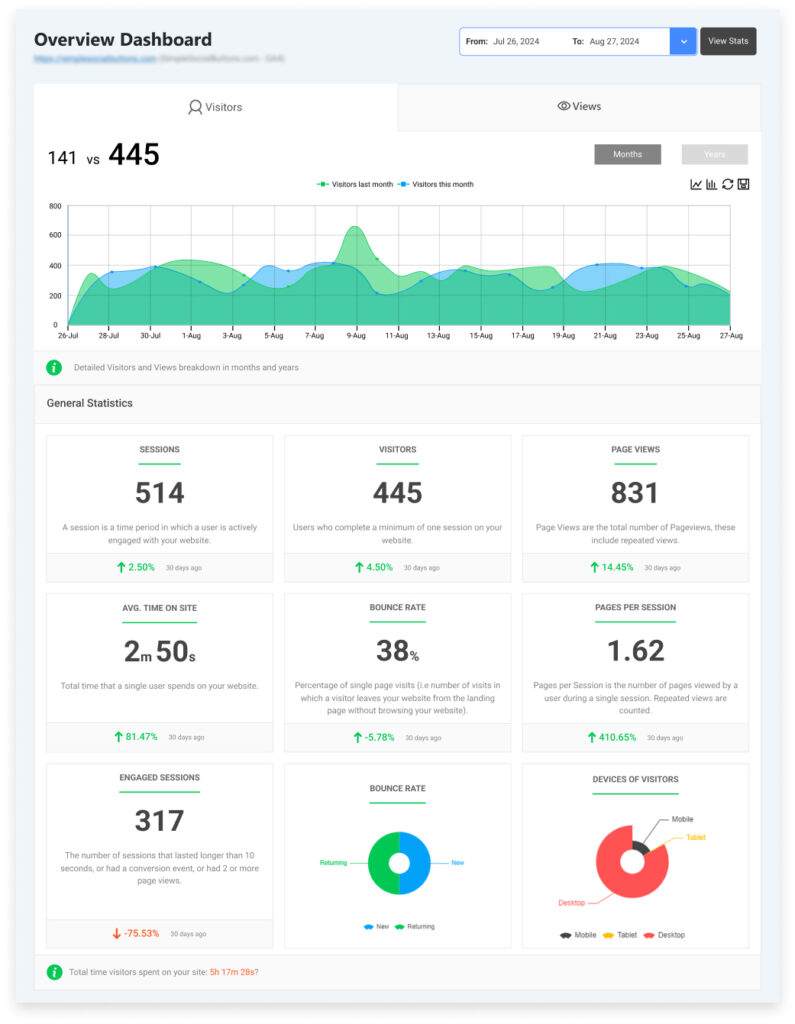
Tip: Pages meeting these criteria are more likely to be pulled for voice search answers.
Step 4: Create a Repeatable Workflow
- Extract question-based queries from Analytify
- Segment by device and location
- Analyze engagement metrics to identify high-potential pages
- Update content (FAQ, headings, structured data) based on insights
- Track results iteratively in Analytify dashboards
This workflow ensures your voice search optimization is fully data-driven rather than guesswork.
Let’s now learn how to use analytics data for voice search optimization.
Voice Search Optimization Strategies Backed by Analytics Data
Effective voice search optimization strategies are no longer based on intuition; they are guided by data extracted from GA4 and surfaced through Analytify.
By analyzing question-based queries, device behavior, engagement metrics, and local intent, you can prioritize content changes that are measurable and repeatable, ensuring both traditional SEO and voice traffic improve simultaneously.
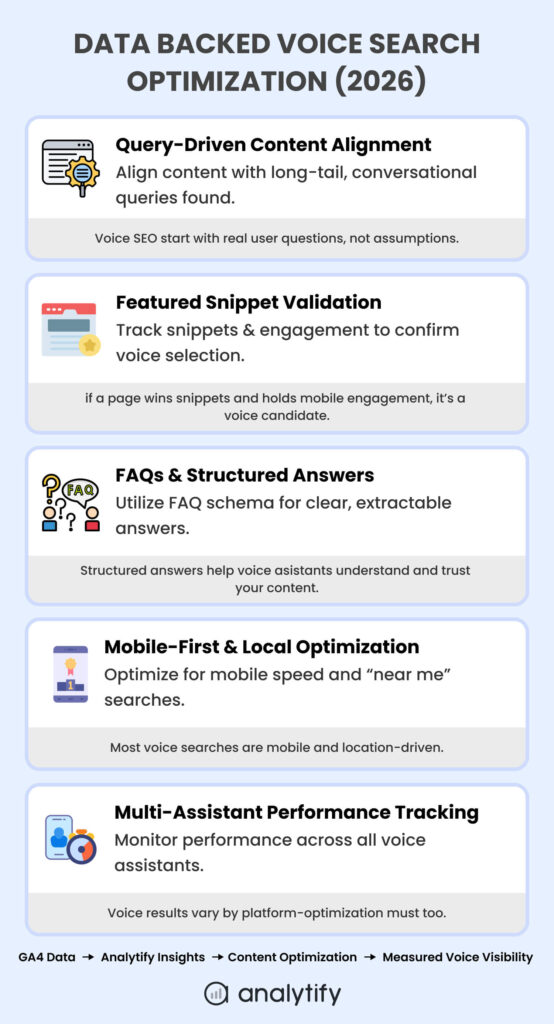
Below are the best ways to optimize content for voice assistants.
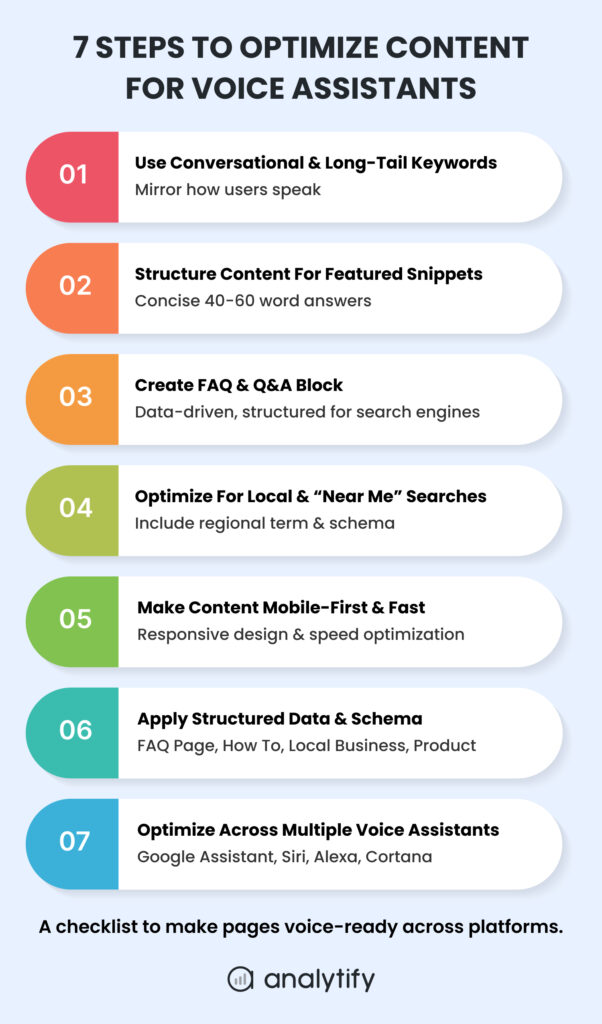
1. Use Conversational & Long-Tail Keywords
Voice searches are naturally longer and phrased as questions. Analytics shows which queries users actually ask via voice. So, using conversational and long keywords is usually considered the best way to optimize content for voice assistants.
Steps to optimize:
- Extract question-based queries from Analytify >> Search Console >> Top Queries.
- Identify high-impression, low-CTR long-tail queries (≥5 words).
- Incorporate them into content headings, FAQs, or blog sections.
- Use AI content prompts for efficiency:
- “Create a blog section answering these GA4 question metrics.”
- “Write a conversational FAQ based on top mobile queries.”
- “Create a blog section answering these GA4 question metrics.”
Example:
GA4 shows a top query: “How can I track WordPress site traffic in real-time?”
- Turn this into a blog subheading or FAQ entry
- Provide a concise 40–60 word answer, followed by expanded guidance
2. Structure Content for Featured Snippets
Voice assistants often read featured snippets as the answer. Analytics can identify which pages are snippet candidates:
- Track CTR, impressions, and engagement via Analytify.
- Prioritize content that already ranks in position 0 or 1.
- Use structured headings, bullets, and tables for clarity.
Snippet optimization tips:
- Directly answer questions in 40–60 words.
- Include the query in your heading.
- Use numbered steps or lists where appropriate.
By correlating GA4 engagement metrics with snippet performance, you can validate which content voice assistants will likely pull, rather than guessing.
3. Create FAQ & Q&A Blocks Based on GA4 Queries
FAQ content improves both voice and traditional SEO. Data-driven steps:
- Use Analytify to extract real search questions from GA4/Search Console.
- Rank questions by impressions and engagement.
- Implement FAQ blocks using the WordPress block editor or structured data plugins.
- Monitor engagement rate and mobile usage to validate effectiveness.
Voice search optimization examples:
- “What is GA4 event tracking?” → Add as FAQ with a structured schema
- “How do I measure mobile voice traffic?” → Include concise answer + step-by-step instructions
4. Optimize for Local and “Near Me” Searches
Voice search is predominantly local, especially on mobile. GA4 and Analytify reveal location-specific traffic patterns.
Actionable steps:
- Identify pages receiving high traffic from specific cities or regions
- Include location modifiers in titles, headings, and meta descriptions
- Implement LocalBusiness schema
- Track performance after optimization to ensure improvement in local engagement and conversions
5. Make Content Mobile-First & Fast
Mobile performance is directly correlated with voice search success:
- Use GA4/Analytify to identify pages with high mobile bounce or low engagement
- Optimize speed: compress images, enable caching, minify CSS/JS, use CDN
- Ensure mobile usability: responsive design, easy tap targets, readable fonts
Faster, mobile-friendly content is more likely to be selected by voice assistants and improves overall mobile SEO.
6. Apply Structured Data and Schema
Structured data helps voice assistants interpret answers quickly:
- Key schemas for voice search:
- FAQPage
- HowTo
- LocalBusiness
- Product & Review (where relevant)
- FAQPage
- Track clicks, impressions, and engagement via Analytify to validate schema effectiveness
7. Optimize Across Multiple Voice Assistants
Different assistants pull from different engines:
| Assistant | Engine | Key Considerations |
| Google Assistant | Google Search | Featured snippets, FAQ, HowTo schema |
| Siri | Google/Bing + Apple Maps | Local intent, Maps optimization |
| Alexa | Bing | Structured local content, rankings in Bing |
| Cortana | Bing | Regional optimization, desktop + mobile |
Actionable steps:
- Implement consistent structured data and location info across all listings
- Track cross-platform impressions in GA4
- Prioritize content improvements based on combined mobile, local, and question-based signals
By using these analytics-informed practices, content teams move from guessing voice search intent to data-driven optimization.
Measurement and Tracking Framework for Voice Search with GA4/Analytify
Optimizing content for voice search without tracking results is like building a bridge blindfolded.
While GA4 doesn’t explicitly label sessions as “voice search,” you can track indirect signals. Analytify surfaces these metrics inside WordPress, making them actionable for content teams.
1. GA4 Signals for Voice Search
GA4 captures behavioral patterns that correlate with voice queries:
| Signal | What It Shows | How to Use |
| Long-tail, question-based queries | Likely voice intent | Filter via Search Console integration |
| Device segmentation (mobile/tablet-heavy) | Mobile-driven searches | Prioritize mobile-first content |
| Local traffic spikes | Location-specific intent | Optimize “near me” pages |
| Landing page engagement | Pages satisfying intent | Focus optimization on high-engagement pages |
Tip: Use custom dimensions in GA4 for “question-type queries” (e.g., starting with who, what, when, where, why, how) and segment reports by device and geography.
2. Key Metrics in Analytify for Voice SEO
| Metric | Why It Matters | How to Act |
| Engagement Rate | Voice assistants favor pages that satisfy intent quickly | Prioritize high-engagement pages for snippet targeting |
| Average Engagement Time | Longer time indicates content effectively answers questions | Monitor pre/post content updates for improvements |
| Mobile vs Desktop Behavior | Voice is mostly mobile | Optimize mobile UX, speed, and readability |
| Local Traffic Shifts | Captures “near me” intent | Add location terms and schema for high-performing regions |
| Featured Snippet Impressions | Primary source for voice answers | Track changes using GA4 + Search Console via Analytify |
3. Workflow Example: Validate Optimization Efforts
- Implement FAQ schema and local optimizations on targeted pages
- Track mobile engagement, CTR, and local impressions in Analytify
- Compare metrics before and after updates
- Adjust content structure, headings, or long-tail phrasing based on trends
Result: Every optimization step has a measurable impact on voice search visibility.
4. Advanced Tracking Tips
- Event-based tracking: Use GA4 events for calls, clicks on directions, or form submissions triggered by voice visitors
- UTM parameters: Tag experimental voice-driven campaigns
- Content-type segmentation: Track FAQs, blogs, and landing pages separately to see which formats perform best
By integrating GA4 insights with Analytify reports, teams can iterate continuously, ensuring voice search optimization is data-driven, measurable, and repeatable.
Advanced Tips & Future Trends for Voice Search Optimization
Voice search is evolving rapidly, and the interplay between AI, predictive analytics, and voice assistants is creating new opportunities for content teams. Advanced practitioners in 2026 focus not only on static optimization but also on anticipating user intent before it is explicitly searched.
1. Voice + AI Synergy
Generative AI influences how voice assistants deliver answers:
- Google, Siri, and Alexa increasingly summarize content instead of reading it verbatim
- Concise, high-signal content is more likely to be selected for voice responses
Actionable Steps:
- Identify top-performing question-based queries in Analytify
- Create AI-optimized summary paragraphs (40–60 words) for snippet readiness
- Provide expanded guidance below the summary for depth
Example: For the query “How to track WordPress traffic?”, include a concise answer followed by a detailed step-by-step tutorial.
2. Predictive Intent Analysis with GA4
GA4 data can help anticipate emerging voice queries:
- Query trends: Detect spikes in question-based searches before content exists
- Behavioral shifts: Mobile users performing quick local searches indicate evolving intent
- Cross-device paths: Users may start a search on mobile voice, then convert via desktop
Strategy:
- Build content around predicted long-tail questions
- Use structured FAQ blocks to capture these early voice queries
3. Testing Content with Experimental Voice Queries
Voice assistants differ across platforms. Internal testing ensures content works everywhere.
| Voice Assistant | Testing Approach | Optimization Tip |
| Google Assistant | Ask top questions aloud, compare spoken answer with snippet | Refine conversational tone and direct answers |
| Alexa | Query Bing, track top content pulled | Optimize structured local content and HowTo schema |
| Siri | Ask queries on iOS devices (web & Maps) | Validate local relevance and mobile-first formatting |
Pro Tip: Have team members read queries aloud to simulate real-world voice interactions and monitor differences across devices and regions using GA4/Analytify.
4. Emerging Trends to Watch
- Generative search results: AI may summarize multiple sources in a single spoken answer
- Local & hyper-contextual queries: Real-time availability, nearby offers, or neighborhood-specific advice are increasingly common
- Multilingual voice search: Growth in non-English queries requires regionalized content optimization
- IoT integration: In-car, smart appliance, and wearable searches are expanding; content must be concise and actionable
Staying ahead requires continuous monitoring of GA4 trends, snippet performance, and user engagement metrics.
FAQs (Voice Search Optimization)
1. What is voice search optimization?
Voice search optimization is the process of improving your website to rank for spoken queries. Unlike typed searches, voice searches are typically long-tail, conversational, and often location-specific.
How to implement:
Use long-tail, question-based keywords from GA4/Analytify
Structure content for featured snippets and FAQs
Apply schema (FAQPage, HowTo, LocalBusiness)
Optimize for mobile speed and usability
2. How is voice search different from regular SEO?
Voice search queries differ from typed searches in length, tone, and intent. People speak naturally, often asking complete questions with local intent.
Key differences:
Longer, conversational queries (“How can I track WordPress site traffic?” vs “WordPress analytics plugin”)
Strong local focus for “near me” searches
Direct-answer preference: Voice assistants read featured snippets instead of a list of results
3. Which voice assistants should I optimize for?
Voice search optimization should cover all major assistants.
Google Assistant – Uses Google Search; focus on featured snippets, FAQ/HowTo schema.
Siri – Uses Google/Bing + Apple Maps; focus on local content and Maps integration.
Alexa – Uses Bing; focus on LocalBusiness and HowTo schema.
Cortana – Uses Bing; focus on regional content and structured answers.
Tip: Consistent structured data and accurate local listings across all platforms maximize your voice search reach.
4. How do featured snippets relate to voice search?
Featured snippets are the boxed answers at the top of search results. Voice assistants frequently read these aloud as their spoken answer.
Optimization steps:
Answer questions directly in 40–60 words
Include the query in the heading
Use bullet points or numbered lists
Track snippet impact using GA4/Analytify engagement metrics
5. Does page speed matter for voice search?
Yes. Voice search users expect fast-loading answers. Studies show pages selected for voice search load ~50% faster than average pages.
Optimization tips:
Compress images and media.
Enable caching and use CDN.
Ensure mobile-first design: readable fonts, tap-friendly buttons.
Track mobile performance in Analytify to correlate with voice traffic.
6. How do I find voice search keywords?
Voice search keywords are long-tail, question-based phrases that users speak aloud.
Actionable methods:
GA4 + Analytify: extract high-impression, low-CTR question-based queries.
Tools: AnswerThePublic, Google’s “People Also Ask”.
Look for keywords starting with who, what, where, when, why, and how.
Include local modifiers (“near me”) for mobile voice searches.
7. How can I track voice search traffic in Google Analytics?
GA4 does not explicitly tag voice search sessions. Track voice search indirectly using:
Long-tail, question-based queries from Search Console
Mobile-heavy traffic patterns
Local search behavior (city/region spikes)
Landing page engagement (high engagement, low bounce, conversions)
Analytify surfaces these metrics in WordPress, making voice search performance measurable and actionable.
8. How do I optimize content for multiple voice assistants?
Optimizing for multiple assistants ensures wider coverage.
Steps:
Implement structured schema (FAQPage, HowTo, LocalBusiness)
Maintain accurate local and contact info across Google, Bing, and Apple Maps
Test spoken queries across devices and assistants
Track device, engagement, and local metrics in GA4/Analytify
This approach ensures your content answers voice queries regardless of platform or engine.
9. Does GA4 track voice search queries?
No, GA4 does not directly track voice search queries.
Voice searches aren’t labeled as “voice” in GA4. Instead, you infer voice search behavior indirectly through signals like long-tail conversational queries, mobile and smart device usage, local intent, and engagement patterns on Q&A-style content.
Voice Search Optimization: Final Thoughts
Voice search is no longer a futuristic trend; it’s a dominant way users discover information, particularly on mobile and in local contexts.
Voice search optimization requires a data-driven, analytics-first approach, leveraging GA4 and Analytify to understand question-based queries, mobile engagement, and local intent.
By focusing on long-tail, conversational keywords, structured FAQ and HowTo content, featured snippet optimization, and mobile-first performance, content teams can ensure their pages are voice-ready across Google Assistant, Siri, Alexa, and Cortana. Local optimization, page speed improvements, and schema markup further increase the likelihood of being selected as the spoken answer.
Advanced practitioners should also monitor emerging trends: AI-driven answers, predictive intent, and experimental voice query testing. With proper measurement through GA4 and Analytify dashboards, every content adjustment can be validated for impact on engagement, conversions, and voice visibility.
Ultimately, optimizing for voice search is no longer about guesswork; it’s about combining real user data with structured content practices to capture the growing voice-driven audience, improve discoverability, and stay ahead of competitors.
Further Readings:
- How To Optimize Google Ads Campaigns (20 Tips)
- How To Find Top Performing Content And Improve It
- 15+ Best SEO Practices To Improve Search Rankings
Which voice search strategies have you tried on your website, and what insights did GA4 or Analytify reveal about your audience’s voice-driven behavior?