Micro-Conversions: How to Track the Signals That Drive Sales

Micro conversion tracking records the small actions visitors take before a purchase or sign-up, such as adding a product to the cart or starting a form. In GA4 you track them as events and mark the important ones as key events.
Micro conversions are small steps that show interest before a major action, such as a purchase or sign-up. Examples are adding a product to the cart, starting a form, or watching a video.
Tracking micro conversions shows how visitors behave, where they get stuck, and how to make a purchase or sign-up easier.
This guide is for WordPress site owners and marketers who want to find where visitors drop off. I show you what micro conversions are, how to track them with GA4 and Google Tag Manager, and how Analytify shows them inside WordPress.
Micro conversion Tracking (TOC):
What are Micro Conversions?
Micro conversions are small actions that users take on your website that show interest and engagement before they complete a main goal (like making a purchase).
These actions may seem small, but they serve as conversion signals, helping predict how likely someone is to become a customer.
Micro vs. Macro Conversions
- Macro conversions are the main goals (purchase, booked call, completed registration).
- Micro conversions are the small steps that lead to those goals.
For example, imagine you run an online course website. Your main goal is for users to buy a course.
Macro conversion:
- Buying the course
Micro conversions:
- Watching a demo lesson
- Signing up for a free trial
- Subscribing to your email list
- Clicking on the pricing page
Each of these small actions shows interest. When you improve these small steps, you increase the chances of getting more sales.
Why Are Micro Conversions Important?
Micro conversions matter because they show where visitors are in the buying journey. Many visitors need time before they buy: they compare options, read reviews, or explore your website.
For example:
- If many people add items to the cart but don’t complete the purchase, there might be a problem with your checkout process.
- If people download your free ebook, it shows they trust your brand and want more information.
The Role of Micro Conversions in the Conversion Journey
Micro conversions are the steps in the conversion journey that come before the final goal. The conversion journey is the path a visitor takes before completing a final goal, such as making a purchase or submitting a contact form.
Conversion journey analytics means tracking and understanding each step along this path.
Instead of measuring only the final sale, you analyze what happens before it: which pages users visit, what they click, and how they engage with your content. This helps you see how people move from interest to action.
Example of a Micro-to-Macro Funnel
A simple funnel might look like this:
Page visit >> CTA click >> Video watch >> Add-to-cart >> Purchase
Here’s how it works:
- A visitor lands on your product page.
- They click a “Learn More” or “Buy Now” button (CTA click).
- They watch a short product demo video.
- They add the product to their cart.
- Finally, they complete the purchase.
The purchase is the macro conversion. Every step before it is a micro conversion. Each step shows growing interest and intent.
Intent Signals to Track
Intent signals are user actions that indicate interest and likelihood to convert. Key intent signals include:
- CTA clicks: Clicking “Buy Now,” “Sign Up,” or “Learn More” shows active interest.
- Add-to-cart actions: Adding products signals intent to purchase, a strong micro conversion.
- Form interactions: Starting or partially completing a form indicates engagement.
- Video engagement: Watching product demos or tutorials shows deeper interest.
- Scroll depth and page views: Users who explore multiple pages or scroll far are more likely to convert.
- Returning sessions: Repeat visits indicate high intent and familiarity with your brand.
By monitoring these pre-conversion metrics, you can identify conversion signals early and adjust your strategy to guide users toward the final sale.
For site owners, this data is powerful.
- If many users watch your video but don’t add items to the cart, your offer or pricing may need improvement.
- If visitors click your CTA but leave quickly, your landing page might need clearer messaging.
By tracking micro conversions, you can identify where users drop off, fix weak steps in the journey, and optimize faster.
How to Track Micro Conversions with GA4 (Step by Step)
To track micro conversions in GA4, define the actions to track, collect them as events, mark the important ones as key events, and review them in the Events report. GA4’s event-based tracking makes it easier to capture small, meaningful actions such as newsletter signups, add-to-cart clicks, form starts, or video engagement.
GA4 Event-Based Tracking
Unlike older analytics platforms that focus on pageviews, GA4
- Uses an event-based model. Every user action, click, scroll, video watch, or form start is treated as an event.
- This model is ideal for tracking pre-conversion metrics because it allows you to measure the small steps that lead to a purchase or other macro conversions.
Follow the step-by-step guide below to set up tracking correctly in GA4.
Step 1. Define What to Track
Decide which high-intent actions to monitor. Examples include:
- CTA clicks (Buy Now, Sign Up)
- Add-to-cart actions in WooCommerce
- Form submissions or form starts
- Video engagement (watching product demos or tutorials)
Focus on actions that signal conversion.
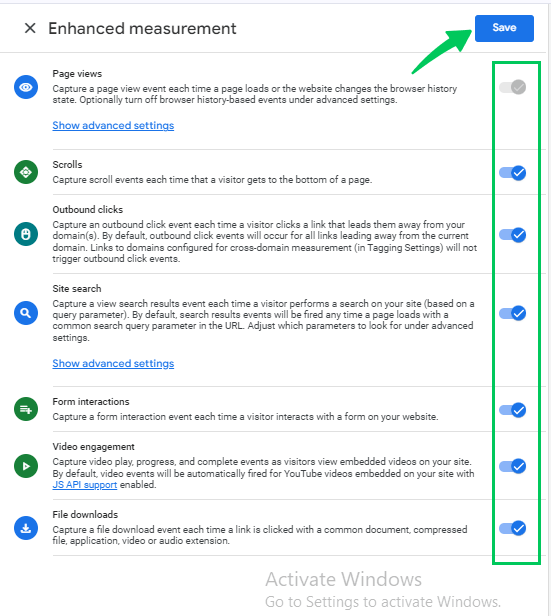
Step 2. Enable Enhanced Measurement
GA4’s enhanced measurement can automatically track interactions like scrolls, outbound clicks, and video engagement. To enable it, follow these steps:
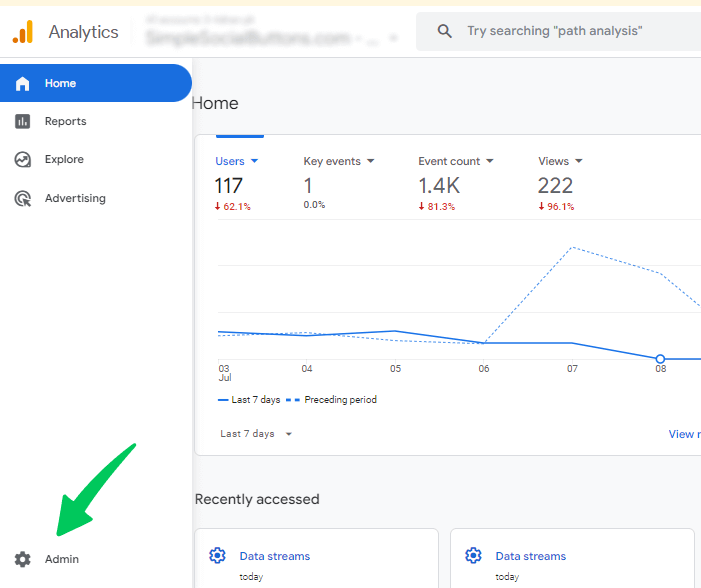
- Go to your GA4 property. Click on the Admin.
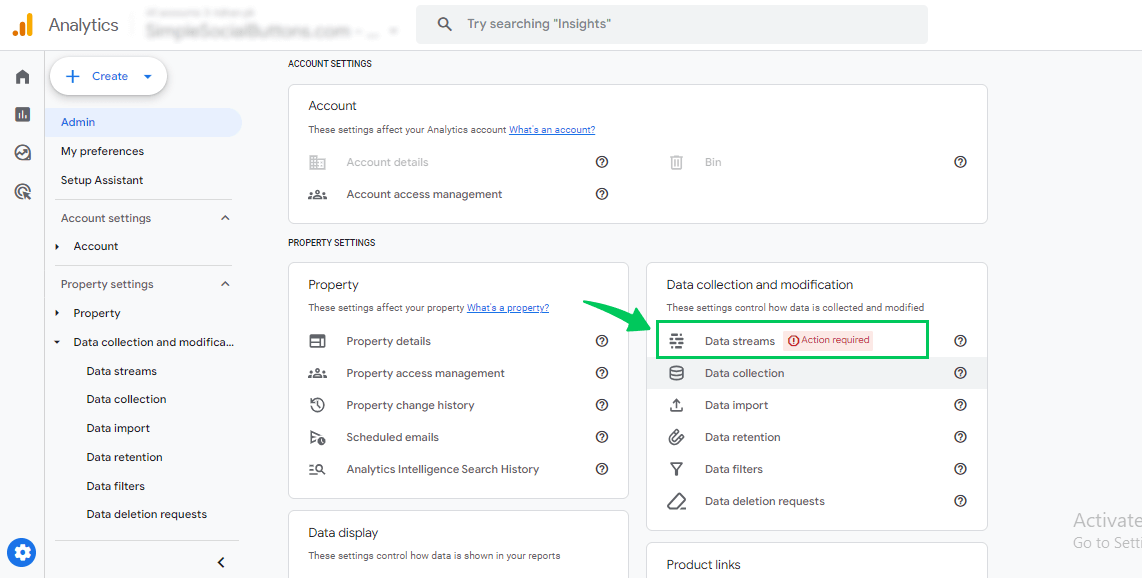
- Under Data collection and modification, select Data streams.
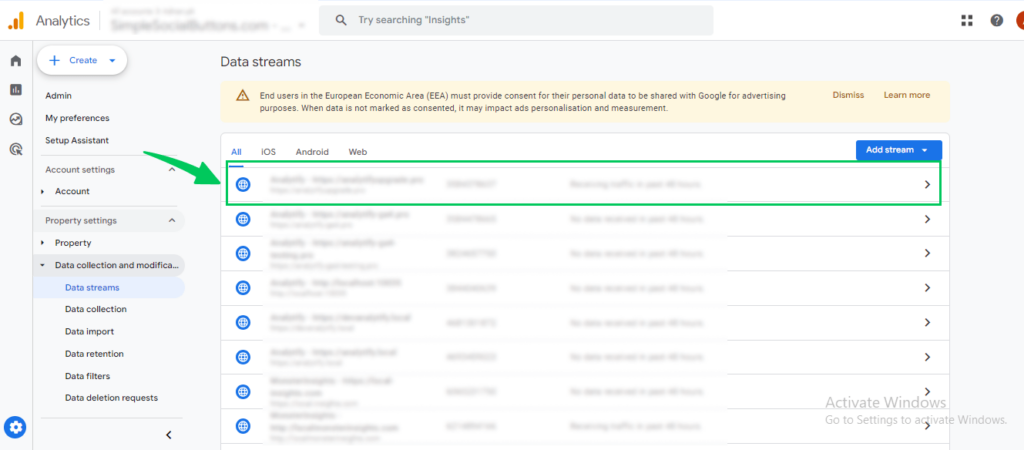
- Choose your Web stream.
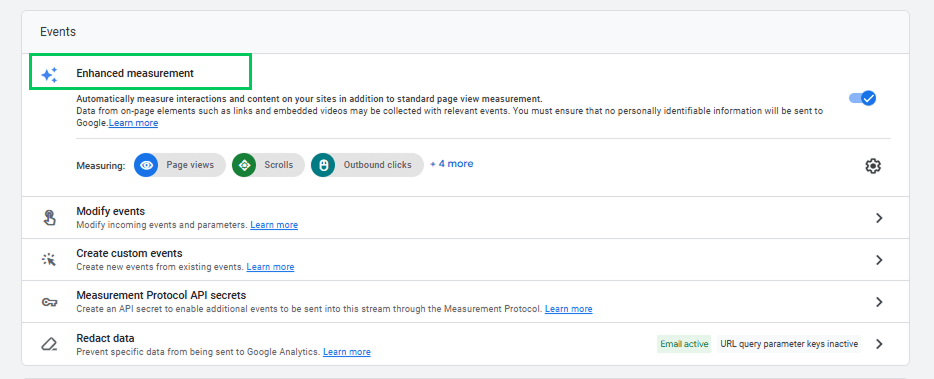
- Toggle on desired events.
Step 3. Use Google Tag Manager (GTM) for Custom Events
For actions not captured by enhanced measurement, Google Tag Manager can help you set up custom events without coding.
For example, you can track specific button clicks, form starts, or add-to-cart actions.
Step 4. Mark Events as Conversions
Once events are firing correctly, mark them as key events in GA4:
- Click on Admin.
- Under Data display, click Events.
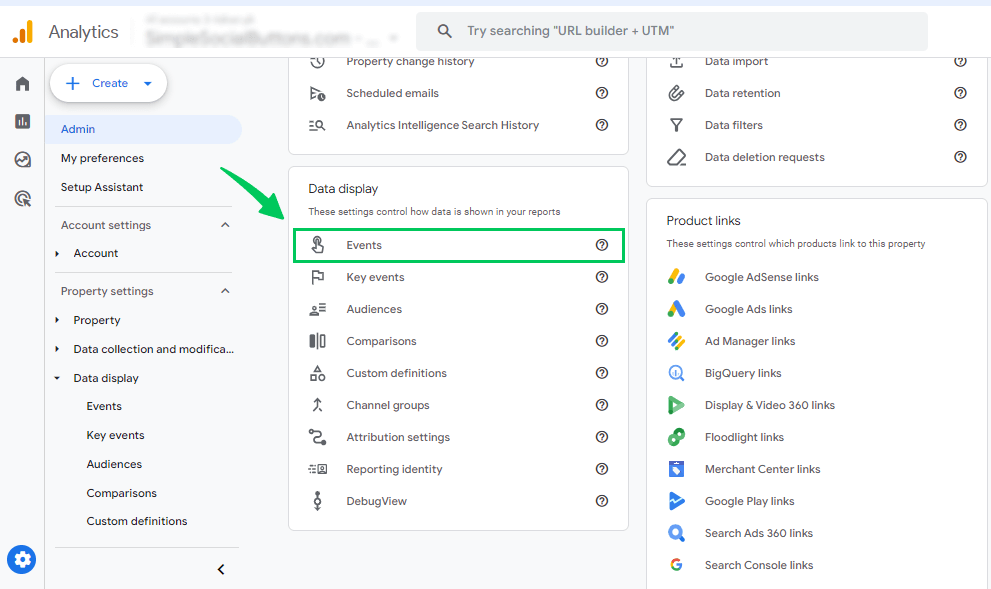
- Find the event you want to mark as a key event.
- Click the star icon next to the event to mark it as a conversion (key event).
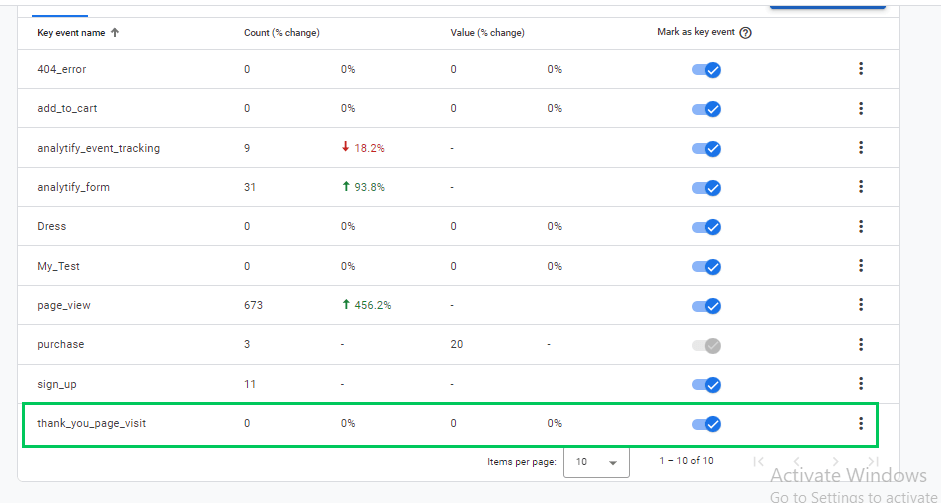
Marking an event as a key event adds it to the Key events counts in your reports. The change applies from the time you mark it and does not change historical data. A new key event can take up to 24 hours to appear in standard reports. A standard property allows up to 30 key events.
Step 5. Naming Conventions and Testing
- Use clear, consistent names for each event (e.g., add_to_cart, newsletter_signup).
- Avoid random or duplicate names, which can make reporting confusing.
- Test your events using GA4’s DebugView to ensure they fire correctly and only once per action.
Step 6. Analyzing Micro Conversion Data
Once your events are set up:
- Check Reports >> Engagement >> Events to see which microconversions are occurring most often.
- Look for trends, such as which pages generate the most add-to-cart clicks, video views, or form interactions.
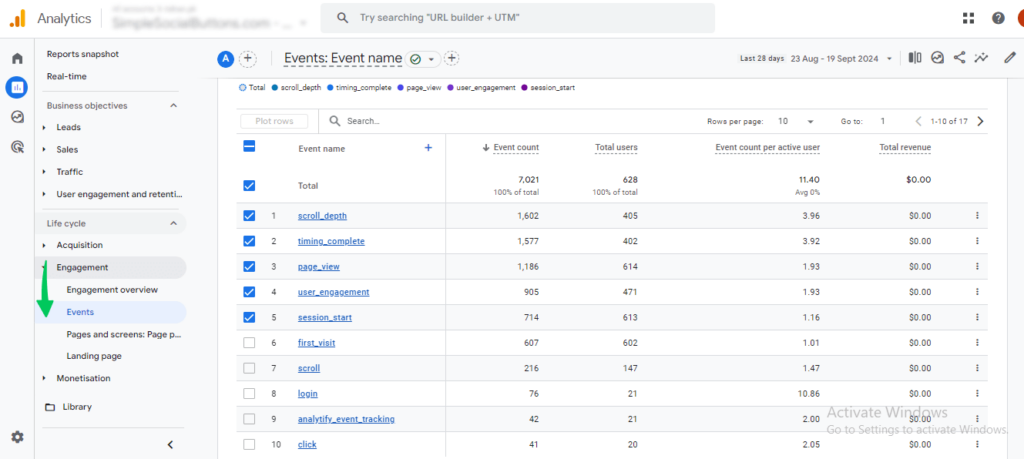
- Compare micro conversions with macro conversions to understand which small actions are most predictive of sales.
Step 7. Acting on Insights
Use your data to make practical improvements:
- If users frequently start a form but don’t submit, simplify the form fields.
- If add-to-cart clicks are high but purchases are low, optimize your checkout flow or product page.
- If video engagement drives conversions, highlight video content more prominently on key pages.
Tracking micro conversions in GA4 shows where visitors lose interest, so you can fix those steps first.
How to Use Analytify for Micro Conversion Tracking
Join 50,000+ beginners & professionals who use Analytify to simplify their Google Analytics!
Analytify shows your GA4 micro conversion data inside the WordPress dashboard, so you can read events, engagement, and campaign data without opening GA4. Analytify simplifies micro conversion tracking.
Analytify connects your WordPress site directly with GA4 and automatically pulls event data into your dashboard. It presents this data in a clear, visual, and easy-to-understand format.
Instead of logging into GA4 and navigating multiple menus, you can view important micro conversions directly inside WordPress.
These include add-to-cart actions, form submissions, top pages, and user engagement, all displayed in one simple interface.
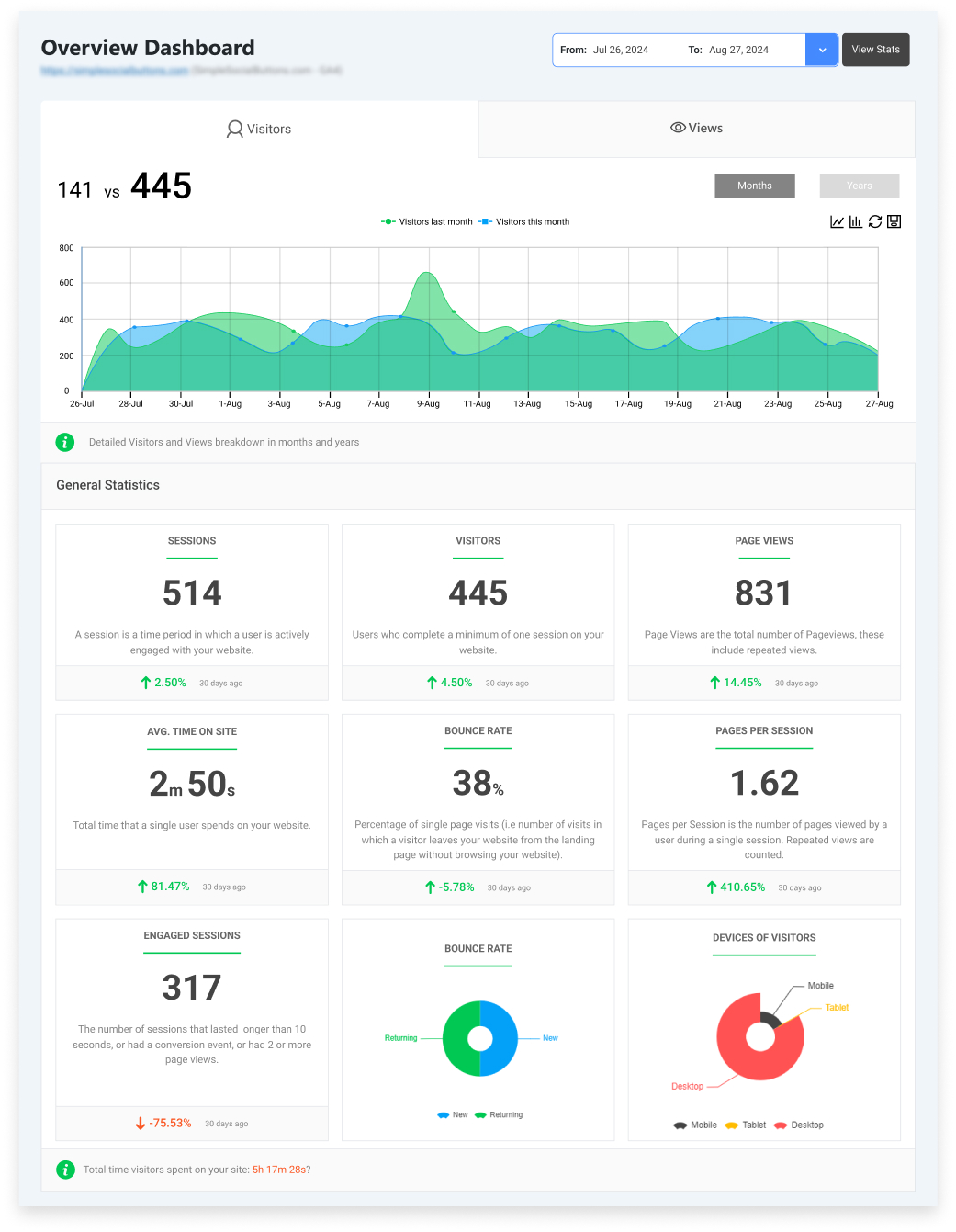
Viewing this data in WordPress makes it easier to monitor conversion signals and sales-driving actions.
Here are a few key features of Analytify that help in microconversion tracking:
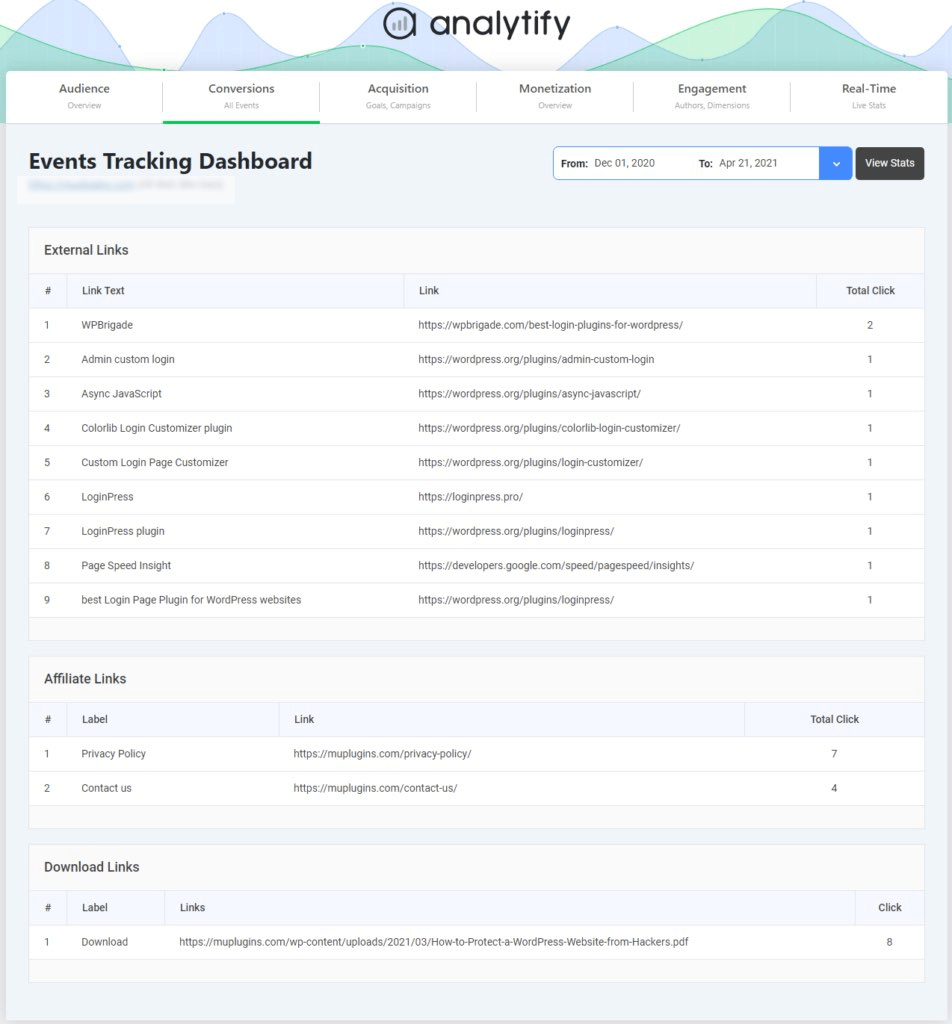
1. Event Visualization
Analytify shows events in a clear layout so you can quickly see which actions users are taking.
For example, you can identify how many users clicked key buttons, added products to their cart, or submitted forms.
2. Engagement Dashboards
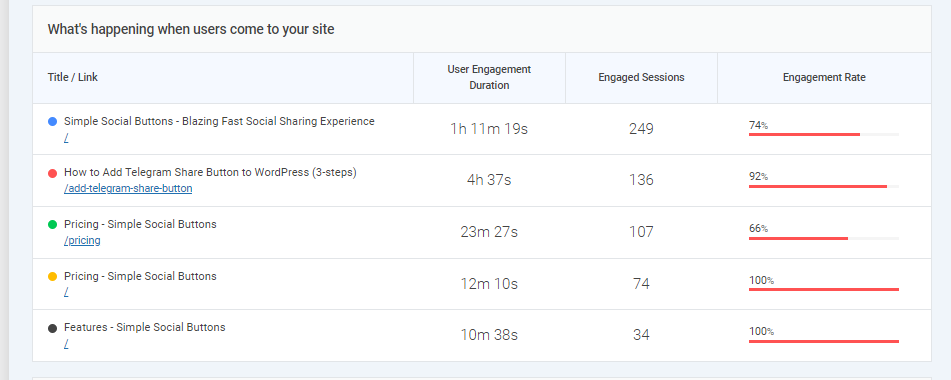
Analytify provides engagement reports that help you monitor user behavior and pre-conversion metrics.
User Activity and Engagement Report
- This report shows what happens when users visit your site, including metrics such as engagement rate, user engagement, session duration, and other behavioral signals.
- It helps you understand how visitors interact with your content and which actions indicate strong intent.
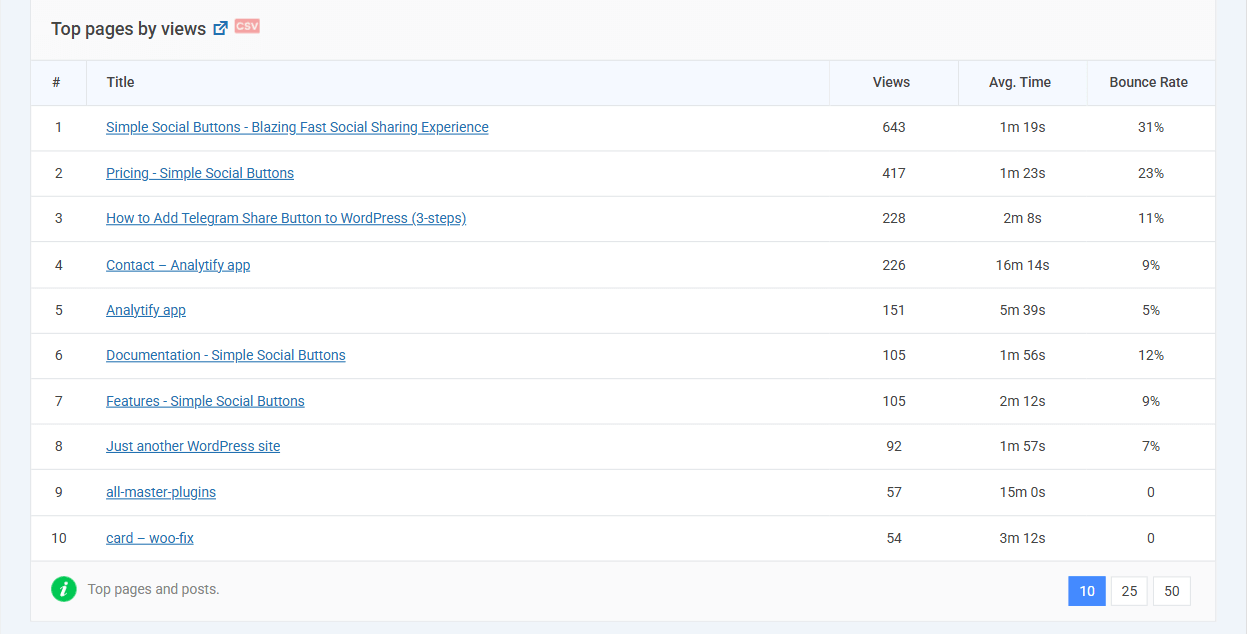
Top Pages by Views Report
- This report highlights your most visited pages along with metrics such as pageviews, bounce rate, and average time on page.
- By analyzing this data, you can identify which pages drive the most engagement and micro-conversions.
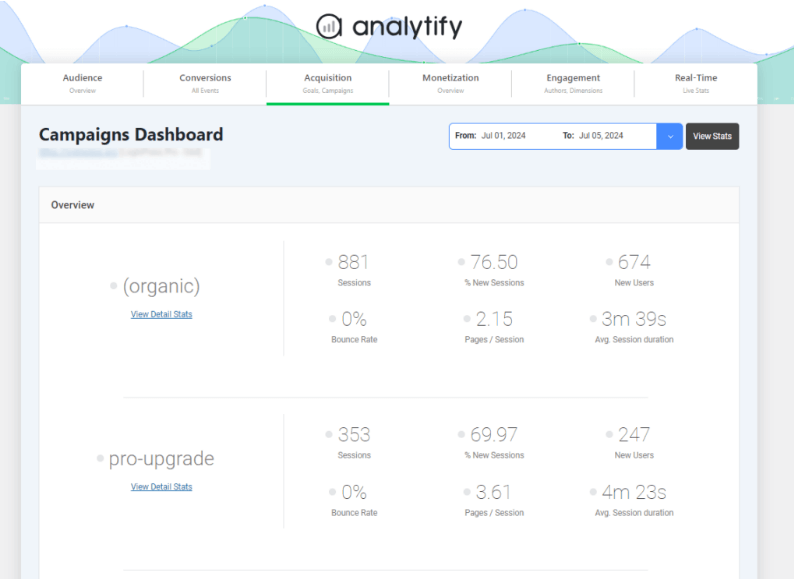
3. Campaign Reporting
Analytify also tracks campaign performance, helping you measure which campaigns generate the most micro conversions.
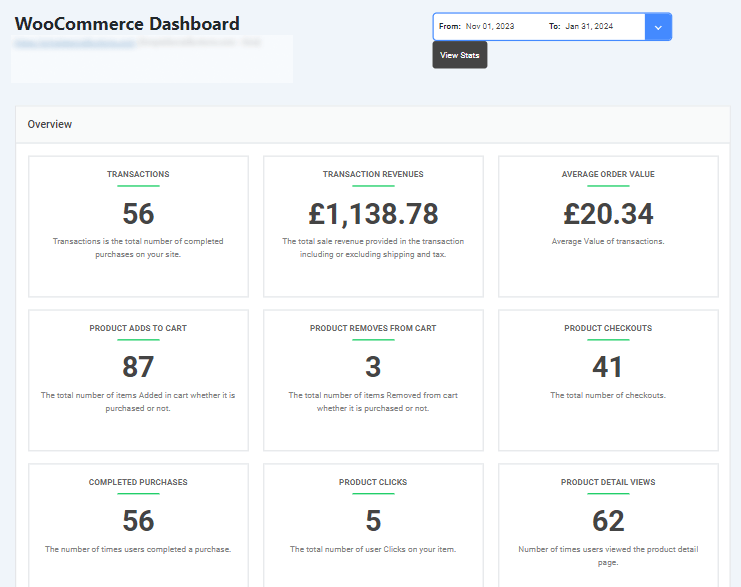
4. WooCommerce Dashboard in Analytify
- Analytify’s WooCommerce dashboard allows you to track sales-driving signals by monitoring key micro conversions for your online store.
- You can track add-to-cart actions, product page views, checkout starts, and completed purchases directly within your WordPress dashboard.
Imagine you run a lead generation website using a contact form plugin. With Analytify, you can monitor early form interactions, such as when users visit the contact page or submit the form.
- If many users visit the form page but few complete it, you can simplify the form fields or improve your call to action.
- If certain traffic sources generate more form submissions, you can invest more in those campaigns.
Common Pitfalls and Best Practices
Four pitfalls affect micro conversion tracking: tracking too many events, inconsistent event naming, poor data quality, and ignoring privacy and consent.
1. Tracking Too Many Events
- Tracking every click and movement creates noise. When everything is tracked, it is harder to see which actions matter. A standard GA4 property also allows only 30 key events, so mark only the most important actions.
- Instead, focus on high-signal actions like add-to-cart, form start, checkout begin, or important button clicks. These actions clearly show buying intent and provide meaningful insights.
2. Inconsistent Event Naming
- Different names for the same action (such as “AddToCart,” “add_to_cart,” and “cartClick”) split your data across separate events. GA4 treats every distinct spelling as a separate event, and event names are case sensitive.
- The best practice is to create a simple, consistent naming structure and use it across your entire site. This keeps your data organized and easy to compare over time.
3. Poor Data Quality
- Incorrect tracking setup, duplicate events, or broken triggers can lead to inaccurate data.
- To prevent this, always test your events and tracking setup before relying on them. Make sure each event fires correctly and only once.
4. Respect Privacy and Compliance
- Failing to comply with data protection laws or to obtain proper user consent can lead to legal issues and loss of trust.
- The best practice is to avoid collecting unnecessary personal information. Collect only the data you truly need, and ensure users give proper consent where required.
- Respecting privacy laws not only protects your business but also builds trust with your audience.
Avoiding these pitfalls keeps your micro conversion data accurate.
Frequently Asked Questions
1. What are micro conversions in marketing?
Micro conversions in marketing are small actions that show a user is interested in your product or service, even if they haven’t made a purchase yet. These actions act as early signals of buying intent. Examples include signing up for a newsletter, downloading a free guide, clicking on a pricing page, watching a product video, or adding an item to the cart.
2. What tools or ideas are good to track micro conversions?
You can track micro conversions using Google Analytics 4 (GA4) to measure events like scrolls, clicks, form starts, and add-to-cart actions. Google Tag Manager helps set up custom tracking without coding. WordPress users can use Analytify to view simplified GA4 reports directly in their dashboard. Focus on tracking high-intent actions, such as CTA clicks, cart activity, and returning visitors.
3. How do micro conversions fit into the conversion journey?
Every micro conversion is a step in the conversion journey analytics. For example, a user may visit a product page, watch a demo video, start filling out a form, and finally make a purchase. By monitoring these metrics, you can optimize each stage for higher final conversions.
4. How can I track sales-driving signals effectively?
Focus on actions that predict buying behavior, such as add-to-cart clicks, returning sessions, and key button interactions. Tools like GA4, Google Tag Manager, or Analytify for WordPress help you track sales- driving signals while keeping your data organized and actionable.
5. What best practices improve micro conversion tracking?
Use consistent event names, test all tracking setups, and focus on high-intent actions. Respect privacy rules while collecting data to ensure accurate user intent tracking. This helps turn conversion signals into insights that guide website improvements.
Micro Conversions: Final Thoughts
Micro conversions are small actions, such as add-to-cart clicks, form starts, and video watches, that show interest before a purchase. Track them as GA4 events, mark the important ones as key events, and review them in the Events report.
For further understanding, you can read:
- GA4 Custom Events Not Showing Up (FIXED)
- How to Fix GA4 Duplicate Events (Explained 2025)
- How to Set Up GA4 Events Without Code (2026 Guide)
We’d love to hear how you’re using micro conversions to grow your business! Share your thoughts in the comments below.