GA4 User Acquisition vs Traffic Acquisition: Which Report Should You Use? (2026)

GA4 User Acquisition and Traffic Acquisition are two different reports: User Acquisition tracks how new users first found your site, while Traffic Acquisition tracks where every session, including returning visitors, originated.
This guide breaks down how each report works, their key metrics and use cases, and shows you how to simplify the process using Analytify if you’re managing a WordPress site.
Table of Contents
What are GA4 Acquisition Reports?
GA4 Acquisition Reports help you understand how users first discover your website or app. These reports track the origin of your traffic, including sources such as search engines, social media, paid ads, and direct visits. By analyzing acquisition data, you can evaluate the performance of your marketing channels and identify which sources drive the most traffic, engagement, and conversions.
In Google Analytics 4, Acquisition Reports are divided into:
- User Acquisition Report, showing where new users came from.
- Traffic Acquisition Report, showing where all sessions originated, regardless of whether the user is new or returning.
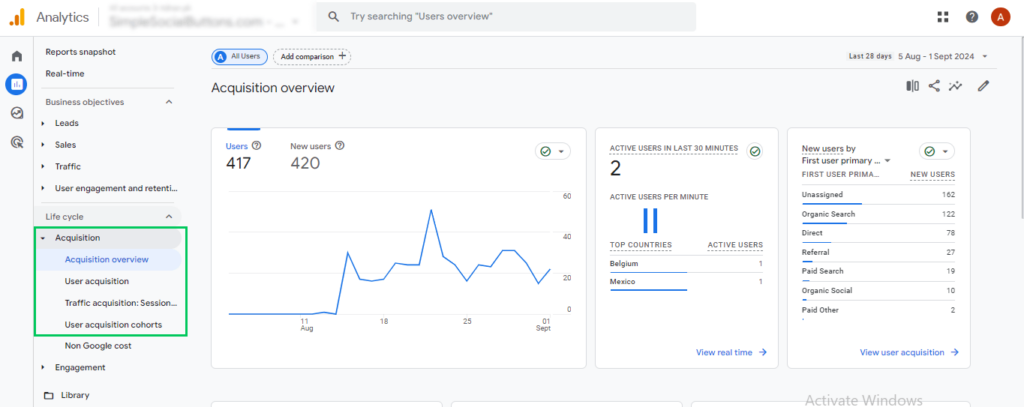
These insights help improve marketing strategies, optimize campaigns, and strengthen user acquisition efforts.
Key Metrics in Acquisition Reports
Here are the primary metrics found in GA4 Acquisition Reports:
| Metric | Definition |
|---|---|
| Users | The number of users acquired from each source. |
| New Users | Users interacting with your site/app for the first time. |
| Sessions | The number of visits from a traffic source. |
| Engaged Sessions | Sessions that lasted longer than 10 seconds, had a conversion event, or had 2+ pageviews. |
| Engagement Rate | The percentage of sessions that were engaged. |
| Average Engagement Time | How long users stayed active during a session. |
| Conversions | The number of key events or goals completed by users from a particular source. |
| Event Count | Total number of events triggered by users from each channel. |
User Acquisition Report in GA4
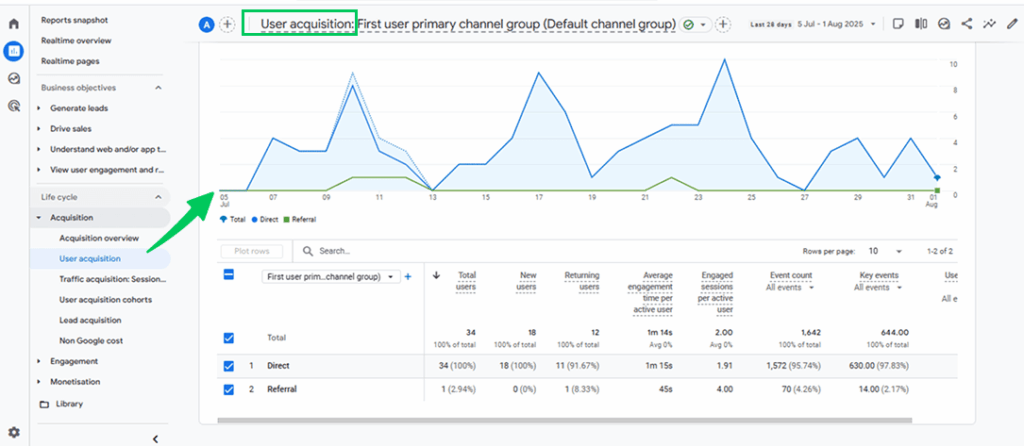
The User Acquisition Report in GA4 focuses on how new users first arrive at your website or app. It helps you understand the original sources that bring fresh visitors, making it valuable for evaluating the performance of campaigns targeting first-time users.
Key Dimensions
The User Acquisition Report uses specific dimensions to identify how new users first discovered your site or app. These dimensions provide context for analyzing the performance of your marketing efforts in attracting fresh traffic.
| Dimension | What It Shows |
|---|---|
| First User Source | Identifies the platform or website (e.g., Google, Facebook) that brought the user for the first time. |
| First User Medium | Indicates the type of channel (e.g., organic, paid, referral) through which the user arrived. |
| First User Source/Medium | A combined view showing both the platform and the channel (e.g., Google/organic). |
| First User Campaign | Refers to the marketing campaign name (if UTM parameters are used) that led to the user’s first visit. |
| First User Default Channel Grouping | Categorizes traffic into common groups like Organic Search, Direct, Paid Search, etc. |
| First User Google Ads Campaign | Shows which Google Ads campaign first drove the user, if applicable. |
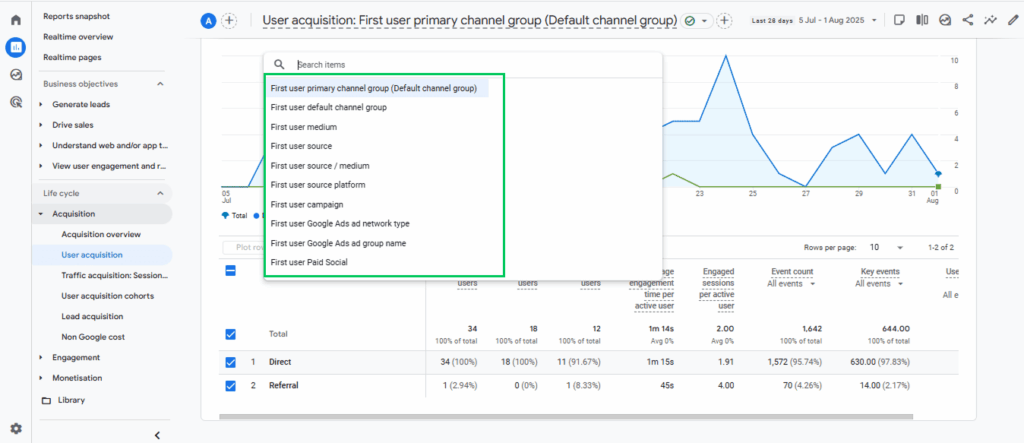
The User Acquisition Report in GA4 uses first-click attribution, assigning full credit to the initial channel that brought the user to your site or app.
Use Cases
The User Acquisition Report in GA4 is particularly useful for evaluating the effectiveness of your marketing campaigns in attracting new users. It allows you to assess which campaigns are driving the most first-time visits and helps determine the return on investment for different acquisition strategies.
By analyzing this report, you can identify which channels, such as search engines, social media, or email, are most effective at introducing new visitors to your website or app. These insights enable marketers to fine-tune their efforts, reallocate budgets to high-performing sources, and improve the targeting of future campaigns.
Limitations
The User Acquisition Report in GA4 has a few limitations to keep in mind. It only tracks how users arrived during their first visit, which means it doesn’t account for any subsequent interactions or returning sessions. This limited view may overlook the full customer journey and underrepresent the role of channels that contribute later in the conversion path.
Additionally, because it uses first-click attribution, it gives all the credit to the initial source, potentially undervaluing channels that played a significant role in driving conversions later on.
Traffic Acquisition Report in GA4
The Traffic Acquisition Report in GA4 analyzes how all sessions, from both new and returning users, originate. Unlike the User Acquisition Report, which only tracks how users arrived during their first visit, this report shows the full picture of traffic sources for every session.
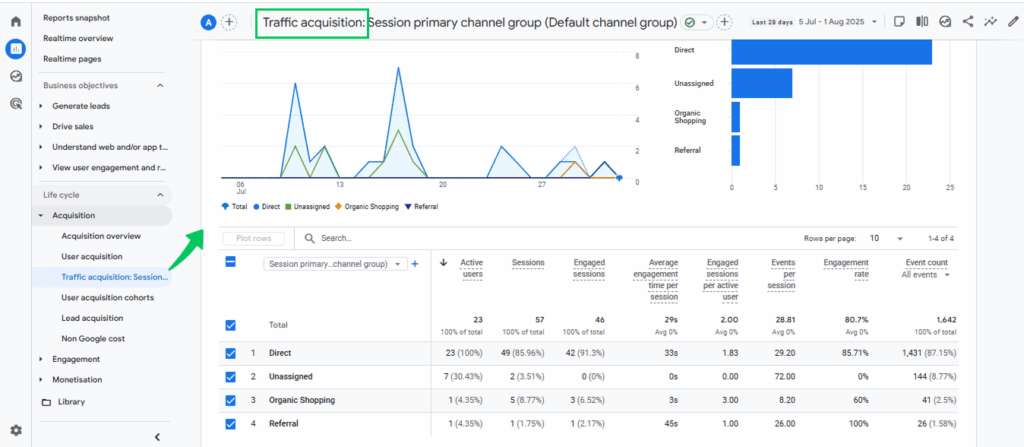
It helps you understand which channels consistently bring users back, offering deeper insights into the performance of ongoing marketing efforts and user engagement across multiple visits.
Key Dimensions
The Traffic Acquisition Report in GA4 focuses on how all sessions arrive, using dimensions like source, medium, and campaign to analyze overall traffic performance.
| Dimension | What It Shows |
|---|---|
| Session Source | Identifies the origin of the session, such as Google, Facebook, or a direct visit. |
| Session Medium | Shows the type of traffic channel, like organic, referral, or paid. |
| Session Source/Medium | A combined view that displays both the source and medium (e.g., Google/organic). |
| Session Campaign | Indicates the marketing campaign associated with the session, if UTM parameters were used. |
| Session Default Channel Grouping | Categorizes traffic into common groups like Organic Search, Paid Search, Direct, Social, etc. |
| Session Source platform | Refers to the specific website or app (like Google, Facebook, or Instagram) that initiated a session on your site. |
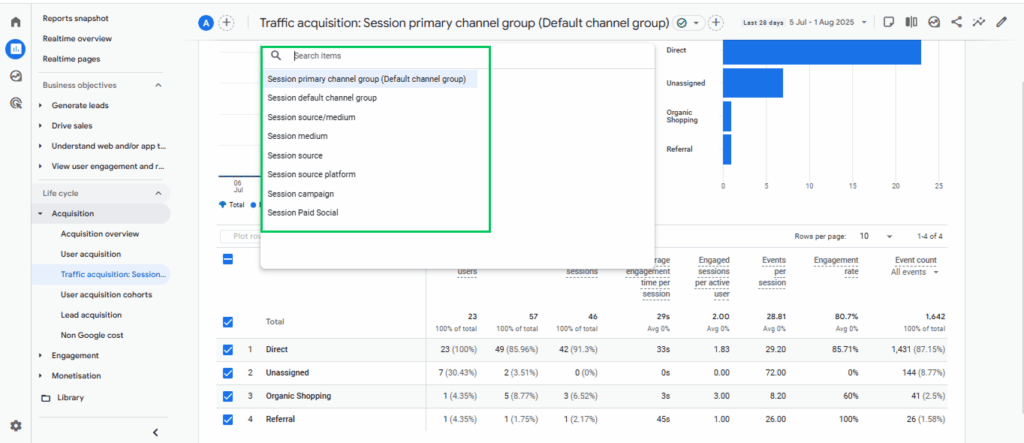
GA4’s Traffic Acquisition Report primarily uses last-click attribution, giving full credit to the last channel that led to a session.
Use Cases
The Traffic Acquisition Report in GA4 helps you evaluate the overall performance of your traffic channels, such as organic search, paid ads, social media, and referrals.
This report is valuable for monitoring the impact of ongoing marketing campaigns, identifying which sources drive the most consistent engagement, and optimizing your channel strategy for better retention and conversions. It also highlights which traffic sources perform best over time, beyond the initial visit.
Limitations
The Traffic Acquisition Report only shows how each individual session started, whether from a new or returning user. It doesn’t track the complete path a user takes before converting, such as the different sources they may have visited before making a purchase or completing a goal.
Because it uses last-click attribution, it gives all the credit to the final source that brought the user in that session. This can hide the value of other channels that helped influence the user earlier, like a Facebook ad they clicked two days before converting through a Google search. As a result, it may not give a full or fair picture of how different marketing efforts contribute to your results.
Comparing User Acquisition vs. Traffic Acquisition
The detailed comparison of Traffic Acquisition vs User Acquisition is given below:
| Feature | User Acquisition | Traffic Acquisition |
| Purpose | Tracks how new users first arrive on your site/app | Tracks how all sessions (new and returning) arrive |
| Attribution Model | Uses first-click attribution, credits the first touchpoint | Uses last-click attribution, credits the last touchpoint |
| Data Focus | Focuses only on new users | Includes data from all sessions |
| Key Use | Understand which channels bring in new visitors | Evaluate the ongoing performance of all marketing channels |
| Granularity | Provides user-level insights for acquisition | Offers session-level insights for traffic patterns |
| Best For | Optimizing campaigns targeting new user growth | Assessing overall traffic sources and user engagement |
| Limitation | Ignores returning visits and the full user journey | Doesn’t show the full multi-touch path before conversion |
How Analytify Simplifies User and Traffic Acquisition in WordPress
Join 50,000+ beginners & professionals who use Analytify to simplify their Google Analytics!
Understanding the difference between User vs Traffic Acquisition GA4 can be tricky, especially if you’re not used to switching between multiple reports. That’s where Analytify comes in.
Analytify simplifies complex GA4 reports, including Google Analytics User Acquisition vs Traffic Acquisition, in a clear, user-friendly format inside your WordPress dashboard.
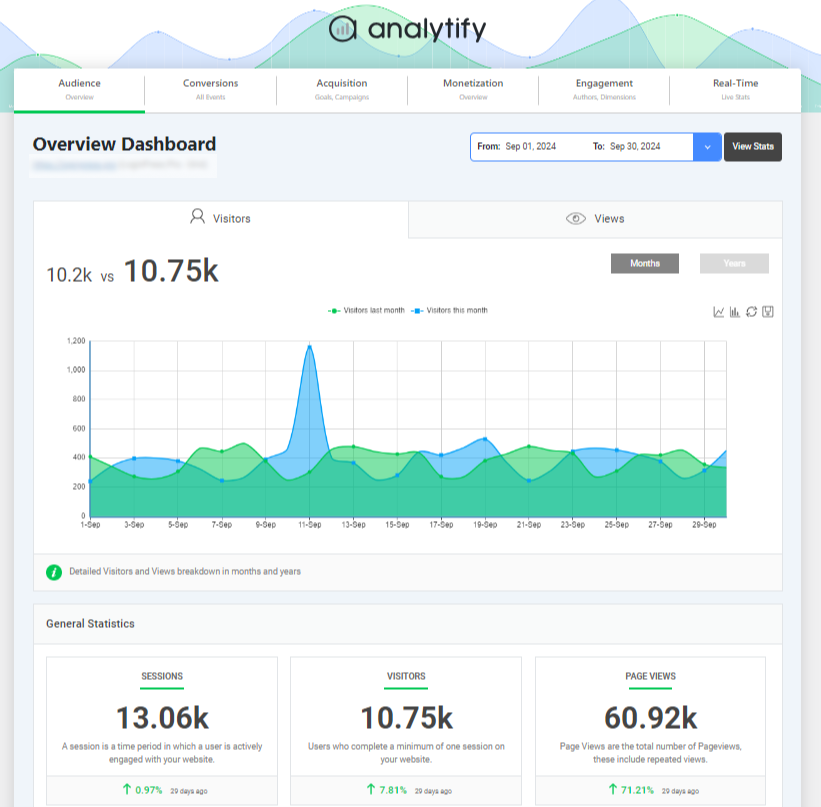
Instead of switching between multiple GA4 dashboards, Analytify brings all the key data directly into your WordPress dashboard. You can easily track where new users are coming from (User Acquisition) versus where your traffic originates, which channels drive traffic overall (Traffic Acquisition), without needing to interpret the complicated GA4 interface.
With Analytify, you can:
- Analytify shows user acquisition and traffic acquisition metrics in simple, readable dashboards. You get a quick overview without digging into complex GA4 menus; everything is displayed within your WordPress dashboard.
- You can compare new versus returning visitors easily, instantly seeing how many users are visiting for the first time versus how many are coming back, which helps you measure loyalty and retention.
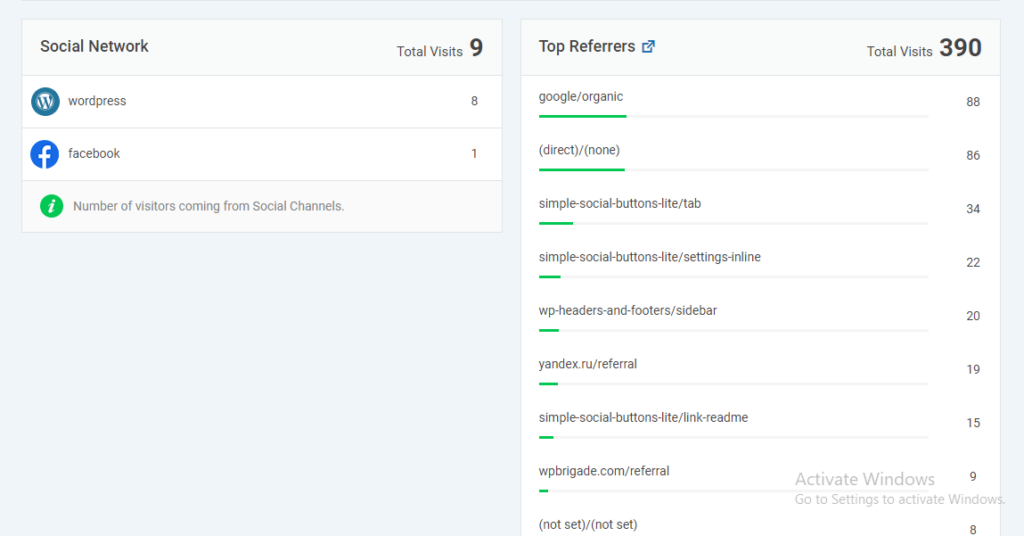
- You can filter reports by device and more, checking how users behave across mobile, desktop, and tablet, or seeing which sites are referring the most traffic.
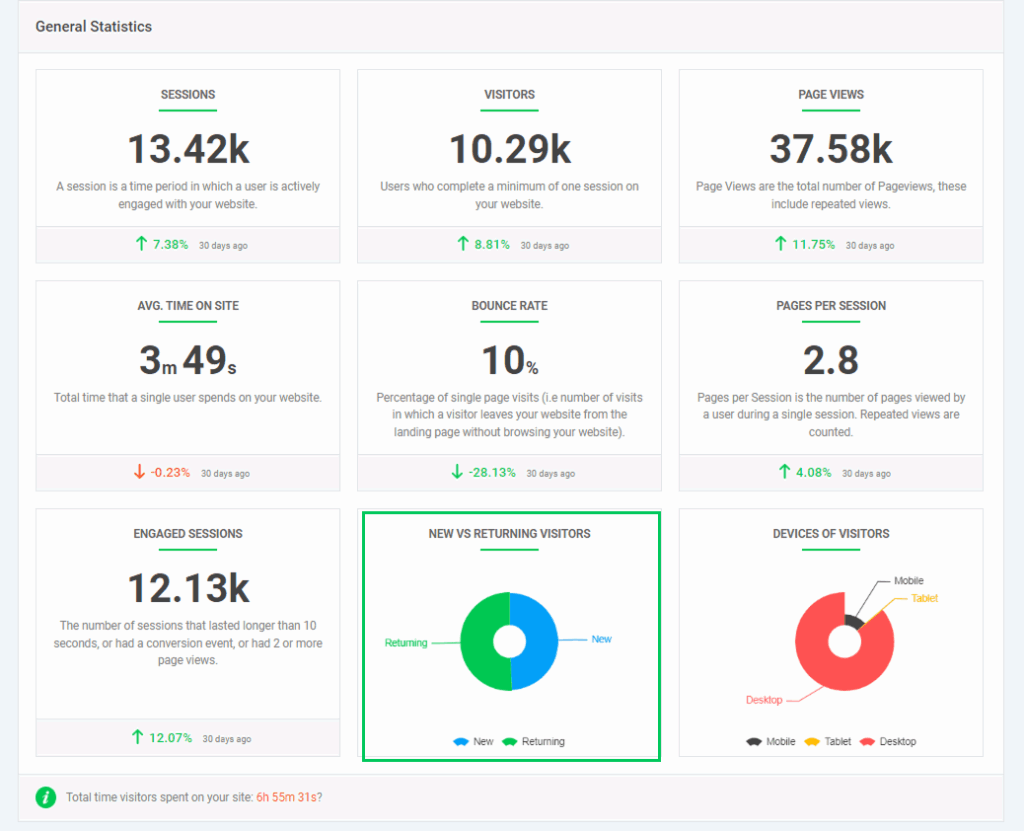
- You can also identify the most valuable traffic sources at a glance. Find out which channels, organic search, social media, paid ads, or referrals, are bringing in the most engaged users or conversions. You can also explore the Referral Sources report for detailed insights.
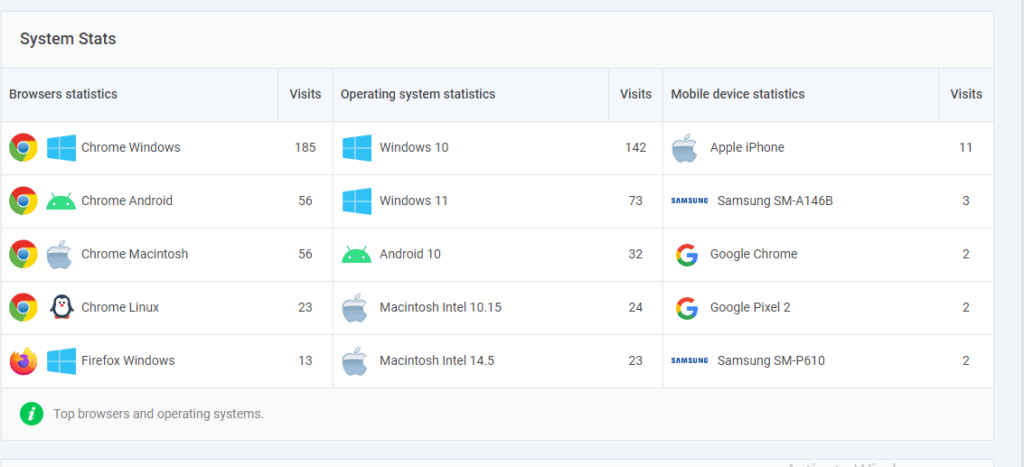
Get Deeper Insights with Analytify’s System Stats Report
You can also use Analytify’s System Stats report to better understand device types, browsers, and platforms your visitors use, adding context to your User and Traffic Acquisition analysis.
Whether you’re running a blog, an online store, or a business site, Analytify makes it effortless to measure and optimize your traffic sources, with no coding or analytics expertise required.
Frequently Asked Questions About GA4 User Acquisition vs Traffic Acquisition
When should you view a User Acquisition Report vs a Traffic Acquisition Report in GA4?
The User Acquisition Report shows how new users first found your website or app, crediting the first channel they interacted with. The Traffic Acquisition Report shows how all sessions (from both new and returning users) arrived, crediting the last channel before each session began. Together, they offer a complete view of how users arrive and return.
What are User Acquisition Cohorts in GA4?
User acquisition cohorts in GA4 group users based on the date they were first acquired (i.e., their first visit to your site). This allows you to track how specific groups of new users behave over time, like how long they stay active, how often they return, or how much they convert, helping you evaluate the long-term value of different traffic sources.
Why is Direct Traffic so High in GA4?
High direct traffic in GA4 usually means GA4 can’t determine the actual source of a session. Common reasons include:
- Missing or broken tracking links (no UTM tags)
- Users bookmarking your site or typing the URL directly
- Clicks from secure (HTTPS) to non-secure (HTTP) pages
- Links from apps, PDFs, or emails without proper tagging
To reduce direct traffic, make sure your campaigns and links are properly tagged with UTM parameters.
How Do I Identify Bot Traffic in GA4?
GA4 automatically filters out most known bot traffic, but for additional detection:
- Look for unusual spikes in sessions with zero engagement (0 seconds, 100% bounce rate)
- Use dimensions like device category, browser, or screen resolution to find anomalies
- Filter traffic from suspicious IPs or user agents via custom dimensions or BigQuery (for advanced users)
- Enable Google Signals and consider integrating reCAPTCHA or server-side validation to reduce bots
How to Measure Traffic in GA4?
To measure traffic in GA4:
- Go to Reports >> Acquisition >> Traffic Acquisition
- Analyze key metrics like Users, Sessions, Engaged Sessions, Engagement Rate, Event Count, and Conversions
- Use filters to segment by traffic source, medium, or campaign
- For deeper insights, explore Exploration reports and custom dashboards
What is acquisition in Google Analytics?
In Google Analytics, acquisition refers to how users arrive at your website or app, the source, channel, or platform that brought them in. It helps you understand whether visitors came from search engines (like Google), social media, paid ads, referral sites, or direct traffic.
In GA4, acquisition is divided into two key reports:
User Acquisition: tracks how new users first found your site.
Traffic Acquisition: tracks how all sessions (new and returning) arrived.
GA4 User Acquisition vs Traffic Acquisition: Which Should You Use?
Use User Acquisition when you want to know which channels bring in new visitors; use Traffic Acquisition when you want to see how all sessions, new and returning, perform. User Acquisition applies first-click attribution to trace where first-time visitors came from, while Traffic Acquisition applies last-click attribution to evaluate every session.
The comparison table above highlights their distinct purposes and limitations. If you’re a WordPress user, Analytify simplifies GA4’s data and lets you analyze both acquisition types directly from your dashboard, no technical skills required.
Further Readings:
Have a question about which acquisition report fits your site? Leave a comment below and we’ll help you figure it out.