Google Analytics vs Adobe Analytics (Compared)

Choose Google Analytics (GA4) if you want free, easy-to-set-up tracking that covers standard reporting needs. Choose Adobe Analytics if you are a large enterprise that needs advanced segmentation, custom attribution, and cross-channel analysis, and can justify a budget starting around $50,000 a year.
Both are capable platforms; the right one depends on your budget, team, and how deep you need to go with the data.
This guide compares Google Analytics vs Adobe Analytics across pricing, setup, features, reporting, and mobile tracking, with a direct recommendation for each type of business.
Google Analytics vs Adobe Analytics (TOC):
Google Analytics vs Adobe Analytics: Quick Overview
| Factor | Google Analytics | Adobe Analytics | Analytify (GA4 for WordPress) |
|---|---|---|---|
| Cost | Free (GA4) or from $50,000/yr (GA360) | Custom, roughly $50,000 to $200,000+/yr by tier | From $99/yr (StartUp), $199/yr for unlimited sites (Agency) |
| Best For | Small to medium-sized businesses | Large enterprises with complex data needs | WordPress site owners who want GA4 without touching code |
| Setup Difficulty | Easy, beginner-friendly | Complex, requires developer support | Easiest: install the plugin and connect in a few clicks |
| Core Focus | Web and app tracking, user behavior | Enterprise data analysis, advanced segmentation | Displaying GA4 data inside the WordPress dashboard |
| Main Integration | Google suite (Ads, Search Console, BigQuery) | Adobe Experience Cloud | GA4 (it is a reporting layer on top of GA4, not a separate data source) |
| Data Sampling | Applied on large datasets (free version) | Minimal, with more accurate data at scale | Same as GA4, since Analytify displays GA4’s own data |
| Support | Community support (free), SLA (GA360) | Dedicated support included | General support (StartUp), VIP support (Agency and Developer) |
What Is Google Analytics?
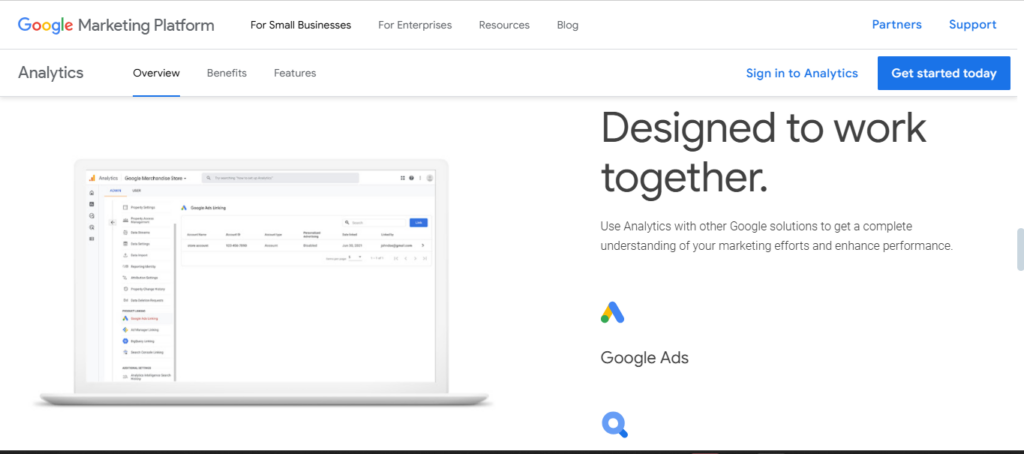
Google Analytics (GA4) is a free web analytics tool from Google. It tracks how users find and interact with your website or app.
It is the most widely used analytics platform in the world, especially popular with small and medium-sized businesses.
Google Analytics is best for:
- Businesses that need reliable, free analytics
- Teams without dedicated analytics developers
- Sites already using Google Ads or Search Console
- WordPress users who want simple reporting inside their dashboard
Tip: Analytify connects Google Analytics to your WordPress dashboard. It shows GA4 data in plain, readable reports without leaving WordPress.
What Is Adobe Analytics?
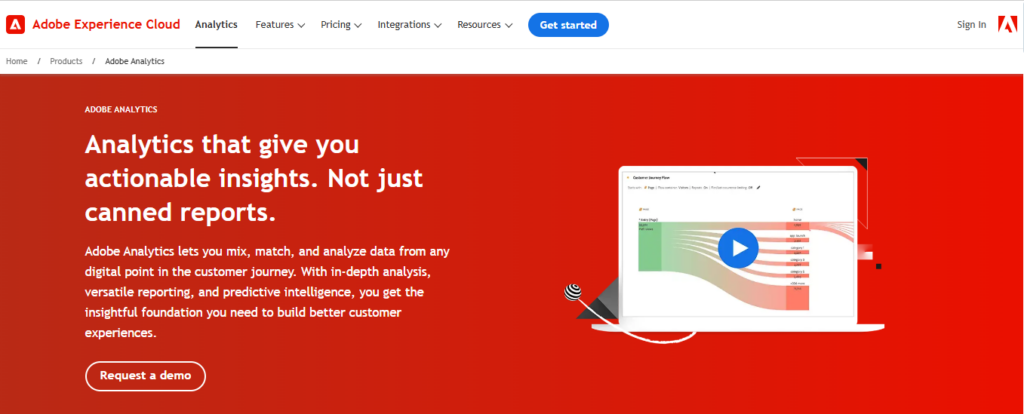
Adobe Analytics is a premium, enterprise-level analytics platform. It is part of the Adobe Experience Cloud.
It is designed for large organizations that need deep data control, advanced segmentation, and cross-channel analysis.
Adobe Analytics is best for:
- Large enterprises with complex tracking needs
- Teams with dedicated analytics and IT departments
- Businesses already using Adobe Experience Cloud products
- Organizations that need detailed cross-device and cross-channel tracking
The pricing gap between the two is the first thing most teams notice.
Before deciding between Google Analytics and Adobe Analytics, it’s helpful to first understand how Google Analytics works. Learn the fundamentals of GA4 here.
Pricing: Google Analytics vs Adobe Analytics
Pricing is usually the first factor businesses consider. Here is how both platforms compare.
| Google Analytics | Adobe Analytics | Analytify | |
|---|---|---|---|
| Free Version | Yes (GA4) | No | No (GA4 itself stays free; Analytify is the paid display layer) |
| Enterprise Option | Yes (GA360) | Yes | Agency plan covers unlimited sites |
| Starting Cost | $0 for GA4 | From about $50,000/year (varies by tier) | $99/year (2 sites) |
| Top Tier Cost | From $50,000/year (GA4 360) | $150,000 to $200,000+/year | $199/year (unlimited sites) or $499 one-time (lifetime) |
| Pricing Model | Free or usage-based (GA360) | Subscription, custom quote | Flat annual license or lifetime license |
| Support Included | No (free), SLA with GA360 | Yes, dedicated support | Yes, general or VIP support depending on plan |
Google Analytics price: GA4 is free. GA360 is event-based, roughly $4,200/month (about $50,000/year) for up to 25 million events, with overages around $17.50 per million events beyond that.
Adobe Analytics price: no free version. Pricing is server-call based and quote-only, typically ranging from about $50,000/year at the entry tier to $150,000 to $200,000+/year at the top tier.
Read more about Google Analytics 4 paid plan pricing in this article.
Adobe Analytics vs Google Analytics: Which Offers Better Value?
Small businesses and startups get the most value from Google Analytics (GA4): it is free, easy to set up, and covers all core analytics needs.
Large enterprises justify Adobe Analytics’ higher cost with what it delivers: advanced segmentation, cross-channel tracking, and custom reporting built for complex data environments.
Tip: WordPress users can get GA4-level insights at a fraction of the cost using Analytify, which starts at $99/year.
Join 50,000+ beginners & professionals who use Analytify to simplify their Google Analytics!
Ease of Setup: Google Analytics vs. Adobe Analytics
Google Analytics is easy to set up. Most businesses can get started in under 30 minutes.
Google Analytics Setup
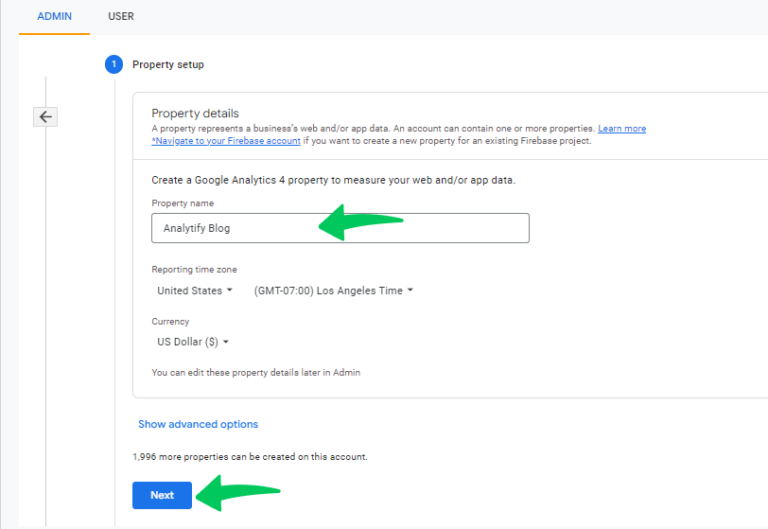
Steps to set up GA4:
- Creating an Account and Property: Create a Google Analytics account and set up a property.
- Adding Tracking Code: Add the GA4 tracking code to your website, or use Google Tag Manager. Analytify removes the need to edit code and connects GA4 to WordPress in a few clicks.
- Connect Google Ads and Search Console for additional data.
- For WordPress: install Analytify to surface GA4 data inside your dashboard.
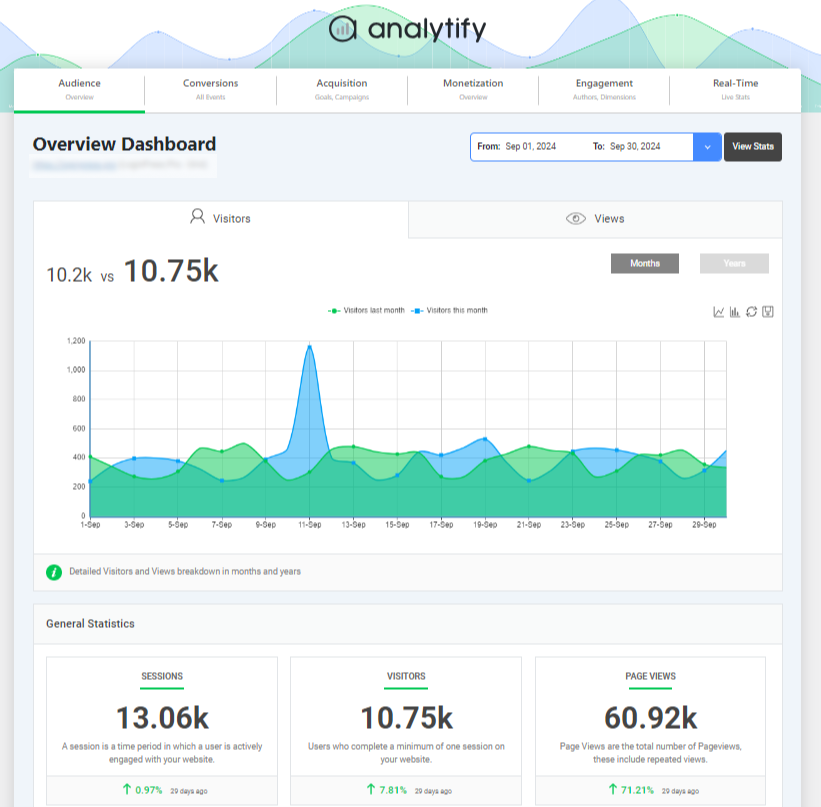
Here’s a screenshot of Analytify’s dashboard, showing how it visually organizes Google Analytics data for easy access:
Adobe Analytics Setup
Adobe Analytics setup is more complex and often requires a specialized team or developer support. Here are the steps and requirements for Adobe Analytics implementation:
- Activate your Adobe Experience Cloud account.
- Set up Adobe Launch (Adobe’s tag management system).
- Configure custom events, eVars (custom variables), and props (tracking properties).
- Implement data layers for complex tracking requirements.
Setup Complexity: Side-by-Side
| Setup Factor | Google Analytics | Adobe Analytics | Analytify (GA4 on WordPress) |
|---|---|---|---|
| Tracking Code | Simple, with step-by-step guidance | Complex, requires Adobe Launch configuration | None to write: the plugin installs the GA4 tag for you |
| Tag Manager | Google Tag Manager | Adobe Launch | Not required |
| Customization | Basic to moderate | High, with extensive options | Basic: report layout and dashboard widgets, not tracking logic |
| Required Expertise | Minimal for basic setup | High, often needs developer support | None; built for non-developers |
| Time to Set Up | Under 30 minutes for basics | Several days to weeks for full setup | A few clicks, typically under 5 minutes |
Features Comparison: Google Analytics vs Adobe Analytics
| Feature | Google Analytics | Adobe Analytics |
|---|---|---|
| User Behavior Tracking | Event-based (page views, clicks, scrolls) | Custom events with eVars and props |
| Conversion Tracking | Standard conversion events | Fully custom goal configuration |
| Cross-Channel Attribution | Limited in GA4 | Detailed, customizable attribution models |
| Advanced Segmentation | Basic and custom audiences | Robust, multi-dimensional segmentation |
| Predictive Analytics | Yes, built into GA4 | Yes, powered by Adobe Sensei AI |
| Custom Dashboards | Moderate customization | Highly customizable Analysis Workspace |
| Path Analysis | Limited | Advanced cohort and path analysis |
| BigQuery Integration | Available in GA360 | None natively; integrates with Adobe tools |
| Real-Time Reporting | Yes | Yes, with batch-processing options |
Adobe vs. Google Analytics: Which Platform Has Better Features?
Small to medium businesses do fine with Google Analytics: GA4 covers all standard analytics needs with a straightforward feature set.
Large enterprises get more from Adobe Analytics here too: advanced segmentation, custom attribution, and Analysis Workspace suit complex data requirements better.
User Interface and Usability: Google Analytics vs. Adobe Analytics
Here is how Google Analytics and Adobe Analytics compare on interface and usability.
Google Analytics Interface
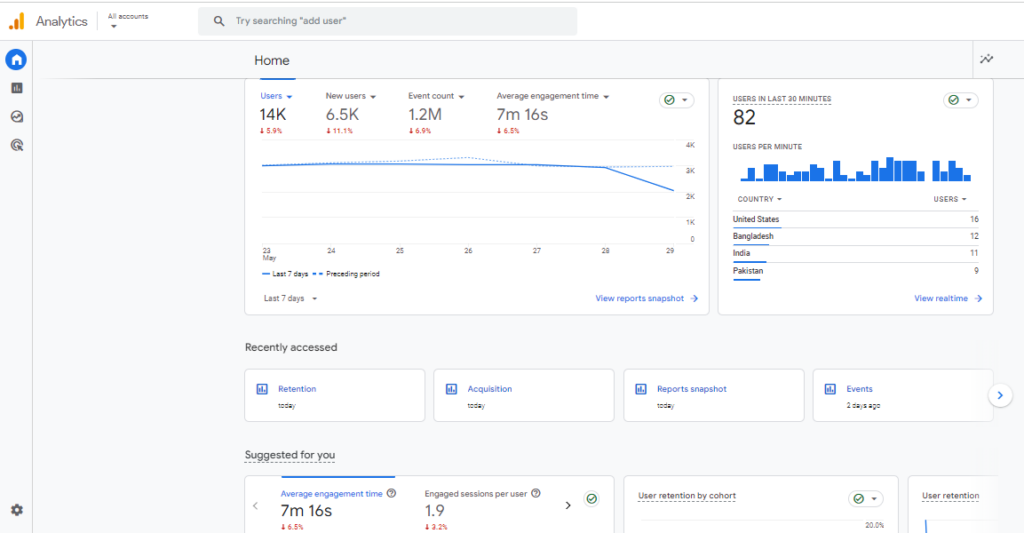
Google Analytics has a clean, user-friendly interface designed for accessibility.
Here are some of the key aspects of GA’s interface:
GA4 Dashboard Layout: The Google Analytics dashboard is organized with:
- Left-hand navigation with clearly labeled report sections
- Pre-built reports for audience, acquisition, engagement, and conversions
- Exploration reports for custom path and funnel analysis
- Basic dashboard customization with widgets and date ranges
Adobe Analytics Interface
Adobe Analytics uses Analysis Workspace. It is a fully flexible, drag-and-drop report builder.
It is more powerful than GA4’s interface, but it takes longer to learn.
Key interface features:
- Fully custom dashboards built from scratch
- Advanced visualizations: flow diagrams, cohort tables, anomaly detection
- Multi-dimensional analysis across channels and devices
- Collaboration tools with live links and shared project access
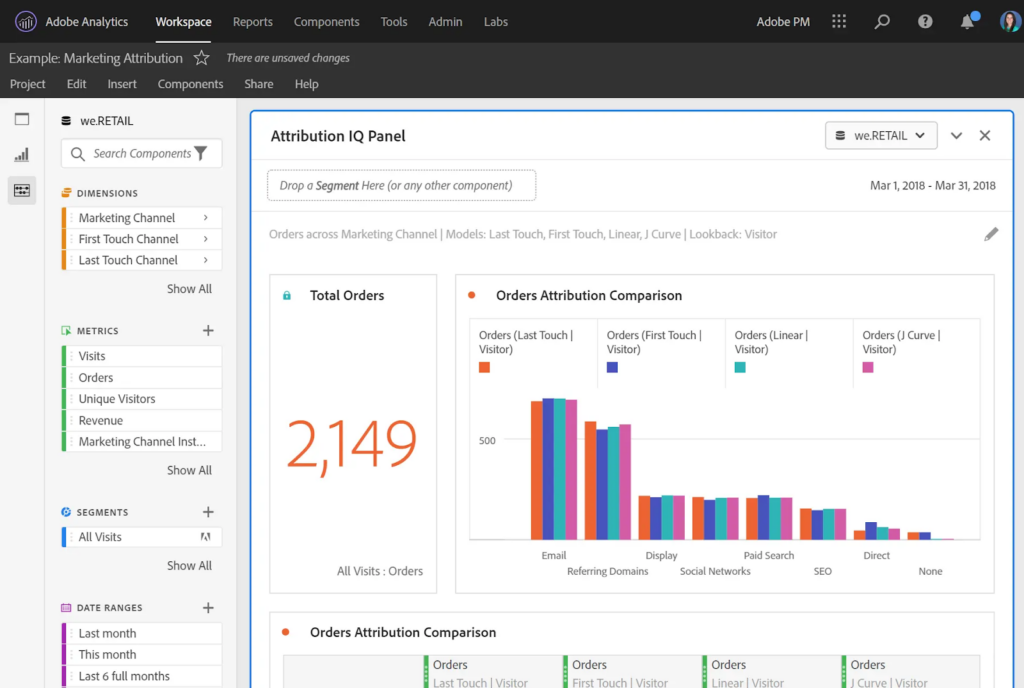
GA4 vs Adobe Analytics Reporting Comparison Table
| Feature | Google Analytics | Adobe Analytics |
|---|---|---|
| Standard Reports | Yes, pre-built and ready to use | Limited; encourages custom builds |
| Custom Dashboards | Yes, with basic widget options | Yes, highly customizable |
| Visualization Options | Basic: line, bar, pie charts | Advanced: flow, cohort, anomaly detection |
| Predictive Analytics | Basic in GA4 | Advanced with Adobe Sensei |
| Data Studio Integration | Yes | No direct equivalent |
| Collaboration | Limited | Extensive, with shared projects and live links |
| Learning Curve | Low to moderate | High |
Adobe vs GA4: Data Collection and Processing
| Feature | Google Analytics | Adobe Analytics |
|---|---|---|
| Tracking Model | Event-based (GA4) | Event-based with custom variables (eVars, props) |
| Automatic Tracking | Yes, via Enhanced Measurement | No, requires custom setup |
| Cross-Device Tracking | Limited, through Google Signals | Strong, with ECID for cross-channel tracking |
| Data Layers | Not required | Required for complex implementations |
| Real-Time Processing | Yes | Yes, with batch-processing options |
| Privacy Compliance Tools | IP anonymization, consent tools | Data retention controls, compliance tools |
| Data Sampling | Applied on large datasets (free version) | Greatly reduced at enterprise scale |
Adobe Analytics gives more control over data collection. It is more precise but requires more setup effort.
Google Analytics is easier to start with. Its Enhanced Measurement feature automatically tracks common events with no coding needed.
Mobile Analytics and App Tracking: Google Analytics vs Adobe Analytics
Here’s how Google Analytics vs Adobe Analytics compares in terms of mobile analytics and app tracking.
Google Analytics Mobile and App Tracking
GA4 tracks mobile apps through Firebase, Google’s app development platform. It is well-suited for standard mobile analytics.
| Metric | Description |
| Screen Views | Number of times app screens are viewed |
| In-App Purchases | Revenue generated from purchases within the app |
| Session Duration | The average time users spend in each session |
| User Demographics | Age, gender, and location of app users |
| Crash Analytics | Reports on app crashes and technical issues |
Adobe Analytics Mobile and App Tracking
Adobe Analytics uses the Adobe Mobile SDK. It offers more granular data collection for complex app tracking.
| Metric | Description |
| Unique User Sessions | Total unique sessions on the app |
| App Retention Rate | Percentage of users who return to the app |
| In-App Purchases | Revenue from transactions within the app |
| Push Notification Opens | Number of times users open the app from notifications |
| Custom User Segments | Segments defined by custom attributes or behaviors |
For standard mobile tracking, Google Analytics is the practical choice: Firebase integration covers the basics well, and it’s free.
Complex enterprise mobile apps are better served by Adobe Analytics: the Adobe Mobile SDK offers deeper customization and cross-device analysis.
Pros and Cons: Google Analytics vs Adobe Analytics
Here is where each platform genuinely wins and loses, side by side.
Google Analytics: Pros and Cons
| Pros | Cons |
|---|---|
| Free version available (GA4) | Limited customization compared to Adobe |
| Easy to set up and use | Predictive analytics are more basic |
| Integrates with Google Ads, Search Console, BigQuery | Data sampling on large datasets (free version) |
| Pre-built reports save time | No native CRM integration |
| Predictive metrics built into GA4 | GA360 is expensive for enterprises ($50,000+/yr) |
| Google Data Studio for enhanced visuals | Cross-device tracking relies on Google Signals |
Adobe Analytics: Pros and Cons
| Pros | Cons |
|---|---|
| Advanced custom metrics (eVars and props) | No free version; quote-only, roughly $50,000 to $200,000+/year |
| Deep integration with Adobe Experience Cloud | Steep learning curve for new users |
| Real-time tracking and segmentation | Limited native integration with Google tools |
| Analysis Workspace for fully custom reports | Complex setup requires developer support |
| ECID for cross-device and cross-channel tracking | Requires in-house analytics or IT expertise |
Google Analytics vs Adobe Analytics: Which Should You Choose?
Small businesses and startups should choose Google Analytics (GA4): it’s free, easy to use, and integrates well with the rest of the Google ecosystem.
WordPress users get the best of both with Google Analytics plus Analytify: Analytify brings GA4 data into your WordPress dashboard for $99/year, without the cost of an enterprise tool.
Medium to large enterprises needing advanced data should choose Adobe Analytics: its customization, segmentation, and cross-channel tracking are hard to match in a complex data environment.
Businesses already in the Adobe ecosystem should stick with Adobe Analytics: if you’re using Adobe Target, Adobe Campaign, or Adobe Audience Manager, it integrates naturally with what you already have.
Still not sure? Start with GA4, since it’s free. If you hit its limits, such as data sampling, retention, or segmentation, evaluate GA360 or Adobe Analytics next.
FAQs about Google Analytics vs Adobe Analytics
Which is better, Adobe or Google?
It depends on your business size and needs. Google Analytics is better for small to medium businesses. It is free, easy to use, and integrates well with Google’s tools. Adobe Analytics is better for large enterprises that need advanced segmentation, cross-channel tracking, and deep customization.
What is the difference between GA4 and Adobe Analytics?
GA4 is free; Adobe Analytics is quote-only and typically starts around $50,000 a year. GA4 setup takes minutes; Adobe Analytics can take weeks with developer support. Adobe Analytics offers more advanced custom tracking through eVars and props, while GA4 covers standard event-based tracking automatically. GA4’s free tier applies data sampling on large datasets; Adobe Analytics reduces this at enterprise scale. Adobe’s Analysis Workspace is more flexible for custom reporting, while GA4’s pre-built reports are faster to use out of the box.
What is the strongest competitor to Google Analytics?
Adobe Analytics is Google Analytics’s main enterprise-level competitor. Other competitors include Mixpanel, Matomo, and Heap. For WordPress users, Analytify simplifies GA4 reporting and eliminates the need to use the full GA4 interface.
Is Adobe Analytics useful?
Yes, for the right audience. Adobe Analytics is highly useful for large enterprises with complex data needs. It offers advanced segmentation, cross-channel attribution, and a fully customizable workspace. However, it requires significant setup time and expertise, and it is not cost-effective for small or medium-sized businesses.
How does Adobe analytics price compare to Google Analytics?
Google Analytics 4 is completely free. Google Analytics 360 starts around $50,000 per year. Adobe Analytics is quote-only, typically ranging from about $50,000 to $200,000+ per year depending on tier and server-call volume. For most businesses, GA4 offers better value; the gap only closes if you need Adobe’s enterprise-scale segmentation and cross-channel attribution.
Conclusion: Google Analytics vs Adobe Analytics
Both platforms are strong analytics tools. The right choice depends on your budget, team, and data requirements.
| Your Situation | Best Choice |
|---|---|
| Small or medium business, limited budget | Google Analytics 4 (free) |
| WordPress site, want simple reporting | Analytify + GA4 (from $99/year) |
| Large enterprise, complex data needs | Adobe Analytics ($50,000 to $200,000+/year) |
| Already using Adobe Experience Cloud | Adobe Analytics |
| Need Google Ads and Search Console integration | Google Analytics |
| Require advanced segmentation and custom metrics | Adobe Analytics |
You may also like to know about the Most Important Content Marketing Metrics and know about a comprehensive list of metrics that can be tracked using Google Analytics.
You may also like to read this comparison article on Mixpanel vs Google Analytics (Detailed Comparison).
Now, we’d like your thoughts on which analytics tool you found best for your web analytics.