
How Developers Influence Website Traffic Analytics?

Developers do more than write code. Every technical decision they make affects how your website performs in search and how users interact with it.
In this post, I’ll explain what website traffic analytics is, which metrics matter most, and exactly how developers influence Website Traffic Analytics.
Website Traffic Analytics (TOC):
What is Website Traffic Analytics?
Website traffic analytics is the process of collecting, measuring, and analyzing data from your website. It tells you how visitors find your site, what they do when they arrive, and whether they complete the actions you want.
This data helps you improve your website’s performance, fix problems, and make better decisions about content and marketing.
Google Analytics helps you see website traffic analytics.
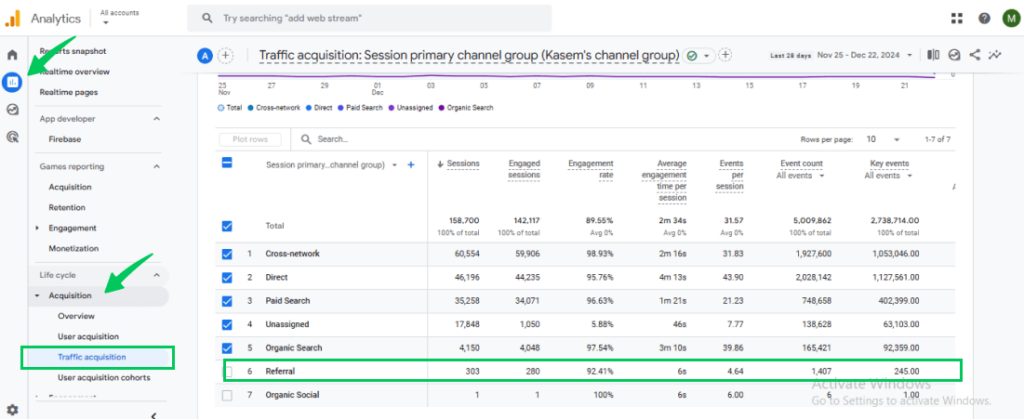
Key questions website traffic analytics answers:
- Where do your visitors come from?
- Which pages do they visit most?
- How long do they stay?
- Where do they drop off?
- Which actions do they complete, like purchases or sign-ups?
How Website Traffic Analytics Works: Tools, Tags & Tracking Flow
Analytics platforms collect data through several methods. Here is how the process works from start to finish.
Data Collection Methods
| Method | How It Works |
|---|---|
| Tracking code | A small JavaScript snippet on each page records visitor data when the page loads |
| Server logs | Your web server records every request for pages, files, and resources |
| Cookies | Stored in the user’s browser to track returning visitors and session data |
| Pixel tags | Embedded in emails or pages to trigger data collection when loaded |
| API integrations | Connect your analytics platform to social media, ad networks, and CRM systems |
The Data Processing Pipeline
Once data is collected, it moves through a processing pipeline before you see it in a report:
- Tracking code sends raw data to the analytics server when a user interacts with your site.
- The server organizes that data into sessions, users, and events.
- Data is summarized and grouped into statistics and dimensions.
- Processed data is stored in databases for fast retrieval.
- The analytics platform displays the data in dashboards, reports, and charts.
Key Traffic Analytics Metrics to Track
There are four main categories of metrics in traffic analytics. Here is what each one covers:
| Category | Metrics | What They Tell You |
|---|---|---|
| Traffic Volume | Sessions, users, pageviews, pages per session | How many people visit and how much content they consume |
| Engagement | Session duration, bounce rate, CTR, conversion rate | How users interact with your content and whether they take action |
| Acquisition | Traffic sources: organic, referral, paid, direct, social | Where your visitors come from |
| Technical Performance | Page load time, server response time, mobile performance, error rates | How fast and stable your site is for real users |
Where Web Developers Come In
A web developer’s technical decisions directly affect every metric in the table above.
Here is a breakdown of the areas where developers have the most impact.
1. Technical Performance Optimization
Page speed is a confirmed Google ranking factor. Slow pages lead to higher bounce rates and fewer conversions.
What developers can do to improve performance:
- Minify and compress HTML, CSS, and JavaScript files
- Implement browser caching so returning visitors load pages faster
- Compress and resize images, and use lazy loading for below-the-fold content
- Use a Content Delivery Network (CDN) to serve content from servers closer to the user
- Reduce HTTP requests by combining files and using sprite sheets
2. Mobile Responsiveness
More than half of all web traffic comes from mobile devices. A site that performs poorly on mobile loses rankings and users.
What developers should implement:
- Responsive design with flexible layouts that adapt to any screen size
- Touch-friendly buttons and navigation elements
- Correct viewport meta tag configuration
- Mobile-first CSS to prioritize the smaller screen experience
3. User Experience and Navigation
Good UX keeps users on your site longer and reduces bounce rate. Both metrics influence search rankings.
Developer improvements that impact UX metrics:
- Clear, logical navigation with consistent menu hierarchy
- Breadcrumb navigation so users always know where they are
- Robust site search with filters and autocomplete suggestions
- Strategic internal linking to keep users moving through related content
- Accessible design: alt text for images, keyboard navigation, ARIA attributes, semantic HTML
Note: Accessibility improvements help all users and are increasingly factored into search rankings. Semantic HTML and correct heading structure help both screen readers and search engine crawlers.
Technical SEO: How Developer Decisions Affect Website Traffic
Technical SEO decisions made by developers directly affect how much organic traffic a site receives.
| Technical SEO Element | What Developers Implement | Impact on Traffic |
|---|---|---|
| Schema markup | Structured data code added to pages | Enables rich snippets in search results, improving CTR |
| Canonical tags | Specify the preferred URL for duplicate content | Prevents keyword cannibalization and split link equity |
| XML sitemaps | Map of all site URLs submitted to search engines | Helps Google find and index content faster |
| Meta tags | Title, description, and robots tags | Directly affects click-through rate in search results |
| Heading structure | Logical H1 to H6 hierarchy | Helps search engines understand page content and hierarchy |
| Clean URLs | Short, descriptive, keyword-rich URLs | Improves both user experience and crawlability |
| robots.txt | Controls which pages crawlers can access | Prevents wasted crawl budget on low-value pages |
| 301 redirects | Send users and crawlers from old to new URLs | Preserves link equity after URL changes |
| Hreflang tags | Signal language and regional targeting | Ensures the correct page version shows in each country |
Analytics Implementation: What Developers Set Up
Accurate analytics data depends on correct technical implementation. This is where developers play a direct role in what data is collected.
Core Tracking Setup
- Install the correct analytics tracking script on every page
- Set up cross-domain tracking if the site spans multiple domains
- Use a tag management system like Google Tag Manager to centralize tracking
- Consider server-side tracking for situations where JavaScript tracking is blocked
- Implement a data layer to standardize how information is passed to tracking tools
Custom Event Tracking
Standard page view tracking is not enough for most sites. Developers also set up custom events to track specific user actions.
| Event to Track | Why It Matters |
|---|---|
| Button clicks | Shows which CTAs are driving action |
| Form submissions | Tracks lead generation and conversion rates |
| Video plays and completions | Measures engagement with video content |
| Scroll depth | Shows how far users read on long-form pages |
| File downloads | Tracks demand for PDFs, guides, and resources |
| E-commerce events | Records product views, add-to-cart, and purchases |
| Error tracking | Identifies technical problems affecting user experience |
Single Page Application (SPA) Tracking
JavaScript-based apps do not reload the page on navigation. Standard analytics misses these route changes.
Developers handle SPA tracking by:
- Implementing virtual pageview tracking when routes change
- Using the History API to record navigation events accurately
- Tracking component-level interactions within the application
- Capturing JavaScript performance metrics like render times
Best Practices for Analytics-Driven Development
Testing and Validation
- Test tracking across all major browsers before going live
- Verify tracking works correctly on mobile devices
- Use Google Tag Manager Preview Mode to validate tags
- Check GA4 DebugView to confirm events fire correctly
- Test privacy compliance to ensure tracking respects user consent settings
Privacy and Compliance
Developers are responsible for ensuring analytics is implemented legally.
- Build a cookie consent management system with clear accept and reject options
- Anonymize IP addresses to protect user identity
- Adapt tracking behavior based on user location and local privacy laws
- Set appropriate data retention periods
- Give users a clear way to opt out of tracking
Continuous Improvement
- Run regular performance audits to catch regressions early
- Use A/B testing frameworks to test changes before full rollout
- Use analytics data to prioritize which improvements to build next
- Combine quantitative analytics with user feedback for a complete picture
Analytify: Simpler Website Traffic Analytics for WordPress Developers
Join 50,000+ beginners & professionals who use Analytify to simplify their Google Analytics!
GA4 is powerful, but it can be complex. Analytify is a WordPress plugin that translates GA4 data into clear, readable reports inside your WordPress dashboard.

For website developers, it provides immediate visibility into how technical changes affect website traffic, without needing to build custom GA4 reports.
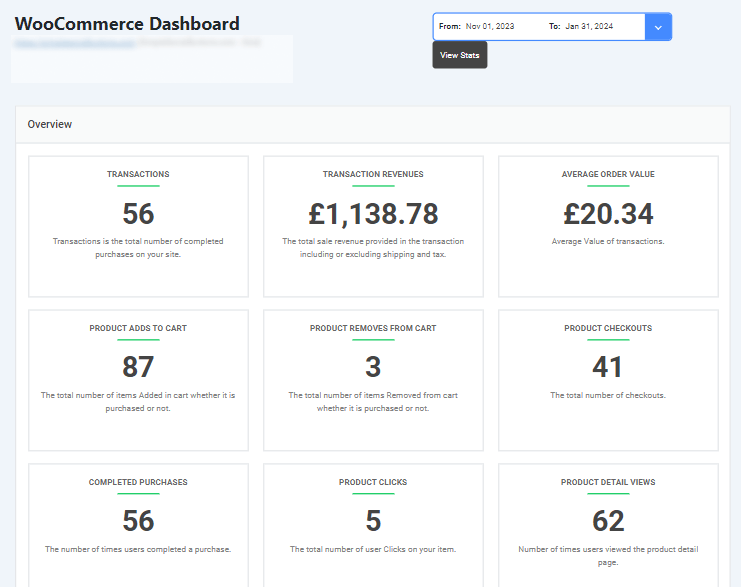
Key Features Developers Use
| Feature | What It Does |
|---|---|
| Real-Time Stats in WordPress | View live traffic data without opening GA4 |
| Simplified Event Tracking | Track clicks, downloads, video plays, and scrolls with no custom GA4 code |
| WooCommerce Tracking | One-click ecommerce tracking with product and revenue reports |
| Page-Level Analytics | See which specific pages and posts drive the most traffic and conversions |
| Frontend Stats (Shortcodes) | Display analytics on the frontend for clients or team members |
| Privacy-First Compliance | Built-in IP anonymization, user consent management, and GDPR tools |
| Google Tag Manager Integration | Works alongside GTM for flexible tag management |
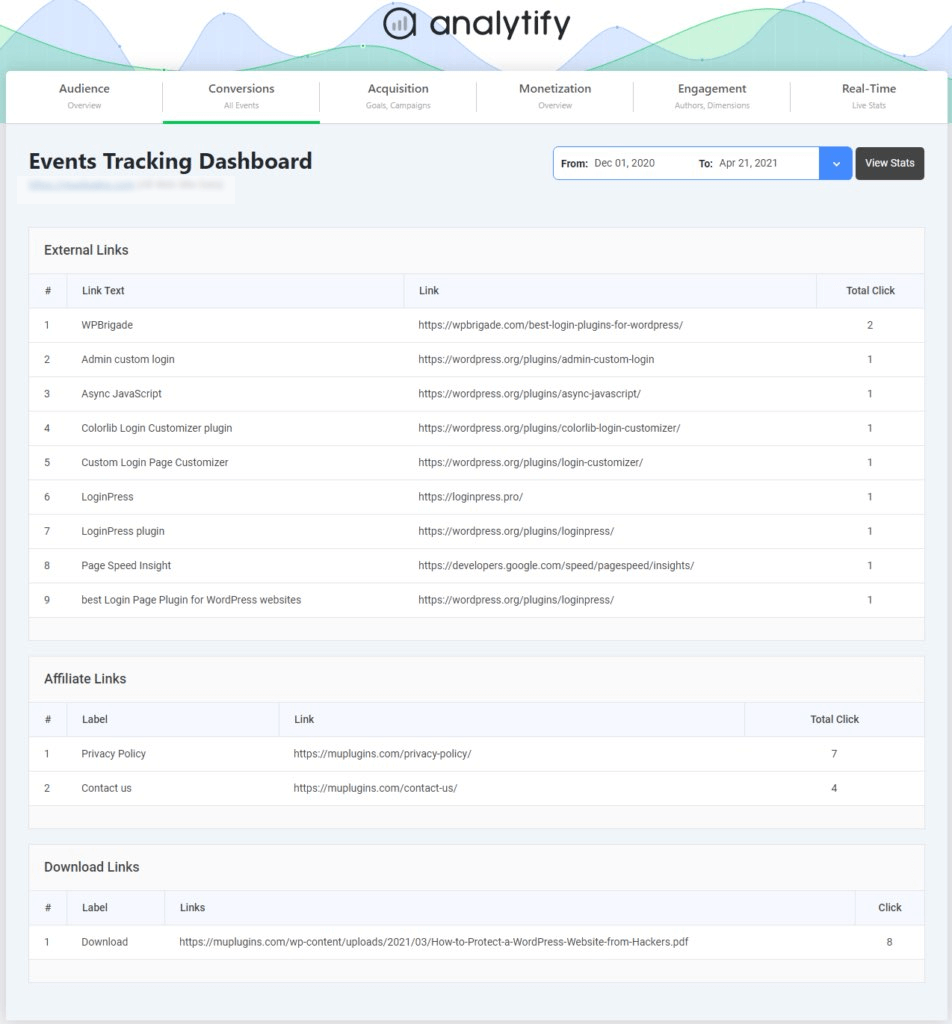
Tip: Analytify is especially useful after deploying technical changes. You can check real-time stats immediately to see whether a performance update improved bounce rate or traffic volume.
Frequently Asked Questions on Website Traffic Analytics
1. What is website traffic analytics, and why is it important?
Website traffic analytics is the process of collecting and analyzing data from your website to understand user behavior. It tells you where visitors come from, what they do on your site, and whether they take the actions you want. This data helps developers, marketers, and business owners make better decisions about site improvements, content, and marketing spend.
2. How do developers influence website traffic analytics?
Developers influence website traffic analytics in several key ways:
Page speed: faster pages rank better and have lower bounce rates
Technical SEO: schema, canonical tags, sitemaps, and clean URLs affect organic traffic
Analytics implementation: correct tracking setup ensures data is accurate
Mobile responsiveness: mobile-friendly sites retain more visitors
Accessibility: semantic HTML helps both users and search crawlers
Custom event tracking: reveals how users interact with specific site elements
3. How does Analytify simplify website analytics?
Analytify connects Google Analytics 4 to your WordPress dashboard. It shows GA4 data in simple, readable reports without requiring you to navigate the full GA4 interface. Developers can track page performance, events, and traffic sources directly in WordPress, making it easier to measure the impact of technical changes.
4. What’s the difference between Google Analytics and Analytify?
Google Analytics 4 is the full analytics platform from Google. It offers powerful data but can be complex to navigate. Analytify is a WordPress plugin that surfaces GA4 data inside WordPress in a simplified format. They work together: GA4 collects the data, and Analytify displays it clearly inside your WordPress admin.
Final Thoughts: Developer Website Traffic Analytics
Website traffic analytics is not just a marketing tool. Developers shape it with every technical decision they make.
Here is a quick summary of what developers control:
| Developer Responsibility | Impact on Analytics |
|---|---|
| Page speed optimization | Lower bounce rate, higher engagement, better rankings |
| Mobile responsiveness | Better performance metrics across device types |
| Technical SEO | More organic traffic from search engines |
| Analytics implementation | Accurate, complete data for all decisions |
| Custom event tracking | Deeper understanding of user behavior |
| Privacy and consent setup | Legal compliance and user trust |
| SPA tracking | Accurate data for JavaScript-heavy applications |
When developers understand how their work connects to website traffic analytics, they build sites that not only function well but improve continuously based on real user data.
Further Readings:
We hope this blog post helped you learn a lot about website traffic analytics. If you have any questions, please ask in the comments section below.