Decision Intelligence Marketing: Turning Analytics into Business Actions (2026)

Decision intelligence marketing is the use of a structured system to turn raw marketing data into actionable frameworks.
Most marketing teams have plenty of analytics tools, but they still face common challenges like an overwhelming volume of data, delayed decision-making, fragmented dashboard systems, and reports that don’t really translate into action items.
Analytics tools are great at showing numbers, but business leaders want visualized results. The real insights often get lost in the middle.
The truth is, data driven decisions need structure, not just more reports.
A structured approach to converting analytics into marketing intelligence systems is more important than fancy dashboards, as dashboards do not drive results on their own.
In this guide, I will show you how to use analytics for real decisions by combining GA4 with marketing intelligence tools.
You will also learn about simple frameworks your team can actually use, without complicated systems.
Decision Intelligence Marketing (TOC):
What is Decision Intelligence Marketing?
Decision intelligence is a discipline that combines data analytics, business logic, and operational workflows to improve decision quality.
Instead of simply analyzing data, it creates systems that automatically guide teams toward the next best action.
In the context of marketing, decision intelligence connects the following components:
- Data collection
- Data analysis
- Predictive modeling
- Fundamental machine learning tools
- Clear execution triggers
Decision intelligence extends beyond business intelligence, reporting, and automation. It constitutes a system that links insight to decision, decision to action, and action to measurable outcomes.
Why Traditional Analytics Decision Making Fails
If dashboards were enough to drive growth, every business using Google Analytics would see results. In practice, most analytics strategies stall for three main reasons:
- The Insight-to-Nowhere Loop: Teams look at dashboards, export reports, discuss them in meetings, and then go back to work without a clear next step.
- No Triggers: There are no set rules for what to do when a metric changes.
- Reporting vs. Action: Many teams see a report as the end goal. In reality, a report should be the first step toward action.
Market trends change faster than most teams review their data. If you do not connect your marketing campaigns to real business results to make data driven decisions, analytics become noise instead of a tool for growth.
The Decision Intelligence Framework for Data Driven Decisions
Transforming a marketing department into an operational intelligence system requires more than implementing tracking codes.
It necessitates a pipeline that progresses from raw data signals to execution, avoiding delays caused by excessive analysis.

Here is how to expand that four-layer model into a high-impact strategy for business intelligence marketing:
Layer 1: Data Collection (Foundation)
High-quality decisions are grounded in high-fidelity data. The objective extends beyond tracking basic interactions to identifying user intent.
- Scope: Integrate website behavior data (GA4), campaign performance metrics (advertising and social media), and conversion events. For differentiation, incorporate qualitative signals such as sales team feedback and customer support tickets.
- Goal: Employ marketing intelligence systems to prevent data isolation. Integrated data sources, such as email and website data, are important for effective decision intelligence.
Layer 2: Data Analysis (Filter)
Raw data alone lacks actionable value. Decision analytics filter this data to uncover underlying causes and motivations.
- Beyond Surface Metrics: Analysis should extend beyond page views to include funnel drop-offs and attribution models.
- Filter: Structured analysis distinguishes between superficial increases in metrics, such as viral social posts without conversions, and genuine shifts in customer intent, such as increased searches for high-value solutions.
Layer 3: Decision Modeling (Logic)
This layer serves as the system’s central logic. Many teams encounter challenges at this stage because they rely on periodic brainstorming sessions. Operational intelligence, by contrast, utilizes pre-defined business rules.
- Scenario A (Intent Gap): High organic traffic accompanied by low revenue indicates that content is attracting an unsuitable audience.
- Recommended Action: Adjust the featured snippet strategy to target keywords with commercial intent.
- Scenario B (Friction Gap): An increase in traffic, coupled with a decline in conversions, suggests the presence of technical or user-experience obstacles.
- Recommended Action: Initiate a mobile usability audit.
- Scenario C (Value Gap): High engagement, as measured by time on page, but a lack of call-to-action clicks indicates a misalignment between the offer and the audience’s stage.
- Recommended action: Replace the “Buy Now” option with a “Download Guide” to facilitate lead nurturing.
Layer 4: Business Action Execution (Result)
At this stage, business intelligence marketing is operationalized. This phase marks the transition from planning to implementation.
- Workflow: When a rule in Layer 3 is activated, it should result in a specific task, such as reallocating advertising spend from underperforming channels, optimizing product descriptions, or updating high-traffic but low-conversion blog posts.
- Feedback Loop: Execution generates new data, which is reintegrated into Layer 1, establishing a continuous cycle of improvement.
Practical Implementation
When these four layers operate together, marketing teams stop functioning like reporting departments and start functioning like growth engineering teams.
How to Use Analytics for Decisions in GA4
You don’t need a massive enterprise budget or a black-box AI to start seeing results. You can implement structured analytics decision making immediately by using your existing GA4 data as a diagnostic tool.
The key is moving from observing to executing by following these three specific steps:
Step 1: Identify High-Traffic Pages with Low Conversion Rates
Traffic alone is an insufficient metric if it does not result in conversions. High-traffic pages often represent significant missed optimization opportunities.
- Workflow: Navigate to Reports >> Engagement >> Pages and Screens.

- Then sort the table by Views (from highest to lowest) and examine the Key Event Rate (Conversion Rate).

Signal: A page with 10,000 views and a 0.1% conversion rate, compared to a site average of 2%, indicates a significant conversion gap.
- Decision: Such discrepancies typically suggest issues with content alignment or user experience friction.
- Action: If the call-to-action (CTA) is not immediately visible, reposition it to the top section of the page.
- Action: Ensure that the page content aligns with user search intent. For example, if users search for instructional content but encounter sales-oriented messaging, revise the copy to provide a relevant lead magnet appropriate for the consideration stage.
Step 2: Trim the Campaign Spend
Not all traffic sources are created equal. Marketing intelligence systems are designed to show you where your money is actually working.
- Workflow: Acquisition >> Traffic Acquisition. Compare each session source or medium by evaluating Engagement Rate and Key Events.

Signal: For example, “Paid Social” may generate 50% of total traffic with a 10% engagement rate, whereas “Organic Search” may account for 20% of traffic with a 60% engagement rate.

Decision: This process exemplifies data-driven decision-making.
- Action: Immediately reallocate budget from the high-bounce social campaigns to the high-intent search terms.
- Action: If a specific referral source is driving high engagement but low conversions, reach out to that partner to refine the landing page message.
Step 3: Establish Action Triggers for Key Events
Rather than manually monitoring statistics, use Key Events (formerly Conversions) as indicators of the health of technical infrastructure.
- The Workflow: Review Admin >> Events >> Key Events. Establish a baseline for your most critical actions: Add-to-Cart, Form Submit, or Free Trial Sign-up.

Signal: Monitor these rates weekly. A sudden decline in the Add-to-Cart rate below the established threshold typically indicates a technical issue rather than a marketing problem.
Decision: This approach establishes a data-driven system that eliminates guesswork.
- Action: Initiate a technical audit to determine whether a recent plugin update has broken the checkout flow.
- Action: If the rate is healthy but Form Submits is down, redesign the form fields to be shorter and more user-friendly.
Rationale for This Approach
This approach turns GA4 from a stat board into an operational intelligence system. It removes emotion from marketing meetings; instead of debating what might work, you simply respond to the rules the data has already set.
Role of Analytify in Decision Intelligence Marketing
For WordPress-based teams, the primary obstacle to decision intelligence marketing is rarely a lack of data.
It is the friction required to access and interpret it. When analytics are siloed on an external platform, the gap between recognizing a trend and taking action widens.
Analytify functions as a lightweight operational intelligence system by integrating GA4 data directly into the WordPress administrative environment.

This integration addresses the Data to Action pipeline through three specific technical advantages:
1. Unified Workflow Management
Most marketing teams lose significant time switching between a Content Management System (CMS) and complex Business Intelligence (BI) tools.
By embedding real-time reports directly into the content management system, Analytify reduces the cognitive load required to make data-driven decisions.
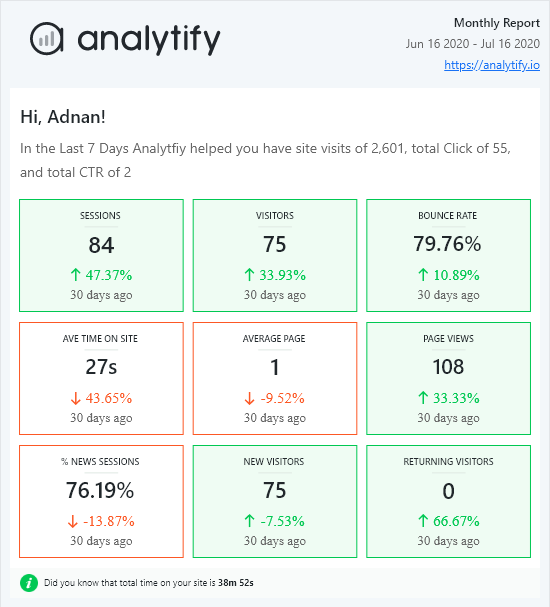
- The Benefit: You can view page-level performance on the “Edit Post” screen, enabling immediate optimizations to headers, CTAs, or metadata based on live engagement data.
2. Simplified Goal Tracking
Instead of navigating the deep sub-menus of GA4 to find conversion signals, Analytify surfaces goal completions and key events on a centralized dashboard.

- The Benefit: Marketing teams can see exactly which campaigns are driving revenue or lead generation without needing a dedicated data analyst to build custom reports.
3. Detailed Overview Dashboard
Effective business intelligence marketing relies on speed. Analytify provides a high-level overview of traffic sources and campaign performance within the WordPress interface.

- The Benefit: If a specific referral source or social campaign begins to underperform, the dashboard visibility enables faster budget reallocation or content adjustments.
By positioning metrics at the point of execution, Analytify transforms WordPress from a simple analytics tool into a marketing intelligence system.
It removes the technical barriers to entry, ensuring that performance data is used to engineer outcomes rather than merely reported after the fact.
Even with a strong marketing intelligence system in place, the transition from data to execution often falters due to structural gaps.
To maintain high-level strategic positioning, marketing leaders must avoid these five common pitfalls that derail decision intelligence marketing.
Common Mistakes in Data to Action Systems
Identifying these bottlenecks is the first step toward achieving true analytics decision making maturity:
- Collecting Data Without Decision Owners: Having data is meaningless if no one is empowered to act on it. Every KPI in your business intelligence marketing strategy should have a decision owner who is responsible for triggering a change when a metric hits a specific threshold.
- Ignoring Qualitative Customer Feedback: Quantitative data tells you what is happening, but qualitative feedback tells you why. A data-driven decision framework that ignores direct customer input or sales team feedback lacks the context needed to solve complex conversion issues.
- Over-relying on Machine Learning Without Business Context: While predictive modeling is a core part of decision analytics, it isn’t the only method. Relying solely on automated algorithms without layering in human business logic can lead to hallucinated trends that don’t align with your actual brand goals.
- Not Aligning Marketing Campaigns with Market Opportunities: High-performing marketing intelligence systems don’t just look inward at their own metrics; they also look outward at market trends. If your data shows a surge in interest for a specific topic but your campaigns remain static, you are missing an opportunity.
- Treating Dashboards as Outcomes: This is the most frequent error in business analytics. A dashboard is a map, not the destination. If your team’s workflow ends once the report is generated, you haven’t built a decision intelligence framework; you’ve simply built a digital filing cabinet.
By auditing your current operational intelligence system against these mistakes, you can move your team from passive reporting to active outcome engineering.
FAQs on Data Driven Decisions
What is decision intelligence in marketing?
Decision intelligence is a practical framework that combines data analytics, business logic, and structured workflows to help marketing teams make better, faster choices. It moves beyond just showing what happened to providing a clear path for what to do next.
How is decision intelligence different from traditional marketing analytics?
Traditional analytics often ends with a report or a dashboard. Decision intelligence marketing includes the action phase. It uses decision analytics to create pre-defined rules; if a specific metric changes, a specific business action is triggered immediately.
Do I need AI to implement decision intelligence?
No. While machine learning can enhance predictive modeling, you can build a highly effective operational intelligence system using standard tools like GA4 and Analytify. The intelligence comes from the structured logic you apply to your data, not just the software
What are the benefits of using a data-to-action system?
A data-to-action system reduces analysis paralysis, ensures marketing campaigns are aligned with market trends, and creates an accountability loop. It shifts the focus from vanity metrics to measurable business intelligence marketing outcomes.
How does Analytify help with decision intelligence?
Analytify acts as a bridge by bringing GA4 data directly into the WordPress dashboard. Reducing data access friction, it allows content-driven businesses to make real-time updates to their site based on live performance signals.
Conclusion: Marketing Intelligence Systems
Decision intelligence marketing transforms passive data collection into a system of structured, repeatable actions that drive growth.
This approach shifts your team’s primary objective. You are no longer just reporting performance; you are engineering outcomes.
Whether you are using GA4 to identify leaky conversion funnels or leveraging Analytify to streamline your WordPress workflow, the goal remains the same: turn every insight into an execution.
In a landscape where data is infinite but time is not, the competitive advantage belongs to the teams that can move from insight to action the fastest.
That is all for this post. For more related posts, check:
- Conversion Intelligence: Using Analytify to Improve AI-Generated Funnels
- Insight Led Marketing: Using Analytics to Guide Strategy (2026)
- Predictive SEO Guide: Forecasting Search Trends with Data (2026)
Do you find yourself spending more time inside your Google Analytics dashboard or your WordPress editor? We’d love to hear how your team bridges the gap between seeing a report and making a site update.