How to Use Analytify Data to Train Better AI Prompts for Marketing

AI tools are everywhere in marketing. But most AI prompts for marketing still rely on guesses instead of real data. That’s why the results often feel generic or misaligned.
AI works best when it is guided by facts. For marketing, those facts live in your analytics.
Analytics prompts for marketing use real GA4 insights, such as top pages, user behavior, traffic sources, and conversions, to guide AI outputs. When prompts are based on actual performance data, AI generates more relevant content, clearer recommendations, and better targeting ideas.
This approach is called data-driven prompt engineering. It means writing AI prompts using real website data instead of assumptions. Rather than asking AI what might work, you show it what already does.
GA4 data can be hard to use directly. This is where Analytify helps. It converts complex GA4 reports into simple, readable insights that marketers can easily plug into AI prompts.
In this guide, you’ll learn how to use Analytify data to train better AI prompts for marketing with clear steps, practical examples, and repeatable frameworks.
Analytics Prompts for Marketing (TOC):
Why Analytics Data is Critical for High-Quality AI Marketing Prompts
Most AI marketing prompts fail for one reason: lack of context.
AI cannot understand your audience, content, or goals without data.
When you use analytics prompts for marketing, you give AI real signals instead of assumptions. These signals come directly from user behavior recorded in GA4.
Website analytics show:
- What users actually read
- Where do they drop off
- Which channels bring engaged traffic
- What converts and what doesn’t
Without this data, AI prompts for analytics are generic. They describe ideal scenarios, not real ones.
GA4 metrics help AI understand intent. For example:
- Top pages reveal content that already works
- Pageviews and engagement time show interest level
- User journeys highlight friction points
- Conversions and goals show business impact
When these insights are included in marketing prompts using GA4 data, AI outputs become more specific. Content ideas align with proven topics. Messaging reflects real audience behavior. Recommendations focus on what drives results.
Analytics data also helps AI prioritize. Instead of treating all pages or campaigns equally, AI learns where to focus attention first.
In short, better data leads to better prompts.
And better prompts lead to better marketing outcomes.
How Analytify Makes GA4 Data Prompt-Ready
GA4 contains powerful data. But it is not built for prompt writing.
Raw reports are complex, fragmented, and hard to interpret quickly.
This is where Analytify plays a critical role.
Analytify simplifies GA4 data into clear, readable insights that marketers can immediately use in analytics prompts for marketing. Instead of digging through multiple GA4 dashboards, you see what matters at a glance.
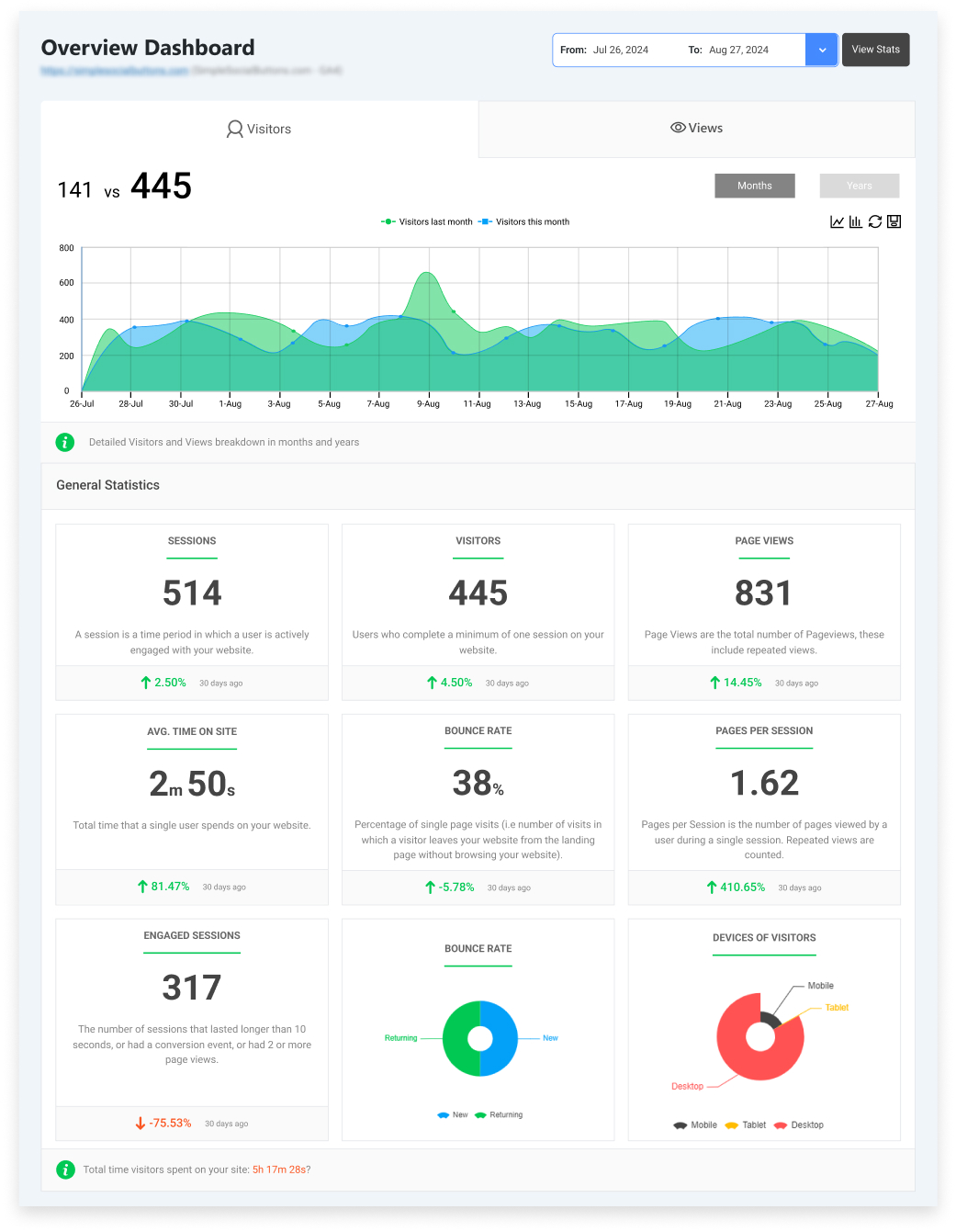
Analytify highlights:
- Top pages and posts by performance
- Engagement metrics in plain language
- Traffic sources and campaign summaries
- Conversion and goal trends
Note: If you have not installed analytify yet, read how to install and activate Analytify and enjoy Google Analytics data in simple clicks.
These summaries are ideal for AI prompts for analytics. AI performs better when data is structured, focused, and contextual. Analytify removes noise and surfaces patterns, which helps AI understand what is important.
Another advantage is accessibility. You don’t need advanced GA4 knowledge to extract insights. Marketing teams can use Analytify reports directly when creating marketing prompts using GA4 data.
Instead of exporting raw spreadsheets, you work with:
- Clear performance trends
- Prioritized content
- Actionable conversion data
This makes data-driven prompt engineering practical. Analytify turns GA4 from a reporting tool into a usable input for AI-driven marketing decisions.
How to Use Analytify Data to Train Better AI Prompts for Marketing (Step by Step)
Join 50,000+ beginners & professionals who use Analytify to simplify their Google Analytics!
Let’s see how you can use Analytify’s Google Analytics data to train better AI prompts for your marketing in simple steps.
Step 1: Collecting the Right Marketing Data from Analytify
The first step in data-driven prompt engineering is gathering the right insights. Not all GA4 data is useful for AI prompts. You need metrics that reflect real user behavior and marketing goals.
Analytify makes this simple. It highlights the data that matters most for AI.
Key data to collect includes:
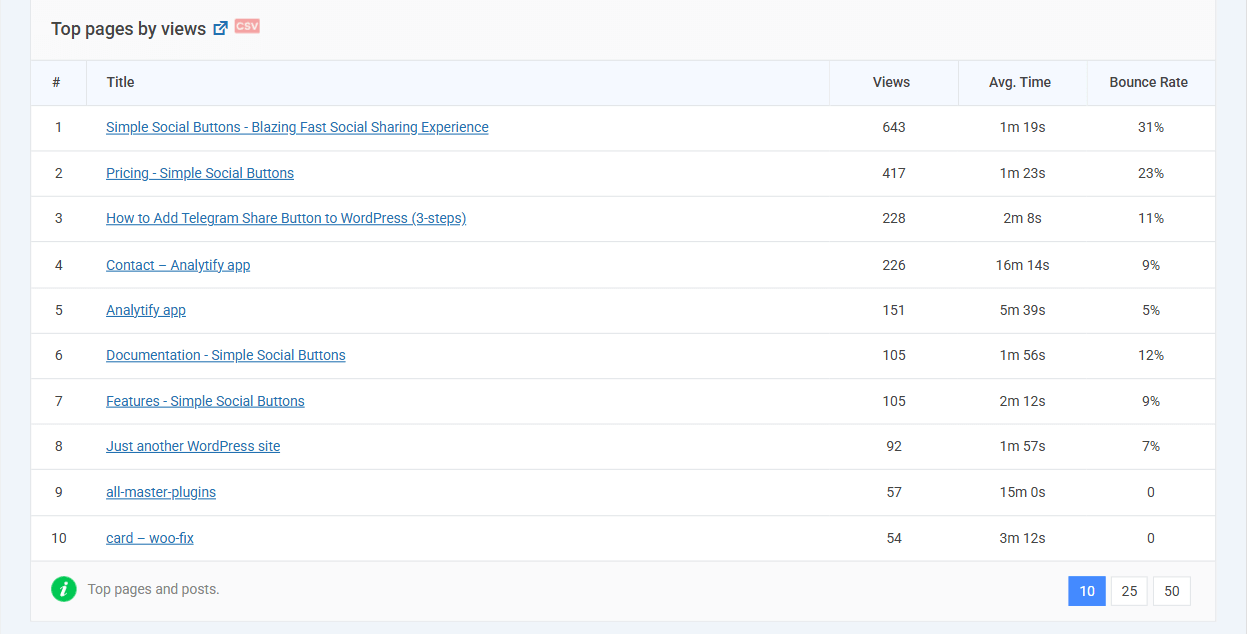
1. Top Pages & Content Performance
- Identify best-performing pages by pageviews and engagement.
- Capture average session duration and bounce rate.
- These insights guide AI toward content your audience values.
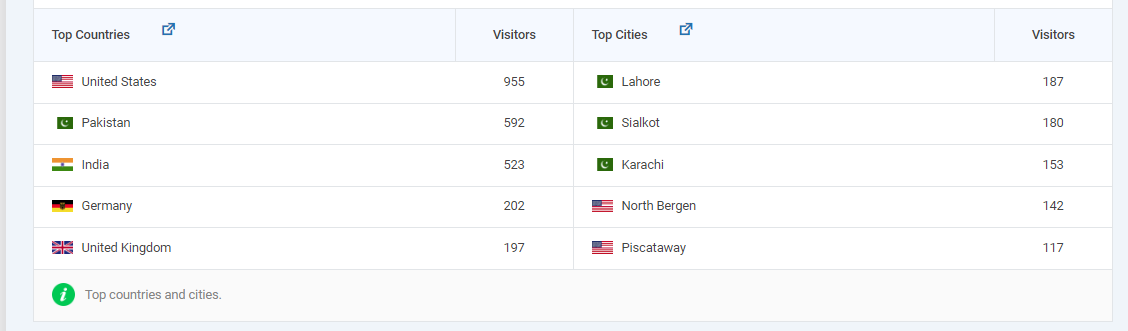
2. User Demographics & Behavior
- Review age, location, device type, and new vs returning visitors.
- Understand how different segments interact with your site.
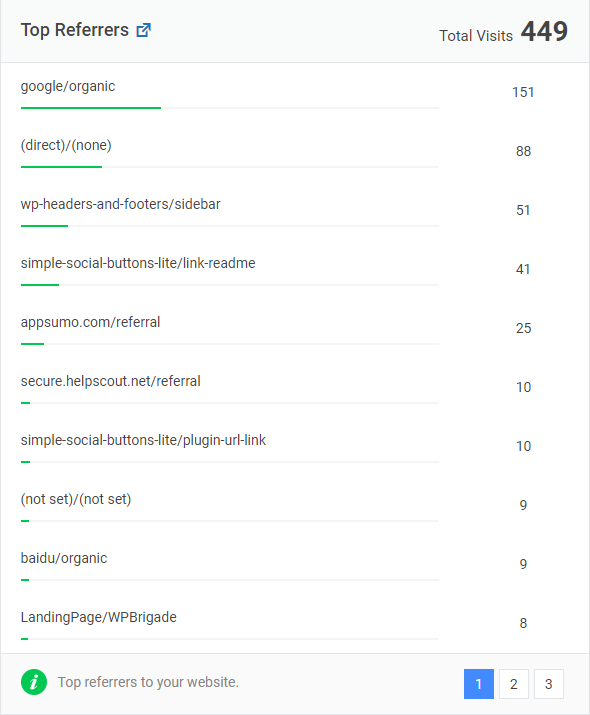
3. Traffic Sources & Campaigns
- Track where visitors come from: search, paid ads, social, or referrals.
- Note which campaigns drive engagement or conversions.
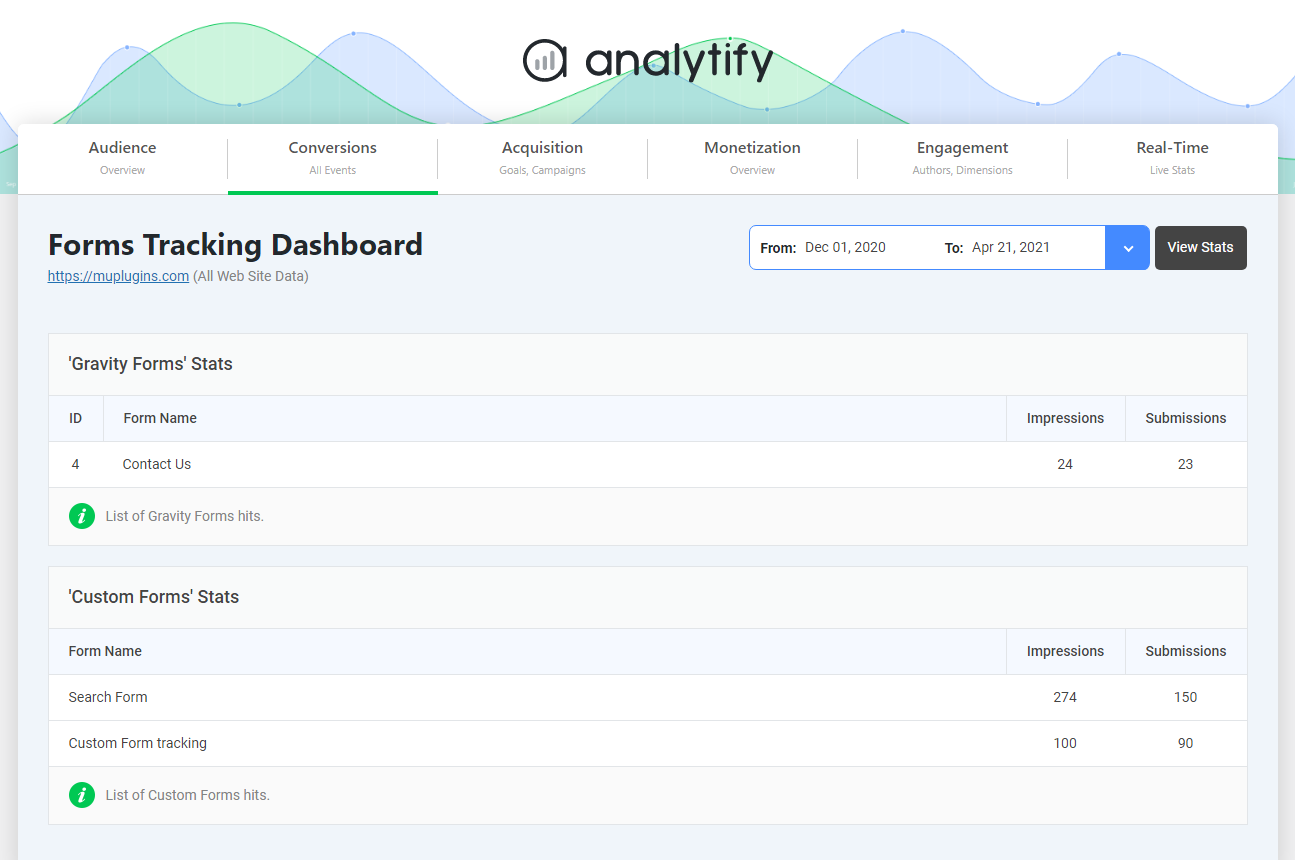
4. Conversion Funnels
- Review goal completions, form submissions, and checkout steps.
- Identify where users drop off in the funnel.
- This data enables AI to generate prompts aimed at improving conversions.
Practical Tips:
- Export only relevant metrics to avoid overwhelming AI.
- Use Analytify’s summary reports for quick insights.
- Organize data into tables or lists for easy AI prompt integration.
By collecting the right analytics, you create a strong foundation for AI. Every prompt you write becomes grounded in actual user behavior, making outputs more relevant and actionable.
Step 2: Turning Analytics Insights into AI-Ready Prompts
Collecting data is just the start. Now, you need to translate insights into structured AI prompts for marketing. Focus on patterns, audience behavior, and conversion opportunities.
- Identify Content Patterns
Look at your top-performing pages and posts. Note recurring topics, formats, and styles. Use these patterns to guide AI toward content your audience already engages with. - Leverage Engagement Signals
Include insights like session duration or scroll depth to highlight what captures attention. These signals help AI generate prompts aligned with real user interest. - Add Channel Context
Customize prompts using traffic source insights. For example, organic search data can guide SEO-focused prompts, while social traffic can shape post or ad content. - Incorporate Conversion Goals
Include funnel trends or checkout performance as context. AI prompts that reference conversion intent produce outputs more likely to drive results. - Use the Data → Insight → Prompt Framework
- Data: Gather relevant metrics from Analytify.
- Insight: Spot trends or patterns (e.g., highly engaged content types).
- Prompt: Write a focused AI instruction that includes context, audience, and desired outcome.
Best Practices:
- Keep prompts concise and focused.
- Include context: audience, channel, and goal.
- Prioritize metrics that are most relevant to the task.
- Test and refine using AI outputs and performance data.
By following this framework, your analytics prompts for marketing become structured, actionable, and grounded in real behavior
By following this framework, your analytics prompts for marketing are structured, actionable, and grounded in real user behavior without overwhelming AI with raw data.
Now, you may be wondering: “How do I actually write prompts using my analytics data?” Let’s have some practical examples.
Practical AI Prompt Templates Using Analytify Data
Let’s see some practical prompts for marketing and how to convert Analytify reports into AI-ready marketing prompts.
For each use case, you’ll learn:
- Which Analytify report to review
- What GA4 data to extract
- The exact AI prompt to use
1. Generate Blog Ideas from Top Pages
How to use Analytify:
Open Analytify >> Pages & Posts Report.
Sort pages by Pageviews and Average Engagement Time.
Select your top 5 performing pages.
Insight to extract:
- Page titles
- Primary topic
- Engagement level
Prompt to use:
Generate 5 blog post ideas based on my top 5 GA4 pages:
– Titles should match the style and topics of these pages
– Include a short meta description for each
– Suggest the main target keyword for SEO
– Recommend the primary channel for promotion (blog, social, email)
Structure as:
1. Blog Title
2. Meta Description (1–2 sentences)
3. Target Keyword
4. Recommended Channel
Keep each suggestion under 50 words.
2. Create Social Media Posts by Traffic Source
How to use Analytify:
Go to Analytify >> Traffic Sources >> Top Referrers / Social Media / Search Engines.
Identify sources with high sessions but low engagement or high bounce rate.
Insight to extract:
- Channel name
- Related top content
- Engagement gap
Prompt to use:
Create 3 social media post ideas for [Channel] using GA4 engagement data:
– Highlight content from my top-performing pages
– Include suggested captions
– Add 3 relevant hashtags per post
Structure as:
1. Caption
2. Hashtags
3. Related Content Link
Keep captions under 30 words.
3. Personalize Email Campaigns Using Audience Data
How to use Analytify:
Open Audience >> Demographics & Device Reports.
Segment users by location, device type, and returning visitors.
Insight to extract:
- User segment behavior
- Top converting pages
Prompt to use:
Generate 3 personalized email prompts for [Audience Segment]:
– Include subject line suggestions
– Write a 2–3 sentence body highlighting top-converting pages
– Suggest CTA text
Structure as:
1. Subject Line
2. Body Copy
3. Call-to-Action
Keep total body copy under 100 words.
4. Improve WooCommerce Conversions Using Analytify Data
How to use Analytify:
Go to Analytify >> WooCommerce Dashboard.
Review overall sales performance and conversion metrics, such as:
- Total revenue
- Conversion rate
- Transactions
- User behavior trends across the store
Look for conversion drops or stagnation, especially during high-traffic periods.
Insight to extract:
- Store-level conversion trends
- Pages or stages where users exit more frequently (based on engagement signals)
- Changes in revenue or transaction patterns
Prompt to use:
Suggest 3 AI prompts to improve my WooCommerce store’s conversion performance using analytics data:
– Focus on improving product page and checkout messaging
– Recommend trust signals or CTA improvements
– Suggest content or layout changes to reduce purchase friction
Structure as:
1. Area to Optimize (product pages, cart, checkout)
2. Suggested Messaging or Content Change
3. Recommended CTA or Trust Element
Keep each suggestion under 40 words.
5. Repurpose High-Engagement Content
How to use Analytify:
Check Top Pages by Engagement.
Select 3 posts with high engagement time and low bounce rate.
Insight to extract:
- Core message
- Content angle
Prompt to use:
Create AI prompts to repurpose my top 3 blog posts into:
– Email newsletter snippets
– Social media posts
– Short video scripts
Structure as:
1. Channel
2. Content Idea
3. Key Message
Keep each idea under 50 words.
6. Target Campaigns by Visitor Type
How to use Analytify:
Go to New vs Returning Visitors.
Compare engagement and conversion behavior.
Insight to extract:
- Visitor type
- Engagement patterns
Prompt to use:
Generate 3 AI prompts for campaigns targeting [New or Returning Visitors]:
– Use engagement data to shape content hooks
– Suggest messaging focused on conversions
– Recommend content format (blog, social, email)
Structure as:
1. Hook/Message
2. Recommended Format
3. Conversion Focus
Keep each prompt under 40 words.
7. Improve Landing Pages with Bounce Data
How to use Analytify:
Open the Landing Pages Report.
Filter pages with a high bounce rate and low session duration.
Insight to extract:
- Page intent
- Engagement issue
Prompt to use:
Based on GA4 landing page metrics, suggest AI prompts for:
– Headline variations
– Copy improvements
– Layout or CTA adjustments
Structure as:
1. Headline Suggestion
2. Copy Improvement
3. Layout or CTA Recommendation
Keep each suggestion under 50 words.
8. Generate Campaign Performance Summaries
How to use Analytify:
Go to Campaigns Report.
Review conversion rate and traffic volume.
Insight to extract:
- Top-performing campaigns
- Underperforming campaigns
Prompt to use:
Generate an AI summary of my campaign performance:
– Highlight top-performing campaigns with key metrics
– Identify low-performing campaigns
– Recommend budget or optimization actions
Structure as:
1. Top Campaigns (with key metric)
2. Low-Performing Campaigns (with metric)
3. Optimization Recommendations
Format as bullet points, maximum 10 bullets.
Common Pitfalls and How to Avoid Them
Even with the right framework and advanced techniques, marketers often make mistakes that reduce the effectiveness of AI prompts. Here’s how to avoid them.
1. Using Incomplete or Outdated Data
- Pitfall: Feeding AI with old GA4/Analytify data can produce irrelevant or misleading prompts.
- Fix: Always use the latest metrics and schedule regular updates for your prompts.
2. Overloading Prompts with Irrelevant Metrics
- Pitfall: Including too many data points can confuse AI, resulting in generic or unfocused outputs.
- Fix: Focus only on key metrics relevant to your marketing goal (e.g., top pages, conversion rate, traffic source).
3. Ignoring Context from GA4 Insights
- Pitfall: Asking AI to generate content without context (audience, channel, goal) leads to poor alignment.
- Fix: Include audience segments, campaign type, and content goal in your prompts.
4. Not Iterating on Prompts
- Pitfall: Using one static prompt without testing results can limit performance.
- Fix: Test multiple prompt variations, track outputs against GA4 metrics, and refine accordingly.
5. Lack of Documentation
- Pitfall: Forgetting to record which prompts worked and why makes scaling difficult.
- Fix: Maintain a prompt library with context, data used, and observed results for repeatable success.
Best Practices for Marketing Teams
To maximize the impact of analytics prompts for marketing, follow these proven best practices:
1. Regularly Update Prompts with Fresh Data
- Schedule GA4/Analytify exports to feed the latest metrics into AI prompts.
- Keeps content aligned with current audience behavior and campaign performance.
2. Collaborate Between Analytics and Marketing Teams
- Analysts provide accurate metrics and insights.
- Marketers translate insights into actionable prompts.
- Collaboration ensures AI outputs are both data-driven and goal-focused.
3. Maintain a Prompt Library
- Document successful prompts with context, data used, and observed results.
- Enables reuse, adaptation, and scaling across campaigns.
4. Keep Prompts Specific and Actionable
- Include audience, channel, goal, and key metrics.
- Avoid vague instructions to prevent generic outputs.
5. Test and Iterate Continuously
- Compare AI outputs against GA4 metrics like engagement, CTR, or conversions.
- Refine prompts to improve relevance and effectiveness over time.
FAQs: Analytics Prompts for Marketing
1. What are analytics prompts for marketing?
Analytics prompts for marketing are AI instructions that use real website or GA4 data to generate targeted marketing content, campaigns, or insights. They bridge analytics and AI-driven decision-making.
2. How do I use GA4 data with AI for marketing?
Export key GA4 metrics via Analytify (e.g., top pages, traffic sources, conversions) and feed them into structured AI prompts specifying audience, goal, and output format.
3. Can AI analytics prompts for marketing improve SEO content?
Yes. By using top-performing pages, engagement metrics, and keywords, AI can generate content ideas, meta descriptions, and headlines optimized for both users and search engines.
4. How often should I update AI marketing prompts with new data?
You should regularly update Analytics prompts for marketing. Weekly or monthly refreshes keep prompts aligned with evolving user behavior and campaign performance.
5. Are Analytics prompts suitable for multiple marketing channels?
Absolutely. You can tailor prompts for blogs, social media, email campaigns, ads, or landing pages by specifying the channel in your instructions.
6. What common mistakes should I avoid while creating Analytics prompts for marketing?
You must avoid using outdated or incomplete data, overloading prompts with irrelevant metrics, ignoring context, or failing to test and iterate.
7. Do I need technical skills to use Analytics prompts for marketing?
No. Basic familiarity with GA4 and Analytify metrics is enough. Structured prompt templates guide AI to produce actionable outputs without coding.
AI Prompts for Marketing: Wrapping Up
AI does not create better marketing on its own.
Better inputs create better outputs.
When you use real analytics data, AI prompts become focused, relevant, and actionable. Instead of guessing what might work, you guide AI using what already performs well on your website.
This is where Analytify makes a clear difference. It turns GA4 data into readable insights that marketing teams can use without friction. Those insights become the foundation for analytics prompts for marketing that actually reflect user behavior.
By combining:
- GA4 metrics
- Analytify reports
- Structured prompt templates
You can create a repeatable system for data-driven prompt engineering.
Start small. Pull top pages, traffic sources, or conversion data from Analytify. Turn those insights into AI prompts. Test the outputs. Refine based on performance.
Over time, your AI-driven marketing will stop being generic and start being guided by real user data.
You may also like to read:
- Top 20 Marketing Hacks for Website Traffic Growth
- Best Ecommerce Digital Marketing Strategies & Tools
- 17 Content Marketing Metrics To Track
- Using Data-Driven Insights To Boost Marketing Growth
Are your AI marketing prompts based on assumptions or on real data from your analytics? Share your thoughts in the comments below.