7 AdSense Tips to Increase Earnings with GA4 and Analytify

You’ve likely optimized your ad placements and targeted high-CPC (Cost Per Click), yet your AdSense earnings remain flat.
It’s frustrating when you’re following all the AdSense tips and best practices, but nothing works. You don’t need more generic advice; you need to know exactly what is happening on your WordPress site.
These seven AdSense tips in Google Analytics 4 help you get the highest impact.
We will look at which posts drive the most ad impressions, which traffic sources to actually monetize, and how engagement time (how long a visitor stays active on your page) signals the best ad spots.
AdSense Tips for WordPress Blogs (TOC):
Why Most Google AdSense Advice Stops Short
Most Google AdSense tips tell you where to put ads in general, but it is not based on how your actual readers behave.
Standard tips often suggest generic “high-CPC” niches or sidebar placements without considering your unique engagement rate, the percentage of visitors who actually interact with your content.
Guessing where to place ads often leads to missed revenue and a poor user experience. With Analytify, and implementing optimized AdSense tips, you can make placement and content decisions that match your specific audience.
With proper AdSense tracking in Google Analytics 4, you can move from guessing to making decisions based on how your actual audience behaves
Let’s look at the specific Google AdSense tips for beginners.
The 7 AdSense Tips to Increase Earnings
These seven AdSense optimization tips use GA4 data available in Analytify to identify where your highest-earning opportunities are hiding.
By showcasing behavioral metrics directly in your WordPress dashboard as one of the AdSense tips, you can stop guessing and start making data-backed decisions.
Tip 1: Find Which Posts Are Driving Your AdSense Impressions
The posts that drive the most traffic also drive the most ad impressions, and those are the posts where ad placement decisions have the biggest earnings impact.
In the world of AdSense, volume is the foundation. More traffic translates to more opportunities for ads to be seen and clicked.
If you optimize an ad unit on a post that only receives 50 visits a month, your total revenue won’t change noticeably.
However, making a small tweak to a post that gets 5,000 organic sessions can boost your monthly payout. Focus your energy on your top 5–10 high-traffic pages first.
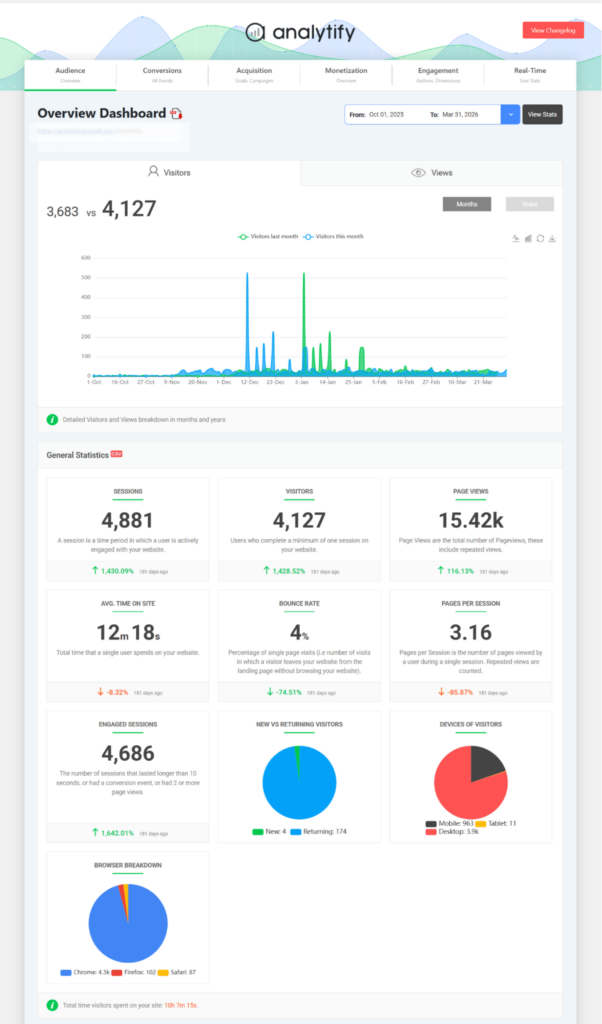
You can find this data in Analytify under the Top Pages report in your WordPress dashboard, following the best AdSense tips.

This report ranks your content by pageviews, showing you which articles or pages are driving the most traffic.
Alternatively, you can view per-post stats by opening any article in the WordPress editor and scrolling to the Analytify block below the content area.

This fetches your GA4 data and displays it right under your individual page and posts.
Tip 2: Use Engagement Time to Find Your Best Ad Placement Pages
Posts with high average engagement time are the best spots for mid-content ads. When readers stick around, they have more chances to see and interact with your ads.
Engagement time shows how long the user stays active on a page or has active engagement events.
Traffic volume shows how many people visited, but engagement time reveals if they actually stayed to read.
A post with 10,000 visits but only 15 seconds of engagement suggests people are bouncing (leaving quickly), making it a poor choice for deep mid-content ads.
Similarly, a post with 2,000 visits and 4 minutes of engagement is the best target. Because these readers are deeply invested in the content, they are much more likely to notice and click on ads naturally embedded in the text.
You can check these engagement metrics in Analytify’s Top Pages report alongside your traffic stats while implementing AdSense tips. Use the decision framework below to prioritize your placements:
| Sessions | Avg Engagement Time | Ad Placement Decision |
| High | High (3+ min) | Best candidate for mid-content and sidebar ads. Optimize placement here first. |
| High | Low (under 60 sec) | Fix content quality before adding more ads. Ads on short sessions earn almost nothing. |
| Low | High (3+ min) | Grow this content. It performs well when it gets traffic. Prioritize SEO before ads. |
| Low | Low (under 60 sec) | Low priority. Focus elsewhere until traffic and engagement improve. |
Tip 3: Identify Which Traffic Sources Send AdSense-Ready Readers
Organic search traffic often delivers higher RPM than social media traffic because it typically has stronger intent.
A visitor who finds your post via Google is usually looking for a solution or information, making them highly valuable to advertisers.
| Traffic Split | Prioritize These AdSense Formats | Avoid or Deprioritize |
| 60%+ mobile | In-article ads, anchor ads, and responsive units | Large rectangles/sidebars (they render poorly or get pushed down) |
| 60%+ desktop | Sidebar units, large rectangles, banners | Anchor ads (can be intrusive on large screens with lower CTR gain) |
| Roughly equal | Responsive units only | Fixed-size units that favor one device over the other |
Typically, traffic falls into three buckets:
- Organic Search: High intent and the best monetization potential.
- Direct/Returning: Loyal readers with moderate engagement.
- Social Media: High volume potential, but often results in lower intent and lower RPM because users click away quickly.
If your traffic is heavily social-dominated, your biggest “AdSense tip” isn’t a placement change; it’s a content shift toward SEO-optimized topics that attract organic searchers.
In Analytify, you can see this breakdown under the Traffic Sources report. Compare your Organic Search share to your Social share.
If organic is below 40%, focusing on search-driven content will likely boost your earnings more than any ad-setting tweak.

Tip 4: Check Device Data Before Choosing Ad Formats

If more than 60% of your traffic is mobile, your highest-earning ad format decisions should be made for mobile first, not desktop.
Ad performance varies wildly by device. Mobile users might see more ads due to smaller screens, but desktop users often have higher click-through rates because of larger, more viewable ad units.
Relying on how your site looks on your laptop can be a mistake. If your data shows a mobile-dominant audience, you should prioritize anchor ads (ads that stay fixed to the bottom of the screen) and responsive units that fit narrow viewports.
Large sidebar banners, while effective on desktop, are often pushed to the bottom of the page on mobile, where they are rarely seen.
Tip 5: Find Keywords That Attract Higher-CPC Audiences
Search terms with commercial intent attract visitors that advertisers pay more to reach, which increases your AdSense CPC. Commercial intent refers to keywords that suggest a user is looking to make a purchase or find a specific product (e.g., “best,” “review,” or “vs”). Advertisers bid higher for these visitors because they are closer to a buying decision.
You don’t necessarily need to switch to a whole new niche to see better CPC. Instead, look at your existing rankings in the Analytify Search Console report.

Identify which keywords already sending you traffic have a “buying” angle. By creating more content around these specific high-value keywords within your existing niche, you naturally attract higher-paying ads.
Some website categories naturally attract higher advertiser bids than others. If you want to understand which niches tend to generate stronger AdSense revenue potential, check out our guide on the best website types for earning with Google AdSense.
Note: You must link Google Search Console to your GA4 account in the Google Analytics admin settings to see this data surfaced in Analytify.
Tip 6: Do Not Let Auto Ads Run Unchecked
Following the best AdSense tips, understand that Google’s Auto Ads can increase earnings on some sites and reduce them on others by placing ads in positions that hurt engagement or page speed, so checking performance data is important.
While Auto Ads are easy to set up, they don’t always understand your specific layout. Sometimes, they place an ad right in the middle of a critical user path, causing frustrated readers to leave.
The best way to audit this is to use the date comparison feature in the Analytify dashboard. Compare your Engagement Rate (the percentage of engaged sessions) for the 30 days before you enabled Auto Ads against the 30 days after.
If your engagement dropped by more than 10%, those “automatic” placements might be costing you more in lost traffic than they are making you in ad revenue.
In this scenario, consider disabling intrusive formats like vignette ads (full-screen ads between page loads) while keeping standard in-article units active.
Tip 7: Build More Content Around Your Best-Earning Post Topics
The best AdSense tips is to increase total AdSense earnings to expand the content cluster around your highest-traffic posts, because more posts on a proven topic bring more impressions without changing any ad settings.
A content cluster is a group of related articles that all link back to a main page. Instead of hunting for new, unproven topics, use the Analytify Top Pages report to see what is already working.
If your top three posts are all about “WordPress SEO,” your audience and Google’s advertisers have already validated that topic for your site.
Creating five more articles on related long-tail keywords in that same category is much safer in terms of AdSense tips, which helps increase ad impressions, than starting a new category from scratch.
Frequently Asked Questions
1. How do I increase my AdSense earnings on a WordPress blog?
The best of AdSense tips is to find your highest-traffic posts (use Analytify’s Top Pages report inside WordPress), optimize ad placement on those posts first, and then create more content on the same topics. Placement changes on low-traffic posts have minimal impact. Focus on the posts that already drive the most impressions.
2. What is a good AdSense RPM for a blog?
RPM varies by niche, traffic geography, and content type. A general benchmark: RPMs between $1 and $5 are common for general-interest blogs. Finance, insurance, and technology niches typically see RPMs of $5 to $20+. If your RPM is below $1, the most likely causes are low-intent traffic (social-heavy), low engagement time, or poor ad placement. Check your traffic sources and engagement data in GA4 before adjusting ad settings.
3. How do I track AdSense performance in Google Analytics 4?
GA4 does not display AdSense earnings, CTR, or RPM natively without a linked AdSense account. To see AdSense data alongside GA4 behavior data, link your AdSense account in GA4 Admin >> Product Links >> AdSense Links. Once linked, the Monetization section in GA4 will show publisher revenue data alongside user behavior. Analytify displays GA4 behavioral data (top pages, traffic sources, engagement) in WordPress, which you use alongside your AdSense dashboard to inform placement and content decisions.
4. Does more traffic always mean higher AdSense earnings?
More traffic increases impressions, but not all traffic monetizes equally. Organic search traffic from commercial-intent queries earns a higher CPC than social media traffic. A site with 10,000 monthly visitors from organic search will typically out-earn a site with 20,000 visitors from social media. Focus on traffic quality, measured by engagement rate and traffic source, alongside raw volume.
5. Should I use AdSense Auto Ads on my WordPress site?
Auto Ads can increase earnings on some sites and reduce them on others. Enable Auto Ads, then compare engagement rate and session duration in Analytify for the 30 days before and after. If engagement dropped noticeably, turn off the most intrusive Auto Ad formats (anchor ads and vignette ads are the most common culprits) and keep only in-article units. Test for another 30 days before making a final decision.
Final Thoughts: AdSense Tips
Increasing your AdSense earnings is about following optimized AdSense tips and making data-informed decisions.
By using the GA4 data surfaced by Analytify, you can stop guessing where to place your ads and start making optimizations based on how your readers actually behave.
Your top posts, traffic sources, device split, and engagement time all provide a clear roadmap for where the highest-impact changes are hiding.
Next Steps for Your AdSense Strategy
- Audit your top content: Open Analytify and check your Top Pages report. Identify your 5 highest-traffic posts, as these are the specific pages where ad placement changes will have the most immediate impact on your revenue.
- Review your audience split: Check your Traffic Sources and Devices reports. If social media traffic is your primary driver or if mobile users make up more than 60% of your audience, focus your efforts on mobile-specific ad formats and SEO-driven content strategy rather than desktop placement tweaks.
- Expand your high-value clusters: Link Google Search Console to GA4 and review your top keywords within Analytify. Identify queries with commercial intent that you already rank for and create new, supporting content in those clusters to compound your results.
Ready to see exactly which posts are driving your revenue potential using these AdSense tips? Get Analytify. To monitor these changes the moment they happen, check out our guide on Real-Time Analytics for WordPress.
Which of these AdSense tips are you going to implement first on your blog? Let me know in the comments below!