
How to Make Your WordPress Website GDPR-Compliant (2026)

A GDPR-compliant WordPress website needs seven things. You need an updated privacy policy, a cookie consent banner, consent on forms, secured data, a process for access and deletion requests, audited plugins, and compliant email marketing. I walk you through each step in this guide.
The GDPR (General Data Protection Regulation) is the European Union law that protects the personal data of people in the EU. Compliance protects your users’ data and helps you avoid fines.
The GDPR applies to businesses outside Europe too. A WordPress site in the United States must comply when it offers goods or services to people in the EU or monitors their behavior.
Names, email addresses, and IP addresses all count as personal data. The rules apply once your site offers goods or services to people in the EU or monitors their behavior, so you do not need to wait until you go global.
Ignoring GDPR can lead to fines of up to 20 million euros or 4% of worldwide annual turnover, whichever is higher, for the most serious infringements. Users also react badly to privacy mistakes, and a public complaint can damage your brand.
This guide is for WordPress site owners who want to protect user data and their business. It covers the technical steps, such as cookie banners and privacy policies, and the legal basics that go with them.
GDPR Compliance for WordPress (TOC):
What GDPR Requires
GDPR protects individuals’ personal data and gives them control over how it is collected, stored, and used. It applies to your WordPress site when you are established in the EU, offer goods or services to people in the EU, or monitor their behavior. Here is what that means in practice:
Key GDPR principles:
- Lawful, fair, and transparent data processing: You must have a valid reason for collecting data and be upfront about what you’re doing with it. No hidden agendas.
- Purpose limitation: Only collect data for specific, legitimate reasons, and don’t use it later for something completely unrelated.
- Data minimization: Don’t collect more data than you need. If an email address is all that’s required, skip the full birthdate, phone number, and address.
- Accuracy and timely updates: Make sure the data you store is correct and give users a way to update it.
- Storage limitation: Don’t hold on to personal data forever. Only keep it as long as necessary.
- Integrity and confidentiality: Secure the data you collect. This includes using encryption, HTTPS, and proper access controls.
User rights under GDPR include:
- Right to access: Users can ask what personal data you’ve collected about them.
- Right to rectify: They can correct inaccurate or incomplete data.
- Right to delete: Also known as the “right to be forgotten,” users can request that their data be erased.
- Right to data portability: Users can ask for their data in a format they can take elsewhere.
- Right to object: They can say no to certain types of processing, like direct marketing.
- Right to withdraw consent: If someone gave you permission to use their data, they can take it back at any time.
Following the principles and rights above supports GDPR compliance for WordPress and builds user trust.
Common WordPress GDPR Violations & How to Avoid Them
The most common WordPress GDPR violations involve cookies, forms, data requests, and third-party tools. Each one has a fix below.
Cookies are a major issue. Many sites use cookies for analytics, ads, or embedded content without disclosing it. You must inform users and get their consent before setting non-essential cookies.
Another frequent slip-up is using contact forms that don’t explain how the submitted data will be used or stored. Every form should have a brief notice, such as a link to your privacy policy, outlining what happens to user information.
Watch out for these pitfalls as well:
- Failing to respond to or honor data access or deletion requests.
- Integrating third-party tools (like analytics or marketing plugins) without verifying they’re GDPR-compliant.
- Collecting data without a clear legal basis or consent.
How to Make WordPress Website GDPR-Compliant (Step by Step)
Seven steps make a WordPress site GDPR-compliant: update your privacy policy, add a cookie banner, manage consent on forms, secure your data, handle access and deletion requests, check your plugins, and follow email consent rules. Review them regularly, because requirements change.
1. Update Your Privacy Policy
Your privacy policy tells users what data you collect and why. GDPR requires you to be upfront about your data practices. In WordPress, go to Settings >> Privacy and click Create New Page to start from the built-in Privacy Policy template, then edit it to match your site. The template is a guide, and you remain responsible for the final content.
What to include:
- What data you collect (name, email, IP address, etc.)
- Why you collect it (e.g., contact, analytics, marketing)
- How long you store it
- Who you share it with (think third-party plugins or email services)
- How users can access, correct, or delete their data
2. Add a Cookie Consent Banner
If your site sets non-essential cookies, users must be able to grant or deny consent before those cookies load. A notice alone is not enough.
Use WordPress GDPR plugins like:
- CookieYes
- Complianz
- WPLP Cookie Consent (formerly GDPR Cookie Consent)
Customize settings by region: GDPR for EU visitors, CCPA options for California users (we’ll discuss this later).
3. Set Up Consent Management for Forms
Every form that collects personal data needs clear consent wording.
For contact forms (e.g., WPForms, Contact Form 7):
- Add clear checkboxes stating users agree to your terms
- Make sure consent is not pre-checked
- Store records of the consent given
4. Secure Your Data
Data protection also requires technical security that keeps information away from attackers.
Best practices:
- Install SSL and enforce HTTPS sitewide
- Use strong, unique passwords and limit user roles
- Keep plugins/themes updated to patch vulnerabilities
- Back up regularly and consider database encryption
5. Create a Data Access & Deletion Process
Under GDPR, users can ask what data you’ve got. They also have the right to demand that you delete it.
How to handle it:
- Use the WordPress privacy tools under Tools >> Export Personal Data and Tools >> Erase Personal Data. They cover data stored in WordPress and in plugins that support them
- Set up a manual or automated way to log requests and confirm deletions
- Maintain an audit trail of who requested what, when, and what you did
6. Check Your Plugins and Third-Party Tools
If a plugin collects data, you’re on the hook for what it does with that data.
Audit your stack:
- Google Analytics
- Mailchimp
- Stripe
- Facebook Pixel
For each one, check that it:
- Has a clear privacy policy
- Publicly states GDPR compliance
- Offers a Data Processing Agreement (DPA) if needed
7. Email Marketing Compliance
Your email list can be a legal minefield if you’re not careful, so tread wisely.
Checklist:
- Use double opt-in to confirm subscriptions
- Include an unsubscribe link in every email
- Store time-stamped proof of consent
Business Structure & Legal Basics That Help
A business structure such as an LLC can separate your personal assets from your site’s legal risk. It does not make a site GDPR-compliant.
If your site collects personal data (as almost every modern site does), you’re potentially exposing your personal assets to risk. A data breach, a privacy violation, or even a dispute with a vendor could land you in legal trouble, and if you’re operating as a sole proprietor, that liability hits your wallet directly.
That’s where forming a Limited Liability Company (LLC) comes in. Whether you’re in Texas, Florida, or anywhere else in the U.S., an LLC separates your personal finances from your business obligations. This means:
- Limited liability protection if things go sideways.
- Credibility when setting up accounts with vendors or payment processors.
- Structure for handling data compliance contracts and user agreements.
If you’re operating in California, be aware of the specific requirements to form an LLC in California, which include filing Articles of Organization, appointing a registered agent, and submitting a Statement of Information within 90 days.
You’ll also need a few legal and operational essentials:
- EIN (Employer Identification Number) from the IRS
- Needed to open a business bank account.
- Required to enter into vendor and affiliate contracts.
- Often necessary to integrate payment systems like Square, Stripe, or PayPal Business.
- Registered agent
- This is a designated person or service that can receive official documents (like legal notices or government forms) on your behalf.
Structuring your site like a business from day one helps you scale smart while remaining protected.
Extra GDPR Tools for WordPress Users
Specialized GDPR tools can automate, document, and monitor your privacy practices after you finish the basic steps. They can save time and reduce manual errors.
Audit and monitoring tools
Keeping track of who’s doing what on your WordPress site is critical for both security and accountability.
- WP Activity Log keeps a detailed log of user activity, which is useful for tracking access to personal data.
Consent and log management
Since you need to collect and record consent, these WordPress GDPR plugins streamline the process:
- Termly offers customizable consent banners, policy templates, and keeps logs.
- iubenda handles legal documentation and consent logging for multiple jurisdictions.
Privacy policy generators
Termly and iubenda both offer privacy policy generators. A generated policy still needs review against what your site actually does.
Other Legal Frameworks That Might Apply
Several privacy laws besides GDPR can apply to a WordPress site, especially one that reaches beyond the EU or handles sensitive data.
Depending on your users, your content, or the type of information you collect, several other legal frameworks may also apply.
- CCPA/CPRA (California Consumer Privacy Act / California Privacy Rights Act)
If you collect personal data from California residents, you may be required to provide data access, deletion options, and an opt-out for the sale of personal data. - ePrivacy Directive (also known as the “EU Cookie Law”)
This governs how cookies and other tracking technologies are used–often alongside GDPR. It requires clear disclosures and consent before placing cookies. - PECR (Privacy and Electronic Communications Regulations – UK)
Similar to the ePrivacy Directive, but specific to United Kingdom users. It regulates marketing emails, tracking, and cookie usage post-Brexit. - HIPAA (Health Insurance Portability and Accountability Act – U.S.)
If your site collects health-related information, especially in the U.S., you may need to comply with HIPAA’s strict requirements for security and privacy.
When to Partner with a Lawyer or Technical Business Consultant
Plugins, checklists, and due diligence cover many GDPR needs, but some sites need professional legal help. Bring in a lawyer or technical consultant when your site handles more than a basic blog or brochure.
If you’re running a complex site–think eCommerce, subscription memberships, or anything involving user accounts and transactions–it’s wise to bring in a legal consultant early. The more user data you collect, the greater your compliance risk.
You should also talk to a lawyer if you’re collecting sensitive or biometric data, including health information, location tracking, or anything that could fall under “special categories” under GDPR. Do not leave special categories of data to guess work.
Planning to advertise internationally, use retargeting tools, or work with data brokers? These activities trigger stricter requirements in most jurisdictions, and a compliance misstep can get expensive fast.
Finally, if you’re not confident which plugins, themes, or services you use are GDPR-compliant, get a second opinion. Legal or technical consultants can help you audit your stack, which can enable you to avoid big problems down the road.
How Analytify Helps You Stay GDPR-Compliant While Tracking Analytics
Join 50,000+ beginners & professionals who use Analytify to simplify their Website Analytics!
Analytics tracking falls under GDPR consent rules. Google states that Google Analytics customers need to inform users about the information stored and give them the opportunity to grant or deny consent. Do not track users who have not consented.
This is where Analytify comes in. Analytify is GDPR compliant. It’s a powerful WordPress plugin that integrates seamlessly with Google Analytics while allowing you to manage and monitor your website’s traffic data responsibly.
Key Features of Analytify for GDPR Compliance:
Easy Integration with Google Analytics: Analytify simplifies the process of integrating Google Analytics into your WordPress site. It enables you to track user behavior and site performance while adhering to GDPR’s data protection principles.
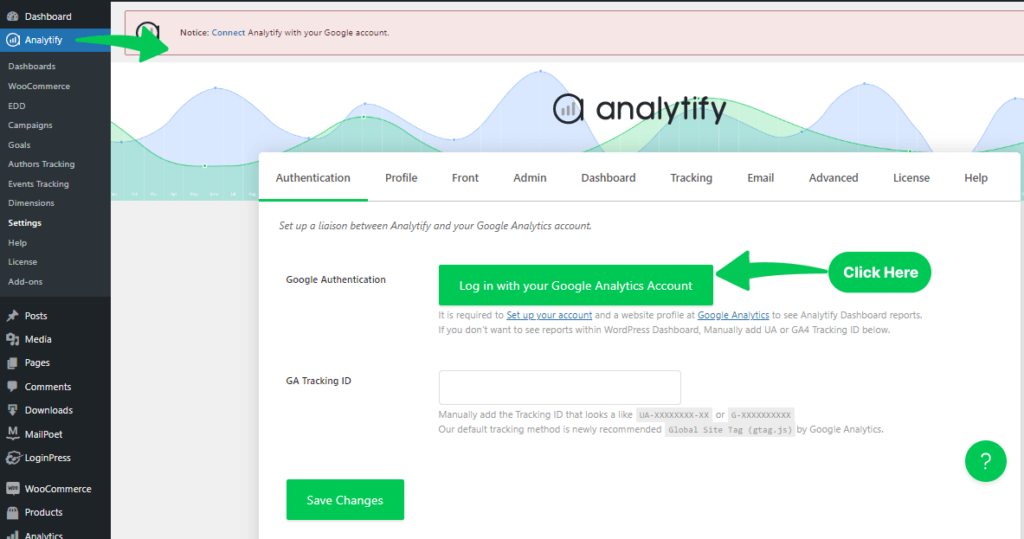
IP address handling: Google Analytics 4 does not log or store IP addresses. For more detail, see the guide on how to anonymize the IP addresses in Google Analytics.

Cookie Consent Integration: Since GDPR requires user consent before tracking cookies can be placed on their devices, Analytify works in tandem with cookie consent plugins. You can ensure that your visitors are properly informed and consent to cookie usage before you collect any tracking data.
User-Friendly Dashboard: Analytify’s easy-to-use dashboard gives you a clear overview of your website’s performance and user engagement, all without overwhelming you with unnecessary data. You can focus on the metrics that matter, all while ensuring compliance with data protection laws.
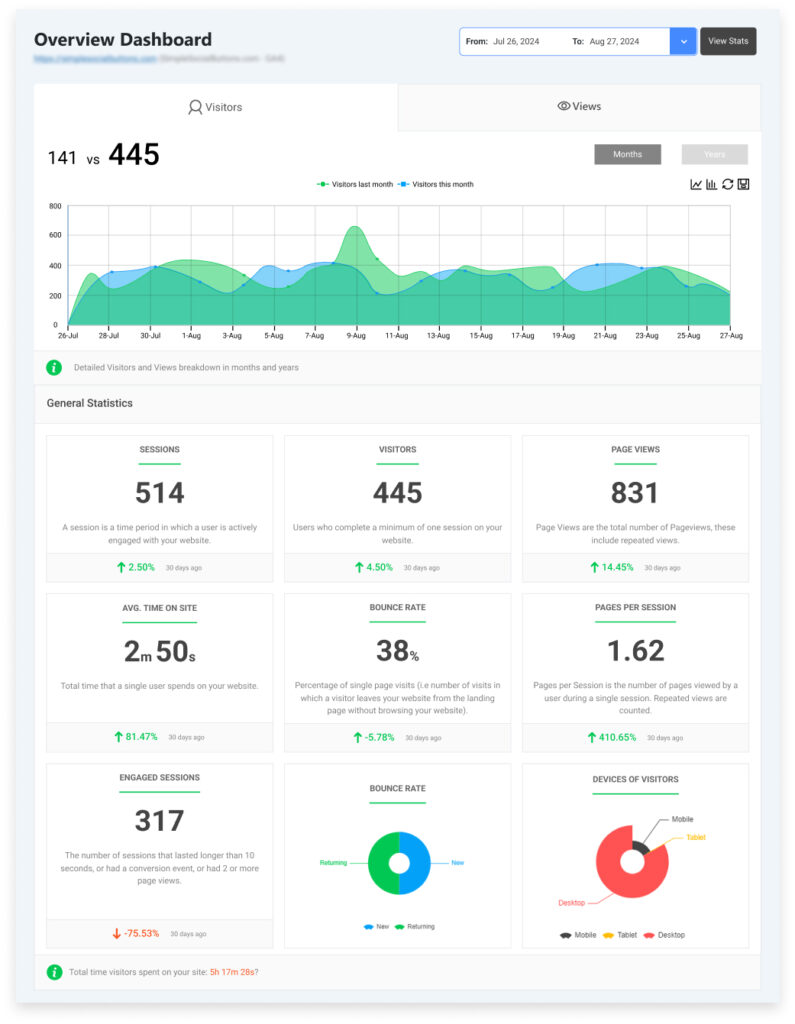
Analytify gives you analytics for your business. Compliance still depends on how you configure consent, cookies, and your privacy policy. You can read Analytify’s data usage policy here.
Frequently Asked Questions
1. How to make a WordPress website GDPR-compliant?
To make your WordPress website GDPR-compliant, you must ensure that you’re transparent about the data you collect, secure that data, and allow users to exercise their rights. This includes implementing a clear GDPR privacy policy, obtaining explicit consent before tracking cookies, and using WordPress GDPR plugins to help manage data requests and cookie consent.
Key steps include:
Updating your privacy policy
Adding a cookie consent banner
Securing user data with SSL encryption
Ensuring all third-party plugins and services are GDPR-compliant
2. What is GDPR compliance for WordPress websites?
GDPR compliance for WordPress websites means adhering to the rules and regulations set forth by the General Data Protection Regulation. This includes protecting personal data, informing users about what data is collected, how it’s used, and ensuring that data is only kept for as long as necessary. Compliance also involves implementing processes for data access and deletion requests and properly handling cookies.
3. How do I create a GDPR privacy policy for WordPress?
Creating a GDPR privacy policy for WordPress involves being transparent about the data you collect, how you use it, and how users can manage their data. Your privacy policy should include:
The types of data you collect (e.g., emails, IP addresses)
The purpose of collecting the data (e.g., contact forms, analytics)
How long you keep the data
Users’ rights to access, correct, and delete their data
You can create your privacy policy manually or use a plugin like Termly or Iubenda, which help generate GDPR-compliant privacy policies for your site.
4. How do I handle user data requests under GDPR?
Under GDPR, users have the right to request access to their data, request corrections, or demand deletion. To comply:
Implement a system for logging and responding to these requests.
Use GDPR plugins like WP GDPR Compliance to help automate this process.
Ensure your privacy policy explains how users can make these requests and what to expect.
5. Do I need to display a cookie consent banner on my WordPress site?
Yes, if your WordPress website uses cookies (including for analytics, ads, or embedded content), GDPR requires you to get explicit consent before placing non-essential cookies on users’ devices. Use a WordPress GDPR plugin like CookieYes or Complianz to easily add a cookie consent banner to your site.
6. Can I use Google Analytics on a GDPR-compliant WordPress site?
Yes, you can use Google Analytics on your WordPress site and remain GDPR-compliant. However, you must ensure that user data is anonymized and that you obtain explicit consent from EU users before placing tracking cookies. Plugins like Analytify can help integrate Google Analytics while ensuring GDPR compliance by anonymizing IP addresses and displaying cookie consent banners.
GDPR Compliance for WordPress: Final Thoughts
Staying GDPR-compliant isn’t just about avoiding fines; it’s about building trust with your visitors, customers, and partners.
At the end of the day, it really doesn’t matter if you’re operating a simple blog or running a full-blown eCommerce platform, protecting user data and setting up the right legal foundations is a boon to your entire operation.
Don’t cut corners. Treat compliance as part of your growth strategy and you’ll be ahead of the curve from day one.
We hope this article, helped you knwoing how to make WordPress website GDPR-compliant.
If you have any queries regarding GDPR compliance, feel free to ask in the comments below.