How to Bridge the Gap Between Offline and Online Tracking (2026)

To bridge the gap between offline and online tracking, give every offline channel a trackable entry point, such as a QR code or a tagged URL, and measure the visits it produces in Google Analytics 4 (GA4).
I recommend combining offline and online tracking, because either one alone no longer gives you the full picture. Using both is required to see which marketing efforts work.
Without a link between the two, it is difficult to gauge how your offline efforts affect your online results. That leads to misguided strategies and ill-advised spending.
This guide is for business owners and marketers who run offline campaigns and want to see their effect online. I cover QR codes, tagged URLs, coupon codes, call tracking, and how to read the results in GA4 and Analytify.
Offline and Online Tracking (TOC):
Techniques For Tracking Offline Activities
You can track offline marketing with QR codes, tagged URLs, coupon codes and call tracking, then measure the online results in GA4 and Analytify. Together, these methods show how your physical marketing efforts influence online interactions and conversions. Here are some effective techniques that businesses can use to track and measure offline marketing activities:
1. Utilizing Smart Entry Points Such as QR Codes
Dynamic QR codes track offline activity by recording every scan. A dynamic QR code can report information such as:
- Date, Time, and Location of Scan
- Device type and OS that did the scan
- How many unique scans happened on the code
This is great for tracking your offline marketing techniques. You can print and post such a QR code on posters, flyers, billboards, etc, in many locations. Then you can track how many people scanned that code and use that as a metric to check how much engagement your offline marketing is driving.
2. Use Tagged URLs For Specific Locations
Tag the URL stored in each static QR code so that GA4 can report which location the visit came from. Dynamic QR codes cost more because a web server stores the data for each unique code. Without a server, dynamic QR codes are not useful.
But the same cannot be said for static QR codes. They contain their data in themselves instead of on a server. They are also free to create. You can go online and use any reputable QR code generator to create custom static QR codes. But the caveat is that they can’t be tracked as easily or changed.
A tagged URL is a normal link with UTM parameters added, such as utm_source, utm_medium and utm_campaign. GA4 reports these values in the Traffic acquisition report. You can assign specific locations a specific tag. Any QR codes in that location should share the same tag.
You can then monitor your website traffic to see how many people visited your site from the tagged URLs to gauge their engagement and performance metrics.
3. Use Analytics Tools Like GA4 and Analytify
GA4 and Analytify show what your offline campaigns do on your website. Visualization tools plot trends on a graph so you can see what the data means.
GA4 and Analytify both let you track customer interactions across multiple touchpoints. The two offer different features for understanding the full impact of your marketing.
Google Analytics 4 (GA4)
Google Analytics 4 (GA4) is the latest iteration of Google’s analytics platform, designed to provide a more holistic view of customer behavior across multiple platforms, including both web and app interactions. With GA4, you can track how online interactions lead to offline actions once you record those actions as events.
Here’s how GA4 enhances your ability to bridge the gap between online and offline tracking:
- Event-Based Tracking: GA4 replaced Universal Analytics and is built around an event-based tracking model. This means you can track specific actions users take, such as clicking on a link, viewing a product, or completing a purchase. For offline activities, you can use events like coupon redemptions, store visits, or calls made using phone numbers linked to your campaign to track how these actions impact online metrics.
- Cross-Platform Tracking: GA4’s ability to track user interactions across both your website and mobile apps enables businesses to see a more complete picture of how online behavior leads to offline actions. For example, if someone clicks a paid ad online and later redeems a coupon code in your physical store, you can record the redemption as an offline event and import it into GA4 with a CSV file of events.
- Enhanced eCommerce Tracking: GA4’s eCommerce features allow you to track the entire customer journey, from initial product views to final purchase. If you’re running campaigns that drive both online purchases and offline store visits, GA4 helps you understand how online interactions influence in-store sales.
- Attribution Modeling: GA4 offers three attribution models in its Attribution reports: data-driven attribution, paid and organic last click, and Google paid channels last click. These models show how marketing touchpoints contribute to key events. Offline actions appear in GA4 once you bring them in, for example with an event data import (a CSV upload). This helps businesses understand the effectiveness of their campaigns across channels and allocate resources more efficiently.
Analytify
Join 50,000+ beginners & professionals who use Analytify to simplify their Website Analytics!
Analytify is a user-friendly Google Analytics plugin designed to simplify data collection and reporting. Analytify takes the complex data in Google Analytics and presents it in an accessible format that businesses can act on.
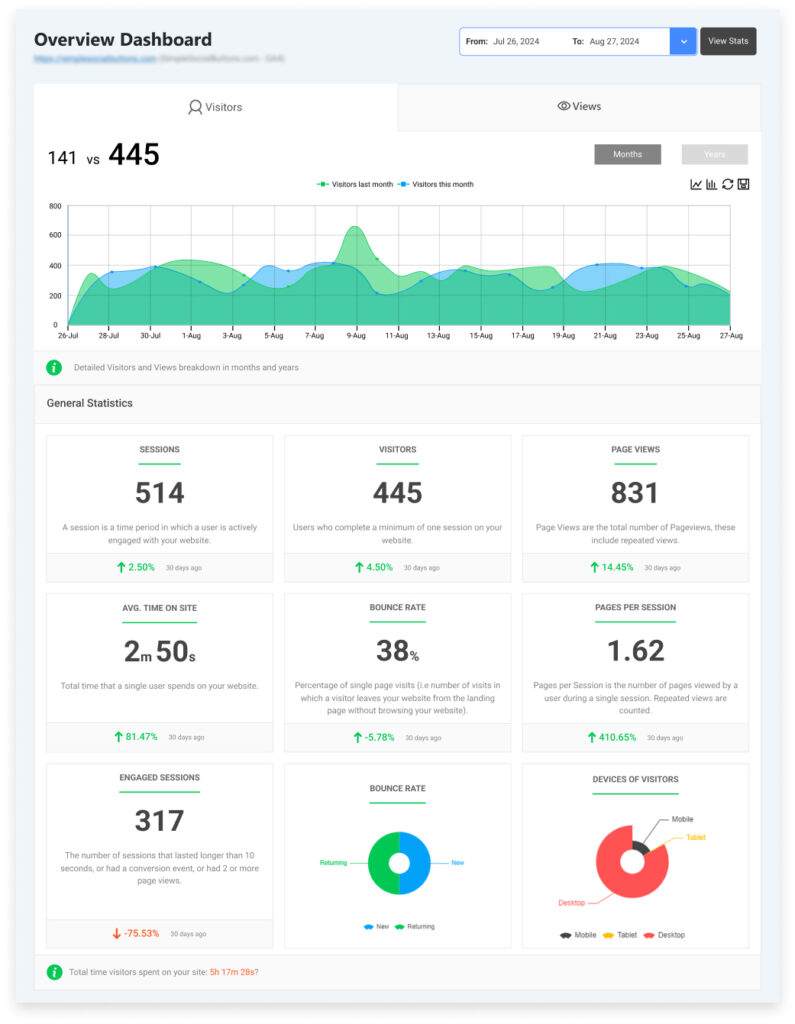
Here’s how Analytify helps you track and analyze your online to offline tracking efforts:
1. Real-Time Data Visualization: With Analytify, you can easily visualize data from both online and offline marketing efforts in real-time. For example, if you’re running a QR code campaign offline and tagging URLs to track online engagement, you can see immediately how those QR code scans translate into website visits, sales, or conversions.
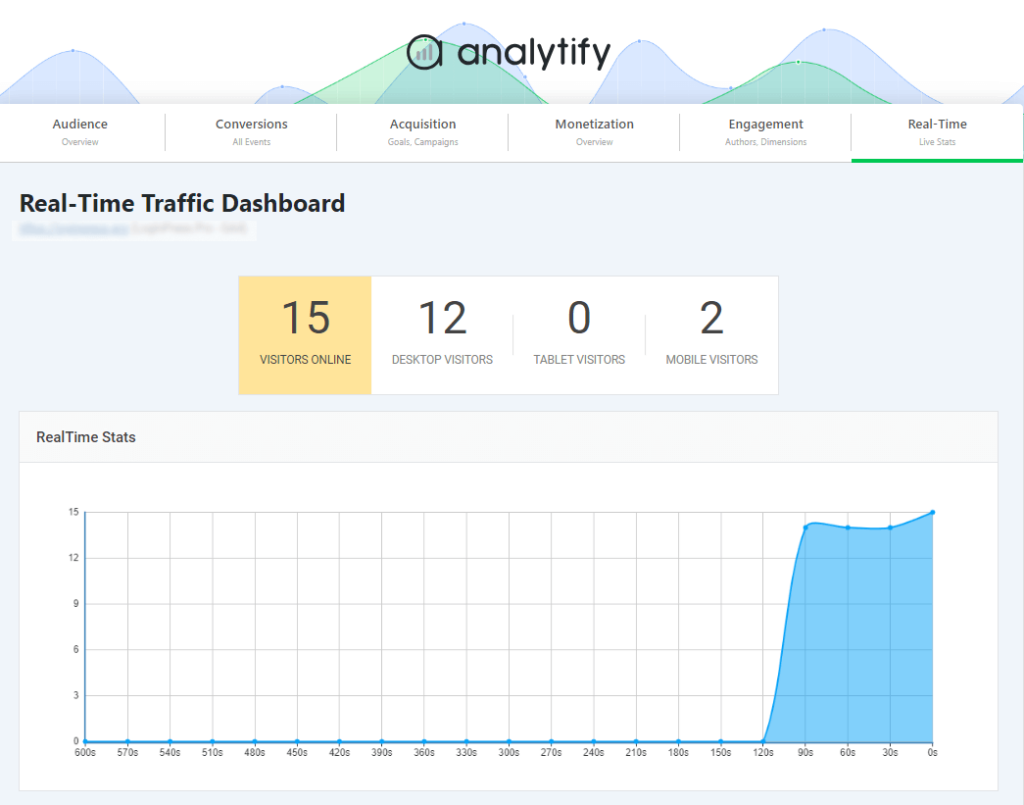
2. Offline Activity Integration: While GA4 provides the framework for tracking customer interactions, Analytify helps consolidate that data into a more digestible format. For example, you can track the success of offline campaigns (like flyers with unique QR codes or printed discount coupons) by seeing how many users accessed the website through the tagged URLs or scanned the QR codes. Analytify makes this information easy to understand, even for non-technical users.
3. Detailed Campaign Insights: Analytify provides detailed reports that can help businesses assess the performance of individual campaigns, both online and offline. Whether you are running a Google Ads campaign, promoting an in-store event through email, or distributing physical coupons with unique codes, Analytify can consolidate the performance data in one place, allowing you to easily see what’s working and what needs improvement.
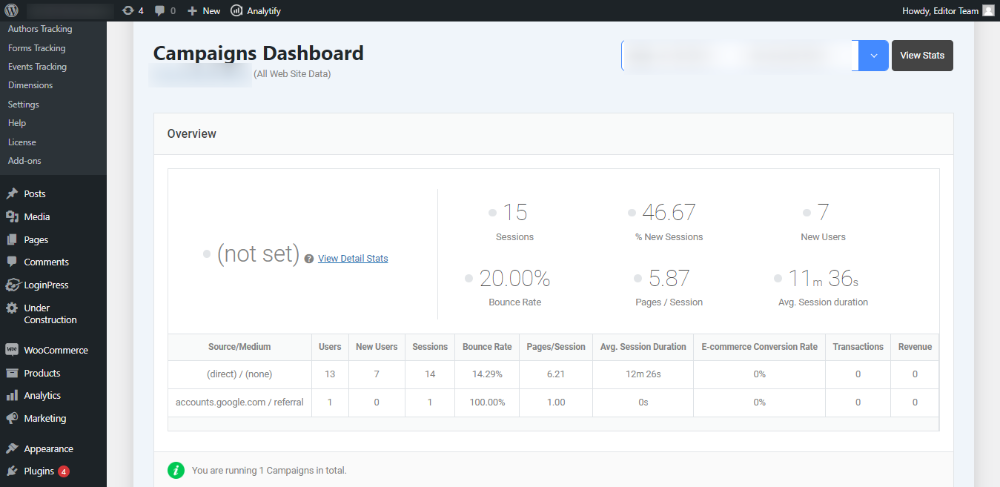
4. Easy Integration with GA4: Since Analytify is a plugin for Google Analytics, it integrates smoothly with GA4, allowing you to pull data from your Google Analytics account into a user-friendly dashboard. This integration enables you to manage all your data in one place, track both online and offline activities, and make data-driven decisions with ease.
This can be done easily with the help of website plugins like Google Analytics 4 or Analytify. GA4 reports four types of information about your tagged URL and QR code traffic:
- Acquisition: where users came from.
- Engagement: what users are doing.
- Monetization: purchases or ad revenue.
- Retention: return users and loyalty trends.
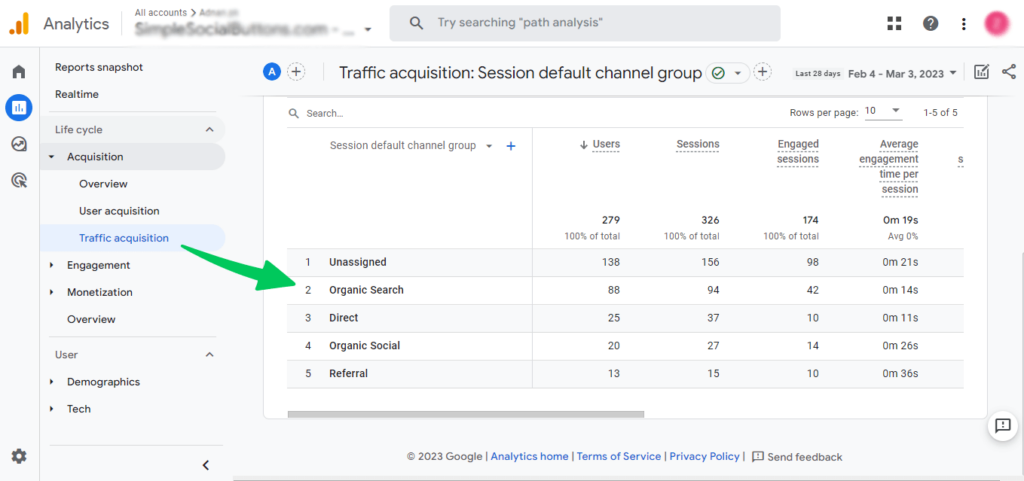
GA4 can track all tagged URLs and, by extension, the QR codes that were scanned, so you can see how effective your offline marketing is.
4. Track Events That Start From Offline Activities
Coupon codes and phone call tracking are two more ways to track events that start offline, in addition to QR codes.
- Coupon codes. You can hand out coupons at your in-person stores with codes that can be redeemed online. The coupon codes for each location are known, so their redemption lets you track them easily.
- Phone Calls and SMS/Texts. Phone calls and texts are still popular in the world, particularly among older demographics. You can use call tracking software to check how many calls your stores get and what the outcomes of those calls are.
Do not send customer phone numbers or other personally identifiable information to GA4, because Google policy prohibits it. Record call counts and outcomes in your call tracking software instead.
5. Analyze and Edit Your Strategy As Needed
Compare the results of each offline method in GA4, keep what works, and change what does not. Some of your offline marketing methods may not be working as well as you hoped, so you may have to reevaluate them.
Weak results can also mean that you are measuring the wrong metrics or that people are not engaging with your chosen tracking method. On the flip side, you will also see which of your methods worked well. Use the results in these ways:
- If certain flyer distributions or store locations lead to more online conversions, double down on those.
- If engagement drops after initial contact, refine your call-to-action or landing page experience.
- If one QR code outperforms others, analyze its placement or design to replicate that success elsewhere.
In this way, you can bridge the gap between offline and online tracking and make the most of your marketing.
Frequently Asked Questions
1. What is Online-to-Offline (O2O) Tracking?
Online to offline tracking refers to the process of measuring customer interactions that begin online (such as clicking on an ad or visiting a website) and result in offline actions, like making a purchase in a physical store or calling a business. It helps businesses understand the full customer journey and optimize their marketing strategies across both online and offline channels.
2. How does Online to Offline Tracking benefit businesses?
By implementing online to offline tracking, businesses can gain valuable insights into how their online marketing efforts influence offline behaviors. This helps in measuring the ROI of online campaigns, optimizing marketing budgets, and ensuring that offline touchpoints are properly integrated into the overall strategy.
3. What tools can I use for Online to Offline Tracking?
Tools like Google Analytics 4 (GA4) and Analytify are excellent for tracking online-to-offline activities. GA4 offers event-based tracking, allowing you to monitor user interactions across websites and apps, while Analytify simplifies the data from Google Analytics, helping you visualize and analyze offline events such as QR code scans or coupon redemptions.
4. How can QR codes facilitate online and offline Tracking?
QR codes are a powerful tool for tracking offline activities. By assigning unique QR codes to offline marketing materials, businesses can track how many people scan the codes and visit the website or make purchases online. This provides a direct link between an offline action and online engagement, making it easier to analyze the effectiveness of offline campaigns.
Offline and Online Tracking: Final Thoughts
Bridge offline and online tracking by giving each offline channel a QR code or tagged URL, then measuring the visits in GA4 and Analytify.
Bridging the gap between online to offline tracking is essential for businesses that want to fully understand their marketing efforts and optimize their strategies. By utilizing tools like QR codes, tagged URLs, and advanced analytics platforms like GA4 and Analytify, businesses can track customer interactions across multiple touchpoints, whether online or offline.
As consumer behavior continues to evolve, relying on a single tracking method no longer suffices. The integration of online to offline tracking provides valuable insights that help refine your marketing tactics, improve customer engagement, and ultimately drive better results.
By continuously measuring and adjusting your strategies based on these insights, you can ensure your marketing budget is being spent wisely and that you’re targeting the right customers at the right time.
Further readings:
- How to Create Custom Reports in Google Analytics (2026)
- How To Setup GA4 Cross Domain Tracking (Recommended)
Now, we’d love to hear from you. How are you currently tracking your offline marketing efforts, and which technique do you think will work best for your business?