
Analytics Simplification: Making Data Understandable for Non-Technical Teams

Do your team members avoid analytics dashboards because they feel too complex or technical?
Many businesses collect large amounts of data, but only a small portion of it is actually used. Reports are often filled with technical terms, crowded visuals, and too many metrics.
As a result, non-technical teams struggle to understand what the numbers really mean. This is where analytics simplification becomes essential.
Analytics simplification focuses on turning complex data into clear, structured insights that business users can easily understand.
In this guide, you will learn what analytics simplification is, why it matters, and the common challenges teams face. We will walk through a step-by-step process to simplify analytics and outline the essential features of easy analytics tools.
Let’s get started!
Analytics Simplification (TOC):
What Is Analytics Simplification and How Does It Help Your Team?
Analytics simplification means turning complex data into clear, easy-to-understand insights that anyone on your team can use.
Instead of dealing with technical reports, confusing metrics, or advanced configurations, teams get clean dashboards and simple summaries that highlight what truly matters.
Many analytics platforms collect large volumes of data. While that sounds helpful, it often overwhelms non-technical teams. Marketing managers, sales teams, content writers, and business owners don’t need dozens of detailed reports. They need clear answers to simple questions like:
- Where is our traffic coming from?
- Which campaigns are converting?
- Why are sales increasing or dropping?
Analytics simplification focuses on presenting only the most relevant data in a structured, visual, and easy format. This is where simplified analytics dashboards and simple data reporting play an important role. They remove technical complexity and highlight actionable insights.
For non-technical teams,
- Instead of waiting for a data expert to explain reports, team members can quickly understand performance and take action.
- It also reduces confusion, saves time, and increases confidence when using analytics tools.
Platforms like Analytify are good examples of beginner-friendly solutions. They simplify Google Analytics data into easy dashboards inside WordPress, making non-technical analytics accessible to business users.
Common Challenges Non-Technical Teams Face with Analytics
Non-technical teams often struggle with analytics tools, not because data is useless, but because the tools feel too complex. Here are some common challenges they face:
- Complex dashboards: Many analytics platforms are built for data experts. They include advanced settings, technical terms, and too many reports. Terms such as “attribution,” “segments,” and “event parameters” can leave team members feeling lost.
- Difficult-to-read visualizations: Some charts and graphs look impressive but are hard to understand. When visualizations are cluttered or unclear, teams cannot quickly see what is improving or declining.
- Inconsistent reporting: Different reports may show slightly different numbers due to filters, time ranges, or tracking methods. This creates doubt and confusion about which data is correct.
- Low confidence in data interpretation: When people do not fully understand what the numbers mean, they hesitate to make decisions. They may rely on estimates rather than data.
These challenges highlight the need for simplified analytics and easy-to-use tools designed for business users, not just technical experts.
Core Section: How to Simplify Analytics for Non-Technical Teams
Here’s a practical guide you can follow to simplify data for your non-technical teams:
1. Start With Business Goals and Key Metrics
Before opening any dashboard, define your business goals. Ask simple questions:
- Do we want more website traffic?
- Are we trying to increase sales?
- Do we want better lead generation?
Once goals are clear, choose only the key metrics that support them. For example:
- Traffic and top channels for awareness
- Conversion rate and revenue for sales
- Leads and form submissions for growth
When you connect data directly to goals, analytics becomes meaningful for business users.
2. Focus Dashboards on KPIs That Matter
Many teams make the mistake of adding too many numbers to a dashboard. This creates confusion.
Instead:
- Highlight only the most important KPIs.
- Keep supporting metrics minimal.
- Remove data that does not help decision-making.
Simplified analytics dashboards should answer one main question at a time.
For example, a marketing dashboard should clearly show traffic, conversions, and campaign performance, not every available technical metric.
Tip: Avoid clutter. Clean dashboards improve understanding and accelerate decision-making.
3. Choose Easy Analytics Tools
The tool you choose plays a significant role in simplifying analytics. Some platforms are built mainly for analysts and developers. Others are designed for business teams.
Look for analytics tools that offer:
- Simple navigation
- Clear visual reports
- Pre-built templates
- Automated insights
A good example of an easy analytics tool is Analytify.
Join 50,000+ beginners & professionals who use Analytify to simplify their Google Analytics!
Analytify transforms complex Google Analytics data into real-time dashboards inside WordPress. Instead of digging through technical reports, users see clear summaries, top pages, traffic sources, and conversions in one place.
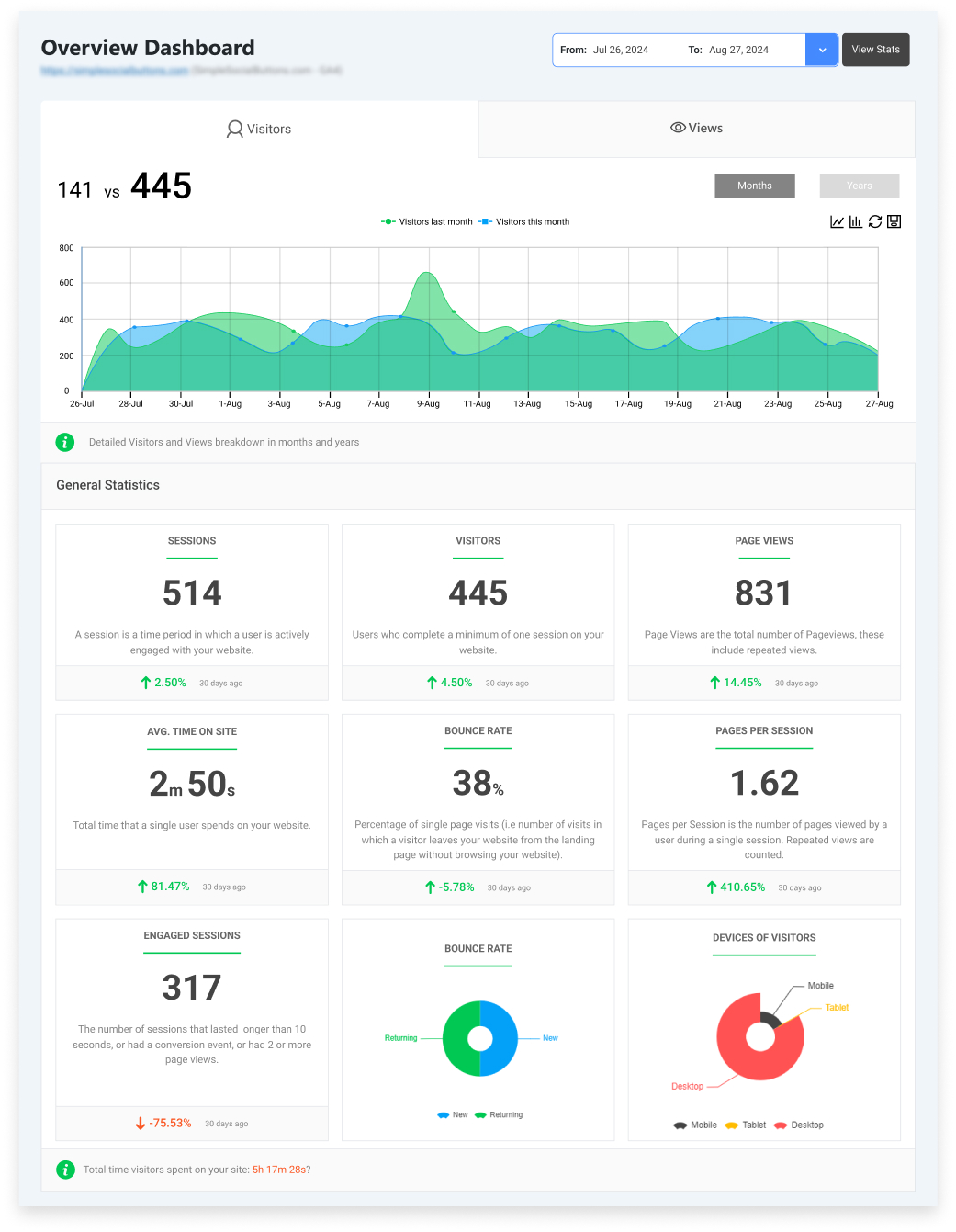
It also supports simple data reporting and automated insights, making it ideal for non-technical teams. The interface is beginner-friendly, allowing team members to explore data without fear of breaking settings.
4. Design Simplified Analytics Dashboards
Even with the right tool, dashboard design matters. Follow these simple rules:
- Limit metrics per dashboard: Avoid overcrowding. Focus on 5–8 key metrics at most.
- Use clear visuals: Choose simple bar charts, line graphs, and summary cards.
- Apply color coding carefully: Use colors to highlight growth, decline, or performance status, but avoid overuse.
- Keep layout organized: Group related metrics together so users can quickly understand the story.
Dashboards should be interactive, but not overwhelming.
Allow users to adjust date ranges or filter campaigns, but avoid advanced settings that create confusion. The goal is clarity, not complexity.
5. Translate Data Into Stories
Numbers alone do not create understanding. Teams need context. To simplify complex data:
- Add short, plain-language explanations below charts.
- Use annotations to explain spikes or drops.
- Include tooltips that define important terms.
For example, instead of only showing “Conversion Rate: 3.5%,” add a short note like:
“Conversion rate increased compared to last month, mainly due to improved landing page performance.”
This approach turns data into insights. It makes analytics more practical, clear, and actionable for business users.
6. Automate Reporting
Manual reporting takes time and increases the chance of errors. Automation is a key part of simplifying analytics.
Use tools that offer:
- Scheduled weekly or monthly reports
- Email summaries
- Alerts for traffic drops or performance spikes
Automated reports keep everyone informed without extra effort. Team members receive clear updates and can act quickly when needed.
This reduces dependency on analysts and makes data reporting part of daily operations.
7. Train Teams on Simple Data Interpretation
Even simplified dashboards require a basic understanding. You do not need long technical training sessions.
Instead:
- Provide short guides explaining key metrics.
- Add embedded tips directly in dashboards.
- Conduct short live walkthroughs showing how to read reports.
- Encourage questions and feedback.
The goal is to build confidence. When teams understand what the numbers mean and how they connect to goals, adoption increases naturally.
When done correctly, simplification transforms data from a technical task into a daily decision-making tool that everyone in the organization can confidently use.
Essential Features of Simplified Analytics Tools
To support analytics simplification, tools must be designed for clarity, not complexity. Below are the key features that make analytics easier for non-technical teams:
- Beginner-friendly dashboards and navigation:
- The dashboard should be clean, organized, and easy to explore.
- Users should quickly find key metrics like traffic, conversions, and top pages without navigating multiple menus.
- Simple navigation reduces frustration and saves time.
- Pre-built templates for business users:
- Instead of creating custom reports from scratch, tools should offer ready-made templates for marketing, sales, and content performance.
- These templates focus on practical insights that business users actually need.
- Simple data visualization and interactive charts:
- Charts should be clear and easy to read.
- Visuals must highlight trends, increases, or declines without clutter.
- Interactive elements, such as selecting a date range, help users explore data without requiring technical steps.
- Automated reporting and alerts:
- Simplified tools should automatically send reports via email and notify teams about important changes, such as traffic drops or sales increases.
- This keeps everyone informed without manual effort.
Platforms like Analytify are strong examples of easy analytics tools. They present Google Analytics data in simplified WordPress dashboards, making analytics for business users more accessible and actionable.
By combining these simplified features with real-time insights, teams can turn clear data into practical actions that drive measurable results.
How Teams Can Use Simplified Analytics to Drive Results
Now that we’ve learned how to simplify analytics, it’s time to see how different teams can use this simplified data in business:
Marketing Teams:
With simplified analytics dashboards, marketers can track campaign performance.
They can see which channels bring the most traffic, which ads generate conversions, and where budget is being wasted.
Example: If a Facebook campaign drives high traffic but low conversions, the team can quickly adjust the landing page or ad message.
Clear reports help them adjust campaigns quickly instead of waiting for a detailed technical analysis.
Sales Teams:
Sales teams benefit from simple data reporting that clearly shows lead flow, conversion rates, and pipeline performance. Instead of navigating complex CRM reports, they can view clean summaries showing how many leads are coming in.
They can also see how many leads are converting and which sources deliver the highest-quality prospects.
Example: If organic search leads convert better than paid ads, the sales team can focus more on those high-value prospects and adjust their outreach strategy.
This helps them prioritize the best opportunities and improve overall sales performance.
Product and UX Teams:
Product teams can track user behavior, feature usage, and adoption metrics. Easy-to-read dashboards show where users drop off and which features are most popular. This makes it easier to improve the user experience using real data.
Example: If a new feature has low adoption, the team can improve onboarding or simplify the design to increase usage.
Operations Teams:
Operations teams can use non-technical analytics to monitor performance indicators such as website uptime, transaction trends, and service efficiency. Clear visuals help them quickly spot problems and respond faster.
Example: If daily transactions suddenly drop, the team can quickly investigate technical issues before they affect revenue.
Tools like Analytify support these use cases by offering a beginner-friendly interface, real-time dashboards, and automated insights. This makes analytics for business users simple, practical, and results-driven.
Measuring the Impact of Analytics Simplification
To measure the success of simplification, focus on how your team interacts with data and how it improves daily decisions.
- Adoption metrics (dashboard usage):
Track how often team members open and use simplified analytics dashboards. If more business users regularly review reports without seeking help, it indicates that non-technical analytics is becoming part of their workflow. - Decision-making speed and accuracy:
When reports are clear, teams can act faster. Instead of spending hours understanding numbers, they quickly identify what is working and what needs improvement. This leads to better and more accurate decisions. - User confidence in interpreting reports:
A simple layout and clear metrics increase confidence. Team members feel comfortable explaining results and suggesting actions based on simple data reporting. - Feedback loops for improvement:
Regular user feedback helps refine dashboards and reports. Small adjustments can make analytics even easier to understand.
Platforms like Analytify support this process with built-in month-over-month data comparison.
This feature clearly shows performance changes over time, helping business users become more practical and actionable.
Future Trends in Analytics Simplification
The future of analytics simplification focuses on making data even easier for everyday teams to understand and use.
- AI-assisted dashboards with plain-language explanations:
Modern analytics dashboards are beginning to include AI that explains data in plain language. Instead of just showing numbers, the system tells users what changed and why it matters. - Predictive insights for business users:
Analytics tools are moving beyond past data. They will help predict future trends, such as expected traffic growth or potential sales declines, making analytics more proactive for business users. - Interactive, self-service analytics for non-technical teams:
Non-technical analytics tools are becoming more interactive. Team members can adjust date ranges, filter results, and explore reports independently without expert help. - Greater focus on accessibility and simplicity:
The demand for easy data reporting is increasing. Businesses want clean layouts, clear visuals, and minimal technical language so everyone can confidently use data.
Overall, the future is about removing barriers and making analytics simple, practical, and accessible for every team member.
Frequently Asked Questions
1. How to make analytics easy to understand?
To make analytics easy to understand, focus on analytics simplification.
Start by showing only the most important metrics, rather than all available numbers.
Use clear labels, simple charts, and short explanations.
Avoid technical terms whenever possible.
Group related data together so users can quickly see trends and results.
2. What are beginner-friendly analytics tools for non-technical teams?
Beginner-friendly, easy analytics tools are designed with simple layouts and clear navigation. They offer simplified analytics dashboards, pre-built reports, and visual summaries that business users can understand without technical skills. These tools focus on non-technical analytics, making it easier for teams to track performance without needing a data expert.
3. How can I simplify complex data for my business users?
You can simplify complex data by focusing on what matters most to your goals. Remove unnecessary metrics and use easy data reporting with clear charts and comparisons. Add brief explanations that clarify what the numbers mean. Consistency in reports also helps users feel more confident when reviewing data.
4. Why are simplified analytics dashboards important?
Simplified analytics dashboards help teams quickly understand performance without confusion. They improve confidence, accelerate decision-making, and make analytics for business users more practical in day-to-day work.
5. How does non-technical analytics help business teams?
Non-technical analytics makes data accessible to marketing, sales, product, and operations teams. It removes complex terms and advanced settings, enabling business users to review reports and take action with confidence without relying on analysts.
Final Thoughts: Analytics Simplification
In this guide, we explored how analytics simplification makes complex data easier for non-technical teams.
We began by understanding the concept and why simplified analytics dashboards help teams focus on clear answers rather than technical reports.
We examined common challenges, such as complex tools and confusing visuals. Then, we shared practical steps to simplify analytics.
These included starting with clear business goals, focusing on key metrics, choosing easy analytics tools, and designing clean, simplified dashboards.
We also discussed how to translate numbers into actionable insights, automate reporting, and train teams to build confidence. Tools like Analytify show how non-technical analytics and simple data reporting can support marketing, sales, product, and operations teams.
When analytics becomes clear and accessible, it delivers powerful insights that enable faster decisions for business users.
For further understanding, you can read:
- GA4 Insights for AI Content: How to Analyze Pages That Rank in AI Answers
- AI Content Velocity: How to Measure Performance of High-Output AI Publishing
What steps have you taken to simplify analytics for your team? Share your experience in the comments below. We’d love to hear from you.