Digital Marketing for Small Business: Analytics-Driven Strategies to Get More Customers (2026)

Digital marketing for small businesses is not just about being online. It’s about building a system that generates measurable growth.
With limited budgets and increasing competition, small businesses cannot afford to rely on guesswork. Running ads without tracking, publishing content without conversion goals, or focusing only on traffic leads to activity, not results.
The real power of digital marketing lies in its measurability. You can track where customers come from, how they interact with your website, which campaigns convert, and which channels generate revenue.
When analytics becomes the foundation of your strategy, marketing shifts from experimentation to informed decision-making.
In this guide, you’ll learn how to design strategies for digital marketing for small businesses using GA4 and Analytify, so you can track performance, get more customers, optimize campaigns, and grow with clarity.
Digital Marketing for Small Business (TOC):
What is Digital Marketing for Small Businesses?
Digital marketing for small businesses refers to using online channels to attract, engage, and convert customers in a measurable way.
For small businesses, the goal is not to be everywhere.
The goal is to focus on the channels that drive real results.
The most common digital marketing channels include:
- Search Engine Optimization (SEO): ranking in search results to attract organic traffic
- Local SEO: targeting nearby customers through location-based searches
- Content marketing: blogs, guides, videos that educate and build trust
- Social media marketing: engaging audiences on platforms relevant to your business
- Email marketing: nurturing leads and retaining customers
- Paid advertising (PPC & social ads): driving immediate, targeted traffic
There are 2 main benefits of digital marketing for small businesses:
- Cost control: You can start small and scale gradually.
- Targeting precision: You can reach specific audiences.
- Measurability: Every click, visit, and conversion can be tracked. And this one is most important.
Without tracking, digital marketing becomes guesswork.
With small business growth analytics, it becomes a structured growth engine.
How Most Small Businesses Waste Marketing Budget
Many small businesses don’t fail at marketing because of poor effort.
They fail because of poor measurement. They don’t track digital marketing performance.
Here’s what typically happens:
- Campaigns are launched without clear conversion goals.
- Traffic increases, but revenue does not.
- Social engagement is celebrated, but no one checks if it leads to sales.
- Paid ads continue running without evaluating the cost per acquisition.
The focus shifts to activity instead of outcomes.
Vanity metrics like likes, impressions, and page views create a false sense of progress. But these metrics do not indicate profitability. If you cannot connect marketing efforts to leads, sales, or revenue, you are operating without clarity.
Another common issue is a lack of attribution. A customer may discover your business through search, return via social media, and finally convert after clicking on an email. Without proper tracking, you might credit the wrong channel and invest more budget where it doesn’t belong.
Over time, this leads to:
- Overspending on low-performing channels
- Under-investing in high-converting ones
- Inconsistent growth
- Reduced marketing confidence
The solution is not more marketing.
The solution is structured, analytics-driven marketing.
Importance of Analytics for Small Business Marketing
Analytics turns digital marketing into a performance system rather than a series of isolated campaigns.
When you properly track your website and marketing channels, you gain visibility into what is actually driving results, not just what appears to be working.
With digital marketing analytics tools, you can understand:
- Where your traffic comes from (organic, paid, social, email)
- How users interact with your pages
- Which campaigns generate conversions
- Which landing pages perform best
- How much revenue each channel produces
This allows you to move from assumptions to evidence.
For example, instead of asking, “Should I invest more in social media?” you can review your data and see whether social traffic converts better than search traffic.
Website Analytics for small business also helps you identify high-ROI opportunities. If one channel consistently generates conversions at a lower cost, you can confidently allocate more budget there.
This is especially important for small businesses, where efficiency matters.
Tools like GA4 provide Analytics data, but dashboards such as Analytify make that data easier to interpret inside WordPress. This means you can monitor key metrics, traffic, engagement, conversions, and revenue without navigating complex reports.
When online marketing analytics, you gain:
- Clear performance visibility
- Better budget allocation
- Faster optimization decisions
- Improved ROI measurement
Let’s see how you can build a digital marketing strategy.
Building Small Business Digital Marketing Strategies Using Analytics (Step by Step)
Below is a step-by-step framework to build a digital marketing strategy for your small business using analytics.
Each step builds on the previous one, so you can move from setup to optimization with clarity and confidence.
Step 1: Set Up Your Website and Analytics Foundation
Before you invest time or money into campaigns, make sure your tracking infrastructure is properly set up. Without accurate data, no strategy will work effectively.
1. Ensure Your Website Is Ready
Your website should be:
- Mobile-responsive
- Fast-loading
- Clear in messaging
- Structured with strong calls-to-action
- Optimized for conversions (forms, checkout, contact options)
Your website is the center of your digital marketing system. All channels should ultimately drive traffic back to it.
2. Set Up GA4 Correctly
Install Google Analytics 4 and configure it to track:
- User activity
- Traffic sources
- Engagement metrics
- Conversion events
- Revenue (if applicable)
Define your key conversions early. These may include:
- Form submissions
- Purchases
- Phone clicks
- Email sign-ups
- Appointment bookings
Without conversion tracking, you cannot measure ROI.
3. Use Analytify for Simplified Reporting
For WordPress users, Analytify integrates GA4 data directly into your dashboard. This allows you to:
- View traffic summaries
- Track campaigns
- Monitor conversions
- Analyze channel performance
- Review reports without technical complexity
This makes analytics accessible for non-technical business owners while maintaining data accuracy.
Step 2: Define Marketing Goals and KPIs
Once your tracking is set up, the next step is clarity.
You cannot build an effective digital marketing for small business strategy without defining what success looks like.
Start with business-focused goals, not marketing activities.
Instead of saying:
“I want more traffic.”
Define something measurable, such as:
“I want 40 qualified leads per month.”
or
“I want to increase online sales by 20% in the next quarter.”
These are outcome-based goals.
Set SMART Goals
Your goals should be:
- Specific
- Measurable
- Achievable
- Relevant
- Time-bound
Now translate those goals into KPIs (Key Performance Indicators).
Examples of KPIs by Objective:
If your goal is lead generation:
- Form submissions
- Cost per lead
- Conversion rate
If your goal is online sales:
- Revenue
- Return on ad spend (ROAS)
- Average order value
- Conversion rate
If your goal is traffic growth:
- Organic sessions
- Referral traffic
- Engagement rate
With GA4 and Analytify, you can monitor these metrics inside your dashboard and track performance over time.
When goals and KPIs are clearly defined, every marketing decision becomes easier. You will know what to measure, what to improve, and what to stop.
Step 3: Choose Your Marketing Channels Based on Data
Now that you have goals and KPIs defined, the next step is deciding where to focus your effort.
For small businesses, the mistake is trying to use every channel at once. A better approach is to select channels strategically and measure them properly.
Here are the core digital marketing channels and how to evaluate them using analytics.
1. SEO (Search Engine Optimization)
SEO helps you attract users actively searching for your products or services.
With analytics, you should track:
- Organic traffic
- Conversion rate from organic visitors
- Top-performing landing pages
- Search-driven revenue
This tells you whether your content is generating real business results, not just rankings.
2. Local SEO
If you serve a specific region, local visibility is critical.
Track:
- Location-based traffic
- Conversions from local landing pages
- Engagement from nearby users
This helps you understand which geographic areas respond best to your marketing.
3. Content Marketing
Content builds authority and trust, but it must be measured.
Monitor:
- Page performance
- Time on page
- Scroll behavior
- Conversions from blog traffic
This shows which topics actually support your business goals.
4. Social Media Marketing
Social traffic should not be measured only by engagement.
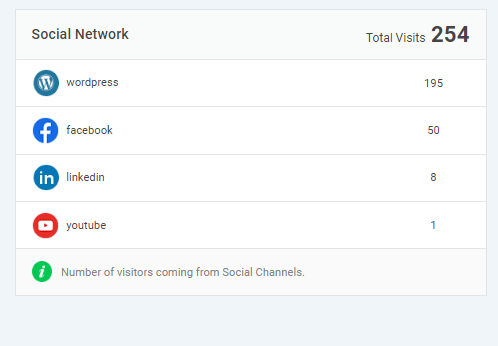
Track:
- Referral traffic from each platform
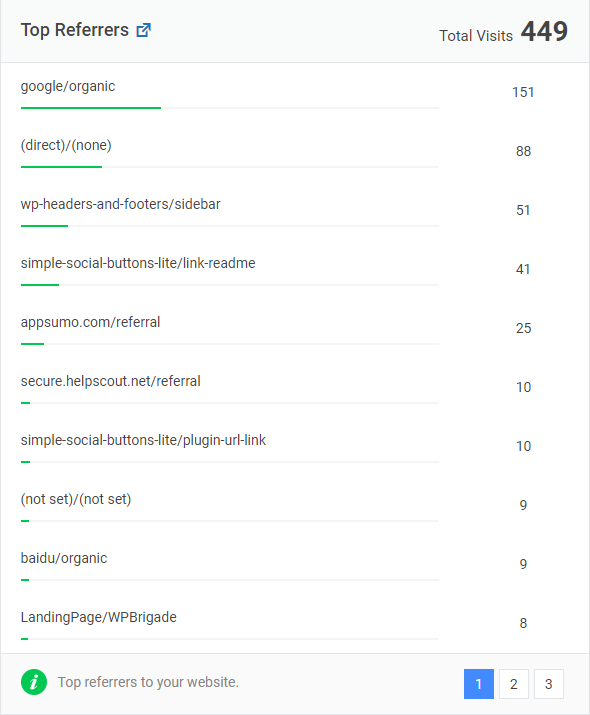
- Conversions per platform
- Assisted conversions
This helps you identify which social channels contribute to revenue.
5. Paid Advertising (PPC & Social Ads)
Paid campaigns require strict ROI tracking.
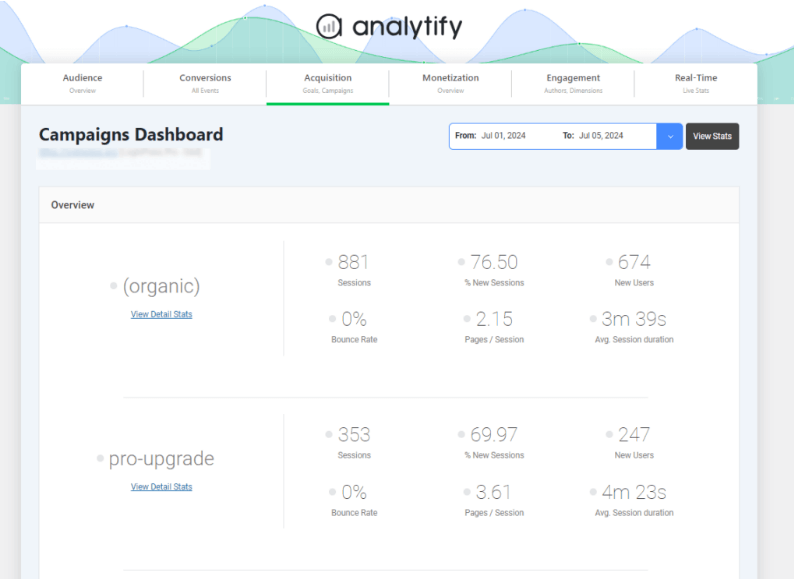
Measure:
- Cost per acquisition (CPA)
- Return on ad spend (ROAS)
- Campaign-level conversions
- Revenue per campaign
You must do ROI measurement for small business marketing to check your spending.
Step 4: Plan Campaigns Using Analytics Insights
Once your channels are selected, do not create campaigns blindly. Use your existing data to guide your planning.
Analytics should inform:
- What content to produce
- Which products or services to promote
- Which audience segments to target
- When to launch campaigns
- Where to allocate budget
Start by reviewing your top-performing pages. Identify:
- Which topics attract the most traffic
- Which pages generate the highest engagement
- Which content drives conversions
These insights tell you what your audience already values.
Next, analyze user behavior patterns:
- Where do visitors drop off?
- Which pages have low engagement?
- Which CTAs receive clicks?
Use this information to refine messaging, improve structure, and strengthen calls-to-action.
You can also use analytics to identify micro-conversions such as:
- Newsletter sign-ups
- Content downloads
- Video views
- Button clicks
These actions indicate interest, even if the user has not yet converted. Tracking them helps you understand early-stage engagement.
With tools like GA4 and Analytify, you can monitor these behaviors inside your dashboard and use the data to shape future campaigns.
When campaigns are built on insights rather than assumptions, performance improves naturally.
Step 5: Launch Campaigns and Track Performance Properly
After planning your strategy, the next step is execution but execution without tracking will not give you clarity.
Every campaign you launch should be measurable from day one.
Here’s what you must track consistently:
1. Traffic Sources
Understand exactly where visitors are coming from:
- Organic search
- Paid ads
- Social media
- Email campaigns
- Direct visits
- Referral traffic
This tells you which channels are contributing to growth.
2. Campaign Tracking with UTMs
Use UTM parameters in your links so you can identify:
- Specific campaigns
- Individual ads
- Email newsletters
- Social posts
This allows you to compare performance accurately.
3. Conversions
Track meaningful conversion actions such as:
- Form submissions
- Purchases
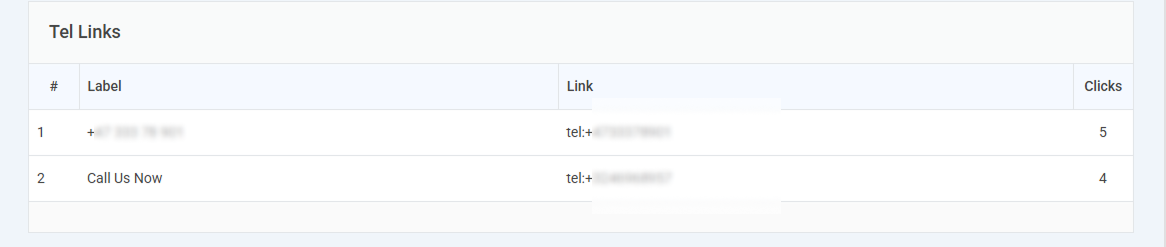
- Phone clicks
- Sign-ups
- Downloads
These are the metrics that reflect business impact.
4. Engagement Metrics
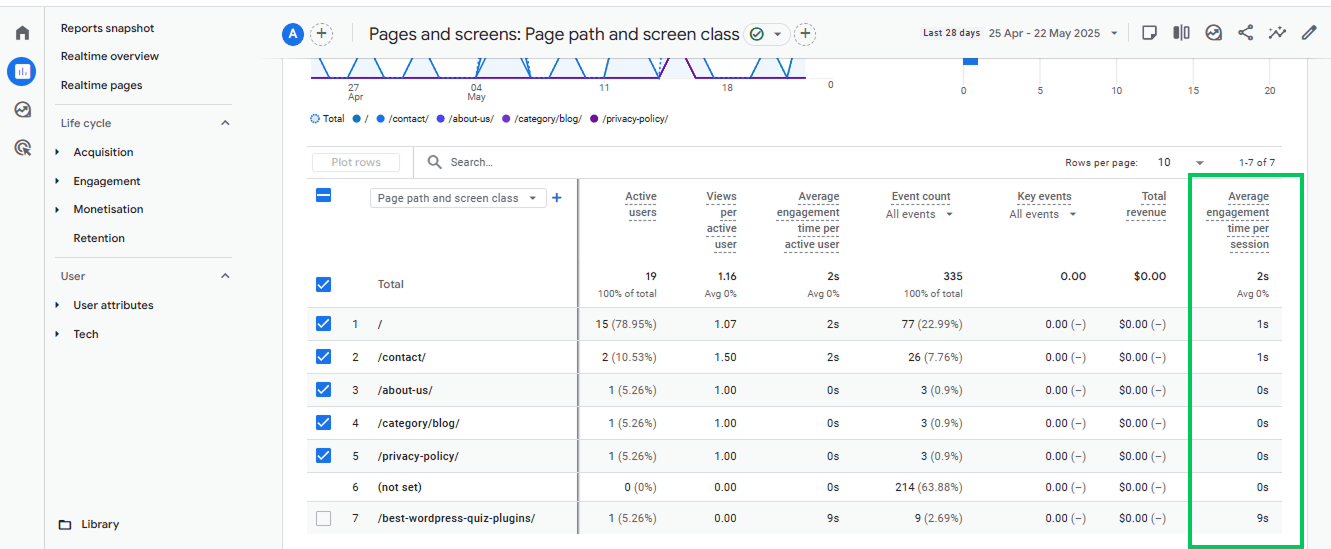
Monitor:
- Time on page
- Scroll depth
- Bounce rate (in context)
- Pages per session
Engagement data helps you understand content quality and user interest.
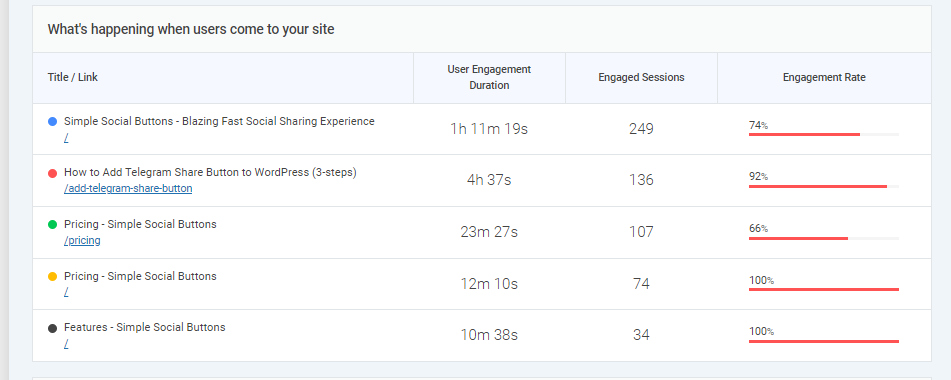
With GA4, you collect this data. With Analytify, you can view it in clear, accessible dashboards inside WordPress without navigating complex reports.
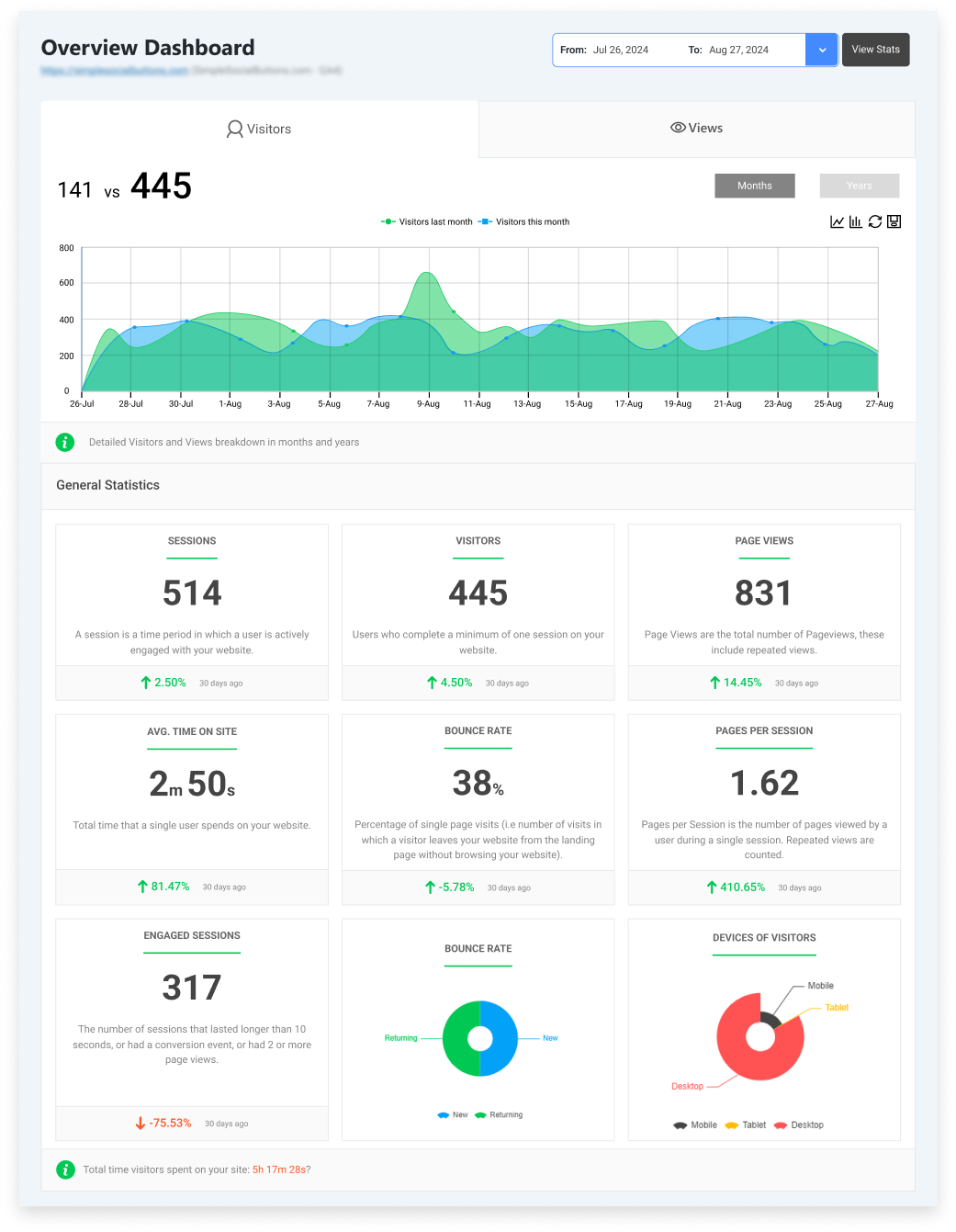
This makes performance monitoring practical for small business owners and teams.
Step 6: Analyze Data and Optimize for Growth
Collecting data is only the beginning. The real value comes from how you use it.
Set a regular review process, weekly or monthly, and focus on trends, not isolated numbers.
Start by identifying your top-performing channels:
- Which source drives the most conversions?
- Which campaign generates the highest revenue?
- Which landing pages convert best?
Once you know what works, you can confidently:
- Increase budget for high-ROI channels
- Reduce or pause underperforming campaigns
- Replicate successful content formats
- Improve pages with low conversion rates
Next, analyze user behavior to optimize performance:
- Improve CTAs on pages with high traffic but low conversions
- Simplify forms if abandonment is high
- Strengthen messaging where engagement is low
- Update content that has declining performance
Use your data to refine decisions across channels.
For example:
- SEO insights can inform content strategy.
- Paid ad performance can influence targeting adjustments.
- Email engagement can guide segmentation.
- Social media data can shape future topics.
This cross-channel optimization is what transforms marketing into a structured growth system.
With Google Analytics and Analytify, you can track these insights clearly and monitor ROI without complex reporting workflows.
Common Mistakes to Avoid in Digital Marketing for Small Businesses
Even with analytics in place, certain mistakes can limit your results. Avoiding them is just as important as implementing the strategy.
1. Tracking Too Many Metrics
More data does not always mean better decisions.
Focus on metrics tied directly to your business goals:
- Conversions
- Revenue
- Cost per acquisition
- Traffic sources
- Engagement quality
Ignore metrics that do not influence decisions.
2. Ignoring Conversions
Traffic alone does not indicate success.
If you are not tracking:
- Form submissions
- Purchases
- Sign-ups
- Key interactions
You cannot measure ROI accurately.
Every campaign should have a clear conversion goal.
3. Overcomplicating Dashboards
Small business owners do not need complex reporting structures.
Your dashboard should answer three questions:
- Where is traffic coming from?
- What is converting?
- What is generating revenue?
Tools like GA4 provide the data, and simplified reporting solutions such as Analytify help present it clearly.
4. Failing to Act on Insights
Data without action has no value.
Regularly review performance and:
- Adjust budgets
- Refine messaging
- Improve landing pages
- Test new strategies
Analytics is not just for reporting it is for optimization.
Avoiding these mistakes ensures your marketing remains focused, efficient, and aligned with business goals.
Frequently Asked Questions
1. How do you measure marketing ROI for small businesses?
For ROI measurement for small business marketing, you must track both costs and outcomes. Start by identifying:
Total marketing spend
Revenue generated from each channel
Cost per acquisition (CPA)
Return on ad spend (ROAS)
Basic formula:
ROI = (Revenue – Marketing Cost) ÷ Marketing Cost
Using GA4 with proper conversion tracking allows you to connect campaigns directly to revenue. Without conversion tracking, ROI measurement is incomplete.
2. Which digital marketing channels should small businesses prioritize?
With limited budgets, prioritize channels for online marketing analytics that:
Align with your audience behavior
Generate measurable conversions
Offer long-term value
For most small businesses, this often includes:
SEO
Local SEO
Email marketing
Targeted paid campaigns
Use analytics data to determine which channel performs best for your specific business rather than following general trends.
3. How can analytics improve small business growth?
Analytics helps you in digital marketing for small businesses in the following ways:
Identify high-performing campaigns
Reduce wasted ad spend
Improve landing page conversions
Understand customer behavior
Allocate budget strategically
Over time, this leads to better ROI, stronger targeting, and more consistent growth.
4. Do small businesses need advanced analytics tools?
Not necessarily.
GA4 provides the core data.
Digital marketing analytics tools like Analytify simplify reporting for WordPress users, making insights accessible without technical complexity.
The key is not complexity. It is clarity and consistent review.
5. What digital marketing tactics work for small business?
The most effective digital marketing tactics for small businesses are those that are measurable and aligned with customer intent.
High-performing tactics typically include:
SEO and Local SEO to attract customers actively searching for your services
Content marketing to build trust and authority
Email marketing to nurture leads and retain customers
Targeted paid advertising for immediate visibility
Conversion-optimized landing pages to increase lead or sales rates
6. How to use analytics for small business marketing?
Start by setting up GA4 and tracking conversions such as form submissions, purchases, or sign-ups.
Then:
Monitor traffic sources
Measure conversion rates
Compare channel performance
Adjust budget based on ROI
Analytics should guide where you invest and what you optimize.
7. What are the best analytics tools for small business online marketing?
For most small businesses:
Google Analytics 4 (GA4) for core tracking
Analytify (for WordPress users) for simplified reporting
Ad platform analytics (Google Ads, Meta Ads)
Email marketing analytics
Choose tools that provide clear insights without unnecessary complexity.
Digital Marketing for Small Business: Conclusion
Effective digital marketing for small business is about measuring marketing analytics better.
When you combine:
- Clear goals
- Defined KPIs
- Proper conversion tracking
- Consistent performance analysis
- And structured optimization
Marketing becomes predictable and scalable.
Analytics gives you the visibility to understand what works, eliminate waste, and invest with confidence.
If you want sustainable growth, start digital marketing for small business with analytics.
Set up your tracking system, monitor performance regularly, and refine your strategy based on real insights.
That is how small businesses build long-term digital success.
Further Readings:
- Using AI In Marketing Analytics (2026 Guide)
- How to Track Email Marketing with Google Analytics (2026)
Now, I’d like to hear from you: Do you know exactly which channel is generating revenue for your business right now?