GA4 vs Firebase vs Firebase Analytics: Choosing the Right Tool for Your Data

A client asked me this again last week: “So is Firebase Analytics basically GA4, or is it its own thing?” I get some version of that question almost every time we bring on a business that has both a website and an app.
Firebase Analytics is GA4 under the hood, just viewed through the Firebase console instead of the standard GA4 interface. But that doesn’t mean the two feel the same to work with day to day, and it doesn’t tell you which one you should actually be looking at for your project.
My team and I have set up GA4 on close to a hundred WordPress sites at this point, plus a handful of hybrid app-and-web businesses, and the mix-up is always the same: people assume they’re picking between competing products when really they’re just deciding which console to live in. This guide covers what GA4, Firebase, and Firebase Analytics are, how they connect, and which one to check depending on whether you’re tracking a site, an app, or both.
GA4 vs Firebase vs Firebase Analytics (TOC):
Firebase Analytics, Firebase, and GA4: An Overview
What is Firebase Analytics?
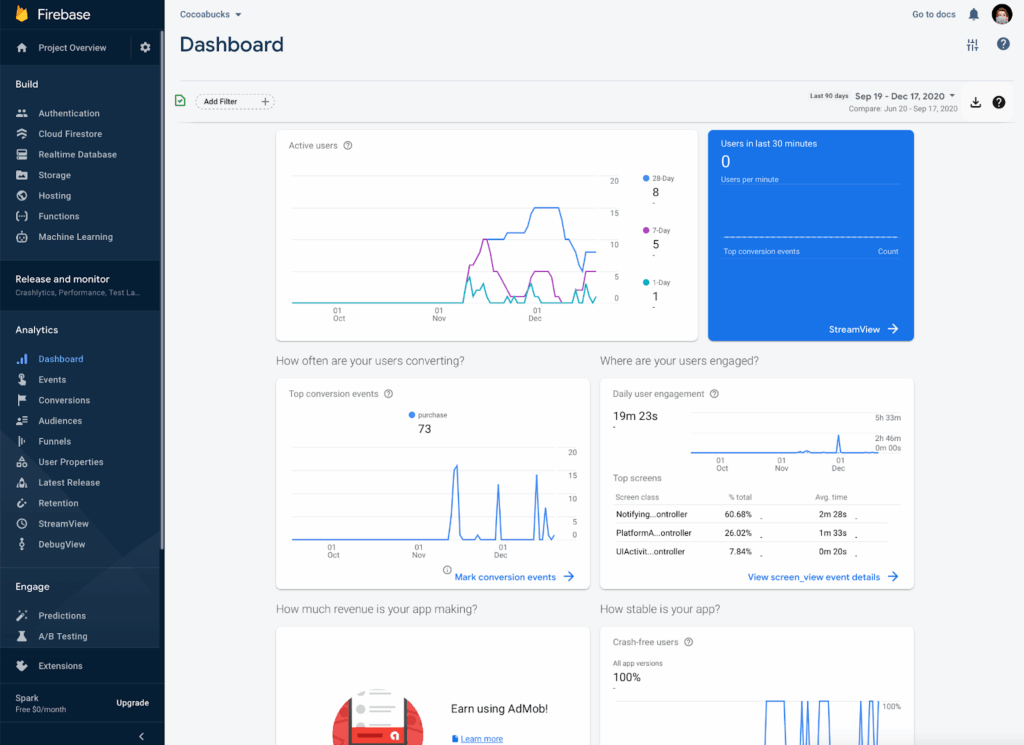
Firebase Analytics (now known as Google Analytics for Firebase) is a free, event-driven analytics tool specifically designed for mobile apps. It is part of the broader Firebase platform, which offers a suite of tools for mobile app development, testing, and monitoring. Firebase Analytics provides developers with deep insights into user behavior, helping them optimize their apps for better user engagement, retention, and overall performance.
Firebase Analytics is a strong fit for teams that live inside the app-development side of a product, since it tracks user behavior at the event level and ties directly into the rest of the Firebase toolset.
Key Features of Firebase Analytics:
- It tracks specific user actions, like sign-ups and purchases, as customizable events, which gives granular insight into user behavior.
- Event tracking is free and unlimited, which keeps it a cost-effective option for app developers.
- You can segment users by behavior or demographics to target marketing efforts more precisely.
- Real-time monitoring lets you adjust campaigns or app features quickly, based on what’s happening right now.
- It connects directly with other Firebase tools like Crashlytics, Remote Config, and Cloud Messaging for app-wide optimization.
- You can build custom reports focused on the metrics that matter most for your app’s performance and engagement.
- It works across iOS and Android, combining data from both platforms into one view of app performance.
Benefits for Mobile App Developers:
- You get a clearer picture of how users engage with your app, which points to specific areas worth improving.
- You can segment users by behavior to build more personalized marketing campaigns.
- Insights from Firebase Analytics inform decisions about app updates and feature changes.
What is Firebase?
Firebase is Google’s mobile and web app development platform. It covers real-time databases, authentication, hosting, and analytics. Firebase Analytics is just one tool inside that ecosystem, and it’s the one that tracks user behavior and app performance.
Key Features of Firebase:
- A full app development suite (including Firebase Analytics).
- Includes tools for cloud messaging, remote configurations, and crash reporting.
- Primarily focused on mobile apps (iOS and Android).
- Firebase Analytics is included as Firebase’s built-in analytics layer, but it only covers mobile app events, not the full web reporting GA4 provides.
What is GA4?
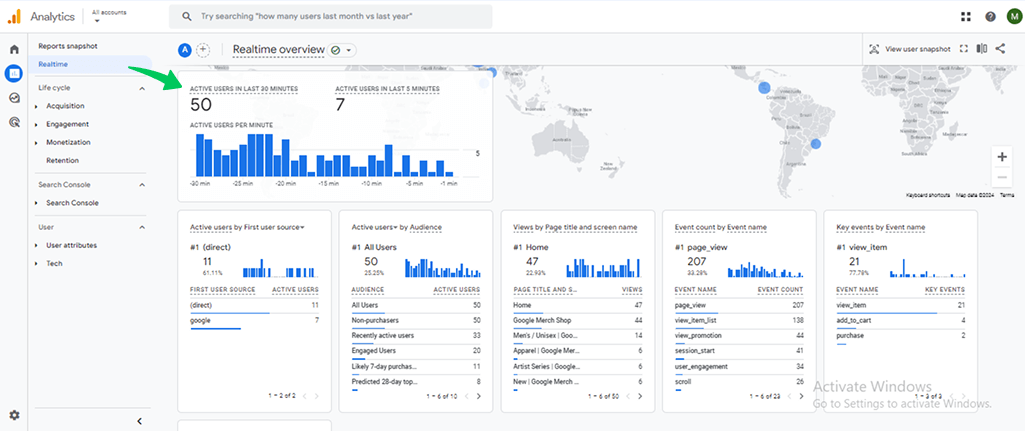
Google Analytics 4 (GA4) is the latest iteration of Google’s web analytics tool, designed to replace Universal Analytics. GA4 provides a more flexible approach to tracking user interactions and is centered around events rather than just pageviews. This change enables businesses to track user behavior across both websites and mobile apps in one unified view.
Key Features of GA4:
- GA4 tracks interactions like page views and button clicks as individual events instead of relying only on pageviews, which gives a deeper read on user actions.
- It covers both web and app analytics, tracking users across websites and mobile apps in one unified view.
- You can segment users by behavior, demographics, or predictive metrics to target and personalize campaigns more effectively.
- Machine learning powers predictive metrics, such as the likelihood a user makes a purchase or the expected revenue from a specific user group.
- Real-time data shows user activity immediately after a change or campaign goes live, so you can react quickly.
- Reports are customizable, so marketers and analysts can shape the data around their own decisions.
- It connects directly with other Google tools like Google Ads, Google Tag Manager, and BigQuery, which keeps marketing and data analysis in one ecosystem.
- GA4 gives you more control over data retention settings, which helps with compliance under rules like GDPR by letting you set how long user data is stored.
Benefits of GA4 for Businesses:
- It collects data from both web and mobile in one place, giving a single view of how customers interact with your business.
- Advanced segmentation, predictive metrics, and real-time data sharpen marketing decisions.
- Reports are customizable, surfacing the insights that matter most for user behavior and campaign performance.
- Built-in privacy controls and machine learning-based insights keep GA4 aligned with where analytics is heading.
Key Differences Between Firebase Analytics, Firebase, and GA4
Here is how GA4, Firebase Analytics, and Firebase compare across the criteria that actually affect a buying decision:
| Feature | GA4 | Firebase Analytics | Firebase |
|---|---|---|---|
| Primary Purpose | Cross-platform analytics (web & app) | Mobile app analytics | Full app development platform |
| Data Model | Event-driven | Event-driven | Event-driven (in Firebase Analytics) |
| Platform Support | Web & mobile apps | Mobile apps only (iOS & Android) | Mobile apps, plus other Firebase tools |
| Integrations | Google Ads, Google Tag Manager, BigQuery | Firebase tools (Crashlytics, Remote Config, etc.) | Firebase tools, third-party integrations |
| Advanced Features | Predictive metrics, machine learning, customizable reports | Real-time data, audience segmentation, app-specific insights | Wide range of app development tools |
| Pricing | Free, with paid usage tiers for some features | Free, with unlimited event tracking | Free on the Spark plan; pay-as-you-go on Blaze for higher usage |
| Best for | Businesses needing cross-platform tracking | Mobile app developers | Developers needing a full app platform |
GA4 vs Firebase vs Firebase Analytics: Which Tool Should You Choose?
Pick based on what you’re tracking, not brand familiarity: choose GA4 if you need web and app data in one place, choose Firebase Analytics if your focus is mobile app behavior specifically, and choose Firebase as a platform if you’re building the app itself and need analytics alongside it.
Choose GA4 if:
- You need cross-platform tracking (web and app).
- You want to access advanced features like predictive metrics, machine learning insights, and deeper audience segmentation.
- You work in a Google ecosystem (e.g., using Google Ads, Google Tag Manager, etc.) and need a tool that integrates well across these platforms.
Choose Firebase Analytics if:
- You’re focusing on mobile apps and need deep insights into user interactions within your app.
- You require tight integration with other Firebase tools like Crashlytics, Remote Config, and Cloud Messaging.
- You’re working with a mobile-first business model, focusing on app development and growth.
Choose Firebase (Platform) if:
- You need a full app development suite that includes backend services like cloud functions, authentication, and real-time databases alongside analytics.
Summary of when to use which:
| Use Case | Recommended Tool |
|---|---|
| Mobile App Analytics | Firebase Analytics |
| Cross-Platform Analytics | GA4 |
| App Development + Analytics | Firebase (Platform + Analytics) |
How Analytify Enhances GA4 on WordPress
Join 50,000+ beginners & professionals who use Analytify to simplify their Website Analytics!
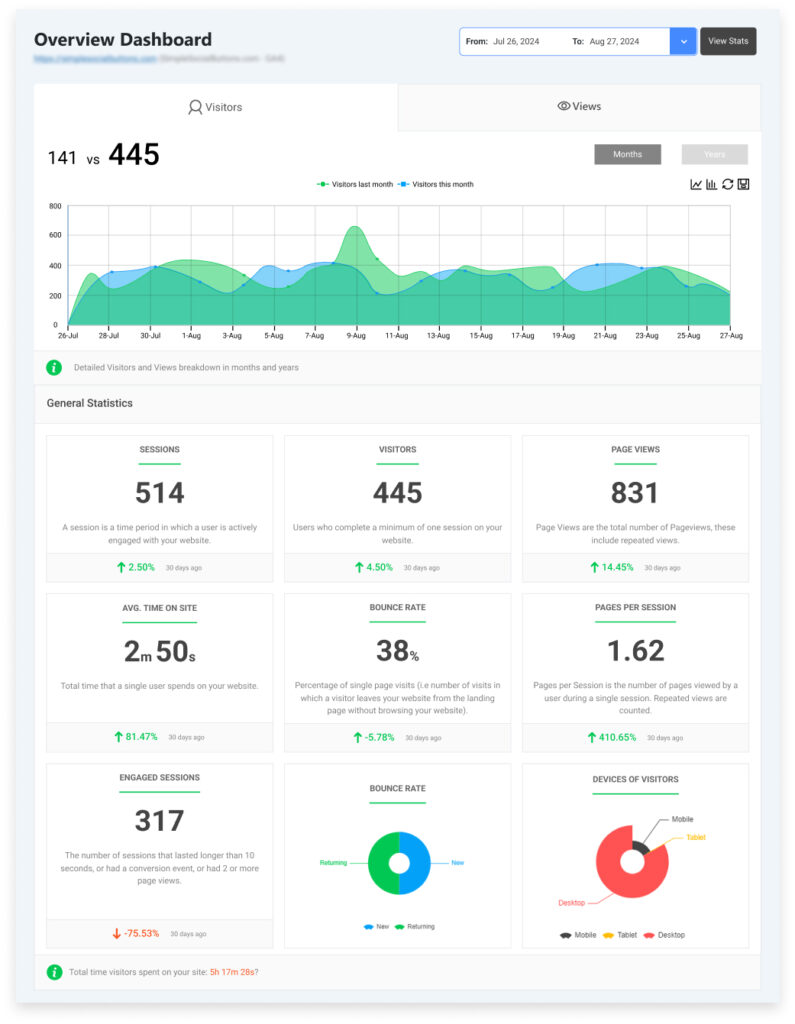
Analytify puts your GA4 data inside the WordPress dashboard, so you can check site traffic and user behavior without logging into Google Analytics separately. It doesn’t touch Firebase Analytics or the Firebase platform. Its job is GA4 on WordPress, specifically.
Here’s what that looks like in practice:
Key Benefits of Using Analytify:
| Analytify Feature | What It Does |
|---|---|
| GA4 setup | Connects your WordPress site to GA4 without editing tracking code. |
| Real-time data | Shows site traffic and user behavior inside the WordPress dashboard, without a separate login to Google Analytics. |
| Custom reports | Turns GA4 data into WordPress-native reports on user behavior and traffic sources. |
Analytify keeps GA4 reporting inside WordPress instead of a separate tab, which is the main time-saver for site owners who check traffic regularly.
GA4 vs Firebase (Frequently Asked Questions)
What’s the main difference between GA4 and Firebase Analytics?
GA4 tracks both web and mobile app activity in one property. Firebase Analytics is the same underlying data, but scoped to mobile app events and viewed through the Firebase console instead of the GA4 interface.
Can I use Firebase Analytics with GA4?
Yes. Firebase Analytics data flows into GA4 automatically once your app is linked, so mobile app events and web interactions show up together in one platform.
Which is better for mobile app developers: Firebase or GA4?
Firebase Analytics is the stronger fit for mobile-only app developers. If you need cross-platform tracking across web and app, GA4 is the better solution.
Why isn’t my GA4 data showing up in Analytify?
This is usually a connection issue, not a data issue: check that your WordPress site is linked to the correct GA4 property in Analytify’s settings, that you’re logged into the Google account with access to that property, and that the tracking code is active on the site. If the property was recently created, GA4 can take up to 24 to 48 hours to start populating data.
GA4 vs Firebase vs Firebase Analytics: The Bottom Line
If you’re focused on mobile app analytics, Firebase Analytics is the clear choice. If you need data from both web and mobile apps in one place, GA4 is the better fit. If you’re building the app itself and need analytics bundled with backend tools, that’s Firebase as a platform.
For WordPress sites specifically, Analytify puts that GA4 data inside your dashboard so you’re not switching tabs to check it.
You may also like to read:
- Analytify Vs Jetpack Stats – Which One Is Better?
- Analytify Free Vs Pro: Key Differences & Features Explained
- How To Set Up Google Analytics 4 (Easy Guide 2026)
Which one are you using right now, GA4, Firebase Analytics, or both? Tell us in the comments.