How to Improve CTR in Google Ads? Strategic Tactics for Higher Click-Through Rates

To improve CTR in Google Ads, I recommend fixing ad copy, keyword targeting, and ad relevance first, because these factors most directly move your click-through rate. CTR (Click-Through Rate) is the percentage of people who click your ad after seeing it. Expected CTR is a component of Quality Score, and Google states that higher quality ads can often lead to lower costs per click.
A CTR improvement compounds. Better ad copy and tighter keyword relevance raise your CTR. Expected CTR is one input to Google’s assessment of ad quality, and ad quality affects your Ad Rank and your cost per click. That is why I recommend optimizing CTR directly.
This guide is for advertisers who run Google Ads campaigns. I cover what counts as a good CTR, the factors that influence it, nine ways to improve it, and how to track the results, including refining your ad copy and optimizing your landing pages.
Increase Google Ads CTR (TOC):
What is Google Ads CTR?
CTR, or Click-Through Rate, is one of the most important metrics in Google Ads. It measures the effectiveness of your ads by calculating the ratio of clicks to impressions. In simple terms, it tells you how often people click your ad after seeing it.
The formula for calculating CTR is straightforward:
CTR = (clicks ÷ impressions) * 100
For example, if you had 20 clicks on 400 impressions, then your CTR would be 5%
This means that for every 100 times your ad was shown, 5 people clicked on it.
A higher CTR indicates that your ad is relevant to your audience and that it successfully encourages users to take action. For advertisers using Google Ads, improving CTR is essential for reducing costs and increasing ad effectiveness.
In Google Ads, expected CTR is one of three Quality Score components, alongside ad relevance and landing page experience. Google describes Quality Score as a diagnostic tool, not an input in the ad auction. Ad quality, including expected CTR, feeds into Ad Rank, and higher quality ads can often lead to lower costs per click (CPC). Improving CTR therefore helps you control both your ad position and your costs.
What is a Good CTR on Google Ads?
A good CTR for Google Ads search campaigns is typically around 3% to 5%, and display campaigns typically see 0.5% to 1%. The right target varies with your industry, your ad type (search or display), and how competitive your keywords are. Here is a general idea:
- Search Ads: A good CTR for Google Ads search campaigns is typically around 3% to 5%. However, highly relevant, well-targeted ads can achieve even higher click-through rates.
- Display Ads: Display ads tend to have lower CTR, with typical rates ranging from 0.5% to 1% because display ads appear on a wide range of websites, often in a more passive context.
Compare your CTR to industry averages to see where you stand. Then test and optimize your campaigns regularly. A good CTR on Google Ads should reflect the relevance of your ad and how well it matches user intent.
Key Factors That Influence CTR in Google Ads
Four factors most directly influence CTR on Google Ads: ad copy quality, keyword relevance, ad extensions, and ad position. Optimizing each one raises your click-through rate and lowers what you pay per click.
1. Ad Copy Quality
Your ad copy is often the first impression users have of your business. Crafting compelling, relevant, and persuasive ad copy is crucial for improving your CTR. Here are some best practices:
- Use Action-Oriented Verbs: Encourage users to take immediate action by using strong verbs like “Buy,” “Shop,” or “Get.”
- Clear Value Propositions: Clearly highlight what users will gain by clicking on your ad, whether it’s a discount, free shipping, or a special offer.
- Strong Calls-to-Action (CTAs): Having a clear CTA helps users know what to do next. Simple CTAs like “Learn More” or “Sign Up Today” can guide the user in the right direction.
The more relevant and engaging your ad copy is, the higher the chances of improving CTR in Google Ads. Always focus on communicating your value clearly and directly to your target audience.
2. Keyword Relevance
When your keywords align closely with what users are searching for, your CTR increases. Relevant keywords ensure your ad shows up for the right queries, making it more likely that users will click.
- Choose the Right Keywords: Select keywords that are specific to what your product or service offers. Using broad or irrelevant terms can lower your CTR as the ads might appear for users who aren’t interested.
- Keyword Match Types: Use the appropriate keyword match types, like broad match, phrase match, and exact match, to target the right audience. Exact match keywords are more likely to lead to clicks because they cater to users with a specific search intent.
Aligning your ad copy and keywords helps improve ad relevance, which is one of the most important factors for increasing CTR on Google Ads.
3. Ad Extensions
Ad extensions are additional pieces of information that can appear with your Google Ads, providing more opportunities for users to interact with your ad. Utilizing ad extensions effectively can significantly boost your CTR.
- Sitelink Extensions: These let you link to specific pages on your website, such as product categories or promotions, directly from your ad. They give users more choices and can increase CTR by offering relevant links.
- Call Extensions: If you want to encourage users to call you directly, call extensions are a great option. They are especially useful for mobile users and can drive higher engagement.
- Location Extensions: If you have a physical store, location extensions can help users find your business, improving the chances of clicks from users who are nearby.
Including ad extensions not only provides more information to potential customers but also makes your ad stand out more, leading to a higher CTR and improved visibility.
4. Ad Position
Your ad position (where your ad appears on the page) also plays a significant role in your CTR. Ads in higher positions, typically at the top of the page, receive more clicks.
- Bid Higher for Better Position: Increasing your bids can help secure a better ad position. A top position gives your ad more visibility and a higher likelihood of being clicked.
- Quality Score: Google rewards relevant ads with a higher Quality Score, which can improve your ad position without needing to increase your bid.
If you want to maximize your CTR on Google Ads, aim for higher positions by improving ad quality through relevant ad copy and effective keyword targeting.
How to Improve CTR in Google Ads (9 Proven Ways)
You improve CTR in Google Ads by tightening ad copy, sharpening keyword targeting, and testing continuously rather than making one change and stopping. Here are 9 proven ways to raise your CTR:
1. Refine Your Ad Copy and CTA
The first step in improving CTR is writing compelling and relevant ad copy. Your ad copy should grab attention and speak directly to the user’s needs. Focus on clear value propositions and action-oriented language.
What You Can Do:
- Use strong call-to-action (CTA) phrases like “Buy Now”, “Shop Today”, or “Get Your Discount”.
- Highlight the benefits or unique selling points (USPs) of your product or service. Show why your offer stands out.
- Be specific in your ad copy. If you are offering a sale, mention the percentage off or limited-time offer to create urgency.
Why It Works: When your ad copy is clear, relevant, and provides a direct call to action, users are more likely to click.
2. Improve Keyword Targeting
Proper keyword targeting is crucial for reaching the right audience. If your ad is shown to users who are genuinely interested in what you’re offering, your CTR will naturally improve.
What You Can Do:
- Use keyword match types like exact match or phrase match to show ads to users who are specifically searching for terms that relate to your products or services.
- Regularly review and update your keyword list based on the performance of your ads. This ensures you’re targeting high-intent keywords that deliver the best results.
- Use negative keywords to filter out irrelevant searches that are unlikely to result in clicks.
Why It Works: When your ads match user intent, they are more likely to engage with your offer, leading to better CTR.
3. Optimize Your Landing Pages
Your landing page plays a big role in your CTR. When users click on your ad, they should land on a page that matches the ad’s promise. If the landing page doesn’t align with the ad, users may leave immediately, increasing your bounce rate.
What You Can Do:
- Ensure the content on your landing page is relevant to the ad copy.
- Make the page easy to navigate, load quickly, and ensure it’s mobile-friendly.
- Include clear calls to action on your landing page as well, such as “Add to Cart” or “Learn More”.
Why It Works: A well-optimized landing page can help improve user experience and reduce bounce rates, increasing your chances of higher CTR.
4. Use Ad Extensions Effectively
Ad extensions , now called assets in Google Ads, add business information such as sitelinks, phone numbers, and locations to your ad. Google states that assets often increase your total number of clicks by giving users more ways to engage with your business.
What You Can Do:
- Use sitelink extensions to show additional links to important pages (like product categories, services, or promotions).
- Use call extensions to allow users to call your business directly from the ad.
- Use location extensions to show your physical store’s address to nearby users.
Why It Works: Ad extensions give users more reasons to click on your ad, increasing its overall visibility and providing more engagement options.
5. A/B Test Ads Continuously
A/B testing helps you compare different versions of your ads to see which one performs better. Regular testing of your ad copy, headlines, and CTAs can lead to a significant boost in CTR.
What You Can Do:
- Test variations of your ad copy, such as changing the headlines, descriptions, or CTAs.
- Experiment with different ad formats, such as responsive ads or image ads, to see what works best for your audience.
- Test your targeting settings to optimize which user groups see your ads.
Why It Works: A/B testing allows you to refine your ads and keep improving your CTR by identifying the most effective combinations.
6. Use Dynamic Keyword Insertion (DKI)
Dynamic Keyword Insertion (DKI) allows your ad to automatically include the keyword a user searched for. This makes the ad more relevant and increases the chances of increasing Google Ads click through rate.
What You Can Do:
- Use DKI in your ad headlines and descriptions to automatically include the keyword the user typed into the search bar.
- Make sure the inserted keyword flows naturally within the ad text so it doesn’t seem forced.
Why It Works: Ads that contain the user’s search query appear more relevant, leading to higher CTR.
7. Adjust Targeting for Better Audience Reach
Targeting the right audience helps raise Google Ads CTR because your ad reaches users who are most likely to engage. The more relevant your audience, the better your CTR will be.
What You Can Do:
- Use demographic targeting to focus on users based on age, gender, and location.
- Use interest targeting to show your ads to people who are interested in topics related to your products.
- Use remarketing to target users who have previously visited your website but did not convert.
Why It Works: By reaching users who are most likely to be interested in your product, you’re increasing the likelihood of clicks, improving your CTR.
8. Improve Ad Positioning
Your ad position can greatly impact CTR. Ads shown at the top of search results typically get more clicks than ads lower on the page.
What You Can Do:
- Aim for the top positions by adjusting your bid strategy or increasing your budget.
- Improve your ad quality (expected CTR, ad relevance, and landing page experience), because ad quality is part of Ad Rank, which sets your position in the auction.
- Focus on relevant keywords to improve your ad relevance, which can help you achieve better positions.
Why It Works: Ads in higher positions get more visibility, making them more likely to get clicks.
9. Use Targeted Negative Keywords
Using negative keywords is known as one of the best Google keyword CTR boosters. Negative keywords allow you to filter out irrelevant searches that waste your ad spend and hurt your CTR. By blocking irrelevant keywords, you ensure your ads show only to users interested in what you offer.
What You Can Do:
- Review your search terms regularly and add negative keywords for irrelevant or low-converting queries.
- Use tools like Google Keyword Planner to identify potential negative keywords that could prevent irrelevant clicks.
Why It Works: Negative keywords help you avoid wasting clicks on users who aren’t interested in your products, leading to a more relevant audience and higher CTR.
How to Track and Measure CTR Improvement in Google Ads
You track CTR improvements through the Google Ads dashboard, where CTR sits alongside impressions, clicks, and conversion rate for each campaign and ad group. Checking it weekly against your baseline tells you whether your changes are working:
Google Ads Dashboard
The Google Ads dashboard shows your CTR alongside other key metrics. Here is how to use it:
- View Click-Through Rate: From the Google Ads dashboard, you can access your CTR under the “Campaigns” or “Ad Groups” section. This will allow you to see the performance of your ads at different levels.
- Track Performance Over Time: You can compare your CTR over different time periods to understand how your ads are performing relative to previous months or weeks. This helps track the impact of changes you’ve made to your campaigns.
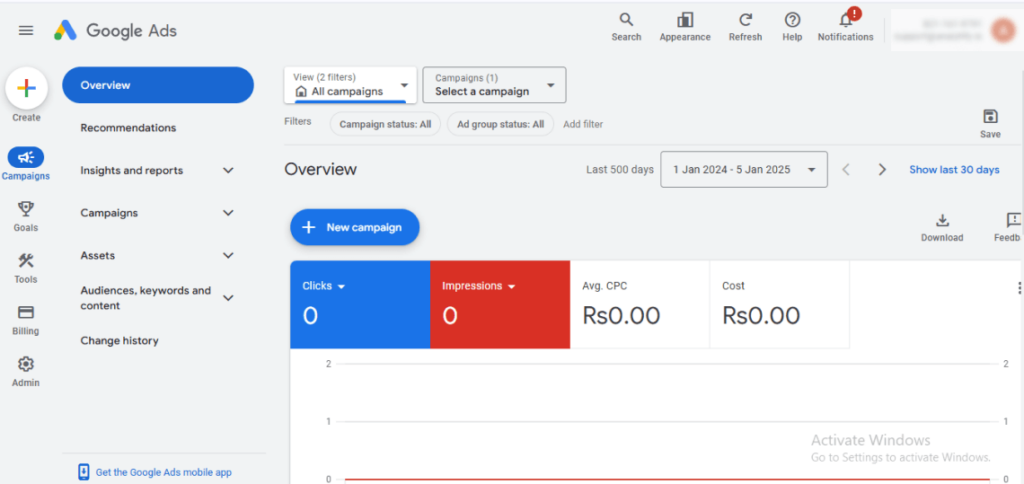
The Google Ads Dashboard also provides other key metrics, such as impressions and cost-per-click (CPC), which can give you a fuller picture of your campaign’s performance.
How Analytify Helps Track and Optimize Your Google Ads CTR
Join 20,000+ beginners & professionals who use Analytify to simplify their Google Analytics!
Analytify makes it easy to track and improve your CTR in Google Ads. It connects Google Ads with Google Analytics and displays everything in your WordPress dashboard. You can track the performance of your ads and get clear insights without switching between platforms.
- Easy Integration with Google Ads: With Analytify, you can link your Google Ads account to Google Analytics. This allows you to see CTR data and other important metrics directly in your WordPress dashboard.
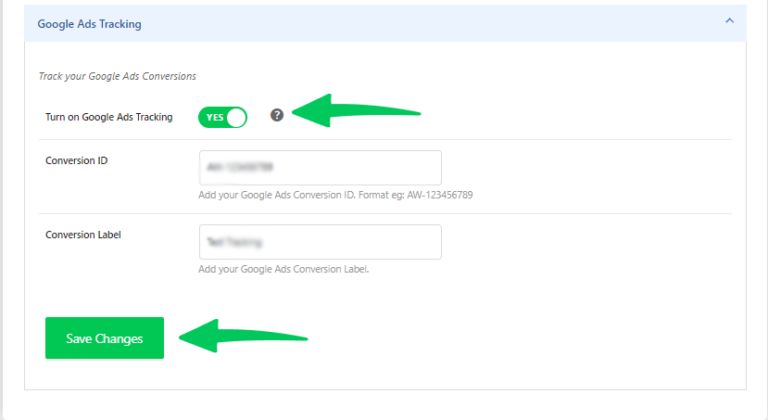
- Track CTR and Conversions Together: You can monitor both CTR and conversions in one place. This helps you understand not just how many people click your ads, but also whether those clicks lead to actions on your site.
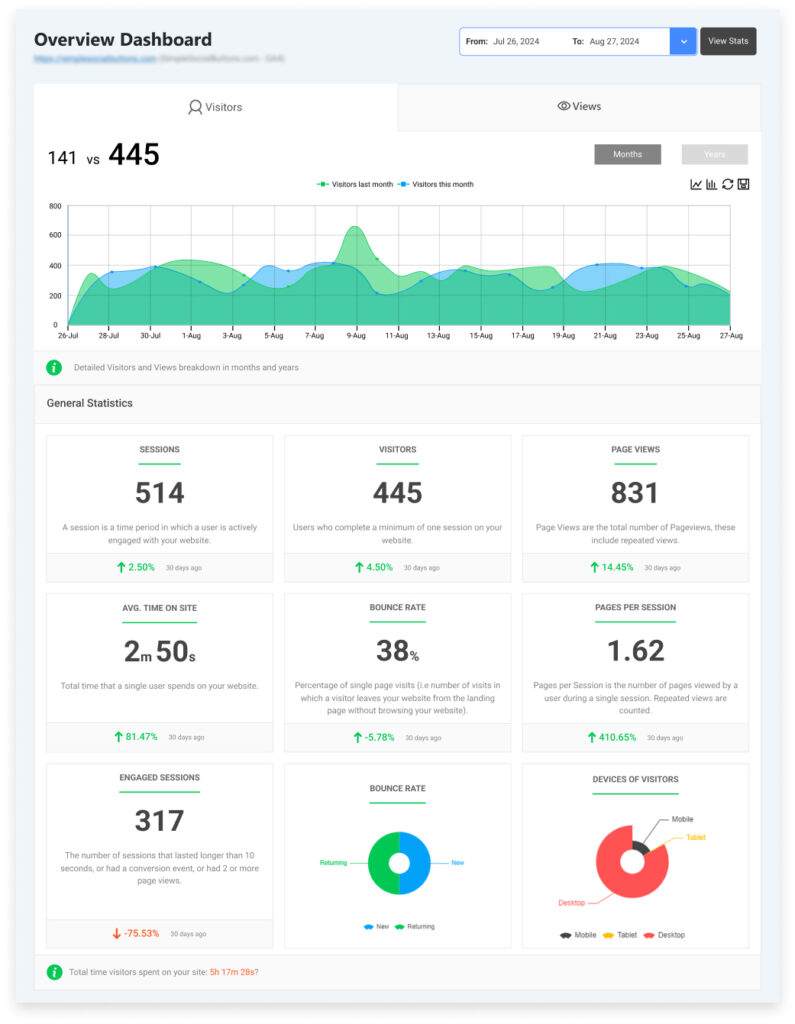
- Simple Data: Analytify presents your data in a simple format that is easy to understand. You don’t need to be a data expert to know how your ads are performing.
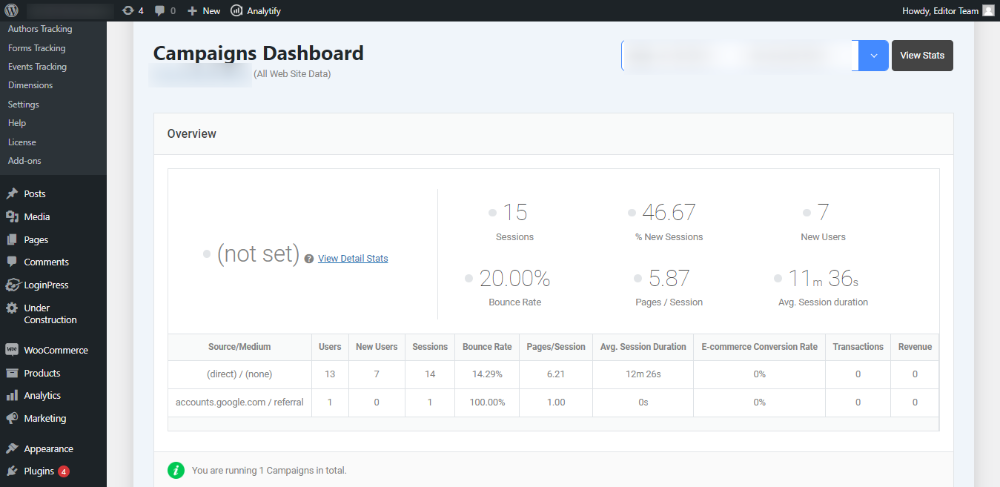
Analytify helps you focus on the metrics that matter most for improving CTR, like the performance of specific ads, keywords, or landing pages.
Analytify makes tracking and improving CTR easier by showing all the key data in one place. It saves you time and helps you make better decisions to improve your ad performance.
Google Ads CTR (FAQs)
1. What is the ideal CTR for Google Ads?
The ideal CTR for Google Ads can vary depending on your industry, campaign type, and goals. However, a good benchmark to aim for is a CTR between 3% to 5%. If your CTR is higher than this, it means your ads are performing well and attracting relevant clicks. If your CTR is lower, it might indicate that you need to refine your ad copy, targeting, or overall strategy.
2. How can I increase CTR in Google Ads quickly?
To improve CTR quickly, focus on the following:
Refine your ad copy: Make sure it’s clear, relevant, and includes strong calls to action (CTAs).
Use keyword match types effectively: Align your ad copy with the intent behind the keywords to attract more relevant clicks.
Use ad extensions: These add extra value to your ads and make them more noticeable, increasing your CTR.
A/B test your ads: Continuously test different variations to see what resonates most with your audience.
3. How do I know if my CTR is good or needs improvement?
You can assess your CTR’s performance by comparing it to the industry benchmarks or your previous campaigns. In general:
Below 1%: Your ad is likely not resonating with users, and you should review targeting, keywords, and copy.
1% to 3%: This is average for many industries, but it’s worth experimenting with optimizations for better performance.
Above 3%: This indicates strong performance, and you may be attracting quality traffic with highly relevant ads.
Also, monitor whether your increased CTR is leading to conversions. If your CTR is high but conversions are low, the issue might lie in the landing page or offer.
4. What is Dynamic Keyword Insertion (DKI), and how does it help improve CTR?
Dynamic Keyword Insertion (DKI) is a feature that automatically inserts the keyword that triggered your ad into your ad copy. This makes the ad more relevant to the search query, leading to better alignment with user intent. Ads with dynamically inserted keywords often perform better because they feel more personalized, which can result in higher CTR.
For example, if someone searches for “buy red shoes,” your ad could show: “Buy Red Shoes at Discount Prices.” This increase in relevance can significantly boost your CTR.
5. How often should I A/B test my Google Ads?
A/B testing should be an ongoing process. Ideally, you should test different elements of your ads, such as:
Headlines
Ad descriptions
Calls to action
Display URLs
Start with major variations, then refine over time based on the results. If you’ve implemented a new strategy (like ad extensions or a new keyword targeting approach), test it to ensure it improves your CTR. Remember to test one element at a time so you can pinpoint what works best.
6. Why is my Google Ads CTR dropping even though I haven’t changed anything?
A dropping CTR with no changes on your end usually comes from something shifting around your ad, not in it. New competitors entering the auction, a seasonal dip in search interest, ad fatigue from the same audience seeing your ad too many times, or a Google Ads layout change can all lower CTR without you touching the campaign. Check the auction insights report for new competitors first, then refresh your ad copy and creative if the same ads have been running for more than a few weeks.
Final Words: How to Improve CTR in Google Ads
You raise your Google Ads CTR by writing clear ad copy, refining keyword targeting, adding assets (formerly ad extensions), and using dynamic keyword insertion (DKI). A higher CTR means more potential customers click through to your site for the same number of impressions.
Here’s a quick recap of the key strategies to implement:
- Write compelling ad copy with clear value propositions and strong calls to action (CTAs).
- Target the right keywords and match them with user intent.
- Optimize landing pages to ensure a smooth transition from ad to content, maintaining user interest.
- Use ad extensions to provide extra information and improve visibility.
- A/B test your ads continuously to refine and improve performance.
- Implement Dynamic Keyword Insertion (DKI) to make your ads more relevant to the search query.
Remember, improving CTR is an ongoing process that involves regularly monitoring performance, making data-driven decisions, and testing new tactics. By applying these proven strategies, you’ll be well on your way to running more successful Google Ads campaigns, ultimately leading to higher engagement, more clicks, and better returns on your advertising investment.
If you are looking for a helpful plugin or tool to track and analyze your Google Ads campaigns effectively, consider using Analytify. With its easy-to-understand reports and insights, you can gain better control over your ad performance and further enhance your CTR.
You may also like to read:
What strategy will you try first to boost your Ad CTR, and how do you plan to measure its success? Let us know in the comments below!