How to Set Up a Multilingual Ecommerce Website? A Technical SEO Guide

To set up a multilingual ecommerce website, choose a platform, install your store, translate your product content, set up language URLs, test every language, and offer multilingual support. For WordPress users, I recommend WooCommerce with a translation plugin, and Weglot is the easiest one to set up.
A multilingual ecommerce website lets you sell to customers in their own language, which removes the language barrier that prevents international visitors from buying.
This guide is for store owners who want to launch a translated store. I cover the six steps, from choosing a platform to testing the user experience and tracking performance with Analytify.
Multilingual Ecommerce Website (TOC):
Why Does Your Ecommerce Website Need to Be Multilingual?
A multilingual online store reaches more customers, builds trust, and improves the user experience. Localized pages can also appear in search results for each language market.
| Benefit | What It Means for Your Business |
|---|---|
| Wider audience | Open your store to millions of new customers in new language markets |
| Better user experience | Customers understand product details, shipping, and policies in their own language |
| Higher conversion rates | Shoppers who can read product details and checkout steps in their own language can buy with more confidence |
| More trust and credibility | Localized content shows respect for the customer’s culture and builds brand confidence |
| SEO benefits | Multilingual content ranks in local search results, driving organic traffic from new regions |
| Competitive edge | Most local competitors do not serve international markets, giving you an advantage |
What to Consider Before Building a Multilingual Ecommerce Store
Before you start, consider your budget, technical skills, and the features you need. Check each platform against the four points below before you choose.
- Budget: multilingual ecommerce platforms range from free to enterprise pricing. Know your limit before evaluating options.
- Technical skills: some platforms are beginner-friendly; others need developer support. Choose based on your team’s capability.
- Features needed: confirm the platform supports multiple languages, multiple currencies, and international shipping.
- Read reviews: check user feedback for each platform before committing. Real-world experiences reveal limitations that feature lists do not.
How to Set Up Multilingual Ecommerce Website in 6 Steps
To set up a multilingual ecommerce website, follow these 6 steps: (1) choose a multilingual platform, (2) install and configure your store, (3) translate product content using a plugin, (4) set up a multilingual URL structure, (5) test the user experience, (6) offer multilingual customer support.
Step 1: Choose a Multilingual Ecommerce Platform
The best multilingual platform for most ecommerce businesses is WooCommerce (for WordPress users) or Shopify (for non-technical users). WooCommerce is free to start and highly customizable. Shopify is easier to set up but costs more monthly.
| Platform | Pricing | Ease of Use | Best For |
|---|---|---|---|
| Shopify | From $29/month | Very easy, beginner-friendly | Businesses wanting an all-in-one hosted solution |
| WooCommerce | Free core plugin (hosting costs extra) | Moderate, requires WordPress | WordPress users wanting full customization |
| Magento | Free community edition; enterprise pricing varies | High, requires developer expertise | Large enterprises with complex requirements |
Note: WooCommerce the core plugin is free, but costs for managed WordPress hosting, themes, and extensions can vary
What to look for in a multilingual online store platform:
- Native support for multiple languages, or easy integration with translation plugins
- Multiple currency support with automatic conversion
- International shipping and tax configuration
- SEO-friendly URL structure for different language versions
- Active community and plugin ecosystem for extensions
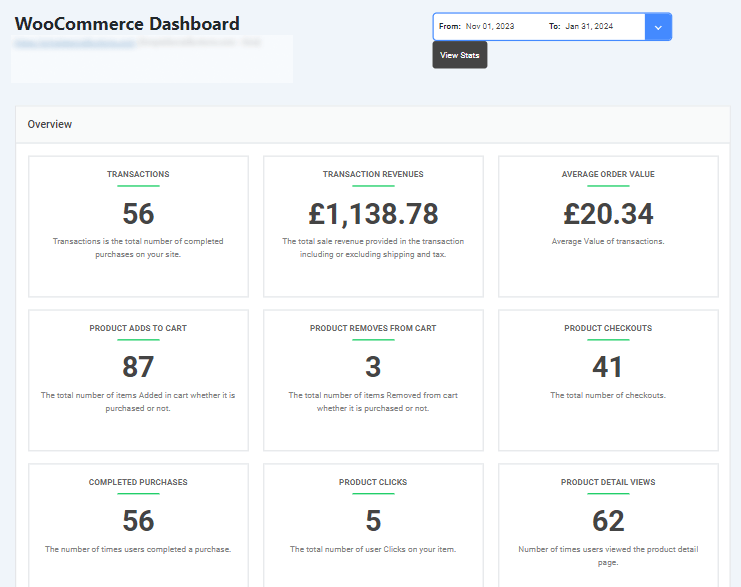
Tip: If you use WooCommerce, install the Analytify WooCommerce Tracking Addon to monitor sales, revenue, and product performance across all language versions of your store from one dashboard.
Step 2: Install and Configure Your Store (WooCommerce Setup)
WooCommerce multilingual ecommerce integration on WordPress takes four steps: install WordPress, install WooCommerce, configure store settings, and prepare for translation plugins.
Install WordPress
Most web hosting providers offer one-click WordPress installation. Set this up first before adding WooCommerce.
Install WooCommerce
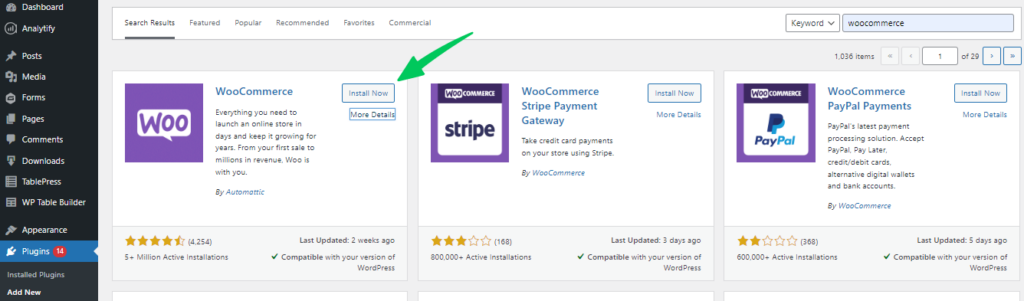
- Log in to your WordPress dashboard.
- Go to Plugins > Add New.
- Search for WooCommerce.
- Click Install Now, then Activate.
Read the complete set up guide on WooCommerce on WordPress.
Configure WooCommerce Settings
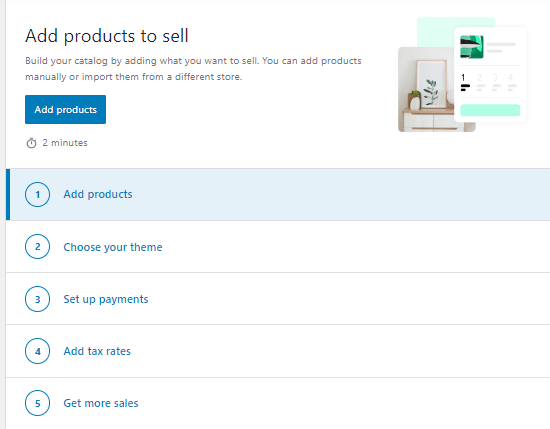
After activation, WooCommerce runs a setup wizard. Complete these settings before adding any products:
- General: store name, currency, and location
- Shipping: set up international shipping zones, rates, and methods
- Taxes: configure tax settings for each region you sell to
- Payments: choose payment gateways that work in your target countries
Choose a Compatible Theme
Use a WooCommerce-compatible theme. Popular options include Storefront and ShopIsle.
Before adding a translation plugin, confirm your theme and all active plugins are compatible with your chosen multilingual solution.
Step 3: Translate Product Content Using a Multilingual Ecommerce Solution
The most widely used multilingual ecommerce solutions for WordPress are WPML, Polylang, TranslatePress, and Weglot. Each offers a different balance of cost, ease of use, and translation control. Weglot is the easiest to set up; WPML offers the most control.
| Plugin | Translation Methods | Ease of Use | Pricing |
|---|---|---|---|
| WPML | Automatic, Manual, Professional services | Moderate | From $39/year |
| Polylang | Manual | Easy | Free; Premium from €99/year |
| TranslatePress | Manual, Visual editor | Easy | Free; Premium from €79/year |
| Weglot | Automatic, Manual, Professional services | Very easy | Freemium; paid from €9/month |
Step 4: Translate Product Information in WordPress (Using Plugins)
Translate your WooCommerce product information with a multilingual plugin: WPML, Polylang, TranslatePress and Weglot all work for this.
The table below compares the key features and pricing of the four plugins.
| Feature | WPML (WordPress Multilingual Plugin) | Polylang | TranslatePress | Weglot |
| Translation Methods | Automatic, Manual, Professional Services | Manual | Manual, Visual | Automatic, Manual, Professional Services |
| Advanced Features | Custom code translation, translation role management | Multilingual widgets, Media Translation | Translation revisions, glossary builder | SEO optimization, Machine translation editing, multilingual forms compatibility |
| Ease of Use | Moderate | Easy | Easy | Easy |
| Pricing | Starts at $39 per year | Free, Premium plan starts at €99 | Free, Premium plan starts at €79 | Freemium (limited features), Paid plans start at €9 per month |
How to Set Up Weglot for Multilingual Online Store Integration
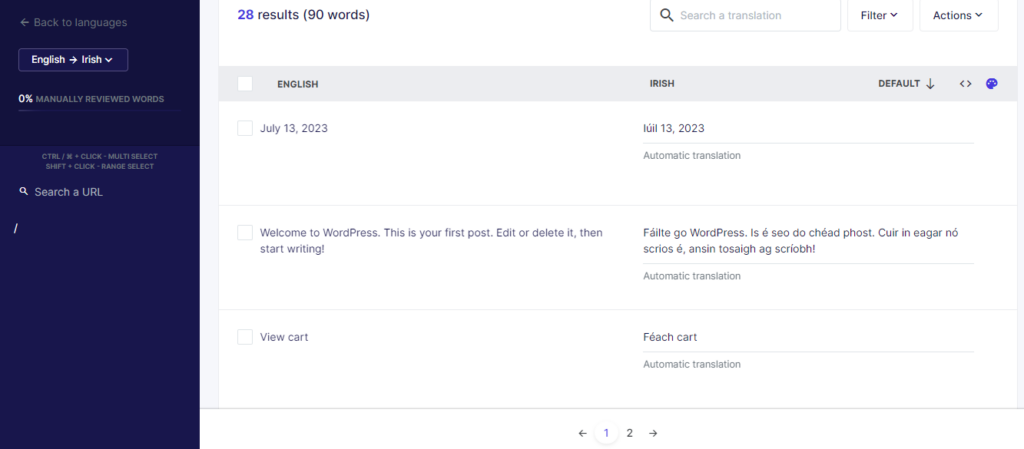
To set up Weglot, install and activate the Weglot plugin, create a free Weglot account to get an API key, then enter the key and choose your languages. Follow these steps:
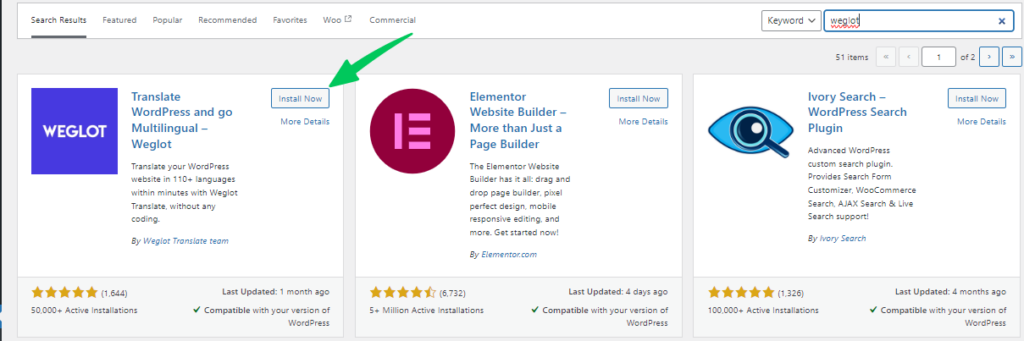
- Go to Plugins > Add New in WordPress.
- Search for Weglot and click Install Now, then Activate.
- Create a free Weglot account to get your API key.
- Go to Weglot settings in your WordPress dashboard.
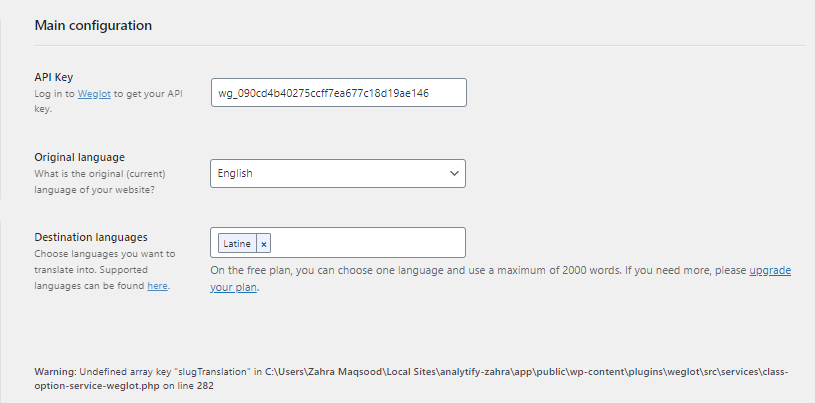
- Enter your API key and set your original language.
- Select the target languages you want to translate into.
- Choose your translation method: automatic, manual, or professional.
Step 5: Set Up a Multilingual URL Structure
Subdirectories suit most multilingual stores. A multilingual URL structure gives each language version its own URL, and hreflang annotations help Google show searchers the correct one. Use subdirectories (yourstore.com/fr/) for simplicity or subdomains (fr.yourstore.com) for stronger language separation. Subdirectories are recommended for most multilingual online store solutions.
| URL Structure | Example | Pros | Cons |
|---|---|---|---|
| Subdirectories | yourstore.com/fr/products/ | Simple to set up; easy for users to understand | All content sits under one domain |
| Subdomains | fr.yourstore.com/products/ | Clear language separation | Needs extra DNS configuration; users might not recognize the language targeting from the URL |
| Country domains | yourstore.fr/products/ | Strongest local SEO signal for each country | Most expensive; requires purchasing separate domains |
Technical setup checklist for multilingual URLs:
- Add hreflang tags to signal language and regional targeting to Google
- Submit your sitemap to Google Search Console (a sitemap can also carry the hreflang annotations for every language version)
- Ensure each language version has its own canonical URL
- Set up 301 redirects if changing from an existing URL structure
Note: Google recommends hreflang tags for language versions of a page. Without them, Google may show the wrong language version to users in different countries. Each language version must list itself and all other language versions.
Step 6: Test the User Experience Before Launch
Before launching your multilingual store, test it in each language for translation accuracy, checkout functionality, browser compatibility, and mobile responsiveness. Problems found before launch cost far less to fix than problems found after.
| Test Type | What to Check |
|---|---|
| Translation accuracy | All product names, descriptions, CTAs, and policies are correctly translated and culturally appropriate |
| Checkout flow | The full purchase process works in every language, including payment and confirmation emails |
| Cross-browser testing | Store works correctly in Chrome, Firefox, Safari, and Edge |
| Mobile responsiveness | Store looks and functions correctly on phones and tablets |
| Form functionality | Contact forms, search, and sign-up forms work in all languages |
| Navigation | Language switcher works correctly and directs users to the right version |
Tip: Use real users from your target markets for usability testing when possible. They will spot issues that automated testing misses.
Step 6: Offer Customer Support in Multiple Languages
Offer multilingual customer support by training your existing team, hiring multilingual staff, using machine translation with human review, or building a translated knowledge base.
| Support Option | Best For | Cost Level |
|---|---|---|
| Train existing team in target languages | Teams with time and budget for language learning | Low to medium |
| Hire multilingual support staff | Stores with high international traffic volumes | Medium to high |
| Machine translation tools (with human review) | Handling initial responses at scale | Low |
| Live chat with translation support | Real-time assistance for international customers | Medium |
| Translated knowledge base and FAQ | Empowering customers to self-serve | Low (one-time investment) |
Priority support channels to localize:
- Help center and FAQ pages in each target language
- Email support with templates in each language
- Live chat with language routing or translation integration
- Return and refund policy pages in each language
How to Track Your Multilingual Ecommerce Performance with Analytify
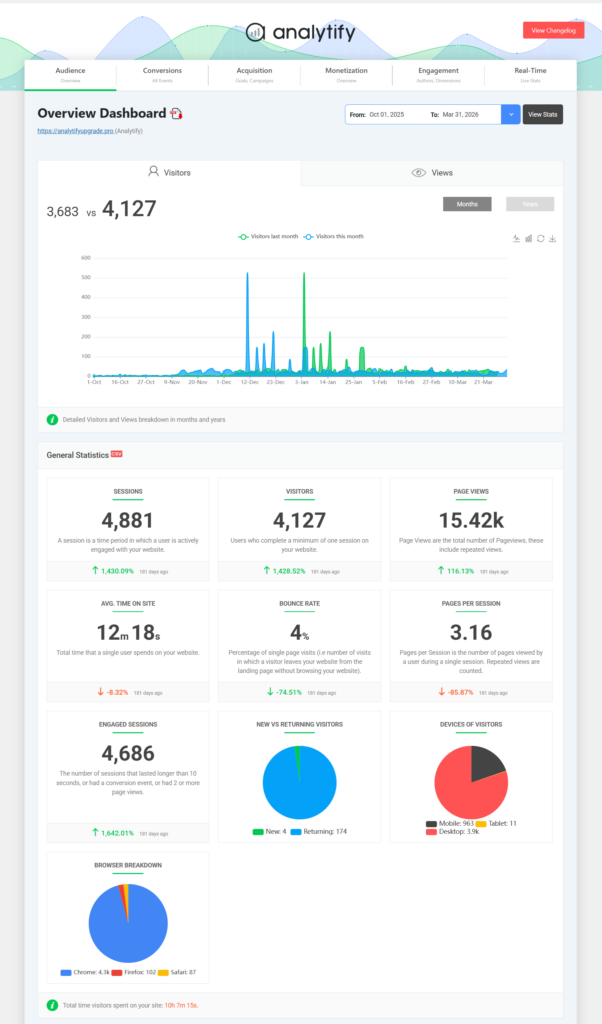
Analytify tracks performance for each language version of your multilingual ecommerce store inside WordPress. It shows traffic by region, keyword performance per language, engagement metrics, and conversion rates, all without opening GA4 separately.
| Analytify Feature | How It Helps Your Multilingual Store |
|---|---|
| Regional Traffic Reports | See which countries and regions send traffic to each language version |
| Search Term Dashboard | Track which local keywords drive organic traffic in each language market |
| WooCommerce Tracking Addon | Monitor sales, revenue, and product performance per language version |
| Engagement Metrics | Compare bounce rate and session duration across different language versions |
| Real-Time Dashboard | Monitor performance immediately after launching a new language version |
| Campaign Tracking (UTM) | Measure the ROI of international marketing campaigns by language and region |
Tip: After launching a new language version, check Analytify’s real-time dashboard immediately. High bounce rates in a specific language version often signal translation quality issues or checkout problems.
Frequently Asked Questions
1. What is the best platform for creating a multilingual ecommerce store?
For WordPress users, WooCommerce is the best multilingual ecommerce platform. It is free to start, highly customizable, and supports all major translation plugins. For non-technical users, Shopify is the easiest option with strong built-in multilingual support. Large enterprises typically choose Magento for its scalability.
2. How do I translate product information in my WooCommerce store?
Use a translation plugin such as Weglot, WPML, Polylang, or TranslatePress. Weglot is the easiest to set up and offers automatic translation with a manual editing option. WPML gives the most control. All four integrate directly with WooCommerce and allow you to translate product names, descriptions, slugs, and meta tags.
3. Is a responsive design crucial for a multilingual store?
Absolutely! A responsive design ensures your website adapts seamlessly to various devices (desktops, tablets, mobiles) and screen sizes, regardless of the displayed language. This provides a consistent and positive user experience for your global audience.
4. What are the best URL structures for multilingual ecommerce?
Subdirectories (yourstore.com/fr/) are the recommended option for most multilingual ecommerce sites. They are simple to set up, keep all language versions under one domain, and are well supported by Google. Subdomains and country-specific domains offer stronger geographic signals but require more technical configuration and higher cost.
5. How can I optimize my store for multilingual SEO (Search Engine Optimization)?
The key multilingual SEO steps are:
Add hreflang tags to every language version to tell Google which audience each page targets
Research keywords separately in each target language — do not translate English keywords directly
Optimize title tags, meta descriptions, and heading tags in each language
Submit language-specific sitemaps to Google Search Console
Build local backlinks from regional publishers and directories in each target market
6. How do I ensure a smooth user experience for international customers?
Test your store in each language before launch. Use real users from target markets for usability testing. Check translation accuracy, checkout flow, mobile responsiveness, and language switcher functionality. After launch, monitor engagement metrics by region in Analytify to catch issues early. High bounce rates on a specific language version often indicate a translation or UX problem
7. How can I offer customer support in multiple languages?
Train your existing team or hire multilingual support staff.
Offer multi-channel support through various channels (live chat, email, phone, etc.).
Develop a comprehensive knowledge base and FAQs section translated into your target languages.
Final Thoughts
A multilingual ecommerce site lets customers buy from your store in their own language.
Quick checklist to set up multilingual ecommerce:
| Step | Action | Tool |
|---|---|---|
| 1 | Choose a multilingual ecommerce platform | Shopify, WooCommerce, or Magento |
| 2 | Install and configure your store | WordPress + WooCommerce |
| 3 | Translate product content | Weglot, WPML, Polylang, or TranslatePress |
| 4 | Set up multilingual URL structure | Subdirectories with hreflang tags |
| 5 | Test the user experience | Manual + user testing in each language |
| 6 | Offer multilingual customer support | Translated FAQ, email templates, live chat |
| Ongoing | Track performance by language and region | Analytify + GA4 |
A multilingual store can raise conversion rates and search visibility in new markets.
Further Reading:
Have questions about setting up your multilingual ecommerce site? Leave a comment below.