Which Tags are Standard Google Analytics Campaign Parameters? (2026)

Are you wondering how to measure the success of your marketing campaigns effectively? Understanding which tags are standard Google Analytics campaign parameters can significantly enhance your ability to track campaign performance and optimize future strategies.
In this article, we will examine standard and optional campaign parameters in Google Analytics, their importance for understanding user behavior and conversions, best practices for implementation, and how tools like Analytify can simplify the tracking process.
Let’s explore them for your next marketing campaign!
GA4 Campaign Parameters (TOC):
What is Campaign Tracking in Google Analytics?
Campaign tracking in Google Analytics is the process of measuring how users arrive at your website from different marketing channels. It works by adding UTM parameters to your URLs. When users click those links, GA4 records the campaign details so you can analyze traffic sources, channel performance, and conversions.
UTM stands for Urchin Tracking Module. It is a system developed by Urchin Software, which Google acquired and built into Google Analytics.
Without UTM parameters, Google Analytics groups most campaign traffic under Direct or Unknown. With UTM parameters, every click is attributed to the right source, medium, and campaign.
| Without UTM Parameters | With UTM Parameters |
|---|---|
| Traffic source shows as Direct or Unknown | Traffic attributed to the correct source (facebook, email, google) |
| Cannot compare campaign performance | Each campaign tracked and compared individually |
| Cannot measure ROI per channel | ROI calculable per source, medium, and campaign |
| A/B testing for ads is difficult | utm_content separates ad variations for direct comparison |
Which Tags Are Standard Google Analytics Campaign Parameters?
The five standard Google Analytics campaign parameters are: utm_source, utm_medium, utm_campaign, utm_term, and utm_content. These are the tags Google Analytics recognizes natively for tracking campaign performance in GA4.
| Parameter | What It Tracks | Required? | Example Value |
|---|---|---|---|
| utm_source | Where the traffic comes from | Yes | facebook, google, newsletter |
| utm_medium | The marketing channel or delivery method | Yes | email, cpc, social, organic |
| utm_campaign | The name of the specific campaign | Yes | summer_sale, product_launch |
| utm_term | The keyword that triggered a paid search ad | Optional | running_shoes, seo_tools |
| utm_content | The specific ad or content variation clicked | Optional | cta_button, banner_top |
1. utm_source
What it does: Identifies where your traffic comes from.
Use it to distinguish between platforms: Google, Facebook, LinkedIn, a newsletter, or a partner website.
Example:
utm_source=facebook
Traffic from this URL is attributed to Facebook in your GA4 reports.

Why it matters:
- Shows which platforms drive the most traffic
- Helps you compare organic vs. paid sources
- Reveals which partners or referrers send valuable visitors
2. utm_medium
What it does: Defines the marketing channel or delivery method.
Use it to separate email from paid search from social from display advertising.
Example:
utm_medium=email
Traffic from this URL is attributed to the email channel.

Common medium values:
- cpc: cost-per-click paid search ads
- email: email campaign links
- social: social media posts or ads
- display: display or banner advertising
- organic: not typically set manually; used by Google automatically
3. utm_campaign
What it does: Tracks the name of a specific marketing campaign.
Use it to measure how individual campaigns perform against each other.

Example:
utm_campaign=fall_sale
All traffic from this campaign is grouped together in GA4 reports, regardless of source or medium.
Naming conventions to follow:
- Use lowercase only to avoid duplicate entries (fall_sale and Fall_Sale appear as two separate campaigns)
- Use underscores instead of spaces
- Use descriptive names: product_launch_april_2026, not campaign1
4. utm_term
What it does: Tracks the keyword that triggered a paid search ad.
It is primarily used in Google Ads and other paid search campaigns to identify which keywords drive traffic and conversions.
Example:
utm_term=running_shoes
This tells GA4 that a user clicked through after searching for ‘running shoes’.

When to use it:
- In Google Ads campaigns to track keyword performance
- In any paid search where you want to compare individual keyword ROI
- To identify which terms convert vs. which generate clicks but no conversions
5. utm_content
What it does: Differentiates between multiple versions of content within the same campaign.
Use it when running A/B tests or when you have multiple ads pointing to the same destination.
Example:
utm_content=cta_button
This tells GA4 that the user clicked the CTA button version of the ad, not the banner or text link version.

When to use it:
- A/B testing two versions of an email subject line or CTA
- Tracking multiple ad formats: banner, video, carousel
- Differentiating two placements of the same link in one email
Importance of Google Analytics Campaign Parameters
Here’s the importance of measuring each Google Analytics campaign parameter individually, explaining how each one contributes to better tracking and optimization of marketing efforts:
Google Analytics campaign parameters are essential tools for tracking the performance of your marketing efforts across various channels. Adding these parameters to your URLs lets you gain a deeper understanding of how users engage with your content, which marketing channels are most effective, and what drives conversions. These parameters, often called UTM parameters, are particularly important for analyzing specific campaigns’ return on investment (ROI).
- Tracking Traffic Sources: By using campaign parameters in Google Analytics, Such as Utm_source, you can identify the specific traffic sources to your website, such as whether visitors came from social media, email, or paid ads. This enables you to understand which channels are driving the most traffic.
- Measuring Campaign Success: utm_medium helps you compare traffic from different mediums, such as paid search, email campaigns, and social media, to adjust your strategy to focus on the most successful channels.
- Analyzing keyword performance: Measuring keywords by campaign parameters such as Utm term ( Keyword ) helps you determine which search terms are most effective in driving qualified traffic. This allows you to optimize paid search campaigns by focusing on high-performing keywords and excluding those that don’t convert.
- Evaluating Individual Campaign Performance: Tracking campaign names, such as product_launch and summer_sale, allows you to assess the performance of each marketing initiative individually. You can see how different campaigns contribute to overall traffic, conversions, and revenue, helping you fine-tune future campaigns based on past performance.
- Analyzing Content Variations: By measuring content variations, you can identify which creatives, calls-to-action, or messages resonate better with your audience and optimize your campaigns accordingly. This is valuable for A/B testing and analyzing which version of your content drives the most engagement or conversions.
- Optimizing Marketing Strategies: With detailed data on which channels and campaigns generate the most conversions, you can fine-tune your marketing strategies to improve performance and ROI. Understanding the role of each campaign parameter helps you identify which campaigns need adjustments.
By measuring these Google Analytics campaign parameters, marketers can understand their campaign’s performance and make decisions to improve ROI.
Optional Campaign Parameters in Google Analytics
Optional campaign parameters in Google Analytics extend standard UTM tracking with additional detail. The most useful optional parameters are utm_id, utm_source_platform, utm_creative_format, and utm_marketing_tactic. These are not reported natively in GA4 but can be used for segmentation and custom reporting.
| Optional Parameter | What It Tracks | When to Use It |
|---|---|---|
| utm_id | A unique campaign ID that links traffic to a specific campaign in your internal systems | When you need to match GA4 data to an external campaign database |
| utm_source_platform | The platform of the traffic source (Facebook, Twitter, TikTok) | When targeting multiple platforms with the same medium |
| utm_creative_format | The format of the ad: banner, video, carousel, native | When testing different ad formats in the same campaign |
| utm_marketing_tactic | The strategic approach: retargeting, awareness, conversion | When segmenting campaigns by funnel stage or goal type |
Note: These optional parameters are not displayed in GA4’s default reports. You must create custom reports or use BigQuery to analyze them.
Which Campaign Parameter Is Not Standard in Google Analytics?
The parameters that are not standard in Google Analytics are utm_source_platform, utm_creative_format, utm_marketing_tactic, and utm_id. These are optional, extended parameters that are not shown in GA4’s default reporting interface. The five standard parameters are: utm_source, utm_medium, utm_campaign, utm_term, and utm_content.
| Parameter Type | Parameters | Available in GA4 Default Reports? |
|---|---|---|
| Standard (native GA4) | utm_source, utm_medium, utm_campaign, utm_term, utm_content | Yes |
| Optional (extended) | utm_id, utm_source_platform, utm_creative_format, utm_marketing_tactic | No (requires custom reports or BigQuery) |
How to View GA4 Campaign Parameters in Your Reports
To view GA4 campaign parameters, go to Reports > Acquisition > Traffic Acquisition. Set the primary dimension to Session Source/Medium or Session Campaign. This shows how each UTM-tagged campaign contributed to your traffic and conversions.
Step-by-step process:
- Or select Session Campaign to group results by campaign name.
- Log in to GA4 and click Reports in the left menu.
- Go to Acquisition >> Traffic Acquisition.
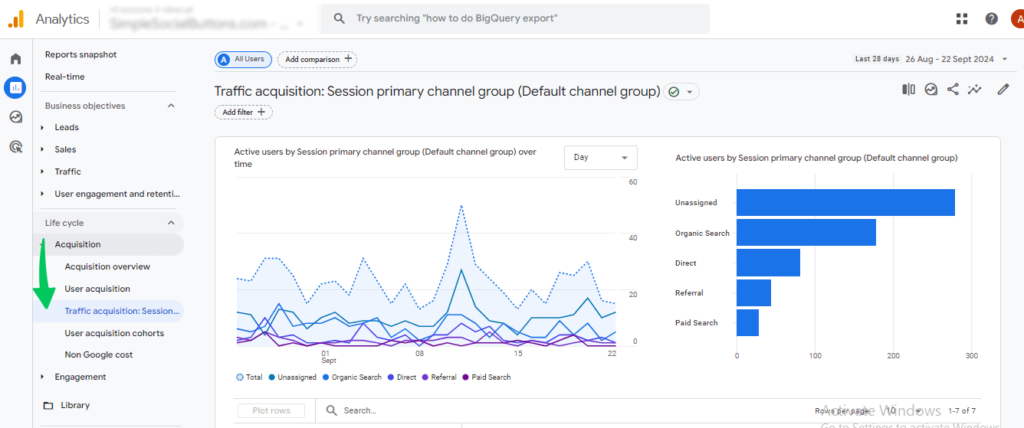
- Click the Primary Dimension dropdown.
- Select Session Source/Medium to see UTM source and medium data.
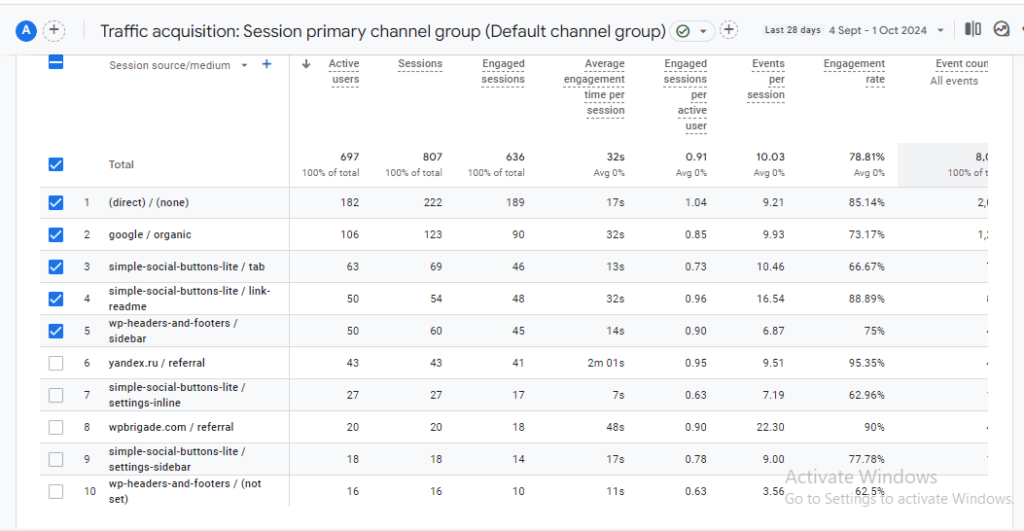
What you can analyze from this report:
- Which source and medium combinations drive the most sessions
- Which campaigns generate the most conversions and revenue
- How engagement metrics (bounce rate, session duration) vary by campaign
- Which keyword terms (utm_term) convert best in paid search
Tip: Bookmark your most-used Traffic Acquisition report view in GA4. It saves time when checking campaign performance daily or weekly.
Tracking Campaign Parameters with Analytify
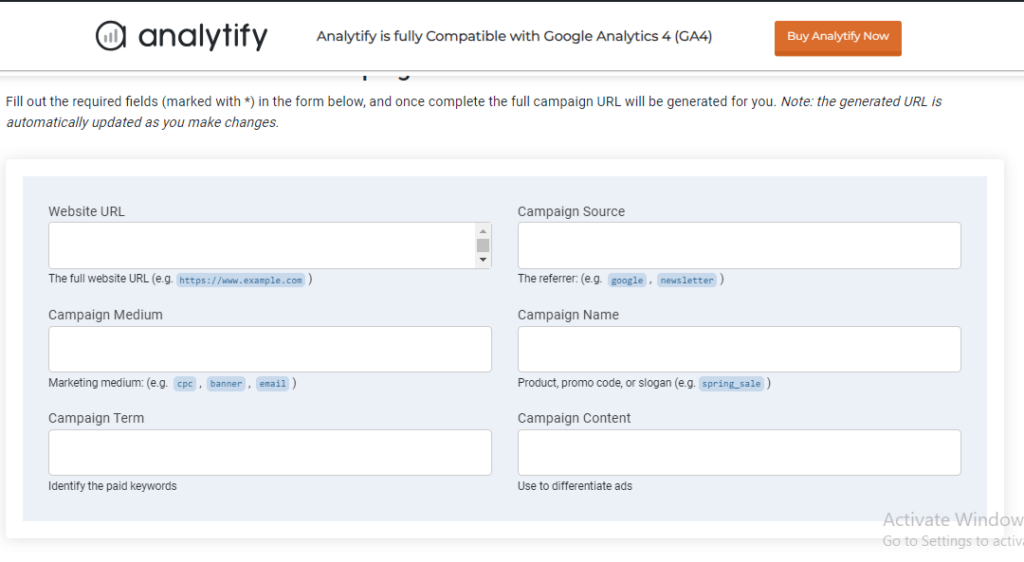
Analytify simplifies UTM parameter tracking for WordPress users. Its UTM Campaign URL Builder generates correctly formatted tracking URLs without errors. The Campaign Tracking Addon displays UTM performance data directly in your WordPress dashboard, eliminating the need to navigate GA4 for routine campaign reporting.
Join 50,000+ beginners & professionals who use Analytify to simplify their Google Analytics!
Check out the detailed instructions here on how to set up and integrate Google Analytics 4 with Analytify.
One of the standout features of Analytify is its UTM Campaign URL Builder, which streamlines the process of creating UTM links.
Additionally, Analytify offers a Campaign Tracking Add-on specifically designed to enhance your ability to monitor and analyze campaign performance. This add-on provides detailed reports on campaigns’ performance across different platforms and channels.
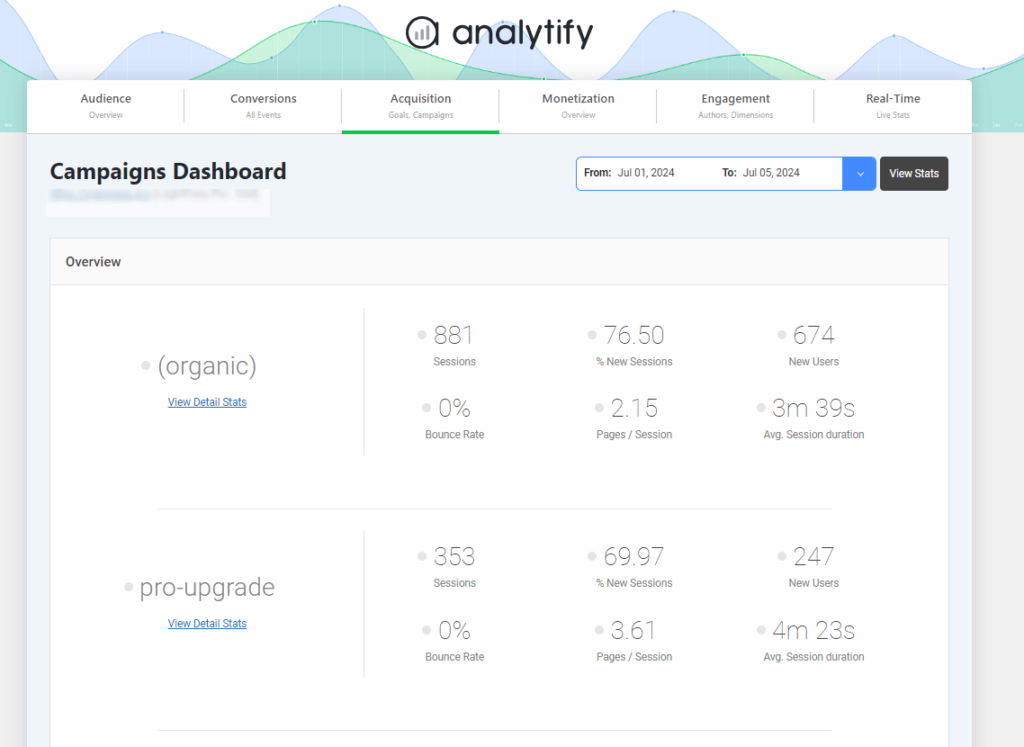
With detailed reports in your WordPress admin dashboard, you can easily track user interactions and conversions, allowing for more granular analysis and optimization of your marketing efforts.
Best Practices for Implementing Google Analytics Campaign Parameters
The most important best practices for Google Analytics campaign parameters are: use consistent lowercase naming, only tag non-Google traffic manually, test URLs before launch, use a UTM builder to avoid errors, and document all campaign parameters in a shared spreadsheet.
| Best Practice | Why It Matters | How to Apply It |
|---|---|---|
| Use lowercase consistently | utm_source=Facebook and utm_source=facebook appear as two separate sources in GA4 | Standardize all UTM values in lowercase across your team |
| Do not tag Google Ads traffic manually | Google Ads auto-tagging (gclid) is more accurate than manual UTM tagging for Google Ads | Enable auto-tagging in Google Ads; use UTM only for other channels |
| Test URLs before launch | Broken UTM tags result in untracked traffic and lost data | Click every tagged URL and verify data appears in GA4 DebugView |
| Use a UTM builder | Manual typing introduces encoding errors: spaces, special characters | Use Analytify’s UTM builder or Google’s Campaign URL Builder |
| Document all parameters | Teams use different naming conventions without a shared reference | Keep a UTM tracking spreadsheet: source, medium, campaign, date |
| Encode special characters | Spaces and symbols break URL functionality | Replace spaces with underscores; use %20 for encoded spaces if needed |
| Use only necessary parameters | Too many parameters make URLs long and reports complex | Start with source, medium, and campaign; add term and content only when needed |
How to Use Campaign Parameters in Google Analytics to Refine Strategy
Campaign parameters in Google Analytics turn raw traffic data into strategic decisions. Use utm_source and utm_medium to find your highest-converting channels, utm_campaign to compare initiatives, utm_term to optimize keyword spend, and utm_content to identify the best-performing creative.
| Strategic Goal | Parameter to Analyze | Action to Take |
|---|---|---|
| Find best-performing channels | utm_source + utm_medium | Increase budget and content for top-converting combinations |
| Compare campaign effectiveness | utm_campaign | Double down on campaigns with highest conversion rate and ROI |
| Optimize paid keyword spend | utm_term | Pause low-converting keywords; increase bids on high-converting ones |
| Improve ad creative | utm_content | Replace underperforming ad variants with the top-performing version |
| Optimize campaign timing | utm_campaign + date analysis | Schedule future campaigns for the days and months with peak engagement |
| Improve audience targeting | utm_source + demographic data | Adjust targeting to match the geographic and demographic segments that convert best |
Campaign Parameters in Google Analytics (FAQ)
1. Does GA4 recognize UTM parameters?
Yes, GA4 recognizes UTM parameters and uses them to track the source, medium, and campaign details of your marketing efforts. These parameters help identify where your traffic is coming from and how users interact with your content across different campaigns.
2. What happens if UTM parameters are not set correctly?
Incorrectly set UTM parameters can lead to inaccurate tracking, broken URLs, or duplication in Google Analytics reports, which can skew campaign performance data.
3. Do UTM parameters affect SEO?
No, UTM parameters do not affect SEO. However, they should be used carefully to avoid creating multiple versions of the same URL in analytics reports.
4. How can I generate UTM parameters easily?
You can use UTM builders like Google’s Campaign URL Builder or tools such as Analytify’s UTM Builder to generate UTM parameters quickly and ensure they are correctly formatted for tracking in Google Analytics.
5. Is it mandatory to use all UTM parameters in every campaign?
No, only utm_source, utm_medium, and utm_campaign are essential for tracking. The other parameters, like utm_term and utm_content, are optional and can be used for more granular tracking.
Final Thoughts: GA4 Campaign Parameters
The five standard Google Analytics campaign parameters are what make accurate campaign tracking possible.
| Parameter | Use It For | Required? |
|---|---|---|
| utm_source | Identifying the platform or website sending traffic | Yes |
| utm_medium | Defining the marketing channel (email, cpc, social) | Yes |
| utm_campaign | Naming the specific campaign for comparison | Yes |
| utm_term | Tracking paid search keywords | Optional |
| utm_content | Differentiating ad variations or content in A/B tests | Optional |
Use Analytify’s UTM Campaign URL Builder to generate correctly formatted URLs and the Campaign Tracking Addon to monitor performance inside your WordPress dashboard.
If you want to learn more about setting up UTM parameters in GA4, check out this guide on GA4 UTM parameters.
If you have any further questions, feel free to leave a comment below!