AI Content Creation Strategies & Tools You Should Use in 2026

AI content creation is no longer about speed alone; it’s about performance.
While AI tools can generate ideas, drafts, and optimized pages in minutes, many teams struggle to understand why their AI-generated content fails to engage or convert. The problem isn’t AI quality; it’s the lack of measurable feedback.
Modern AI content creation requires more than prompts and publishing. It demands a structured system where AI supports ideation and drafting, humans guide strategy and accuracy, and performance data determines what works and what doesn’t.
By integrating GA4 insights directly into WordPress, plugins like Analytify allow you to evaluate, refine, and improve AI-assisted content where it’s created.
In this guide, we’ll cover proven AI content creation strategies, recommended AI content creation tools, and step-by-step workflows, showing how analytics turns AI output into content that drives traffic, engagement, and measurable growth.
AI Content Creation (TOC):
What is AI Content Creation?
AI content creation is a workflow where AI assists research and drafting, while analytics validates performance and guides optimization.
AI content creation combines:
- Large Language Models (LLMs) for ideation, drafting, and expansion
- SEO and optimization tools for structure and relevance
- Analytics for validation, iteration, and continuous improvement
The objective is no longer speed alone. The objective is predictable, measurable content performance.
How AI Content Generation Has Evolved
AI for content creation has shifted significantly over the past few years:
Earlier AI usage:
- Generate a draft
- Light editing
- Publish and move on
AI content creation now:
- Generate ideas based on audience and search intent
- Draft structured, SEO-aware content
- Optimize before publishing
- Measure real user behavior
- Improve content and prompts using performance data
This evolution reflects a broader change in how content is evaluated. With AI-powered search results, summaries, and overviews becoming more common, content must now be clear, structured, and engagement-focused to perform well, both for users and AI systems.
AI-Assisted vs Fully Automated Content
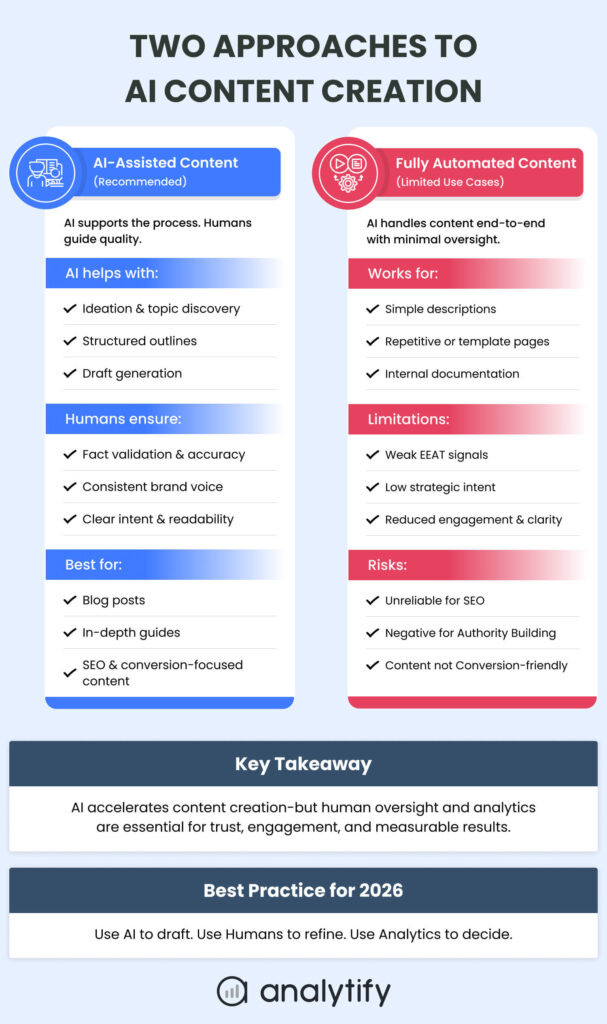
There are two primary approaches to AI content creation today:
AI-Assisted Content (Recommended)
AI supports ideation, outlines, and drafting, while humans:
- Validate facts and accuracy
- Maintain brand voice
- Optimize for intent and clarity
This approach balances efficiency with quality and works best for blogs, guides, and high-impact content.
Fully Automated Content (Limited Use Cases)
AI assisted content workflow produces content end-to-end with minimal oversight.
This can work for:
- Simple descriptions
- Repetitive or templated content
- Internal documentation
However, it often lacks nuance, strategic intent, and engagement, making it risky for SEO-driven or conversion-focused content.
What AI Actually Helps With in Modern Content Teams
In AI AI-assisted content workflow, AI is most effective when used to:
- Identify topic opportunities and content gaps
- Generate structured outlines aligned with search intent
- Draft long-form content efficiently
- Create variations for headlines, CTAs, or formats
- Support repurposing into social, email, or visual content
What AI does not reliably do on its own is determine whether content performs. That requires understanding how users interact with the content after it’s published.
AI also cannot independently establish experience, authority, or trust.
EEAT signals, such as factual accuracy, original insights, real-world examples, and brand credibility, still depend on human review and validation.
This is why modern AI content creation is inseparable from analytics. AI produces output, but performance data determines direction.
Why Analytics is Critical for AI Content Success
AI can generate content quickly, but speed alone doesn’t guarantee results. Without analytics, teams risk producing posts that rank yet fail to engage, convert, or align with business goals. Analytics acts as the control system for AI content; it shows what resonates, identifies gaps, and guides continuous improvement.
Key Areas Where Analytics Makes a Difference:
- Engagement vs. Rankings
A page may rank for keywords but still underperform if readers leave quickly or scroll only partially. Metrics like session duration, scroll depth, and bounce rate reveal whether content truly connects with the audience. - Understanding User Intent
AI can miss subtle nuances in what users are looking for. Analytics shows how people interact with each page, highlighting where clarity, format, or focus needs adjustment. - Tracking Conversions
Traffic alone doesn’t indicate impact. Analytics ties content to business outcomes, such as sign-ups, downloads, or purchases, helping teams understand which posts drive real results. - Iterating Smarter
Performance insights feed back into your AI workflow. Teams can refine prompts, tweak content structure, and test headlines to improve engagement, conversions, and SEO over time.
Key Takeaway: AI accelerates content creation, but analytics ensures it drives measurable performance. Every AI-generated post should be guided by data, not guesswork.
How to Create Content with AI (Step by Step)
Creating high-performing AI content requires a structured workflow that combines AI tools, human oversight, and analytics at every stage.
By integrating analytics, such as GA4 insights via Analytify directly into your workflow, teams can ensure AI-generated content not only scales but also drives engagement and conversions.
Let’s go through some of the best AI content creation tips step by step.
Step 1: Ideation & Topic Planning
- Use the best tools for AI content to generate multiple topic ideas and identify content gaps.
- Validate topics using analytics to prioritize those with the highest potential for engagement and conversions.
- Analytics Tip: Check historical page performance and audience interest trends to select data-backed topics.
Step 2: Drafting & Structuring Content
- Generate AI-assisted drafts using tools like ChatGPT, Claude, or Jasper.
- Humans review for accuracy, tone, and brand voice.
- Structure content with headings, CTAs, and multi-format elements.
- Analytics Tip: Reference past engagement metrics to inform section length, headings, and content format.
Step 3: Optimization Before Publishing
- Refine meta titles, descriptions, internal links, and semantic SEO using AI or SEO tools.
- Ensure readability, clarity, and alignment with search intent.
- Analytics Tip: Use Analytify data to identify keywords and sections that historically boost scroll depth and conversions.
Step 4: Publishing & Performance Tracking
- Publish content in WordPress and monitor engagement, traffic sources, and conversions through Analytify.
- Track scroll depth, session duration, bounce rate, and conversion events to evaluate initial performance.
- Analytics Tip: Identify underperforming sections early to inform prompt refinement and content adjustments.
Step 5: Iteration & Prompt Refinement
- Use performance insights to tweak AI prompts, restructure content, or update sections for better results.
- Test different headlines, formats, or content lengths to optimize engagement and conversion metrics.
- Analytics Tip: Maintain a playbook of high-performing prompts, formats, and structures for consistent results across future content.
Best AI Tools for Content Creation (You Need)
Effective AI content creation relies on using the right combination of tools at each stage of your workflow. The goal is to streamline ideation, drafting, optimization, and performance tracking.
Here are the main categories:
1. Writing & Ideation Tools
AI writing tools accelerate brainstorming, outlines, and draft creation, helping teams produce content faster while maintaining structure and focus.
Top Tools:
- ChatGPT
Best for: Structured drafts, idea generation, and content outlines.
Use Case: Quickly create blog posts, social media snippets, and article frameworks.
Tip: Always review and refine AI output to maintain brand voice and accuracy. - Claude
Best for: Long-form, research-heavy content with nuanced context.
Use Case: Thought leadership pieces, in-depth guides, and complex articles.
Tip: Ideal for content requiring reasoning and layered explanations. - Jasper
Best for: SEO-focused writing with templates and content scoring.
Use Case: Product pages, service descriptions, and optimized blog posts.
Tip: Pair with keyword research tools to align with search intent. - Writesonic
Best for: Quick copy generation for marketing campaigns and micro-content.
Use Case: Headlines, meta descriptions, email drafts, and social captions.
Tip: Use iterative prompts to refine tone and engagement.
Key Takeaway: These tools complement each other across ideation, drafting, and repurposing, but human oversight is crucial for quality and brand consistency.
2. SEO & Content Optimization Tools
Optimizing AI-generated content for search engines ensures visibility and relevance. These tools analyze content structure, keyword use, and semantic coverage before publishing.
Top Tools:
- Surfer SEO
Use Case: Optimize blogs, landing pages, and guides for keyword density, headings, and semantic relevance.
Tip: Combine with AI drafts to enhance on-page SEO. - Clearscope & Frase
Use Case: Benchmark content against competitors and recommend target keywords.
Tip: Use post-publish analytics to validate optimization effectiveness.
Best Practice: Draft content with AI, optimize with SEO tools for readability and search performance, then track results using analytics for continuous improvement.
3. Visual & Multimedia Tools
Visual content amplifies engagement and makes written content more shareable. AI-powered tools streamline the creation of graphics, images, and videos.
Top Tools:
- Canva AI – For social media graphics, infographics, and presentations.
- Runway – For AI-assisted video editing and creative effects.
- Lumen5 – For converting blog posts into short, engaging videos.
Best Use: Social media assets, infographics, marketing visuals, and repurposed formats that complement written content.
4. Analytics & Insights Tools (Analytify)
Join 50,000+ beginners & professionals who use Analytify to simplify their Google Analytics!
AI-generated content is only as effective as the insights guiding its optimization. Analytify brings GA4 analytics into WordPress, making performance tracking simple and actionable.
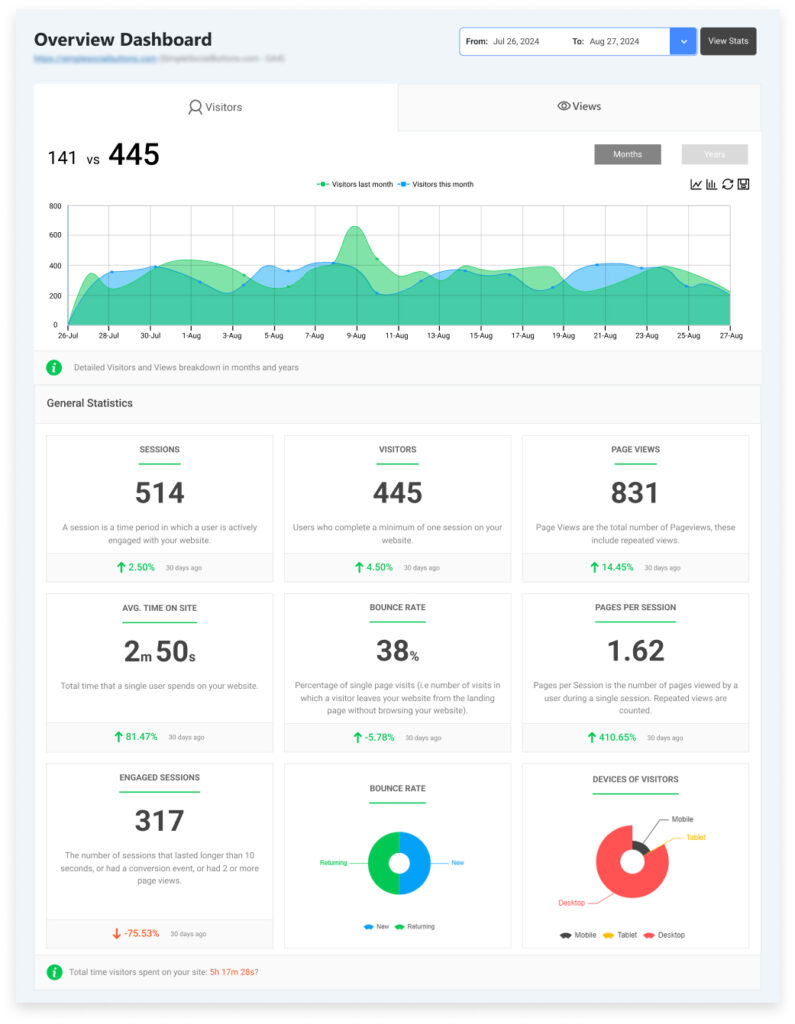
Key Features:
- Page-Level Engagement Metrics – Track sessions, scroll depth, and time on page to see which AI-generated posts resonate.
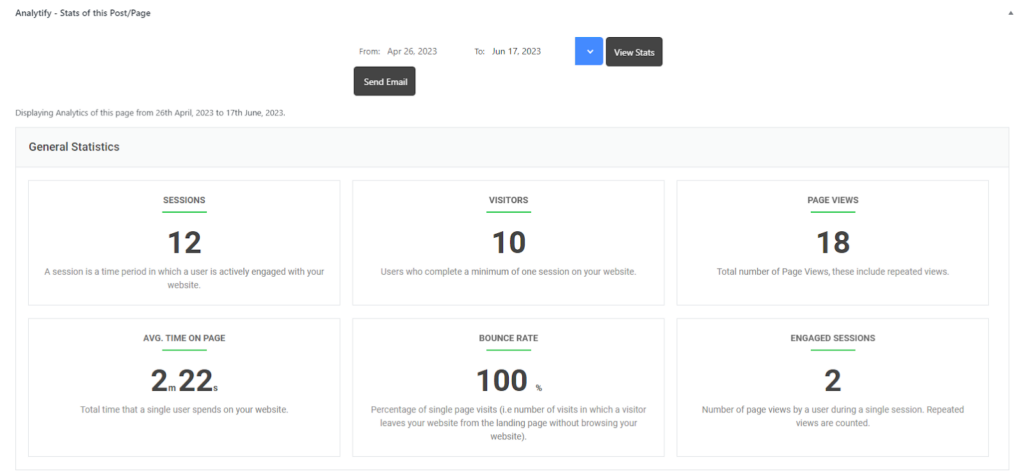
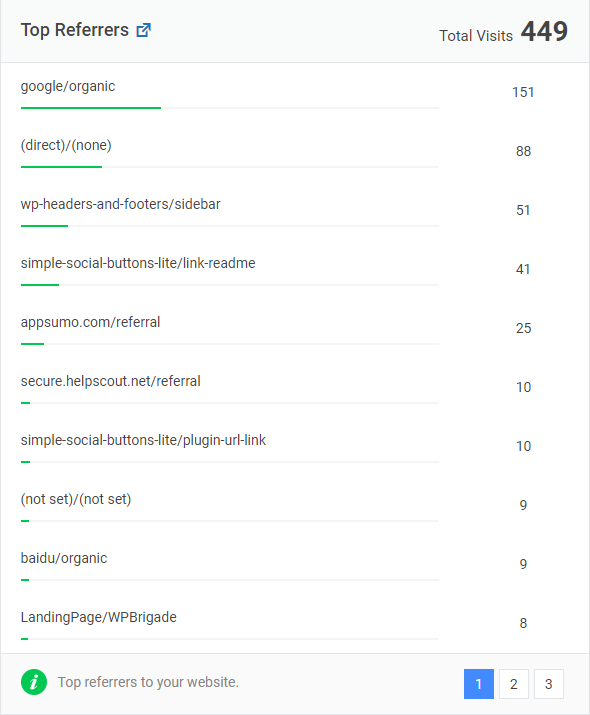
- Traffic Source Visibility – Understand audience origins (organic, social, referral, email) to optimize promotion strategies.
- Conversion Tracking – Measure actions like sign-ups, downloads, or purchases and correlate them with content types.
- Simplified GA4 Reporting – Access detailed analytics directly in WordPress without navigating complex GA4 dashboards.
- Data-Driven Prompt Refinement – Use insights to tweak AI prompts, headlines, and structures for better performance.
Key Takeaway: Combining AI content creation with analytics transforms drafting tools into a data-driven content system, ensuring measurable growth and scalable workflows.
AI Content Creation Strategies: Experiments, Best Practices & Prompts
Maximizing AI-generated content requires treating every post as an experiment, applying best practices, and using performance-focused prompts. Together, these strategies ensure content is not just produced quickly but consistently drives engagement, conversions, and measurable results.
1. Experiment & Measure
The first step in maximizing AI content is to approach each post as an experiment. Test different approaches to see what resonates with your audience.
AI Content Creation Workflow Example:
Below is an AI content creation workflow, which you can use to experiment.
- Tone and detail: Compare a technical, in-depth post (“Write a 1,500-word blog on GA4 metrics with actionable steps”) with a simpler, beginner-friendly version (“Explain GA4 metrics for beginners with examples”). See which style keeps readers engaged.
- Content length and format: Try short-form versus long-form content, or text-only versus text with visuals. Track which format increases engagement or leads to conversions.
- AI-only vs. human-edited content: Publish AI drafts alongside versions refined by humans. Measure differences in engagement, scroll depth, and search performance to understand where human input adds the most value.
Key metrics to track:
- Engagement: Time on page, scroll depth, and social shares.
- Bounce and exit rates: How often users leave after viewing a page.
- Conversions: Sign-ups, downloads, purchases, or other desired actions.
Example outcome: Small improvements, such as restructuring headings, simplifying sections, or adding clear subpoints, can increase scroll depth by 18% and lengthen average session duration.
2. Best Practices for 2026
Experimentation is only effective when combined with best practices. These ensure AI content aligns with your brand, is accurate, and delivers value.
- AI assists, humans refine: Always review AI drafts to maintain accuracy, tone, and brand voice. AI is fast, but human input ensures credibility and engagement.
- Data-guided decisions: Use analytics to determine which topics, formats, and prompts perform best. Let data guide your content strategy rather than assumptions.
- Update existing content: Refresh underperforming posts instead of constantly producing new ones. Improving older content can boost traffic, engagement, and SEO without extra effort.
- Multi-format repurposing: Turn AI content into social posts, visuals, infographics, or short videos. Repurposing helps reach audiences where they prefer to consume content.
- Iterate continuously: Regularly test different prompts, lengths, and content structures to refine your workflow and improve outcomes over time.
3. Performance-Focused AI Content Generation Prompt Templates
If you don’t know how to write blog posts with AI tools, you just need an AI tool and the right prompts. Prompts are the instructions you give AI to produce content. Linking each prompt to measurable results ensures your AI outputs are actionable and results-driven.
AI Content Creation Prompts for Blog Ideas:
- “Generate 10 blog post ideas on GA4 metrics for SaaS marketers, including long-tail keywords and search intent.”
Content Expansion Prompts:
- “Expand this 500-word draft into a 1,500-word article with actionable steps, examples, and clear headings.”
Optimization Prompts:
- “Rewrite this introduction to naturally include ‘AI content creation,’ improve clarity, and boost reader retention.”
Multi-format Prompts:
- “Convert this blog section into three social media posts with engaging hooks and clear CTAs.”
Experimentation Prompts:
- “Suggest two alternative headlines for this section, focused on curiosity and conversion potential.”
Tip: Always tie prompts to measurable outcomes like engagement, scroll depth, or conversions. Use analytics to test and improve each approach, so your AI content evolves into a high-performing, data-backed asset.
Frequently Asked Questions: AI Content Creation
1. How do I write blog posts with AI tools?
Start by generating topic ideas and outlines using AI tools like ChatGPT or Claude. Draft content in structured sections, then refine with human editing for accuracy, tone, and brand voice. Always optimize for SEO and track performance with analytics tools like Analytify.
2. What is the best AI tool for content creation in 2026?
There isn’t a single “best” tool. ChatGPT and Claude excel in drafting long-form content, Jasper and Writesonic are optimized for SEO and marketing copy, while Surfer SEO and Clearscope help with optimization. Combine tools based on your workflow needs and integrate analytics for performance tracking.
3. How do I track AI-generated content performance?
Use tools like Analytify to view GA4 metrics inside WordPress. Monitor page-level engagement, scroll depth, bounce rates, traffic sources, and conversions to see what’s working and what needs refinement.
4. How do I optimize WordPress analytics for AI content?
Ensure each AI-generated page is tagged for tracking. Use Analytify to visualize metrics for every post, compare performance across content types, and link insights to improvements in prompts, headings, or formatting.
5. Does AI content help with traditional SEO?
Yes, when combined with proper optimization. AI can help generate keyword-focused drafts, meta descriptions, and internal links, but analytics and human editing ensure that the content ranks and engages effectively.
AI Content Creation: Conclusion
AI content creation is creating content that performs and scales. By combining AI tools with a structured workflow, human oversight, and data-driven analytics, marketers can produce content that engages audiences, drives conversions, and delivers measurable results.
Tools like ChatGPT, Claude, Jasper, and Writesonic streamline ideation, drafting, and SEO optimization. SEO-focused tools such as Surfer SEO and Clearscope refine content before publishing. Yet, the missing piece in any AI strategy is analytics. Platforms like Analytify bring GA4 insights directly into WordPress, allowing teams to track engagement, conversions, and traffic sources for every AI-generated post.
The future of content lies in AI-assisted workflows guided by performance data. By continuously measuring, experimenting, and refining AI content, you ensure that every post isn’t just created, but it delivers value, ranks effectively, and supports your business goals.
You may also like to read:
- How To Find Top Performing Content And Improve It
- Content Performance Benchmarks: How To Measure Good
Do you know which AI prompts and content formats are improving performance, and which ones are quietly failing? Share your thoughts below.