GA4 Metrics That Matter Most for SaaS & Subscription Websites

Are you tracking a lot of data but still unsure which numbers actually grow your SaaS? That’s where GA4 metrics for SaaS make the real difference.
Unlike older analytics focused on traffic, GA4 focuses on events, engagement, and user actions. This aligns far better with how subscription-based businesses grow, retain users, and generate recurring revenue.
In this guide, we will discuss the GA4 metrics that truly matter for SaaS growth. You’ll learn how to measure acquisition quality, activation, retention, churn, revenue, and lifetime value. You’ll also see how user lifecycle analytics tie all these metrics together.
You’ll also see how tools like Analytify simplify subscription analytics tracking, enabling teams to use GA4 insights without the technical complexity or confusion.
Let’s get started!
GA4 Metrics For SaaS (TOC):
Why GA4 Fits SaaS & Subscription Business Models Better Than UA
SaaS and subscription business models are companies that offer software or digital services through monthly or yearly plans, focusing on long-term user engagement rather than one-time sales. This is where GA4 fits better than Universal Analytics (UA).
UA was built primarily around pageviews and sessions, which work for content-based websites but fall short for subscription products.
GA4, on the other hand, is designed to track how users interact with a product over time. It focuses on actions and behavior, which aligns more closely with how SaaS platforms grow and retain users.
Event-based Tracking For Product Usage
- GA4 tracks actions instead of pageviews, making it ideal for understanding product usage.
- SaaS teams can measure events like signups, free-trial starts, feature interactions, upgrades, and renewals.
- This makes it easier to see which actions matter most and how users move toward conversion or retention.
User-Centric Measurement
- Another major advantage of GA4 is its user-centric approach.
- Instead of treating each session as a separate interaction, GA4 tracks the same user across multiple visits and devices. This creates a continuous view of the customer journey.
- For SaaS teams, this makes it easier to understand how users move from first touch to long-term subscribers.
Cross-Platform & Predictive Capabilities
- GA4 also supports cross-platform tracking by combining web and app data into a single property, making it easier for SaaS teams to track users across platforms.
- It also provides predictive insights to identify users likely to convert or churn.
- This makes GA4 a stronger foundation for understanding growth, retention, and user lifecycle analytics in subscription-based businesses.
Acquisition Metrics That Bring High-Intent SaaS Users
For SaaS businesses, not all traffic is created equal. The real goal is attracting high-intent users, people who are likely to sign up, start a trial, and eventually become paying customers.
GA4 provides powerful SaaS analytics metrics that help teams see which channels bring in these users and which only inflate traffic numbers.
User Acquisition Channels
User acquisition channels show where SaaS users come from and which sources attract users with stronger intent. GA4 offers two key dimensions to understand this:
- First user source: shows where a user originally discovered your product. This is especially useful for SaaS growth analysis because it reflects the true origin of long-term users.
- session source: It shows where users come from during individual visits and is better suited for short-term campaign tracking.
For most SaaS teams, the first user source is more important because it helps identify the channels that consistently bring high-intent users, not just repeat visits.
Tip: Track UTM parameters in your marketing links to get more accurate source and campaign attribution.
By analyzing user acquisition channels alongside engagement and conversion data, SaaS teams can identify which sources bring high-intent users and which channels need optimization.
Key Acquisition Metrics
Some of the most important GA4 SaaS analytics metrics for acquisition include:
- New users by channel: See which channels, like organic search, paid ads, or referrals, bring in new potential customers to your SaaS product.
- Engagement rate by channel: Shows which channels bring users who spend time and actively explore your product instead of leaving quickly.
- Conversion rate to signup or trial: Measure the percentage of users who take meaningful actions.
Tracking organic, paid, and referral traffic helps SaaS teams identify which campaigns deliver the highest-value users. Understand this concept with this simple example:
Example: Volume vs Intent
Imagine this data:
- Paid Ads bring 1,000 new users, but most leave quickly.
- Organic Search brings 300 new users, many of whom explore features and start trials.
In this case:
- Paid Ads win for new users by channel (higher volume).
- Organic Search wins for engagement rate by channel (higher quality users).
This highlights why engagement and conversion metrics matter more than volume because engaged users are more likely to convert and stay subscribed.
Activation Metrics: Measuring Real Product Interest
Activation metrics show whether new users are genuinely interested in your SaaS product and taking meaningful actions, rather than just visiting a page.
Engagement Rate Over Bounce Rate
For SaaS websites, bounce rate can be misleading. A user might land on a page, read the content, understand its value, and leave, all of which would be counted as a bounce in older analytics models. That doesn’t always mean low interest.
GA4 replaces bounce rate with engagement rate, which gives a more realistic view of user behavior. GA4 considers a session “engaged” when users spend time on the site, view multiple pages, or trigger key events.
On SaaS landing pages, this could mean scrolling, visiting pricing pages, or interacting with signup buttons, all of which indicate that users are genuinely interested in your product.
Key Events Every SaaS Should Track
Activation becomes much clearer when SaaS teams track the right events. Some essential activation events include:
- sign_up
- start_trial
- pricing_page_view
- feature_used
- demo_requested
Not every event should be marked as a conversion. SaaS teams should focus only on business-critical actions that indicate real intent. Over-tracking small interactions can create noise and make reports harder to interpret.
Funnel Analysis for SaaS Onboarding
GA4 funnel analysis helps SaaS teams visualize how users move through onboarding steps, such as:
Visit >> Signup >> Trial >> First key action
This makes it easier to identify where users drop off and which steps create friction.
Tools like Analytify simplify this process by presenting these funnels in a clear, visual, and non-technical way, helping teams monitor activation without digging into complex GA4 reports.
Retention & Churn Metrics: The Core of Subscription Growth
Retention is the core of every successful SaaS business. While acquiring new users is important, keeping them active and subscribed over time is what really drives growth.
GA4 offers retention metrics for SaaS that show how often users come back and how engaged they stay after signing up.
GA4 Retention Metrics Explained
- GA4 lets you track new vs. returning users and measure 1-day, 7-day, and 30-day retention.
- These metrics show how often users come back and interact with your product over time.
For SaaS, understanding retention is critical. It’s often more valuable than acquiring more users because loyal customers generate recurring revenue and provide feedback for product improvement.
Churn Analysis in Google Analytics
- Churn happens when users cancel subscriptions or let trials expire.
- GA4 enables tracking these behaviors through events such as subscription_canceled or trial_expired.
By analyzing patterns leading up to churn, SaaS teams can identify early behavioral signals, such as reduced feature usage, and take action before users leave.
This is where churn analysis in Google Analytics becomes a key tool for proactive retention strategies.
Subscription Analytics Tracking
- To manage subscriptions effectively, GA4 allows tracking of renewals, plan upgrades, or downgrades.
- Using user properties such as subscription status or plan type, teams can segment users into retained and churned groups.
- This type of subscription analytics tracking helps identify trends, evaluate which plans are most successful, and design interventions to keep more users engaged.
By combining GA4 retention metrics, churn analysis, and subscription analytics tracking, SaaS businesses gain a clear picture of the customer lifecycle.
Understanding which users are likely to stay, which are at risk of leaving, and how engagement impacts retention is key to driving long-term subscription growth.
Revenue & Lifetime Value Metrics for SaaS
For SaaS businesses, understanding revenue and the long-term value of customers is just as important as tracking user acquisition and engagement.
GA4 provides insights into revenue events and helps SaaS teams measure how each user contributes to growth over time.
Revenue Events in GA4
Key revenue events for SaaS include actions like:
- Subscription start: When a user signs up for a paid plan
- Recurring payments: Monthly or annual billing cycles
- Upgrades and add-ons: When users move to higher plans or purchase extra features
Tracking these events allows teams to see which actions generate revenue and which users are most valuable.
By focusing on the right events, SaaS teams can avoid tracking unnecessary interactions that don’t impact business outcomes.
Customer Lifetime Value (LTV)
Lifetime Value (LTV) shows how much revenue a customer will bring to your SaaS over time. It helps founders decide how much to spend on marketing and product improvements.
- GA4 estimates LTV using past purchases, engagement, subscriptions, and other SaaS analytics metrics.
- Higher LTV means better retention, strong product-market fit, and more valuable customers.
Revenue Attribution
- GA4 also helps determine which channels drive paying users over the long term.
- By aligning revenue with acquisition and retention metrics, SaaS teams can see which campaigns not only attract users but also generate subscriptions and upgrades.
- This holistic view helps optimize marketing spend and focus on channels that produce real value.
By combining revenue events, LTV insights, and revenue attribution, SaaS businesses can track growth more accurately.
Using these GA4 metrics for SaaS, teams can focus on long-term subscription growth rather than just short-term traffic or signups.
Cohort & User Lifecycle Analysis for SaaS
Understanding individual cohorts and the overall user journey is key to improving retention and growth.
Cohort Analysis for Retention & Churn
Cohort analysis is a powerful way to understand how different user groups behave over time. In a SaaS context, you can group users by signup date or first interaction to see how retention and churn evolve over time.
For example, a cohort of users who joined in January might show higher engagement in the first month but drop off faster than users who joined in February.
Cohort analysis with user lifecycle analytics helps SaaS teams improve retention by guiding decisions based on real user behavior.
Predictive Metrics in GA4
GA4 metrics for SaaS offer predictive insights that can further enhance your understanding of the user lifecycle. Metrics such as purchaseand churn probabilities help SaaS teams anticipate which users are likely to convert or churn.
By tracking these metrics through user lifecycle analytics, SaaS teams can run targeted retention campaigns, reduce churn, and improve long-term customer value.
Mapping the SaaS User Lifecycle
Understanding the full SaaS user lifecycle helps teams optimize every stage of the customer journey:
- Acquisition: Attracting new users through marketing channels.
- Activation: Guiding users to experience the product’s core value quickly.
- Engagement: Encouraging repeated usage and deeper interaction.
- Monetization: Converting active users into paying customers.
- Retention: Keeping users satisfied and reducing churn.
Using user lifecycle analytics, SaaS teams can track top-performing cohorts, spot friction points, and optimize retention. GA4’s predictive metrics make these strategies focused on high-value users.
SaaS GA4 Metrics Framework (Summary)
Tracking the right metrics at each stage of the SaaS user lifecycle is essential for understanding growth, retention, and revenue. GA4 provides actionable insights across acquisition, activation, retention, monetization, and churn, as given below:
| SaaS Stage | GA4 Metrics | Business Insight |
| Acquisition | New users, source/medium | Understand traffic quality and which channels bring high-intent users. |
| Activation | Engagement rate, key events (sign_up, start_trial, pricing_page_view, feature_used, demo_requested) | Measure onboarding effectiveness and how quickly users experience core product value. |
| Retention | 1-day, 7-day, 30-day retention; cohort analysis | Track product value, engagement over time, and identify churn patterns. |
| Monetization | Revenue events (subscription_start, recurring payments, upgrades/add-ons), LTV | Evaluate growth sustainability, revenue contribution, and long-term customer value. |
| Churn | Cancel events, trial_expired, cohort drop-off | Identify revenue leakage, early churn signals, and areas for intervention. |
How Analytify Simplifies GA4 Metrics for SaaS Teams
Join 50,000+ beginners & professionals who use Analytify to simplify their Google Analytics!
GA4 is powerful, but for many SaaS and subscription teams, it can feel overwhelming. You often have to explore multiple reports to understand user behavior, engagement, revenue, and retention. This is where Analytify comes in to simplify the process.
Analytify is one of the best Google Analytics plugins for WordPress. It takes complex GA4 reports and presents them in a single, easy-to-read dashboard.
With seamless GA4 integration, teams can access actionable insights without technical complexity, making GA4 metrics for SaaS simple to understand and use.
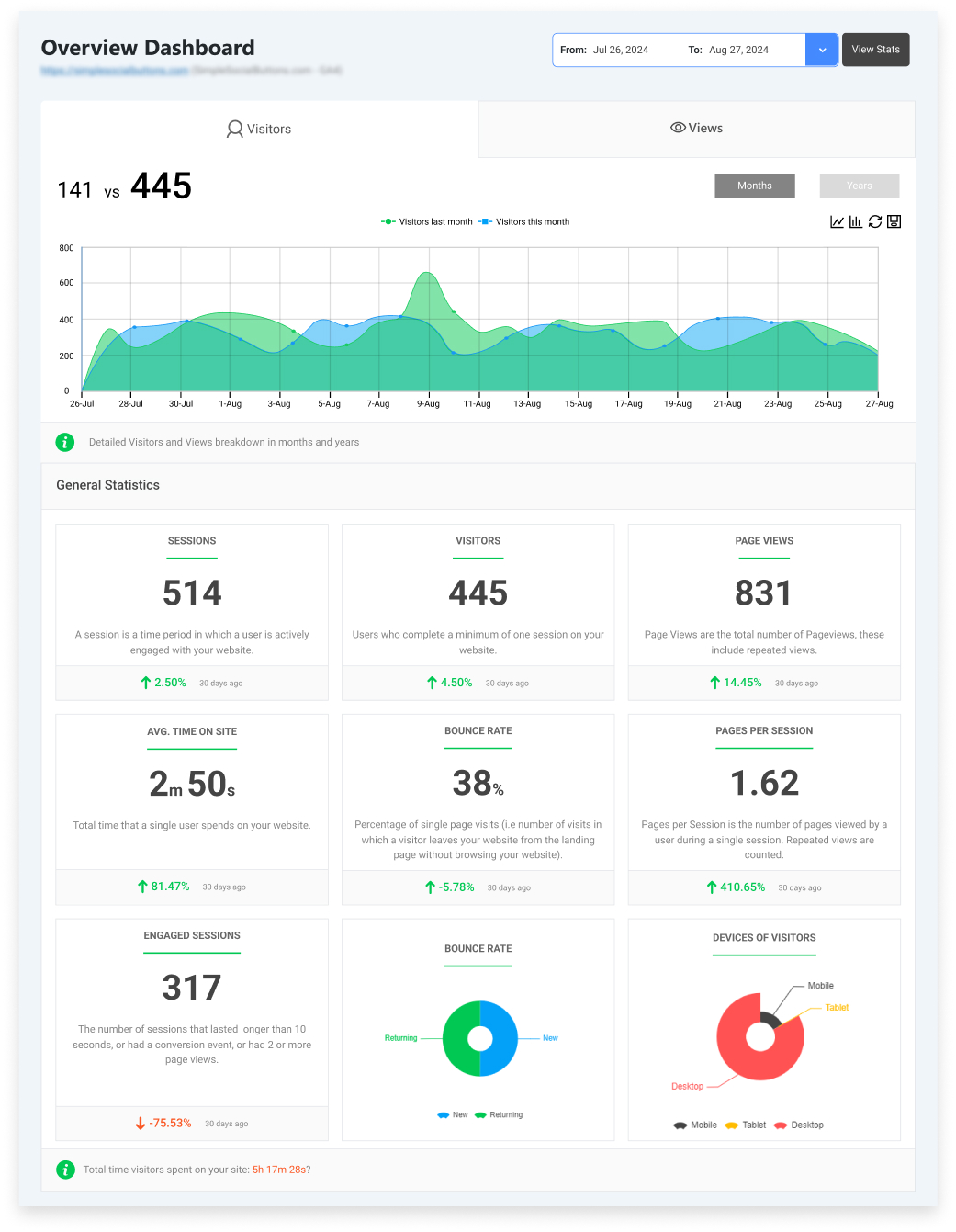
In general statistics, Analytify shows essential SaaS analytics metrics such as engaged sessions, bounce rate, and new vs. returning users.
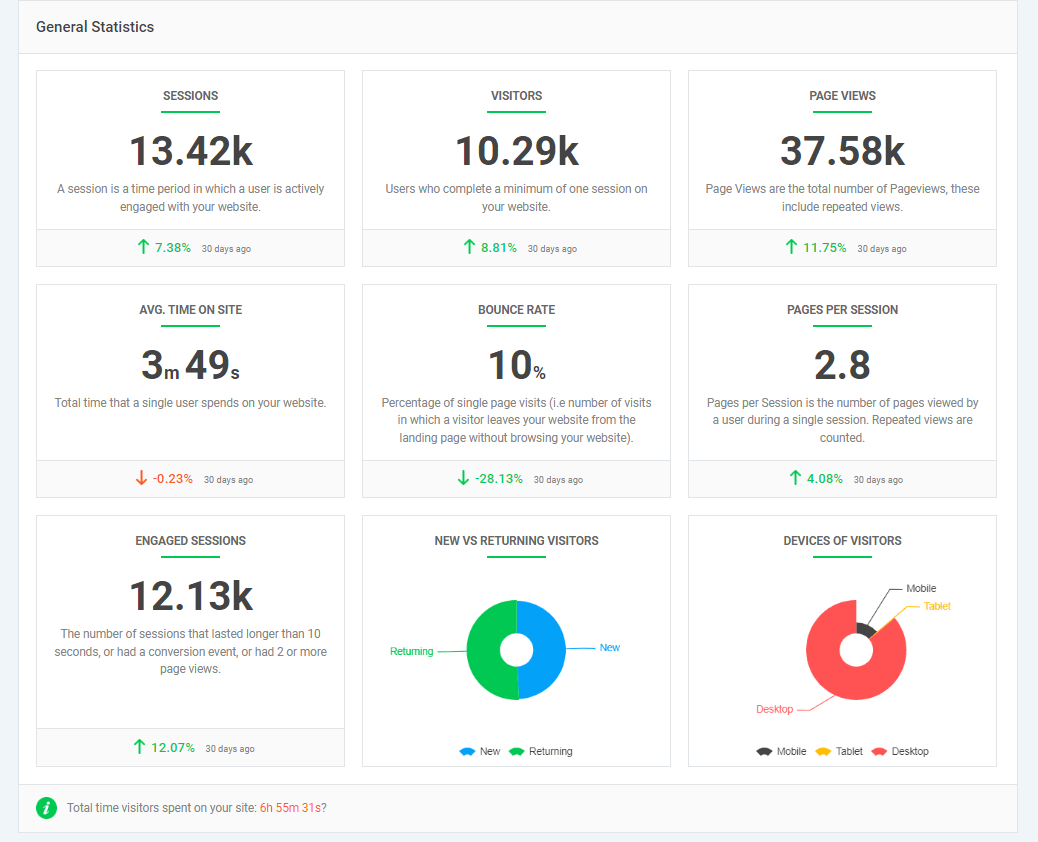
The Analytify event-tracking dashboard lets you monitor all GA4 events in one place. So, you can easily track feature usage, signups, and trial starts without navigating multiple reports.
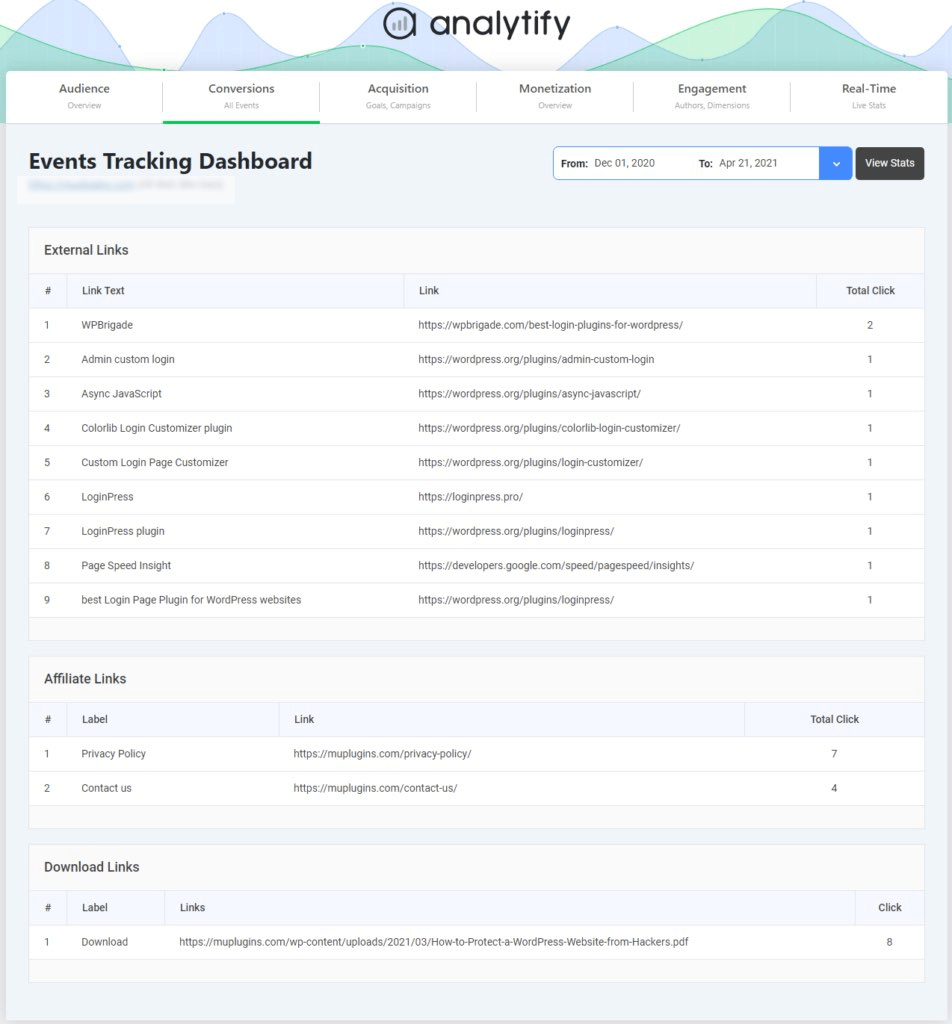
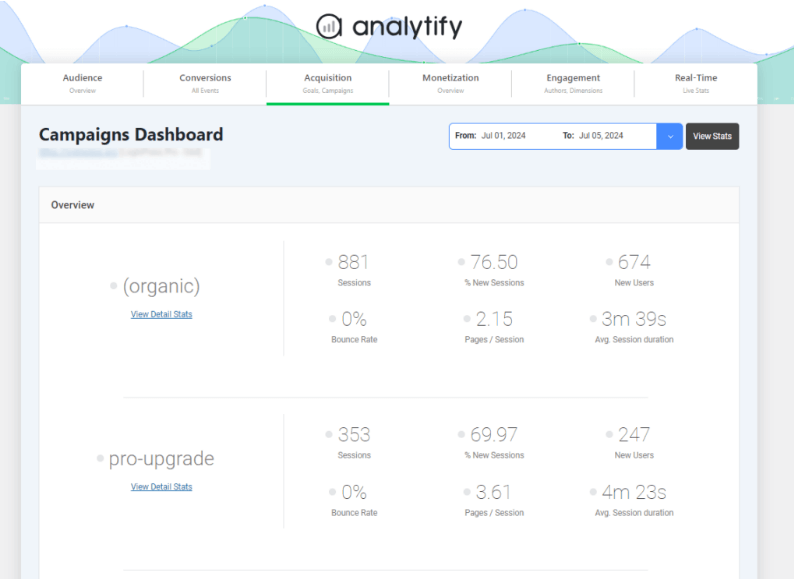
Analytify also tracks UTM parameters and campaign performance through the campaign dashboard, helping SaaS teams identify which channels bring high-intent users.
For subscription and SaaS businesses, Analytify provides all essential metrics, revenue, retention, cost, and lifetime value directly through the WooCommerce dashboard.
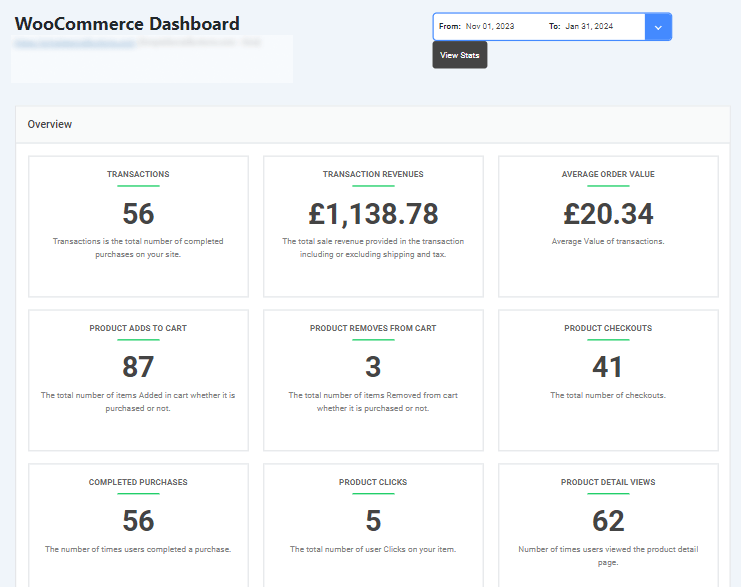
By consolidating these insights, Analytify helps SaaS teams focus on growth, optimize engagement, and make smarter, data-driven decisions.
Frequently Asked Questions About GA4 Metrics for SaaS
1. What are the 5 most important metrics for SaaS companies?
The most important SaaS metrics are MRR (Monthly Recurring Revenue), Churn Rate, CAC (Customer Acquisition Cost), LTV (Customer Lifetime Value), and ARPU.
These SaaS analytics metrics help track revenue growth, customer value, and acquisition efficiency. These metrics help founders make smarter pricing, marketing, and retention decisions.
2. What is the Rule of 40 in SaaS metrics?
The Rule of 40 states that a SaaS company’s growth rate + profit margin should equal or exceed 40%. It balances growth and profitability, especially for scaling companies. If one is low, the other should compensate to maintain financial health.
3. Is GA4 A SaaS Platform?
Yes, GA4 is a SaaS platform delivered entirely through the cloud and accessed via a web interface. It enables SaaS teams to track subscription analytics reliably using GA4 metrics, without installing or managing software. Both the free GA4 version and the enterprise GA360 operate as SaaS solutions managed and updated by Google.
4. What is the 5-pillar SaaS metrics framework?
The 5 SaaS metric pillars are Acquisition, Activation, Revenue, Retention, and Referral. This framework tracks the full customer lifecycle from first touch to advocacy. GA4 supports this framework through user lifecycle analytics. This helps SaaS teams identify where users drop off and optimize each lifecycle stage.
5. How does GA4 support subscription analytics tracking?
GA4 tracks user actions as events, such as sign-ups, upgrades, renewals, and cancellations. This event-based model helps SaaS teams monitor user interactions throughout the subscription lifecycle. As a result, GA4 makes subscription analytics tracking simpler and more accurate over time.
6. What are good KPIs for a SaaS company?
Good SaaS KPIs include:
MRR (Monthly Recurring Revenue) growth
Net Revenue Retention
Churn Rate
CAC Payback Period (Customer Acquisition Cost Payback Period)
LTV: CAC ratio (Customer Lifetime Value to Customer Acquisition Cost ratio)
These KPIs measure scalability, efficiency, and long-term sustainability. The best KPIs vary depending on the company’s stage and business model.
Final Thoughts: GA4 Metrics for SaaS
In this guide, we started by explaining why GA4 is a better fit for SaaS and subscription businesses than Universal Analytics, primarily because of its event-based, user-centric approach.
Then, we explored acquisition metrics to understand which channels bring high-intent users, followed by activation metrics that show real product interest through engagement and key events.
After that, we focused on retention and churn, where GA4 retention metrics, churn analysis in Google Analytics, and subscription analytics tracking help SaaS teams protect recurring revenue. We also covered revenue, LTV, and attribution to measure long-term growth, not just short-term signups.
Finally, we looked at cohort and user lifecycle analytics to connect everything into one clear growth framework. Analytify simplifies GA4 metrics for SaaS by consolidating engagement, events, campaigns, and user behavior into a single, easy-to-use dashboard, helping teams make faster, data-driven growth decisions.
For further guidance, you can read:
- How to Analyze Sales & Ecommerce Metrics in Google Analytics 4
- How to Track User Engagement by Device in GA4 (2026)
Which GA4 metrics for SaaS do you think could make the biggest impact on your subscription growth? Share your thoughts or questions in the comments below!