
20 Useful Google Search Operators for SEO to Find Insights Faster

Google search operators are commands and symbols that narrow search results. Examples: site: lists the indexed pages of a domain, and intitle: finds pages by title. SEOs use them for keyword research, competitor analysis and content audits.
Use site: to check which of your pages Google has indexed, and quotation marks to find an exact phrase.
This guide covers what Google search operators are and why they matter for SEO. It lists the top 20 operators, shows how to use them, and explains how Analytify helps you apply them for better insights.
Google Search Operators (TOC)
What are Google Search Operators?
Google search operators are special commands or symbols you add to a search query. They refine and filter results more precisely. These Google advanced search operators help users find specific types of information, file formats, websites, or keyword combinations.
In SEO, search operators help professionals uncover insights about competitors, site indexing, backlinks, duplicate content, and more. For instance, site:example.com shows only results from one website. “exact phrase” returns results containing that exact wording.
Basic Google searches often return broad or unrelated results. Search operators narrow the information quickly. A regular search like best SEO tips may return millions of pages. Adding operators like intitle: “SEO tips” or filetype: pdf finds highly relevant, targeted data.
In short, search operators save SEOs time. They uncover hidden content and support focused research directly from the search bar.
The Importance of Google Search Operators in SEO
Google Search Operators are powerful tools for SEO professionals, helping to uncover specific insights and save time. Here’s how they boost your SEO efforts:
Efficient Content Indexing
The site: operator (e.g., site: yourdomain.com) displays all pages from a domain that Google has indexed. This helps you spot missing, duplicate, or outdated pages and ensure key content is indexed correctly.
Improved Keyword Targeting
Operators like intitle: and inurl: find content with your target keywords in titles or URLs. This makes keyword research more focused and helps shape better optimization strategies.
Advanced Competitor Research
Combining queries like “keyword” site:competitor.com helps uncover what your competitors are publishing. You can identify content gaps, backlinks, and opportunities to outrank them in search.
Support for Technical SEO Audits
Operators such as filetype: pdf help locate old or unnecessary files still being indexed. You can also detect broken links or test redirects by filtering specific URL patterns, improving site health.
Saves Time and Increases Precision
Search operators refine your queries instead of making you sort through irrelevant results. They speed up tasks like audits, content discovery, and link analysis.
Enhances SEO Strategy
With better control over search, operators provide deeper insights into your site and competitors. This leads to more targeted, data-driven SEO strategies.
Google Search Operators transform broad searches into precise tools, making SEO research smarter, faster, and more effective. With search operators, you can filter results, uncover hidden opportunities, and gather data that regular searches rarely show.
Top 20 Google Search Operators for SEO
The top 20 Google search operators for SEO narrow results by site, title, URL, and text. Below is each one, with practical examples and use cases:
1. site: Operator
The site: operator restricts search results to a specific domain or subdomain.
For example: site:example.com Displays all pages from the specific website example.com indexed by Google.
This search operator is essential for checking how many and which pages of your site are indexed by Google. It helps uncover content gaps, thin pages, or duplicate content that may need improvement.
You can also identify outdated files or pages that should be deindexed. Combine this operator with a keyword (e.g., site:example.com SEO guide). You see which pages on your site rank for specific terms. That helps with content optimization and keyword targeting.
2. intitle: Operator
The intitle: operator finds web pages that contain a specific word or phrase in their title tag.
For example, intitle: “on-page SEO” shows pages with the exact phrase “on-page SEO” in their title, for focused topic searches.
This operator is useful for finding blog posts and articles that target specific keywords in their titles. That is often a strong signal of content relevance. It shows how competitors use keywords in their title tags. That helps you craft your own optimized titles.
It also helps you evaluate keyword competition in the SERPs. You can see how directly others target your focus terms.
3. allintitle: Operator
The allintitle: operator searches for pages that include all the specified words in the title tag.
For example, allintitle: SEO tips 2026 shows only pages with the exact phrase “SEO tips 2026” in their title. It helps you find highly targeted content.
This operator is valuable for checking how many pages are directly targeting your whole keyword phrase in their titles. It gives a quick snapshot of keyword competition at the title level. That helps you judge how saturated a topic is.
You can also use it for content gap analysis. Compare your content titles to what currently ranks, and find where your target keywords are underused.
4. inurl: Operator
The inurl: operator allows you to find pages that contain a specific keyword within their URL.
For example, inurl: seo-checklist finds pages that have “seo-checklist” in their URL.
This operator helps understand how competitors structure their URLs, especially when targeting specific keywords. It can show how a site organizes its content. Search for segments like /blog/ or /services/ to find blog posts, service pages, or resource hubs.
It also refines your keyword mapping strategy by making sure essential terms appear in URLs. That benefits both user experience and search engine visibility.
5. allinurl: Operator
The allinurl: operator returns web pages that contain all specified keywords in the URL.
For example: allinurl:seo audit checklist finds pages with all the words “seo,” “audit,” and “checklist” in the URL.
This operator helps analyze how many sites are using your exact keyword phrase within their URLs. It’s a useful tool for evaluating how optimized competitor URLs are for specific keywords.
Seeing how others structure their URLs can help inform your own SEO-friendly URL strategy, especially when targeting long-tail keywords
6. intext: Operator
The intext: operator finds web pages that contain a specific word, text, or phrase in the main body of the content.
For example, intext: “best SEO practices” shows pages containing the exact phrase “best SEO practices” in their content.
This operator is especially useful for analyzing how keywords are naturally used within a page’s content. It lets you review how competitors structure their on-page SEO. You can see how often they use specific phrases and the context around keyword placement.
It also helps you find content inspiration. You can spot the styles, tone, or formatting others use on the same topic.
7. allintext: Operator
The allintext: operator is used to find pages that contain all listed keywords in the body text.
For example, allintext: SEO optimization tools returns results where the words SEO, optimization, and tools all appear in the main text.
Use this operator to explore how long-tail keywords appear in content. It helps assess content depth and variation in keyword usage.
8. filetype: Operator
The filetype: operator searches for content in a specific file format, such as PDF, DOCX, PPT, or XLS.
For example, using the SEO checklist filetype: pdf will return only PDF documents related to SEO checklists.
This operator helps you discover downloadable resources like PDFs, DOCX files, or PPTs. They may contain valuable content or backlink opportunities. SEO professionals use them to locate outdated files for SEO audits.
9. related: Operator
The related: operator is no longer reliable. It once listed websites similar to a domain, but Google no longer documents it and it does not return similar sites today.
For example, related:moz.com used to list websites similar to Moz. Google no longer supports it, so the results are not similar sites.
Today, find similar websites by searching the topics a competitor covers, or with an SEO tool. That list is useful for backlink building, guest posting, or affiliate partnerships. You can also build lists of potential outreach targets. Or study how similar websites structure their content and SEO strategies.
10. cache: Operator
The cache: operator is retired. Google removed it on September 24, 2024 and no longer shows cached pages.
For example, cache:example.com used to show what Google saw when it last crawled a page. Google retired this operator on September 24, 2024.
To see how Google last crawled a page, use the URL Inspection tool in Google Search Console.
Compare the crawled version in Search Console with the live version. This shows whether recent content changes are reflected in Google’s index. It’s also helpful for analyzing rendering issues in dynamic content or JavaScript-heavy pages.
11. ” ” (Exact Match Search)
This operator forces Google to show results that include the exact phrase placed within quotation marks.
For example, “technical SEO guide” tells Google to show only pages with this exact phrase in the same word order.
Quotation marks are highly effective for finding exact-match content. They help with citation tracking, plagiarism checks, and locating branded mentions.
They ensure you find pages with the precise phrase you search for. That is valuable for analyzing competitor content or checking how keywords are used in published material.
12. – (Exclude a Term)
This operator removes specific words or phrases from the search results.
For example, SEO tools -paid shows results about SEO tools. It excludes any that mention the word “paid.”
The minus sign is useful when you want to refine your search results by excluding specific terms. SEO professionals can use it to filter out branded content, paid tools, or unrelated topics. That narrows results to the most relevant organic content. It’s a simple yet effective way to focus your research.
13. OR Operator (Must Be Uppercase)
This operator returns results containing either one term or the other.
For example, SEO tools OR plugins show results that include either “SEO tools” or “plugins” or both.
The OR operator helps expand your research by allowing you to search for multiple variations at once. It’s beneficial when exploring different content angles, comparing keyword options, or researching broader topics.
Using OR saves time and reveals diverse possibilities that might otherwise require separate searches.
14. * (Wildcard Operator)
The asterisk acts as a placeholder for one or more unknown words in a phrase.
For example, “best * for SEO” shows results like “best tools for SEO” or “best tips for SEO.”
The Google wildcard search operator is beneficial when you don’t know the exact words people use in a search. It lets you see how others talk about a topic. That is great for finding long-tail keywords or new content ideas. SEOs often use it to come up with blog titles, FAQs, or page content that matches real search terms.
15. define: Operator
The define: operator is used to quickly get Google’s definition of a specific word or term.
For example: define: engagement. This shows Google’s definition of “engagement” directly at the top of the results.
This is for SEOs and content creators who want to understand or explain technical SEO terms. It’s advantageous when creating glossaries, beginner-friendly content, or simplifying concepts for your readers.
16. before: and after: Operators
These operators limit search results to before or after a specific date.
For example, SEO trends after 2024. This shows results about SEO trends published after the year 2024.
SEOs can use these to find the latest updates and track how SEO strategies changed over time. They can also locate older content that needs refreshing. It’s great for time-based content research and updating evergreen blog posts.
17. AROUND(X) Proximity Search Operator
The AROUND(X) operator finds pages where two words appear close to each other, based on the number you set. It means finding pages where two terms appear within X words of each other.
For example: SEO AROUND(3) audit, this shows results where “SEO” and “audit” appear within three words of each other.
This helps SEOs discover how closely related terms are used in content. It helps analyze semantic relationships, check natural keyword usage, and improve on-page optimization.
18. link: Operator (Deprecated but sometimes functional)
The link: operator was used to search for pages that link to a specific URL.
For example: link:example.com, this used to show which sites linked to “example.com”, but it now works very rarely.
While not reliable anymore, this operator once helped with basic backlink analysis. Today, SEOs combine it with tools like Ahrefs, SEMrush, or Moz to uncover more complete backlink data.
19. AND Operator
Searches for results containing all the specified keywords, regardless of position on the page.
For example, SEO AND analytics finds pages that mention both “SEO” and “analytics” anywhere in the content.
While Google automatically assumes an AND between terms, using it explicitly can make Boolean searches clearer in complex queries. It is useful when researching topics that must include multiple keywords. Your content strategy then targets pages that fully cover the combined subjects.
20. Allinanchor: Operator
Finds pages where all specified keywords appear in the anchor text of links pointing to the page.
For example, allinanchor: SEO tools guide shows results where all three words appear in inbound link anchor text.
This operator is useful for checking how other sites link to a page using specific anchor text. It helps in backlink analysis, anchor text optimization, and identifying potential link-building opportunities. If your target keyword rarely appears in the anchors pointing to your site, adjust your link-building strategy.
How to Use Google Search Operators for SEO
Google search operators improve your SEO workflow. They narrow down results, analyze competitors, and find content gaps without navigating through irrelevant pages. By following the example, we will learn how to use Google Search operators for SEO:
1. For Competitive Analysis
To spy on competitors, you might use:
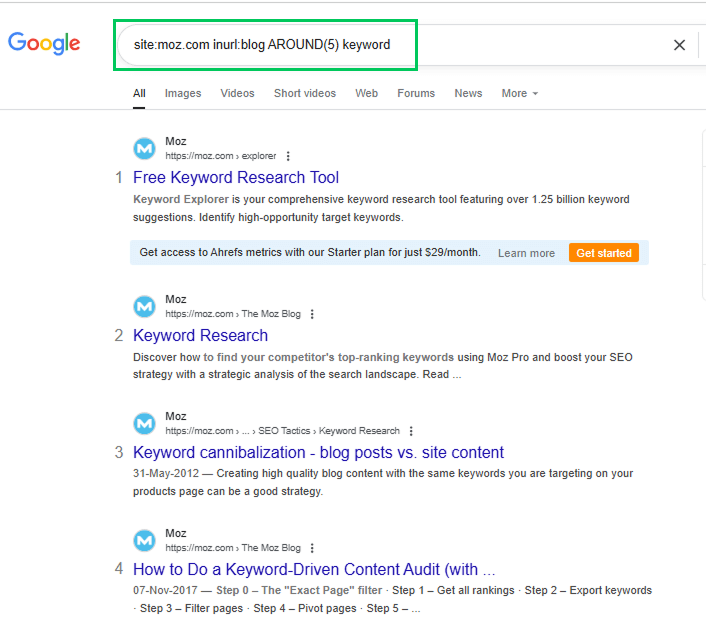
For example: site:moz.com inurl:blog AROUND(5) keyword
This shows blog posts on Moz where the word “keyword” appears close to other relevant terms. It helps you analyze content structure or topic focus.
2. Get Internal Linking Opportunities
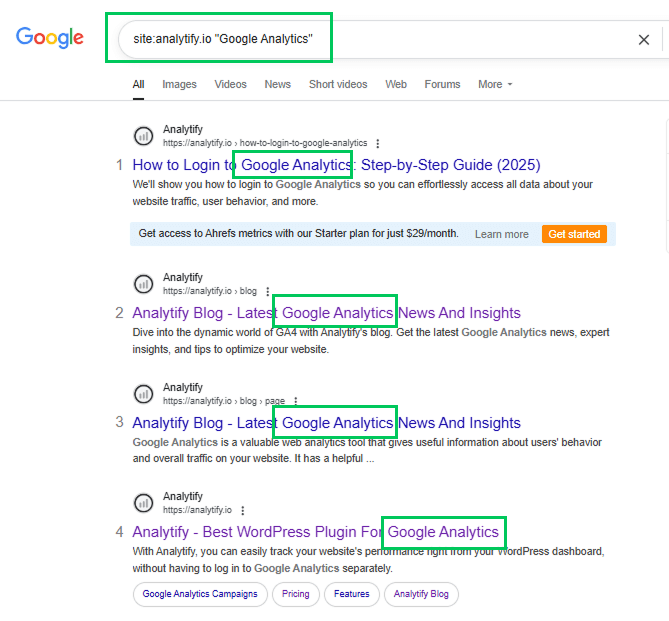
Run site:yourdomain.com “target phrase” to find unlinked mentions where you can add internal links.
For example: site:analytify.io “Google Analytics”
3. Track the Publishing Frequency of Competitors
Combine site:competitor.com with before: and/or after: to see how often they publish. You can use this data to benchmark your own publishing schedule and stay competitive.
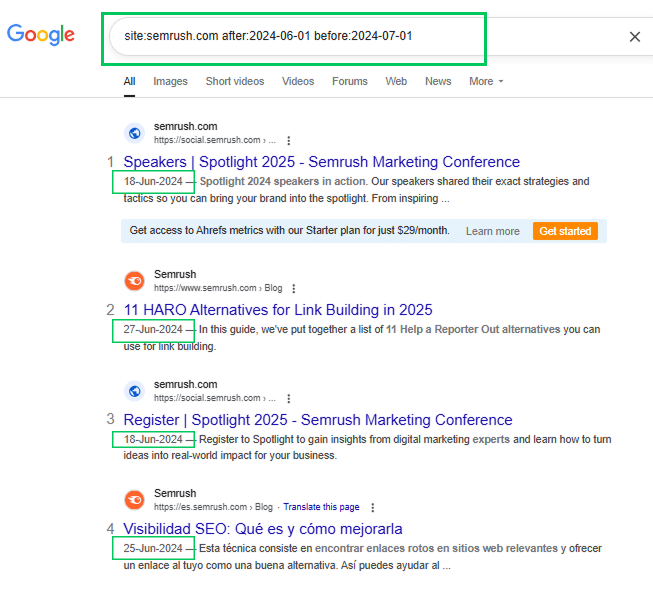
For example: site:semrush.com after:2024-06-01 before:2024-07-01
This search tells Google to show only pages from semrush.com that were published (or indexed) between June 1, 2024, and July 1, 2024. By doing this, you can quickly see how many posts your competitor published in that specific period.
4. For Deeper Research
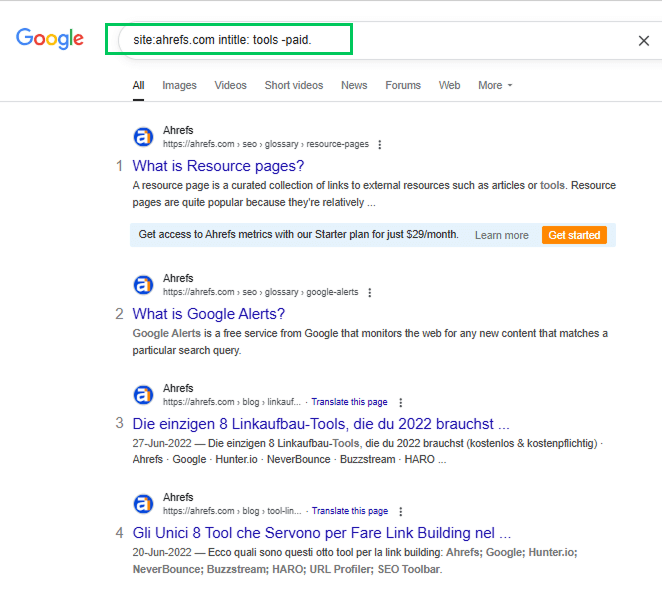
You can also combine multiple operators for deeper research, like site:competitor.com intitle: tools -paid.
For example: site:ahrefs.com intitle: tools -paid.
This displays content about tools from competitors such as Ahrefs. It excludes paid tools.
Tips
- Use quotes for exact phrases: Always enclose specific phrases in quotation marks to get accurate matches.
- Exclude results with the minus sign: Use the minus (-) operator to remove irrelevant results from your search.
- Combine operators: Stack multiple operators like intitle:, filetype:, or AROUND(X) to refine your searches. For instance, site:backlinko.com intitle: guide AROUND(4) link building can help you uncover detailed guides on a topic.
Mastering these combinations helps SEOs streamline research, improve targeting, and discover untapped opportunities with minimal effort.
How Analytify Enhances SEO with Google Search Operators
Join 50,000+ beginners & professionals who use Analytify to simplify their Google Analytics!
Analytify is one of the best WordPress plugins for integrating Google Analytics into your site without any technical complexity.
Analytify provides a clean, user-friendly dashboard inside WordPress. Track essential website metrics, monitor traffic sources, analyze user behavior, and measure content performance without leaving your admin panel.

Features like real-time tracking, campaign monitoring, top referrers, and page-level analytics help you make data-driven SEO improvements faster with Analytify.
When it comes to integrating Google search operators for SEO, Analytify’s Search Term Dashboard can be helpful. Track which keywords and queries bring users to your site. You can identify content gaps, discover high-performing terms, and align pages with the phrases your audience searches for.
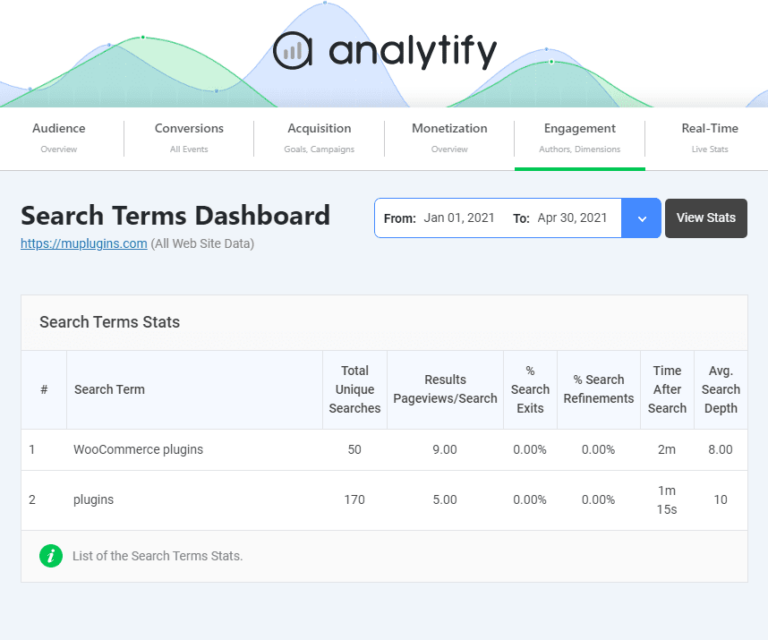
This insight lets you create or optimize content based on real search data. Your use of Google search operators stays targeted, effective, and backed by analytics.
Frequently Asked Questions About Google Search Operators
1. What are Google Search Operators?
Google search operators are special commands or symbols that refine search results. They help SEOs find specific content, analyze competitors, and speed up research.
2. How to rank No. 1 in Google Search?
To rank at the top, create valuable, original content, optimize for relevant keywords, improve site speed, build quality backlinks, and ensure your site is mobile-friendly.
3. Which operator is used for exact search?
The quotation mark operator (” “) is used for exact searches. For example, typing “best SEO tips” shows only results with that exact phrase.
4. What is the Google update for SEO 2026?
The Google SEO update for 2026 continues to focus on helpful, high-quality content, user experience, and mobile-first indexing. AI-powered search enhancements, like Search Generative Experience (SGE), are also influencing rankings.
5. What are the different types of Google searches?
The main types of Google searches include navigational searches (finding a specific website), informational searches (looking for knowledge or answers), transactional searches (intent to buy or complete an action), commercial investigation searches (researching before purchase), and local searches (finding nearby businesses or services).
6. What are the three Google advanced search operators in detail in SEO?
Popular advanced operators are:
Site: – Finds results from a specific domain.
intitle: – Finds pages with specific words in the title.
inurl: – Finds pages with specific words in the URL.
7. What are the main operations of Google?
The main operations of Google include web search, online advertising (Google Ads), cloud services (Google Cloud), YouTube, Android and Chrome development, and AI innovations like Google Bard and Search Generative Experience (SGE).
Final Thoughts: Google Search Operators
This guide began with what Google search operators are: special commands and symbols that refine search results. It also covered why they are essential for SEO. We explored how search operators help with keyword targeting, competitor analysis, content indexing, and technical audits. They save time and improve accuracy.
We then moved to the importance of Google advanced search operators for uncovering hidden opportunities and crafting data-driven strategies. The core section covered the top 20 Google search operators for SEO in 2026, with examples and use cases. It included commands like site:, intitle:, inurl:, filetype:, wildcards (*), and proximity searches such as AROUND(X).
We also covered how to combine operators to extract deeper insights. Use cases include content audits, link prospecting, and new content ideas. Then we discussed how analytify enhances SEO with its search term dashboard.
For further guidance, you can read:
- How to Use Google Analytics for SEO
- How to Add SEO Keywords in a WordPress Website
- Google Analytics Keyword Report
Which Google Search Operator do you find the most powerful for your SEO strategy? Share your experience in the comments below. We would love to hear from you!