
How to Leverage Website Analytics for Enterprise Website (2026)

To use website analytics on an enterprise website, I recommend six steps: align analytics with business objectives, define KPIs, segment your audience, build a data collection framework, create standardized reports, and set up cross-team collaboration. I cover each step below.
Enterprise website analytics shows how users navigate your site, which content drives conversions, and where marketing spend is and is not working. For large organizations, it also connects data from multiple channels, teams, and systems into a single view of online performance.
Website Analytics for Enterprise Website (TOC):
What Is Website Analytics for Enterprise Websites?
Website analytics for enterprise websites means collecting and analyzing data from large, complex digital properties. It tracks how users behave, where traffic comes from, which actions convert, and how different channels perform together.
Enterprise analytics differs from small business analytics in scale and complexity. Enterprise sites typically have multiple subdomains, international audiences, complex user journeys, and data flowing from many integrated systems.
| Factor | Small Business Analytics | Enterprise Website Analytics |
|---|---|---|
| Data volume | Manageable with standard tools | Requires higher data limits and sampling controls |
| Team structure | One person manages analytics | Multiple teams: marketing, IT, product, finance |
| Data sources | Website only | Website, CRM, email, paid ads, offline systems |
| Reporting | Pre-built dashboards | Custom reports with cross-department distribution |
| Compliance | Basic cookie consent | GDPR, CCPA, regional regulations, data governance policies |
| Tools | GA4 free version | GA360, Mixpanel, Amplitude, or enterprise-tier platforms |
Core Metrics Every Enterprise Website Should Track
Enterprise websites should track seven core metrics: sessions, users, conversion rate, average session duration, bounce rate, click-through rate, and exit pages.
Each one reveals a different part of how the site performs.
| Metric | What It Measures | Why It Matters for Enterprises |
|---|---|---|
| Sessions | Total number of visits within a time period | Shows overall traffic volume and trend direction |
| Users (unique visitors) | Number of individual people who visited | Measures reach and audience size |
| Conversion rate | Percentage of sessions that include a key event (the GA4 name for what was formerly called a conversion) | Directly measures whether the site achieves business objectives |
| Average session duration | Average time users spend per visit | Indicates engagement and content relevance |
| Bounce rate | Percentage of sessions that were not engaged (an engaged session lasts longer than 10 seconds, has a key event, or has 2 or more page or screen views) | Flags pages where users leave without engaging |
| Click-through rate (CTR) | Percentage of users who click a specific link or CTA | Measures effectiveness of calls to action and ad copy |
| Exit pages | Last pages viewed before a user leaves | Identifies where users abandon their journey |
Note: Limit your core KPI set to 5 to 7 metrics. More than that creates reporting overload and makes it harder to identify what actually needs attention.
How to Build an Analytics Strategy for Enterprises
A complete enterprise analytics strategy has six components.
Thesix components are aligning analytics with business objectives, defining KPIs, segmenting the audience, building a data collection framework, creating standardized reports, and establishing cross-team collaboration.
All six must be in place for analytics to deliver real business value.
Step 1: Align Analytics with Business Objectives
Start with business goals, not dashboards. Define what the enterprise needs to achieve before deciding what to track.
- Ask specific questions: ‘Why are customers abandoning checkout?’ not ‘How is the site performing?’
- Work with leaders from marketing, product, IT, and finance to agree on what success looks like
- Confirm that every analytics initiative connects directly to a business outcome
Step 2: Define KPIs That Drive Action
A KPI is only useful if acting on it changes an outcome. Choose metrics that lead to decisions.
- Focus on actionable KPIs: conversion rate, revenue per visitor, customer acquisition cost
- Avoid vanity metrics: raw page views, social follower counts, total impressions without context
- Limit core KPIs to 5 to 7 per team or business unit
Step 3: Segment Your Audience
Different audience segments behave differently on your site. Treating all visitors the same produces misleading averages.
- Segment by acquisition source: organic, paid, direct, referral, email
- Segment by behavior: first-time visitors, returning users, high-value account visitors
- Segment by demographics: geography, device, language
- Analyze each segment separately to find personalization and optimization opportunities
Step 4: Build a Data Collection Framework
A data collection framework defines what data is collected, how it is tagged, and how it flows between systems.
- Use a tag manager (Google Tag Manager or equivalent) to deploy and manage tracking codes centrally
- Define consistent naming conventions for events, dimensions, and key events across all properties
- Audit tracking implementation quarterly to catch gaps or broken tags
- Document every custom event and dimension so teams share the same definitions
Step 5: Create Standardized Reports for Each Team
Different teams need different views of the same data. Build reports tailored to each audience.
| Team | Report Focus | Key Metrics |
|---|---|---|
| Marketing | Campaign and channel performance | Traffic by source, CTR, conversion rate per campaign |
| Product | User behavior and feature adoption | Engagement rate, funnel drop-offs, feature event triggers |
| Finance | Revenue attribution and ROI | Revenue per visitor, cost per acquisition, key event value |
| IT / Engineering | Technical performance | Page load time, error rates, Core Web Vitals |
| Executive | High-level business performance | Revenue, conversion trends, YoY traffic growth |
Step 6: Establish Cross-Team Collaboration
Analytics insights only drive change when teams act on them together. Siloed analytics produces data nobody uses.
- Create a regular cross-functional review meeting (monthly minimum) covering key findings
- Build a shared dashboard accessible to marketing, product, IT, and business leadership
- Assign clear owners for each KPI so someone is accountable for acting on changes
Selecting the Right Analytics Tools
Google Analytics for enterprises starts with GA4 (free) and scales to GA360 for large organizations needing higher data limits and dedicated support. For specialized needs, layer in Hotjar for heatmaps, Mixpanel for product analytics, or Amplitude for user journey analysis.
| Tool | Best For | Enterprise Features | Cost |
|---|---|---|---|
| Google Analytics 4 (GA4) | Web analytics foundation for all enterprise sites | Event-based tracking, Search Console integration, BigQuery export | Free |
| Google Analytics 360 | Large enterprises needing higher data and SLA | Higher quotas, higher sampling limits, unsampled explorations, data retention of up to 50 months (standard properties: up to 14 months) | From $50,000/year |
| Hotjar | Visual user behavior insights | Heatmaps, session recordings, feedback tools | From $32/month |
| Mixpanel | Product analytics and user retention | Funnel analysis, cohort tracking, A/B testing | From $25/month |
| Amplitude | User journey analysis at scale | Behavioral cohorts, pathfinder, retention analysis | Custom pricing |
Combining several platforms gives you one measurement framework, provided every tool uses the same data definitions.
Key tool integration considerations:
- Connect analytics to your CRM to track the full customer journey from first visit through purchase
- Ensure consistent data definitions across all tools to prevent reporting conflicts
- Use a tag manager as the central deployment layer for all tracking implementations
- Plan data governance before connecting tools so privacy compliance is built in, not added later
Analytics Implementation Best Practices for Enterprise Sites
Enterprise analytics implementation has four foundational requirements. First, deploy tracking through a tag manager. Second, configure conversion tracking tied to business KPIs. Third, create custom dimensions for business-specific data. Fourth, build privacy compliance into data collection from day one.
1. Deploy Tracking via a Tag Manager
Install analytics tracking through Google Tag Manager (or equivalent) rather than adding code directly to pages.
- Reduces the need for developer involvement for every tracking change
- Provides built-in templates for standard events, reducing implementation errors
- Enables version control and rollback for tracking changes
- Centralizes all tag management across multiple properties and teams
Tip: For WordPress-based enterprise content sites, Analytify connects GA4 directly to your WordPress dashboard without requiring GTM setup. It is the fastest route to accurate analytics for WordPress properties.
2. Configure Conversion Tracking
Define which actions count as key events (called conversions in earlier GA4 versions) before you set up tracking. Not every form submission or page visit qualifies.
- Identify your highest-value actions: form completions, trial sign-ups, purchases, demo requests
- Set a value for each key event so revenue attribution is accurate
- Configure conversion windows that match your typical sales cycle length
- Review key event counts monthly to confirm tracking is working correctly
3. Create Custom Dimensions
Custom dimensions add business-specific context to your standard analytics data.
- Examples: account tier, logged-in user type, content category, product line
- Custom dimensions enable segmentation by business-specific attributes not captured by default
- Document all custom dimensions in a shared data dictionary accessible to all teams
4. Privacy and Compliance
Enterprise analytics must comply with regional data privacy regulations including GDPR and CCPA.
- Implement a consent management platform (CMP) to collect and respect user consent choices
- Use server-side tracking where possible to reduce reliance on browser-based cookies
- Avoid collecting personally identifiable information (PII). Google states that IP masking is not necessary in Google Analytics 4 because IP addresses are not logged or stored.
- Establish a data retention policy and configure it in your analytics platform
5. Quality Assurance
Strong analytics requires ongoing quality checks. Use these practices to keep your tracking accurate.
- Use tag manager preview mode to test all tracking before deploying to production
- Run monthly audits of your tracking implementation to catch gaps or broken tags
- Maintain a tracking plan document that records every event, dimension, and key event
- Test tracking after every major site update or release
Advanced Enterprise Website Analytics Techniques
Advanced analytics techniques for enterprise websites include user journey mapping, audience segmentation, multi-touch attribution modeling, predictive analytics, and cross-channel data integration. These techniques move analytics from describing what happened to predicting and influencing what happens next.
| Technique | What It Does | Business Value |
|---|---|---|
| User journey mapping | Visualizes how visitors move through the site and where they exit | Identifies friction points and drop-off opportunities for improvement |
| Audience segmentation | Groups visitors by behavior, source, or characteristics | Enables personalized experiences for high-value segments |
| Attribution modeling | Assigns credit to channels and touchpoints in the conversion path | Shows which marketing channels truly drive results |
| Predictive analytics | Uses past data to forecast future user behavior and trends | Helps plan resources and content before demand arrives |
| A/B testing | Compares two page or element variations with real users | Confirms improvements with data before full rollout |
| Cross-channel integration | Combines website, CRM, social, and offline data in one view | Reveals insights invisible from any single data source |
Specialized development agencies like ITMonks provide enterprise solutions that integrate these analytics capabilities and help businesses put their data to use.
How Analytify Enhances Analytics for WordPress-Based Enterprise Properties
Join 50,000+ beginners & professionals who use Analytify to simplify their Google Analytics!
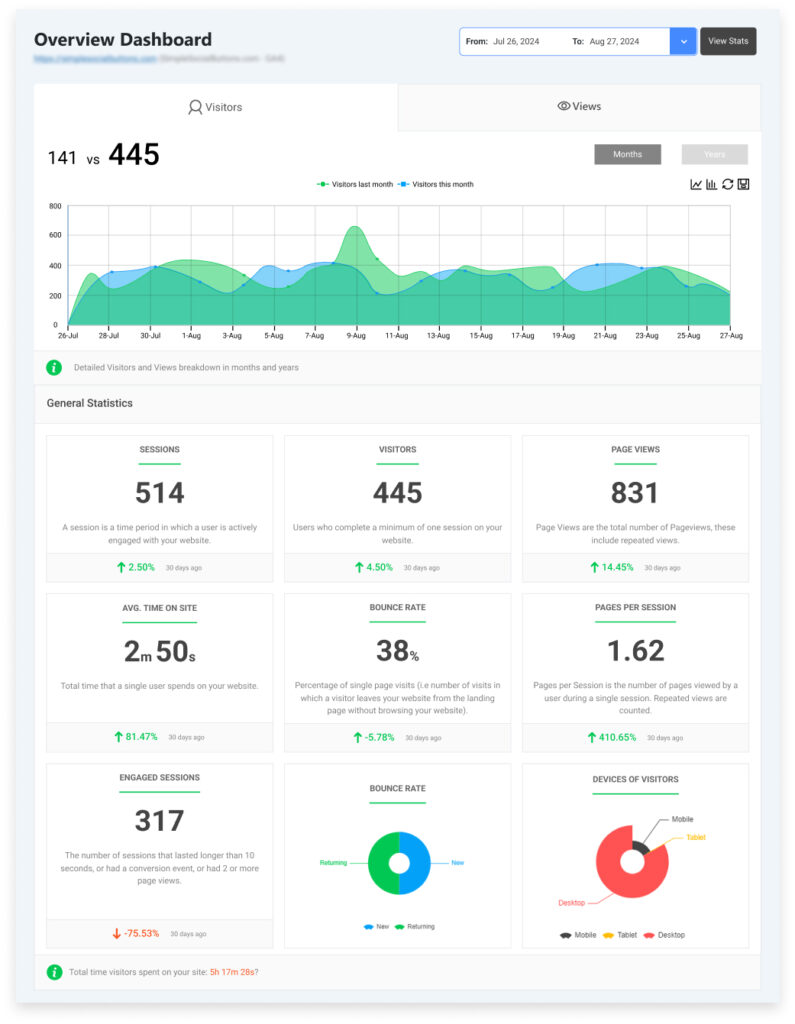
Analytify connects Google Analytics to your WordPress dashboard, simplifying enterprise analytics for WordPress-based sites, blogs, and documentation. It presents GA4 data in readable reports without requiring technical expertise, making analytics accessible to every team that needs it.
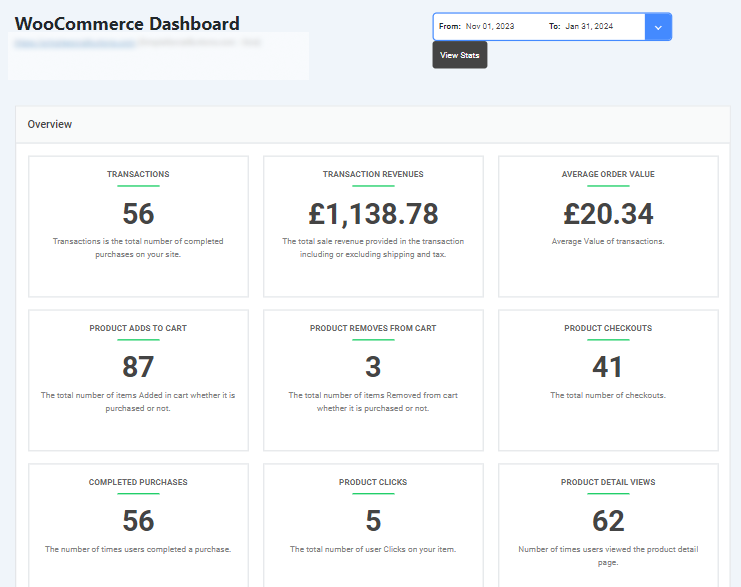
Analytify includes built-in e-commerce tracking for WordPress stores. Analytify reports on product performance, revenue, and cart abandonment inside your WordPress dashboard, so you can spot drop-off points and act on them without leaving WordPress.
Adding Analytify to your analytics stack gives your team direct access to GA4 data inside WordPress. This makes it easier to act on insights without switching tools or relying on technical teams.
Measuring the ROI of Enterprise Analytics Initiatives
Measure analytics ROI by tracking specific KPIs before and after implementing analytics-driven changes. Compare conversion rates, revenue per visitor, and cost savings from optimized processes to quantify the business impact of each analytics initiative.
| ROI Measurement Method | How to Apply It |
|---|---|
| Conversion rate improvement | Run A/B tests on key pages; measure the lift in key events and calculate revenue impact |
| Cost savings from UX fixes | Identify pages causing support calls or cart abandonment; measure reduction after fixing them |
| Revenue attribution | Use attribution models to connect analytics-driven optimizations to actual revenue changes |
| Customer lifetime value | Segment users by acquisition source and measure LTV differences to identify best-performing channels |
| Budget reallocation | Shift spend from low-converting channels to high-converting ones and measure revenue change |
Tip: Build a business case for analytics investment by presenting three numbers: revenue gained, costs saved, and churn reduced.
Frequently Asked Questions
1. What is website analytics, and why is it important for enterprises?
For enterprises, analytics reveal how users interact with the site, which content converts, and where the experience breaks down. This analytics drives faster decisions across UX, marketing, and business growth.
2. Which metrics should enterprises track to measure website success?
Enterprises should monitor a variety of metrics, including:
Sessions and Users: Measure overall website traffic.
Conversion Rates: Track how many sessions lead to desired actions (sales, sign-ups).
Bounce Rates: Monitor single-page visits to assess the relevance of landing pages.
Click-Through Rates (CTR): Evaluate the effectiveness of calls-to-action.
Average Session Duration: Understand user engagement and interaction with content.
3. How does Analytify improve website analytics for enterprises?
Analytify simplifies Google Analytics for WordPress websites, offering clear, visual reports on essential metrics like conversion rates, bounce rates, and user behavior. With its e-commerce tracking, Analytify provides granular insights into product performance and cart abandonment. Its easy-to-use interface and customizable dashboards make it an ideal tool for enterprises to optimize website performance.
4. What is the difference between conversion tracking and bounce rate?
Conversion Tracking measures the percentage of sessions that lead to a desired action, such as a purchase or form submission.
Bounce Rate tracks the percentage of visitors who leave the site after viewing only one page, often indicating that the landing page wasn’t engaging or relevant to the user.
5. How can I use website analytics to improve my enterprise website?
Analyzing user behavior helps enterprises find friction in the user journey, fix slow pages, improve content, and sharpen marketing decisions. Regular A/B testing and audience segmentation keep improvements data-backed over time.
Website Analytics for Enterprise Website: Final Thoughts
Website analytics for enterprise websites only delivers value when it is connected to decisions. Data collected but not acted on is a cost, not an asset.
Core checklist for enterprise analytics success:
| Area | Action Required |
|---|---|
| Objectives | Align every analytics initiative to a specific business goal |
| KPIs | Define 5 to 7 core metrics per team; eliminate vanity metrics |
| Audience segmentation | Analyze behavior by source, device, geography, and user type separately |
| Data collection | Deploy tracking via tag manager; audit quarterly |
| Reporting | Build team-specific dashboards; schedule regular cross-team reviews |
| Compliance | Implement consent management; configure data retention; anonymize PII |
| Advanced techniques | Apply attribution modeling, A/B testing, and predictive analytics progressively |
| ROI measurement | Track KPIs before and after changes; present results to stakeholders |
For WordPress-based enterprise properties, Analytify reduces the complexity of this process by surfacing GA4 data inside your dashboard where content and marketing teams already work.
Enterprise analytics works best when it drives decisions. Start with your business objectives, choose the right tools, and measure the impact of every change.
You may also like to read:
- How To Use Google Analytics For SEO (15 Effective Ways)
- Top 10 Google Analytics Tips And Tricks.
- 9 Best Website Analytics Tools.
Now, we’d love to hear from you. What strategy are you using to track website analytics for an enterprise website effectively? Share your thoughts in the comment box.