
Smart Scaling: How to Use Traffic to Optimize Hosting Costs Without Sacrificing Uptime

Smart scaling optimizes hosting costs by matching your server resources to your real traffic, so you pay for peak capacity only when you need it. In this guide, I use a Minecraft server as the example.
Sudden traffic spikes can push hosting costs up quickly, and scaling up your server is not always the most cost-effective answer. Smart scaling adjusts your hosting resources in real time. Players get a smooth experience, and you do not pay for resources you do not use. Choose hosting that scales without downtime to protect uptime.
This guide is for Minecraft server owners and WordPress site owners who want to control hosting costs. I explain what smart scaling is, how to apply it to a Minecraft server, and how Analytify tracks the website traffic metrics behind hosting decisions.
Smart Scaling (TOC):
What is Smart Scaling and Why Does It Matter?
Smart scaling adjusts your server resources to match the number of players on your Minecraft server at any given time. Rather than paying for overpowered hardware 24/7, smart scaling lets you scale up when traffic increases and scale down during quieter times.
Some hosts call it “auto-scaling.” Others just offer flexible plans that you can adjust based on your needs. You should not be locked into a flat rate for power you do not use, or stuck on a plan that cannot keep up when traffic rises.
Why Minecraft Hosting Makes Smart Scaling Challenging
Minecraft hosting makes smart scaling challenging because mods, plugins and large player counts can quickly strain server resources. A basic vanilla Minecraft server does not need much processing power.
Key Factors Affecting Minecraft Server Performance:
- Exploring New Chunks: High memory and CPU usage.
- Redstone Contraptions and Complex Machines: Significant strain on the server.
- Modded Mobs/Custom Content: Even more resources are required for complex or heavily customized content.
That’s why a lot of people on forums like this one about minecraft modded servers hosting recommend hosts that let you adjust resources easily, or switch between plans with minimal hassle.
How to Scale Smartly for Your Minecraft Server
Smart scaling for a Minecraft server takes six steps: know your traffic patterns, use flexible hosting, consider container-based hosting, cache and offload, schedule cleanup, and monitor and adjust.
1. Know Your Traffic Patterns
Track when your players are most active, such as weekends, evenings or school holidays. If you host a public server, check analytics (some control panels offer this) or watch your server logs.
For example, if your server gets most of its traffic between 6 PM and 10 PM, you may not need top-tier specs running 24 hours a day.
Some hosts let you temporarily bump your resources for peak hours. Others offer burst options that automatically kick in when traffic spikes.
2. Use Hosting That’s Flexible
Choose hosting that moves with your actual usage instead of a fixed monthly plan.
Look for one of these:
- A host that lets you scale your server up and down without downtime.
- A pay-as-you-go setup that bills based on actual usage (CPU, RAM, bandwidth).
If you’re looking for something like that, Godlike Minecraft Server Hosting is one option that focuses on this kind of flexibility. You can start small and upgrade as you go, which makes sense if you’re still growing your player base.
3. Consider Container-Based Hosting
Container-based hosting uses container technology such as Docker to isolate and manage each Minecraft instance, so your server does not share resources with other processes. It is a little more technical.
Containers can scale in real time. When more players join, spin up another container. When traffic drops, spin it down again. This model suits server owners who run events or get traffic in waves.
4. Cache and Offload What You Can
Move maps, skins and static files to external storage or a CDN. Offloading does not reduce CPU load directly, but it keeps your main server cleaner.
Run monitoring and analytics on a separate machine or service, so your main server does not do all the work.
5. Use Scheduled Tasks to Clean Up
Schedule daily reboots, chunk purges or entity clears to keep a modded server lean. Modded servers grow bloated over time: world files grow, entities pile up, and memory leaks appear.
Automating cleanup reduces the need for higher specs just to handle old data.
6. Monitor and Adjust, Don’t “Set and Forget”
Check your server’s performance stats regularly. Setting up a server and never reviewing how it runs is one of the biggest mistakes.
Watch for lag spikes, TPS drops and RAM usage.
If you’re hosting for a community, be open with your players about it too. If you hit limits, you may need to upgrade, or you may only need to prune inactive plugins.
Maintaining Uptime: The Key to Smart Scaling
Scaling protects uptime only when it avoids random crashes and long reboots each time traffic changes.
Follow these rules:
- Use hosts that support graceful scaling, where your server stays online during resource adjustments.
- Avoid overselling hosts and cheap plans that cram too many servers onto one machine.
- Backups. Always backups. Even the best host can fail.
Using Analytify for Scaling Your WordPress-Based Minecraft Website
Join 50,000+ beginners & professionals who use Analytify to simplify their Google Analytics!
Your Minecraft game server may not run on WordPress. A WordPress-based Minecraft website, such as a blog, a community site or an online store, can still benefit from smart scaling.
This is where Analytify comes in. As a Google Analytics plugin for WordPress, Analytify helps you track and monitor key performance metrics of your WordPress site, making it easier to scale resources and optimize hosting costs.
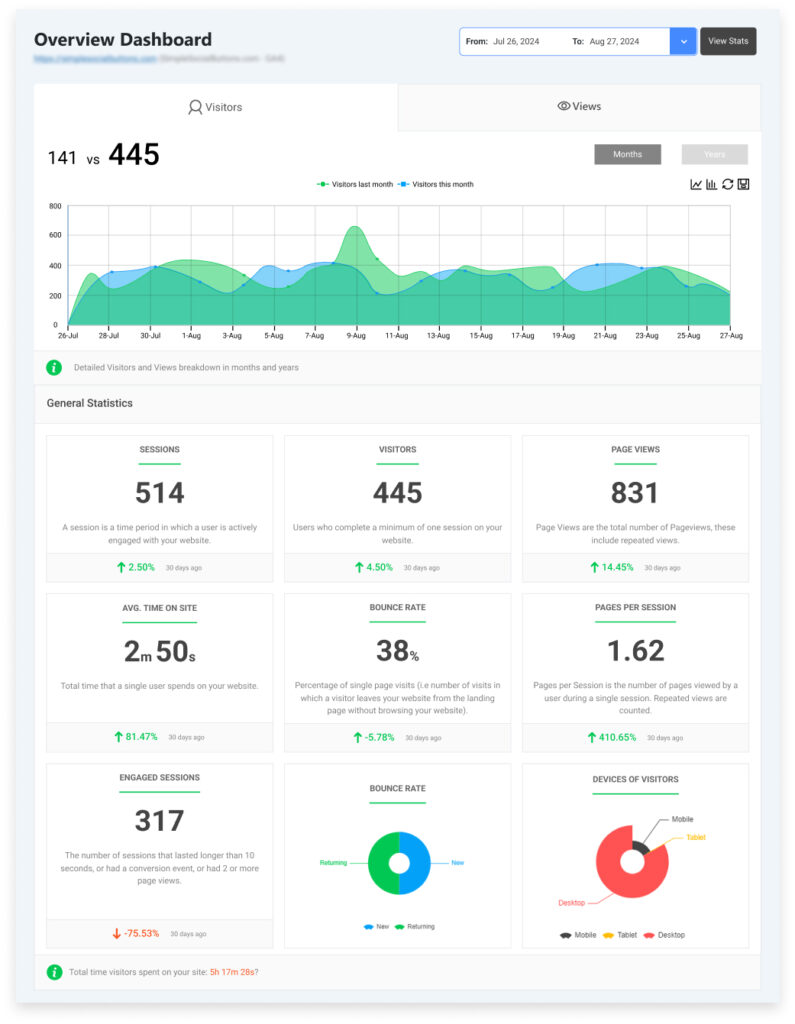
Track Website Traffic Patterns for Smarter Scaling
The key to effective scaling is understanding your website’s traffic patterns. Analytify connects to Google Analytics and shows real-time traffic, visitor engagement and user activity on your WordPress-based Minecraft website.
Real-Time Monitoring: See when your community members visit your site, what content they interact with most, and how often they visit. This insight helps you determine when your website might need more resources, especially during peak times like weekends or events.
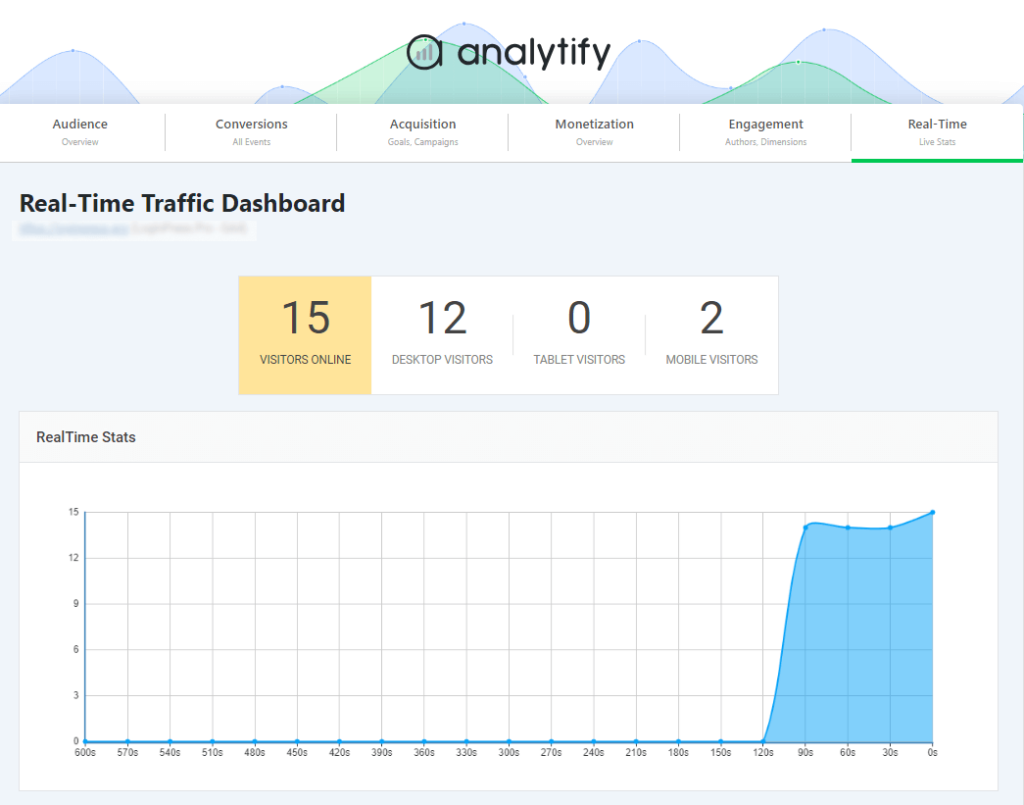
Optimize Hosting Costs Based on Traffic Insights
Use Analytify to track when traffic spikes occur, then adjust your hosting plan so you do not pay for resources you do not need.
- Traffic Data: Understand when your website experiences heavy traffic, allowing you to scale resources efficiently during peak times.
- Cost-Effective Hosting: With detailed insights, you can optimize hosting plans to ensure you’re not overpaying for unused resources during quieter periods.
Make Data-Driven Decisions for Your Minecraft Website
Analytify reports give you the website traffic data you need to adjust hosting without guessing.
- Automated Reports: Set up automated email reports to keep track of your website’s key metrics like traffic, bounce rates, and page views.
- Custom Report Exports: Export data on player interactions, traffic sources, and more in CSV or PDF formats for detailed analysis or sharing with your team.
Frequently Asked Questions
1. What is smart scaling in hosting?
Smart scaling refers to the ability to dynamically adjust server resources—such as CPU, RAM, and bandwidth based on real-time demand. This approach ensures optimal performance during traffic surges and cost savings during quieter periods. By leveraging auto-scaling technologies, websites can maintain uptime without overpaying for unused resources.
2. How can I optimize hosting costs for Minecraft server?
To optimize hosting costs, consider the following strategies:
Implement auto-scaling: Automatically adjust resources based on traffic patterns to avoid over-provisioning.
Monitor traffic patterns: Use analytics tools to identify peak usage times and adjust resources accordingly.
Choose flexible hosting plans: Opt for providers that offer pay-as-you-go or elastic plans to scale resources up or down as needed.
3. How does traffic monitoring help in scaling decisions?
Monitoring traffic allows you to:
Identify peak usage times: Understand when your server experiences the most traffic.
Predict future demand: Use historical data to anticipate traffic surges.
Adjust resources proactively: Scale up or down before issues arise, ensuring smooth performance.
4. What is the difference between vertical and horizontal scaling?
Vertical scaling involves adding more resources (CPU, RAM) to a single server.
Horizontal scaling involves adding more servers to distribute the load.
Smart Scaling Final Thoughts: Don’t Pay for Idle Time
Smart scaling lowers hosting costs because you pay only for the resources you need, when you need them. By understanding your traffic patterns, choosing flexible hosting, using container-based hosting when necessary, and regularly monitoring server performance, you can optimize hosting costs without compromising uptime.
With Analytify, you can track the website traffic metrics that inform your hosting decisions.
You may also like to read:
- How To Track Website Traffic With Google Analytics 4
- How To Use Google Analytics To Increase Traffic (10 Ways)
How will you optimize your server performance for the next big traffic surge? We’d love to hear from you. Share your strategies with us in the comments below.