Content Performance Benchmarks: How to Measure Good Metrics in 2026

Struggling to know if your content is truly performing well in 2026? With so many metrics, it’s easy to get lost without knowing what ‘good’ looks like.
Content performance benchmarks act as a reference point, helping you measure your content against industry standards, historical data, or competitors.
By understanding these benchmarks, you can identify which pieces of content are driving engagement, conversions, and overall growth and which ones need improvement.
In this guide, you’ll learn what content performance benchmarks are, why they matter, key metrics to track in 2026, and how to measure everything easily using GA4 and Analytify inside WordPress.
Let’s get started!
Content Performance Benchmarks (TOC):
Why Content Performance Benchmarks Matter
A content performance benchmark is a reference point used to measure how well your content is performing compared to your past results or industry standards, or content performance benchmarks in your niche.
By comparing metrics like traffic, engagement, or conversions to these benchmarks, you can quickly see whether your content is performing above average, meeting expectations, or falling behind.
For example, if your average blog post usually gets 1,000 views but a new post gets only 400, you immediately know it’s underperforming because it falls below your established benchmark.
Benchmarks and WordPress content analytics also help you spot trends, track growth, and identify what type of content works best for your audience.
Most importantly, they help you understand what’s working and what isn’t. This makes it easier to refine your content strategy, focus on high-performing formats, and fix areas that consistently fall below expectations.
Key Metrics to Track for Content Performance
To understand how well your content is performing, you need to monitor the core metrics that provide visibility into engagement, user behavior, and results. These blog performance metrics help you see what attracts readers, what keeps them engaged, and what drives conversions.
Essential content performance metrics include:
- Pageviews: The total number of times users view a specific piece of content or page.
- Unique Visitors: The number of individual users who visit your content, counted only once, even if they return multiple times.
- Engaged Sessions: The number of sessions in which users actively interacted with your content, typically lasting longer than 10 seconds or including meaningful actions.
- Average Engagement Time: The average amount of active time users spend interacting with your content, such as reading, scrolling, or clicking.
- Scroll Depth: The percentage of a page that users scroll through, indicating how much of the content they actually read.
- Bounce Rate: The percentage of users who leave your site after viewing only one page, without taking further action.
- Traffic Sources: Shows how people find your website or content. This includes visitors coming from search engines, social media, email links, other websites, or by typing your website address directly.
- Click-Through Rate (CTR): The percentage of users who click on links, buttons, or calls-to-action (CTAs) compared to the total number of users who saw them.
- Conversion Rate: The percentage of visitors who complete a desired action, such as signing up, downloading a resource, or making a purchase.
- New vs. Returning Visitors: Compares first-time visitors to those who have visited your site before, showing audience loyalty and repeat interest.
- User Demographics: Information about your audience’s characteristics, such as age, gender, and location, which helps in tailoring content.
- Top Landing Pages: The pages where users first enter your site, showing which content attracts the most initial traffic.
- Exit Pages: Pages where users leave your website, helping identify potential drop-off points.
- Backlinks / Referrals: External links from other websites directing users to your content. These serve as both a source of referral traffic and a signal of authority, relevance, and trustworthiness in search engine algorithms.
- Social Shares & Engagement: The number of times your content is shared or interacted with on social platforms, reflecting its popularity and reach.
What are Content Marketing Benchmark Standards
Benchmarks vary across different content types, platforms, and industries. Blogs, WordPress sites, e-commerce stores, SaaS platforms, and media websites all have unique performance expectations.
Understanding these distinctions ensures that your content is evaluated in the proper context.
1. Blog Performance Benchmarks
Blog performance benchmarks help you understand how well your content is performing compared to typical results in your niche. Key blog performance metrics to monitor include average engagement rates, pageviews per post, and social shares, all of which reveal how well your topics, headlines, and promotion efforts are connecting with your audience.
Benchmarks can vary by industry and blog type, but the following average engagement rate benchmarks will help you understand how your blog performs:
- Marketing & Business Blogs: 3–5% average engagement rate per post.
- Technology &SaaS Blogs: 2–4% average engagement rate.
- Lifestyle & Personal Blogs: 4–6% average engagement rate.
- E-commerce & Product Blogs: 2–3% average engagement rate.
- Media & News Blogs: 1–3% average engagement rate.
For a benchmark example, in the marketing industry, the average blog post receives around 1,500 pageviews in the first month with an engagement rate of 3–5%. If your post reaches 2,500 pageviews with a 6% engagement rate, it’s performing above the standard, signaling that your content is more effective than the industry average.
Tracking these average engagement rate benchmarks helps you identify which types of posts generate more interest, so you can replicate their success and optimize underperforming content.
Over time, this ensures your blog remains aligned with audience expectations and industry trends. This helps you make improvements that consistently boost engagement and reach.
2. WordPress Content Analytics Benchmarks
WordPress content analytics benchmarks provide a way to understand how typical WordPress sites perform and where your site stands in comparison. Key metrics include average session duration, bounce rate, pageviews per user, and conversion rates.
By looking at these benchmarks, you can see what “normal” performance looks like for sites similar to yours and set realistic goals for your own content.
Performance can vary significantly by industry or niche. For example, a personal blog might have lower pageviews but higher engagement per post. While an e-commerce WordPress site may focus more on product page views and conversions.
Similarly, a news or media site may see high traffic volumes but shorter session durations. Comparing your site’s metrics to these industry-specific averages helps identify strengths, weaknesses, and areas that need optimization.
Using WordPress benchmarks also allows you to track growth over time. By regularly reviewing WordPress content analytics, you can see which content formats, topics, or strategies perform best, and adjust your content strategy accordingly.
This approach ensures your WordPress site remains competitive, engages visitors effectively, and achieves good results in your specific niche.
3. Industry-Specific Benchmarks
Different industries have distinct content performance standards, and comparing your metrics against these benchmarks helps set realistic goals.
For instance, blogs in the marketing and education niches often see higher engagement rates and social shares, while finance or legal blogs may attract fewer readers but higher-quality, targeted traffic.
In e-commerce, industry benchmarks focus on conversion rates, average order value, and product page interactions. Meanwhile, SaaS and technology industries prioritize trial signups, demo requests, and feature engagement as key measures of content effectiveness.
Media and news industries often emphasize pageviews, ad impressions, and repeat visits, reflecting audience reach and retention.
By understanding industry-specific benchmarks, you can evaluate content performance in the right context. This helps identify which strategies are effective for your niche to optimize engagement, conversions, and overall results.
How to Measure Your Content Performance with Analytify
Join 50,000+ beginners & professionals who use Analytify to simplify their Google Analytics!
While navigating multiple reports in GA4 can feel overwhelming for many WordPress users, a clear view of your key metrics can instantly simplify things. This is where Analytify becomes extremely helpful.
Analytify is one of the best Google Analytics WordPress plugins, making WordPress content analytics simple by bringing all important GA4 metrics directly into your website dashboard.
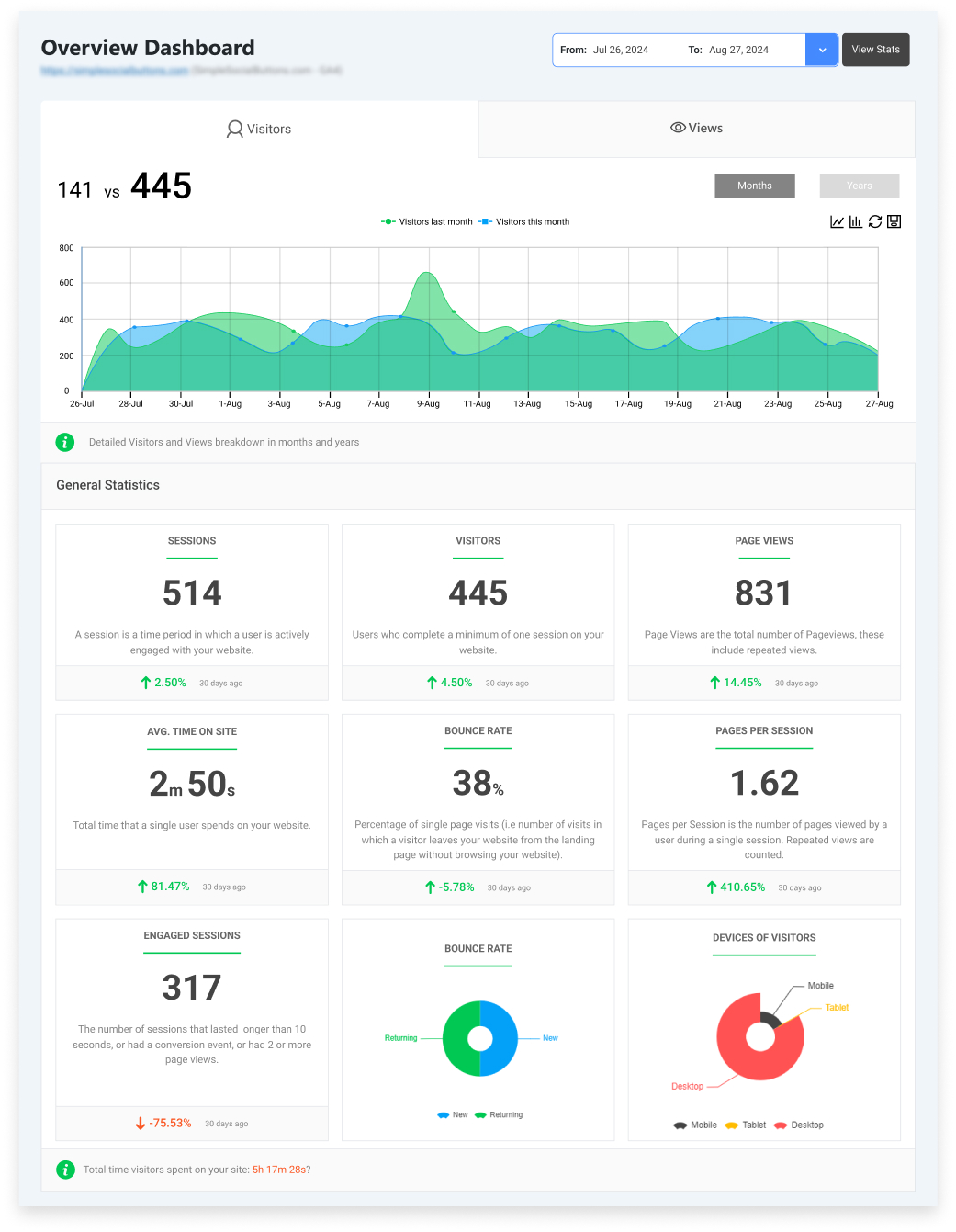
To get started, you simply connect your GA4 property to WordPress using Analytify. Once connected, the plugin displays all key metrics in one place.
You can also upgrade to the Analytify Pro version for advanced reports, eCommerce tracking, UTM analytics, and more detailed performance benchmarking.
In analytify you can,
Use the Real-Time Dashboard: See live users, traffic spikes, and immediate engagement inside WordPress. This helps you understand how your content is performing right now and whether it meets your expected benchmarks.
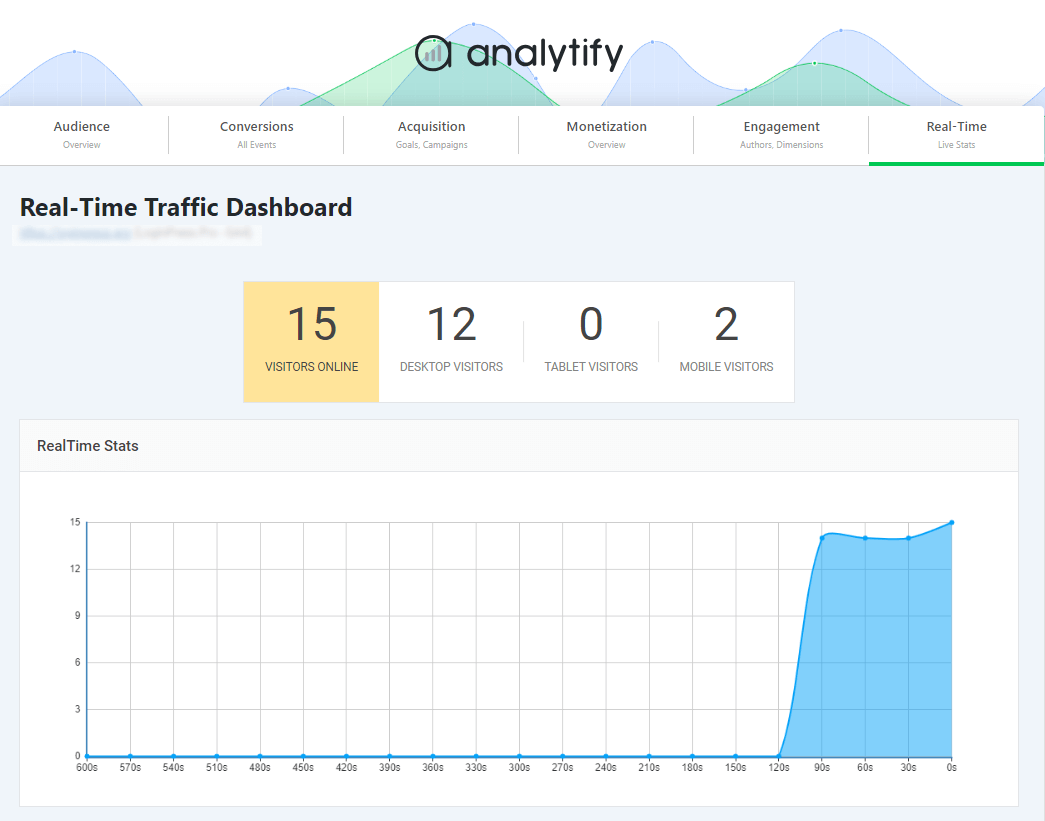
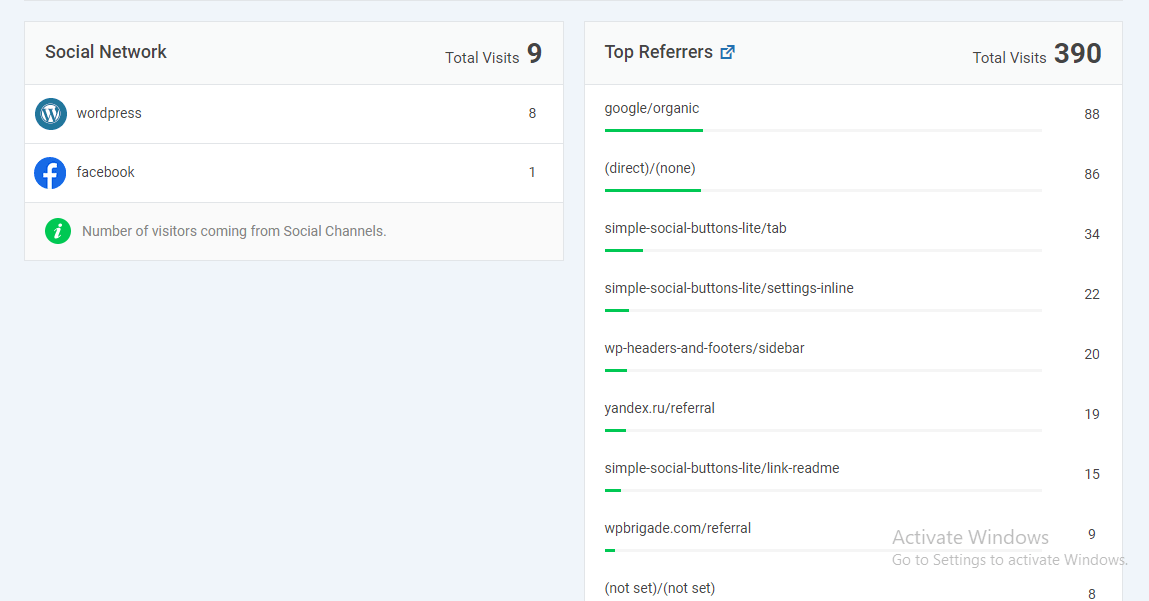
Review Traffic Sources: Check whether your search, social, referral, or email traffic is performing above or below your benchmark levels. This is especially useful for content marketing benchmarks.
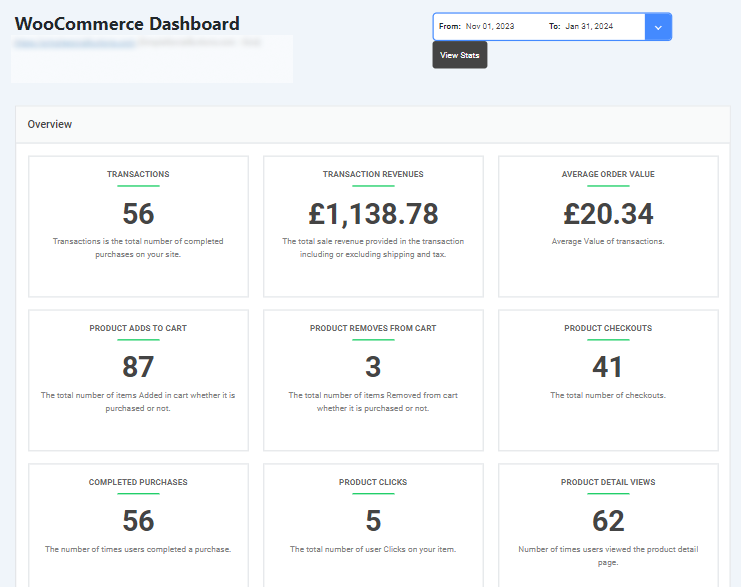
Track eCommerce Performance: For WooCommerce sites, Analytify provides product-level reports, revenue trends, and conversion data that you can compare against industry averages to measure performance more accurately.
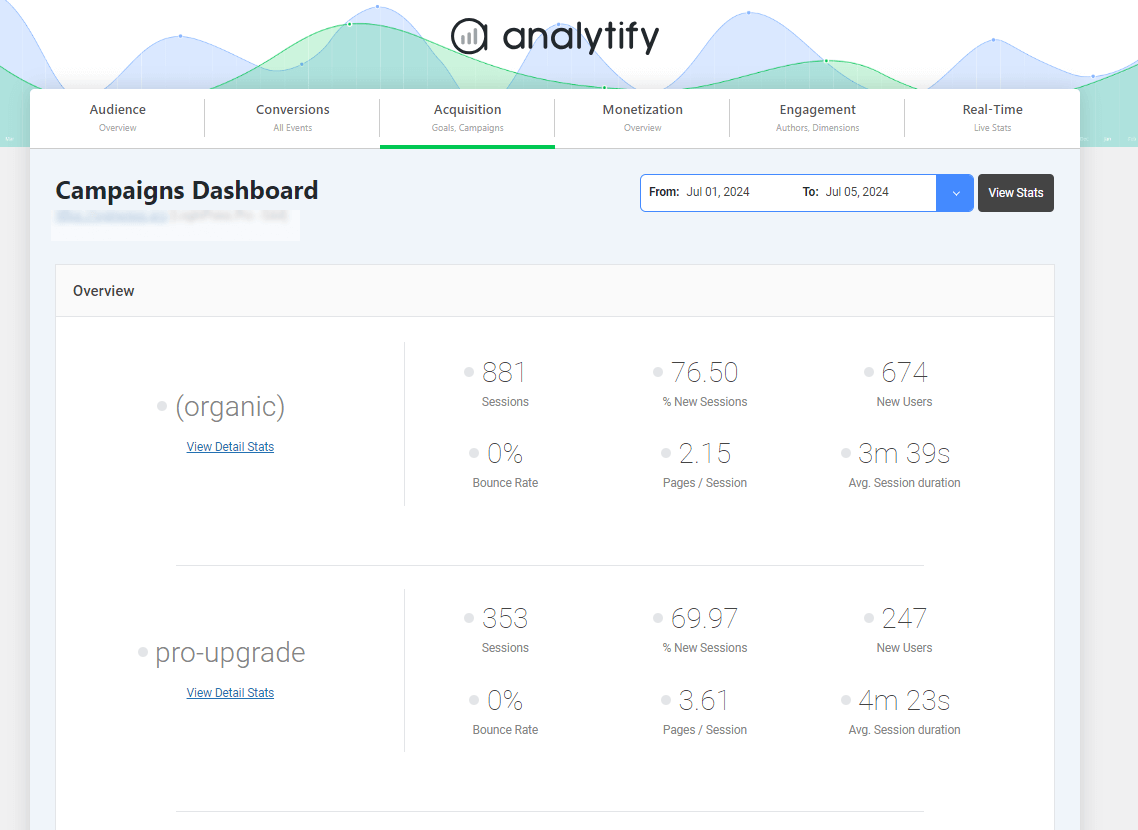
Monitor Campaign Tracking: With Analytify’s UTM Campaign Tracking Addon, you can see which marketing efforts are driving results. Comparing these reports with GA4 benchmarks shows whether your campaigns are stronger or weaker than industry norms.
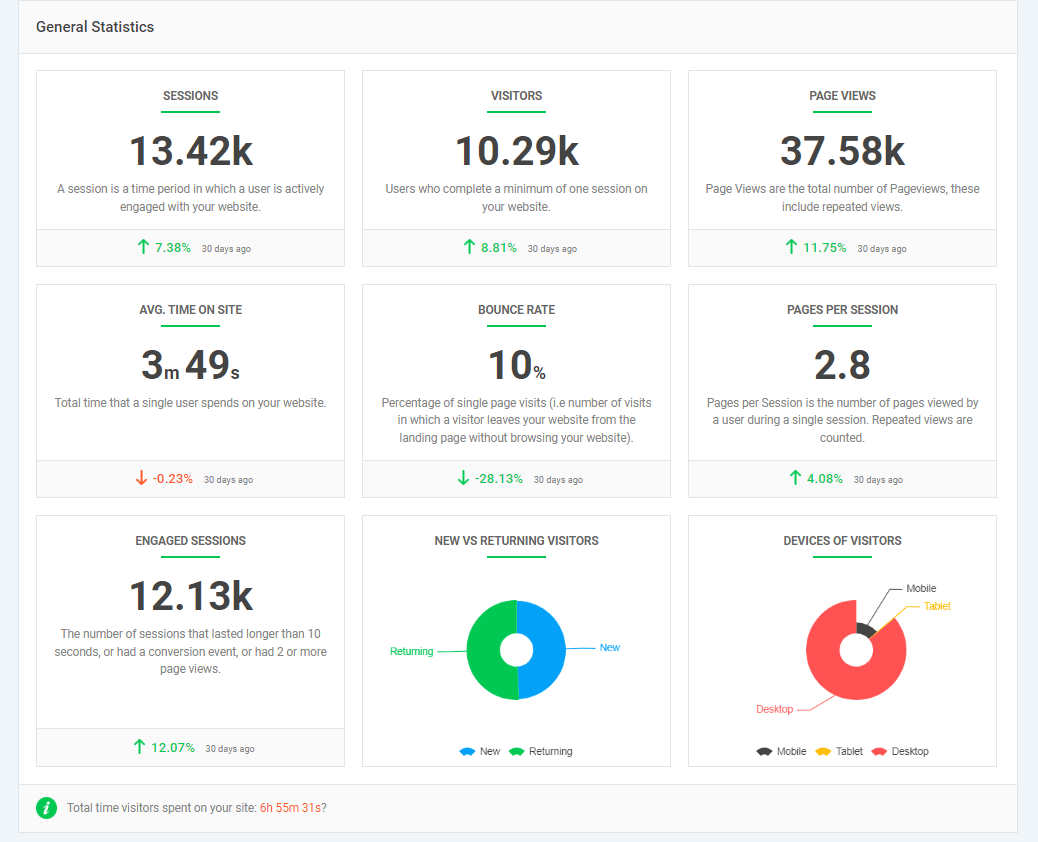
General Statistics report: This General Statistics report gives you a quick snapshot of your site’s overall performance, showing key metrics like sessions, visitors, engagement, and device usage in one place.
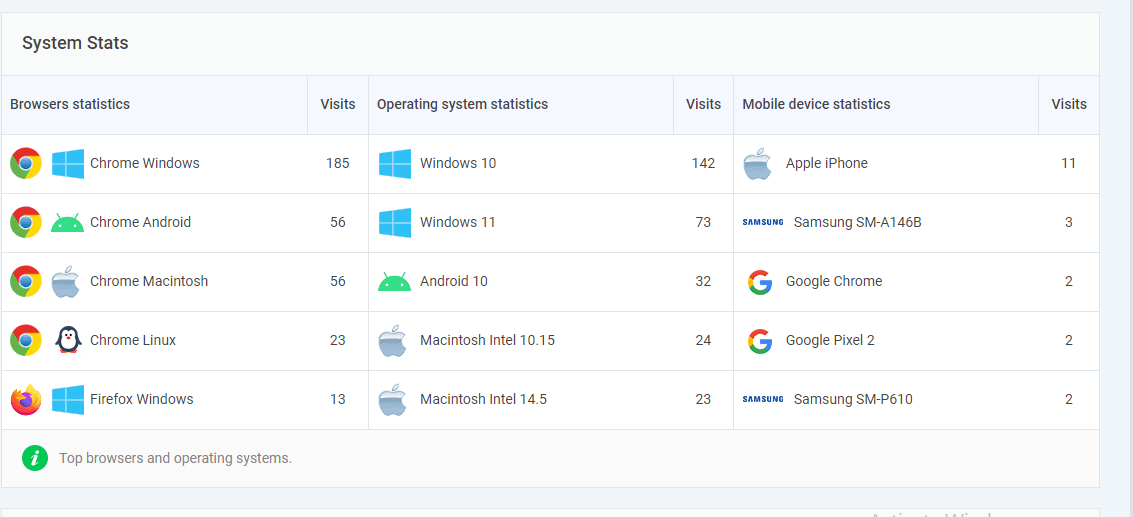
System Stats Report: This report shows which browsers, devices, and operating systems your audience uses, helping you understand how people access your WordPress content.
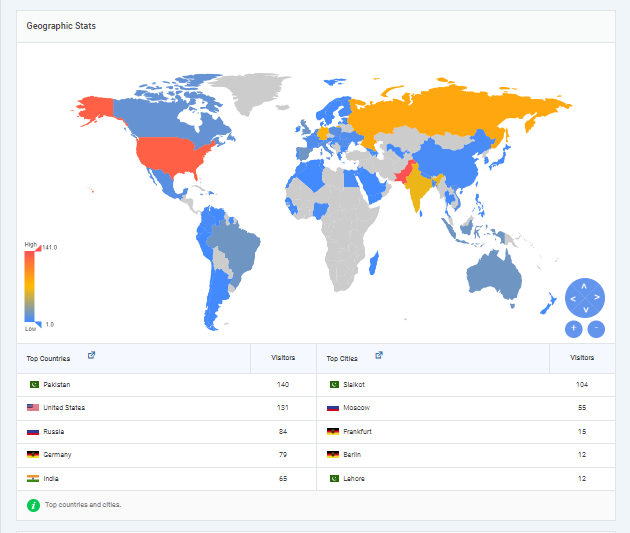
Geographic Stats Report: This report highlights where your visitors come from, the top countries, and cities. So you can compare your content performance across different locations.
Search Terms Dashboard: This report shows what users search for on your site, helping you measure content performance analytify and find new content opportunities using Analytify.
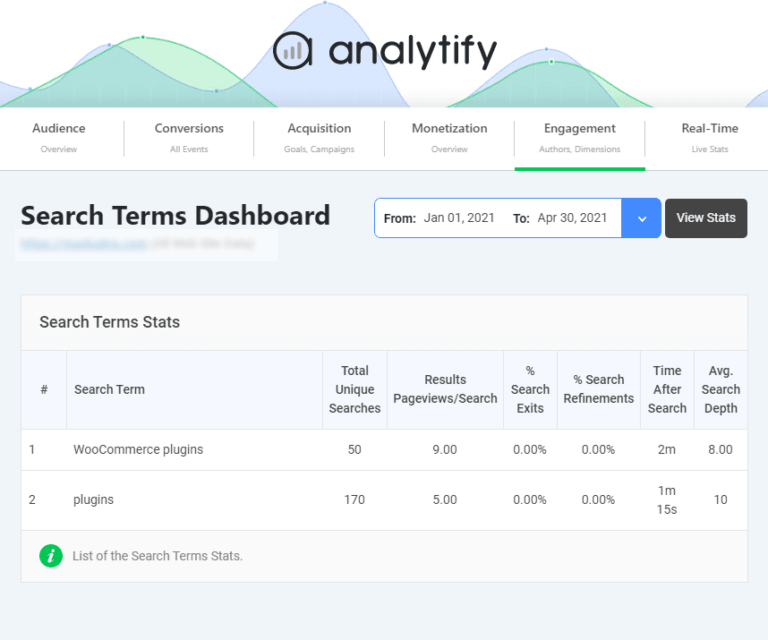
Analytify makes those insights easy to read and act on. It’s the perfect WordPress tool for anyone who wants clear benchmarks and simple WordPress content analytics.
Interpreting Your Metrics and Taking Action
Now that you know which metrics matter, the next step is learning how to interpret them inside Google Analytics 4. By analyzing key GA4 reports, you can quickly identify high-performing and underperforming content and understand what those numbers actually mean.
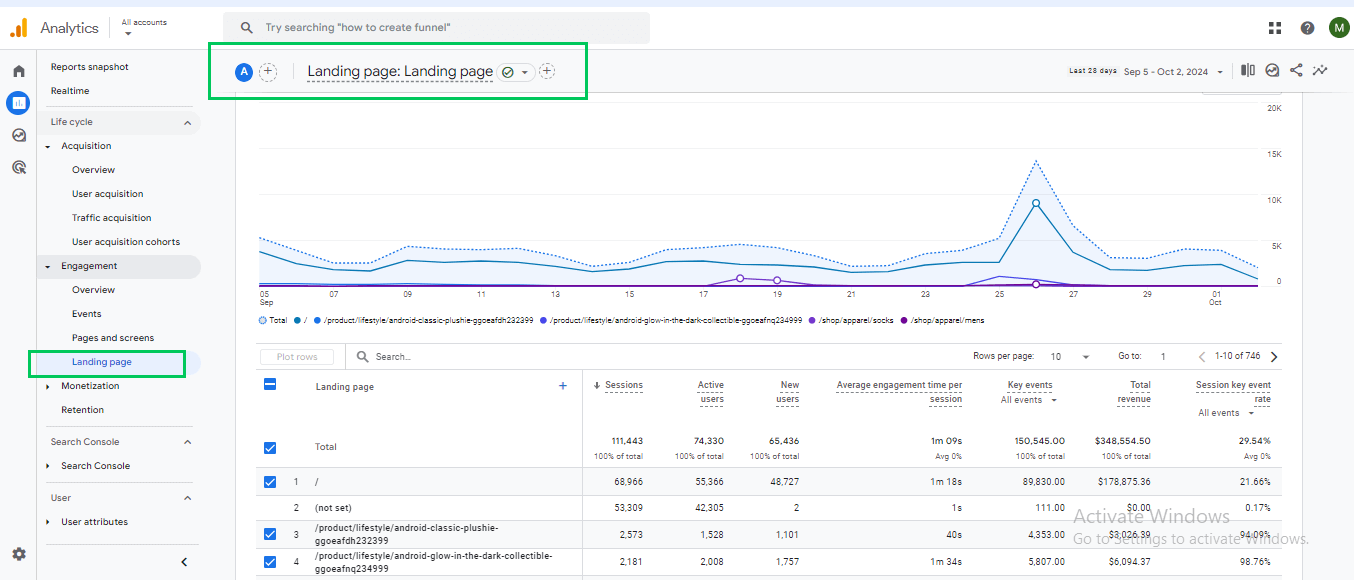
For example, the Landing Pages report shows which pages attract the most initial traffic. A page with high pageviews, long average engagement time, and low bounce rate indicates strong performance, while pages with low views and short engagement need attention.
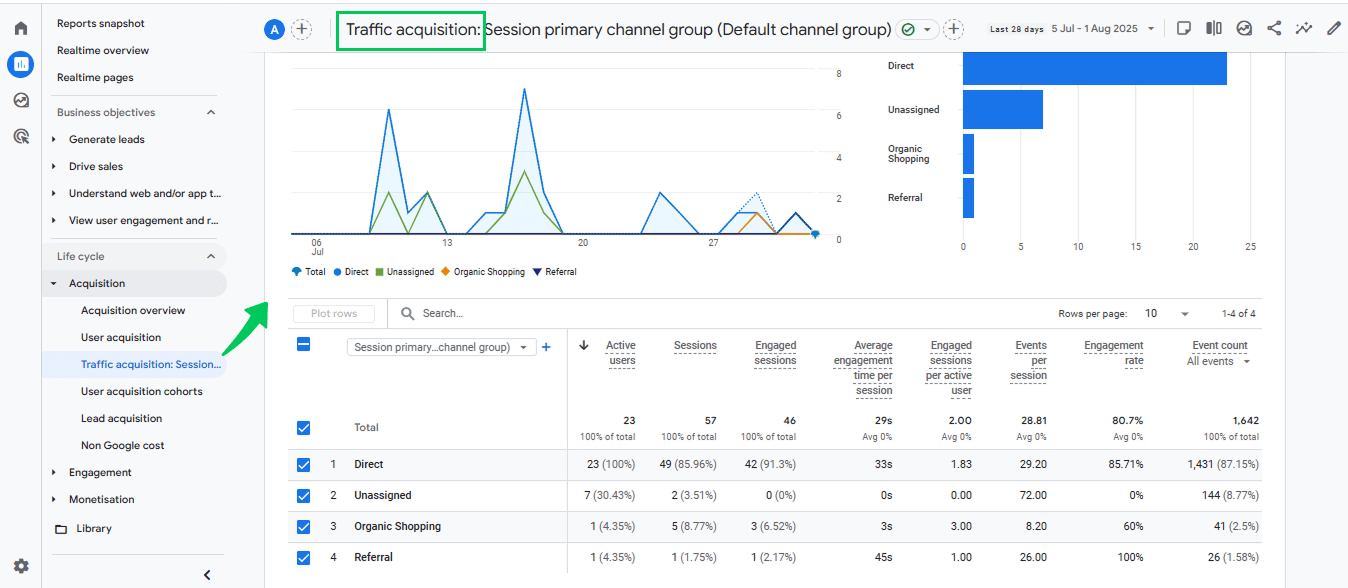
The Traffic Acquisition report shows where your visitors are coming from, organic search, social media, email, or referral links. If a post receives minimal organic search traffic despite relevant keywords, it may need better SEO optimization or updated meta tags.
Once underperforming content is identified, several strategies can improve WordPress content analytics:
- Improve your headlines: Make your titles clearer and more interesting so more people want to click and read.
- Add strong CTAs: Tell readers what to do next, like “Read more” or “Sign up,” so they keep moving forward.
- Strengthen internal linking: Connect related posts to increase pages per session and keep users engaged longer.
- Update outdated content: Refresh stats, add visuals, and improve explanations to boost relevance and search performance.
- Enhance the intro section of the content: Make your intro stronger and place key information early to reduce bounce rates.
- Optimize mobile readability: Make your content easy to read on phones so mobile users don’t leave.
- Improve page load speed: Make your page open faster so visitors don’t get bored and exit.
- Add multimedia elements: Use images, infographics, or short videos to improve engagement time and scroll depth.
- Target better keywords: Adjust your SEO strategy by analyzing search queries and optimizing headings and meta tags.
You can track the impact of these changes in GA4 by monitoring Average Engagement Time, Scroll Depth, and Conversion Events before and after optimization.
For instance, you might see a tutorial post consistently achieving 3,000 pageviews and 5% engagement, while a similar topic gets only 1,200 pageviews and 2% engagement. This gap highlights underperformance and informs which improvements, like updating content, testing new headlines, or enhancing CTAs, are needed.
By connecting GA4 reports like Landing Pages, Traffic Acquisition, and Engagement Over Time, you can visually support your analysis and improve both your content strategy and WordPress content analytics for better performance.
Advanced Tips for Content Benchmarking
Here are some advanced tips to help you analyze your content:
1. Segmenting by Audience
Segmenting your data helps you understand how different groups of people interact with your content. In GA4, you can compare new vs. returning visitors to see whether your content attracts fresh readers or keeps loyal ones coming back.
Segmenting by device type shows how users behave on mobile vs. desktop, helping you spot issues like low mobile engagement.
You can also look at geographic segments to understand which countries or regions respond best to your content.
By looking at these groups separately, you can see what’s working and what’s not, and set benchmarks that actually match how your audience behaves.
2. Using Predictive Analytics
Predictive analytics gives you smarter ways to set benchmarks by forecasting how your content will perform based on historical trends.
In GA4, predictive metrics such as purchase probability and churn probability help you understand which content pieces are most likely to drive action or lose interest.
By analyzing how similar content performed in the past in terms of pageviews, engagement time, or conversions, you can estimate future performance before publishing.
This helps you plan topics, formats, and posting frequency more confidently, ensuring your benchmarks stay realistic and aligned with expected outcomes.
3. Competitive Benchmarking
Competitive benchmarking allows you to understand where your content stands in the wider market, even when you can’t see competitors’ exact GA4 data.
You can analyze their performance indirectly using tools such as Similarweb, SEMrush, and Ahrefs, which provide estimated traffic, top-performing pages, ranking keywords, and backlink profiles.
By comparing your metrics, such as organic traffic, engagement, or publication frequency, with these insights, you can spot gaps and opportunities. For example, if a competitor’s how-to guides earn more search traffic, it signals a benchmark you can aim for and a content area worth strengthening.
Content Performance Benchmarks FAQs
1. What is performance benchmarking?
Performance benchmarking is the process of comparing your metrics against industry standards or your own historical results to determine whether your content is performing well, at average, or below expectations.
2. What metrics should be used to measure content performance?
You should measure content performance using metrics like pageviews, engagement time, bounce rate, scroll depth, conversions, traffic sources, and keyword rankings. These metrics show how many people visit, how long they stay, what actions they take, and how well your content performs in search.
3. What is a good average engagement rate benchmark?
A good average engagement rate benchmark varies by industry, but most websites aim for 3–6%on blog posts. If your engagement rate is higher than this, your content is performing above average.
4. What are the 3 A’s of metrics?
The 3 A’s of metrics are:
Accuracy: data must be correct.
Actionability: data must help you make decisions.
Accessibility: data must be easy to find and understand.
5. What are the 5 steps of benchmarking?
The five steps are:
Identify what you want to measure.
Find industry or historical benchmarks.
Collect and analyze your data.
Compare your results with the benchmark.
Take action to improve performance.
6. How do I measure content performance?
You can measure content performance using metrics like pageviews, engagement time, bounce rate, scroll depth, conversions, and traffic sources. Tools like Analytify make this easy by showing WordPress content analytics directly inside your dashboard.
7. How often should I review my WordPress content analytics?
Most websites review their WordPress content analytics weekly or monthly. This helps you spot trends early, track growth, and update benchmarks based on fresh performance data.
Final Thoughts: Content Performance Benchmarks
In this guide, we explored content performance benchmarks, showing how they help measure whether your content is performing above average, meeting expectations, or falling behind.
We covered the key metrics to track, including pageviews, engagement, conversions, traffic sources, and scroll depth, and explained how blog performance metrics and WordPress content analytics benchmarks differ across industries.
You also learned how to interpret these metrics and take action to improve content performance, from optimizing headlines and CTAs to updating old posts.
Finally, we highlighted how Analytify simplifies measuring content performance, making it easy to track, analyze, and compare your results against industry standards.
By applying these insights, you can optimize your content, achieve higher engagement, and ensure your strategy aligns with the latest content marketing benchmarks.
For further guidance, you can read:
- How to Analyze Sales & Ecommerce Metrics in Google Analytics 4
- 7 Best Website User Engagement Metrics in Google Analytics 4 (GA4)
- 17 Content Marketing Metrics To Track
Which content metric do you find most challenging to meet, and why? Share your thoughts and experiences in the comments below. We’d love to hear from you!